






Matomo (formerly Piwik) Docker image.
[!TIP] Want to be notified of new releases? Check out 🔔 Diun (Docker Image Update Notifier) project!
git clone https://github.com/crazy-max/docker-matomo.git
cd docker-matomo

# Build image and output to docker (default)
docker buildx bake

# Build multi-platform image
docker buildx bake image-all
| Registry | Image |
|---|---|
| Docker Hub | crazymax/matomo |
| GitHub Container Registry | ghcr.io/crazy-max/matomo |
Following platforms for this image are available:
$ docker buildx imagetools inspect crazymax/matomo --format "{{json .Manifest}}" | \
  jq -r '.manifests[] | select(.platform.os != null and .platform.os != "unknown") | .platform | "\(.os)/\(.architecture)\(if .variant then "/" + .variant else "" end)"'

linux/amd64
linux/arm/v7
linux/arm64
linux/ppc64le
linux/riscv64
linux/s390x
TZ: The timezone assigned to the container (default UTC)PUID: Matomo user id (default 1000)PGID: Matomo group id (default 1000)MEMORY_LIMIT: PHP memory limit (default 256M)NGINX_WORKER_PROCESSES: Number of Nginx worker processes (default auto)UPLOAD_MAX_SIZE: Upload max size (default 16M)CLEAR_ENV: Clear environment in FPM workers (default yes)OPCACHE_MEM_SIZE: PHP OpCache memory consumption (default 128)LISTEN_IPV6: Enable IPv6 for Nginx (default true)REAL_IP_FROM: Trusted addresses that are known to send correct replacement addresses (default 0.0.0.0/32)REAL_IP_HEADER: Request header field whose value will be used to replace the client address (default X-Forwarded-For)LOG_IP_VAR: Use another variable to retrieve the remote IP address for access log_format on Nginx. (default remote_addr)LOG_LEVEL: Log level of Matomo UI (default WARN)SHORTCODE_DOMAIN: Domain that you use for ShortcodeTracker plugin (default invalid)The following environment variables are only used if you run the container as "sidecar" mode:
SIDECAR_CRON: Set to 1 to enable sidecar cron mode (default 0)ARCHIVE_OPTIONS: Pass additional options during cron archiveCRON_ARCHIVE: Periodically execute Matomo archive (disabled if empty ; ex 0 * * * *)/data: Contains GeoIP2 databases, configuration, installed plugins (not core ones), tmp and user folders to store
your custom logo⚠️ Note that the volume should be owned by the user/group with the specified
PUIDandPGID. If you don't give the volume correct permissions, the container may not start.
8000: HTTP portDocker compose is the recommended way to run this image. Copy the content of folder examples/compose
in /var/matomo/ on your host for example. Edit the compose and env files with your preferences and run the following
commands:
docker compose up -d
docker compose logs -f
# open your browser at http://localhost:8000
Deploy this image in your Swarm cluster. Detailed instructions can be found here.
Deploy this image in your kubernetes cluster. Detailed instructions can be found here.
You can also use the following minimal command:
docker run -d -p 8000:8000 --name matomo \
  -v $(pwd)/data:/data \
  crazymax/matomo:latest
⚠️ You will need to have your own database server to connect to as this only runs Matomo.
You can upgrade Matomo automatically through the UI, it works well. But I recommend to recreate the container whenever I push an update:
docker compose pull
docker compose up -d
If you want to use the console command to perform common server operations, type:
docker compose exec matomo console
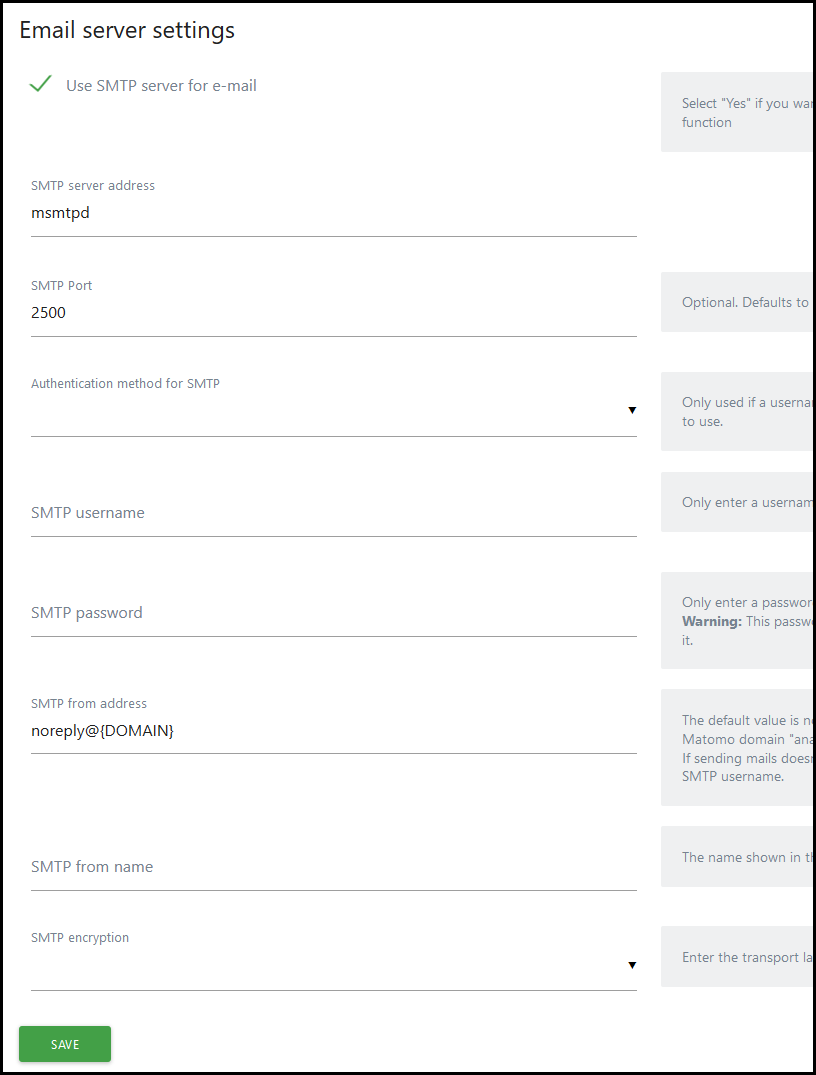
You can use our SMTP relay msmtpd service published on port 2500 and
declared in the compose.yml:
On a HA environment, enable backend sticky sessions on your load balancer.
If you want to enable the cron job, you have to run a "sidecar" container like in the compose file or run a simple container like this:
docker run -d --name matomo_cron \
  --env-file $(pwd)/matomo.env \
  --no-healthcheck \
  -e "SIDECAR_CRON=1" \
  -e "CRON_ARCHIVE=0 * * * *" \
  -e "ARCHIVE_OPTIONS=--concurrent-requests-per-website=3" \
  -v $(pwd)/data:/data \
  crazymax/matomo:latest
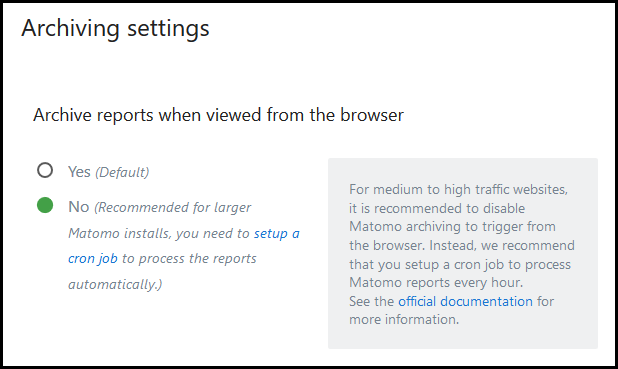
Then if you have enabled CRON_ARCHIVE to automatically archive the reports, you have to disable Matomo archiving
to trigger from the browser. Go to System > General settings:
This image already uses GeoIP2 databases of MaxMind with their PHP extension and are updated with geoip-updater. You just have to install and activate the GeoIP 2 plugin.
Also make sure to select DBIP / GeoIP 2 (Php) in System > Geolocation:

If you are running Matomo behind a reverse proxy, add this to your config.ini.php:
[General]
assume_secure_protocol = 1 # 0=http 1=https
proxy_client_headers[] = HTTP_X_FORWARDED_FOR
proxy_client_headers[] = HTTP_X_REAL_IP
proxy_host_headers[] = HTTP_X_FORWARDED_HOST
To use Redis as a cache (useful if your Matomo environment consists of multiple servers), add this to your config.ini.php:
[Cache]
backend = chained

[ChainedCache]
backends[] = array
backends[] = redis

[RedisCache]
host = "redis" # Docker service name for Redis
port = 6379
timeout = 0.0
password = ""
database = 14
In case you are using queued tracking: Make sure to configure a different database! Otherwise queued requests will be flushed.
If you are on a HA environment, there is no need to set
multi_server_environment = 1 in your config.
Want to contribute? Awesome! The most basic way to show your support is to star the project, or to raise issues. You can also support this project by becoming a sponsor on GitHub or by making a PayPal donation to ensure this journey continues indefinitely!
Thanks again for your support, it is much appreciated! 🙏
MIT. See LICENSE for more details.
Matomo (formerly Piwik) Docker image.
[!TIP] Want to be notified of new releases? Check out 🔔 Diun (Docker Image Update Notifier) project!
git clone https://github.com/crazy-max/docker-matomo.git
cd docker-matomo

# Build image and output to docker (default)
docker buildx bake

# Build multi-platform image
docker buildx bake image-all
| Registry | Image |
|---|---|
| Docker Hub | crazymax/matomo |
| GitHub Container Registry | ghcr.io/crazy-max/matomo |
Following platforms for this image are available:
$ docker buildx imagetools inspect crazymax/matomo --format "{{json .Manifest}}" | \
  jq -r '.manifests[] | select(.platform.os != null and .platform.os != "unknown") | .platform | "\(.os)/\(.architecture)\(if .variant then "/" + .variant else "" end)"'

linux/amd64
linux/arm/v7
linux/arm64
linux/ppc64le
linux/riscv64
linux/s390x
TZ: The timezone assigned to the container (default UTC)PUID: Matomo user id (default 1000)PGID: Matomo group id (default 1000)MEMORY_LIMIT: PHP memory limit (default 256M)NGINX_WORKER_PROCESSES: Number of Nginx worker processes (default auto)UPLOAD_MAX_SIZE: Upload max size (default 16M)CLEAR_ENV: Clear environment in FPM workers (default yes)OPCACHE_MEM_SIZE: PHP OpCache memory consumption (default 128)LISTEN_IPV6: Enable IPv6 for Nginx (default true)REAL_IP_FROM: Trusted addresses that are known to send correct replacement addresses (default 0.0.0.0/32)REAL_IP_HEADER: Request header field whose value will be used to replace the client address (default X-Forwarded-For)LOG_IP_VAR: Use another variable to retrieve the remote IP address for access log_format on Nginx. (default remote_addr)LOG_LEVEL: Log level of Matomo UI (default WARN)SHORTCODE_DOMAIN: Domain that you use for ShortcodeTracker plugin (default invalid)The following environment variables are only used if you run the container as "sidecar" mode:
SIDECAR_CRON: Set to 1 to enable sidecar cron mode (default 0)ARCHIVE_OPTIONS: Pass additional options during cron archiveCRON_ARCHIVE: Periodically execute Matomo archive (disabled if empty ; ex 0 * * * *)/data: Contains GeoIP2 databases, configuration, installed plugins (not core ones), tmp and user folders to store
your custom logo⚠️ Note that the volume should be owned by the user/group with the specified
PUIDandPGID. If you don't give the volume correct permissions, the container may not start.
8000: HTTP portDocker compose is the recommended way to run this image. Copy the content of folder examples/compose
in /var/matomo/ on your host for example. Edit the compose and env files with your preferences and run the following
commands:
docker compose up -d
docker compose logs -f
# open your browser at http://localhost:8000
Deploy this image in your Swarm cluster. Detailed instructions can be found here.
Deploy this image in your kubernetes cluster. Detailed instructions can be found here.
You can also use the following minimal command:
docker run -d -p 8000:8000 --name matomo \
  -v $(pwd)/data:/data \
  crazymax/matomo:latest
⚠️ You will need to have your own database server to connect to as this only runs Matomo.
You can upgrade Matomo automatically through the UI, it works well. But I recommend to recreate the container whenever I push an update:
docker compose pull
docker compose up -d
If you want to use the console command to perform common server operations, type:
docker compose exec matomo console
You can use our SMTP relay msmtpd service published on port 2500 and
declared in the compose.yml:
On a HA environment, enable backend sticky sessions on your load balancer.
If you want to enable the cron job, you have to run a "sidecar" container like in the compose file or run a simple container like this:
docker run -d --name matomo_cron \
  --env-file $(pwd)/matomo.env \
  --no-healthcheck \
  -e "SIDECAR_CRON=1" \
  -e "CRON_ARCHIVE=0 * * * *" \
  -e "ARCHIVE_OPTIONS=--concurrent-requests-per-website=3" \
  -v $(pwd)/data:/data \
  crazymax/matomo:latest
Then if you have enabled CRON_ARCHIVE to automatically archive the reports, you have to disable Matomo archiving
to trigger from the browser. Go to System > General settings:
This image already uses GeoIP2 databases of MaxMind with their PHP extension and are updated with geoip-updater. You just have to install and activate the GeoIP 2 plugin.
Also make sure to select DBIP / GeoIP 2 (Php) in System > Geolocation:
If you are running Matomo behind a reverse proxy, add this to your config.ini.php:
[General]
assume_secure_protocol = 1 # 0=http 1=https
proxy_client_headers[] = HTTP_X_FORWARDED_FOR
proxy_client_headers[] = HTTP_X_REAL_IP
proxy_host_headers[] = HTTP_X_FORWARDED_HOST
To use Redis as a cache (useful if your Matomo environment consists of multiple servers), add this to your config.ini.php:
[Cache]
backend = chained

[ChainedCache]
backends[] = array
backends[] = redis

[RedisCache]
host = "redis" # Docker service name for Redis
port = 6379
timeout = 0.0
password = ""
database = 14
In case you are using queued tracking: Make sure to configure a different database! Otherwise queued requests will be flushed.
If you are on a HA environment, there is no need to set
multi_server_environment = 1 in your config.
Want to contribute? Awesome! The most basic way to show your support is to star the project, or to raise issues. You can also support this project by becoming a sponsor on GitHub or by making a PayPal donation to ensure this journey continues indefinitely!
Thanks again for your support, it is much appreciated! 🙏
MIT. See LICENSE for more details.


