






This project is not maintained anymore and is abandoned. Feel free to fork and make your own changes if needed.
Docker image for DokuWiki, a simple to use and highly versatile Open Source wiki software that doesn't require a database.
[!TIP] Want to be notified of new releases? Check out 🔔 Diun (Docker Image Update Notifier) project!
git clone https://github.com/crazy-max/docker-dokuwiki.git
cd docker-dokuwiki

# Build image and output to docker (default)
docker buildx bake

# Build multi-platform image
docker buildx bake image-all
| Registry | Image |
|---|---|
| Docker Hub | crazymax/dokuwiki |
| GitHub Container Registry | ghcr.io/crazy-max/dokuwiki |
Following platforms for this image are available:
$ docker buildx imagetools inspect crazymax/dokuwiki --format "{{json .Manifest}}" | \
  jq -r '.manifests[] | select(.platform.os != null and .platform.os != "unknown") | .platform | "\(.os)/\(.architecture)\(if .variant then "/" + .variant else "" end)"'

linux/amd64
linux/arm/v6
linux/arm/v7
linux/arm64
linux/ppc64le
linux/riscv64
linux/s390x
TZ: The timezone assigned to the container (default UTC)PUID: Dokuwiki user id (default 1500)PGID: Dokuwiki group id (default 1500)MEMORY_LIMIT: PHP memory limit (default 256M)UPLOAD_MAX_SIZE: Upload max size (default 16M)CLEAR_ENV: Clear environment in FPM workers (default yes)OPCACHE_MEM_SIZE: PHP OpCache memory consumption (default 128)LISTEN_IPV6: Enable IPv6 for Nginx (default true)REAL_IP_FROM: Trusted addresses that are known to send correct replacement addresses (default 0.0.0.0/32)REAL_IP_HEADER: Request header field whose value will be used to replace the client address (default X-Forwarded-For)LOG_IP_VAR: Use another variable to retrieve the remote IP address for access log_format on Nginx. (default remote_addr)DOKUWIKI_RUN_INDEXER: Run DokuWiki indexer on startup (default true)/data: Contains configuration, plugins, templates and data⚠️ Note that the volume should be owned by the user/group with the specified
PUIDandPGID. If you don't give the volume correct permissions, the container may not start.
8000: HTTP portDocker compose is the recommended way to run this image. Copy the content of
folder examples/compose in /var/dokuwiki/ on your host
for example. Edit the compose and env files with your preferences and run the
following commands:
docker compose up -d
docker compose logs -f
You can also use the following minimal command :
docker run -d -p 8000:8000 --name dokuwiki \
  -v $(pwd)/data:/data \
  crazymax/dokuwiki:latest
Recreate the container whenever I push an update:
docker compose pull
docker compose up -d
A Dokuwiki SMTP Plugin is available to send emails over external SMTP servers. When the plugin is installed you have to configure it:
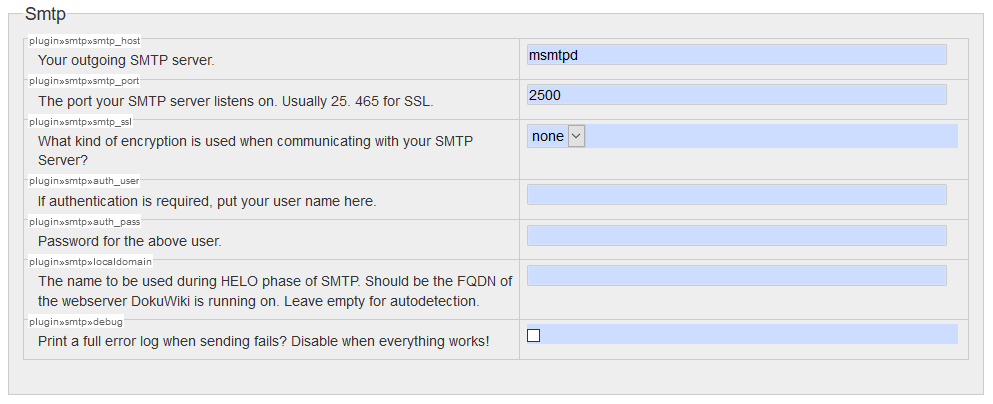
Here we use our msmtpd service published on port 2500 declared in our
compose.yml.
Want to contribute? Awesome! The most basic way to show your support is to star the project, or to raise issues. You can also support this project by becoming a sponsor on GitHub or by making a PayPal donation to ensure this journey continues indefinitely!
Thanks again for your support, it is much appreciated! 🙏
MIT. See LICENSE for more details.
194 followers · starred Jan 2021
This project is not maintained anymore and is abandoned. Feel free to fork and make your own changes if needed.
Docker image for DokuWiki, a simple to use and highly versatile Open Source wiki software that doesn't require a database.
[!TIP] Want to be notified of new releases? Check out 🔔 Diun (Docker Image Update Notifier) project!
git clone https://github.com/crazy-max/docker-dokuwiki.git
cd docker-dokuwiki

# Build image and output to docker (default)
docker buildx bake

# Build multi-platform image
docker buildx bake image-all
| Registry | Image |
|---|---|
| Docker Hub | crazymax/dokuwiki |
| GitHub Container Registry | ghcr.io/crazy-max/dokuwiki |
Following platforms for this image are available:
$ docker buildx imagetools inspect crazymax/dokuwiki --format "{{json .Manifest}}" | \
  jq -r '.manifests[] | select(.platform.os != null and .platform.os != "unknown") | .platform | "\(.os)/\(.architecture)\(if .variant then "/" + .variant else "" end)"'

linux/amd64
linux/arm/v6
linux/arm/v7
linux/arm64
linux/ppc64le
linux/riscv64
linux/s390x
TZ: The timezone assigned to the container (default UTC)PUID: Dokuwiki user id (default 1500)PGID: Dokuwiki group id (default 1500)MEMORY_LIMIT: PHP memory limit (default 256M)UPLOAD_MAX_SIZE: Upload max size (default 16M)CLEAR_ENV: Clear environment in FPM workers (default yes)OPCACHE_MEM_SIZE: PHP OpCache memory consumption (default 128)LISTEN_IPV6: Enable IPv6 for Nginx (default true)REAL_IP_FROM: Trusted addresses that are known to send correct replacement addresses (default 0.0.0.0/32)REAL_IP_HEADER: Request header field whose value will be used to replace the client address (default X-Forwarded-For)LOG_IP_VAR: Use another variable to retrieve the remote IP address for access log_format on Nginx. (default remote_addr)DOKUWIKI_RUN_INDEXER: Run DokuWiki indexer on startup (default true)/data: Contains configuration, plugins, templates and data⚠️ Note that the volume should be owned by the user/group with the specified
PUIDandPGID. If you don't give the volume correct permissions, the container may not start.
8000: HTTP portDocker compose is the recommended way to run this image. Copy the content of
folder examples/compose in /var/dokuwiki/ on your host
for example. Edit the compose and env files with your preferences and run the
following commands:
docker compose up -d
docker compose logs -f
You can also use the following minimal command :
docker run -d -p 8000:8000 --name dokuwiki \
  -v $(pwd)/data:/data \
  crazymax/dokuwiki:latest
Recreate the container whenever I push an update:
docker compose pull
docker compose up -d
A Dokuwiki SMTP Plugin is available to send emails over external SMTP servers. When the plugin is installed you have to configure it:
Here we use our msmtpd service published on port 2500 declared in our
compose.yml.
Want to contribute? Awesome! The most basic way to show your support is to star the project, or to raise issues. You can also support this project by becoming a sponsor on GitHub or by making a PayPal donation to ensure this journey continues indefinitely!
Thanks again for your support, it is much appreciated! 🙏
MIT. See LICENSE for more details.
194 followers · starred Jan 2021