craigary/nobelium

A static blog build on top of Notion and NextJS, deployed on Vercel.

JavaScript

3,151

561 commits

updated Jun 7, 2025

See the code

README

Nobelium

A static blog build on top of Notion and Nextjs, deployed on Vercel.

Demo: https://nobelium.vercel.app/

Screenshot

Highlights ✨

🚀  Fast and responsive

  • Fast page render and responsive design
  • Fast static generation with efficient compiler

🤖  Deploy instantly

  • Deploy on Vercel in minutes
  • Incremental regeneration and no need to redeploy after update the content in notion

🚙  Fully functional

  • Comments, full width page, quick search and tag filter
  • RSS, analytics, web vital... and much more

🎨  Easy for customization

  • Rich config options, support English & Chinese interface
  • Built with Tailwind CSS, easy for customization

🕸  Pretty URLs and SEO friendly

Quick Start

  • Star this repo 😉
  • Duplicate this Notion template, and share it to the public
  • Fork this project
  • Customize blog.config.js
  • (Optional) Replace favicon.svg, and favicon.ico in /public folder with your own
  • Deploy on Vercel, set following environment variables:
    • NOTION_PAGE_ID (Required): The ID of the Notion page you previously shared to the web, usually has 32 digits after your workspace address
    • NOTION_ACCESS_TOKEN (Optional, not recommended): If you decide not to share your database, you can use token to let Nobelium grab data from Notion database. You can find it in your browser cookies called token_v2
      • Keep in mind Notion token is only valid for 180 days, make sure to update manually in vercel dashboard, we probably switch to Official API to resolve this issue in the future. Also, images in Notion database will not properly rendered
  • That's it! Easy-peasy?
Wait for a sec, what is Page ID?

Play With Docker

Unofficial, thanks to @Vaayne's work!

Build Docker image yourself

# set env
export NOTION_PAGE_ID=xxx # your NOTION_PAGE_ID
export IMAGE=nobelium:latest

# build with docker
docker build -t ${IMAGE} --build-arg NOTION_PAGE_ID .

# run with docker
docker run -d --name nobelium -p 3000:3000 -e NOTION_PAGE_ID=${NOTION_PAGE_ID} nobelium:latest

Use default docker image

# pull image
docker pull ghcr.io/craigary/nobelium:main

# run with docker
docker run -d --name nobelium -p 3000:3000 -e NOTION_PAGE_ID=${NOTION_PAGE_ID} ghcr.io/craigary/nobelium:main

Roadmap

Check out our roadmap here

  • Better SEO
  • Dark mode
  • Open Graph support
  • Switch to react-notion-x
  • Sitemap
  • ...

Technical details

  • Generation: Next.js and Incremental Static Regeneration
  • Page render: react-notion-x
  • Style: Tailwind CSS and @tailwindcss/jit compiler
  • Comments: Gitalk, Cusdis and more

FAQ

How can I change my avatar? Nobelium fetches avatars from Gravatar. You need to set your avatar there with the same email address that you defined in blog.config.js.
My posts disappear after I set up grouping in Notion database! Nobelium currently doesn’t support Notion database grouping. If you really want to manage your posts by groups, you can create views with filters instead.

Special Thanks

Contributors

Powered by DartNode

License

The MIT License.

blog
nextjs-blog
nobelium
notion
notion-blog
utterances
vercel

craigary/nobelium

A static blog build on top of Notion and NextJS, deployed on Vercel.

JavaScript

3,151

561 commits

updated Jun 7, 2025

See the code

README

Nobelium

A static blog build on top of Notion and Nextjs, deployed on Vercel.

Demo: https://nobelium.vercel.app/

Screenshot

Highlights ✨

🚀  Fast and responsive

  • Fast page render and responsive design
  • Fast static generation with efficient compiler

🤖  Deploy instantly

  • Deploy on Vercel in minutes
  • Incremental regeneration and no need to redeploy after update the content in notion

🚙  Fully functional

  • Comments, full width page, quick search and tag filter
  • RSS, analytics, web vital... and much more

🎨  Easy for customization

  • Rich config options, support English & Chinese interface
  • Built with Tailwind CSS, easy for customization

🕸  Pretty URLs and SEO friendly

Quick Start

  • Star this repo 😉
  • Duplicate this Notion template, and share it to the public
  • Fork this project
  • Customize blog.config.js
  • (Optional) Replace favicon.svg, and favicon.ico in /public folder with your own
  • Deploy on Vercel, set following environment variables:
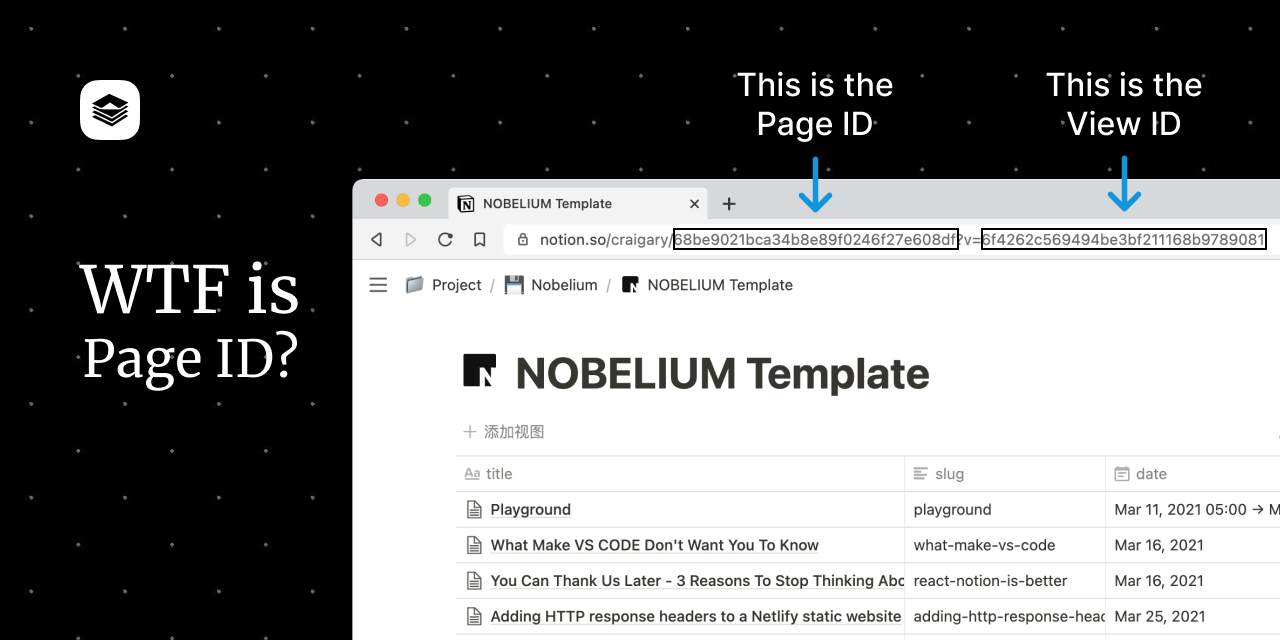
    • NOTION_PAGE_ID (Required): The ID of the Notion page you previously shared to the web, usually has 32 digits after your workspace address
    • NOTION_ACCESS_TOKEN (Optional, not recommended): If you decide not to share your database, you can use token to let Nobelium grab data from Notion database. You can find it in your browser cookies called token_v2
      • Keep in mind Notion token is only valid for 180 days, make sure to update manually in vercel dashboard, we probably switch to Official API to resolve this issue in the future. Also, images in Notion database will not properly rendered
  • That's it! Easy-peasy?
Wait for a sec, what is Page ID?

Play With Docker

Unofficial, thanks to @Vaayne's work!

Build Docker image yourself

# set env
export NOTION_PAGE_ID=xxx # your NOTION_PAGE_ID
export IMAGE=nobelium:latest

# build with docker
docker build -t ${IMAGE} --build-arg NOTION_PAGE_ID .

# run with docker
docker run -d --name nobelium -p 3000:3000 -e NOTION_PAGE_ID=${NOTION_PAGE_ID} nobelium:latest

Use default docker image

# pull image
docker pull ghcr.io/craigary/nobelium:main

# run with docker
docker run -d --name nobelium -p 3000:3000 -e NOTION_PAGE_ID=${NOTION_PAGE_ID} ghcr.io/craigary/nobelium:main

Roadmap

Check out our roadmap here

  • Better SEO
  • Dark mode
  • Open Graph support
  • Switch to react-notion-x
  • Sitemap
  • ...

Technical details

  • Generation: Next.js and Incremental Static Regeneration
  • Page render: react-notion-x
  • Style: Tailwind CSS and @tailwindcss/jit compiler
  • Comments: Gitalk, Cusdis and more

FAQ

How can I change my avatar? Nobelium fetches avatars from Gravatar. You need to set your avatar there with the same email address that you defined in blog.config.js.
My posts disappear after I set up grouping in Notion database! Nobelium currently doesn’t support Notion database grouping. If you really want to manage your posts by groups, you can create views with filters instead.

Special Thanks

Contributors

Powered by DartNode

License

The MIT License.

blog
nextjs-blog
nobelium
notion
notion-blog
utterances
vercel

Significant stargazers

Lee Robinson

16,271 followers · starred May 2021

Xuan Huang (黄玄)

7,886 followers · starred Jan 2022

Tim Qian

2,534 followers · starred May 2021

Sam Poder

612 followers · starred Jun 2021