
See what people are saying
README
Publish from Notion
Your CMS is a checkbox.
Write and edit in Notion. Keep your site’s design, URLs and hosting. This kit connects the two through the official Notion API, without making your database public.
Live demo · Get started · Docs · Issues


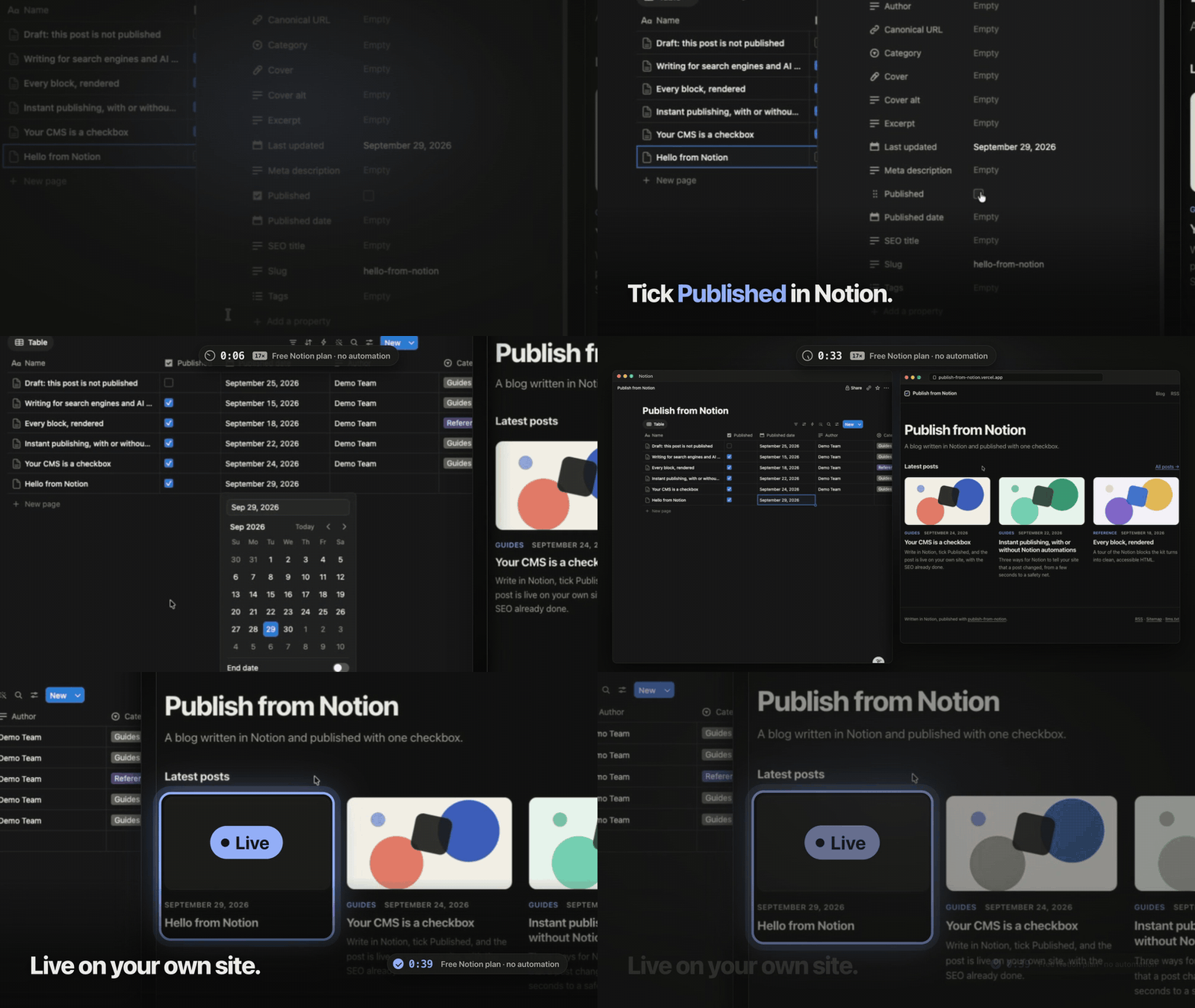
39 seconds in this recording, on the Free Notion plan with connection webhooks. The wait is accelerated in the GIF; delivery times vary.
See it in action
Open Every block, rendered to see an article with headings, lists, tables, toggles and images. Connect your own database to try publishing.
Get started
Requires Git and Node.js 22.18 or later. Start with the local demo; you do not need a Notion account or token for this step.
git clone https://github.com/loriscomba97/publish-from-notion.git
cd publish-from-notion
npm ci
npm run dev
Open localhost:3000, choose All posts, and open an article. You should see built-in sample content, including a page demonstrating the supported blocks.
Connect Notion
Create a database with Name (title), Slug (text) and Published (checkbox). Create a read-only internal connection in Notion and give it access to that database.
Copy .env.example to .env.local. Fill in NOTION_TOKEN and NOTION_DATA_SOURCE; keep the local SITE_URL for development. Restart the server. Add a page with a title, a slug such as hello-from-notion, some text and Published checked. Open /blog/hello-from-notion to read it on your site.
The setup guide covers every field, permissions and the optional database setup command. It also explains where to put secrets when deploying.
What it does
- Use Notion as your editor. The website selects published rows and renders their blocks as HTML. Your database can stay private, and the API token stays on the server.
- Update without rebuilding. Signed connection webhooks notify the website about page edits. The receiving route invalidates cached data so later requests can render the update.
- Produce a complete blog. Article pages include metadata and structured data. The template also generates a sitemap, RSS and a text index at
llms.txt. Uploaded images are served through signed paths on your domain.
Instant publishing
Connection webhooks work with the Free Notion plan tested during development. They arrive asynchronously, including for text edits. Paid plans can also use a database automation. Neither path promises a fixed delivery time.
Follow the publishing guide to configure and verify one path. Without webhooks, the one-hour cache interval allows refreshes on subsequent requests; it is not an hourly background job.
How it works
The TypeScript core reads the official API and converts blocks into HTML. Next.js caches that data. Page events invalidate the post list and the changed page; broader database events can invalidate more. The core has no runtime dependencies. The included template depends on Next.js and React.
Add it to an existing Next.js site
Use the integration guide to copy the core, configuration, components and routes into an App Router project. The ready-to-run template targets Next.js 16; older versions need adaptation.
What it does not do
This is a self-hosted public blog, not an access-controlled document portal. Unpublishing cannot erase downloaded content or cached images. Notion-hosted video, audio and PDFs are not rendered; equations appear as source text. Read the rendering limits before migrating content.
Hosting and Notion remain external services. The kit makes no ranking promises and does not provide comments, search or an admin dashboard.
Contribute and license
Bug reports with a reproducible example are useful. CONTRIBUTING.md explains development and tests; report security issues through SECURITY.md.
MIT © 2026 Loris Comba. Not affiliated with Notion Labs, Inc.
Similar repos


Languages
TypeScript
90.5%
CSS
4.9%
JavaScript
4.1%
See what people are saying
README
Publish from Notion
Your CMS is a checkbox.
Write and edit in Notion. Keep your site’s design, URLs and hosting. This kit connects the two through the official Notion API, without making your database public.
Live demo · Get started · Docs · Issues
39 seconds in this recording, on the Free Notion plan with connection webhooks. The wait is accelerated in the GIF; delivery times vary.
See it in action
Open Every block, rendered to see an article with headings, lists, tables, toggles and images. Connect your own database to try publishing.
Get started
Requires Git and Node.js 22.18 or later. Start with the local demo; you do not need a Notion account or token for this step.
git clone https://github.com/loriscomba97/publish-from-notion.git
cd publish-from-notion
npm ci
npm run dev
Open localhost:3000, choose All posts, and open an article. You should see built-in sample content, including a page demonstrating the supported blocks.
Connect Notion
Create a database with Name (title), Slug (text) and Published (checkbox). Create a read-only internal connection in Notion and give it access to that database.
Copy .env.example to .env.local. Fill in NOTION_TOKEN and NOTION_DATA_SOURCE; keep the local SITE_URL for development. Restart the server. Add a page with a title, a slug such as hello-from-notion, some text and Published checked. Open /blog/hello-from-notion to read it on your site.
The setup guide covers every field, permissions and the optional database setup command. It also explains where to put secrets when deploying.
What it does
- Use Notion as your editor. The website selects published rows and renders their blocks as HTML. Your database can stay private, and the API token stays on the server.
- Update without rebuilding. Signed connection webhooks notify the website about page edits. The receiving route invalidates cached data so later requests can render the update.
- Produce a complete blog. Article pages include metadata and structured data. The template also generates a sitemap, RSS and a text index at
llms.txt. Uploaded images are served through signed paths on your domain.
Instant publishing
Connection webhooks work with the Free Notion plan tested during development. They arrive asynchronously, including for text edits. Paid plans can also use a database automation. Neither path promises a fixed delivery time.
Follow the publishing guide to configure and verify one path. Without webhooks, the one-hour cache interval allows refreshes on subsequent requests; it is not an hourly background job.
How it works
The TypeScript core reads the official API and converts blocks into HTML. Next.js caches that data. Page events invalidate the post list and the changed page; broader database events can invalidate more. The core has no runtime dependencies. The included template depends on Next.js and React.
Add it to an existing Next.js site
Use the integration guide to copy the core, configuration, components and routes into an App Router project. The ready-to-run template targets Next.js 16; older versions need adaptation.
What it does not do
This is a self-hosted public blog, not an access-controlled document portal. Unpublishing cannot erase downloaded content or cached images. Notion-hosted video, audio and PDFs are not rendered; equations appear as source text. Read the rendering limits before migrating content.
Hosting and Notion remain external services. The kit makes no ranking promises and does not provide comments, search or an admin dashboard.
Contribute and license
Bug reports with a reproducible example are useful. CONTRIBUTING.md explains development and tests; report security issues through SECURITY.md.
MIT © 2026 Loris Comba. Not affiliated with Notion Labs, Inc.
Similar repos
Languages
TypeScript
90.5%
CSS
4.9%
JavaScript
4.1%