
Sorts your browser's bookmarks automatically and proposes a new home for each one, without compromising your privacy
Swift
3
67 commits
updated Sep 22, 2026
See what people are saying (1)
README

Rookmark
Sorts a pile of browser bookmarks into sensible topic folders, using the
on-device language model built into macOS.
Nothing is uploaded, nothing is deleted, and no account is required.
Rooks cache things and remember where they put them, that's why!
Problem & Solution
If you're anything like me, you keep finding interesting content around the web but never take the time to organize it properly. Or, a botched browser migration wipes what you've painstakingly organized by hand.
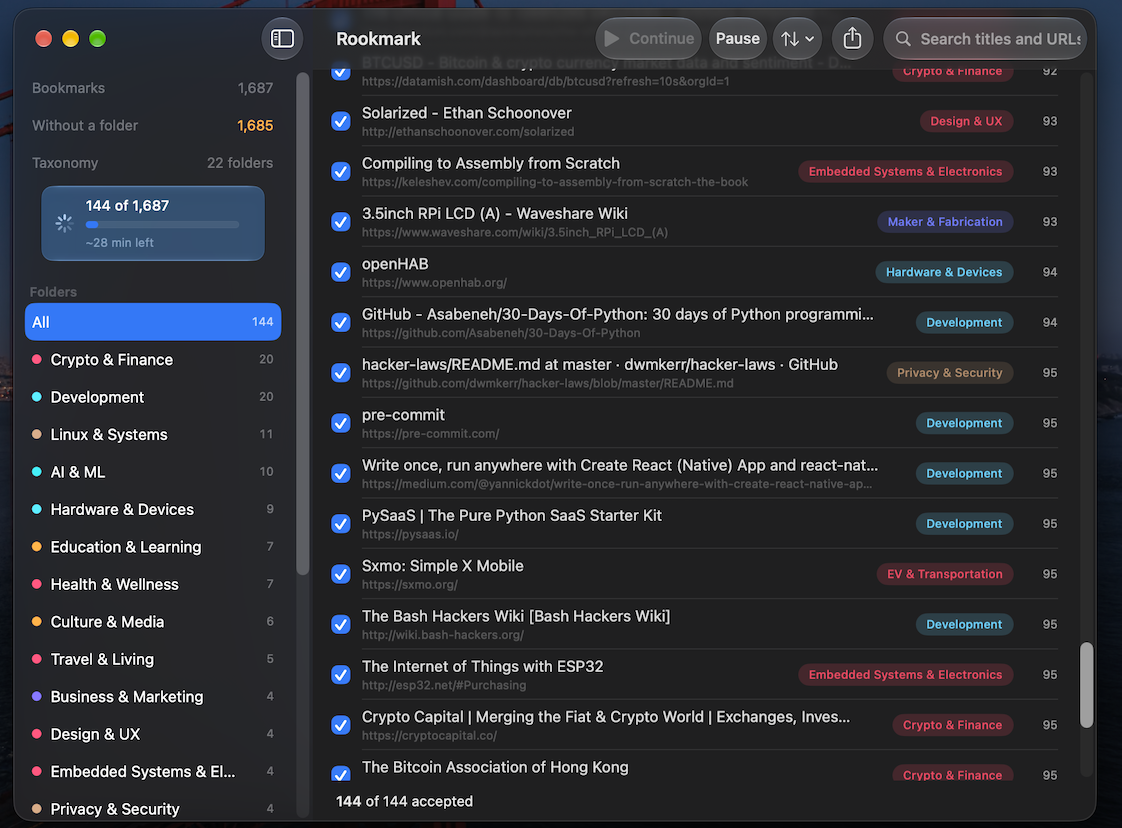
Rookmark sorts your pile of bookmarks automatically and proposes a new home for each one, without exposing any of your content.
Requirements
- macOS 26 or later, Apple Silicon, with Apple Intelligence enabled
- Xcode 26+ toolchain to build
The classifier is Apple's FoundationModels system model.
There is no Linux or Intel support currently, sorry!
Install
git clone https://github.com/corv89/rookmark
cd rookmark
swift build -c release
Check that the model is actually available before anything else:
swift run rookmark doctor
That reports model availability, the context window, and which embedding backend is active. If it reports the model as unavailable, nothing else will work.
Use it
Graphical
./scripts/make-app.sh      # builds build/Rookmark.app
open build/Rookmark.app
If you're iterating on this repo and plan to grant Full Disk Access more than
once, read the signing comment at the top of scripts/make-app.sh first: an
ad-hoc-signed build (the default) loses that grant on every rebuild, because
TCC ties it to the binary's exact signature rather than the app's identity.
Setting ROOKMARK_CODESIGN_IDENTITY to a local code-signing certificate (free,
one-time setup in Keychain Access — the script walks through it) makes the
grant survive rebuilds.
Or run it straight from the package during development, which skips the bundle
and therefore shows up as RookmarkApp rather than Rookmark:
swift run -c release RookmarkApp
On first launch (or once you clear the current library via Switch Source) you get a welcome screen with one card per browser actually installed on your Mac. Orion, Safari, Chrome, Brave, Edge, Vivaldi and Firefox all read automatically — their card says "Read automatically" and loads the live profile in place, with no export step. All of them sit behind Full Disk Access, and macOS never asks for that on an app's behalf: grant it in System Settings ▸ Privacy & Security ▸ Full Disk Access, then fully quit and relaunch Rookmark — a running process keeps the old, denied state even after the grant, so the relaunch is not optional. Until you do, Rookmark says so — a blocked card reads "Needs Full Disk Access" and offers a button straight to that pane, rather than quietly demoting that browser to a manual export you didn't need. Any browser not in the grid gets a card naming exactly where that browser hides its Export Bookmarks command, which opens straight into a file picker. Nothing not installed is guessed at — an uninstalled browser simply doesn't get a card, so you're never looking at a wrong or placeholder logo. Dragging an export onto the window or pressing Cmd+O both still work too, for anything the grid doesn't cover.
Whichever way it loads, the result is presented for review: folders with counts down the side, items sorted least-confident-first so your attention lands where the model is weakest, and an inspector explaining why each item went where it did. Nothing is written until you press Export, and your browser is never modified — Rookmark only ever reads the export file.
Command line
# Pull bookmarks straight out of an installed browser profile
swift run rookmark import-orion -o mybookmarks.html
swift run rookmark import-chromium --browser chrome -o mybookmarks.html   # needs Full Disk Access
swift run rookmark import-firefox -o mybookmarks.html                    # needs Full Disk Access
swift run rookmark import-safari -o mybookmarks.html                     # needs Full Disk Access

# Organize any Netscape-format bookmark export
swift run rookmark organize mybookmarks.html \
    --taxonomy-from tuning/consolidated-taxonomy-v5.json \
    --cluster --no-enrich
Add --stateful to checkpoint every classified batch to SQLite — if the run is interrupted, re-running the same command prints resuming: N/M already classified and picks up where it stopped.
organize writes a new HTML file you re-import from your browser's bookmark
manager. Other subcommands: dedup, check-links, eval, worksheet,
import/export/list/search/undo/status.
How it works
bookmarks ──▶ taxonomy ──▶ classify ──▶ cluster leftovers ──▶ new HTML
              (pinned or    (batched,     (embeddings group
               generated)    constrained   the residue, the
                             decoding)     model names it)
Classification presents bookmarks to the model in small batches against a list
of candidate folders, each with a one-sentence rationale. A runtime
GenerationSchema constrains the output so the model can only emit a folder
that actually exists. Items it cannot place confidently go to Unsorted rather
than being guessed at, and every item gets a decision: nothing is silently
dropped.
Whatever lands in Unsorted can then be clustered by embedding similarity, with
the model naming each cluster, so genuinely new topics become new folders
instead of a junk drawer.
Accuracy
On 720 hand-labeled placements from a real collection:
| Metric | |
|---|---|
| Coverage (placed / total) | 96.9% |
| Placement precision (accepted / placed) | 84.0% |
| Effective yield (accepted / total) | 81.4% |
Throughput is roughly 0.9 seconds per bookmark on an M4 with default settings (auto-derived batch size, up to 4 classification batches in flight at once). The Neural Engine is the same across the M4 line, regardless of which variant you have.
These figures come from one person's collection and are provisional. See
docs/EVALUATION.md for the methodology and docs/TUNING.md for the tuning
runbook. The eval subcommand computes the same statistics against your own
labels, but treat it as a tool for measuring a fresh run, not a way to
reproduce this exact table: re-running classification against the same taxonomy
does not reliably reproduce a historical run item-for-item, so a rerun's numbers
will disagree with the ones above even with nothing else changed.
What it will not do
- It does not edit your existing bookmarks! Output is always a new file that you choose to import manually, once you're satisfied with the proposed structure.
- It never sends your bookmarks anywhere. Classification and embedding both
run on-device. Page-description fetching and link-liveness checks are the
only features that touch the network (each request just fetches a URL your
bookmarks already point at). The GUI never does this. The CLI's
organizedoes it by default — pass--no-enrichto turn it off, as the example above does.
Known limitations
- Every browser on the grid reads live, but only once you grant Full Disk Access by hand — macOS has no prompt for it, so no app can ask on your behalf — and only after you fully quit and relaunch Rookmark; a grant made while it's still running does not apply until the next launch. Any browser the grid doesn't know about still needs a manual HTML export. The welcome screen's export cards exist because of this: each one points you at that browser's Export Bookmarks command and opens the picker.
- The taxonomy is flat. Rookmark won't create nested folder structures.
Contributing
If you'd like to help improve accuracy and taxonomy, open an issue, or get in touch if you're willing to share your own bookmark collection (handled respectfully and never redistributed).
Credits
Shoutout to LLMCoolJ for the Lazybookmarks prototype!
Special thanks to Anthropic for the Fable 5.1 Build Day hackathon which brought about this GUI.
License
GNU General Public License v3.0. See LICENSE.
Contributors

67 commits
Similar repos


Languages
Swift
96.6%
Python
2.7%
Sorts your browser's bookmarks automatically and proposes a new home for each one, without compromising your privacy
Swift
3
67 commits
updated Sep 22, 2026
See what people are saying (1)
README
Rookmark
Sorts a pile of browser bookmarks into sensible topic folders, using the
on-device language model built into macOS.
Nothing is uploaded, nothing is deleted, and no account is required.
Rooks cache things and remember where they put them, that's why!
Problem & Solution
If you're anything like me, you keep finding interesting content around the web but never take the time to organize it properly. Or, a botched browser migration wipes what you've painstakingly organized by hand.
Rookmark sorts your pile of bookmarks automatically and proposes a new home for each one, without exposing any of your content.
Requirements
- macOS 26 or later, Apple Silicon, with Apple Intelligence enabled
- Xcode 26+ toolchain to build
The classifier is Apple's FoundationModels system model.
There is no Linux or Intel support currently, sorry!
Install
git clone https://github.com/corv89/rookmark
cd rookmark
swift build -c release
Check that the model is actually available before anything else:
swift run rookmark doctor
That reports model availability, the context window, and which embedding backend is active. If it reports the model as unavailable, nothing else will work.
Use it
Graphical
./scripts/make-app.sh      # builds build/Rookmark.app
open build/Rookmark.app
If you're iterating on this repo and plan to grant Full Disk Access more than
once, read the signing comment at the top of scripts/make-app.sh first: an
ad-hoc-signed build (the default) loses that grant on every rebuild, because
TCC ties it to the binary's exact signature rather than the app's identity.
Setting ROOKMARK_CODESIGN_IDENTITY to a local code-signing certificate (free,
one-time setup in Keychain Access — the script walks through it) makes the
grant survive rebuilds.
Or run it straight from the package during development, which skips the bundle
and therefore shows up as RookmarkApp rather than Rookmark:
swift run -c release RookmarkApp
On first launch (or once you clear the current library via Switch Source) you get a welcome screen with one card per browser actually installed on your Mac. Orion, Safari, Chrome, Brave, Edge, Vivaldi and Firefox all read automatically — their card says "Read automatically" and loads the live profile in place, with no export step. All of them sit behind Full Disk Access, and macOS never asks for that on an app's behalf: grant it in System Settings ▸ Privacy & Security ▸ Full Disk Access, then fully quit and relaunch Rookmark — a running process keeps the old, denied state even after the grant, so the relaunch is not optional. Until you do, Rookmark says so — a blocked card reads "Needs Full Disk Access" and offers a button straight to that pane, rather than quietly demoting that browser to a manual export you didn't need. Any browser not in the grid gets a card naming exactly where that browser hides its Export Bookmarks command, which opens straight into a file picker. Nothing not installed is guessed at — an uninstalled browser simply doesn't get a card, so you're never looking at a wrong or placeholder logo. Dragging an export onto the window or pressing Cmd+O both still work too, for anything the grid doesn't cover.
Whichever way it loads, the result is presented for review: folders with counts down the side, items sorted least-confident-first so your attention lands where the model is weakest, and an inspector explaining why each item went where it did. Nothing is written until you press Export, and your browser is never modified — Rookmark only ever reads the export file.
Command line
# Pull bookmarks straight out of an installed browser profile
swift run rookmark import-orion -o mybookmarks.html
swift run rookmark import-chromium --browser chrome -o mybookmarks.html   # needs Full Disk Access
swift run rookmark import-firefox -o mybookmarks.html                    # needs Full Disk Access
swift run rookmark import-safari -o mybookmarks.html                     # needs Full Disk Access

# Organize any Netscape-format bookmark export
swift run rookmark organize mybookmarks.html \
    --taxonomy-from tuning/consolidated-taxonomy-v5.json \
    --cluster --no-enrich
Add --stateful to checkpoint every classified batch to SQLite — if the run is interrupted, re-running the same command prints resuming: N/M already classified and picks up where it stopped.
organize writes a new HTML file you re-import from your browser's bookmark
manager. Other subcommands: dedup, check-links, eval, worksheet,
import/export/list/search/undo/status.
How it works
bookmarks ──▶ taxonomy ──▶ classify ──▶ cluster leftovers ──▶ new HTML
              (pinned or    (batched,     (embeddings group
               generated)    constrained   the residue, the
                             decoding)     model names it)
Classification presents bookmarks to the model in small batches against a list
of candidate folders, each with a one-sentence rationale. A runtime
GenerationSchema constrains the output so the model can only emit a folder
that actually exists. Items it cannot place confidently go to Unsorted rather
than being guessed at, and every item gets a decision: nothing is silently
dropped.
Whatever lands in Unsorted can then be clustered by embedding similarity, with
the model naming each cluster, so genuinely new topics become new folders
instead of a junk drawer.
Accuracy
On 720 hand-labeled placements from a real collection:
| Metric | |
|---|---|
| Coverage (placed / total) | 96.9% |
| Placement precision (accepted / placed) | 84.0% |
| Effective yield (accepted / total) | 81.4% |
Throughput is roughly 0.9 seconds per bookmark on an M4 with default settings (auto-derived batch size, up to 4 classification batches in flight at once). The Neural Engine is the same across the M4 line, regardless of which variant you have.
These figures come from one person's collection and are provisional. See
docs/EVALUATION.md for the methodology and docs/TUNING.md for the tuning
runbook. The eval subcommand computes the same statistics against your own
labels, but treat it as a tool for measuring a fresh run, not a way to
reproduce this exact table: re-running classification against the same taxonomy
does not reliably reproduce a historical run item-for-item, so a rerun's numbers
will disagree with the ones above even with nothing else changed.
What it will not do
- It does not edit your existing bookmarks! Output is always a new file that you choose to import manually, once you're satisfied with the proposed structure.
- It never sends your bookmarks anywhere. Classification and embedding both
run on-device. Page-description fetching and link-liveness checks are the
only features that touch the network (each request just fetches a URL your
bookmarks already point at). The GUI never does this. The CLI's
organizedoes it by default — pass--no-enrichto turn it off, as the example above does.
Known limitations
- Every browser on the grid reads live, but only once you grant Full Disk Access by hand — macOS has no prompt for it, so no app can ask on your behalf — and only after you fully quit and relaunch Rookmark; a grant made while it's still running does not apply until the next launch. Any browser the grid doesn't know about still needs a manual HTML export. The welcome screen's export cards exist because of this: each one points you at that browser's Export Bookmarks command and opens the picker.
- The taxonomy is flat. Rookmark won't create nested folder structures.
Contributing
If you'd like to help improve accuracy and taxonomy, open an issue, or get in touch if you're willing to share your own bookmark collection (handled respectfully and never redistributed).
Credits
Shoutout to LLMCoolJ for the Lazybookmarks prototype!
Special thanks to Anthropic for the Fable 5.1 Build Day hackathon which brought about this GUI.
License
GNU General Public License v3.0. See LICENSE.
Similar repos
Contributors
67 commits
Languages
Swift
96.6%
Python
2.7%