One second to read GitHub code with VS Code.
See the code
GitHub1s is a browser-based code explorer built on VS Code. Browse files, search code, and review changes without cloning a repository. Connect your preferred model to the built-in AI chat for help understanding the code.
🌐 Try it now · 📖 Usage guide · 🔮 AI setup
Add 1s after github in a repository URL:
https://github.com/microsoft/vscode
        ↓
https://github1s.com/microsoft/vscode
Public repositories can be browsed without signing in, subject to the upstream services' access and rate limits.
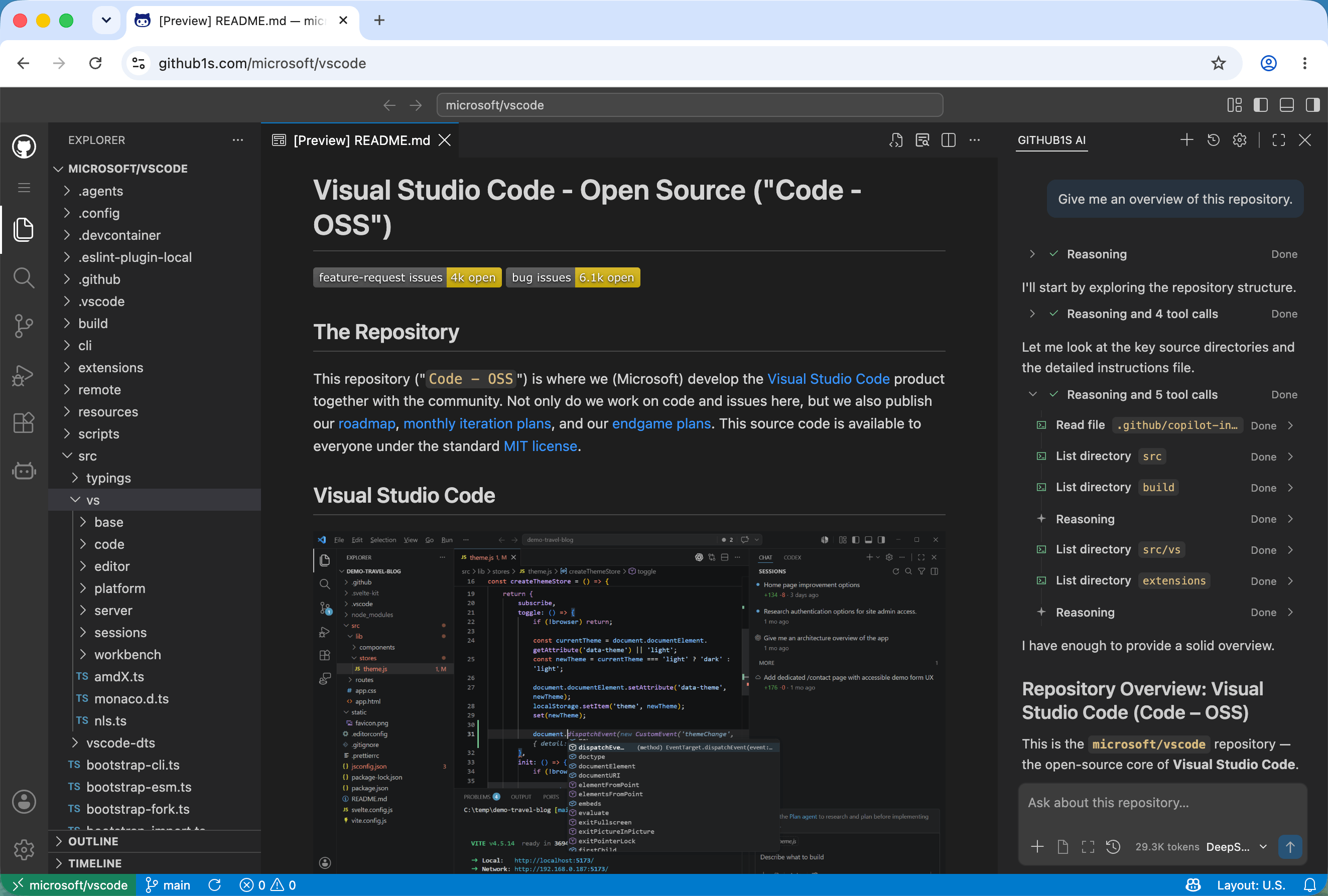
You can also browse GitLab repositories at gitlab1s.com and published npm packages at npmjs1s.com. See the usage guide for URL formats, authentication, and navigation.
Remote repositories are read-only. Search and code navigation depend on the repository platform and available upstream services; see capabilities and limits.
Get a repository overview, explain a file or selection, and ask follow-up questions. The assistant can look up relevant code as you chat.
Click Toggle Secondary Side Bar in the layout controls at the top of GitHub1s to open the AI panel.
Use a model endpoint that accepts browser requests. Messages and code context are sent to the selected endpoint. See the AI guide for configuration and data handling.
| Guide | What you will find |
|---|---|
| Using GitHub1s | Navigation, authentication, search, and troubleshooting |
| GitHub1s AI | Model setup, context, tools, and data handling |
| Development | Local setup, builds, and checks |
| Architecture | Components, data flow, and source layout |
| Deployment | Hosting, OAuth, and service configuration |
| Community | Third-party extensions and star history |
See the development guide to run GitHub1s locally. Report bugs and suggest improvements through GitHub Issues.
conwnet · xcv58 · Siddhant Khare
Thanks to everyone who has contributed to GitHub1s, and to Sourcegraph, searchcode, and OSS Insight for the tools and services used by GitHub1s.
Overall
Maintained
Code review
npm
Latest release
Releases this year
(top 24 of 236)
1,818 followers · starred Feb 2021
7,138 followers · starred Dec 2023
309 followers · starred Feb 2021
368 followers · starred Feb 2021
One second to read GitHub code with VS Code.
See the code
GitHub1s is a browser-based code explorer built on VS Code. Browse files, search code, and review changes without cloning a repository. Connect your preferred model to the built-in AI chat for help understanding the code.
🌐 Try it now · 📖 Usage guide · 🔮 AI setup
Add 1s after github in a repository URL:
https://github.com/microsoft/vscode
        ↓
https://github1s.com/microsoft/vscode
Public repositories can be browsed without signing in, subject to the upstream services' access and rate limits.
You can also browse GitLab repositories at gitlab1s.com and published npm packages at npmjs1s.com. See the usage guide for URL formats, authentication, and navigation.
Remote repositories are read-only. Search and code navigation depend on the repository platform and available upstream services; see capabilities and limits.
Get a repository overview, explain a file or selection, and ask follow-up questions. The assistant can look up relevant code as you chat.
Click Toggle Secondary Side Bar in the layout controls at the top of GitHub1s to open the AI panel.
Use a model endpoint that accepts browser requests. Messages and code context are sent to the selected endpoint. See the AI guide for configuration and data handling.
| Guide | What you will find |
|---|---|
| Using GitHub1s | Navigation, authentication, search, and troubleshooting |
| GitHub1s AI | Model setup, context, tools, and data handling |
| Development | Local setup, builds, and checks |
| Architecture | Components, data flow, and source layout |
| Deployment | Hosting, OAuth, and service configuration |
| Community | Third-party extensions and star history |
See the development guide to run GitHub1s locally. Report bugs and suggest improvements through GitHub Issues.
conwnet · xcv58 · Siddhant Khare
Thanks to everyone who has contributed to GitHub1s, and to Sourcegraph, searchcode, and OSS Insight for the tools and services used by GitHub1s.
Overall
Maintained
Code review
npm
Latest release
Releases this year
(top 24 of 236)
1,818 followers · starred Feb 2021
7,138 followers · starred Dec 2023
309 followers · starred Feb 2021
368 followers · starred Feb 2021



