Free inspector attributes for Unity [Custom Editor, Custom Inspector, Inspector Attributes, Attribute Extensions]
C#
1,457
429 commits
updated Sep 24, 2026




Advanced inspector attributes for Unity
[!WARNING] 2.0 is currently a preview release and may contain bugs. If you run into any issues, please report them. If you need a stable experience, install the latest 1.x.x release from the
1.x.xbranch.
Tri Inspector 2.0 is a significant milestone — rebuilt from the ground up on Unity's UI Toolkit, bringing a modern foundation, polished visuals, and long-requested features.
[TableList] can be dragged and reordered directly in the inspector, making list management significantly faster.TriInspector ships with a built-in Samples Window — your interactive playground for every attribute in the package. Open it from Tools/Tri Inspector/Samples and browse all attributes organized by category. Select any sample to instantly see a live inspector with real fields, so you can explore exactly how each attribute looks and behaves without writing a single line of code.
Each sample also displays its full source code right in the window, so you can see exactly how the attribute is used and copy it straight into your project. It's the fastest way to discover what TriInspector can do and understand how to apply it.

TriInspector comes packed with a huge collection of attributes — far too many to cover here in full. Below are some of the most frequently used ones to get you started. For the complete list, open the Samples Window.
Shows non-serialized property in the inspector.

Makes property non-editable in the inspector.

Marks a field as required and shows an error in the inspector when it is not assigned. Supports an optional fix action — a custom method that can perform any logic to resolve the issue, such as finding and assigning the missing reference automatically.
Runs a custom validation method whenever the field value changes and displays the result as an error or warning directly in the inspector.

Displays a static or dynamic message box above a property with configurable severity — info, warning, or error.

Replaces a field's default input with a dropdown list of predefined values. Values can be static constants or generated dynamically at runtime.

Renders a string field as a scene picker dropdown populated from the project's build settings, eliminating typos and making scene references refactor-safe. TriInspector also includes other specialized field drawers of this kind, such as [Layer] for layer selection, [AnimatorParameter] for Animator parameters, [MaterialProperty] for shader properties, and more.

Renders a numeric field as a slider with configurable fixed or dynamic min and max bounds, giving designers an intuitive range control instead of a raw number input.
Renders a Vector2 field as a min-max range slider, letting you define both the lower and upper bound of a range with a single intuitive control.
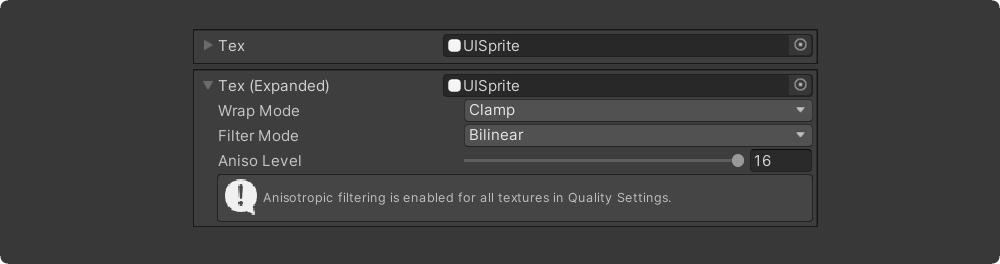
Embeds the full inspector of a referenced asset inline within the parent inspector, so you can view and edit nested assets without leaving the current selection.
Shows an interactive 3D mesh preview below a GameObject field directly in the inspector, making it easy to visually verify the right mesh is assigned.
Draws a bold header line above a property or button in the inspector, making it easy to visually separate and label sections of a large component.

Renders a list or array as a compact multi-column table in the inspector, with support for drag reordering and custom column sizes — perfect for large structured datasets.

Properties can be grouped in the inspector using the [Group] attribute. TriInspector supports six group types, each declared on the class with a corresponding [Declare*Group] attribute:
Groups can be freely nested and combined to build complex, multi-region inspector layouts.


Tri Inspector is able to work in compatibility mode with Odin Inspector. In this mode, the primary interface will be drawn by the Odin Inspector. However, parts of the interface can be rendered by the Tri Inspector.
In order for the interface to be rendered by Tri instead of Odin,
it is necessary to mark classes with [DrawWithTriInspector] attribute.
Alternatively, you can mark the entire assembly with an attribute [assembly:DrawWithTriInspector]
to draw all types in the assembly using the Tri Inspector.
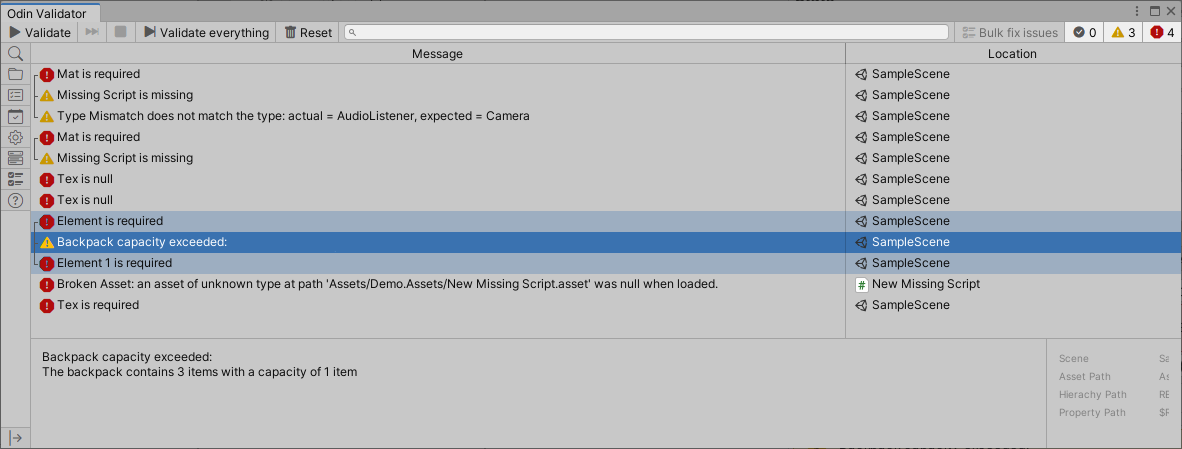
Tri Inspector is integrated with the Odin Validator so all validation results from Tri attributes will be shown in the Odin Validator window.
Library distributed as git package (How to install package from git URL)
Git URL: https://github.com/codewriter-packages/Tri-Inspector.git
Localization package dependency
Tri Inspector automatically installs Localization package as dependency.
If you are not using localization package and do not want to install it, you can install a stub package instead.
Git URL: https://github.com/codewriter-packages/Unity-Localization-Stub-for-Tri-Inspector.git
Tri-Inspector is MIT licensed.
180 followers · starred Jul 2022
81 followers · starred Jul 2025
24 followers · starred Mar 2023
12 followers · starred Dec 2025
Free inspector attributes for Unity [Custom Editor, Custom Inspector, Inspector Attributes, Attribute Extensions]
C#
1,457
429 commits
updated Sep 24, 2026
Advanced inspector attributes for Unity
[!WARNING] 2.0 is currently a preview release and may contain bugs. If you run into any issues, please report them. If you need a stable experience, install the latest 1.x.x release from the
1.x.xbranch.
Tri Inspector 2.0 is a significant milestone — rebuilt from the ground up on Unity's UI Toolkit, bringing a modern foundation, polished visuals, and long-requested features.
[TableList] can be dragged and reordered directly in the inspector, making list management significantly faster.TriInspector ships with a built-in Samples Window — your interactive playground for every attribute in the package. Open it from Tools/Tri Inspector/Samples and browse all attributes organized by category. Select any sample to instantly see a live inspector with real fields, so you can explore exactly how each attribute looks and behaves without writing a single line of code.
Each sample also displays its full source code right in the window, so you can see exactly how the attribute is used and copy it straight into your project. It's the fastest way to discover what TriInspector can do and understand how to apply it.
TriInspector comes packed with a huge collection of attributes — far too many to cover here in full. Below are some of the most frequently used ones to get you started. For the complete list, open the Samples Window.
Shows non-serialized property in the inspector.
Makes property non-editable in the inspector.
Marks a field as required and shows an error in the inspector when it is not assigned. Supports an optional fix action — a custom method that can perform any logic to resolve the issue, such as finding and assigning the missing reference automatically.
Runs a custom validation method whenever the field value changes and displays the result as an error or warning directly in the inspector.
Displays a static or dynamic message box above a property with configurable severity — info, warning, or error.
Replaces a field's default input with a dropdown list of predefined values. Values can be static constants or generated dynamically at runtime.
Renders a string field as a scene picker dropdown populated from the project's build settings, eliminating typos and making scene references refactor-safe. TriInspector also includes other specialized field drawers of this kind, such as [Layer] for layer selection, [AnimatorParameter] for Animator parameters, [MaterialProperty] for shader properties, and more.
Renders a numeric field as a slider with configurable fixed or dynamic min and max bounds, giving designers an intuitive range control instead of a raw number input.
Renders a Vector2 field as a min-max range slider, letting you define both the lower and upper bound of a range with a single intuitive control.
Embeds the full inspector of a referenced asset inline within the parent inspector, so you can view and edit nested assets without leaving the current selection.
Shows an interactive 3D mesh preview below a GameObject field directly in the inspector, making it easy to visually verify the right mesh is assigned.
Draws a bold header line above a property or button in the inspector, making it easy to visually separate and label sections of a large component.
Renders a list or array as a compact multi-column table in the inspector, with support for drag reordering and custom column sizes — perfect for large structured datasets.
Properties can be grouped in the inspector using the [Group] attribute. TriInspector supports six group types, each declared on the class with a corresponding [Declare*Group] attribute:
Groups can be freely nested and combined to build complex, multi-region inspector layouts.
Tri Inspector is able to work in compatibility mode with Odin Inspector. In this mode, the primary interface will be drawn by the Odin Inspector. However, parts of the interface can be rendered by the Tri Inspector.
In order for the interface to be rendered by Tri instead of Odin,
it is necessary to mark classes with [DrawWithTriInspector] attribute.
Alternatively, you can mark the entire assembly with an attribute [assembly:DrawWithTriInspector]
to draw all types in the assembly using the Tri Inspector.
Tri Inspector is integrated with the Odin Validator so all validation results from Tri attributes will be shown in the Odin Validator window.
Library distributed as git package (How to install package from git URL)
Git URL: https://github.com/codewriter-packages/Tri-Inspector.git
Localization package dependency
Tri Inspector automatically installs Localization package as dependency.
If you are not using localization package and do not want to install it, you can install a stub package instead.
Git URL: https://github.com/codewriter-packages/Unity-Localization-Stub-for-Tri-Inspector.git
Tri-Inspector is MIT licensed.
180 followers · starred Jul 2022
81 followers · starred Jul 2025
24 followers · starred Mar 2023
12 followers · starred Dec 2025



