A terminal based graphical activity monitor inspired by gtop and vtop
Go
7,402
424 commits
updated Mar 30, 2023

Another terminal based graphical activity monitor, inspired by gtop and vtop, this time written in Go!
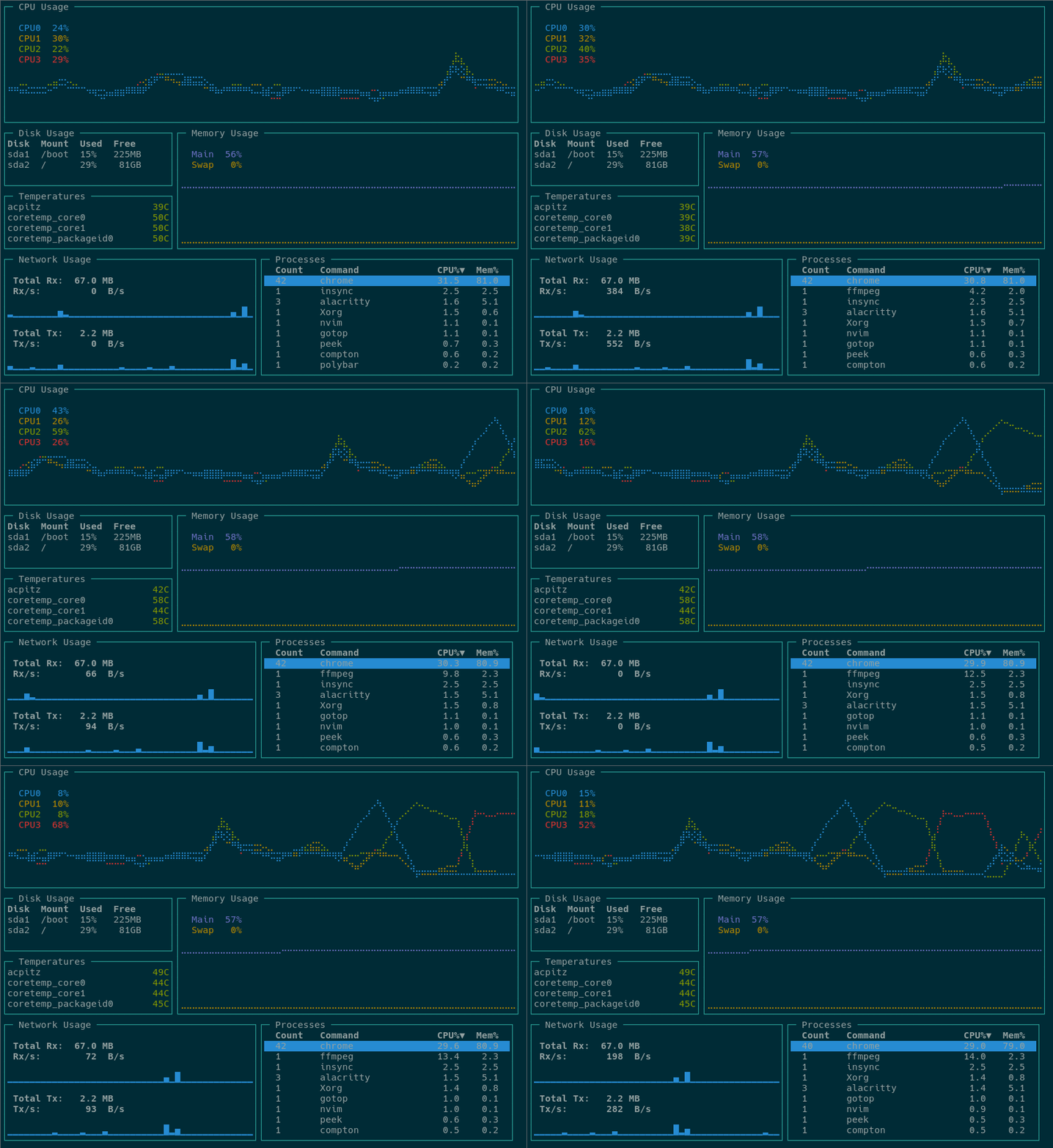
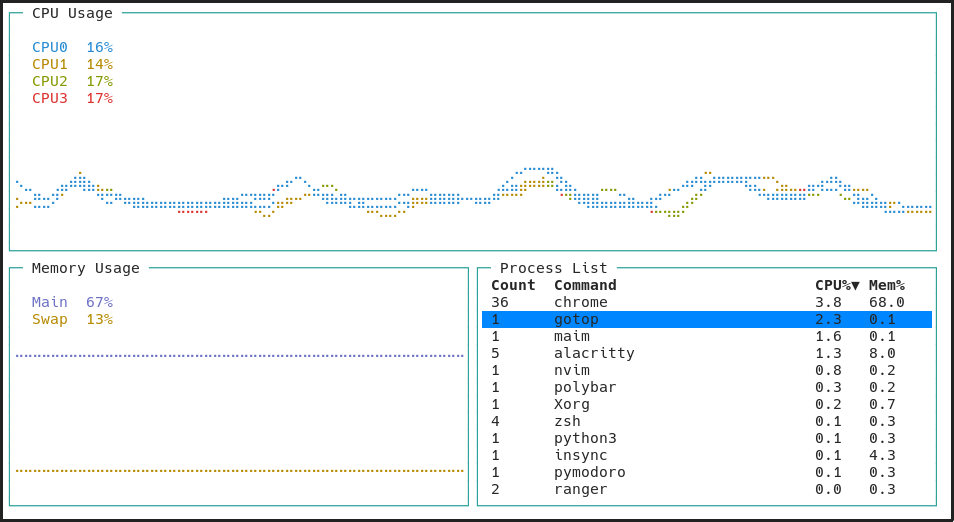
Working and tested on Linux, FreeBSD and macOS. Windows support is planned. OpenBSD works with some caveats.
go get github.com/cjbassi/gotop
Note: Doesn't require Go.
Clone the repo and then run scripts/download.sh to download the correct binary for your system from the releases tab:
git clone --depth 1 https://github.com/cjbassi/gotop /tmp/gotop
/tmp/gotop/scripts/download.sh
Then move gotop into your $PATH somewhere.
Install gotop, gotop-bin, or gotop-git from the AUR.
pkg install gotop
brew tap cjbassi/gotop
brew install gotop
snap install gotop-cjbassi
Note: You may need to enable certain permissions for all of the widgets to work:
snap connect gotop-cjbassi:hardware-observe
snap connect gotop-cjbassi:mount-observe
snap connect gotop-cjbassi:system-observe
q or <C-c>k and <Up>: upj and <Down: down<C-u>: half page up<C-d>: half page down<C-b>: full page up<C-f>: full page downgg and <Home>: jump to topG and <End>: jump to bottom<Tab>: toggle process groupingdd: kill selected process or group of processesc: CPUm: Memp: PIDh: scale inl: scale out?: toggles keybind help menugotop ships with a few colorschemes which can be set with the -c flag followed by the name of one. You can find all the colorschemes in the colorschemes folder.
To make a custom colorscheme, check out the template for instructions and then use default.json as a starter. Then put the file at ~/.config/gotop/<name>.json and load it with gotop -c <name>. Colorschemes PR's are welcome!
-c, --color=NAME Set a colorscheme.
-m, --minimal Only show CPU, Mem and Process widgets.
-r, --rate=RATE Number of times per second to update CPU and Mem widgets [default: 1].
-V, --version Print version and exit.
-p, --percpu Show each CPU in the CPU widget.
-a, --averagecpu Show average CPU in the CPU widget.
-s, --statusbar Show a statusbar with the time.
-b, --battery Show battery level widget (minimal turns off). preview
-i, --interface=NAME Select network interface [default: all].

(top 24 of 55)
1,660 followers · starred Oct 2019
151 followers · starred May 2018
37 followers · starred Apr 2018
304 followers · starred Feb 2019
A terminal based graphical activity monitor inspired by gtop and vtop
Go
7,402
424 commits
updated Mar 30, 2023
Another terminal based graphical activity monitor, inspired by gtop and vtop, this time written in Go!
Working and tested on Linux, FreeBSD and macOS. Windows support is planned. OpenBSD works with some caveats.
go get github.com/cjbassi/gotop
Note: Doesn't require Go.
Clone the repo and then run scripts/download.sh to download the correct binary for your system from the releases tab:
git clone --depth 1 https://github.com/cjbassi/gotop /tmp/gotop
/tmp/gotop/scripts/download.sh
Then move gotop into your $PATH somewhere.
Install gotop, gotop-bin, or gotop-git from the AUR.
pkg install gotop
brew tap cjbassi/gotop
brew install gotop
snap install gotop-cjbassi
Note: You may need to enable certain permissions for all of the widgets to work:
snap connect gotop-cjbassi:hardware-observe
snap connect gotop-cjbassi:mount-observe
snap connect gotop-cjbassi:system-observe
q or <C-c>k and <Up>: upj and <Down: down<C-u>: half page up<C-d>: half page down<C-b>: full page up<C-f>: full page downgg and <Home>: jump to topG and <End>: jump to bottom<Tab>: toggle process groupingdd: kill selected process or group of processesc: CPUm: Memp: PIDh: scale inl: scale out?: toggles keybind help menugotop ships with a few colorschemes which can be set with the -c flag followed by the name of one. You can find all the colorschemes in the colorschemes folder.
To make a custom colorscheme, check out the template for instructions and then use default.json as a starter. Then put the file at ~/.config/gotop/<name>.json and load it with gotop -c <name>. Colorschemes PR's are welcome!
-c, --color=NAME Set a colorscheme.
-m, --minimal Only show CPU, Mem and Process widgets.
-r, --rate=RATE Number of times per second to update CPU and Mem widgets [default: 1].
-V, --version Print version and exit.
-p, --percpu Show each CPU in the CPU widget.
-a, --averagecpu Show average CPU in the CPU widget.
-s, --statusbar Show a statusbar with the time.
-b, --battery Show battery level widget (minimal turns off). preview
-i, --interface=NAME Select network interface [default: all].
(top 24 of 55)
1,660 followers · starred Oct 2019
151 followers · starred May 2018
37 followers · starred Apr 2018
304 followers · starred Feb 2019



