chinmayembedded/flask_template

CSS

0

22 commits

updated Mar 18, 2022

See the code

README

YANMTT User Interface

Welcome to the YANMTT User Interface. Please find the instructions below to get started with the UI. Please note that any models that you need to deploy to the UI, should be stored (as an individual model foler) inside the yanmtt/interface/models folder.

Installation ( necessary; but easy :) )

Step 1

git clone https://github.com/prajdabre/yanmtt.git
cd yanmtt/interface

Step 2

pip install -r requirements.txt

Run

python app.py --port <VALUE>

(requires GPU for fast inference, slower inference with CPUs)

Now, you can open Browser and copy and paste URL indicated in prompt (http://localhost:5000)


User Interface
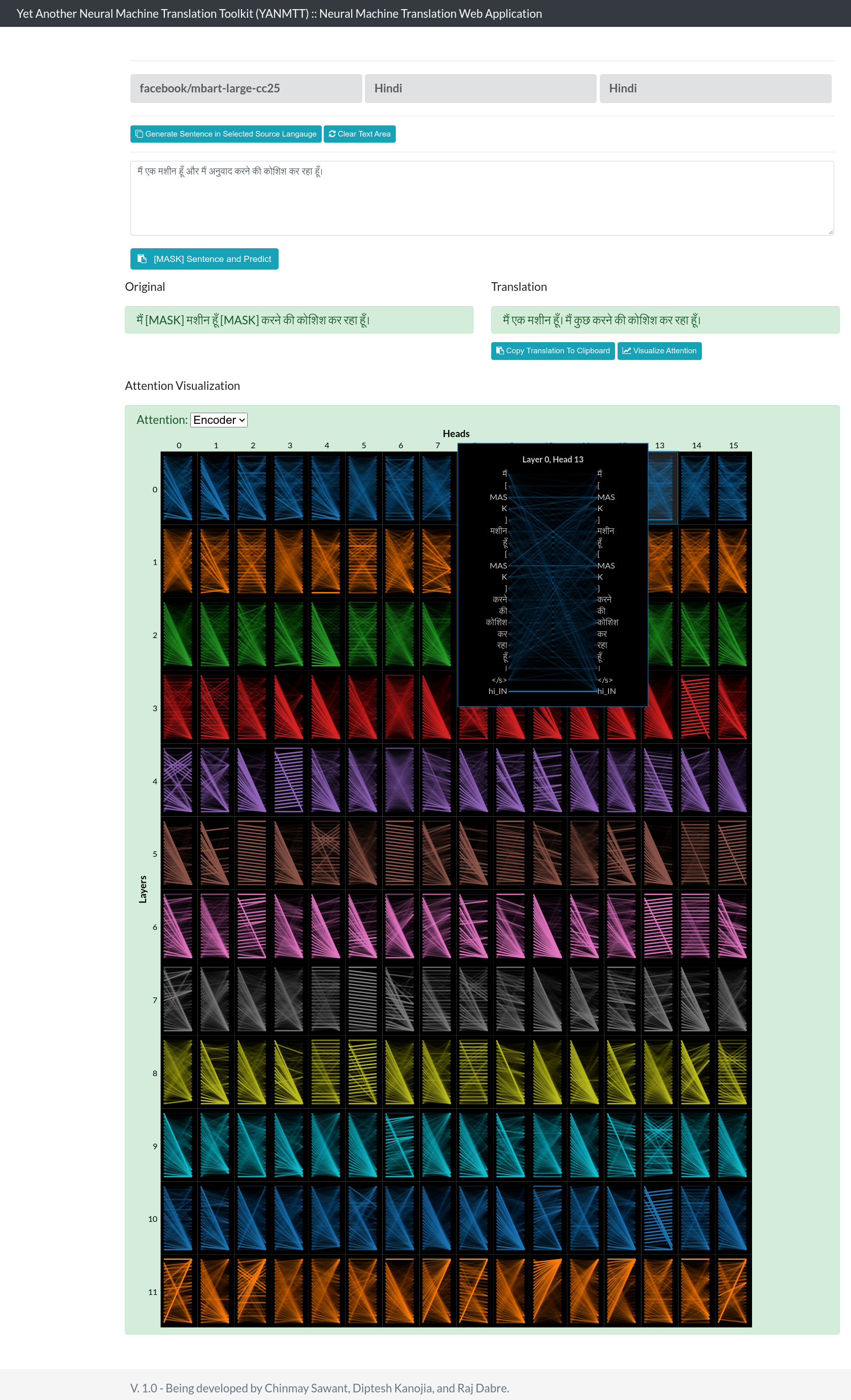

alt text


Yet to be added

  • Feedback support

Changelog

16/03/2022

  • Added support for mbart-large-50, and mbart-large-cc25

11/03 - 15/03/2022

  • Sentence Generation on source side for each of the 99 languages supported by the FB model.
  • Language Identification via the JS-based langid.py library. Supports 78 languages. Thanks to the developer! :)
  • Inference using trained NMT models from the folder "models" in CTSNMT root.
  • PORT value to be passed as an argparse parameter now. Use --port otherwise it defaults to using PORT 5000.
  • Interface cleaning.

10/03/2022

  • Added bertviz based visualization. Thanks to the developer! :)

09/03/2022

  • Alert boxes for missing parameters.
  • Copy button, and clear buttons added for ease.
  • langauges order changed to alphabetical (mostly).
  • Copy translation button to copy the translated text to clipboard.
  • Back-translate button to reverse the language pairs and back-translate the previous translated output.

08/03/2022

  • v1.0.0: Asynchrounous translation finally!
  • Use of Swagger API added, calls to API for translation (removed form submit).
  • Source and Target language selection via Python dictionary; removed dependency of data-id from HTML.
  • resolved icon issue while selecting languages.
  • resolved "hidden input" dependencies, jquery based language selection using semantic UI default hidden fields.
  • navbar icon trimmed.
  • added collection of translated text to a file (step towards feedback)

01/01/2022

  • Added Semantic UI for searchable dropdown.
  • Added support for selection of source language.
  • POST request sends back previous source/target language pair (system defaults to translating for the last language pair, if languages not selected).
  • Added support for model change in HTML (Flask side pages to be added later).
  • Added CTS logo.

31/12/2021

  • v0.5.1: Added support for multiple languages.
  • Tokenizer change.
  • Added target language change support via dropdown (source language change to be added later).
  • Flask hosting changed to 0.0.0.0 to support access throughout internal network.

chinmayembedded/flask_template

CSS

0

22 commits

updated Mar 18, 2022

See the code

README

YANMTT User Interface

Welcome to the YANMTT User Interface. Please find the instructions below to get started with the UI. Please note that any models that you need to deploy to the UI, should be stored (as an individual model foler) inside the yanmtt/interface/models folder.

Installation ( necessary; but easy :) )

Step 1

git clone https://github.com/prajdabre/yanmtt.git
cd yanmtt/interface

Step 2

pip install -r requirements.txt

Run

python app.py --port <VALUE>

(requires GPU for fast inference, slower inference with CPUs)

Now, you can open Browser and copy and paste URL indicated in prompt (http://localhost:5000)


User Interface


alt text


Yet to be added

  • Feedback support

Changelog

16/03/2022

  • Added support for mbart-large-50, and mbart-large-cc25

11/03 - 15/03/2022

  • Sentence Generation on source side for each of the 99 languages supported by the FB model.
  • Language Identification via the JS-based langid.py library. Supports 78 languages. Thanks to the developer! :)
  • Inference using trained NMT models from the folder "models" in CTSNMT root.
  • PORT value to be passed as an argparse parameter now. Use --port otherwise it defaults to using PORT 5000.
  • Interface cleaning.

10/03/2022

  • Added bertviz based visualization. Thanks to the developer! :)

09/03/2022

  • Alert boxes for missing parameters.
  • Copy button, and clear buttons added for ease.
  • langauges order changed to alphabetical (mostly).
  • Copy translation button to copy the translated text to clipboard.
  • Back-translate button to reverse the language pairs and back-translate the previous translated output.

08/03/2022

  • v1.0.0: Asynchrounous translation finally!
  • Use of Swagger API added, calls to API for translation (removed form submit).
  • Source and Target language selection via Python dictionary; removed dependency of data-id from HTML.
  • resolved icon issue while selecting languages.
  • resolved "hidden input" dependencies, jquery based language selection using semantic UI default hidden fields.
  • navbar icon trimmed.
  • added collection of translated text to a file (step towards feedback)

01/01/2022

  • Added Semantic UI for searchable dropdown.
  • Added support for selection of source language.
  • POST request sends back previous source/target language pair (system defaults to translating for the last language pair, if languages not selected).
  • Added support for model change in HTML (Flask side pages to be added later).
  • Added CTS logo.

31/12/2021

  • v0.5.1: Added support for multiple languages.
  • Tokenizer change.
  • Added target language change support via dropdown (source language change to be added later).
  • Flask hosting changed to 0.0.0.0 to support access throughout internal network.