Kietnehi/Translation_Generation

This modern ReactJS website integrates Tencent's AI models to provide flexible translation services. By utilizing custom system prompts, the platform ensures context-aware, natural, and highly adaptable responses, delivering a sophisticated multilingual experience beyond traditional literal translation for diverse user needs.

JavaScript

2

13 commits

updated Jan 11, 2026

See the code

README

🌐 Translation + Custom System Prompt Web UI

Intelligent parallel translation powered by Tencent HY-MT1.5-1.8B & Custom System Prompts. The project provides a lightweight web interface and backend for text translation with extensive System Prompt customization capabilities.
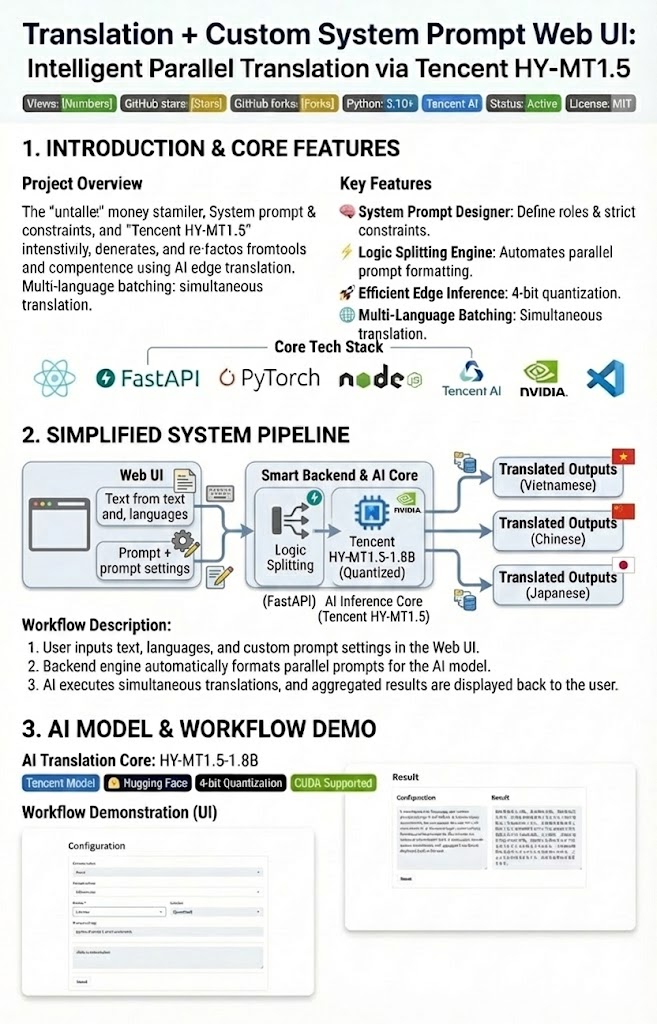
Powered by Tencent HY-MT1.5-1.8B with Custom System Prompt

Translation Text Generation Poster

Lightweight Web UI for Parallel Translation with Custom System Prompt Design

Views GitHub stars GitHub forks GitHub repo size GitHub last commit Python Tencent Status Maintained Open PRs GitHub Profile GitHub followers React FastAPI Python PyTorch Node.js Tencent NVIDIA VS Code Tencent Model Hugging Face Quantization CUDA

πŸ” System Pipeline & Architecture

This diagram illustrates the end-to-end workflow of the Translation + Custom System Prompt Web UI, from user input to parallel multilingual output.

Translation System Pipeline


Features

  • Translate text into multiple target languages.
  • Set a custom system prompt to influence translation behavior.
  • Lightweight web interface for easy testing.
  • Uses 4-bit quantized model for efficient GPU usage.

🌟 Features

  • Multi-Language Support: Translate text into multiple target languages simultaneously.
  • System Prompt Designer: Influence translation behavior by setting Persona, Context, and Strict Constraints.
  • Logic Splitting: Automatically formats instructions for the AI, replacing [Target Language] dynamically for each task.
  • Efficient Inference: Uses 4-bit quantization (bitsandbytes) for optimized GPU usage.
  • History Tracking: Keep track of recent translation requests and configurations.

πŸ“Έ Screenshots & Workflow Analysis

Below is a practical illustration of how the system handles intelligent translation logic:

1. System Prompt Designer (Logic Configuration)

Where the "brain" is set up for the AI before executing the task.

System Prompt Designer Interface

  • Persona & Context: Setting up the role of "Creative Game Localizer" helps the AI choose words with nuances suitable for the Fantasy genre instead of rigid machine translation.
  • Constraint Enforcement: Applying strict constraints such as "Do not translate proper nouns" (ShadowRealm) to protect the content's identity.

2. Intelligent Translator (Execution & Results)

AI performs parallel translation based on the established instructions.

Translation Results Interface

  • Analysis: The model strictly adheres to system commands β€” keeping the word "ShadowRealm" unchanged in Vietnamese, Chinese, and Japanese translations.
  • Optimization: Intuitive card interface supports quick copying of each language, helping to increase work efficiency.

🌟 Advanced Features (New!)

  • Logic Splitting Engine: Automates the splitting of system logic. You only need to set up the template once, the system will automatically adjust the content for each target language by replacing the [Target Language] variable in real time.
  • System Prompt Designer: In-depth Prompt design interface with:
    • Persona Role: Define the translation style (Expert, Creative, Technical).
    • Project Context: Provide context for the AI to deeply understand the content to be translated.
    • Strict Constraints: Set "hard" rules (maintain original length, do not translate technical terms, preserve Code formatting).
  • Real-time Instruction Preview: Preview the system command chain that will be sent to the HY-MT1.5 model before translation.
  • Multi-Language Batch Processing: Translate multiple languages in parallel with separate system instructions for each stream.

Quick Start

1. Frontend Setup

npm install
npm run dev

This will start the frontend development server.

2. Backend Setup

  1. Create a Python virtual environment and activate it:
python -m venv venv
source venv/bin/activate  # Linux/Mac
venv\Scripts\activate     # Windows
  1. Install Python dependencies:
pip install -r requirements.txt
  1. Run the FastAPI app:
python app.py
  1. Open your browser at http://localhost:8000 and use the form to:
  • Enter input text
  • Optionally provide a custom system prompt
  • Select target language(s)

3. Using Prompt Designer

  • Switch to the System Prompt Designer tab.
  • Fill in the parameters: Role, Context, and Constraints.
  • Return to the Translator tab, enter the text and press "Translate". The system will automatically combine these parameters into the system command sent to the AI.

Notes

  • Model weights are loaded with 4-bit quantization. Make sure:
    • Your environment supports bitsandbytes
    • You have a compatible GPU
  • The server currently runs inference synchronously in a thread pool.
    For production, consider batching requests or using an async queue for better throughput.

Dependencies

  • Python >= 3.10
  • FastAPI
  • Uvicorn
  • bitsandbytes
  • tencent/HY-MT1.5-1.8B model from Hugging Face
  • Node.js & npm for frontend

HY-MT1.5-1.8B - Hunyuan Translation Model v1.5 (1.8B)

Overview

HY-MT1.5-1.8B is a 1.8 billion parameter translation model from Tencent's Hunyuan Translation Model v1.5 series. It is designed for high-quality, real-time translations across 33 languages and 5 ethnic/dialect variations. Despite being smaller than the 7B version, it achieves comparable performance while being optimized for edge device deployment.

Key Features

  • High Performance: Industry-leading results for models of similar size, surpassing most commercial translation APIs.
  • Edge Deployment: Quantized versions allow real-time translation on edge devices.
  • Advanced Translation Capabilities:
    • Terminology intervention
    • Contextual translation
    • Formatted translation
    • Mixed-language scenario support
  • Lightweight & Fast: Delivers high-speed inference without significant loss in translation quality.

Model Variants

ModelDescription
HY-MT1.5-1.8BStandard 1.8B translation model
HY-MT1.5-1.8B-FP8FP8 quantized model for faster deployment
HY-MT1.5-1.8B-GPTQ-Int4INT4 quantized model for edge devices
HY-MT1.5-7BLarger 7B model, upgraded for mixed-language and annotated translation
HY-MT1.5-7B-FP8FP8 quantized 7B model
HY-MT1.5-7B-GPTQ-Int4INT4 quantized 7B model

Supported Languages

  • Chinese (zh), English (en), French (fr), Portuguese (pt), Spanish (es)
  • Japanese (ja), Turkish (tr), Russian (ru), Arabic (ar), Korean (ko)
  • Thai (th), Italian (it), German (de), Vietnamese (vi), Malay (ms)
  • Indonesian (id), Filipino (tl), Hindi (hi), Traditional Chinese (zh-Hant)
  • Polish (pl), Czech (cs), Dutch (nl), Khmer (km), Burmese (my)
  • Persian (fa), Gujarati (gu), Urdu (ur), Telugu (te), Marathi (mr)
  • Hebrew (he), Bengali (bn), Tamil (ta), Ukrainian (uk), Tibetan (bo)
  • Kazakh (kk), Mongolian (mn), Uyghur (ug), Cantonese (yue)

Quick Start with Transformers

from transformers import AutoModelForCausalLM, AutoTokenizer

model_name_or_path = "tencent/HY-MT1.5-1.8B"

tokenizer = AutoTokenizer.from_pretrained(model_name_or_path)
model = AutoModelForCausalLM.from_pretrained(model_name_or_path, device_map="auto")

messages = [
    {"role": "user", "content": "Translate the following segment into Chinese, without additional explanation.\n\nIt’s on the house."},
]

tokenized_chat = tokenizer.apply_chat_template(
    messages,
    tokenize=True,
    add_generation_prompt=False,
    return_tensors="pt"
)

outputs = model.generate(tokenized_chat.to(model.device), max_new_tokens=2048)
output_text = tokenizer.decode(outputs[0])
print(output_text)
{
  "top_k": 20,
  "top_p": 0.6,
  "repetition_penalty": 1.05,
  "temperature": 0.7
}

License

Specify your license here (MIT/Apache/Proprietary).

πŸ”— Author's GitHub

Avatar Truong Phu Kiet

πŸš€ Truong Phu Kiet

Typing SVG


SGU HCMC

πŸ›  Tech Stack

My Skills


🌟 Translation + Text Generation Web Application Using Tencent Model

Stars Forks Issues

Daily Quote

Thank you for visiting! Don't forget to click ⭐️ Star to support the project.


Citation

@misc{hy-mt1.5,
  title={HY-MT1.5 Technical Report}, 
  author={Mao Zheng and Zheng Li and Tao Chen and Mingyang Song and Di Wang},
  year={2025},
  eprint={2512.24092},
  archivePrefix={arXiv},
  primaryClass={cs.CL},
  url={https://arxiv.org/abs/2512.24092}
}

Kietnehi/Translation_Generation

This modern ReactJS website integrates Tencent's AI models to provide flexible translation services. By utilizing custom system prompts, the platform ensures context-aware, natural, and highly adaptable responses, delivering a sophisticated multilingual experience beyond traditional literal translation for diverse user needs.

JavaScript

2

13 commits

updated Jan 11, 2026

See the code

README

🌐 Translation + Custom System Prompt Web UI

Intelligent parallel translation powered by Tencent HY-MT1.5-1.8B & Custom System Prompts. The project provides a lightweight web interface and backend for text translation with extensive System Prompt customization capabilities.

Powered by Tencent HY-MT1.5-1.8B with Custom System Prompt

Translation Text Generation Poster

Lightweight Web UI for Parallel Translation with Custom System Prompt Design

Views GitHub stars GitHub forks GitHub repo size GitHub last commit Python Tencent Status Maintained Open PRs GitHub Profile GitHub followers React FastAPI Python PyTorch Node.js Tencent NVIDIA VS Code Tencent Model Hugging Face Quantization CUDA

πŸ” System Pipeline & Architecture

This diagram illustrates the end-to-end workflow of the Translation + Custom System Prompt Web UI, from user input to parallel multilingual output.
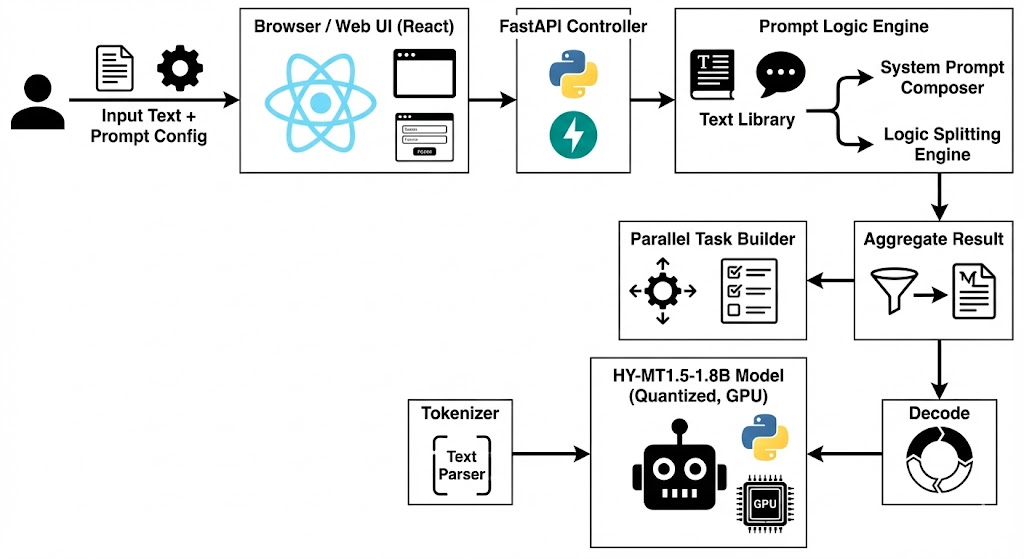
Translation System Pipeline


Features

  • Translate text into multiple target languages.
  • Set a custom system prompt to influence translation behavior.
  • Lightweight web interface for easy testing.
  • Uses 4-bit quantized model for efficient GPU usage.

🌟 Features

  • Multi-Language Support: Translate text into multiple target languages simultaneously.
  • System Prompt Designer: Influence translation behavior by setting Persona, Context, and Strict Constraints.
  • Logic Splitting: Automatically formats instructions for the AI, replacing [Target Language] dynamically for each task.
  • Efficient Inference: Uses 4-bit quantization (bitsandbytes) for optimized GPU usage.
  • History Tracking: Keep track of recent translation requests and configurations.

πŸ“Έ Screenshots & Workflow Analysis

Below is a practical illustration of how the system handles intelligent translation logic:

1. System Prompt Designer (Logic Configuration)

Where the "brain" is set up for the AI before executing the task.
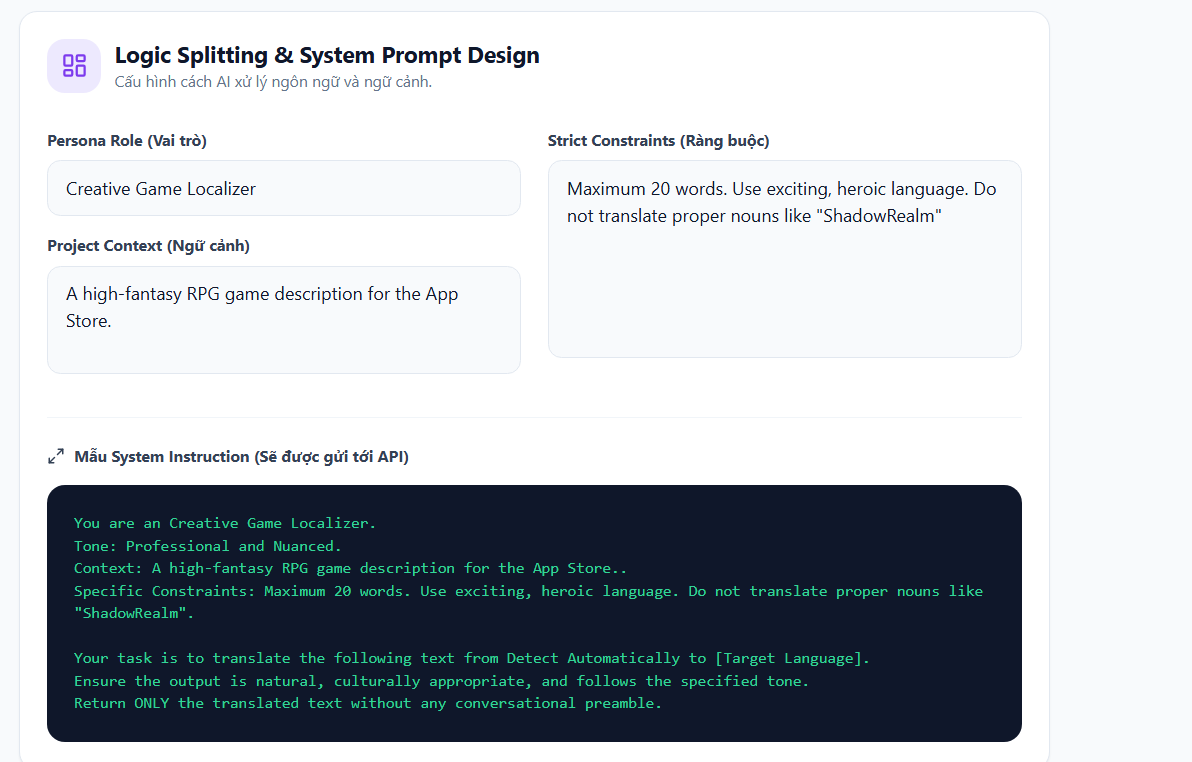
System Prompt Designer Interface

  • Persona & Context: Setting up the role of "Creative Game Localizer" helps the AI choose words with nuances suitable for the Fantasy genre instead of rigid machine translation.
  • Constraint Enforcement: Applying strict constraints such as "Do not translate proper nouns" (ShadowRealm) to protect the content's identity.

2. Intelligent Translator (Execution & Results)

AI performs parallel translation based on the established instructions.
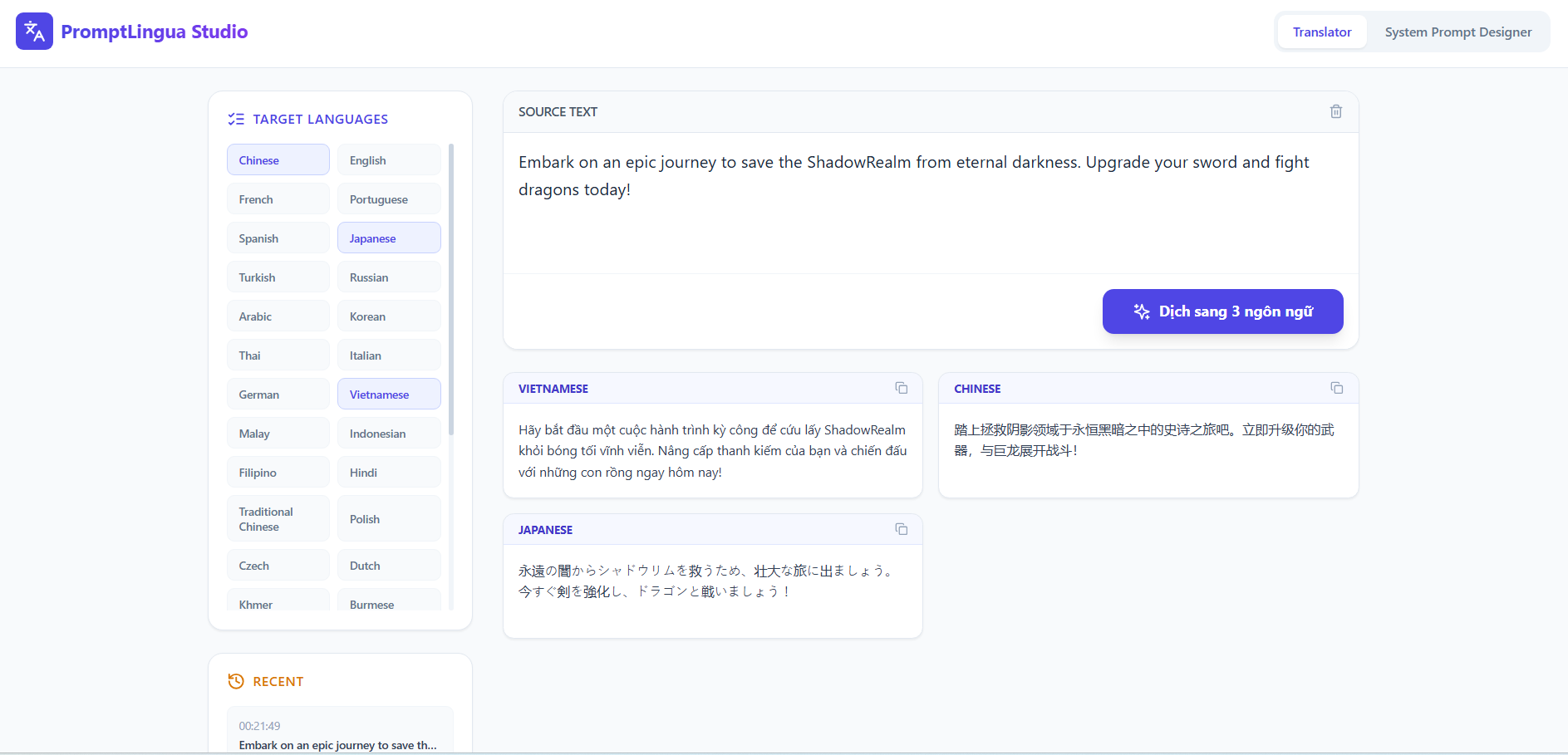
Translation Results Interface

  • Analysis: The model strictly adheres to system commands β€” keeping the word "ShadowRealm" unchanged in Vietnamese, Chinese, and Japanese translations.
  • Optimization: Intuitive card interface supports quick copying of each language, helping to increase work efficiency.

🌟 Advanced Features (New!)

  • Logic Splitting Engine: Automates the splitting of system logic. You only need to set up the template once, the system will automatically adjust the content for each target language by replacing the [Target Language] variable in real time.
  • System Prompt Designer: In-depth Prompt design interface with:
    • Persona Role: Define the translation style (Expert, Creative, Technical).
    • Project Context: Provide context for the AI to deeply understand the content to be translated.
    • Strict Constraints: Set "hard" rules (maintain original length, do not translate technical terms, preserve Code formatting).
  • Real-time Instruction Preview: Preview the system command chain that will be sent to the HY-MT1.5 model before translation.
  • Multi-Language Batch Processing: Translate multiple languages in parallel with separate system instructions for each stream.

Quick Start

1. Frontend Setup

npm install
npm run dev

This will start the frontend development server.

2. Backend Setup

  1. Create a Python virtual environment and activate it:
python -m venv venv
source venv/bin/activate  # Linux/Mac
venv\Scripts\activate     # Windows
  1. Install Python dependencies:
pip install -r requirements.txt
  1. Run the FastAPI app:
python app.py
  1. Open your browser at http://localhost:8000 and use the form to:
  • Enter input text
  • Optionally provide a custom system prompt
  • Select target language(s)

3. Using Prompt Designer

  • Switch to the System Prompt Designer tab.
  • Fill in the parameters: Role, Context, and Constraints.
  • Return to the Translator tab, enter the text and press "Translate". The system will automatically combine these parameters into the system command sent to the AI.

Notes

  • Model weights are loaded with 4-bit quantization. Make sure:
    • Your environment supports bitsandbytes
    • You have a compatible GPU
  • The server currently runs inference synchronously in a thread pool.
    For production, consider batching requests or using an async queue for better throughput.

Dependencies

  • Python >= 3.10
  • FastAPI
  • Uvicorn
  • bitsandbytes
  • tencent/HY-MT1.5-1.8B model from Hugging Face
  • Node.js & npm for frontend

HY-MT1.5-1.8B - Hunyuan Translation Model v1.5 (1.8B)

Overview

HY-MT1.5-1.8B is a 1.8 billion parameter translation model from Tencent's Hunyuan Translation Model v1.5 series. It is designed for high-quality, real-time translations across 33 languages and 5 ethnic/dialect variations. Despite being smaller than the 7B version, it achieves comparable performance while being optimized for edge device deployment.

Key Features

  • High Performance: Industry-leading results for models of similar size, surpassing most commercial translation APIs.
  • Edge Deployment: Quantized versions allow real-time translation on edge devices.
  • Advanced Translation Capabilities:
    • Terminology intervention
    • Contextual translation
    • Formatted translation
    • Mixed-language scenario support
  • Lightweight & Fast: Delivers high-speed inference without significant loss in translation quality.

Model Variants

ModelDescription
HY-MT1.5-1.8BStandard 1.8B translation model
HY-MT1.5-1.8B-FP8FP8 quantized model for faster deployment
HY-MT1.5-1.8B-GPTQ-Int4INT4 quantized model for edge devices
HY-MT1.5-7BLarger 7B model, upgraded for mixed-language and annotated translation
HY-MT1.5-7B-FP8FP8 quantized 7B model
HY-MT1.5-7B-GPTQ-Int4INT4 quantized 7B model

Supported Languages

  • Chinese (zh), English (en), French (fr), Portuguese (pt), Spanish (es)
  • Japanese (ja), Turkish (tr), Russian (ru), Arabic (ar), Korean (ko)
  • Thai (th), Italian (it), German (de), Vietnamese (vi), Malay (ms)
  • Indonesian (id), Filipino (tl), Hindi (hi), Traditional Chinese (zh-Hant)
  • Polish (pl), Czech (cs), Dutch (nl), Khmer (km), Burmese (my)
  • Persian (fa), Gujarati (gu), Urdu (ur), Telugu (te), Marathi (mr)
  • Hebrew (he), Bengali (bn), Tamil (ta), Ukrainian (uk), Tibetan (bo)
  • Kazakh (kk), Mongolian (mn), Uyghur (ug), Cantonese (yue)

Quick Start with Transformers

from transformers import AutoModelForCausalLM, AutoTokenizer

model_name_or_path = "tencent/HY-MT1.5-1.8B"

tokenizer = AutoTokenizer.from_pretrained(model_name_or_path)
model = AutoModelForCausalLM.from_pretrained(model_name_or_path, device_map="auto")

messages = [
    {"role": "user", "content": "Translate the following segment into Chinese, without additional explanation.\n\nIt’s on the house."},
]

tokenized_chat = tokenizer.apply_chat_template(
    messages,
    tokenize=True,
    add_generation_prompt=False,
    return_tensors="pt"
)

outputs = model.generate(tokenized_chat.to(model.device), max_new_tokens=2048)
output_text = tokenizer.decode(outputs[0])
print(output_text)
{
  "top_k": 20,
  "top_p": 0.6,
  "repetition_penalty": 1.05,
  "temperature": 0.7
}

License

Specify your license here (MIT/Apache/Proprietary).

πŸ”— Author's GitHub

Avatar Truong Phu Kiet

πŸš€ Truong Phu Kiet

Typing SVG


SGU HCMC

πŸ›  Tech Stack

My Skills


🌟 Translation + Text Generation Web Application Using Tencent Model

Stars Forks Issues

Daily Quote

Thank you for visiting! Don't forget to click ⭐️ Star to support the project.


Citation

@misc{hy-mt1.5,
  title={HY-MT1.5 Technical Report}, 
  author={Mao Zheng and Zheng Li and Tao Chen and Mingyang Song and Di Wang},
  year={2025},
  eprint={2512.24092},
  archivePrefix={arXiv},
  primaryClass={cs.CL},
  url={https://arxiv.org/abs/2512.24092}
}