
Rename thousands of files, right in your browser.
See the codeSee what people are saying
README
Rename.Tools
A powerful browser-based batch file renaming tool.
Regex, rule chains, live preview — all processed locally for total privacy.


Live Demo · Report Bug · Request Feature
English | 简体中文
✨ Features
- 100% Local Processing — Files never leave your device. All operations run in-browser via File System Access API.
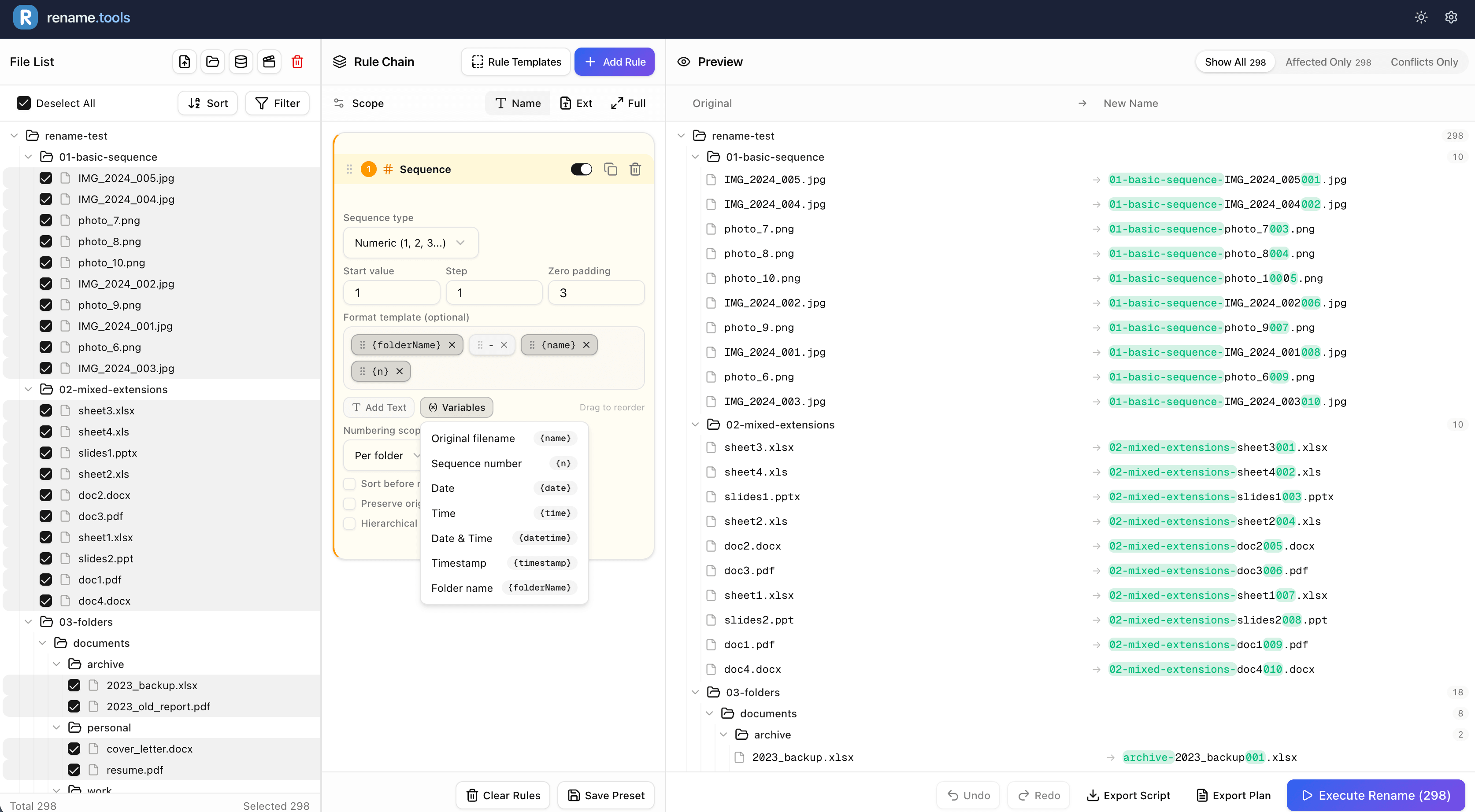
- Rule Chains — Combine multiple rename rules (Find & Replace, Regex, Sequence, Case/Style, Custom JS) in sequence.
- Live Preview — See changes instantly as you configure rules. Conflicts are detected before execution.
- Metadata Support — Extract EXIF data from images and audio tags from music files for smart renaming.
- TV Show Scraper — Auto-match video files with show/episode info from TMDb (requires internet and a TMDb API key).
- Export Scripts — Generate bash or PowerShell scripts for offline execution.
- Undo Support — Built-in undo in the UI, plus exportable undo scripts for command-line rollback.
- Works Offline — No internet needed after initial page load. (Note: TV show scraping requires internet and a TMDb API key)
- Multi-language — English and Chinese supported.
🖼️ Screenshot
🚀 Getting Started
Prerequisites
- Node.js >= 20 (see
.nvmrc) - pnpm
Installation
# Clone the repository
git clone https://github.com/chenz24/rename.tools.git
cd rename.tools

# Install dependencies
pnpm install

# Copy environment variables
cp .env.example .env.local

# Start development server
pnpm dev
Open http://localhost:3000 to see the app.
🛠️ Tech Stack
| Category | Technology |
|---|---|
| Framework | Next.js 16 (App Router, Turbopack) |
| UI | React 19, Tailwind CSS 4, shadcn/ui |
| State | Zustand |
| Drag & Drop | @dnd-kit |
| Metadata | exifr, music-metadata-browser |
| i18n | next-intl |
| Linting | Biome |
| Language | TypeScript |
📖 Usage
Quick Start
- Import Files — Drag & drop files/folders or use the file picker
- Add Rules — Build a rule chain with multiple rename operations
- Preview — Review changes in real-time with conflict detection
- Execute — Rename files directly on your device
Available Rule Types
| Rule | Description |
|---|---|
| Find & Replace | Text replacement with case sensitivity and position options |
| Regex Replace | Full regex support with capture groups and backreferences |
| Add/Insert | Insert text at start, end, or specific position |
| Sequence | Auto-numbering with custom start, step, and padding |
| Case/Style | UPPERCASE, lowercase, Title Case, kebab-case, etc. |
| Remove/Cleanup | Remove characters by count, range, or type (digits, symbols, etc.) |
| Custom JS | Write your own transform function |
Template Variables
Use variables in Insert rules:
{name}— Original filename{n}— Sequence number{date},{time},{datetime}— Current date/time{exifDate},{exifCamera}— EXIF metadata{mediaArtist},{mediaTitle},{mediaAlbum}— Audio tags
🌐 Browser Support
| Browser | Direct Rename | Export Scripts |
|---|---|---|
| Chrome / Edge / Brave / Arc | ✅ | ✅ |
| Firefox / Safari | ❌ | ✅ |
Direct renaming requires the File System Access API (Chromium-based browsers). Other browsers can use sample test mode or export scripts.
📦 Scripts
| Command | Description |
|---|---|
pnpm dev | Start dev server with Turbopack |
pnpm build | Build for production |
pnpm start | Start production server |
pnpm lint | Lint with Biome |
pnpm format | Format with Biome |
pnpm check | Lint + format (auto-fix) |
Releases and recovery
Use pnpm build, pnpm build:cf, or pnpm deploy for production builds. The build wrapper generates public/sw.js from scripts/service-worker.js and shares a unique release ID with Next.js. If setting NEXT_DEPLOYMENT_ID in CI, use a different value for every release; do not run next build directly.
The service worker never caches App Router/Flight responses. Offline HTML is isolated per release, while cached immutable chunks remain available to older tabs. An update waits for user acceptance. This retains cached assets, not every old asset on the server: an old tab requesting a previously uncached, removed chunk may still need to reload.
Errors offer Try again and Repair and reload. A small inline fallback also offers repair when application scripts fail, or startup has not completed after 20 seconds. /repair.html is a standalone recovery page (Cloudflare may redirect it to /repair) with no React or external asset dependencies. After a user click and an online check, it unregisters only this site's root worker, clears only rename-tools- caches, and navigates once. It preserves saved presets/settings in localStorage and IndexedDB; unsaved in-memory work is lost on navigation. Close other site tabs before repairing. Offline/storage failures show a retryable message instead of repeatedly refreshing.
Already-open pages from before this feature cannot acquire a new error UI without reloading; the direct recovery URL remains available once deployed. This is a cache recovery mechanism, not a remedy for server outages or application logic bugs.
Navigation requests fall back to the current offline cache after 10 seconds without a network response. Offline fallback pages come only from the current static cache. Update actions handle workers already activated by another tab; a refresh fallback runs only after the user accepts the update. Repair checks for concurrent re-registration before deleting caches. Failed production builds leave the previous generated worker untouched.
🔒 Privacy
Rename.Tools is built with a privacy-first architecture:
- No uploads — Files are accessed via browser APIs, never transmitted
- No server processing — All rename logic runs client-side
- No data retention — Close the tab and everything is gone
- No accounts — No sign-up, no tracking, no analytics on your files
❓ FAQ
Is Rename.Tools really free? Yes, completely free and open source. There are no premium tiers, no trials, and no hidden fees.
Do my files get uploaded to a server? No. Rename.Tools runs entirely in your browser. Your files are accessed through the File System Access API and never leave your device.
What browsers are supported? Rename.Tools works best in Chromium-based browsers (Chrome, Edge, Brave, Arc). Firefox and Safari can use sample test mode or export scripts.
Can I undo a rename operation? Yes. Rename.Tools provides a built-in undo button in the interface to reverse your last rename operation. You can also export an undo script for command-line reversal if needed.
How many files can it handle? Rename.Tools can handle thousands of files in a single batch. Performance depends on your browser and device capabilities.
Does it work completely offline? Most features work offline after initial page load. However, the TV show scraping feature requires internet access and a TMDb API key to query the TMDb API.
🤝 Contributing
Contributions are welcome! Please feel free to submit a Pull Request.
- Fork the project
- Create your feature branch (
git checkout -b feature/amazing-feature) - Commit your changes (
git commit -m 'Add some amazing feature') - Push to the branch (
git push origin feature/amazing-feature) - Open a Pull Request
📄 License
This project is licensed under the AGPL-3.0 License — see the LICENSE file for details.
🙏 Acknowledgments
- shadcn/ui for the beautiful components
- TMDb for TV show data API
- All contributors who help improve this project
Made with ❤️ by chenz24
Similar repos


Languages
TypeScript
93.0%
Shell
3.2%
JavaScript
1.5%
HTML
1.3%
Rename thousands of files, right in your browser.
See the codeSee what people are saying
README
Rename.Tools
A powerful browser-based batch file renaming tool.
Regex, rule chains, live preview — all processed locally for total privacy.
Live Demo · Report Bug · Request Feature
English | 简体中文
✨ Features
- 100% Local Processing — Files never leave your device. All operations run in-browser via File System Access API.
- Rule Chains — Combine multiple rename rules (Find & Replace, Regex, Sequence, Case/Style, Custom JS) in sequence.
- Live Preview — See changes instantly as you configure rules. Conflicts are detected before execution.
- Metadata Support — Extract EXIF data from images and audio tags from music files for smart renaming.
- TV Show Scraper — Auto-match video files with show/episode info from TMDb (requires internet and a TMDb API key).
- Export Scripts — Generate bash or PowerShell scripts for offline execution.
- Undo Support — Built-in undo in the UI, plus exportable undo scripts for command-line rollback.
- Works Offline — No internet needed after initial page load. (Note: TV show scraping requires internet and a TMDb API key)
- Multi-language — English and Chinese supported.
🖼️ Screenshot
🚀 Getting Started
Prerequisites
- Node.js >= 20 (see
.nvmrc) - pnpm
Installation
# Clone the repository
git clone https://github.com/chenz24/rename.tools.git
cd rename.tools

# Install dependencies
pnpm install

# Copy environment variables
cp .env.example .env.local

# Start development server
pnpm dev
Open http://localhost:3000 to see the app.
🛠️ Tech Stack
| Category | Technology |
|---|---|
| Framework | Next.js 16 (App Router, Turbopack) |
| UI | React 19, Tailwind CSS 4, shadcn/ui |
| State | Zustand |
| Drag & Drop | @dnd-kit |
| Metadata | exifr, music-metadata-browser |
| i18n | next-intl |
| Linting | Biome |
| Language | TypeScript |
📖 Usage
Quick Start
- Import Files — Drag & drop files/folders or use the file picker
- Add Rules — Build a rule chain with multiple rename operations
- Preview — Review changes in real-time with conflict detection
- Execute — Rename files directly on your device
Available Rule Types
| Rule | Description |
|---|---|
| Find & Replace | Text replacement with case sensitivity and position options |
| Regex Replace | Full regex support with capture groups and backreferences |
| Add/Insert | Insert text at start, end, or specific position |
| Sequence | Auto-numbering with custom start, step, and padding |
| Case/Style | UPPERCASE, lowercase, Title Case, kebab-case, etc. |
| Remove/Cleanup | Remove characters by count, range, or type (digits, symbols, etc.) |
| Custom JS | Write your own transform function |
Template Variables
Use variables in Insert rules:
{name}— Original filename{n}— Sequence number{date},{time},{datetime}— Current date/time{exifDate},{exifCamera}— EXIF metadata{mediaArtist},{mediaTitle},{mediaAlbum}— Audio tags
🌐 Browser Support
| Browser | Direct Rename | Export Scripts |
|---|---|---|
| Chrome / Edge / Brave / Arc | ✅ | ✅ |
| Firefox / Safari | ❌ | ✅ |
Direct renaming requires the File System Access API (Chromium-based browsers). Other browsers can use sample test mode or export scripts.
📦 Scripts
| Command | Description |
|---|---|
pnpm dev | Start dev server with Turbopack |
pnpm build | Build for production |
pnpm start | Start production server |
pnpm lint | Lint with Biome |
pnpm format | Format with Biome |
pnpm check | Lint + format (auto-fix) |
Releases and recovery
Use pnpm build, pnpm build:cf, or pnpm deploy for production builds. The build wrapper generates public/sw.js from scripts/service-worker.js and shares a unique release ID with Next.js. If setting NEXT_DEPLOYMENT_ID in CI, use a different value for every release; do not run next build directly.
The service worker never caches App Router/Flight responses. Offline HTML is isolated per release, while cached immutable chunks remain available to older tabs. An update waits for user acceptance. This retains cached assets, not every old asset on the server: an old tab requesting a previously uncached, removed chunk may still need to reload.
Errors offer Try again and Repair and reload. A small inline fallback also offers repair when application scripts fail, or startup has not completed after 20 seconds. /repair.html is a standalone recovery page (Cloudflare may redirect it to /repair) with no React or external asset dependencies. After a user click and an online check, it unregisters only this site's root worker, clears only rename-tools- caches, and navigates once. It preserves saved presets/settings in localStorage and IndexedDB; unsaved in-memory work is lost on navigation. Close other site tabs before repairing. Offline/storage failures show a retryable message instead of repeatedly refreshing.
Already-open pages from before this feature cannot acquire a new error UI without reloading; the direct recovery URL remains available once deployed. This is a cache recovery mechanism, not a remedy for server outages or application logic bugs.
Navigation requests fall back to the current offline cache after 10 seconds without a network response. Offline fallback pages come only from the current static cache. Update actions handle workers already activated by another tab; a refresh fallback runs only after the user accepts the update. Repair checks for concurrent re-registration before deleting caches. Failed production builds leave the previous generated worker untouched.
🔒 Privacy
Rename.Tools is built with a privacy-first architecture:
- No uploads — Files are accessed via browser APIs, never transmitted
- No server processing — All rename logic runs client-side
- No data retention — Close the tab and everything is gone
- No accounts — No sign-up, no tracking, no analytics on your files
❓ FAQ
Is Rename.Tools really free? Yes, completely free and open source. There are no premium tiers, no trials, and no hidden fees.
Do my files get uploaded to a server? No. Rename.Tools runs entirely in your browser. Your files are accessed through the File System Access API and never leave your device.
What browsers are supported? Rename.Tools works best in Chromium-based browsers (Chrome, Edge, Brave, Arc). Firefox and Safari can use sample test mode or export scripts.
Can I undo a rename operation? Yes. Rename.Tools provides a built-in undo button in the interface to reverse your last rename operation. You can also export an undo script for command-line reversal if needed.
How many files can it handle? Rename.Tools can handle thousands of files in a single batch. Performance depends on your browser and device capabilities.
Does it work completely offline? Most features work offline after initial page load. However, the TV show scraping feature requires internet access and a TMDb API key to query the TMDb API.
🤝 Contributing
Contributions are welcome! Please feel free to submit a Pull Request.
- Fork the project
- Create your feature branch (
git checkout -b feature/amazing-feature) - Commit your changes (
git commit -m 'Add some amazing feature') - Push to the branch (
git push origin feature/amazing-feature) - Open a Pull Request
📄 License
This project is licensed under the AGPL-3.0 License — see the LICENSE file for details.
🙏 Acknowledgments
- shadcn/ui for the beautiful components
- TMDb for TV show data API
- All contributors who help improve this project
Made with ❤️ by chenz24
Similar repos
Languages
TypeScript
93.0%
Shell
3.2%
JavaScript
1.5%
HTML
1.3%