
FoMni: a chord harp firmware for the M-VAVE FM-1, inspired by the Omnichord. Strum the white keys, pick chords on the black ones.
See the codeSee what people are saying
README
FoMni for the M-VAVE FM-1
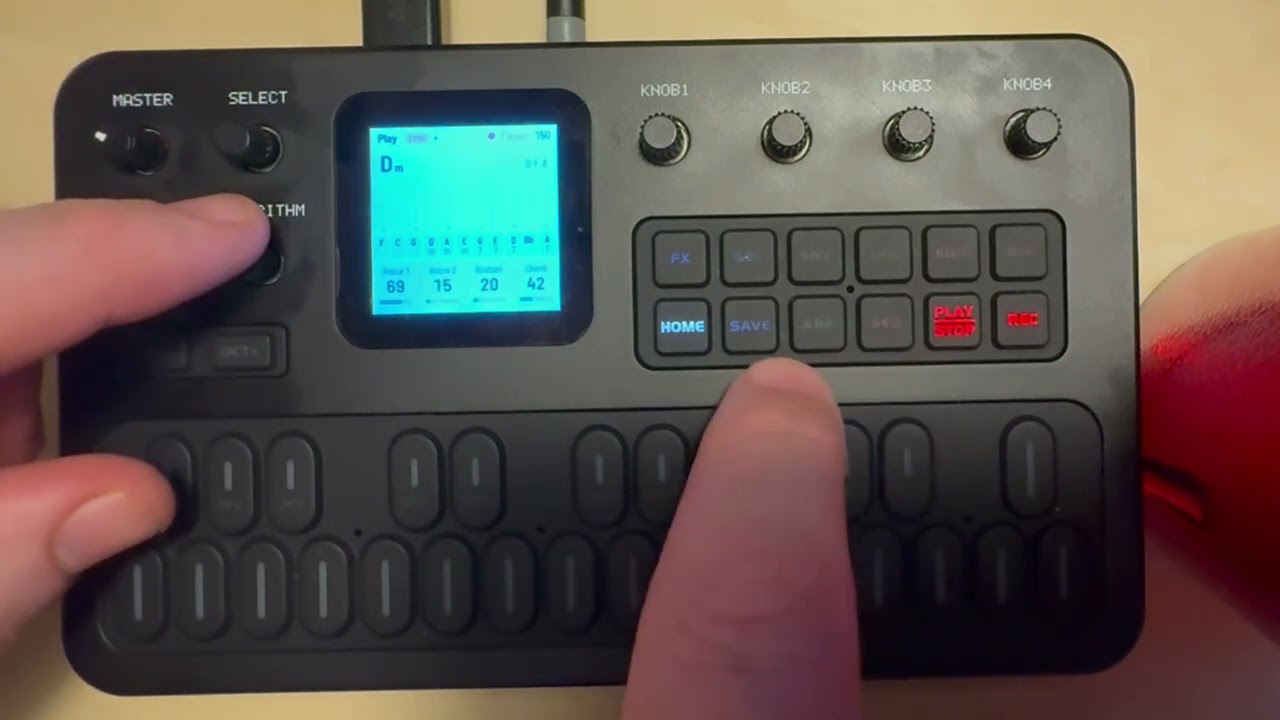
FoMni turns the M-VAVE FM-1 into a chord harp inspired by the Suzuki Omnichord. The 16 white keys are the strum plate: run a finger across them and they ring out the chord. The 11 black keys are the chord buttons. Behind them sit an organ-like chord with its bass, and the OM-84's ten rhythms, which can play the bass and chord in time (auto bass sync).
It is meant to be simple: one screen, four knobs a page, no patterns to program.
- Try it in your browser (no FM-1 needed): https://charlesvestal.github.io/fm1-fomni/emu/
- Install it (Chrome or Edge, with the FM-1 plugged in): https://charlesvestal.github.io/fm1-fomni/install/
- Download the firmware file: releases
Installing is at your own risk, though it's hard to get stuck: the web installer can put M-VAVE's firmware back, and an FM-1 that keeps crashing starts in a safe mode.
Playing
| White keys | The strum plate. Each key plucks one string of the chord. As on the Omnichord, each group of three keys is root, third and fifth, folded into an F#–F window, five groups up, with a root on top. |
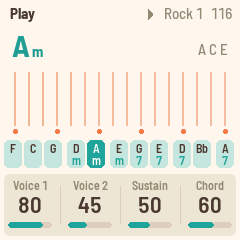
| Black keys | Chord buttons (F C G, Dm Am, Em G7 E7, D7 Bb, A7 by default). Hold ENV for the minor, LFO for the 7th, both for the m7, the Omnichord's three rows. |
| PLAY | The rhythm, on and off. |
| REC | SYNC START: the rhythm waits for your first chord. |
| ARP | CHORD HOLD: the chord keeps playing after you let go (press the same button again to stop it). |
| OCT− / OCT+ | Move the strum plate an octave. |
| SELECT | Tempo. |
| ALGORITHM | Rhythm. |
| PRESETS | Transpose (−6 to +6). |
| KNOB 1–4 | The four values on the screen (see the pages below). |
| SAVE | Saves. FoMni also saves by itself a few seconds after a change, once it's quiet. |
The pages
Each page puts four values on KNOB 1–4. EDIT steps through the pages.
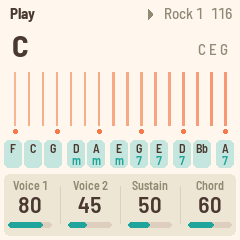
- HOME: Play. Voice 1, Voice 2, Sustain, Chord level.
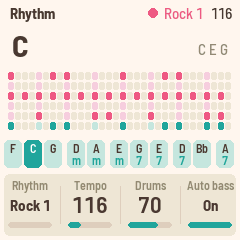
- SEQ: Rhythm. Rhythm, Tempo, Drums level, Auto bass (on: the bass and chord play in time with the rhythm).
- FX: Sound. Reverb (the strings' send), Space (the plate's size), Width, Chord rev (the chord and bass's send). The drums stay dry.
- SEL: Chords. Change the chord on any black key: press the key, then turn Root (KNOB 1) and Type (KNOB 2). KNOB 3 and 4 are Transpose and Octave.
- GLO: Setup. Tune, MIDI out, Key lights.
Voice 1 is the Omnichord's shimmering harp, and Voice 2 is its plain one. Mix them, and set how long the strings ring with Sustain.
MIDI
MIDI comes in over USB and the TRS jack (the FM-1's jack is an input), and goes out over USB.
- In, channel 1: notes pluck the nearest string.
- In, channel 2: play a chord on a keyboard and it becomes the chord, as if you'd pressed a black key.
- In, clock: the rhythm follows MIDI clock and start / stop; the screen shows EXT for the tempo.
- Out (on by default, Setup page): the strings on channel 1, the chord on 2, the bass on 3, the drums on 10, and clock with start / stop when the rhythm runs on its own tempo.
Building and testing
The toolchain is the same as X0X's (see BUILDING.md):
tests/run_tests.sh      # the instrument, the platform pieces, the app in a simulator
./build.sh              # build/omni.fwsc
python3 tools/fm1_install.py build/omni.fwsc     # install it over USB
build/host/omni_host SCRIPT OUTDIR runs the whole app on a computer from a script
(tests/scenarios/*.omni), with audio and screenshots coming out. web/emu/build.sh builds the
same code for the browser.
Credits
The rhythms, waves, drum sounds and envelope shapes come from Chordian, Jan125's OM-84 emulator (CC0). The platform (hardware layer, USB, update loader, storage, installer) is Felucca's by Leo Kuroshita (Hügelton Instruments), by way of X0X. GPL-3.0-only; see LICENSING.md.
Omnichord is a trademark of Suzuki. FoMni isn't affiliated with or endorsed by Suzuki, M-VAVE or Hügelton Instruments.
Similar repos


FoMni: a chord harp firmware for the M-VAVE FM-1, inspired by the Omnichord. Strum the white keys, pick chords on the black ones.
See the codeSee what people are saying
README
FoMni for the M-VAVE FM-1
FoMni turns the M-VAVE FM-1 into a chord harp inspired by the Suzuki Omnichord. The 16 white keys are the strum plate: run a finger across them and they ring out the chord. The 11 black keys are the chord buttons. Behind them sit an organ-like chord with its bass, and the OM-84's ten rhythms, which can play the bass and chord in time (auto bass sync).
It is meant to be simple: one screen, four knobs a page, no patterns to program.
- Try it in your browser (no FM-1 needed): https://charlesvestal.github.io/fm1-fomni/emu/
- Install it (Chrome or Edge, with the FM-1 plugged in): https://charlesvestal.github.io/fm1-fomni/install/
- Download the firmware file: releases
Installing is at your own risk, though it's hard to get stuck: the web installer can put M-VAVE's firmware back, and an FM-1 that keeps crashing starts in a safe mode.
Playing
| White keys | The strum plate. Each key plucks one string of the chord. As on the Omnichord, each group of three keys is root, third and fifth, folded into an F#–F window, five groups up, with a root on top. |
| Black keys | Chord buttons (F C G, Dm Am, Em G7 E7, D7 Bb, A7 by default). Hold ENV for the minor, LFO for the 7th, both for the m7, the Omnichord's three rows. |
| PLAY | The rhythm, on and off. |
| REC | SYNC START: the rhythm waits for your first chord. |
| ARP | CHORD HOLD: the chord keeps playing after you let go (press the same button again to stop it). |
| OCT− / OCT+ | Move the strum plate an octave. |
| SELECT | Tempo. |
| ALGORITHM | Rhythm. |
| PRESETS | Transpose (−6 to +6). |
| KNOB 1–4 | The four values on the screen (see the pages below). |
| SAVE | Saves. FoMni also saves by itself a few seconds after a change, once it's quiet. |
The pages
Each page puts four values on KNOB 1–4. EDIT steps through the pages.
- HOME: Play. Voice 1, Voice 2, Sustain, Chord level.
- SEQ: Rhythm. Rhythm, Tempo, Drums level, Auto bass (on: the bass and chord play in time with the rhythm).
- FX: Sound. Reverb (the strings' send), Space (the plate's size), Width, Chord rev (the chord and bass's send). The drums stay dry.
- SEL: Chords. Change the chord on any black key: press the key, then turn Root (KNOB 1) and Type (KNOB 2). KNOB 3 and 4 are Transpose and Octave.
- GLO: Setup. Tune, MIDI out, Key lights.
Voice 1 is the Omnichord's shimmering harp, and Voice 2 is its plain one. Mix them, and set how long the strings ring with Sustain.
MIDI
MIDI comes in over USB and the TRS jack (the FM-1's jack is an input), and goes out over USB.
- In, channel 1: notes pluck the nearest string.
- In, channel 2: play a chord on a keyboard and it becomes the chord, as if you'd pressed a black key.
- In, clock: the rhythm follows MIDI clock and start / stop; the screen shows EXT for the tempo.
- Out (on by default, Setup page): the strings on channel 1, the chord on 2, the bass on 3, the drums on 10, and clock with start / stop when the rhythm runs on its own tempo.
Building and testing
The toolchain is the same as X0X's (see BUILDING.md):
tests/run_tests.sh      # the instrument, the platform pieces, the app in a simulator
./build.sh              # build/omni.fwsc
python3 tools/fm1_install.py build/omni.fwsc     # install it over USB
build/host/omni_host SCRIPT OUTDIR runs the whole app on a computer from a script
(tests/scenarios/*.omni), with audio and screenshots coming out. web/emu/build.sh builds the
same code for the browser.
Credits
The rhythms, waves, drum sounds and envelope shapes come from Chordian, Jan125's OM-84 emulator (CC0). The platform (hardware layer, USB, update loader, storage, installer) is Felucca's by Leo Kuroshita (Hügelton Instruments), by way of X0X. GPL-3.0-only; see LICENSING.md.
Omnichord is a trademark of Suzuki. FoMni isn't affiliated with or endorsed by Suzuki, M-VAVE or Hügelton Instruments.