A very simple Ticket System based on WhatsApp messages, that allow multi-users in same WhatsApp account.
JavaScript
2,076
760 commits
updated Oct 13, 2026

The open-source WhatsApp ticketing system that Whaticket grew out of.
Several agents on one WhatsApp number. Every conversation becomes a ticket.


What is this · Open Source vs Whaticket · Screenshots · Quick start · Configuration · Project status
In 2020 this repository was a weekend experiment: turn WhatsApp messages into support tickets so a whole team could answer from a single number. It became one of the most forked WhatsApp helpdesk projects on GitHub, and it grew into Whaticket, the commercial platform that today serves 4,500+ companies across Latin America.
This repo is Whaticket Open Source: the original codebase, under an MIT license. You can self-host it, fork it and build on top of it. The code the company started from stays public.
Backend: Node.js + TypeScript + Express + Sequelize. It talks to WhatsApp through a pluggable provider layer (whatsapp-web.js or zapo-js) and stores everything in MySQL/MariaDB.
Frontend: a React + Material UI chat app built with Vite. It communicates with the backend over REST and WebSockets, in English, Portuguese and Spanish.
[!NOTE] Prefer not to run servers? Whaticket is the managed product built by the same team. It works with the official WhatsApp API and brings Instagram, Facebook, TikTok, Telegram and web chat into one inbox, with AI chatbots, campaigns and 24/7 support. 14-day free trial, no credit card.
Both are built by the same team. The difference is how much infrastructure you want to run.
| Whaticket Open Source | Whaticket | |
|---|---|---|
| License / price | MIT, free forever | From US$49/month for 3 users |
| Hosting, updates, backups | You run it | Managed for you |
| WhatsApp via QR code | ✅ | ✅ |
| Official WhatsApp Cloud API | ❌ | ✅ |
| Multiple agents on one number | ✅ | ✅ |
| Multiple WhatsApp connections | ✅ | ✅ |
| Queues / departments | ✅ | ✅ |
| Quick replies | ✅ | ✅ |
| Media messages (image/audio/video/files) | ✅ | ✅ |
| Instagram, Facebook, TikTok, Telegram, web chat | ❌ | ✅ |
| Rule-based and AI chatbots (Wäbot) | ❌ | ✅ |
| Bulk campaigns | ❌ | ✅ |
| Analytics, CSAT and performance reports | Basic dashboard | ✅ |
| Integrations (Zapier, Shopify, Slack, Google…) | ❌ | ✅ |
| Mobile apps (iOS / Android) | ❌ | ✅ |
| Support | Community, on Discord and issues | 24/7 over WhatsApp |
The commercial plan starts at 3 users, which comes to about US$16 per user per month.
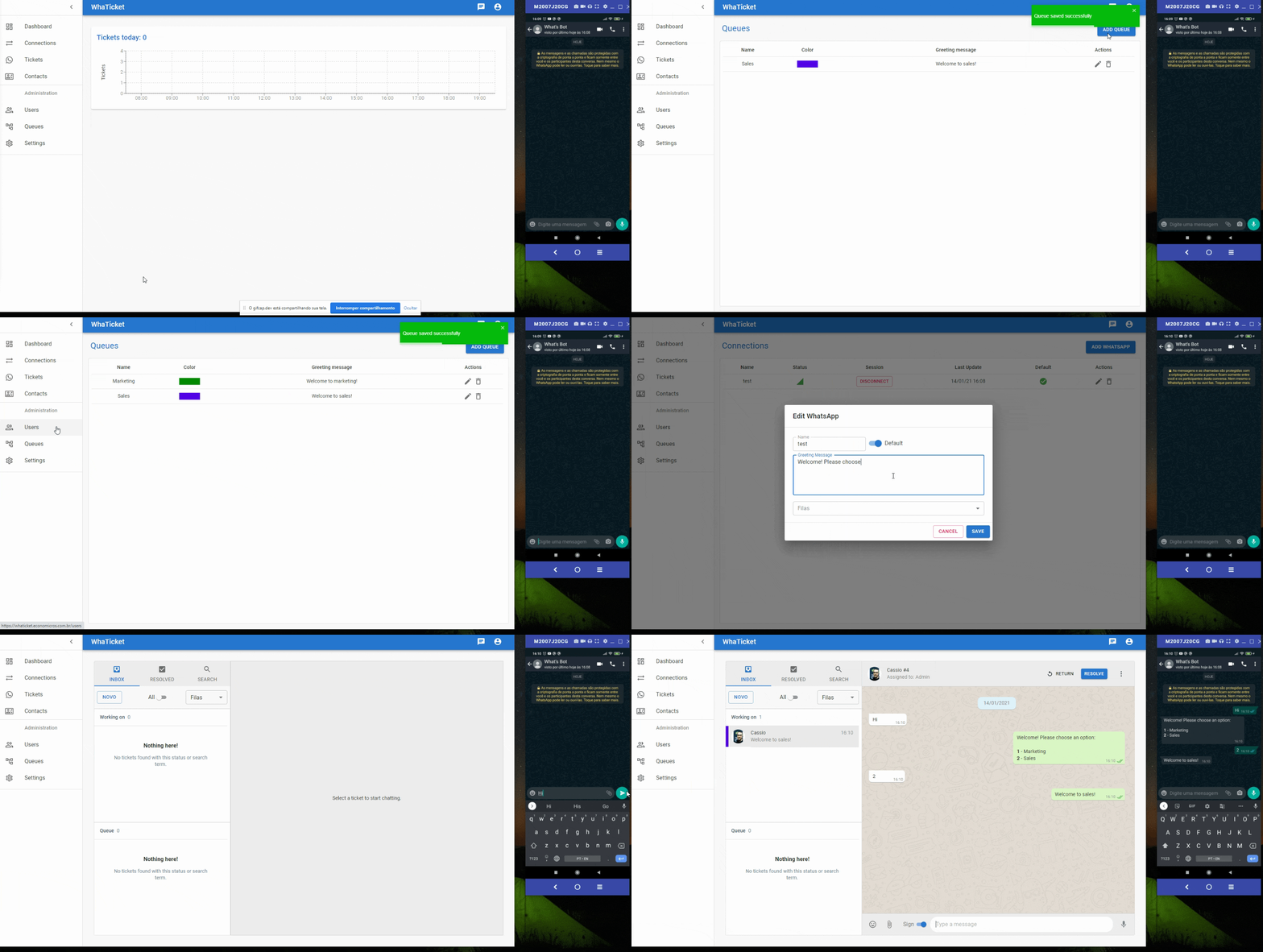
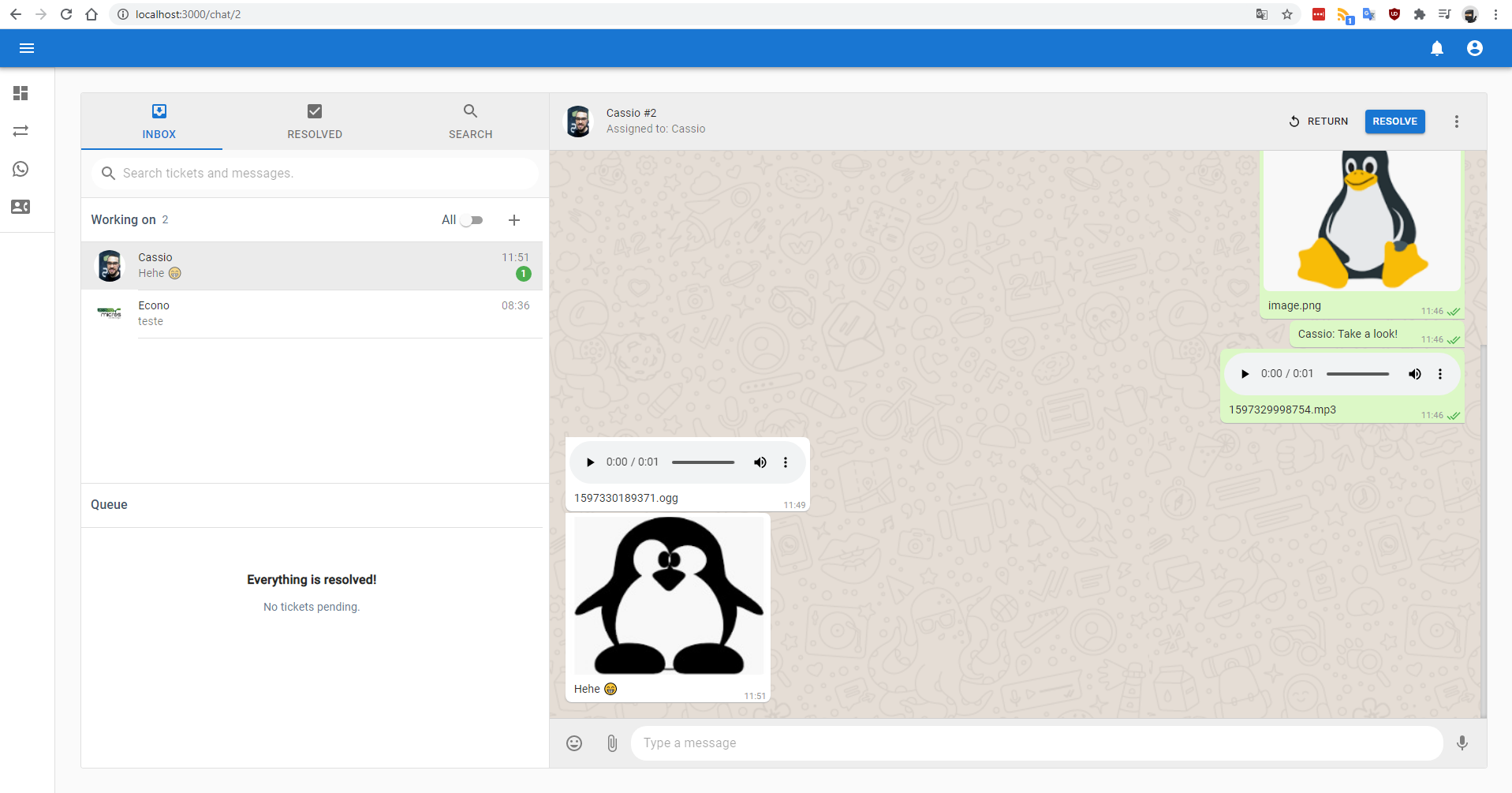 |  |
| Ticket conversation | Agent chat view |
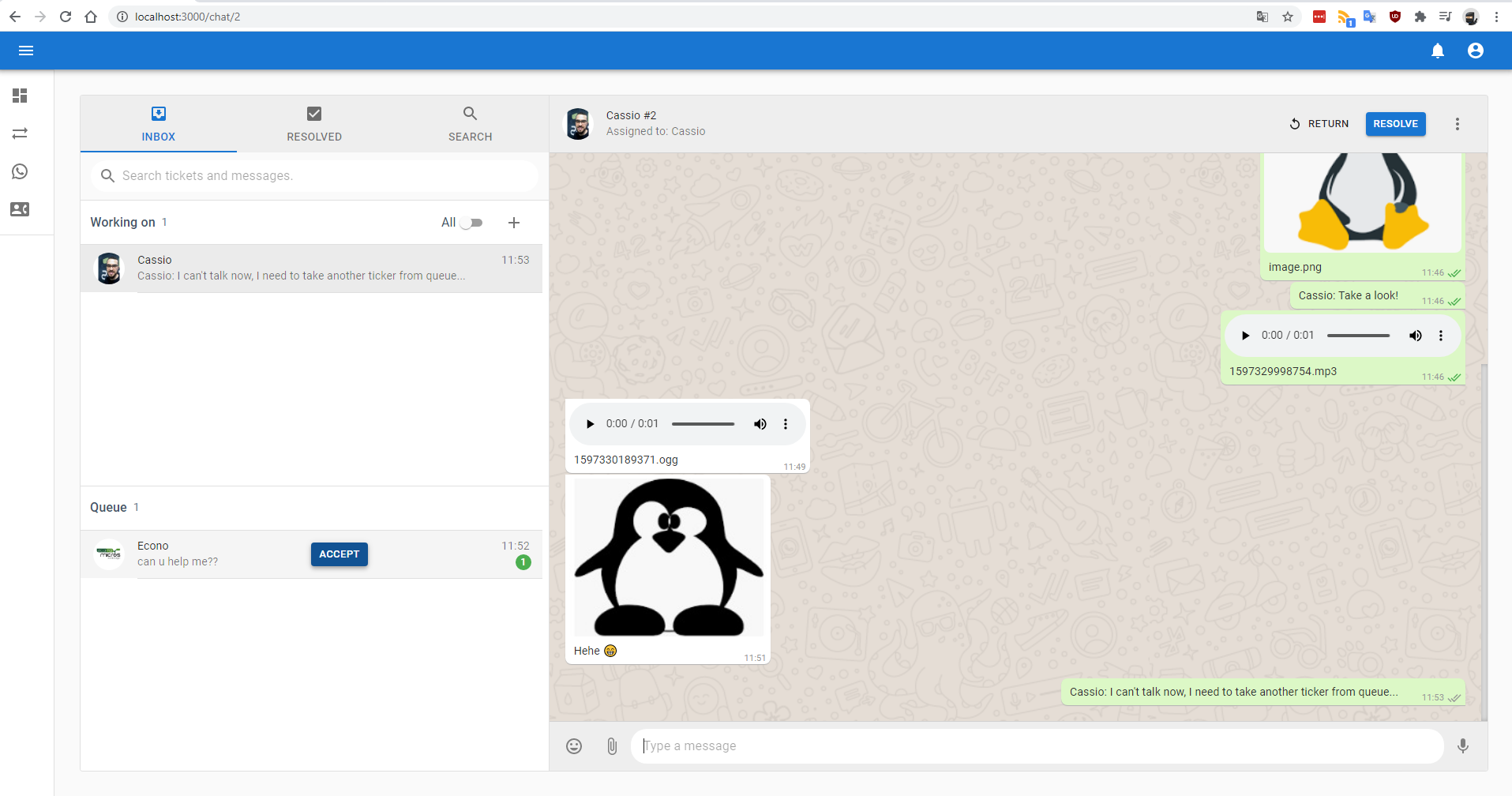
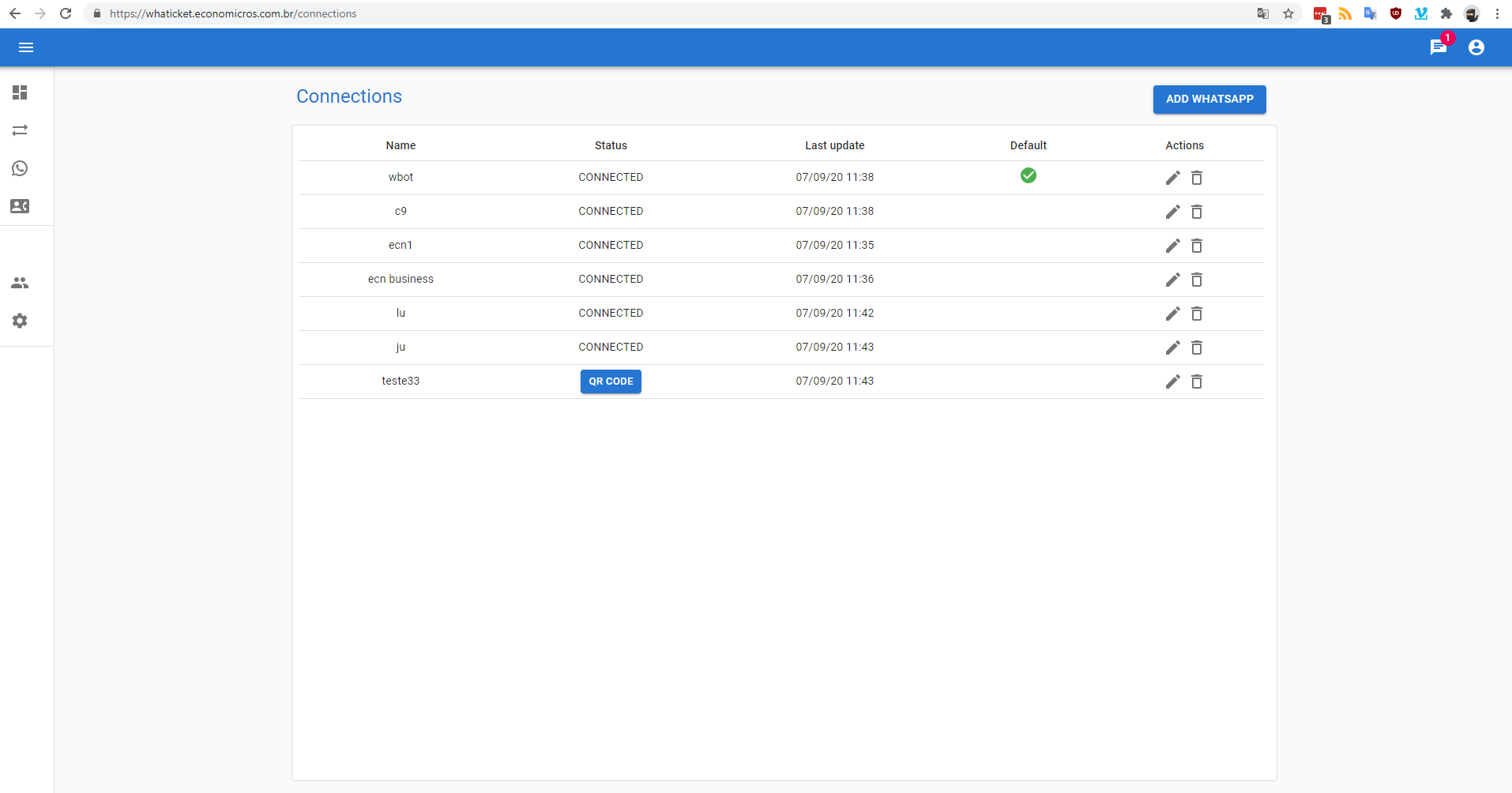 | 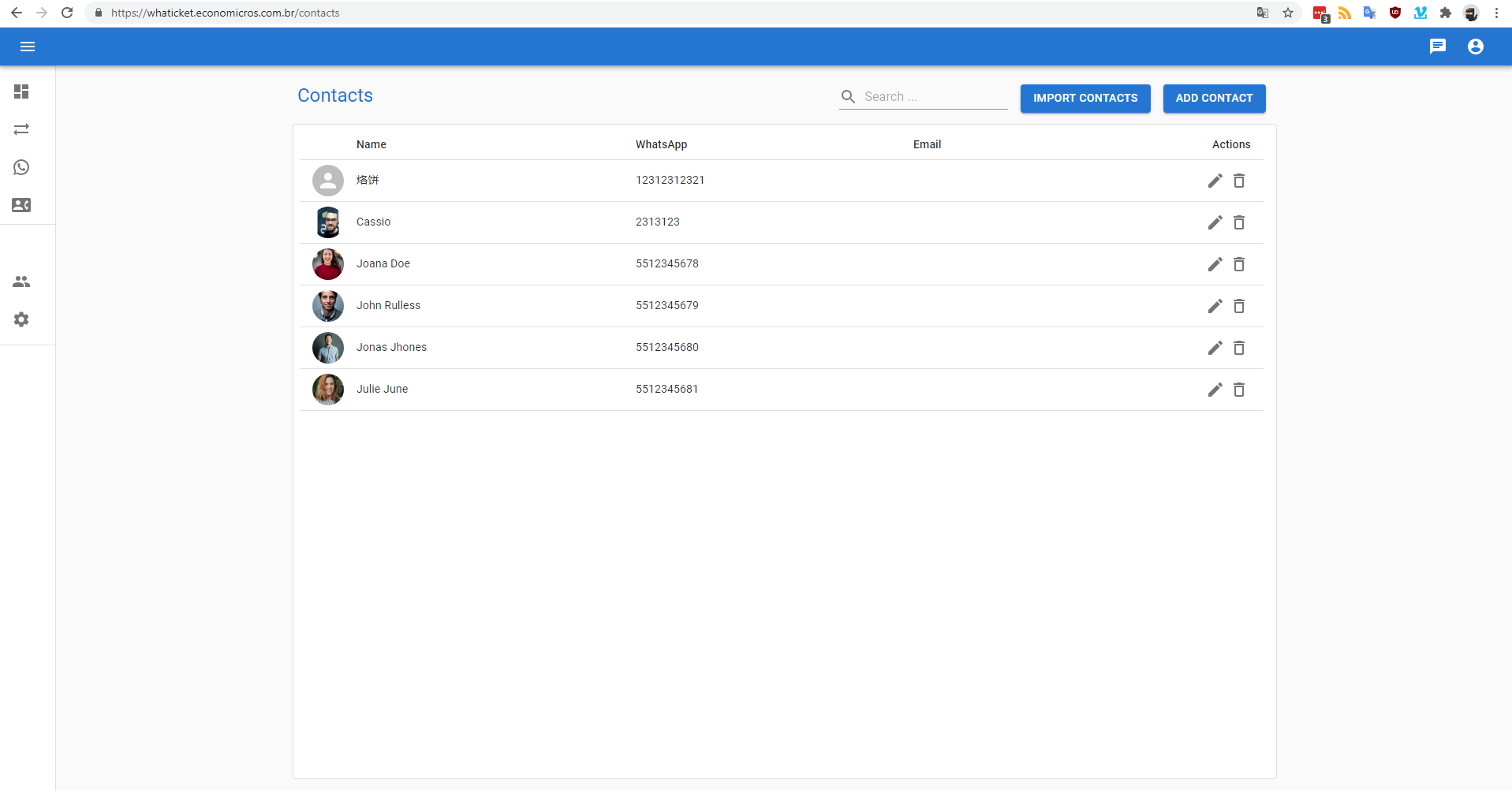 |
| Multiple WhatsApp connections | Contact management |
whatsapp-web.js (Puppeteer) or zapo (WebSocket)Every new message on a connected WhatsApp number creates a Ticket. Tickets land in a queue on the Tickets page, where an agent accepts one, answers it, and eventually resolves it.
Follow-up messages from the same contact attach to the first open/pending ticket found. If a contact writes again within 2 hours and has no pending or open ticket, the most recent closed ticket is reopened instead of a new one being created.
wwebjs provider, Node.js 22+ for the zapo provider
(the backend CI and Dockerfile build on Node 22)[!WARNING] The QR-code providers used here are unofficial WhatsApp clients. WhatsApp does not allow bots or unofficial clients on their platform, and numbers connected this way can be blocked. The supported alternative is the official WhatsApp Cloud API, which Whaticket provides.
git clone https://github.com/canove/whaticket.git
cd whaticket
cp .env.example .env
Edit .env. At minimum, set MYSQL_ROOT_PASSWORD, JWT_SECRET and JWT_REFRESH_SECRET:
# MYSQL
MYSQL_ENGINE=mariadb
MYSQL_VERSION=10.6
MYSQL_ROOT_PASSWORD=change-me
MYSQL_DATABASE=whaticket
MYSQL_PORT=3306
TZ=America/Fortaleza

# BACKEND
BACKEND_PORT=8080
BACKEND_SERVER_NAME=api.mydomain.com
BACKEND_URL=https://api.mydomain.com
PROXY_PORT=443
JWT_SECRET=change-me
JWT_REFRESH_SECRET=change-me-too

# FRONTEND
FRONTEND_PORT=80
FRONTEND_SSL_PORT=443
FRONTEND_SERVER_NAME=myapp.mydomain.com
FRONTEND_URL=https://myapp.mydomain.com
Bring everything up:
docker-compose up -d --build
On the first run only, seed the database:
docker-compose exec backend npx sequelize db:seed:all
Open the frontend, log in with the seeded account, go to Connections, create your first WhatsApp connection and scan the QR code. Every message that number receives now shows up in the ticket list.
Default credentials: [email protected] / admin. Change them immediately.
phpMyAdmin, to inspect the database (port 9000 by default, configurable with PMA_PORT):
docker-compose -f docker-compose.phpmyadmin.yaml up -d
Browserless, to run Chrome outside the backend container (set MAX_CONCURRENT_SESSIONS):
docker-compose -f docker-compose.browserless.yaml up -d
Drop your certificates into ssl/certs, with one folder per service:
.
├── certs
│   ├── backend
│   │   ├── fullchain.pem
│   │   └── privkey.pem
│   └── frontend
│       ├── fullchain.pem
│       └── privkey.pem
└── www
The frontend nginx container is already set up to answer certbot's webroot challenge:
certbot certonly --cert-name backend  --webroot --webroot-path ./ssl/www/ -d api.mydomain.com
certbot certonly --cert-name frontend --webroot --webroot-path ./ssl/www/ -d myapp.mydomain.com
1. Start a database
docker run --name whaticketdb \
  -e MYSQL_ROOT_PASSWORD=strongpassword \
  -e MYSQL_DATABASE=whaticket \
  -e MYSQL_USER=whaticket \
  -e MYSQL_PASSWORD=whaticket \
  --restart always -p 3306:3306 -d mariadb:10.6 \
  --character-set-server=utf8mb4 --collation-server=utf8mb4_bin
2. Install Puppeteer's system dependencies (only needed for the wwebjs provider):
sudo apt-get install -y libxshmfence-dev libgbm-dev wget unzip fontconfig locales gconf-service \
  libasound2 libatk1.0-0 libc6 libcairo2 libcups2 libdbus-1-3 libexpat1 libfontconfig1 libgcc1 \
  libgconf-2-4 libgdk-pixbuf2.0-0 libglib2.0-0 libgtk-3-0 libnspr4 libpango-1.0-0 \
  libpangocairo-1.0-0 libstdc++6 libx11-6 libx11-xcb1 libxcb1 libxcomposite1 libxcursor1 \
  libxdamage1 libxext6 libxfixes3 libxi6 libxrandr2 libxrender1 libxss1 libxtst6 ca-certificates \
  fonts-liberation libappindicator1 libnss3 lsb-release xdg-utils
3. Backend
cd backend
cp .env.example .env   # then fill it in, see Configuration below
npm install
npm run build
npx sequelize db:migrate
npx sequelize db:seed:all
npm run dev            # or: npm start
4. Frontend, in a second terminal:
cd frontend
cp .env.example .env
npm install
npm run dev
frontend/.env only needs to point at the backend:
VITE_BACKEND_URL = http://localhost:8080/
5. Open http://localhost:3000/signup, create a user, then go to Connections and scan the QR code.
These steps assume you are not running as root, since Puppeteer refuses to start as root.
Point two subdomains at your server first; this walkthrough uses myapp.mydomain.com for the
frontend and api.mydomain.com for the backend.
Create a deploy user
adduser deploy
usermod -aG sudo deploy
su deploy
Install Node and Docker
sudo apt update && sudo apt upgrade -y

curl -fsSL https://deb.nodesource.com/setup_14.x | sudo -E bash -
sudo apt-get install -y nodejs

sudo apt install -y apt-transport-https ca-certificates curl software-properties-common
curl -fsSL https://download.docker.com/linux/ubuntu/gpg | sudo apt-key add -
sudo add-apt-repository "deb [arch=amd64] https://download.docker.com/linux/ubuntu bionic stable"
sudo apt update && sudo apt install -y docker-ce
sudo usermod -aG docker ${USER}
su - ${USER}
Database, code and backend
docker run --name whaticketdb \
  -e MYSQL_ROOT_PASSWORD=strongpassword -e MYSQL_DATABASE=whaticket \
  -e MYSQL_USER=whaticket -e MYSQL_PASSWORD=whaticket \
  --restart always -p 3306:3306 -d mariadb:10.6 \
  --character-set-server=utf8mb4 --collation-server=utf8mb4_bin

cd ~ && git clone https://github.com/canove/whaticket.git whaticket
cp whaticket/backend/.env.example whaticket/backend/.env
nano whaticket/backend/.env    # use https:// URLs and PROXY_PORT=443

cd whaticket/backend
npm install
npm run build
npx sequelize db:migrate
npx sequelize db:seed:all
Confirm it boots with npm start (you should see Server started on port...), stop it with
CTRL + C, then hand it to pm2:
sudo npm install -g pm2
pm2 start dist/server.js --name whaticket-backend
pm2 startup ubuntu -u $USER     # run the command it prints back
Frontend
cd ../frontend
npm install
echo "VITE_BACKEND_URL = https://api.mydomain.com/" > .env
npm run build
pm2 start server.js --name whaticket-frontend
pm2 save
nginx
sudo apt install -y nginx
sudo rm /etc/nginx/sites-enabled/default
sudo nano /etc/nginx/sites-available/whaticket-frontend
server {
  server_name myapp.mydomain.com;

  location / {
    proxy_pass http://127.0.0.1:3333;
    proxy_http_version 1.1;
    proxy_set_header Upgrade $http_upgrade;
    proxy_set_header Connection 'upgrade';
    proxy_set_header Host $host;
    proxy_set_header X-Real-IP $remote_addr;
    proxy_set_header X-Forwarded-Proto $scheme;
    proxy_set_header X-Forwarded-For $proxy_add_x_forwarded_for;
    proxy_cache_bypass $http_upgrade;
  }
}
Copy it for the backend, changing server_name to api.mydomain.com and proxy_pass to
http://127.0.0.1:8080, then enable both:
sudo cp /etc/nginx/sites-available/whaticket-frontend /etc/nginx/sites-available/whaticket-backend
sudo nano /etc/nginx/sites-available/whaticket-backend
sudo ln -s /etc/nginx/sites-available/whaticket-frontend /etc/nginx/sites-enabled
sudo ln -s /etc/nginx/sites-available/whaticket-backend  /etc/nginx/sites-enabled
nginx caps request bodies at 1MB, which is too small for media uploads. In
/etc/nginx/nginx.conf, inside the http { } block:
client_max_body_size 20M;
sudo nginx -t && sudo service nginx restart
HTTPS, required for notifications and audio messages:
sudo snap install --classic certbot
sudo certbot --nginx
backend/.env)| Variable | Description | Default |
|---|---|---|
WHATSAPP_PROVIDER | WhatsApp driver: wwebjs or zapo | wwebjs |
NODE_ENV | DEVELOPMENT gives you verbose debugging | |
PORT | Port the backend listens on | 8080 |
PROXY_PORT | Public port behind your reverse proxy (443 in production) | 8080 |
BACKEND_URL | Public backend URL | http://localhost:8080 |
FRONTEND_URL | Public frontend URL. CORS depends on this | http://localhost:3000 |
DB_HOST / DB_PORT | Database host and port | localhost / 3306 |
DB_DIALECT | mysql | mysql |
DB_NAME / DB_USER / DB_PASS | Database credentials | |
JWT_SECRET / JWT_REFRESH_SECRET | Token signing secrets, change these | |
CHROME_BIN / CHROME_WS / CHROME_ARGS | Puppeteer/Chrome settings (wwebjs only) | |
LOG_LEVEL | silent, fatal, error, warn, info, debug, trace | info |
ZAPO_LOG_LEVEL | Log level for the zapo provider | error |
ZAPO_AUTH_PATH | SQLite file where the zapo provider keeps session state | .zapo_auth/state.sqlite |
frontend/.env)| Variable | Description |
|---|---|
VITE_BACKEND_URL | Backend URL the app talks to |
VITE_HOURS_CLOSE_TICKETS_AUTO | Hours of inactivity before tickets auto-close |
wwebjs | zapo | |
|---|---|---|
| How it connects | Puppeteer driving WhatsApp Web | Direct WebSocket protocol |
| Memory footprint | Heavy, one Chrome per session | Light |
| System dependencies | Chrome + many lib* packages | Node 22+ and SQLite (better-sqlite3) |
| Maturity in this repo | Default, in production for years | Newer, in active development |
Switch between them with WHATSAPP_PROVIDER in backend/.env.
The zapo provider uploads media without any extra dependency, but thumbnails, media
dimensions and voice-note waveforms come from the optional @zapo-js/media-utils package
(which needs ffmpeg/ffprobe and sharp). Install it and the provider picks it up on the
next restart; without it media still sends, just without previews.
Always diff .env.example against your .env before upgrading. New variables show up there
first.
#!/bin/bash
echo "Updating Whaticket, please wait."

cd ~/whaticket
git pull

cd backend
npm install
rm -rf dist
npm run build
npx sequelize db:migrate
npx sequelize db:seed

cd ../frontend
npm install
rm -rf build
npm run build

pm2 restart all
echo "Update finished. Enjoy!"
whaileys providerThe whaileys provider was replaced by zapo. Connections paired under whaileys carry
over on their own, without scanning a new QR code:
better-sqlite3 requirement).WHATSAPP_PROVIDER=zapo in backend/.env. The old whaileys value keeps
working and points to the same provider..zapo_auth/state.sqlite and the connection comes back without a new
QR code.The copy reads the session column of Whatsapps and the WppKeys table, so keep WppKeys
until every connection is back online. Redis is no longer read and can be turned off. A
connection whose session can't be copied shows a new QR code, like a fresh pairing.
Maintenance mode, with active development returning.
For the last few years this repository has received security and dependency patches while the team's effort went into the commercial platform. That is changing: we are planning a return to regular feature work here. Recent commits are the first steps: the frontend moved to Vite, and the WhatsApp integration moved to a pluggable provider layer with the new zapo-js driver.
What that means for you today:
If you depend on this project, tell us on Discord what you need most. That is what shapes the priorities.
Pull requests are welcome: bug fixes, dependency upgrades, documentation and translations. For anything large, open an issue first so we can agree on the approach.
zapo providerMIT © Whaticket and contributors.
This project is not affiliated with, associated with, authorized by, endorsed by, or in any way officially connected to WhatsApp or any of its subsidiaries or affiliates. The official WhatsApp website is https://whatsapp.com. "WhatsApp" and related names, marks, emblems and images are registered trademarks of their respective owners.
Using unofficial clients to connect to WhatsApp can get your number blocked. Run this software at your own risk, and review it against your own security requirements before exposing it to the internet.
14 followers · starred Oct 2020
10 followers · starred May 2022
A very simple Ticket System based on WhatsApp messages, that allow multi-users in same WhatsApp account.
JavaScript
2,076
760 commits
updated Oct 13, 2026
The open-source WhatsApp ticketing system that Whaticket grew out of.
Several agents on one WhatsApp number. Every conversation becomes a ticket.
What is this · Open Source vs Whaticket · Screenshots · Quick start · Configuration · Project status
In 2020 this repository was a weekend experiment: turn WhatsApp messages into support tickets so a whole team could answer from a single number. It became one of the most forked WhatsApp helpdesk projects on GitHub, and it grew into Whaticket, the commercial platform that today serves 4,500+ companies across Latin America.
This repo is Whaticket Open Source: the original codebase, under an MIT license. You can self-host it, fork it and build on top of it. The code the company started from stays public.
Backend: Node.js + TypeScript + Express + Sequelize. It talks to WhatsApp through a pluggable provider layer (whatsapp-web.js or zapo-js) and stores everything in MySQL/MariaDB.
Frontend: a React + Material UI chat app built with Vite. It communicates with the backend over REST and WebSockets, in English, Portuguese and Spanish.
[!NOTE] Prefer not to run servers? Whaticket is the managed product built by the same team. It works with the official WhatsApp API and brings Instagram, Facebook, TikTok, Telegram and web chat into one inbox, with AI chatbots, campaigns and 24/7 support. 14-day free trial, no credit card.
Both are built by the same team. The difference is how much infrastructure you want to run.
| Whaticket Open Source | Whaticket | |
|---|---|---|
| License / price | MIT, free forever | From US$49/month for 3 users |
| Hosting, updates, backups | You run it | Managed for you |
| WhatsApp via QR code | ✅ | ✅ |
| Official WhatsApp Cloud API | ❌ | ✅ |
| Multiple agents on one number | ✅ | ✅ |
| Multiple WhatsApp connections | ✅ | ✅ |
| Queues / departments | ✅ | ✅ |
| Quick replies | ✅ | ✅ |
| Media messages (image/audio/video/files) | ✅ | ✅ |
| Instagram, Facebook, TikTok, Telegram, web chat | ❌ | ✅ |
| Rule-based and AI chatbots (Wäbot) | ❌ | ✅ |
| Bulk campaigns | ❌ | ✅ |
| Analytics, CSAT and performance reports | Basic dashboard | ✅ |
| Integrations (Zapier, Shopify, Slack, Google…) | ❌ | ✅ |
| Mobile apps (iOS / Android) | ❌ | ✅ |
| Support | Community, on Discord and issues | 24/7 over WhatsApp |
The commercial plan starts at 3 users, which comes to about US$16 per user per month.
| |
| Ticket conversation | Agent chat view |
| |
| Multiple WhatsApp connections | Contact management |
whatsapp-web.js (Puppeteer) or zapo (WebSocket)Every new message on a connected WhatsApp number creates a Ticket. Tickets land in a queue on the Tickets page, where an agent accepts one, answers it, and eventually resolves it.
Follow-up messages from the same contact attach to the first open/pending ticket found. If a contact writes again within 2 hours and has no pending or open ticket, the most recent closed ticket is reopened instead of a new one being created.
wwebjs provider, Node.js 22+ for the zapo provider
(the backend CI and Dockerfile build on Node 22)[!WARNING] The QR-code providers used here are unofficial WhatsApp clients. WhatsApp does not allow bots or unofficial clients on their platform, and numbers connected this way can be blocked. The supported alternative is the official WhatsApp Cloud API, which Whaticket provides.
git clone https://github.com/canove/whaticket.git
cd whaticket
cp .env.example .env
Edit .env. At minimum, set MYSQL_ROOT_PASSWORD, JWT_SECRET and JWT_REFRESH_SECRET:
# MYSQL
MYSQL_ENGINE=mariadb
MYSQL_VERSION=10.6
MYSQL_ROOT_PASSWORD=change-me
MYSQL_DATABASE=whaticket
MYSQL_PORT=3306
TZ=America/Fortaleza

# BACKEND
BACKEND_PORT=8080
BACKEND_SERVER_NAME=api.mydomain.com
BACKEND_URL=https://api.mydomain.com
PROXY_PORT=443
JWT_SECRET=change-me
JWT_REFRESH_SECRET=change-me-too

# FRONTEND
FRONTEND_PORT=80
FRONTEND_SSL_PORT=443
FRONTEND_SERVER_NAME=myapp.mydomain.com
FRONTEND_URL=https://myapp.mydomain.com
Bring everything up:
docker-compose up -d --build
On the first run only, seed the database:
docker-compose exec backend npx sequelize db:seed:all
Open the frontend, log in with the seeded account, go to Connections, create your first WhatsApp connection and scan the QR code. Every message that number receives now shows up in the ticket list.
Default credentials: [email protected] / admin. Change them immediately.
phpMyAdmin, to inspect the database (port 9000 by default, configurable with PMA_PORT):
docker-compose -f docker-compose.phpmyadmin.yaml up -d
Browserless, to run Chrome outside the backend container (set MAX_CONCURRENT_SESSIONS):
docker-compose -f docker-compose.browserless.yaml up -d
Drop your certificates into ssl/certs, with one folder per service:
.
├── certs
│   ├── backend
│   │   ├── fullchain.pem
│   │   └── privkey.pem
│   └── frontend
│       ├── fullchain.pem
│       └── privkey.pem
└── www
The frontend nginx container is already set up to answer certbot's webroot challenge:
certbot certonly --cert-name backend  --webroot --webroot-path ./ssl/www/ -d api.mydomain.com
certbot certonly --cert-name frontend --webroot --webroot-path ./ssl/www/ -d myapp.mydomain.com
1. Start a database
docker run --name whaticketdb \
  -e MYSQL_ROOT_PASSWORD=strongpassword \
  -e MYSQL_DATABASE=whaticket \
  -e MYSQL_USER=whaticket \
  -e MYSQL_PASSWORD=whaticket \
  --restart always -p 3306:3306 -d mariadb:10.6 \
  --character-set-server=utf8mb4 --collation-server=utf8mb4_bin
2. Install Puppeteer's system dependencies (only needed for the wwebjs provider):
sudo apt-get install -y libxshmfence-dev libgbm-dev wget unzip fontconfig locales gconf-service \
  libasound2 libatk1.0-0 libc6 libcairo2 libcups2 libdbus-1-3 libexpat1 libfontconfig1 libgcc1 \
  libgconf-2-4 libgdk-pixbuf2.0-0 libglib2.0-0 libgtk-3-0 libnspr4 libpango-1.0-0 \
  libpangocairo-1.0-0 libstdc++6 libx11-6 libx11-xcb1 libxcb1 libxcomposite1 libxcursor1 \
  libxdamage1 libxext6 libxfixes3 libxi6 libxrandr2 libxrender1 libxss1 libxtst6 ca-certificates \
  fonts-liberation libappindicator1 libnss3 lsb-release xdg-utils
3. Backend
cd backend
cp .env.example .env   # then fill it in, see Configuration below
npm install
npm run build
npx sequelize db:migrate
npx sequelize db:seed:all
npm run dev            # or: npm start
4. Frontend, in a second terminal:
cd frontend
cp .env.example .env
npm install
npm run dev
frontend/.env only needs to point at the backend:
VITE_BACKEND_URL = http://localhost:8080/
5. Open http://localhost:3000/signup, create a user, then go to Connections and scan the QR code.
These steps assume you are not running as root, since Puppeteer refuses to start as root.
Point two subdomains at your server first; this walkthrough uses myapp.mydomain.com for the
frontend and api.mydomain.com for the backend.
Create a deploy user
adduser deploy
usermod -aG sudo deploy
su deploy
Install Node and Docker
sudo apt update && sudo apt upgrade -y

curl -fsSL https://deb.nodesource.com/setup_14.x | sudo -E bash -
sudo apt-get install -y nodejs

sudo apt install -y apt-transport-https ca-certificates curl software-properties-common
curl -fsSL https://download.docker.com/linux/ubuntu/gpg | sudo apt-key add -
sudo add-apt-repository "deb [arch=amd64] https://download.docker.com/linux/ubuntu bionic stable"
sudo apt update && sudo apt install -y docker-ce
sudo usermod -aG docker ${USER}
su - ${USER}
Database, code and backend
docker run --name whaticketdb \
  -e MYSQL_ROOT_PASSWORD=strongpassword -e MYSQL_DATABASE=whaticket \
  -e MYSQL_USER=whaticket -e MYSQL_PASSWORD=whaticket \
  --restart always -p 3306:3306 -d mariadb:10.6 \
  --character-set-server=utf8mb4 --collation-server=utf8mb4_bin

cd ~ && git clone https://github.com/canove/whaticket.git whaticket
cp whaticket/backend/.env.example whaticket/backend/.env
nano whaticket/backend/.env    # use https:// URLs and PROXY_PORT=443

cd whaticket/backend
npm install
npm run build
npx sequelize db:migrate
npx sequelize db:seed:all
Confirm it boots with npm start (you should see Server started on port...), stop it with
CTRL + C, then hand it to pm2:
sudo npm install -g pm2
pm2 start dist/server.js --name whaticket-backend
pm2 startup ubuntu -u $USER     # run the command it prints back
Frontend
cd ../frontend
npm install
echo "VITE_BACKEND_URL = https://api.mydomain.com/" > .env
npm run build
pm2 start server.js --name whaticket-frontend
pm2 save
nginx
sudo apt install -y nginx
sudo rm /etc/nginx/sites-enabled/default
sudo nano /etc/nginx/sites-available/whaticket-frontend
server {
  server_name myapp.mydomain.com;

  location / {
    proxy_pass http://127.0.0.1:3333;
    proxy_http_version 1.1;
    proxy_set_header Upgrade $http_upgrade;
    proxy_set_header Connection 'upgrade';
    proxy_set_header Host $host;
    proxy_set_header X-Real-IP $remote_addr;
    proxy_set_header X-Forwarded-Proto $scheme;
    proxy_set_header X-Forwarded-For $proxy_add_x_forwarded_for;
    proxy_cache_bypass $http_upgrade;
  }
}
Copy it for the backend, changing server_name to api.mydomain.com and proxy_pass to
http://127.0.0.1:8080, then enable both:
sudo cp /etc/nginx/sites-available/whaticket-frontend /etc/nginx/sites-available/whaticket-backend
sudo nano /etc/nginx/sites-available/whaticket-backend
sudo ln -s /etc/nginx/sites-available/whaticket-frontend /etc/nginx/sites-enabled
sudo ln -s /etc/nginx/sites-available/whaticket-backend  /etc/nginx/sites-enabled
nginx caps request bodies at 1MB, which is too small for media uploads. In
/etc/nginx/nginx.conf, inside the http { } block:
client_max_body_size 20M;
sudo nginx -t && sudo service nginx restart
HTTPS, required for notifications and audio messages:
sudo snap install --classic certbot
sudo certbot --nginx
backend/.env)| Variable | Description | Default |
|---|---|---|
WHATSAPP_PROVIDER | WhatsApp driver: wwebjs or zapo | wwebjs |
NODE_ENV | DEVELOPMENT gives you verbose debugging | |
PORT | Port the backend listens on | 8080 |
PROXY_PORT | Public port behind your reverse proxy (443 in production) | 8080 |
BACKEND_URL | Public backend URL | http://localhost:8080 |
FRONTEND_URL | Public frontend URL. CORS depends on this | http://localhost:3000 |
DB_HOST / DB_PORT | Database host and port | localhost / 3306 |
DB_DIALECT | mysql | mysql |
DB_NAME / DB_USER / DB_PASS | Database credentials | |
JWT_SECRET / JWT_REFRESH_SECRET | Token signing secrets, change these | |
CHROME_BIN / CHROME_WS / CHROME_ARGS | Puppeteer/Chrome settings (wwebjs only) | |
LOG_LEVEL | silent, fatal, error, warn, info, debug, trace | info |
ZAPO_LOG_LEVEL | Log level for the zapo provider | error |
ZAPO_AUTH_PATH | SQLite file where the zapo provider keeps session state | .zapo_auth/state.sqlite |
frontend/.env)| Variable | Description |
|---|---|
VITE_BACKEND_URL | Backend URL the app talks to |
VITE_HOURS_CLOSE_TICKETS_AUTO | Hours of inactivity before tickets auto-close |
wwebjs | zapo | |
|---|---|---|
| How it connects | Puppeteer driving WhatsApp Web | Direct WebSocket protocol |
| Memory footprint | Heavy, one Chrome per session | Light |
| System dependencies | Chrome + many lib* packages | Node 22+ and SQLite (better-sqlite3) |
| Maturity in this repo | Default, in production for years | Newer, in active development |
Switch between them with WHATSAPP_PROVIDER in backend/.env.
The zapo provider uploads media without any extra dependency, but thumbnails, media
dimensions and voice-note waveforms come from the optional @zapo-js/media-utils package
(which needs ffmpeg/ffprobe and sharp). Install it and the provider picks it up on the
next restart; without it media still sends, just without previews.
Always diff .env.example against your .env before upgrading. New variables show up there
first.
#!/bin/bash
echo "Updating Whaticket, please wait."

cd ~/whaticket
git pull

cd backend
npm install
rm -rf dist
npm run build
npx sequelize db:migrate
npx sequelize db:seed

cd ../frontend
npm install
rm -rf build
npm run build

pm2 restart all
echo "Update finished. Enjoy!"
whaileys providerThe whaileys provider was replaced by zapo. Connections paired under whaileys carry
over on their own, without scanning a new QR code:
better-sqlite3 requirement).WHATSAPP_PROVIDER=zapo in backend/.env. The old whaileys value keeps
working and points to the same provider..zapo_auth/state.sqlite and the connection comes back without a new
QR code.The copy reads the session column of Whatsapps and the WppKeys table, so keep WppKeys
until every connection is back online. Redis is no longer read and can be turned off. A
connection whose session can't be copied shows a new QR code, like a fresh pairing.
Maintenance mode, with active development returning.
For the last few years this repository has received security and dependency patches while the team's effort went into the commercial platform. That is changing: we are planning a return to regular feature work here. Recent commits are the first steps: the frontend moved to Vite, and the WhatsApp integration moved to a pluggable provider layer with the new zapo-js driver.
What that means for you today:
If you depend on this project, tell us on Discord what you need most. That is what shapes the priorities.
Pull requests are welcome: bug fixes, dependency upgrades, documentation and translations. For anything large, open an issue first so we can agree on the approach.
zapo providerMIT © Whaticket and contributors.
This project is not affiliated with, associated with, authorized by, endorsed by, or in any way officially connected to WhatsApp or any of its subsidiaries or affiliates. The official WhatsApp website is https://whatsapp.com. "WhatsApp" and related names, marks, emblems and images are registered trademarks of their respective owners.
Using unofficial clients to connect to WhatsApp can get your number blocked. Run this software at your own risk, and review it against your own security requirements before exposing it to the internet.
14 followers · starred Oct 2020
10 followers · starred May 2022



