
Privacy-first personal finance for iPhone, iPad, and Mac. Track your money without a Cairn-operated backend.
Swift
2
195 commits
updated Sep 23, 2026
See what people are saying
README
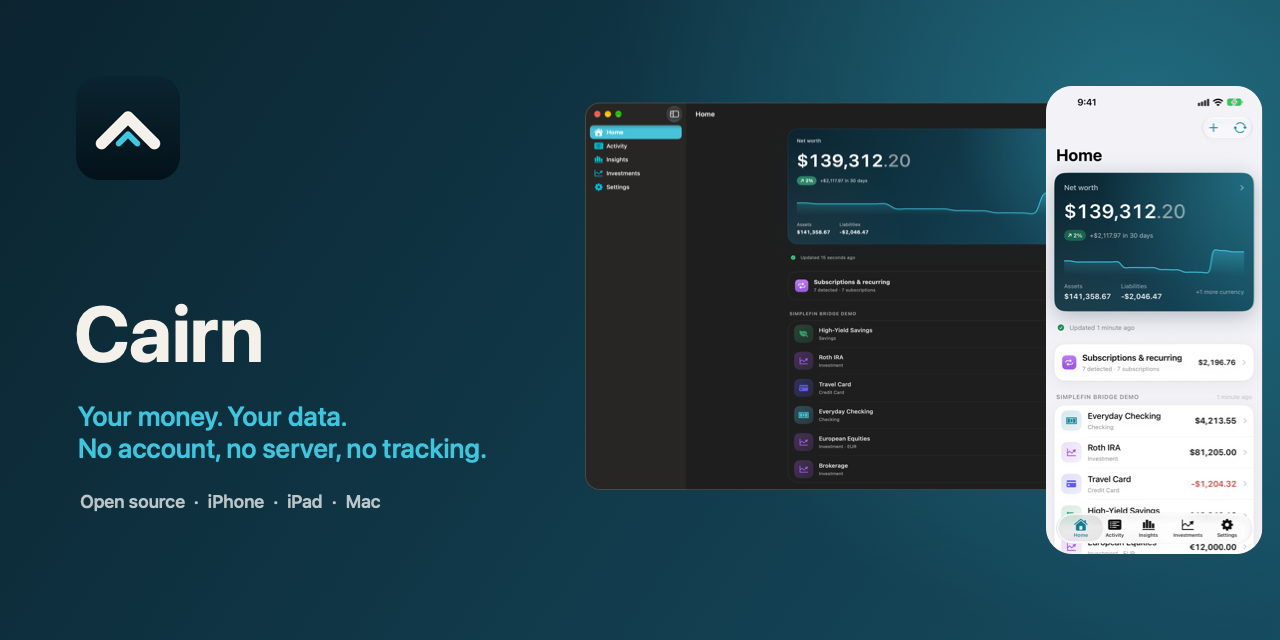






Cairn is a privacy-first personal finance app for iPhone, iPad, and Mac, for people who want to see their whole financial picture without a Cairn-operated backend. It reads the bank accounts you authorize through SimpleFIN ($1.5/month or $15/year) and Apple Wallet, enriches everything on your device, and — if you choose — syncs between your devices through your own private iCloud database. There is no Cairn backend. Ever.
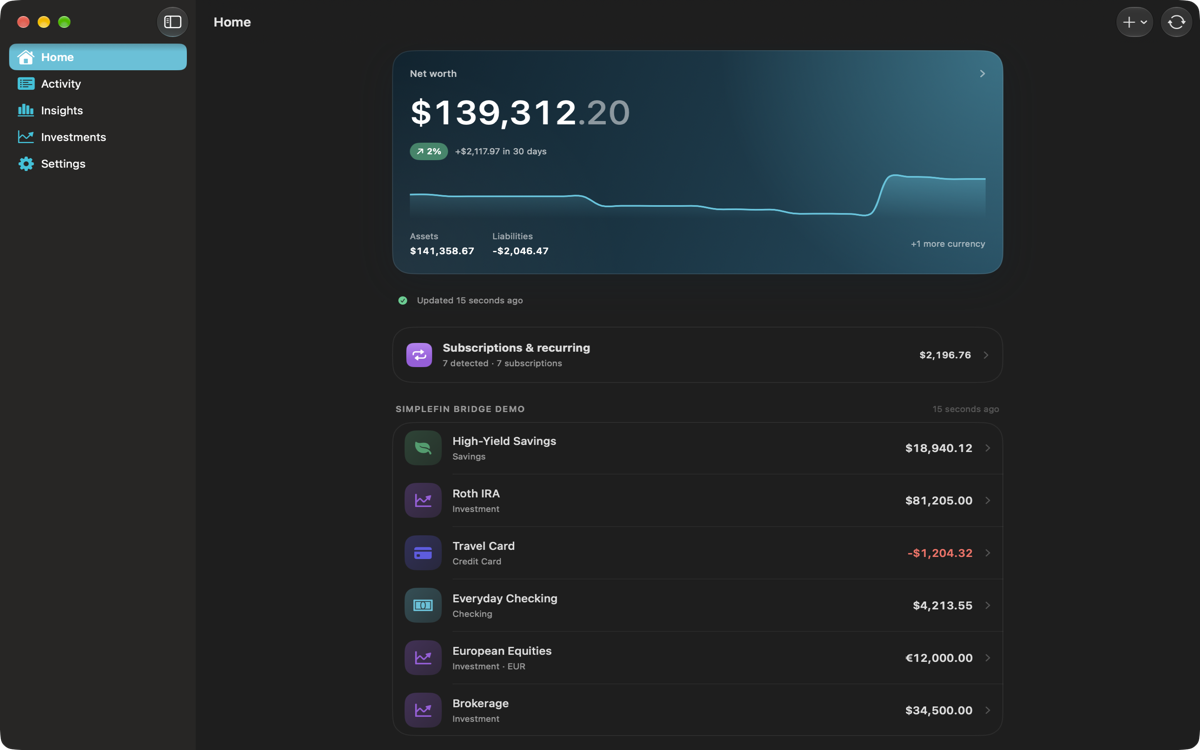
Screenshots
Project status
Cairn is in public beta on TestFlight, heading toward 1.0 on the App Store. It is usable today for read-only tracking of real accounts; there are no budgets, reports, or exchange rates yet.
Try it
- Join the public beta: https://testflight.apple.com/join/zcmwDyef
- Cairn is free: it has no subscription, account, or Cairn service fee. Automatic bank sync needs your own SimpleFIN Bridge account, a separate paid service billed by SimpleFIN — not Cairn. Cairn talks to it directly; there is no Cairn server in between.
- Thank you to SimpleFIN for the Bridge service and SimpleFIN protocol that make direct, read-only bank connections possible. SimpleFIN is independent; its pricing, institution coverage, and terms are its own.
- You can use Cairn without SimpleFIN: add manual accounts and import CSV exports from your bank or another app.
- Apple Wallet import (Apple Card, Apple Cash, Savings) works on iPhone and iPad. On the Mac, Wallet accounts appear through iCloud Sync.
- This is a beta. Bank transactions can always be downloaded again from SimpleFIN, and a saved connection can be reconnected without a new setup token. But notes, tags, categories, rules, manual accounts, and CSV imports live only in Cairn — turn on iCloud Sync, or export from Settings → Your data, if you rely on them.
- Requires iOS 26, iPadOS 26, or macOS 26.
What it does
- Connects to SimpleFIN Bridge or a bank-hosted SimpleFIN server, and reads Apple Wallet financial data through FinanceKit on iPhone and iPad.
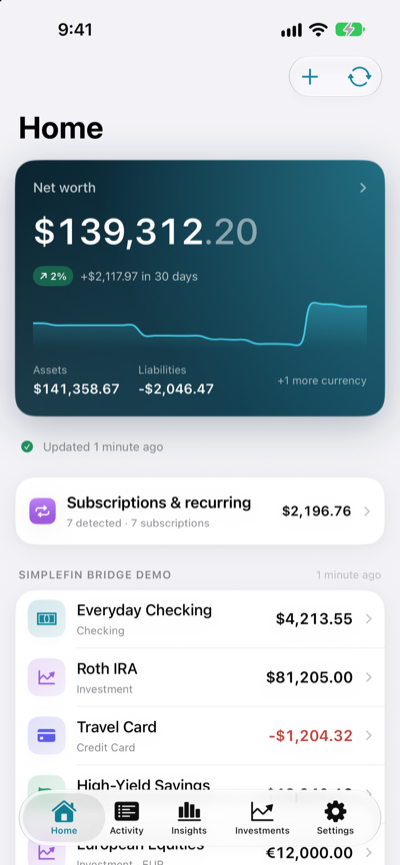
- Shows accounts, balances, transactions, and net worth per currency.
- Categorizes on-device: rules you write yourself, merchant memory, and — where available — Apple Intelligence. Notes, tags, and manual categories are never overwritten by automation.
- Manages those rules and free-form tags in Settings, and can start a rule from any transaction's detail screen.
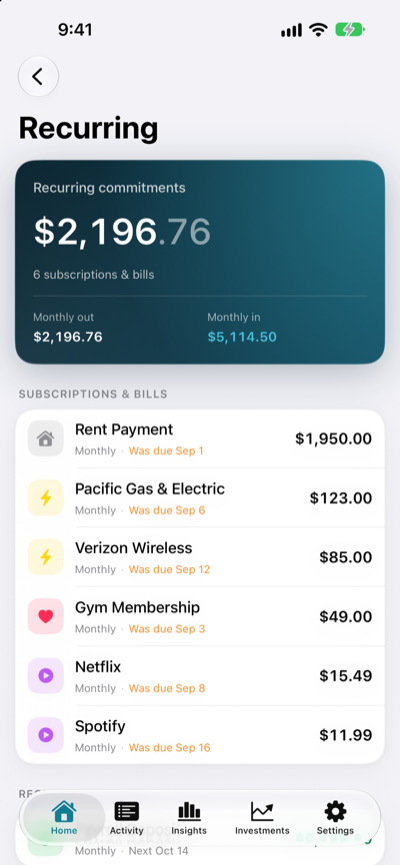
- Finds subscriptions and other regular payments entirely on-device, with the expected next charge.
- Investments and holdings, with cost basis and gain per position.
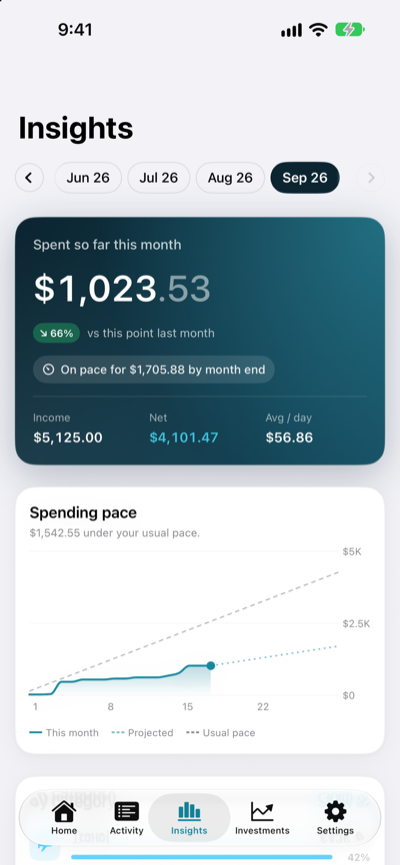
- Insights: spending pace, category breakdowns, and six-month trends.
- Imports CSV exports from other apps, and adds manual accounts.
- Syncs across devices through your private iCloud database with end-to-end encrypted financial fields — Apple stores the record, not the amount. iCloud sync is opt-in; new installs keep everything on this device.
- Optional Face ID / Touch ID app lock.
- Exports every transaction to CSV or JSON, and can delete everything.
Privacy
- No Cairn backend, analytics, advertising, or third-party runtime SDKs. The only network traffic is to the SimpleFIN server you configure, plus your own iCloud database if you turn sync on. Nothing is sent to the Cairn developer. If a bank reports a custom currency (miles, points), Cairn fetches that descriptor once from the HTTPS URL the SimpleFIN response names, and caches it.
- Apple Wallet data is read through FinanceKit on-device and mirrored into the same store as everything else, so it follows the same storage choice.
- Categorization runs on-device. When Apple Intelligence is used, transaction text is handled by the system model locally and never sent to a server.
- The SimpleFIN Access URL is a bearer credential and lives in the Keychain, never in the database or logs.
- Amounts, balances, names, descriptions, notes, merchant names, and dates are
marked
@Attribute(.allowsCloudEncryption), so CloudKit encrypts them end-to-end with keys from your iCloud Keychain, independent of Advanced Data Protection. Structural metadata is not encrypted — for example, which category a transaction is linked to, category icons, status flags such as pending or transfer, and sync timestamps. - Financial amounts are stored as integer minor units — exact, and never a float.
See docs/threat-model.md and
docs/privacy-policy.md. The app's public
Privacy Policy and
Support pages are hosted
on GitHub Pages.
Requirements
- Xcode 27 or newer
- iOS 26 / iPadOS 26 / macOS 26 deployment target
- XcodeGen (
brew install xcodegen)
Build
# Generate the Xcode project from project.yml
xcodegen generate

# Run the core test suite
swift test

# Build the app (macOS)
xcodebuild -project Cairn.xcodeproj -scheme Cairn -destination 'platform=macOS' build

# Build the app (iOS simulator)
xcodebuild -project Cairn.xcodeproj -scheme Cairn \
  -destination 'platform=iOS Simulator,name=iPhone 17 Pro' build
The Xcode project is generated and not checked in. Edit project.yml, not the
.xcodeproj.
Signing (device builds and iCloud)
The simulator needs no signing setup. To build for a device or enable iCloud sync, put your own team and bundle identifier in a git-ignored local file:
cp Config/Signing.example.xcconfig Config/Signing.local.xcconfig
# edit DEVELOPMENT_TEAM and PRODUCT_BUNDLE_IDENTIFIER, then:
xcodegen generate
Config/Signing.xcconfig holds safe defaults and pulls in that local file via
#include?. ICLOUD_CONTAINER_ID names the CloudKit container and defaults to
iCloud.<bundle id>, so no shared container is baked into the repo. Every
configuration ships the same entitlements, so CloudKit and iCloud Keychain work
in Debug as well as Release; whether iCloud is used is decided at runtime
(ubiquityIdentityToken), with local-only fallback when there is no account.
See docs/releasing.md for the details.
Running without a SimpleFIN token
Debug builds accept --cairn-sample-data, which loads demo accounts and
transactions so you can explore the UI:
xcodebuild ... -scheme Cairn build
xcrun simctl launch <device> <your.bundle.id> --cairn-sample-data
Architecture
CairnCore is a local Swift package holding all logic — models, the SimpleFIN client, the sync engine, security, enrichment, and export — so it can be tested without a simulator. The app target is a thin SwiftUI layer.
See docs/architecture.md for the full picture.
Releasing
Releases are cut from main by pushing a vX.Y.Z tag. CI runs the tests,
uploads iOS and macOS builds to TestFlight, and publishes a GitHub Release with
generated notes and dSYMs:
Scripts/release.sh patch # or minor / major
See docs/releasing.md for the versioning scheme, the
required repository secrets, the CloudKit schema-promotion step, and the hotfix
flow.
Contributing
Contributions are welcome — please read CONTRIBUTING.md and
the CODE_OF_CONDUCT.md. Security issues: see
SECURITY.md.
License
Apache-2.0. See LICENSE and NOTICE.
Cairn is not affiliated with SimpleFIN or any financial institution.
Contributors

195 commits
Similar repos


Languages
Swift
98.6%
Shell
1.4%
Privacy-first personal finance for iPhone, iPad, and Mac. Track your money without a Cairn-operated backend.
Swift
2
195 commits
updated Sep 23, 2026
See what people are saying
README
Cairn is a privacy-first personal finance app for iPhone, iPad, and Mac, for people who want to see their whole financial picture without a Cairn-operated backend. It reads the bank accounts you authorize through SimpleFIN ($1.5/month or $15/year) and Apple Wallet, enriches everything on your device, and — if you choose — syncs between your devices through your own private iCloud database. There is no Cairn backend. Ever.
Screenshots
Project status
Cairn is in public beta on TestFlight, heading toward 1.0 on the App Store. It is usable today for read-only tracking of real accounts; there are no budgets, reports, or exchange rates yet.
Try it
- Join the public beta: https://testflight.apple.com/join/zcmwDyef
- Cairn is free: it has no subscription, account, or Cairn service fee. Automatic bank sync needs your own SimpleFIN Bridge account, a separate paid service billed by SimpleFIN — not Cairn. Cairn talks to it directly; there is no Cairn server in between.
- Thank you to SimpleFIN for the Bridge service and SimpleFIN protocol that make direct, read-only bank connections possible. SimpleFIN is independent; its pricing, institution coverage, and terms are its own.
- You can use Cairn without SimpleFIN: add manual accounts and import CSV exports from your bank or another app.
- Apple Wallet import (Apple Card, Apple Cash, Savings) works on iPhone and iPad. On the Mac, Wallet accounts appear through iCloud Sync.
- This is a beta. Bank transactions can always be downloaded again from SimpleFIN, and a saved connection can be reconnected without a new setup token. But notes, tags, categories, rules, manual accounts, and CSV imports live only in Cairn — turn on iCloud Sync, or export from Settings → Your data, if you rely on them.
- Requires iOS 26, iPadOS 26, or macOS 26.
What it does
- Connects to SimpleFIN Bridge or a bank-hosted SimpleFIN server, and reads Apple Wallet financial data through FinanceKit on iPhone and iPad.
- Shows accounts, balances, transactions, and net worth per currency.
- Categorizes on-device: rules you write yourself, merchant memory, and — where available — Apple Intelligence. Notes, tags, and manual categories are never overwritten by automation.
- Manages those rules and free-form tags in Settings, and can start a rule from any transaction's detail screen.
- Finds subscriptions and other regular payments entirely on-device, with the expected next charge.
- Investments and holdings, with cost basis and gain per position.
- Insights: spending pace, category breakdowns, and six-month trends.
- Imports CSV exports from other apps, and adds manual accounts.
- Syncs across devices through your private iCloud database with end-to-end encrypted financial fields — Apple stores the record, not the amount. iCloud sync is opt-in; new installs keep everything on this device.
- Optional Face ID / Touch ID app lock.
- Exports every transaction to CSV or JSON, and can delete everything.
Privacy
- No Cairn backend, analytics, advertising, or third-party runtime SDKs. The only network traffic is to the SimpleFIN server you configure, plus your own iCloud database if you turn sync on. Nothing is sent to the Cairn developer. If a bank reports a custom currency (miles, points), Cairn fetches that descriptor once from the HTTPS URL the SimpleFIN response names, and caches it.
- Apple Wallet data is read through FinanceKit on-device and mirrored into the same store as everything else, so it follows the same storage choice.
- Categorization runs on-device. When Apple Intelligence is used, transaction text is handled by the system model locally and never sent to a server.
- The SimpleFIN Access URL is a bearer credential and lives in the Keychain, never in the database or logs.
- Amounts, balances, names, descriptions, notes, merchant names, and dates are
marked
@Attribute(.allowsCloudEncryption), so CloudKit encrypts them end-to-end with keys from your iCloud Keychain, independent of Advanced Data Protection. Structural metadata is not encrypted — for example, which category a transaction is linked to, category icons, status flags such as pending or transfer, and sync timestamps. - Financial amounts are stored as integer minor units — exact, and never a float.
See docs/threat-model.md and
docs/privacy-policy.md. The app's public
Privacy Policy and
Support pages are hosted
on GitHub Pages.
Requirements
- Xcode 27 or newer
- iOS 26 / iPadOS 26 / macOS 26 deployment target
- XcodeGen (
brew install xcodegen)
Build
# Generate the Xcode project from project.yml
xcodegen generate

# Run the core test suite
swift test

# Build the app (macOS)
xcodebuild -project Cairn.xcodeproj -scheme Cairn -destination 'platform=macOS' build

# Build the app (iOS simulator)
xcodebuild -project Cairn.xcodeproj -scheme Cairn \
  -destination 'platform=iOS Simulator,name=iPhone 17 Pro' build
The Xcode project is generated and not checked in. Edit project.yml, not the
.xcodeproj.
Signing (device builds and iCloud)
The simulator needs no signing setup. To build for a device or enable iCloud sync, put your own team and bundle identifier in a git-ignored local file:
cp Config/Signing.example.xcconfig Config/Signing.local.xcconfig
# edit DEVELOPMENT_TEAM and PRODUCT_BUNDLE_IDENTIFIER, then:
xcodegen generate
Config/Signing.xcconfig holds safe defaults and pulls in that local file via
#include?. ICLOUD_CONTAINER_ID names the CloudKit container and defaults to
iCloud.<bundle id>, so no shared container is baked into the repo. Every
configuration ships the same entitlements, so CloudKit and iCloud Keychain work
in Debug as well as Release; whether iCloud is used is decided at runtime
(ubiquityIdentityToken), with local-only fallback when there is no account.
See docs/releasing.md for the details.
Running without a SimpleFIN token
Debug builds accept --cairn-sample-data, which loads demo accounts and
transactions so you can explore the UI:
xcodebuild ... -scheme Cairn build
xcrun simctl launch <device> <your.bundle.id> --cairn-sample-data
Architecture
CairnCore is a local Swift package holding all logic — models, the SimpleFIN client, the sync engine, security, enrichment, and export — so it can be tested without a simulator. The app target is a thin SwiftUI layer.
See docs/architecture.md for the full picture.
Releasing
Releases are cut from main by pushing a vX.Y.Z tag. CI runs the tests,
uploads iOS and macOS builds to TestFlight, and publishes a GitHub Release with
generated notes and dSYMs:
Scripts/release.sh patch # or minor / major
See docs/releasing.md for the versioning scheme, the
required repository secrets, the CloudKit schema-promotion step, and the hotfix
flow.
Contributing
Contributions are welcome — please read CONTRIBUTING.md and
the CODE_OF_CONDUCT.md. Security issues: see
SECURITY.md.
License
Apache-2.0. See LICENSE and NOTICE.
Cairn is not affiliated with SimpleFIN or any financial institution.
Similar repos
Contributors
195 commits
Languages
Swift
98.6%
Shell
1.4%