VSCode theme based off the easemate IDE and Jetbrains islands theme
Shell
8,526
112 commits
updated Jun 21, 2026


A dark color theme for VS Code-compatible editors, including VSCodium, inspired by the easemate IDE. Features floating glass-like panels, rounded corners, smooth animations, and a deeply refined UI.
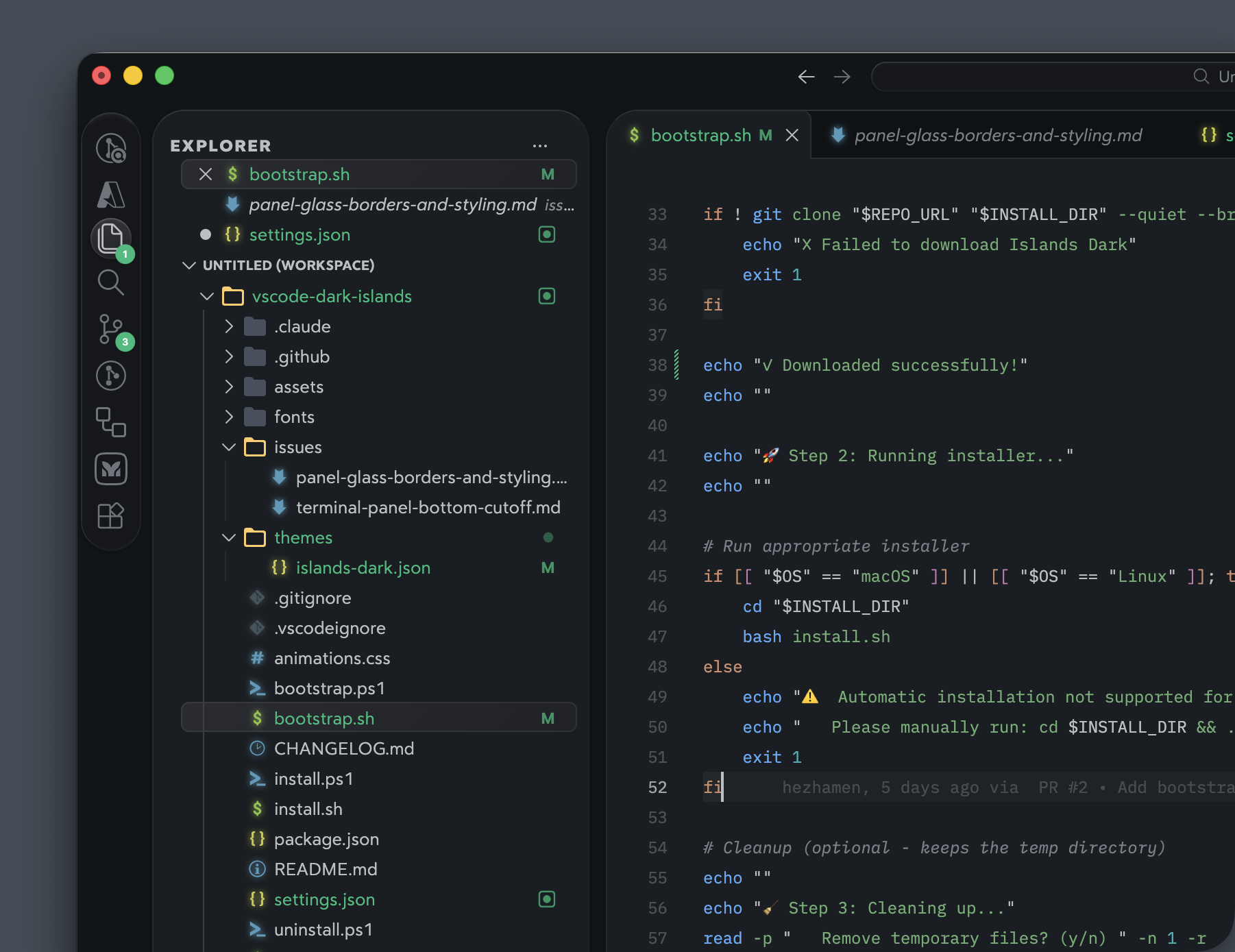
#131217) with floating panels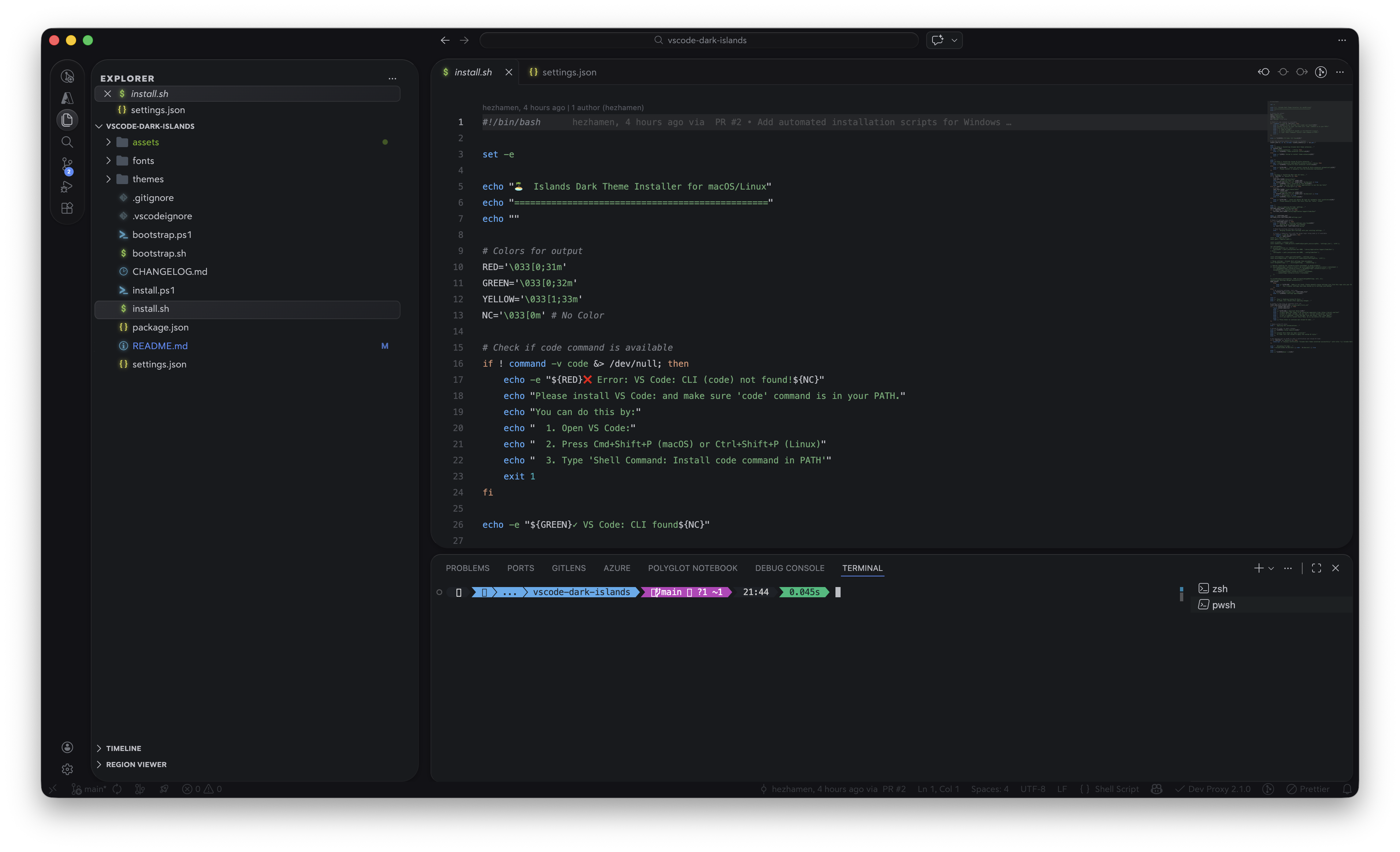
This theme has two parts: a color theme and CSS customizations that create the floating glass panel look.
The fastest way to install:
curl -fsSL https://raw.githubusercontent.com/bwya77/vscode-dark-islands/main/bootstrap.sh | bash
irm https://raw.githubusercontent.com/bwya77/vscode-dark-islands/main/bootstrap.ps1 | iex
curl -fsSL https://raw.githubusercontent.com/bwya77/vscode-dark-islands/main/bootstrap.sh | bash -s -- --vscodium
$env:ISLANDS_DARK_EDITOR = "vscodium"; irm https://raw.githubusercontent.com/bwya77/vscode-dark-islands/main/bootstrap.ps1 | iex
If you prefer to clone first:
git clone https://github.com/bwya77/vscode-dark-islands.git islands-dark
cd islands-dark
./install.sh
git clone https://github.com/bwya77/vscode-dark-islands.git islands-dark
cd islands-dark
.\install.ps1
git clone https://github.com/bwya77/vscode-dark-islands.git islands-dark
cd islands-dark
./install.sh --vscodium
git clone https://github.com/bwya77/vscode-dark-islands.git islands-dark
cd islands-dark
.\install.ps1 -Editor vscodium
The scripts will automatically:
Important: After the script finishes and your editor reloads, you need to activate the CSS styling once:
- Press
Cmd+Shift+P(macOS) orCtrl+Shift+P(Windows/Linux)- Type Custom UI Style: Reload and press Enter
- VS Code or VSCodium will reload with the full theme applied
You only need to do this once (or after editor updates).
Note: IBM Plex Mono and FiraCode Nerd Font Mono must be installed separately (the script will remind you).
If you use Nix, you can run a pre-configured instance of VS Code (or VSCodium) with the theme, extensions, and fonts already bundled.
To run it directly without installing:
# Run VS Code
nix run github:bwya77/vscode-dark-islands#vscode

# Or run VSCodium
nix run github:bwya77/vscode-dark-islands#vscodium
To use it in your NixOS or Home Manager configuration, add it to your flake inputs:
{
  inputs.islands-dark.url = "github:bwya77/vscode-dark-islands";

  outputs = { self, nixpkgs, islands-dark, ... }: {
    # Then you can add and use it:
    # islands-dark.packages.${pkgs.stdenv.hostPlatform.system}.vscode
    # islands-dark.packages.${pkgs.stdenv.hostPlatform.system}.vscodium
  };
}
Note: The Nix flake automatically includes the Custom UI Style extension, Seti Folder icon theme, and all required fonts (Bear Sans UI, IBM Plex Mono, and FiraCode Nerd Font). It will also copy the recommended
settings.jsonon the first run.
The standard installers support VSCodium via --vscodium on macOS/Linux and -Editor vscodium on Windows. They target VSCodium-specific paths and use the codium CLI:
~/.vscode-oss/extensions/ on macOS/Linux and %USERPROFILE%\.vscode-oss\extensions\ on Windows~/Library/Application Support/VSCodium/User/ on macOS, ~/.config/VSCodium/User/ on Linux, and %APPDATA%\VSCodium\User\ on WindowsUse ./install.sh --vscodium or .\install.ps1 -Editor vscodium for local installs, and ./uninstall.sh --vscodium or .\uninstall.ps1 -Editor vscodium to remove it.
Islands Dark works on Cursor with two small adaptations baked into a dedicated set of scripts and a settings-cursor.json variant.
curl -fsSL https://raw.githubusercontent.com/bwya77/vscode-dark-islands/main/bootstrap-cursor.sh | bash
git clone https://github.com/bwya77/vscode-dark-islands.git islands-dark
cd islands-dark
./install-cursor.sh
The Cursor installer is a parallel of install.sh that targets Cursor-specific paths (~/.cursor/extensions/, ~/Library/Application Support/Cursor/User/ on macOS, ~/.config/Cursor/User/ on Linux) and uses the cursor CLI instead of code. It applies settings-cursor.json, which is identical to settings.json plus two adjustments required for Cursor:
"custom-ui-style.webview.enable": false — Cursor's extension detail panel renders inside a webview with a stricter Content-Security-Policy than VS Code's; leaving the webview patch enabled triggers a CSP error and a blank panel (upstream issue)..titlebar-left .action-item:has(.codicon-panel-left) — Cursor renders a "Toggle Primary Side Bar" button at the top-left of the title bar that overlaps the sidebar's rounded corner. Cmd+B continues to toggle the sidebar.Note: Custom UI Style is not officially supported on Cursor, but works reliably from version
0.5.6onwards (see issue #40). After every Cursor update you'll need to re-run Custom UI Style: Reload from the command palette to reapply the CSS injection. The "corrupt installation" warning that appears after the first reload is expected and can be dismissed with Don't Show Again.
To uninstall:
./uninstall-cursor.sh
The fastest way to install:
curl -fsSL https://raw.githubusercontent.com/bwya77/vscode-dark-islands/main/bootstrap-antigravity.sh | bash
git clone https://github.com/bwya77/vscode-dark-islands.git islands-dark
cd islands-dark
./install-antigravity.sh
The Antigravity installer is a parallel of install.sh that targets Antigravity-specific paths (~/.antigravity-ide/extensions/, ~/Library/Application Support/Antigravity IDE/User/ on macOS, ~/.config/Antigravity IDE/User/ on Linux) and uses the agy-ide CLI instead of code.
Note: Older deprecated Antigravity versions (<2.0) used legacy config paths, which are not currently supported. If you use an older version, manually back up your settings, install the theme yourself, and copy the relevant parts of
settings.jsoninto your Antigravity settings.
To uninstall:
./uninstall-antigravity.sh
If you prefer to install manually, follow these steps:
Clone this repo and copy the extension files:
git clone https://github.com/bwya77/vscode-dark-islands.git islands-dark
cd islands-dark
mkdir -p ~/.vscode/extensions/bwya77.islands-dark-1.0.0
cp package.json ~/.vscode/extensions/bwya77.islands-dark-1.0.0/
cp -r themes ~/.vscode/extensions/bwya77.islands-dark-1.0.0/
For VSCodium, use ~/.vscode-oss/extensions/bwya77.islands-dark-1.0.0 instead of ~/.vscode/extensions/bwya77.islands-dark-1.0.0.
On Windows (PowerShell):
git clone https://github.com/bwya77/vscode-dark-islands.git islands-dark
cd islands-dark
$ext = "$env:USERPROFILE\.vscode\extensions\bwya77.islands-dark-1.0.0"
New-Item -ItemType Directory -Path $ext -Force
Copy-Item package.json $ext\
Copy-Item themes $ext\themes -Recurse
For VSCodium on Windows, use $env:USERPROFILE\.vscode-oss\extensions\bwya77.islands-dark-1.0.0.
The floating panels, rounded corners, glass borders, and animations are powered by the Custom UI Style extension.
Cmd+Shift+X / Ctrl+Shift+X)subframe7536)For the best experience with the color-matched icon glow effect, install the Seti Folder icon theme:
Cmd+Shift+X / Ctrl+Shift+X)l-igh-t)This theme uses two fonts:
fonts/ folder)To install Bear Sans UI:
fonts/ folder in this repo.otf files and double-click to open in Font Book (macOS) or right-click > Install (Windows)If you prefer different fonts, update the editor.fontFamily, terminal.integrated.fontFamily, and font-family values in the settings.
Copy the contents of settings.json from this repo into your VS Code: settings:
Cmd+Shift+P / Ctrl+Shift+P)settings.json into your settings fileNote: If you already have existing settings, merge carefully. The key settings are
workbench.colorTheme,custom-ui-style.stylesheet, and the font/indent preferences.
Cmd+Shift+P / Ctrl+Shift+P)Note: You may see a "corrupt installation" warning after enabling. This is expected since Custom UI Style injects CSS into VS Code. Click the gear icon on the warning and select Don't Show Again.
| Element | Effect |
|---|---|
| Canvas | Deep dark background (--islands-bg-canvas) behind all panels |
| Sidebar | Floating with rounded corners (--islands-panel-radius), glass borders, drop shadow |
| Editor | Floating with rounded corners (--islands-panel-radius), glass borders, browser-tab effect |
| Activity bar | Pill-shaped with glass inset shadows, circular selection indicator |
| Command center | Pill-shaped with glass effect |
| Bottom panel | Floating with rounded corners (--islands-panel-radius), glass borders |
| Right sidebar | Floating with rounded corners (--islands-panel-radius), glass borders |
| Notifications | Rounded corners (--islands-widget-radius), glass borders, deep drop shadow |
| Command palette | Rounded corners (--islands-widget-radius), glass borders, rounded list rows |
| Scrollbars | Pill-shaped thumbs with fade transition |
| Tabs | Browser-tab style (active tab open at bottom), close button fades in on hover |
| Breadcrumbs | Hidden until hover with smooth fade transition |
| Status bar | Dimmed text that brightens on hover |
| File icons | Color-matched glow via drop-shadow (best with Seti Folder icon theme) |
All key visual properties are controlled by CSS custom properties defined at the top of the custom-ui-style.stylesheet in settings.json. Edit the variables on .monaco-workbench to quickly adjust the look:
".monaco-workbench": {
    "--islands-panel-radius": "24px",
    "--islands-widget-radius": "14px",
    "--islands-input-radius": "12px",
    "--islands-item-radius": "6px",
    "--islands-panel-gap": "8px",
    "--islands-panel-top": "8px",
    "--islands-bg-canvas": "#121216",
    "--islands-bg-surface": "#181a1d",
    "background-color": "var(--islands-bg-canvas) !important"
}
| Variable | Default | Applies to |
|---|---|---|
--islands-bg-canvas | #121216 | Deep background behind all panels (workbench, title bar, status bar, activity bar) |
--islands-bg-surface | #181a1d | Panel/surface background (chat input, editor widgets) |
These two colors define the theme's depth. The canvas is the darker base layer visible between panels, while the surface is the slightly lighter color used for interactive elements. To override the theme's panel colors (sidebar, editor, terminal backgrounds), use VS Code's workbench.colorCustomizations in your settings.
| Variable | Default | Applies to |
|---|---|---|
--islands-panel-radius | 24px | Sidebar, editor, terminal/bottom panel, auxiliary bar |
--islands-widget-radius | 14px | Notifications, chat input, command palette |
--islands-input-radius | 12px | Search bars, SCM commit input, buttons, hover tooltips |
--islands-item-radius | 6px | List rows, tabs, pane headers, terminal tabs |
For example, to make everything sharper, set all values to 8px. For a fully rounded look, try 32px / 20px / 16px / 8px. Pill-shaped elements (activity bar, scrollbar thumbs, command center, badges) are not affected by these variables.
| Variable | Default | Applies to |
|---|---|---|
--islands-panel-gap | 8px | Horizontal spacing between sidebar, editor, chat/auxiliary bar, terminal, and notifications |
--islands-panel-top | 8px | Top margin of panels (space below the title bar) |
Increase to 12px or 16px for a more spaced-out layout, or reduce to 4px for a tighter look.
Try disabling and re-enabling Custom UI Style:
This is expected after enabling Custom UI Style. Dismiss it or select Don't Show Again.
If you previously used the Custom CSS and JS Loader extension (be5invis.vscode-custom-css), it may have injected CSS directly into VS Code's workbench.html that persists even after disabling. If styles conflict, reinstall VS Code to get a clean workbench.html, then use only Custom UI Style.
Run the uninstall script to restore your editor to its previous state:
macOS/Linux:
# If you still have the repo cloned:
cd islands-dark
./uninstall.sh

# Or download and run directly:
curl -fsSL https://raw.githubusercontent.com/bwya77/vscode-dark-islands/main/uninstall.sh | bash
Windows (PowerShell):
# If you still have the repo cloned:
cd islands-dark
.\uninstall.ps1

# Or download and run directly:
irm https://raw.githubusercontent.com/bwya77/vscode-dark-islands/main/uninstall.ps1 | iex
VSCodium macOS/Linux:
# If you still have the repo cloned:
cd islands-dark
./uninstall.sh --vscodium

# Or download and run directly:
curl -fsSL https://raw.githubusercontent.com/bwya77/vscode-dark-islands/main/uninstall.sh | bash -s -- --vscodium
VSCodium Windows (PowerShell):
# If you still have the repo cloned:
cd islands-dark
.\uninstall.ps1 -Editor vscodium

# Or download and run directly:
$env:ISLANDS_DARK_EDITOR = "vscodium"; irm https://raw.githubusercontent.com/bwya77/vscode-dark-islands/main/uninstall.ps1 | iex
Cursor (macOS/Linux):
# If you still have the repo cloned:
cd islands-dark
./uninstall-cursor.sh
Antigravity (macOS/Linux):
# If you still have the repo cloned:
cd islands-dark
./uninstall-antigravity.sh
The uninstall script will:
settings.json from the backup (or surgically remove Islands Dark keys if no backup exists)Everything is fully automated — no manual steps required after the script runs.
Inspired by the JetBrains Islands Dark UI theme.
MIT
(top 24 of 64)
6,483 followers · starred Apr 2026
622 followers · starred Feb 2026
745 followers · starred Feb 2026
679 followers · starred Feb 2026
VSCode theme based off the easemate IDE and Jetbrains islands theme
Shell
8,526
112 commits
updated Jun 21, 2026
A dark color theme for VS Code-compatible editors, including VSCodium, inspired by the easemate IDE. Features floating glass-like panels, rounded corners, smooth animations, and a deeply refined UI.
#131217) with floating panels
This theme has two parts: a color theme and CSS customizations that create the floating glass panel look.
The fastest way to install:
curl -fsSL https://raw.githubusercontent.com/bwya77/vscode-dark-islands/main/bootstrap.sh | bash
irm https://raw.githubusercontent.com/bwya77/vscode-dark-islands/main/bootstrap.ps1 | iex
curl -fsSL https://raw.githubusercontent.com/bwya77/vscode-dark-islands/main/bootstrap.sh | bash -s -- --vscodium
$env:ISLANDS_DARK_EDITOR = "vscodium"; irm https://raw.githubusercontent.com/bwya77/vscode-dark-islands/main/bootstrap.ps1 | iex
If you prefer to clone first:
git clone https://github.com/bwya77/vscode-dark-islands.git islands-dark
cd islands-dark
./install.sh
git clone https://github.com/bwya77/vscode-dark-islands.git islands-dark
cd islands-dark
.\install.ps1
git clone https://github.com/bwya77/vscode-dark-islands.git islands-dark
cd islands-dark
./install.sh --vscodium
git clone https://github.com/bwya77/vscode-dark-islands.git islands-dark
cd islands-dark
.\install.ps1 -Editor vscodium
The scripts will automatically:
Important: After the script finishes and your editor reloads, you need to activate the CSS styling once:
- Press
Cmd+Shift+P(macOS) orCtrl+Shift+P(Windows/Linux)- Type Custom UI Style: Reload and press Enter
- VS Code or VSCodium will reload with the full theme applied
You only need to do this once (or after editor updates).
Note: IBM Plex Mono and FiraCode Nerd Font Mono must be installed separately (the script will remind you).
If you use Nix, you can run a pre-configured instance of VS Code (or VSCodium) with the theme, extensions, and fonts already bundled.
To run it directly without installing:
# Run VS Code
nix run github:bwya77/vscode-dark-islands#vscode

# Or run VSCodium
nix run github:bwya77/vscode-dark-islands#vscodium
To use it in your NixOS or Home Manager configuration, add it to your flake inputs:
{
  inputs.islands-dark.url = "github:bwya77/vscode-dark-islands";

  outputs = { self, nixpkgs, islands-dark, ... }: {
    # Then you can add and use it:
    # islands-dark.packages.${pkgs.stdenv.hostPlatform.system}.vscode
    # islands-dark.packages.${pkgs.stdenv.hostPlatform.system}.vscodium
  };
}
Note: The Nix flake automatically includes the Custom UI Style extension, Seti Folder icon theme, and all required fonts (Bear Sans UI, IBM Plex Mono, and FiraCode Nerd Font). It will also copy the recommended
settings.jsonon the first run.
The standard installers support VSCodium via --vscodium on macOS/Linux and -Editor vscodium on Windows. They target VSCodium-specific paths and use the codium CLI:
~/.vscode-oss/extensions/ on macOS/Linux and %USERPROFILE%\.vscode-oss\extensions\ on Windows~/Library/Application Support/VSCodium/User/ on macOS, ~/.config/VSCodium/User/ on Linux, and %APPDATA%\VSCodium\User\ on WindowsUse ./install.sh --vscodium or .\install.ps1 -Editor vscodium for local installs, and ./uninstall.sh --vscodium or .\uninstall.ps1 -Editor vscodium to remove it.
Islands Dark works on Cursor with two small adaptations baked into a dedicated set of scripts and a settings-cursor.json variant.
curl -fsSL https://raw.githubusercontent.com/bwya77/vscode-dark-islands/main/bootstrap-cursor.sh | bash
git clone https://github.com/bwya77/vscode-dark-islands.git islands-dark
cd islands-dark
./install-cursor.sh
The Cursor installer is a parallel of install.sh that targets Cursor-specific paths (~/.cursor/extensions/, ~/Library/Application Support/Cursor/User/ on macOS, ~/.config/Cursor/User/ on Linux) and uses the cursor CLI instead of code. It applies settings-cursor.json, which is identical to settings.json plus two adjustments required for Cursor:
"custom-ui-style.webview.enable": false — Cursor's extension detail panel renders inside a webview with a stricter Content-Security-Policy than VS Code's; leaving the webview patch enabled triggers a CSP error and a blank panel (upstream issue)..titlebar-left .action-item:has(.codicon-panel-left) — Cursor renders a "Toggle Primary Side Bar" button at the top-left of the title bar that overlaps the sidebar's rounded corner. Cmd+B continues to toggle the sidebar.Note: Custom UI Style is not officially supported on Cursor, but works reliably from version
0.5.6onwards (see issue #40). After every Cursor update you'll need to re-run Custom UI Style: Reload from the command palette to reapply the CSS injection. The "corrupt installation" warning that appears after the first reload is expected and can be dismissed with Don't Show Again.
To uninstall:
./uninstall-cursor.sh
The fastest way to install:
curl -fsSL https://raw.githubusercontent.com/bwya77/vscode-dark-islands/main/bootstrap-antigravity.sh | bash
git clone https://github.com/bwya77/vscode-dark-islands.git islands-dark
cd islands-dark
./install-antigravity.sh
The Antigravity installer is a parallel of install.sh that targets Antigravity-specific paths (~/.antigravity-ide/extensions/, ~/Library/Application Support/Antigravity IDE/User/ on macOS, ~/.config/Antigravity IDE/User/ on Linux) and uses the agy-ide CLI instead of code.
Note: Older deprecated Antigravity versions (<2.0) used legacy config paths, which are not currently supported. If you use an older version, manually back up your settings, install the theme yourself, and copy the relevant parts of
settings.jsoninto your Antigravity settings.
To uninstall:
./uninstall-antigravity.sh
If you prefer to install manually, follow these steps:
Clone this repo and copy the extension files:
git clone https://github.com/bwya77/vscode-dark-islands.git islands-dark
cd islands-dark
mkdir -p ~/.vscode/extensions/bwya77.islands-dark-1.0.0
cp package.json ~/.vscode/extensions/bwya77.islands-dark-1.0.0/
cp -r themes ~/.vscode/extensions/bwya77.islands-dark-1.0.0/
For VSCodium, use ~/.vscode-oss/extensions/bwya77.islands-dark-1.0.0 instead of ~/.vscode/extensions/bwya77.islands-dark-1.0.0.
On Windows (PowerShell):
git clone https://github.com/bwya77/vscode-dark-islands.git islands-dark
cd islands-dark
$ext = "$env:USERPROFILE\.vscode\extensions\bwya77.islands-dark-1.0.0"
New-Item -ItemType Directory -Path $ext -Force
Copy-Item package.json $ext\
Copy-Item themes $ext\themes -Recurse
For VSCodium on Windows, use $env:USERPROFILE\.vscode-oss\extensions\bwya77.islands-dark-1.0.0.
The floating panels, rounded corners, glass borders, and animations are powered by the Custom UI Style extension.
Cmd+Shift+X / Ctrl+Shift+X)subframe7536)For the best experience with the color-matched icon glow effect, install the Seti Folder icon theme:
Cmd+Shift+X / Ctrl+Shift+X)l-igh-t)This theme uses two fonts:
fonts/ folder)To install Bear Sans UI:
fonts/ folder in this repo.otf files and double-click to open in Font Book (macOS) or right-click > Install (Windows)If you prefer different fonts, update the editor.fontFamily, terminal.integrated.fontFamily, and font-family values in the settings.
Copy the contents of settings.json from this repo into your VS Code: settings:
Cmd+Shift+P / Ctrl+Shift+P)settings.json into your settings fileNote: If you already have existing settings, merge carefully. The key settings are
workbench.colorTheme,custom-ui-style.stylesheet, and the font/indent preferences.
Cmd+Shift+P / Ctrl+Shift+P)Note: You may see a "corrupt installation" warning after enabling. This is expected since Custom UI Style injects CSS into VS Code. Click the gear icon on the warning and select Don't Show Again.
| Element | Effect |
|---|---|
| Canvas | Deep dark background (--islands-bg-canvas) behind all panels |
| Sidebar | Floating with rounded corners (--islands-panel-radius), glass borders, drop shadow |
| Editor | Floating with rounded corners (--islands-panel-radius), glass borders, browser-tab effect |
| Activity bar | Pill-shaped with glass inset shadows, circular selection indicator |
| Command center | Pill-shaped with glass effect |
| Bottom panel | Floating with rounded corners (--islands-panel-radius), glass borders |
| Right sidebar | Floating with rounded corners (--islands-panel-radius), glass borders |
| Notifications | Rounded corners (--islands-widget-radius), glass borders, deep drop shadow |
| Command palette | Rounded corners (--islands-widget-radius), glass borders, rounded list rows |
| Scrollbars | Pill-shaped thumbs with fade transition |
| Tabs | Browser-tab style (active tab open at bottom), close button fades in on hover |
| Breadcrumbs | Hidden until hover with smooth fade transition |
| Status bar | Dimmed text that brightens on hover |
| File icons | Color-matched glow via drop-shadow (best with Seti Folder icon theme) |
All key visual properties are controlled by CSS custom properties defined at the top of the custom-ui-style.stylesheet in settings.json. Edit the variables on .monaco-workbench to quickly adjust the look:
".monaco-workbench": {
    "--islands-panel-radius": "24px",
    "--islands-widget-radius": "14px",
    "--islands-input-radius": "12px",
    "--islands-item-radius": "6px",
    "--islands-panel-gap": "8px",
    "--islands-panel-top": "8px",
    "--islands-bg-canvas": "#121216",
    "--islands-bg-surface": "#181a1d",
    "background-color": "var(--islands-bg-canvas) !important"
}
| Variable | Default | Applies to |
|---|---|---|
--islands-bg-canvas | #121216 | Deep background behind all panels (workbench, title bar, status bar, activity bar) |
--islands-bg-surface | #181a1d | Panel/surface background (chat input, editor widgets) |
These two colors define the theme's depth. The canvas is the darker base layer visible between panels, while the surface is the slightly lighter color used for interactive elements. To override the theme's panel colors (sidebar, editor, terminal backgrounds), use VS Code's workbench.colorCustomizations in your settings.
| Variable | Default | Applies to |
|---|---|---|
--islands-panel-radius | 24px | Sidebar, editor, terminal/bottom panel, auxiliary bar |
--islands-widget-radius | 14px | Notifications, chat input, command palette |
--islands-input-radius | 12px | Search bars, SCM commit input, buttons, hover tooltips |
--islands-item-radius | 6px | List rows, tabs, pane headers, terminal tabs |
For example, to make everything sharper, set all values to 8px. For a fully rounded look, try 32px / 20px / 16px / 8px. Pill-shaped elements (activity bar, scrollbar thumbs, command center, badges) are not affected by these variables.
| Variable | Default | Applies to |
|---|---|---|
--islands-panel-gap | 8px | Horizontal spacing between sidebar, editor, chat/auxiliary bar, terminal, and notifications |
--islands-panel-top | 8px | Top margin of panels (space below the title bar) |
Increase to 12px or 16px for a more spaced-out layout, or reduce to 4px for a tighter look.
Try disabling and re-enabling Custom UI Style:
This is expected after enabling Custom UI Style. Dismiss it or select Don't Show Again.
If you previously used the Custom CSS and JS Loader extension (be5invis.vscode-custom-css), it may have injected CSS directly into VS Code's workbench.html that persists even after disabling. If styles conflict, reinstall VS Code to get a clean workbench.html, then use only Custom UI Style.
Run the uninstall script to restore your editor to its previous state:
macOS/Linux:
# If you still have the repo cloned:
cd islands-dark
./uninstall.sh

# Or download and run directly:
curl -fsSL https://raw.githubusercontent.com/bwya77/vscode-dark-islands/main/uninstall.sh | bash
Windows (PowerShell):
# If you still have the repo cloned:
cd islands-dark
.\uninstall.ps1

# Or download and run directly:
irm https://raw.githubusercontent.com/bwya77/vscode-dark-islands/main/uninstall.ps1 | iex
VSCodium macOS/Linux:
# If you still have the repo cloned:
cd islands-dark
./uninstall.sh --vscodium

# Or download and run directly:
curl -fsSL https://raw.githubusercontent.com/bwya77/vscode-dark-islands/main/uninstall.sh | bash -s -- --vscodium
VSCodium Windows (PowerShell):
# If you still have the repo cloned:
cd islands-dark
.\uninstall.ps1 -Editor vscodium

# Or download and run directly:
$env:ISLANDS_DARK_EDITOR = "vscodium"; irm https://raw.githubusercontent.com/bwya77/vscode-dark-islands/main/uninstall.ps1 | iex
Cursor (macOS/Linux):
# If you still have the repo cloned:
cd islands-dark
./uninstall-cursor.sh
Antigravity (macOS/Linux):
# If you still have the repo cloned:
cd islands-dark
./uninstall-antigravity.sh
The uninstall script will:
settings.json from the backup (or surgically remove Islands Dark keys if no backup exists)Everything is fully automated — no manual steps required after the script runs.
Inspired by the JetBrains Islands Dark UI theme.
MIT
(top 24 of 64)
6,483 followers · starred Apr 2026
622 followers · starred Feb 2026
745 followers · starred Feb 2026
679 followers · starred Feb 2026



