[ICCV 2025] From anything to mesh like human artists. Official impl. of "MeshAnything V2: Artist-Created Mesh Generation With Adjacent Mesh Tokenization"
See the code
Yiwen Chen1,2,
Yikai Wang3*,
Yihao Luo4,
Zhengyi Wang2,3,
Zilong Chen2,3,
Jun Zhu2,3,
Chi Zhang5*,
Guosheng Lin1*
*Corresponding authors.
1S-Lab, Nanyang Technological University,
2Shengshu,
3Tsinghua University,
4Imperial College London,
5Westlake University



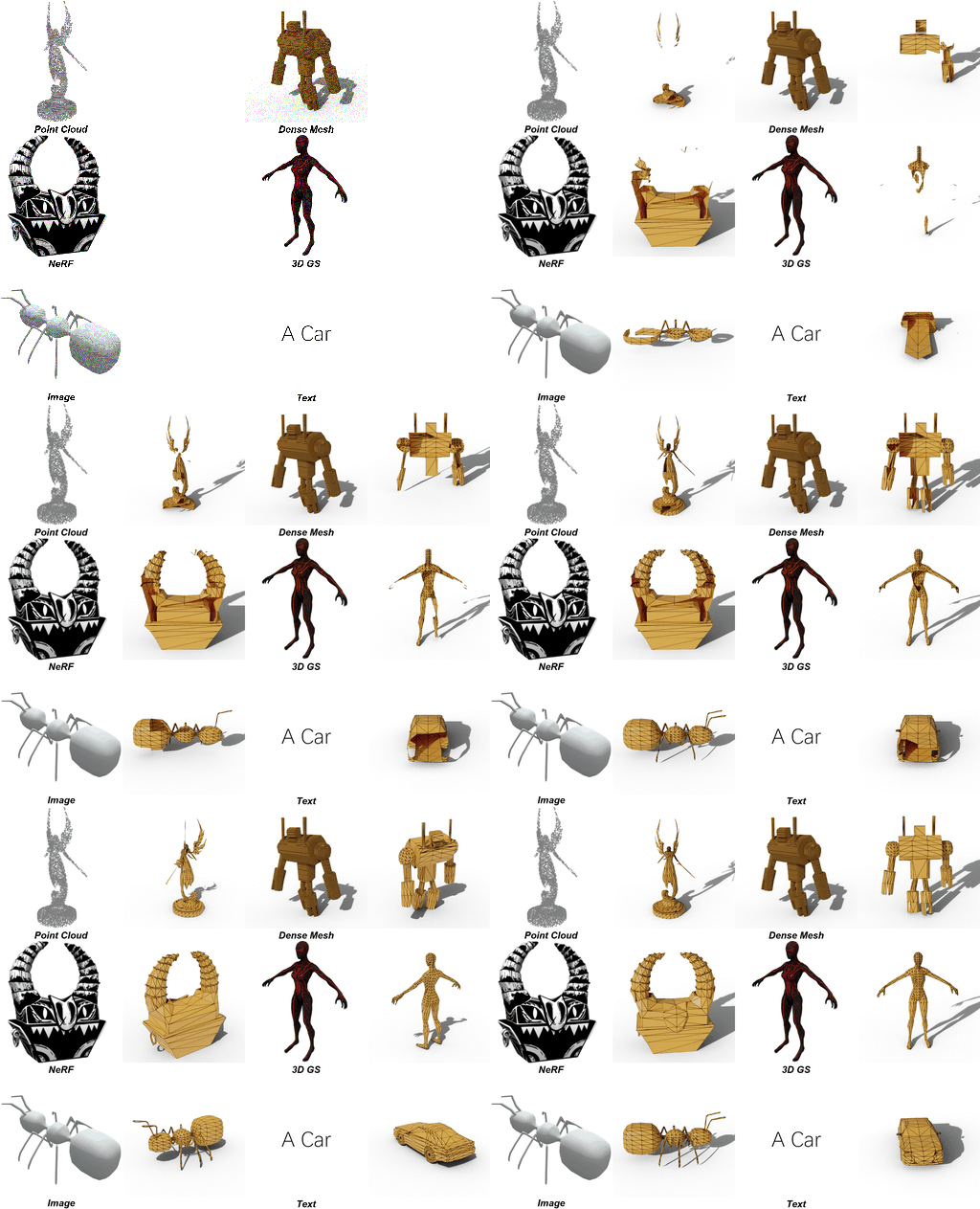
Our environment has been tested on Ubuntu 22, CUDA 11.8 with A800.
git clone https://github.com/buaacyw/MeshAnythingV2.git && cd MeshAnythingV2
conda create -n MeshAnythingV2 python==3.10.13 -y
conda activate MeshAnythingV2
pip install torch==2.1.1 torchvision==0.16.1 torchaudio==2.1.1 --index-url https://download.pytorch.org/whl/cu118
pip install -r requirements.txt
pip install -r training_requirements.txt # in case you want to train
pip install flash-attn --no-build-isolation
pip install -U gradio
# We release our adjacent mesh tokenization implementation in adjacent_mesh_tokenization.py.
# For detokenization please check the function adjacent_detokenize in MeshAnything/models/meshanything_v2.py
python adjacent_mesh_tokenization.py
# Put the output obj file of Rodin to rodin_result and using the following command to generate the Artist-Created Mesh.
# We suggest using the --mc flag to preprocess the input mesh with Marching Cubes first. This helps us to align the inference point cloud to our training domain.
python main.py --input_dir rodin_result --out_dir mesh_output --input_type mesh --mc
# folder input
python main.py --input_dir examples --out_dir mesh_output --input_type mesh

# single file input
python main.py --input_path examples/wand.obj --out_dir mesh_output --input_type mesh

# Preprocess with Marching Cubes first
python main.py --input_dir examples --out_dir mesh_output --input_type mesh --mc

# The mc resolution is default to be 128. For some delicate mesh, this resolution is not sufficient. Raise this resolution takes more time to preprocess but should achieve a better result.
# Change it by : --mc_level 7 -> 128 (2^7), --mc_level 8 -> 256 (2^8).
# 256 resolution Marching Cube example.
python main.py --input_dir examples --out_dir mesh_output --input_type mesh --mc --mc_level 8
# Note: if you want to use your own point cloud, please make sure the normal is included.
# The file format should be a .npy file with shape (N, 6), where N is the number of points. The first 3 columns are the coordinates, and the last 3 columns are the normal.

# inference for folder
python main.py --input_dir pc_examples --out_dir pc_output --input_type pc_normal

# inference for single file
python main.py --input_path pc_examples/grenade.npy --out_dir pc_output --input_type pc_normal

python app.py
We provide part of our processed dataset from Objaverse. You can download it from https://huggingface.co/datasets/Yiwen-ntu/MeshAnythingV2/tree/main
After downloading, place train.npz and test.npz into the dataset directory.
If you prefer to process your own data, please refer to data_process.py.
Download Michelangelo's point encoder from https://huggingface.co/Maikou/Michelangelo/tree/main/checkpoints/aligned_shape_latents and put it into meshanything_train/miche/checkpoints/aligned_shape_latents/shapevae-256.ckpt.
# Training with MultiGPU
accelerate launch --multi_gpu --num_processes 8 train.py  --batchsize_per_gpu 2 --checkpoint_dir training_trial

# Evaluation
python train.py --batchsize_per_gpu 2 --checkpoint_dir evaluation_trial --pretrained_weights gpt_output/training_trial/xxx_xxx.pth --test_only
Our code is based on these wonderful repos:
@misc{chen2024meshanythingv2artistcreatedmesh,
      title={MeshAnything V2: Artist-Created Mesh Generation With Adjacent Mesh Tokenization},
      author={Yiwen Chen and Yikai Wang and Yihao Luo and Zhengyi Wang and Zilong Chen and Jun Zhu and Chi Zhang and Guosheng Lin},
      year={2024},
      eprint={2408.02555},
      archivePrefix={arXiv},
      primaryClass={cs.CV},
      url={https://arxiv.org/abs/2408.02555},
}
122 followers · starred Oct 2024
46 followers · starred Aug 2024
121 followers · starred Jan 2025
[ICCV 2025] From anything to mesh like human artists. Official impl. of "MeshAnything V2: Artist-Created Mesh Generation With Adjacent Mesh Tokenization"
See the code
Yiwen Chen1,2,
Yikai Wang3*,
Yihao Luo4,
Zhengyi Wang2,3,
Zilong Chen2,3,
Jun Zhu2,3,
Chi Zhang5*,
Guosheng Lin1*
*Corresponding authors.
1S-Lab, Nanyang Technological University,
2Shengshu,
3Tsinghua University,
4Imperial College London,
5Westlake University
Our environment has been tested on Ubuntu 22, CUDA 11.8 with A800.
git clone https://github.com/buaacyw/MeshAnythingV2.git && cd MeshAnythingV2
conda create -n MeshAnythingV2 python==3.10.13 -y
conda activate MeshAnythingV2
pip install torch==2.1.1 torchvision==0.16.1 torchaudio==2.1.1 --index-url https://download.pytorch.org/whl/cu118
pip install -r requirements.txt
pip install -r training_requirements.txt # in case you want to train
pip install flash-attn --no-build-isolation
pip install -U gradio
# We release our adjacent mesh tokenization implementation in adjacent_mesh_tokenization.py.
# For detokenization please check the function adjacent_detokenize in MeshAnything/models/meshanything_v2.py
python adjacent_mesh_tokenization.py
# Put the output obj file of Rodin to rodin_result and using the following command to generate the Artist-Created Mesh.
# We suggest using the --mc flag to preprocess the input mesh with Marching Cubes first. This helps us to align the inference point cloud to our training domain.
python main.py --input_dir rodin_result --out_dir mesh_output --input_type mesh --mc
# folder input
python main.py --input_dir examples --out_dir mesh_output --input_type mesh

# single file input
python main.py --input_path examples/wand.obj --out_dir mesh_output --input_type mesh

# Preprocess with Marching Cubes first
python main.py --input_dir examples --out_dir mesh_output --input_type mesh --mc

# The mc resolution is default to be 128. For some delicate mesh, this resolution is not sufficient. Raise this resolution takes more time to preprocess but should achieve a better result.
# Change it by : --mc_level 7 -> 128 (2^7), --mc_level 8 -> 256 (2^8).
# 256 resolution Marching Cube example.
python main.py --input_dir examples --out_dir mesh_output --input_type mesh --mc --mc_level 8
# Note: if you want to use your own point cloud, please make sure the normal is included.
# The file format should be a .npy file with shape (N, 6), where N is the number of points. The first 3 columns are the coordinates, and the last 3 columns are the normal.

# inference for folder
python main.py --input_dir pc_examples --out_dir pc_output --input_type pc_normal

# inference for single file
python main.py --input_path pc_examples/grenade.npy --out_dir pc_output --input_type pc_normal
python app.py
We provide part of our processed dataset from Objaverse. You can download it from https://huggingface.co/datasets/Yiwen-ntu/MeshAnythingV2/tree/main
After downloading, place train.npz and test.npz into the dataset directory.
If you prefer to process your own data, please refer to data_process.py.
Download Michelangelo's point encoder from https://huggingface.co/Maikou/Michelangelo/tree/main/checkpoints/aligned_shape_latents and put it into meshanything_train/miche/checkpoints/aligned_shape_latents/shapevae-256.ckpt.
# Training with MultiGPU
accelerate launch --multi_gpu --num_processes 8 train.py  --batchsize_per_gpu 2 --checkpoint_dir training_trial

# Evaluation
python train.py --batchsize_per_gpu 2 --checkpoint_dir evaluation_trial --pretrained_weights gpt_output/training_trial/xxx_xxx.pth --test_only
Our code is based on these wonderful repos:
@misc{chen2024meshanythingv2artistcreatedmesh,
      title={MeshAnything V2: Artist-Created Mesh Generation With Adjacent Mesh Tokenization},
      author={Yiwen Chen and Yikai Wang and Yihao Luo and Zhengyi Wang and Zilong Chen and Jun Zhu and Chi Zhang and Guosheng Lin},
      year={2024},
      eprint={2408.02555},
      archivePrefix={arXiv},
      primaryClass={cs.CV},
      url={https://arxiv.org/abs/2408.02555},
}
122 followers · starred Oct 2024
46 followers · starred Aug 2024
121 followers · starred Jan 2025





