Krasis is a Hybrid LLM runtime which focuses on efficient running of larger models on consumer grade VRAM limited hardware
C++
522
783 commits
updated Oct 19, 2026
Krasis is an LLM runtime for running large MoE models on NVIDIA consumer GPUs. It is built around fast GPU prompt processing, GPU-executed decode, and HCS expert residency management so models much larger than VRAM can still run locally.
The current runtime is no longer the early Python-hot-path prototype. The serving path is Rust/CUDA focused: Python is used for launcher/setup/model loading work, while the performance-sensitive runtime path uses Rust/CUDA orchestration, CUDA kernels, cached quantized weights, and measured VRAM budgeting.
The current release is
v1.0.16.
Native Windows: Download the Krasis Windows installer.
It installs Krasis for the current user, includes its own Python runtime, and
adds Krasis to the Start Menu.
Linux or WSL2:
curl -sSf https://raw.githubusercontent.com/brontoguana/krasis/main/install.sh | bash -s -- prerelease
See all releases for older versions and individual wheel/source assets.
You can contact me here, but for bugs, setup problems, model requests, or feature requests please open a GitHub issue.
If you want to monitor Krasis during runs, check out ktop.
~/.krasis.k6v6 Quality and k4v4 Ultra
Compact.tool_calls, including streaming responses and
multi-turn tool results.The current release line is a major change from v0.1.64, the previous stable
Krasis release. Highlights:
k6v6 and k4v4, with k6v6
as the quality-oriented launcher default and k4v4 for tighter VRAM budgets.krasis update and krasis prerelease maintenance commands.k6v6, k4v4, or BF16 KV depending on the
memory/quality target.Selected current timing-disabled results. Decode is the internal engine
measurement; HTTP round trip includes local client/server HTTP overhead.
| Hardware | Model | Params | Attention + KV | Prefill | Decode | HTTP round trip |
|---|---|---|---|---|---|---|
| RTX PRO 6000 96 GB | DeepSeek-V4-Flash-0731 | 304.2B checkpoint / 284B main | INT4/HQQ8/BF16 cache | 1,301.1 tok/s at 39,920 | 30.08/29.86/29.29 tok/s for 50/100/250 outputs | 50.75/38.36/32.45 tok/s |
| RTX PRO 6000 96 GB | Step-3.7-Flash | 201.4B | INT4/HQQ4/k4v4 | 5,261.0 tok/s | 55.40 tok/s | 112.82 tok/s |
| RTX PRO 6000 96 GB | Ornith-1.0-397B | 397B | INT4/HQQ4/k4v4 | 2,354.5 tok/s | 23.58 tok/s | 41.73 tok/s |
| RTX PRO 6000 96 GB | Qwen3-Coder-Next | 80B | INT4/HQQ4/k4v4 | 11,211.1 tok/s | 91.34 tok/s | 161.82 tok/s |
| RTX 5090 32 GB | Nemotron-3-Super-120B-A12B | 123.6B | INT4/HQQ4/k4v4 | 1,852.2 tok/s | 41.87 tok/s | 50.76 tok/s |
| RTX 5090 32 GB | Qwen3.5-397B-A17B | 397B | INT4/HQQ4/k4v4 | 973.8 tok/s | 10.04 tok/s | 18.71 tok/s |
| RTX 5090 32 GB | Nemotron-3-Nano-30B-A3B | 31.6B | INT4/HQQ4/k4v4 | 8,583.9 tok/s | 151.76 tok/s | 325.36 tok/s |
See the complete benchmark table, the associated quality results, and the reproducible benchmark index. Approximate adaptive-pruning results are not used in this table.
~/.krasis.Linux/WSL:
curl -sSf https://raw.githubusercontent.com/brontoguana/krasis/main/install.sh | bash -s -- prerelease
This creates a managed environment at ~/.krasis/venv, installs Krasis,
symlinks commands into ~/.local/bin, and updates PATH for the current shell.
No sudo is required for the Krasis install itself. Omit prerelease when
installing the latest stable release.
Native Windows:
Download KrasisSetup-1.0.16-win64.exe.
The installer creates a per-user install under
%LOCALAPPDATA%\Programs\Krasis, installs and validates a release-pinned
private Python/Krasis/PyTorch runtime, and adds Krasis and Krasis Manager
shortcuts to the Start Menu folder. It never uses or modifies a system Python.
Krasis opens the native interactive launcher in a maximized, resizable
console; Krasis Manager starts the localhost management dashboard. Models
and caches still live under
%USERPROFILE%\.krasis. The first install downloads the pinned CUDA PyTorch
wheel and can take several minutes.
Native Windows packages Marlin, FlashAttention, and FLA sidecars for supported Ampere and newer NVIDIA architectures.
krasis-setup
This installs runtime CUDA/PyTorch dependencies when needed. It is usually only required once per machine.
Run:
krasis
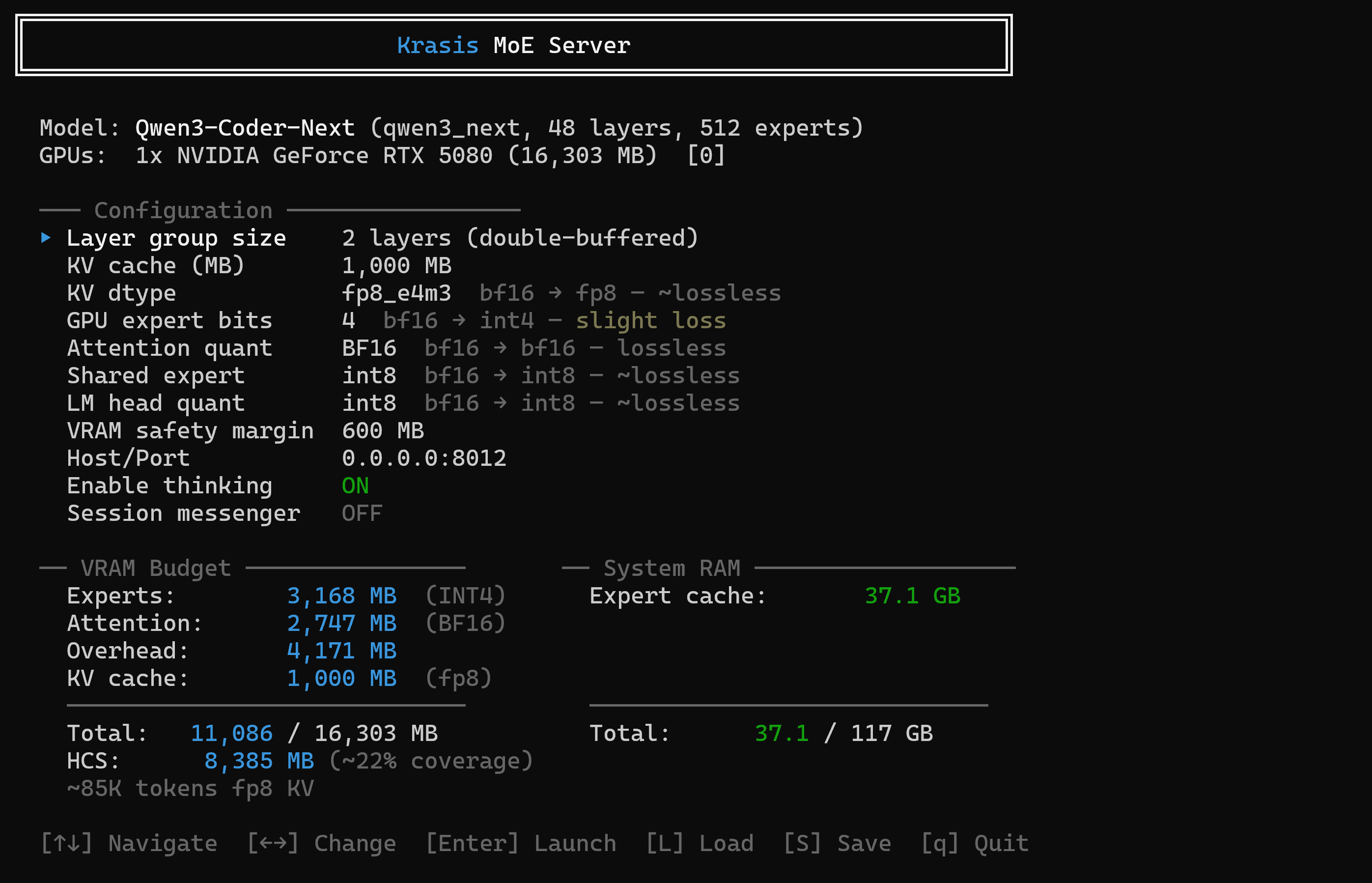
Then use the interactive launcher to choose from Krasis-supported Hugging Face
models, or put BF16 safetensors manually under ~/.krasis/models/.
Manual download example:
huggingface-cli download Qwen/Qwen3-Coder-Next \
    --local-dir ~/.krasis/models/Qwen3-Coder-Next
krasis
The launcher walks through model selection, GPU selection, quantization/runtime
options, and server startup. Settings are saved under ~/.krasis/config.
On Linux or WSL:
# Latest stable release
krasis update

# Latest pre-release
krasis prerelease

# Uninstall Krasis, keeping model files
curl -sSf https://raw.githubusercontent.com/brontoguana/krasis/main/install.sh | bash -s -- --uninstall
On native Windows, download and run the desired stable or prerelease installer from the Krasis releases page.
Krasis works on WSL2. By default WSL often limits available memory, which is usually too small for large MoE models. Create or edit:
C:\Users\<YourUsername>\.wslconfig
Example:
[wsl2]
memory=120GB
Adjust the value to leave memory for Windows, then restart WSL from PowerShell:
wsl --shutdown
krasis
The launcher provides:
krasis manager
Krasis Manager is a Rust control plane and dashboard bound by default to
127.0.0.1:8090. It discovers every NVIDIA GPU by stable UUID and shows the
verified Krasis model, process, port, configuration, and VRAM use assigned to
each GPU. Click a GPU to select an installed model, edit launcher-qualified
HQQ, KV, memory, serving, multi-GPU, and SSH-forwarding settings, then validate
or Apply them. Stop safely terminates only a process re-verified as a Krasis
model server. Apply validates the complete proposal before stopping the
current model.
Apply and Stop are asynchronous. The page shows validation, shutdown, GPU
release, launch, loading/calibration, ready, stopped, and failed progress with
bounded startup logs. The same state is available from the versioned JSON API.
Thorough copyable curl and PowerShell instructions are included on
the Manager page for agents, including discovery, validation, Apply,
progress polling, and Stop. Mutating requests require the owner-only token in
~/.krasis/manager/token.
On native Windows, open the dedicated Krasis Manager Start Menu shortcut or run:
Krasis.exe manager
Use krasis manager --help to select a different port or suppress automatic
browser opening.
To make Manager available on the local network, opt in explicitly:
krasis manager --lan --port 8080
LAN mode binds to 0.0.0.0, accepts requests only when the Host address
matches the exact destination interface and port, and requires the owner token
for every API request. Open http://<machine-lan-ip>:8080/ from another
machine and enter the token stored at ~/.krasis/manager/token (or
%USERPROFILE%\.krasis\manager\token on Windows). Do not expose Manager to
the public internet; it serves HTTP rather than TLS. The host firewall must
permit the selected port on the private network; Krasis does not silently add
or broaden firewall rules.
# Use saved config
krasis --non-interactive

# Use a config file
krasis --config tests/qcn-k4v4-hqq8-int4-benchmark.conf

# Override selected values
krasis --non-interactive --model-path /path/to/model --selected-gpus 0,2 --benchmark
Common options:
--attention-quant hqq6 or hqq8--kv-dtype k6v6, k4v4, or bf16--gpu-expert-bits 4 or 8--vram-safety-margin 600--dynamic-hcs / --no-dynamic-hcs--prefix-cache / --no-prefix-cache (enabled by default)--prefix-cache-ram-fraction 0.25--ssh-tunnel user@host--ssh-key-path ~/.ssh/id_ed25519For the full option surface, run:
krasis --help
krasis chat
krasis chat --prompt "Explain HCS in one paragraph"
krasis chat --file prompts.txt
krasis chat --port 8013
krasis chat --url http://host:8012
The standalone command also remains available:
krasis-chat
Krasis exposes an OpenAI-compatible chat endpoint:
http://localhost:8012/v1/chat/completions
Useful endpoints:
GET /healthGET /v1/modelsPOST /v1/timingSend OpenAI-compatible tools with a chat-completions request. Krasis renders
the tools using the loaded checkpoint's own chat template, then translates the
model's native output grammar into structured OpenAI tool_calls. This works
for streaming and non-streaming responses, multiple calls in one turn, typed
arguments, and subsequent tool-role results.
Supported template families include DeepSeek-V4 DSML, Qwen JSON, Qwen function XML (Qwen3-Coder-Next, Qwen3.5/3.6, Ornith, Step-3.7 and Nemotron), GLM argument XML, Gemma 4 and MiniMax. A tools request fails visibly if the loaded template does not declare a supported output grammar; Krasis never silently treats a valid native tool block as assistant text. Malformed or truncated blocks remain visible as text. DeepSeek-V2/V2-Lite and DeepSeek-VL2 currently have no tool grammar in their shipped fallback template and are therefore not tool-use capable.
Grammar transport support is distinct from live model validation. Some model and client combinations have runtime or context limitations. In particular, Nemotron-3-Super's current INT4/HQQ4 runtime does not reliably emit tool calls and shows substantial autoregressive degradation on a difficult llama-witness sequence even though the rendered tool prompt matches Hugging Face exactly. Large agent policies and many tool schemas can also exceed smaller models' contexts or degrade tool selection; Step and Gemma completed live Opencode round trips with concise agent prompts. The per-family table records parser coverage separately from current end-to-end evidence.
See Advanced Configuration for the per-family support table.
Use the fixed speed-regression entry point for repeatable Qwen3-Coder-Next speed checks:
./dev speed-test
Run a standard benchmark for a config:
./dev benchmark tests/qcn-k4v4-hqq8-int4-benchmark.conf
Run a benchmark from the installed command:
krasis --config tests/qcn-k4v4-hqq8-int4-benchmark.conf --benchmark
For development builds:
git clone https://github.com/brontoguana/krasis.git
cd krasis
./dev build
./dev run qcn
DeepSeek-V4-Flash-0731 is available as ./dev run dsv4 (also
deepseek-v4). Fresh launcher selections use INT4 experts, HQQ6 attention, and
the architecture-owned Native cache. HQQ6 measured 4.838535 WikiText-2
perplexity, +0.466% versus HQQ8/Native, and passed the four-prompt witness.
The measured HQQ8/expanded-BF16 comparison profile matched the accepted BF16
quality gate and measured
30.08/29.86/29.29 tok/s internal decode for 50/100/250-token outputs. An
explicit Native cache stores the checkpoint's existing E4M3/E2M1 QAT state
without a second quantizer and increases the measured 1,000 MiB context capacity
from 149,808 to 294,432 tokens. Native currently regresses 1K/5K prefill by
8.45%/6.22% against expanded BF16 while remaining effectively flat at 10K and
above; the launcher nevertheless defaults to Native to prioritize context
capacity, with expanded BF16 retained as an explicit faster-short-prefill mode.
The ./dev entry point handles environment setup and is preferred for local
development commands. Its general config shortcuts are qcn, dsv4, and
gemma; pass an explicit validated .conf path for other models. Shortcuts
that resolved to deprecated KV configurations were removed rather than kept as
commands that fail at startup.
See ADVANCED.md for detailed config options, quantization modes, HQQ cache controls, HCS controls, benchmarking commands, and API details.
SSPL-1.0
Krasis is free to use, modify, and distribute.
If you want to support the project or offer Krasis as part of a commercial product or a hosted/managed service, please get in touch.
520 followers · starred Apr 2026
1,040 followers · starred Mar 2026
372 followers · starred Mar 2026
461 followers · starred Feb 2026
Krasis is a Hybrid LLM runtime which focuses on efficient running of larger models on consumer grade VRAM limited hardware
C++
522
783 commits
updated Oct 19, 2026
Krasis is an LLM runtime for running large MoE models on NVIDIA consumer GPUs. It is built around fast GPU prompt processing, GPU-executed decode, and HCS expert residency management so models much larger than VRAM can still run locally.
The current runtime is no longer the early Python-hot-path prototype. The serving path is Rust/CUDA focused: Python is used for launcher/setup/model loading work, while the performance-sensitive runtime path uses Rust/CUDA orchestration, CUDA kernels, cached quantized weights, and measured VRAM budgeting.
The current release is
v1.0.16.
Native Windows: Download the Krasis Windows installer.
It installs Krasis for the current user, includes its own Python runtime, and
adds Krasis to the Start Menu.
Linux or WSL2:
curl -sSf https://raw.githubusercontent.com/brontoguana/krasis/main/install.sh | bash -s -- prerelease
See all releases for older versions and individual wheel/source assets.
You can contact me here, but for bugs, setup problems, model requests, or feature requests please open a GitHub issue.
If you want to monitor Krasis during runs, check out ktop.
~/.krasis.k6v6 Quality and k4v4 Ultra
Compact.tool_calls, including streaming responses and
multi-turn tool results.The current release line is a major change from v0.1.64, the previous stable
Krasis release. Highlights:
k6v6 and k4v4, with k6v6
as the quality-oriented launcher default and k4v4 for tighter VRAM budgets.krasis update and krasis prerelease maintenance commands.k6v6, k4v4, or BF16 KV depending on the
memory/quality target.Selected current timing-disabled results. Decode is the internal engine
measurement; HTTP round trip includes local client/server HTTP overhead.
| Hardware | Model | Params | Attention + KV | Prefill | Decode | HTTP round trip |
|---|---|---|---|---|---|---|
| RTX PRO 6000 96 GB | DeepSeek-V4-Flash-0731 | 304.2B checkpoint / 284B main | INT4/HQQ8/BF16 cache | 1,301.1 tok/s at 39,920 | 30.08/29.86/29.29 tok/s for 50/100/250 outputs | 50.75/38.36/32.45 tok/s |
| RTX PRO 6000 96 GB | Step-3.7-Flash | 201.4B | INT4/HQQ4/k4v4 | 5,261.0 tok/s | 55.40 tok/s | 112.82 tok/s |
| RTX PRO 6000 96 GB | Ornith-1.0-397B | 397B | INT4/HQQ4/k4v4 | 2,354.5 tok/s | 23.58 tok/s | 41.73 tok/s |
| RTX PRO 6000 96 GB | Qwen3-Coder-Next | 80B | INT4/HQQ4/k4v4 | 11,211.1 tok/s | 91.34 tok/s | 161.82 tok/s |
| RTX 5090 32 GB | Nemotron-3-Super-120B-A12B | 123.6B | INT4/HQQ4/k4v4 | 1,852.2 tok/s | 41.87 tok/s | 50.76 tok/s |
| RTX 5090 32 GB | Qwen3.5-397B-A17B | 397B | INT4/HQQ4/k4v4 | 973.8 tok/s | 10.04 tok/s | 18.71 tok/s |
| RTX 5090 32 GB | Nemotron-3-Nano-30B-A3B | 31.6B | INT4/HQQ4/k4v4 | 8,583.9 tok/s | 151.76 tok/s | 325.36 tok/s |
See the complete benchmark table, the associated quality results, and the reproducible benchmark index. Approximate adaptive-pruning results are not used in this table.
~/.krasis.Linux/WSL:
curl -sSf https://raw.githubusercontent.com/brontoguana/krasis/main/install.sh | bash -s -- prerelease
This creates a managed environment at ~/.krasis/venv, installs Krasis,
symlinks commands into ~/.local/bin, and updates PATH for the current shell.
No sudo is required for the Krasis install itself. Omit prerelease when
installing the latest stable release.
Native Windows:
Download KrasisSetup-1.0.16-win64.exe.
The installer creates a per-user install under
%LOCALAPPDATA%\Programs\Krasis, installs and validates a release-pinned
private Python/Krasis/PyTorch runtime, and adds Krasis and Krasis Manager
shortcuts to the Start Menu folder. It never uses or modifies a system Python.
Krasis opens the native interactive launcher in a maximized, resizable
console; Krasis Manager starts the localhost management dashboard. Models
and caches still live under
%USERPROFILE%\.krasis. The first install downloads the pinned CUDA PyTorch
wheel and can take several minutes.
Native Windows packages Marlin, FlashAttention, and FLA sidecars for supported Ampere and newer NVIDIA architectures.
krasis-setup
This installs runtime CUDA/PyTorch dependencies when needed. It is usually only required once per machine.
Run:
krasis
Then use the interactive launcher to choose from Krasis-supported Hugging Face
models, or put BF16 safetensors manually under ~/.krasis/models/.
Manual download example:
huggingface-cli download Qwen/Qwen3-Coder-Next \
    --local-dir ~/.krasis/models/Qwen3-Coder-Next
krasis
The launcher walks through model selection, GPU selection, quantization/runtime
options, and server startup. Settings are saved under ~/.krasis/config.
On Linux or WSL:
# Latest stable release
krasis update

# Latest pre-release
krasis prerelease

# Uninstall Krasis, keeping model files
curl -sSf https://raw.githubusercontent.com/brontoguana/krasis/main/install.sh | bash -s -- --uninstall
On native Windows, download and run the desired stable or prerelease installer from the Krasis releases page.
Krasis works on WSL2. By default WSL often limits available memory, which is usually too small for large MoE models. Create or edit:
C:\Users\<YourUsername>\.wslconfig
Example:
[wsl2]
memory=120GB
Adjust the value to leave memory for Windows, then restart WSL from PowerShell:
wsl --shutdown
krasis
The launcher provides:
krasis manager
Krasis Manager is a Rust control plane and dashboard bound by default to
127.0.0.1:8090. It discovers every NVIDIA GPU by stable UUID and shows the
verified Krasis model, process, port, configuration, and VRAM use assigned to
each GPU. Click a GPU to select an installed model, edit launcher-qualified
HQQ, KV, memory, serving, multi-GPU, and SSH-forwarding settings, then validate
or Apply them. Stop safely terminates only a process re-verified as a Krasis
model server. Apply validates the complete proposal before stopping the
current model.
Apply and Stop are asynchronous. The page shows validation, shutdown, GPU
release, launch, loading/calibration, ready, stopped, and failed progress with
bounded startup logs. The same state is available from the versioned JSON API.
Thorough copyable curl and PowerShell instructions are included on
the Manager page for agents, including discovery, validation, Apply,
progress polling, and Stop. Mutating requests require the owner-only token in
~/.krasis/manager/token.
On native Windows, open the dedicated Krasis Manager Start Menu shortcut or run:
Krasis.exe manager
Use krasis manager --help to select a different port or suppress automatic
browser opening.
To make Manager available on the local network, opt in explicitly:
krasis manager --lan --port 8080
LAN mode binds to 0.0.0.0, accepts requests only when the Host address
matches the exact destination interface and port, and requires the owner token
for every API request. Open http://<machine-lan-ip>:8080/ from another
machine and enter the token stored at ~/.krasis/manager/token (or
%USERPROFILE%\.krasis\manager\token on Windows). Do not expose Manager to
the public internet; it serves HTTP rather than TLS. The host firewall must
permit the selected port on the private network; Krasis does not silently add
or broaden firewall rules.
# Use saved config
krasis --non-interactive

# Use a config file
krasis --config tests/qcn-k4v4-hqq8-int4-benchmark.conf

# Override selected values
krasis --non-interactive --model-path /path/to/model --selected-gpus 0,2 --benchmark
Common options:
--attention-quant hqq6 or hqq8--kv-dtype k6v6, k4v4, or bf16--gpu-expert-bits 4 or 8--vram-safety-margin 600--dynamic-hcs / --no-dynamic-hcs--prefix-cache / --no-prefix-cache (enabled by default)--prefix-cache-ram-fraction 0.25--ssh-tunnel user@host--ssh-key-path ~/.ssh/id_ed25519For the full option surface, run:
krasis --help
krasis chat
krasis chat --prompt "Explain HCS in one paragraph"
krasis chat --file prompts.txt
krasis chat --port 8013
krasis chat --url http://host:8012
The standalone command also remains available:
krasis-chat
Krasis exposes an OpenAI-compatible chat endpoint:
http://localhost:8012/v1/chat/completions
Useful endpoints:
GET /healthGET /v1/modelsPOST /v1/timingSend OpenAI-compatible tools with a chat-completions request. Krasis renders
the tools using the loaded checkpoint's own chat template, then translates the
model's native output grammar into structured OpenAI tool_calls. This works
for streaming and non-streaming responses, multiple calls in one turn, typed
arguments, and subsequent tool-role results.
Supported template families include DeepSeek-V4 DSML, Qwen JSON, Qwen function XML (Qwen3-Coder-Next, Qwen3.5/3.6, Ornith, Step-3.7 and Nemotron), GLM argument XML, Gemma 4 and MiniMax. A tools request fails visibly if the loaded template does not declare a supported output grammar; Krasis never silently treats a valid native tool block as assistant text. Malformed or truncated blocks remain visible as text. DeepSeek-V2/V2-Lite and DeepSeek-VL2 currently have no tool grammar in their shipped fallback template and are therefore not tool-use capable.
Grammar transport support is distinct from live model validation. Some model and client combinations have runtime or context limitations. In particular, Nemotron-3-Super's current INT4/HQQ4 runtime does not reliably emit tool calls and shows substantial autoregressive degradation on a difficult llama-witness sequence even though the rendered tool prompt matches Hugging Face exactly. Large agent policies and many tool schemas can also exceed smaller models' contexts or degrade tool selection; Step and Gemma completed live Opencode round trips with concise agent prompts. The per-family table records parser coverage separately from current end-to-end evidence.
See Advanced Configuration for the per-family support table.
Use the fixed speed-regression entry point for repeatable Qwen3-Coder-Next speed checks:
./dev speed-test
Run a standard benchmark for a config:
./dev benchmark tests/qcn-k4v4-hqq8-int4-benchmark.conf
Run a benchmark from the installed command:
krasis --config tests/qcn-k4v4-hqq8-int4-benchmark.conf --benchmark
For development builds:
git clone https://github.com/brontoguana/krasis.git
cd krasis
./dev build
./dev run qcn
DeepSeek-V4-Flash-0731 is available as ./dev run dsv4 (also
deepseek-v4). Fresh launcher selections use INT4 experts, HQQ6 attention, and
the architecture-owned Native cache. HQQ6 measured 4.838535 WikiText-2
perplexity, +0.466% versus HQQ8/Native, and passed the four-prompt witness.
The measured HQQ8/expanded-BF16 comparison profile matched the accepted BF16
quality gate and measured
30.08/29.86/29.29 tok/s internal decode for 50/100/250-token outputs. An
explicit Native cache stores the checkpoint's existing E4M3/E2M1 QAT state
without a second quantizer and increases the measured 1,000 MiB context capacity
from 149,808 to 294,432 tokens. Native currently regresses 1K/5K prefill by
8.45%/6.22% against expanded BF16 while remaining effectively flat at 10K and
above; the launcher nevertheless defaults to Native to prioritize context
capacity, with expanded BF16 retained as an explicit faster-short-prefill mode.
The ./dev entry point handles environment setup and is preferred for local
development commands. Its general config shortcuts are qcn, dsv4, and
gemma; pass an explicit validated .conf path for other models. Shortcuts
that resolved to deprecated KV configurations were removed rather than kept as
commands that fail at startup.
See ADVANCED.md for detailed config options, quantization modes, HQQ cache controls, HCS controls, benchmarking commands, and API details.
SSPL-1.0
Krasis is free to use, modify, and distribute.
If you want to support the project or offer Krasis as part of a commercial product or a hosted/managed service, please get in touch.
520 followers · starred Apr 2026
1,040 followers · starred Mar 2026
372 followers · starred Mar 2026
461 followers · starred Feb 2026