Seamlessly extend any image in any direction with AI. Open-source web app powered by Gemini via OpenRouter, with Poisson-blended seams and best-of-3 variant picker.
See the codeSeamlessly extend any image in any direction with AI — then build whole 2D game art sets (parallax backgrounds, autotiles, sprite animations, and decoration props) from the same studio.
A small open-source web app for AI outpainting and 2D game-art generation. Powered by Google's Gemini image models via OpenRouter, with a Poisson-blending pipeline that hides the seam between original and AI-generated pixels, plus purpose-built pipelines for tiles, sprites, and props.
Bring your own OpenRouter API key — it stays in your browser, never on the server.
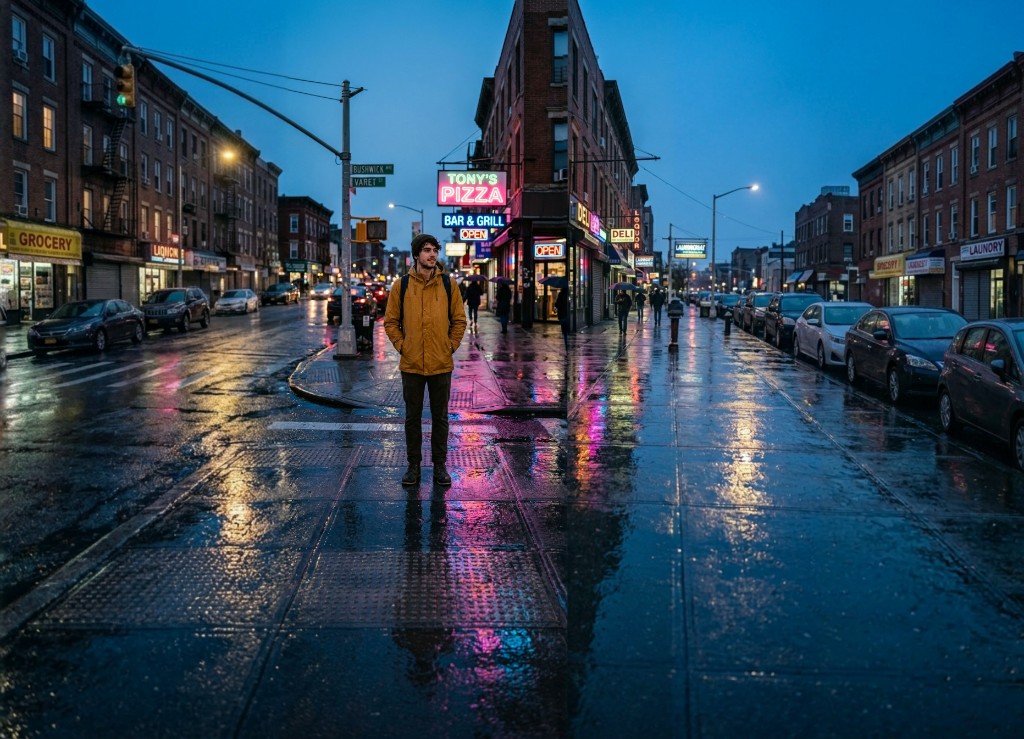
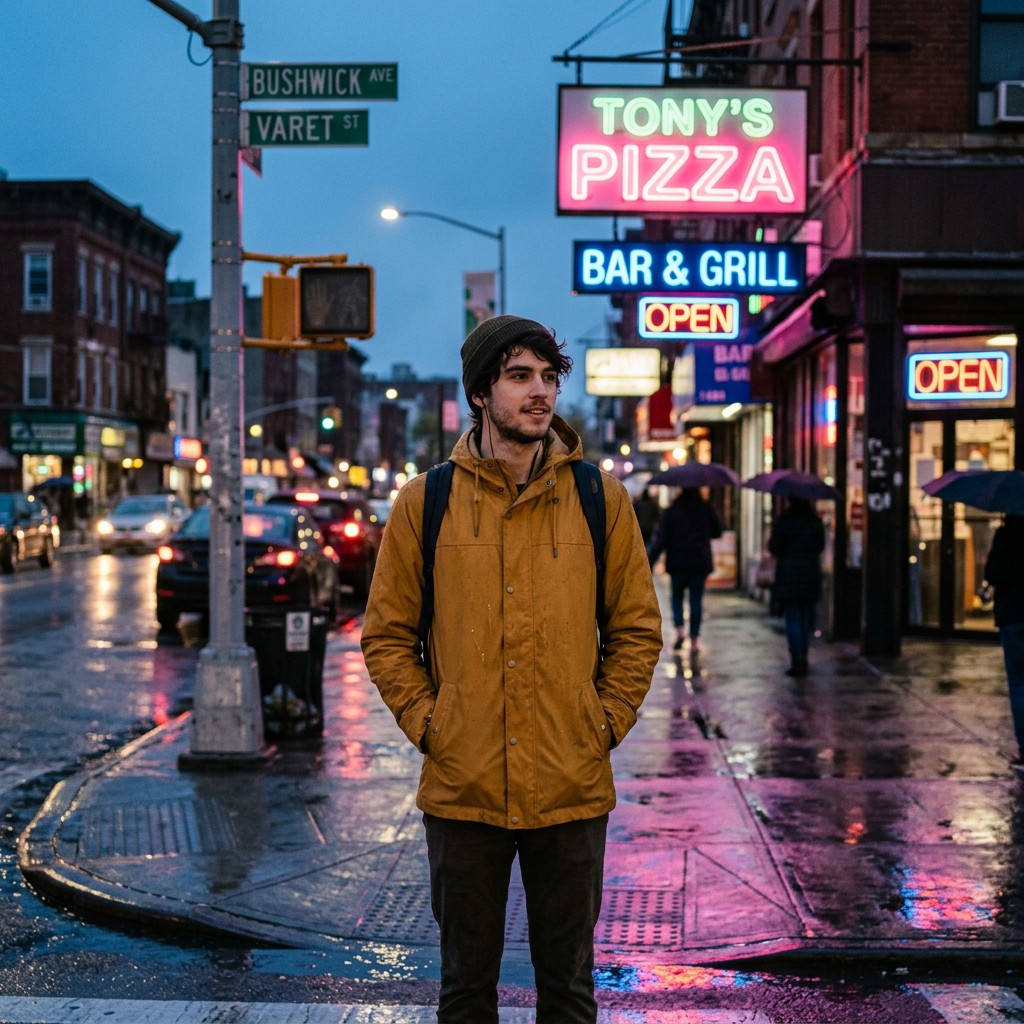
A single 1024 × 1024 phone-style portrait → a wide 16:9 cinematic frame, in a few clicks. Same colors, same lighting, same wet-pavement reflections — just much, much more of them.
| Before · 1024 × 1024 | After · extended L+R into a cinematic wide |
|---|---|
 | |
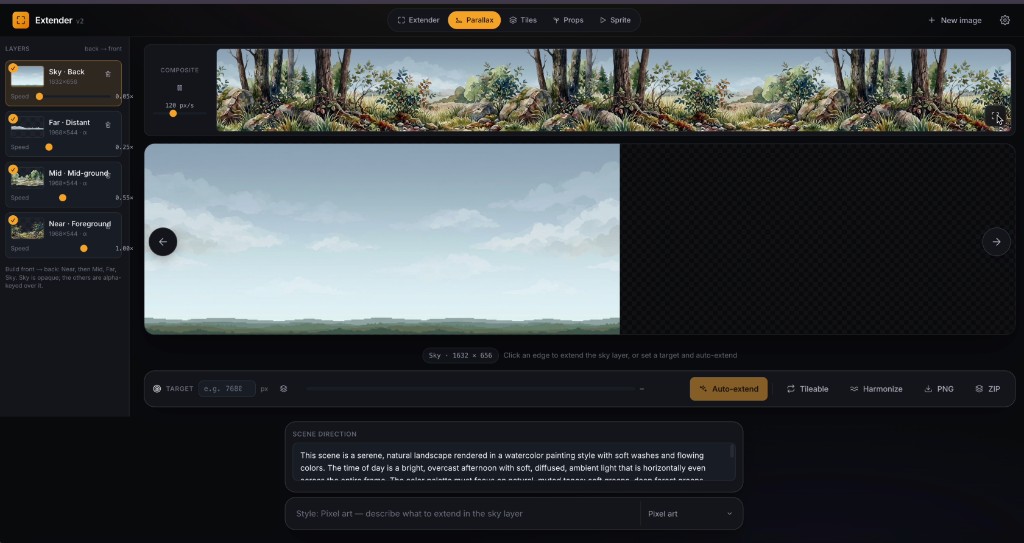
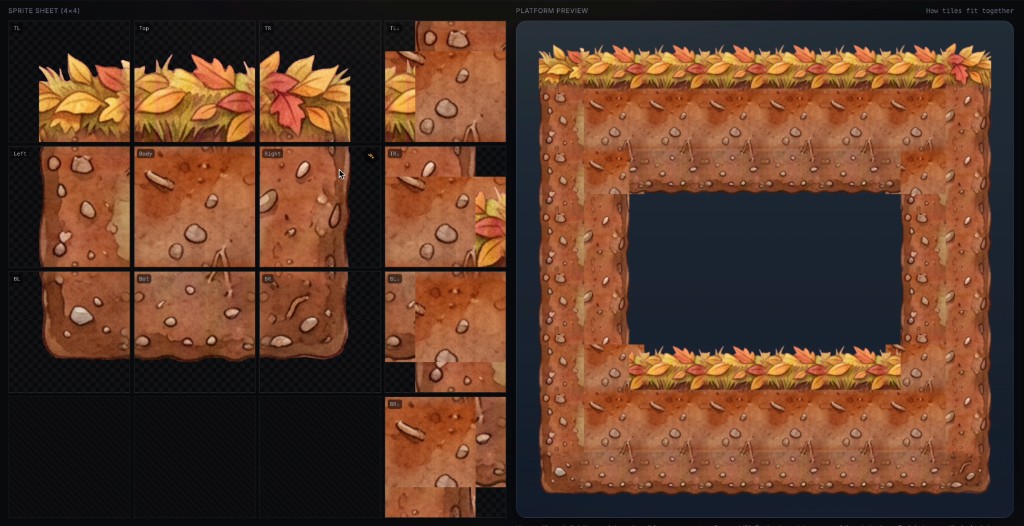
The app ships as a tiny studio with five workspaces, switchable from the pill in the top bar:
← → and pick the one
you like before accepting.localStorage. The server proxies your requests to OpenRouter
but never logs or persists the key.←/→ to cycle variants,
Enter to accept, R to regenerate, Esc to discard.#FF00FF) which the client
replaces with real alpha — so each layer composites cleanly over the sky.repeat-x scroll for
every populated layer, each at its own adjustable speed (Sky drifts slow,
Near runs fast). Tweak per-layer speed sliders and feel the depth in real
time before exporting.← and → are exposed — vertical
extends would warp the game height, so they're suppressed.Stop to interrupt.repeat-x. The Tileable button does the standard "offset by half / heal
the new middle seam / offset back" pass so the texture loops invisibly. It
also auto-runs at the end of auto-extend so the default exported result
Just Works.Harmonize button runs a column-mean smoothing that kills the banding while
preserving fine detail.parallax.json manifest listing depth order, scroll
speeds, and dimensions — drop the ZIP into Unity / Godot / Phaser and wire
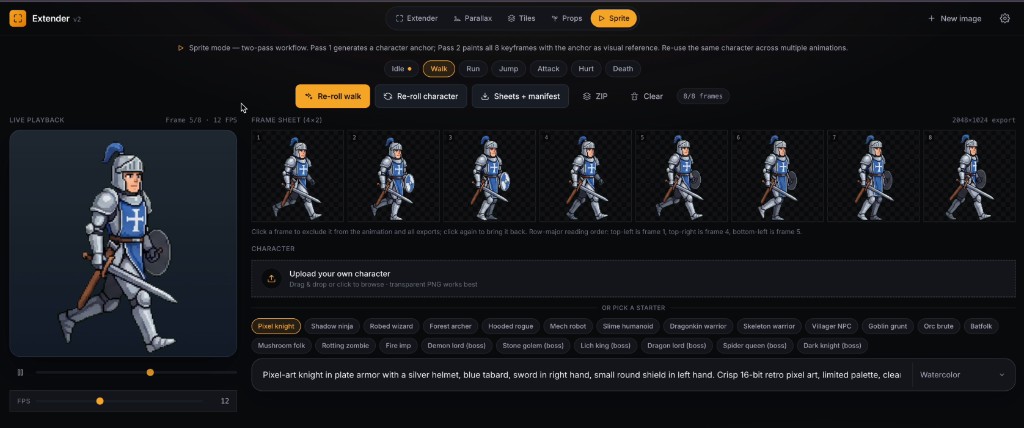
it straight into your parallax controller.Re-roll character button discards the anchor for a fresh one.manifest.json listing FPS, loop flag, frame size,
and per-frame grid + strip coordinates.prop_001: the manifest carries a human name per prop and the
files are named after it (lantern.png, mushroom.png, with _02/_03
suffixes on repeats), so the atlas is self-documenting in your engine.Tiles and Props share a two-call reasoning-vs-rendering pattern that consistently beats a single blind generation:
Critics are scoped to defects the painter can actually fix, run at low temperature for consistency, and fail-open (a flaky critic never blocks you).
┌─────────────┐   1. expand canvas with        ┌───────────────────┐
│  original   │ ──  light-gray blank area ──▶  │  expanded canvas  │
└─────────────┘     in chosen direction        └─────────┬─────────┘
                                                         │
                                                         ▼
                                              ┌─────────────────────┐
                                              │  Gemini outpaints   │
                                              │  the blank region   │
                                              └─────────┬───────────┘
                                                        │
                                                        ▼
                                              ┌─────────────────────┐
                                              │  pre-correct color  │
                                              │  drift at seam      │
                                              └─────────┬───────────┘
                                                        │
                                                        ▼
                                              ┌─────────────────────┐
                                              │  Poisson blend with │
                                              │  grown mask         │
                                              └─────────┬───────────┘
                                                        │
                                                        ▼
                                              ┌─────────────────────┐
                                              │  measure seam       │
                                              │  residual, repeat   │
                                              │  ×3, sort, present  │
                                              └─────────────────────┘
For horizontal extensions we run the pipeline up to 3 times in parallel attempts (each at a different temperature), measure the seam residual of each blended result, and present the candidates sorted best-blend first. You're free to cycle and pick a different one if you prefer the AI's content choices over the cleanest seam.
Vertical extensions use a different chunked path that's deterministic enough that 1 attempt usually suffices.
git clone https://github.com/boona13/image-extender.git
cd image-extender
npm install
npm run dev
Open http://localhost:3000. On first load the app will prompt for your OpenRouter API key — paste it once, it's stored locally, you'll never see the prompt again unless you clear it from Settings.
Get a key at openrouter.ai/keys. It costs about $0.03 per Gemini extension (Nano Banana 2 Flash Image).
If you'd rather not enter the key in the browser (or you're hosting a demo
where you want to provide the key for visitors), copy .env.example to
.env.local and fill in your key:
cp .env.example .env.local
# edit .env.local and add your OPENROUTER_API_KEY
When set, the server will use this key for any request that doesn't include a client-provided one.
| Action | How |
|---|---|
| Switch mode | Click Extender / Parallax / Tiles / Sprite / Props pill in the top bar |
| Upload image | Drag & drop, click the dropzone, or generate one from text |
| Extend | Click one of the four edge handles, or press ↑ ↓ ← → (parallax mode: ← → only) |
| Cycle variants | ← → arrow keys (or chevrons in the pill below the image) |
| Accept / Regenerate / Discard / Download | Enter / R / Esc / Download button |
| Pick a parallax layer | Click a card in the left panel (Sky / Far / Mid / Near) |
| Adjust per-layer scroll speed | Drag the slider on each layer card — preview updates live |
| Auto-extend (parallax) | Set a target width, click Auto-extend, click Stop to interrupt |
| Make tileable / Harmonize (parallax) | Tileable heals the loop seam (auto-runs after auto-extend); Harmonize flattens cumulative drift |
| Export project (parallax) | Click ZIP → all layers + parallax.json manifest |
| Generate a tile set | Describe the material, click generate — one AI call, auto corner-reconcile + QA review |
| Re-roll one tile | Click the spark on a single tile cell (re-reconciles corners after) |
| Export tile set | Atlas (with extrude padding) + per-tile PNGs + manifest |
| Pick a sprite body plan | Choose Humanoid / Quadruped / Serpent / Fish / Flyer / Bird / Blob — swaps the rig, anim set, and presets |
| Pick a sprite animation | Click an animation chip (the set depends on the body plan) |
| Lock a sprite character | Pick a starter chip (or describe one), click Lock character + <anim> — runs both passes |
| Re-roll a sprite anim / character | Re-roll <anim> runs Pass 2 only (identity preserved); Re-roll character runs both from scratch |
| Play / pause sprite, adjust FPS | Play button + scrubber under the live player; drag the FPS slider |
| Export sprite project | Sheets + manifest for grid + strip PNGs, or ZIP for everything |
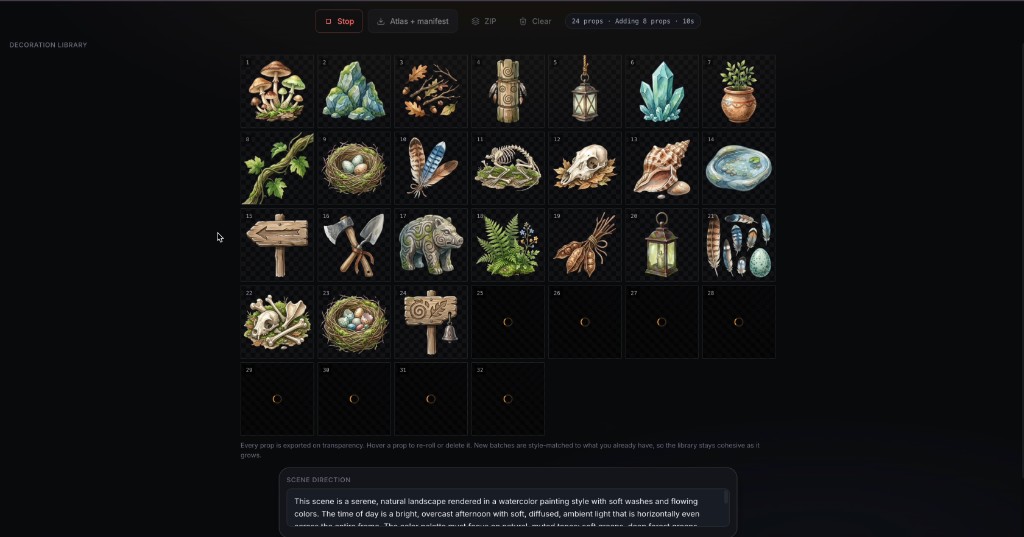
| Generate props | Pick a biome preset (or describe one), click add — paints 8 new distinct props and appends them |
| Add more props | Press add again — another batch of 8, deduped against the existing library |
| Curate props | Hover a prop to re-roll or delete it |
| Export props | Atlas + manifest for the packed transparent atlas, or ZIP for individual PNGs + atlas + manifest |
Optional custom prompt and art style live in the bottom command bar.
google/gemini-3.1-flash-image-preview (Nano Banana 2, default),
google/gemini-3-pro-image-preview (Nano Banana Pro),
google/gemini-2.5-flash-image (Nano Banana), and
openai/gpt-5.4-image-2 (GPT-5.4 Image 2 — high fidelity, slower)google/gemini-2.0-flash-001app/
├── api/
│ ├── extend/route.ts Outpainting endpoint (proxies OpenRouter)
│ ├── generate/route.ts Text-to-image + tile-sheet + sprite-sheet prompts
│ ├── scene-brief/route.ts Distill a shared scene brief for a project
│ ├── prop-brief/route.ts Props "art director" — invents the next prop batch
│ ├── tile-review/route.ts Tile QA "art director" (vision critic)
│ └── sprite-review/route.ts Sprite QA "art director" (vision critic)
├── components/ UI split by workspace
│ ├── TopBar / CommandBar / Workspace / VariantSelector / Modals / icons
│ ├── ParallaxStudio.tsx
│ ├── TileStudio.tsx + PlatformPreview compositor
│ ├── SpriteStudio.tsx
│ └── PropStudio.tsx
├── lib/ Domain logic & constants
│ ├── app.ts / models.ts / artStyles.ts
│ ├── parallax.ts / tileset.ts / sprite.ts / props.ts
│ └── bodyPlans.ts Sprite body-plan registry (anims, presets, rigs)
├── utils/
│ ├── imageProcessor.ts Canvas: chunking, Poisson blend, chroma key,
│ │ tileability, seam scoring, sprite align/scale
│ ├── poseRig.ts Dispatches to the body-plan rig + measures subject
│ ├── rigCore.ts Shared rig primitives (capsule/dot/projection…)
│ └── rigs/ Per-body-plan pose rigs (biped, quadruped,
│ serpent, flyer, blob)
├── globals.css Dark "studio" design system
├── layout.tsx Root layout, Inter font
└── page.tsx App shell: state, generation pipelines, QA loops
A few small values you might want to tune:
| Constant | Where | Default | Meaning |
|---|---|---|---|
EXTENSION_PERCENT | app/lib/app.ts | 38 | How much of the current dimension each extension adds |
maxAttempts | per model in app/lib/models.ts | 1–3 | Best-of-N candidates per horizontal extension |
MAX_TILE_REVIEW_PASSES | app/page.tsx | 2 | Extra tile repaint passes the QA art director may trigger |
TILESET_TILE_SIZE | app/lib/tileset.ts | 512 | Per-tile resolution in the 4×4 sheet |
TILESET_ATLAS_EXTRUDE_PX | app/lib/tileset.ts | 2 | Duplicated border around each exported atlas tile |
PROP_BATCH | app/lib/props.ts | 8 | Props painted per "add more" press |
GROW_PX | app/utils/imageProcessor.ts | 8 | Pixels to grow the Poisson mask into the original |
iterations | app/utils/imageProcessor.ts | 250 | Max Gauss-Seidel iterations |
localStorage. It is never written to the server's disk and
never logged. The server uses it once per request to proxy the call to
OpenRouter, then discards it.OPENROUTER_API_KEY env var is optional and acts only
as a fallback for requests that don't include a client-provided key.205 followers · starred Aug 2026
772 followers · starred Jun 2026
17 followers · starred Jun 2026
2 followers · starred Jun 2026
Seamlessly extend any image in any direction with AI. Open-source web app powered by Gemini via OpenRouter, with Poisson-blended seams and best-of-3 variant picker.
See the codeSeamlessly extend any image in any direction with AI — then build whole 2D game art sets (parallax backgrounds, autotiles, sprite animations, and decoration props) from the same studio.
A small open-source web app for AI outpainting and 2D game-art generation. Powered by Google's Gemini image models via OpenRouter, with a Poisson-blending pipeline that hides the seam between original and AI-generated pixels, plus purpose-built pipelines for tiles, sprites, and props.
Bring your own OpenRouter API key — it stays in your browser, never on the server.
A single 1024 × 1024 phone-style portrait → a wide 16:9 cinematic frame, in a few clicks. Same colors, same lighting, same wet-pavement reflections — just much, much more of them.
| Before · 1024 × 1024 | After · extended L+R into a cinematic wide |
|---|---|
| |
The app ships as a tiny studio with five workspaces, switchable from the pill in the top bar:
← → and pick the one
you like before accepting.localStorage. The server proxies your requests to OpenRouter
but never logs or persists the key.←/→ to cycle variants,
Enter to accept, R to regenerate, Esc to discard.#FF00FF) which the client
replaces with real alpha — so each layer composites cleanly over the sky.repeat-x scroll for
every populated layer, each at its own adjustable speed (Sky drifts slow,
Near runs fast). Tweak per-layer speed sliders and feel the depth in real
time before exporting.← and → are exposed — vertical
extends would warp the game height, so they're suppressed.Stop to interrupt.repeat-x. The Tileable button does the standard "offset by half / heal
the new middle seam / offset back" pass so the texture loops invisibly. It
also auto-runs at the end of auto-extend so the default exported result
Just Works.Harmonize button runs a column-mean smoothing that kills the banding while
preserving fine detail.parallax.json manifest listing depth order, scroll
speeds, and dimensions — drop the ZIP into Unity / Godot / Phaser and wire
it straight into your parallax controller.Re-roll character button discards the anchor for a fresh one.manifest.json listing FPS, loop flag, frame size,
and per-frame grid + strip coordinates.prop_001: the manifest carries a human name per prop and the
files are named after it (lantern.png, mushroom.png, with _02/_03
suffixes on repeats), so the atlas is self-documenting in your engine.Tiles and Props share a two-call reasoning-vs-rendering pattern that consistently beats a single blind generation:
Critics are scoped to defects the painter can actually fix, run at low temperature for consistency, and fail-open (a flaky critic never blocks you).
┌─────────────┐   1. expand canvas with        ┌───────────────────┐
│  original   │ ──  light-gray blank area ──▶  │  expanded canvas  │
└─────────────┘     in chosen direction        └─────────┬─────────┘
                                                         │
                                                         ▼
                                              ┌─────────────────────┐
                                              │  Gemini outpaints   │
                                              │  the blank region   │
                                              └─────────┬───────────┘
                                                        │
                                                        ▼
                                              ┌─────────────────────┐
                                              │  pre-correct color  │
                                              │  drift at seam      │
                                              └─────────┬───────────┘
                                                        │
                                                        ▼
                                              ┌─────────────────────┐
                                              │  Poisson blend with │
                                              │  grown mask         │
                                              └─────────┬───────────┘
                                                        │
                                                        ▼
                                              ┌─────────────────────┐
                                              │  measure seam       │
                                              │  residual, repeat   │
                                              │  ×3, sort, present  │
                                              └─────────────────────┘
For horizontal extensions we run the pipeline up to 3 times in parallel attempts (each at a different temperature), measure the seam residual of each blended result, and present the candidates sorted best-blend first. You're free to cycle and pick a different one if you prefer the AI's content choices over the cleanest seam.
Vertical extensions use a different chunked path that's deterministic enough that 1 attempt usually suffices.
git clone https://github.com/boona13/image-extender.git
cd image-extender
npm install
npm run dev
Open http://localhost:3000. On first load the app will prompt for your OpenRouter API key — paste it once, it's stored locally, you'll never see the prompt again unless you clear it from Settings.
Get a key at openrouter.ai/keys. It costs about $0.03 per Gemini extension (Nano Banana 2 Flash Image).
If you'd rather not enter the key in the browser (or you're hosting a demo
where you want to provide the key for visitors), copy .env.example to
.env.local and fill in your key:
cp .env.example .env.local
# edit .env.local and add your OPENROUTER_API_KEY
When set, the server will use this key for any request that doesn't include a client-provided one.
| Action | How |
|---|---|
| Switch mode | Click Extender / Parallax / Tiles / Sprite / Props pill in the top bar |
| Upload image | Drag & drop, click the dropzone, or generate one from text |
| Extend | Click one of the four edge handles, or press ↑ ↓ ← → (parallax mode: ← → only) |
| Cycle variants | ← → arrow keys (or chevrons in the pill below the image) |
| Accept / Regenerate / Discard / Download | Enter / R / Esc / Download button |
| Pick a parallax layer | Click a card in the left panel (Sky / Far / Mid / Near) |
| Adjust per-layer scroll speed | Drag the slider on each layer card — preview updates live |
| Auto-extend (parallax) | Set a target width, click Auto-extend, click Stop to interrupt |
| Make tileable / Harmonize (parallax) | Tileable heals the loop seam (auto-runs after auto-extend); Harmonize flattens cumulative drift |
| Export project (parallax) | Click ZIP → all layers + parallax.json manifest |
| Generate a tile set | Describe the material, click generate — one AI call, auto corner-reconcile + QA review |
| Re-roll one tile | Click the spark on a single tile cell (re-reconciles corners after) |
| Export tile set | Atlas (with extrude padding) + per-tile PNGs + manifest |
| Pick a sprite body plan | Choose Humanoid / Quadruped / Serpent / Fish / Flyer / Bird / Blob — swaps the rig, anim set, and presets |
| Pick a sprite animation | Click an animation chip (the set depends on the body plan) |
| Lock a sprite character | Pick a starter chip (or describe one), click Lock character + <anim> — runs both passes |
| Re-roll a sprite anim / character | Re-roll <anim> runs Pass 2 only (identity preserved); Re-roll character runs both from scratch |
| Play / pause sprite, adjust FPS | Play button + scrubber under the live player; drag the FPS slider |
| Export sprite project | Sheets + manifest for grid + strip PNGs, or ZIP for everything |
| Generate props | Pick a biome preset (or describe one), click add — paints 8 new distinct props and appends them |
| Add more props | Press add again — another batch of 8, deduped against the existing library |
| Curate props | Hover a prop to re-roll or delete it |
| Export props | Atlas + manifest for the packed transparent atlas, or ZIP for individual PNGs + atlas + manifest |
Optional custom prompt and art style live in the bottom command bar.
google/gemini-3.1-flash-image-preview (Nano Banana 2, default),
google/gemini-3-pro-image-preview (Nano Banana Pro),
google/gemini-2.5-flash-image (Nano Banana), and
openai/gpt-5.4-image-2 (GPT-5.4 Image 2 — high fidelity, slower)google/gemini-2.0-flash-001app/
├── api/
│ ├── extend/route.ts Outpainting endpoint (proxies OpenRouter)
│ ├── generate/route.ts Text-to-image + tile-sheet + sprite-sheet prompts
│ ├── scene-brief/route.ts Distill a shared scene brief for a project
│ ├── prop-brief/route.ts Props "art director" — invents the next prop batch
│ ├── tile-review/route.ts Tile QA "art director" (vision critic)
│ └── sprite-review/route.ts Sprite QA "art director" (vision critic)
├── components/ UI split by workspace
│ ├── TopBar / CommandBar / Workspace / VariantSelector / Modals / icons
│ ├── ParallaxStudio.tsx
│ ├── TileStudio.tsx + PlatformPreview compositor
│ ├── SpriteStudio.tsx
│ └── PropStudio.tsx
├── lib/ Domain logic & constants
│ ├── app.ts / models.ts / artStyles.ts
│ ├── parallax.ts / tileset.ts / sprite.ts / props.ts
│ └── bodyPlans.ts Sprite body-plan registry (anims, presets, rigs)
├── utils/
│ ├── imageProcessor.ts Canvas: chunking, Poisson blend, chroma key,
│ │ tileability, seam scoring, sprite align/scale
│ ├── poseRig.ts Dispatches to the body-plan rig + measures subject
│ ├── rigCore.ts Shared rig primitives (capsule/dot/projection…)
│ └── rigs/ Per-body-plan pose rigs (biped, quadruped,
│ serpent, flyer, blob)
├── globals.css Dark "studio" design system
├── layout.tsx Root layout, Inter font
└── page.tsx App shell: state, generation pipelines, QA loops
A few small values you might want to tune:
| Constant | Where | Default | Meaning |
|---|---|---|---|
EXTENSION_PERCENT | app/lib/app.ts | 38 | How much of the current dimension each extension adds |
maxAttempts | per model in app/lib/models.ts | 1–3 | Best-of-N candidates per horizontal extension |
MAX_TILE_REVIEW_PASSES | app/page.tsx | 2 | Extra tile repaint passes the QA art director may trigger |
TILESET_TILE_SIZE | app/lib/tileset.ts | 512 | Per-tile resolution in the 4×4 sheet |
TILESET_ATLAS_EXTRUDE_PX | app/lib/tileset.ts | 2 | Duplicated border around each exported atlas tile |
PROP_BATCH | app/lib/props.ts | 8 | Props painted per "add more" press |
GROW_PX | app/utils/imageProcessor.ts | 8 | Pixels to grow the Poisson mask into the original |
iterations | app/utils/imageProcessor.ts | 250 | Max Gauss-Seidel iterations |
localStorage. It is never written to the server's disk and
never logged. The server uses it once per request to proxy the call to
OpenRouter, then discards it.OPENROUTER_API_KEY env var is optional and acts only
as a fallback for requests that don't include a client-provided key.205 followers · starred Aug 2026
772 followers · starred Jun 2026
17 followers · starred Jun 2026
2 followers · starred Jun 2026



