Simple go utility to download HuggingFace Models and Datasets
Go
1,190
188 commits
updated Oct 4, 2026
The fastest, smartest way to download models from HuggingFace Hub




Parallel downloads • Smart GGUF analyzer • Python compatible • Full proxy support
Quick Start • Why This Tool • Smart Analyzer • Web UI • Mirror Sync • Proxy Support
Maximize your bandwidth with multiple connections per file and concurrent file downloads:
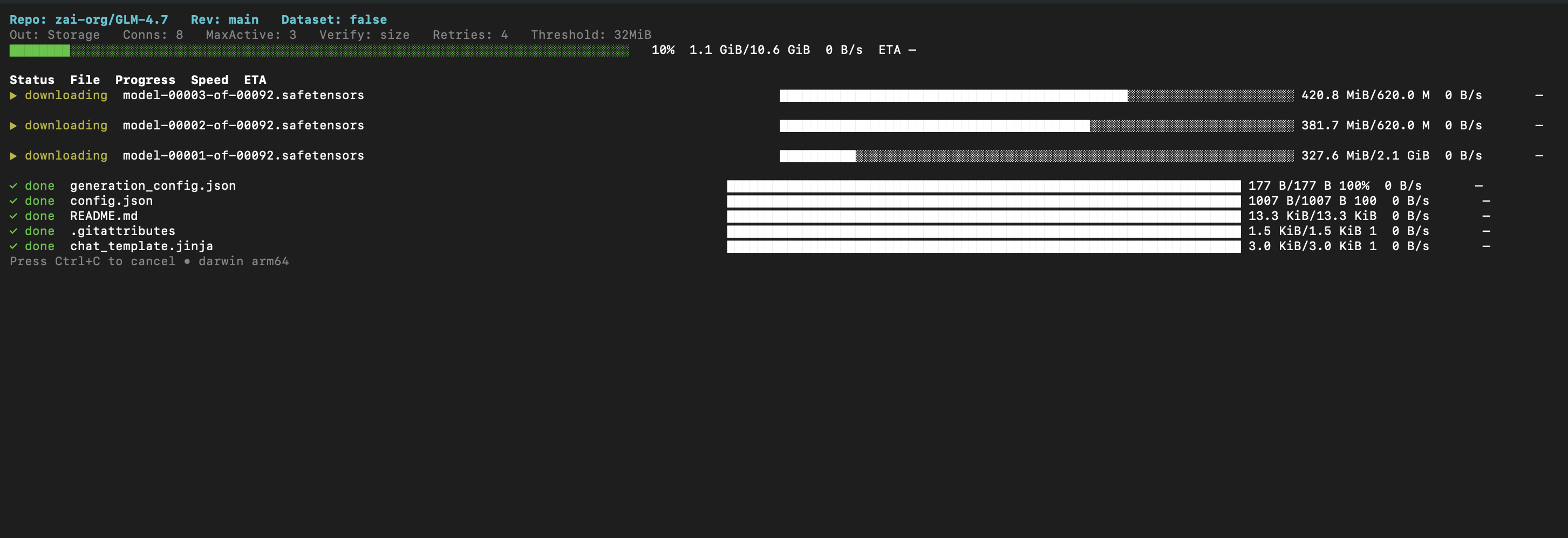
Real-time progress with per-file status, speed, and ETA.
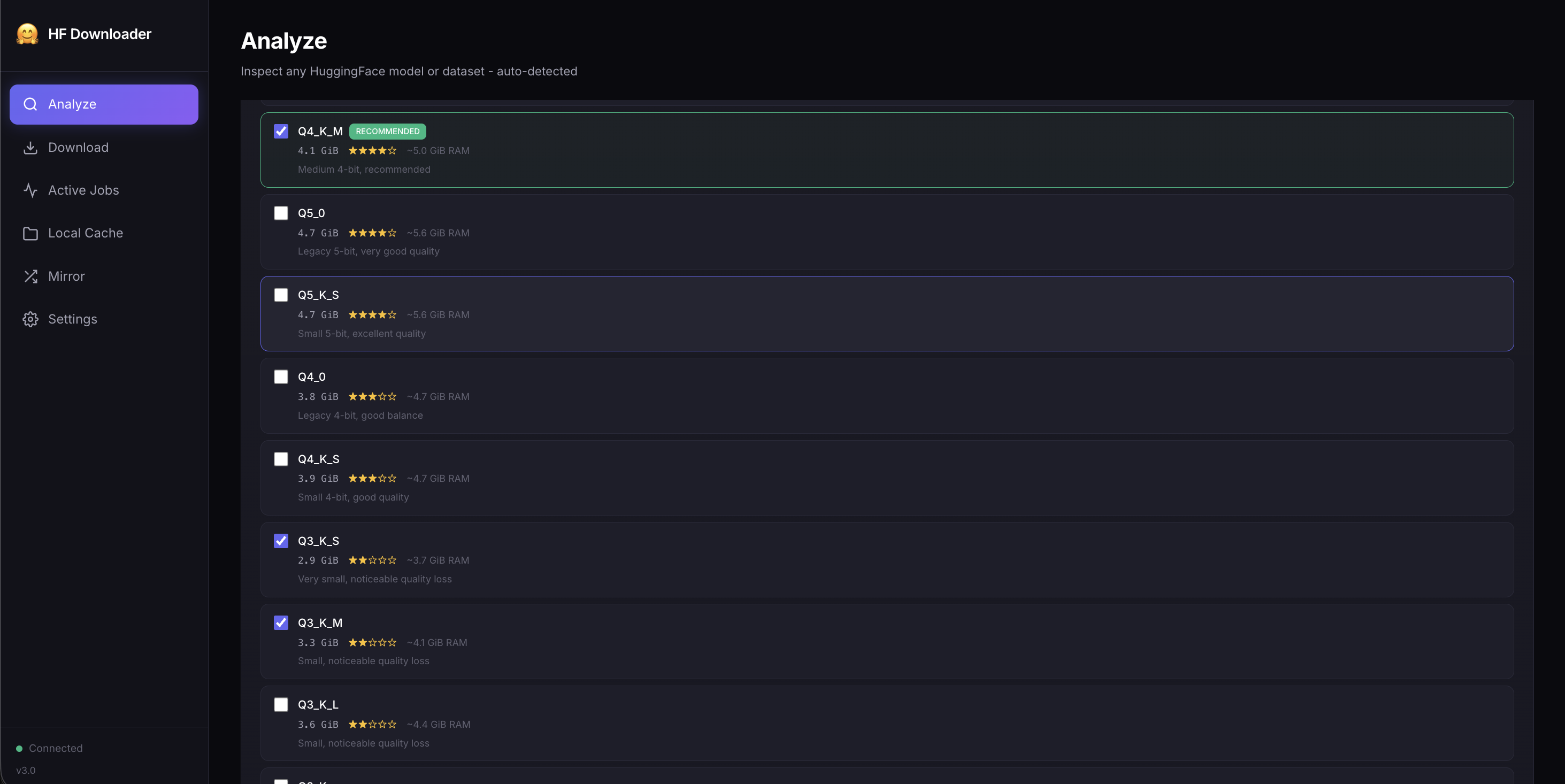
Don't guess which quantization to download. Use -i for an interactive picker with quality ratings and RAM estimates:
hfdownloader analyze -i TheBloke/Mistral-7B-Instruct-v0.2-GGUF
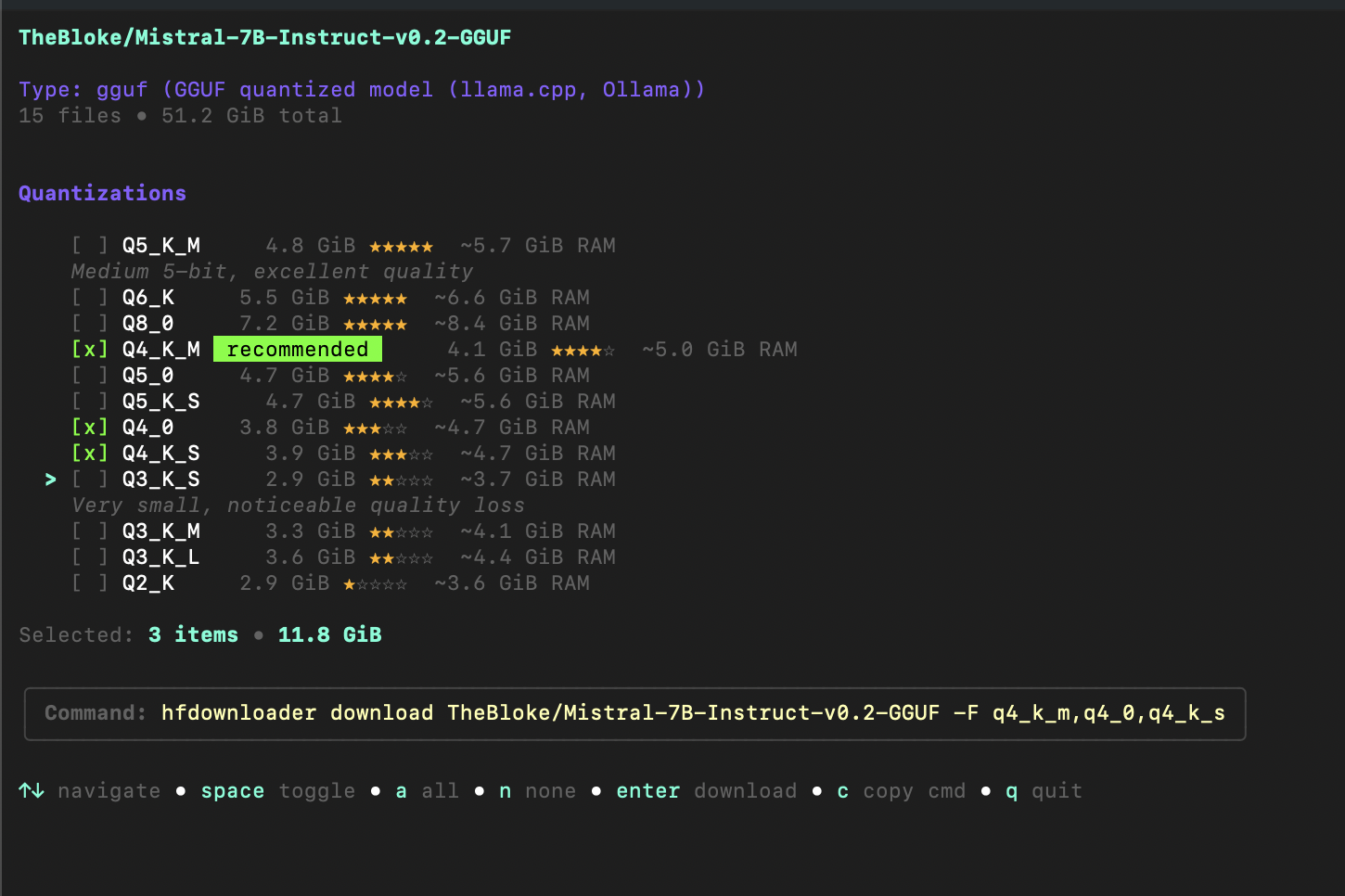
Interactive mode features:
c to copy commandWithout -i, output is text/JSON — perfect for scripts and piping to other tools.
Downloads go to the standard HuggingFace cache. Python libraries find them automatically:
from transformers import AutoModel
model = AutoModel.from_pretrained("TheBloke/Mistral-7B-Instruct-v0.2-GGUF")  # Just works
Plus, you get human-readable paths at ~/.cache/huggingface/models/ for easy browsing.
Full proxy support including SOCKS5, authentication, and CIDR bypass rules:
hfdownloader download meta-llama/Llama-2-7b --proxy socks5://localhost:1080
Try it first — no installation required:
# Analyze a model with interactive GGUF picker
bash <(curl -sSL https://g.bodaay.io/hfd) analyze -i TheBloke/Mistral-7B-Instruct-v0.2-GGUF

# Download a model
bash <(curl -sSL https://g.bodaay.io/hfd) download TheBloke/Mistral-7B-Instruct-v0.2-GGUF

# Start web UI
bash <(curl -sSL https://g.bodaay.io/hfd) serve

# Start web UI with authentication
bash <(curl -sSL https://g.bodaay.io/hfd) serve --auth-user admin --auth-pass secret
Like it? Install permanently (no sudo):
bash <(curl -sSL https://g.bodaay.io/hfd) install
By default this installs to ~/.local/bin (or ~/bin if that's already on
your PATH) so no sudo prompt is needed. Pass an explicit path to override:
# System-wide install (may prompt for sudo)
bash <(curl -sSL https://g.bodaay.io/hfd) install /usr/local/bin
Now use directly:
hfdownloader analyze -i TheBloke/Mistral-7B-Instruct-v0.2-GGUF
hfdownloader download TheBloke/Mistral-7B-Instruct-v0.2-GGUF:q4_k_m
hfdownloader serve
hfdownloader serve --auth-user admin --auth-pass secret   # with authentication
Files go to ~/.cache/huggingface/ — Python libraries find them automatically.
Not sure what's in a repository? Analyze it first:
hfdownloader analyze <any-repo>
For GGUF models, you get an interactive picker (see screenshot above). For other types, the analyzer auto-detects and shows relevant information:
| Type | What It Shows |
|---|---|
| GGUF | Interactive picker with quality ratings, RAM estimates, multi-select |
| Transformers | Architecture, parameters, context length, vocabulary size |
| Diffusers | Pipeline type, components, variants (fp16, bf16) |
| LoRA | Base model, rank, alpha, target modules |
| GPTQ/AWQ | Bits, group size, estimated VRAM |
| Dataset | Formats, configs, splits, sizes |
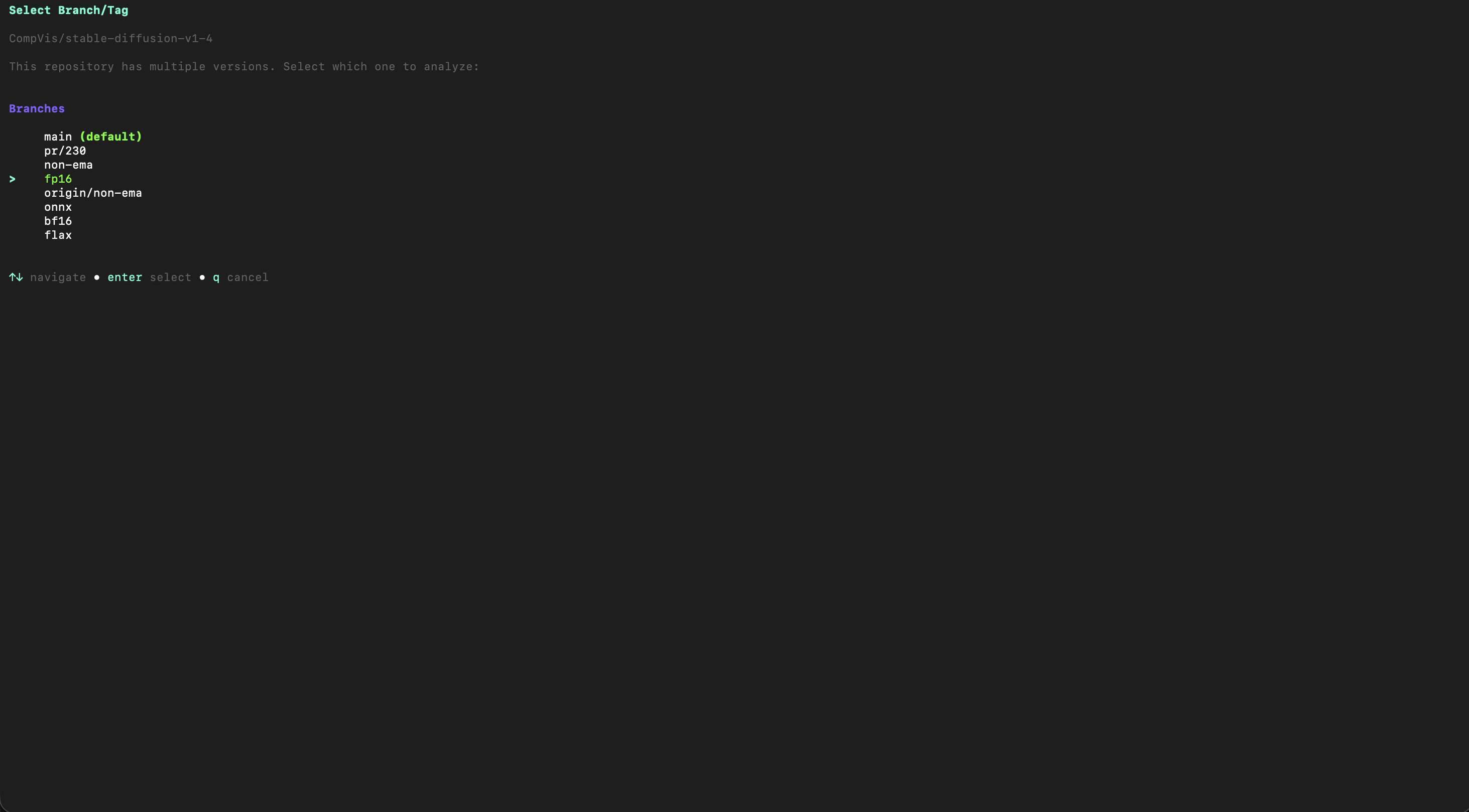
Some repos have multiple branches (fp16, onnx, flax). The analyzer lets you pick:
hfdownloader analyze -i CompVis/stable-diffusion-v1-4
For Stable Diffusion models, pick exactly which components you need:
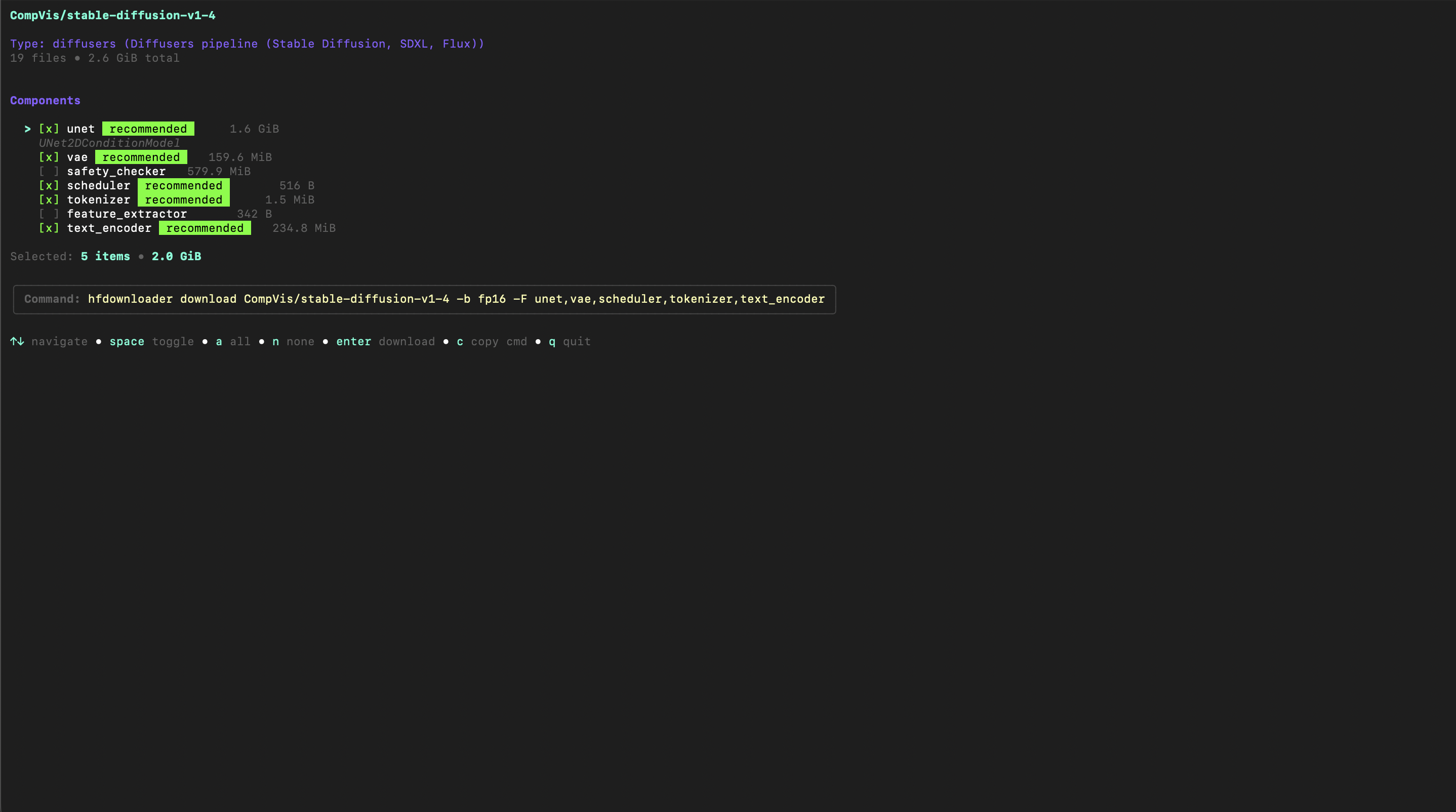
Select unet, vae, text_encoder — skip what you don't need. The command is generated automatically.
Download specific files without extra flags:
# Download only Q4_K_M quantization
hfdownloader download TheBloke/Mistral-7B-Instruct-v0.2-GGUF:q4_k_m

# Download multiple quantizations
hfdownloader download TheBloke/Mistral-7B-Instruct-v0.2-GGUF:q4_k_m,q5_k_m

# Or use flags
hfdownloader download TheBloke/Mistral-7B-Instruct-v0.2-GGUF -F q4_k_m -E ".md,fp16"
# Interrupted? Just run again - automatically resumes
hfdownloader download owner/repo

# Large (LFS) files are always SHA256-verified; --verify sets the check
# for the remaining files (none|size|etag|sha256, default size)
hfdownloader download owner/repo --verify sha256

# Preview what would download
hfdownloader download owner/repo --dry-run
# Maximum parallelism
hfdownloader download owner/repo -c 16 --max-active 8
| Flag | Default | Description |
|---|---|---|
-c, --connections | 8 | Connections per file |
--max-active | 3 | Concurrent file downloads |
-F, --filters | Include patterns | |
-E, --exclude | Exclude patterns | |
-b, --revision | main | Branch, tag, or commit |
Two modes are fully supported. Pick whichever fits your workflow — neither is going away.
hfdownloader download TheBloke/Mistral-7B-Instruct-v0.2-GGUF
Files go into the standard HuggingFace cache so Python libraries
(transformers, diffusers, huggingface_hub, llama.cpp's Python
bindings, …) find them automatically — nothing to configure.
~/.cache/huggingface/
├── hub/                              # Layer 1: HF cache (Python compatible)
│   └── models--TheBloke--Mistral.../
│       ├── blobs/                    # real files, content-addressed
│       ├── snapshots/a1b2c3d4.../
│       │   └── model.gguf            → symlink to blobs/<sha>
│       └── refs/main
│
└── models/                           # Layer 2: human-readable view
    └── TheBloke/
        └── Mistral-7B-GGUF/
            ├── model.gguf            → symlink to hub/.../snapshots/...
            └── hfd.yaml              # download manifest
Layer 1 (hub/): Standard HF cache structure. Python tools just work.
Layer 2 (models/): Human-readable paths via symlinks — browse your
downloads like normal folders.
Windows: Symlinks need Administrator or Developer Mode on Windows, so without them hfdownloader uses hardlinks instead — real files that share the same disk space, which Python, the HF CLI and you can all use. On drives without hardlinks either (FAT/exFAT), it copies, and asks once first. Choose explicitly with
--link-mode auto|symlink|hardlink|copy.Caches written by older Windows builds (files only in
blobs/) are repaired byhfdownloader rebuild.
Need real files for LM Studio, Ollama or llama.cpp but already downloaded
into the cache? Export them — nothing is re-downloaded; the files are copied
into a folder of your choice (add --mode hardlink to share the cache's disk
space instead):
hfdownloader export TheBloke/Mistral-7B-Instruct-v0.2-GGUF ~/lmstudio/models/TheBloke/Mistral-7B
hfdownloader export unsloth/Qwen3-Coder-30B-A3B-Instruct-GGUF ./qwen -F q4_k_m   # just one quant
In the Web UI, start the server with --export-dir <folder> and use
Export as real files on any cached repo.
If you want real files at a path of your choice — no cache, no blob
hashes, no symlinks — use --local-dir (matching
huggingface-cli download --local-dir):
hfdownloader download TheBloke/Mistral-7B-Instruct-v0.2-GGUF \
    --local-dir ./my-model
# files land in ./my-model/TheBloke/Mistral-7B-Instruct-v0.2-GGUF/
Unlike huggingface-cli, the files go into an <owner>/<name>/ subfolder of
the directory you pass. To put a repo's files directly into a folder of your
choice, download normally and use export.
This is the right mode for:
The v2.x-compatible spelling --legacy -o <dir> produces the exact same
result and is kept permanently for script compatibility:
hfdownloader download TheBloke/Mistral-7B-Instruct-v0.2-GGUF \
    --legacy -o ./my-model
Both spellings are interchangeable; pick whichever reads better in your scripts. They are mutually exclusive on a single command line.
Every download creates hfd.yaml so you know exactly what you have:
version: "1.0"
type: model
repo: TheBloke/Mistral-7B-Instruct-v0.2-GGUF
branch: main
commit: a1b2c3d4...
repo_path: hub/models--TheBloke--Mistral-7B-Instruct-v0.2-GGUF
started_at: 2024-01-15T10:25:12Z
completed_at: 2024-01-15T10:30:00Z
command: hfdownloader download TheBloke/Mistral-7B-Instruct-v0.2-GGUF -F q4_k_m
total_size: 4368438272
total_files: 1
files:
  - name: mistral-7b-instruct-v0.2.Q4_K_M.gguf
    blob: blobs/<sha256>
    size: 4368438272
    lfs: true
# List everything you've downloaded
hfdownloader list

# Get details about a specific download
hfdownloader info Mistral
A modern web interface with real-time progress:
hfdownloader serve
# Open http://localhost:8080
Browse everything you've downloaded with stats, search, and filters:
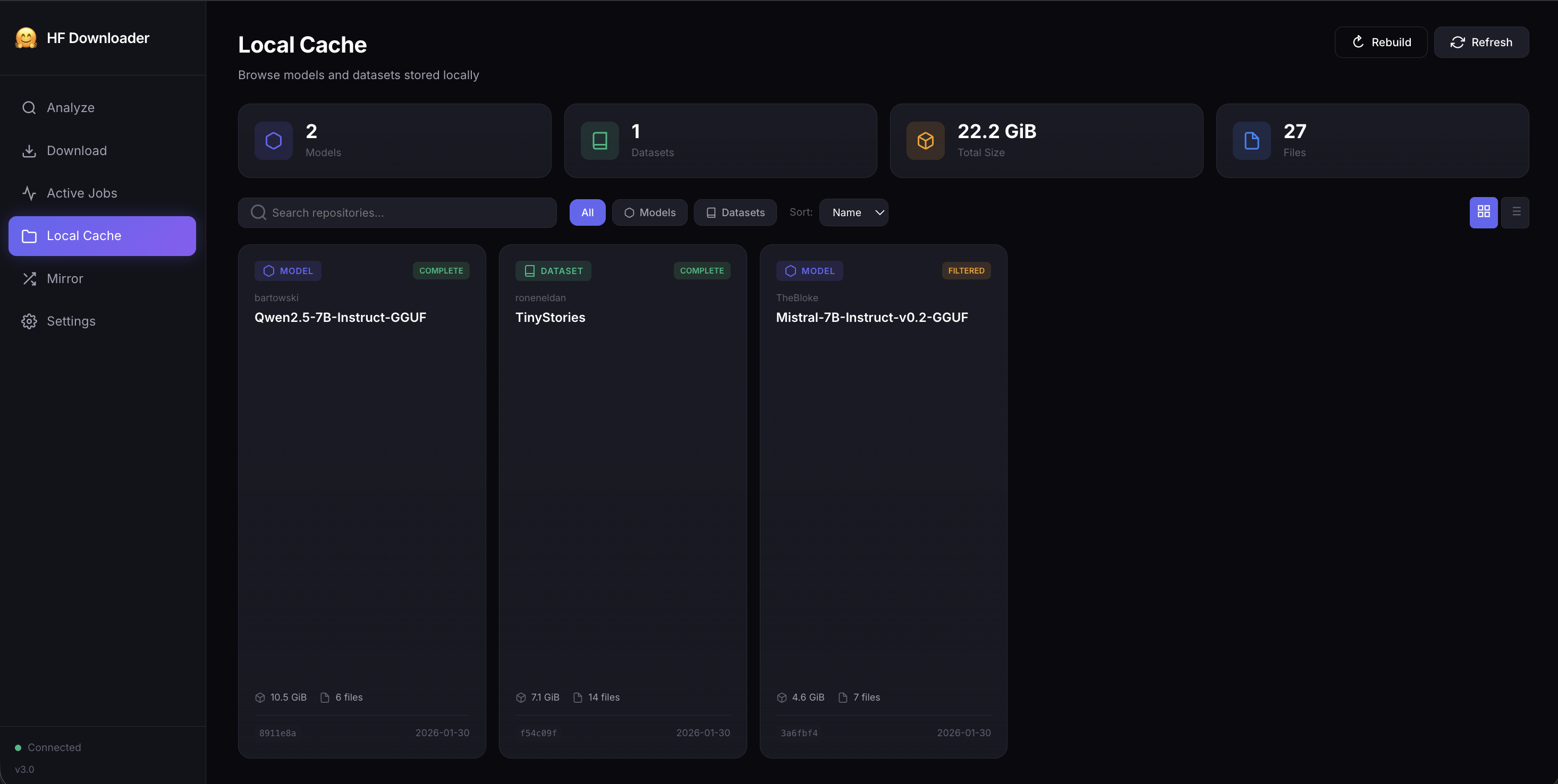
| Page | Features |
|---|---|
| Analyze | Enter any repo, auto-detect type, see files/sizes, pick GGUF quantizations |
| Jobs | Real-time WebSocket progress, pause/resume/cancel, download history |
| Cache | Browse downloaded repos, disk usage stats, search & filter |
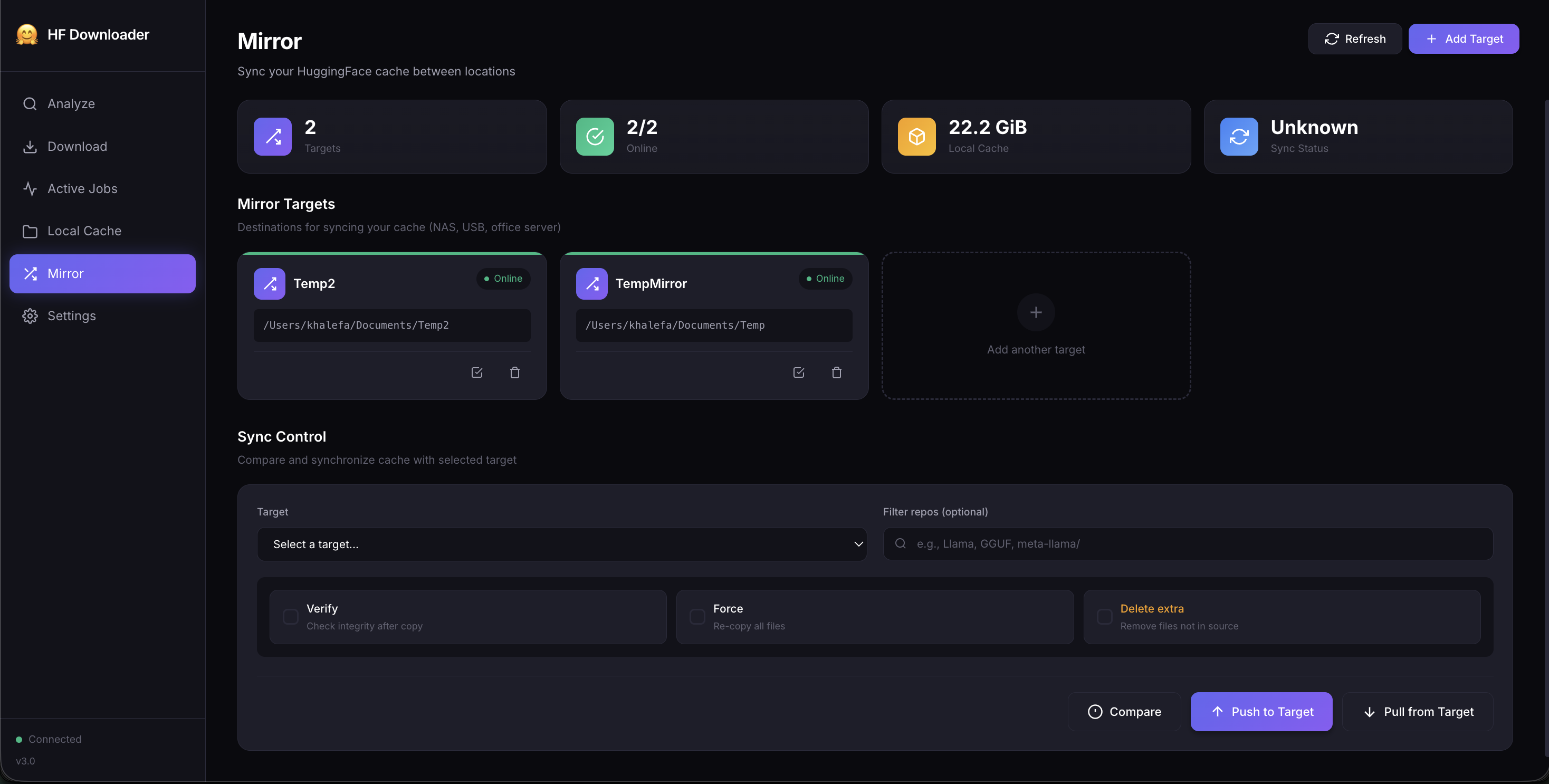
| Mirror | Configure targets, compare differences, push/pull sync |
| Settings | Token, connections, proxy, verification mode |
hfdownloader serve \
  --port 3000 \
  --auth-user admin \
  --auth-pass secret \
  -t hf_xxxxx
Sync your model cache between machines — home, office, NAS, USB drive.
# Add mirror targets
hfdownloader mirror target add office /mnt/nas/hf-models
hfdownloader mirror target add usb /media/usb/hf-cache

# Compare local vs target
hfdownloader mirror diff office

# Push local cache to target
hfdownloader mirror push office

# Pull from target to local
hfdownloader mirror pull office

# Sync specific repos only (case-insensitive substring of owner/name)
hfdownloader mirror push office --repo Llama

# Verify integrity after sync
hfdownloader mirror push office --verify
Perfect for:
Full proxy support for corporate environments:
# HTTP proxy
hfdownloader download owner/repo --proxy http://proxy:8080

# SOCKS5 (e.g., SSH tunnel)
hfdownloader download owner/repo --proxy socks5://localhost:1080

# With authentication
hfdownloader download owner/repo \
  --proxy http://proxy:8080 \
  --proxy-user myuser \
  --proxy-pass mypassword

# Test proxy connectivity before downloading
hfdownloader proxy test --proxy http://proxy:8080
| Type | URL Format |
|---|---|
| HTTP | http://host:port |
| HTTPS | https://host:port |
| SOCKS5 | socks5://host:port |
| SOCKS5h | socks5h://host:port (remote DNS) |
Save proxy settings in ~/.config/hfdownloader.yaml:
proxy:
  url: http://proxy.corp.com:8080
  username: myuser
  password: mypassword
  no_proxy: localhost,.internal.com,10.0.0.0/8
bash <(curl -sSL https://g.bodaay.io/hfd) install
That's it. Works on Linux, macOS, and WSL. Installs to ~/.local/bin by
default — no sudo required. Pass an explicit path to install somewhere else:
bash <(curl -sSL https://g.bodaay.io/hfd) install /usr/local/bin   # system-wide
bash <(curl -sSL https://g.bodaay.io/hfd) install ~/bin            # custom
Or run without installing:
bash <(curl -sSL https://g.bodaay.io/hfd) download TheBloke/Mistral-7B-Instruct-v0.2-GGUF
bash <(curl -sSL https://g.bodaay.io/hfd) serve   # Web UI
Get from Releases:
| Platform | Architecture | File |
|---|---|---|
| Linux | x86_64 | hfdownloader_linux_amd64_* |
| Linux | ARM64 | hfdownloader_linux_arm64_* |
| macOS | Apple Silicon | hfdownloader_darwin_arm64_* |
| macOS | Intel | hfdownloader_darwin_amd64_* |
| Windows | x86_64 | hfdownloader_windows_amd64_*.exe |
git clone https://github.com/bodaay/HuggingFaceModelDownloader
cd HuggingFaceModelDownloader
go build -o hfdownloader ./cmd/hfdownloader
# Pull from GitHub Container Registry
docker pull ghcr.io/bodaay/huggingfacemodeldownloader:latest

# Or build locally
docker build -t hfdownloader .

# Run (mounts your local HF cache)
docker run --rm -v ~/.cache/huggingface:/home/hfdownloader/.cache/huggingface \
  ghcr.io/bodaay/huggingfacemodeldownloader download TheBloke/Mistral-7B-Instruct-v0.2-GGUF
For private repos or gated models (Llama, etc.):
# Set token via environment
export HF_TOKEN=hf_xxxxx
hfdownloader download meta-llama/Llama-2-7b

# Or via flag
hfdownloader download meta-llama/Llama-2-7b -t hf_xxxxx
For gated models, you must first accept the license on the model's HuggingFace page.
Use the HuggingFace mirror for faster downloads in China:
hfdownloader download owner/repo --endpoint https://hf-mirror.com
Or set in config file:
endpoint: https://hf-mirror.com
| Command | Description |
|---|---|
download | Download models or datasets (hfdownloader download owner/name; the subcommand is required) |
analyze | Analyze repository before downloading |
serve | Start web server with REST API |
list | List all downloaded repos |
info | Show details about a downloaded repo |
rebuild | Regenerate friendly view from HF cache |
export | Export a downloaded repo as plain files (no re-download) |
mirror | Sync cache between locations |
proxy | Test and show proxy configuration |
config | Manage configuration |
version | Show version info |
Full documentation: docs/CLI.md • docs/API.md • docs/V3_FEATURES.md
| Feature | Description |
|---|---|
| HF Cache Compatibility | Downloads use standard HuggingFace cache structure by default (see Storage Modes) |
--local-dir flag | One-flag opt-in to flat files at a path of your choice — huggingface-cli-style |
| Dual-Layer Storage | Python-compatible cache + human-readable symlinks |
| Smart Analyzer | Auto-detect model types, GGUF quality ratings, RAM estimates |
| Web UI v3 | Modern interface with real-time WebSocket progress |
| Mirror Sync | Push/pull cache between locations |
| Full Proxy Support | HTTP, SOCKS5, authentication, CIDR bypass |
| Manifest Tracking | hfd.yaml records what/when/how for every download |
Both storage modes (HF cache and flat-file --local-dir / --legacy -o)
are fully supported and permanent — neither is deprecated. See
Storage Modes for when to pick which.
| Variable | Purpose |
|---|---|
HF_TOKEN | HuggingFace access token |
HF_HOME | Override ~/.cache/huggingface |
HF_HUB_CACHE | Override just the hub/ directory |
HTTP_PROXY | Proxy for HTTP requests |
HTTPS_PROXY | Proxy for HTTPS requests |
NO_PROXY | Comma-separated bypass list |
Apache 2.0 — use freely in personal and commercial projects.
22 followers · starred Sep 2024
140 followers · starred Apr 2026
102 followers · starred Oct 2023
170 followers · starred Jan 2026
Simple go utility to download HuggingFace Models and Datasets
Go
1,190
188 commits
updated Oct 4, 2026
The fastest, smartest way to download models from HuggingFace Hub
Parallel downloads • Smart GGUF analyzer • Python compatible • Full proxy support
Quick Start • Why This Tool • Smart Analyzer • Web UI • Mirror Sync • Proxy Support
Maximize your bandwidth with multiple connections per file and concurrent file downloads:
Real-time progress with per-file status, speed, and ETA.
Don't guess which quantization to download. Use -i for an interactive picker with quality ratings and RAM estimates:
hfdownloader analyze -i TheBloke/Mistral-7B-Instruct-v0.2-GGUF
Interactive mode features:
c to copy commandWithout -i, output is text/JSON — perfect for scripts and piping to other tools.
Downloads go to the standard HuggingFace cache. Python libraries find them automatically:
from transformers import AutoModel
model = AutoModel.from_pretrained("TheBloke/Mistral-7B-Instruct-v0.2-GGUF")  # Just works
Plus, you get human-readable paths at ~/.cache/huggingface/models/ for easy browsing.
Full proxy support including SOCKS5, authentication, and CIDR bypass rules:
hfdownloader download meta-llama/Llama-2-7b --proxy socks5://localhost:1080
Try it first — no installation required:
# Analyze a model with interactive GGUF picker
bash <(curl -sSL https://g.bodaay.io/hfd) analyze -i TheBloke/Mistral-7B-Instruct-v0.2-GGUF

# Download a model
bash <(curl -sSL https://g.bodaay.io/hfd) download TheBloke/Mistral-7B-Instruct-v0.2-GGUF

# Start web UI
bash <(curl -sSL https://g.bodaay.io/hfd) serve

# Start web UI with authentication
bash <(curl -sSL https://g.bodaay.io/hfd) serve --auth-user admin --auth-pass secret
Like it? Install permanently (no sudo):
bash <(curl -sSL https://g.bodaay.io/hfd) install
By default this installs to ~/.local/bin (or ~/bin if that's already on
your PATH) so no sudo prompt is needed. Pass an explicit path to override:
# System-wide install (may prompt for sudo)
bash <(curl -sSL https://g.bodaay.io/hfd) install /usr/local/bin
Now use directly:
hfdownloader analyze -i TheBloke/Mistral-7B-Instruct-v0.2-GGUF
hfdownloader download TheBloke/Mistral-7B-Instruct-v0.2-GGUF:q4_k_m
hfdownloader serve
hfdownloader serve --auth-user admin --auth-pass secret   # with authentication
Files go to ~/.cache/huggingface/ — Python libraries find them automatically.
Not sure what's in a repository? Analyze it first:
hfdownloader analyze <any-repo>
For GGUF models, you get an interactive picker (see screenshot above). For other types, the analyzer auto-detects and shows relevant information:
| Type | What It Shows |
|---|---|
| GGUF | Interactive picker with quality ratings, RAM estimates, multi-select |
| Transformers | Architecture, parameters, context length, vocabulary size |
| Diffusers | Pipeline type, components, variants (fp16, bf16) |
| LoRA | Base model, rank, alpha, target modules |
| GPTQ/AWQ | Bits, group size, estimated VRAM |
| Dataset | Formats, configs, splits, sizes |
Some repos have multiple branches (fp16, onnx, flax). The analyzer lets you pick:
hfdownloader analyze -i CompVis/stable-diffusion-v1-4
For Stable Diffusion models, pick exactly which components you need:
Select unet, vae, text_encoder — skip what you don't need. The command is generated automatically.
Download specific files without extra flags:
# Download only Q4_K_M quantization
hfdownloader download TheBloke/Mistral-7B-Instruct-v0.2-GGUF:q4_k_m

# Download multiple quantizations
hfdownloader download TheBloke/Mistral-7B-Instruct-v0.2-GGUF:q4_k_m,q5_k_m

# Or use flags
hfdownloader download TheBloke/Mistral-7B-Instruct-v0.2-GGUF -F q4_k_m -E ".md,fp16"
# Interrupted? Just run again - automatically resumes
hfdownloader download owner/repo

# Large (LFS) files are always SHA256-verified; --verify sets the check
# for the remaining files (none|size|etag|sha256, default size)
hfdownloader download owner/repo --verify sha256

# Preview what would download
hfdownloader download owner/repo --dry-run
# Maximum parallelism
hfdownloader download owner/repo -c 16 --max-active 8
| Flag | Default | Description |
|---|---|---|
-c, --connections | 8 | Connections per file |
--max-active | 3 | Concurrent file downloads |
-F, --filters | Include patterns | |
-E, --exclude | Exclude patterns | |
-b, --revision | main | Branch, tag, or commit |
Two modes are fully supported. Pick whichever fits your workflow — neither is going away.
hfdownloader download TheBloke/Mistral-7B-Instruct-v0.2-GGUF
Files go into the standard HuggingFace cache so Python libraries
(transformers, diffusers, huggingface_hub, llama.cpp's Python
bindings, …) find them automatically — nothing to configure.
~/.cache/huggingface/
├── hub/                              # Layer 1: HF cache (Python compatible)
│   └── models--TheBloke--Mistral.../
│       ├── blobs/                    # real files, content-addressed
│       ├── snapshots/a1b2c3d4.../
│       │   └── model.gguf            → symlink to blobs/<sha>
│       └── refs/main
│
└── models/                           # Layer 2: human-readable view
    └── TheBloke/
        └── Mistral-7B-GGUF/
            ├── model.gguf            → symlink to hub/.../snapshots/...
            └── hfd.yaml              # download manifest
Layer 1 (hub/): Standard HF cache structure. Python tools just work.
Layer 2 (models/): Human-readable paths via symlinks — browse your
downloads like normal folders.
Windows: Symlinks need Administrator or Developer Mode on Windows, so without them hfdownloader uses hardlinks instead — real files that share the same disk space, which Python, the HF CLI and you can all use. On drives without hardlinks either (FAT/exFAT), it copies, and asks once first. Choose explicitly with
--link-mode auto|symlink|hardlink|copy.Caches written by older Windows builds (files only in
blobs/) are repaired byhfdownloader rebuild.
Need real files for LM Studio, Ollama or llama.cpp but already downloaded
into the cache? Export them — nothing is re-downloaded; the files are copied
into a folder of your choice (add --mode hardlink to share the cache's disk
space instead):
hfdownloader export TheBloke/Mistral-7B-Instruct-v0.2-GGUF ~/lmstudio/models/TheBloke/Mistral-7B
hfdownloader export unsloth/Qwen3-Coder-30B-A3B-Instruct-GGUF ./qwen -F q4_k_m   # just one quant
In the Web UI, start the server with --export-dir <folder> and use
Export as real files on any cached repo.
If you want real files at a path of your choice — no cache, no blob
hashes, no symlinks — use --local-dir (matching
huggingface-cli download --local-dir):
hfdownloader download TheBloke/Mistral-7B-Instruct-v0.2-GGUF \
    --local-dir ./my-model
# files land in ./my-model/TheBloke/Mistral-7B-Instruct-v0.2-GGUF/
Unlike huggingface-cli, the files go into an <owner>/<name>/ subfolder of
the directory you pass. To put a repo's files directly into a folder of your
choice, download normally and use export.
This is the right mode for:
The v2.x-compatible spelling --legacy -o <dir> produces the exact same
result and is kept permanently for script compatibility:
hfdownloader download TheBloke/Mistral-7B-Instruct-v0.2-GGUF \
    --legacy -o ./my-model
Both spellings are interchangeable; pick whichever reads better in your scripts. They are mutually exclusive on a single command line.
Every download creates hfd.yaml so you know exactly what you have:
version: "1.0"
type: model
repo: TheBloke/Mistral-7B-Instruct-v0.2-GGUF
branch: main
commit: a1b2c3d4...
repo_path: hub/models--TheBloke--Mistral-7B-Instruct-v0.2-GGUF
started_at: 2024-01-15T10:25:12Z
completed_at: 2024-01-15T10:30:00Z
command: hfdownloader download TheBloke/Mistral-7B-Instruct-v0.2-GGUF -F q4_k_m
total_size: 4368438272
total_files: 1
files:
  - name: mistral-7b-instruct-v0.2.Q4_K_M.gguf
    blob: blobs/<sha256>
    size: 4368438272
    lfs: true
# List everything you've downloaded
hfdownloader list

# Get details about a specific download
hfdownloader info Mistral
A modern web interface with real-time progress:
hfdownloader serve
# Open http://localhost:8080
Browse everything you've downloaded with stats, search, and filters:
| Page | Features |
|---|---|
| Analyze | Enter any repo, auto-detect type, see files/sizes, pick GGUF quantizations |
| Jobs | Real-time WebSocket progress, pause/resume/cancel, download history |
| Cache | Browse downloaded repos, disk usage stats, search & filter |
| Mirror | Configure targets, compare differences, push/pull sync |
| Settings | Token, connections, proxy, verification mode |
hfdownloader serve \
  --port 3000 \
  --auth-user admin \
  --auth-pass secret \
  -t hf_xxxxx
Sync your model cache between machines — home, office, NAS, USB drive.
# Add mirror targets
hfdownloader mirror target add office /mnt/nas/hf-models
hfdownloader mirror target add usb /media/usb/hf-cache

# Compare local vs target
hfdownloader mirror diff office

# Push local cache to target
hfdownloader mirror push office

# Pull from target to local
hfdownloader mirror pull office

# Sync specific repos only (case-insensitive substring of owner/name)
hfdownloader mirror push office --repo Llama

# Verify integrity after sync
hfdownloader mirror push office --verify
Perfect for:
Full proxy support for corporate environments:
# HTTP proxy
hfdownloader download owner/repo --proxy http://proxy:8080

# SOCKS5 (e.g., SSH tunnel)
hfdownloader download owner/repo --proxy socks5://localhost:1080

# With authentication
hfdownloader download owner/repo \
  --proxy http://proxy:8080 \
  --proxy-user myuser \
  --proxy-pass mypassword

# Test proxy connectivity before downloading
hfdownloader proxy test --proxy http://proxy:8080
| Type | URL Format |
|---|---|
| HTTP | http://host:port |
| HTTPS | https://host:port |
| SOCKS5 | socks5://host:port |
| SOCKS5h | socks5h://host:port (remote DNS) |
Save proxy settings in ~/.config/hfdownloader.yaml:
proxy:
  url: http://proxy.corp.com:8080
  username: myuser
  password: mypassword
  no_proxy: localhost,.internal.com,10.0.0.0/8
bash <(curl -sSL https://g.bodaay.io/hfd) install
That's it. Works on Linux, macOS, and WSL. Installs to ~/.local/bin by
default — no sudo required. Pass an explicit path to install somewhere else:
bash <(curl -sSL https://g.bodaay.io/hfd) install /usr/local/bin   # system-wide
bash <(curl -sSL https://g.bodaay.io/hfd) install ~/bin            # custom
Or run without installing:
bash <(curl -sSL https://g.bodaay.io/hfd) download TheBloke/Mistral-7B-Instruct-v0.2-GGUF
bash <(curl -sSL https://g.bodaay.io/hfd) serve   # Web UI
Get from Releases:
| Platform | Architecture | File |
|---|---|---|
| Linux | x86_64 | hfdownloader_linux_amd64_* |
| Linux | ARM64 | hfdownloader_linux_arm64_* |
| macOS | Apple Silicon | hfdownloader_darwin_arm64_* |
| macOS | Intel | hfdownloader_darwin_amd64_* |
| Windows | x86_64 | hfdownloader_windows_amd64_*.exe |
git clone https://github.com/bodaay/HuggingFaceModelDownloader
cd HuggingFaceModelDownloader
go build -o hfdownloader ./cmd/hfdownloader
# Pull from GitHub Container Registry
docker pull ghcr.io/bodaay/huggingfacemodeldownloader:latest

# Or build locally
docker build -t hfdownloader .

# Run (mounts your local HF cache)
docker run --rm -v ~/.cache/huggingface:/home/hfdownloader/.cache/huggingface \
  ghcr.io/bodaay/huggingfacemodeldownloader download TheBloke/Mistral-7B-Instruct-v0.2-GGUF
For private repos or gated models (Llama, etc.):
# Set token via environment
export HF_TOKEN=hf_xxxxx
hfdownloader download meta-llama/Llama-2-7b

# Or via flag
hfdownloader download meta-llama/Llama-2-7b -t hf_xxxxx
For gated models, you must first accept the license on the model's HuggingFace page.
Use the HuggingFace mirror for faster downloads in China:
hfdownloader download owner/repo --endpoint https://hf-mirror.com
Or set in config file:
endpoint: https://hf-mirror.com
| Command | Description |
|---|---|
download | Download models or datasets (hfdownloader download owner/name; the subcommand is required) |
analyze | Analyze repository before downloading |
serve | Start web server with REST API |
list | List all downloaded repos |
info | Show details about a downloaded repo |
rebuild | Regenerate friendly view from HF cache |
export | Export a downloaded repo as plain files (no re-download) |
mirror | Sync cache between locations |
proxy | Test and show proxy configuration |
config | Manage configuration |
version | Show version info |
Full documentation: docs/CLI.md • docs/API.md • docs/V3_FEATURES.md
| Feature | Description |
|---|---|
| HF Cache Compatibility | Downloads use standard HuggingFace cache structure by default (see Storage Modes) |
--local-dir flag | One-flag opt-in to flat files at a path of your choice — huggingface-cli-style |
| Dual-Layer Storage | Python-compatible cache + human-readable symlinks |
| Smart Analyzer | Auto-detect model types, GGUF quality ratings, RAM estimates |
| Web UI v3 | Modern interface with real-time WebSocket progress |
| Mirror Sync | Push/pull cache between locations |
| Full Proxy Support | HTTP, SOCKS5, authentication, CIDR bypass |
| Manifest Tracking | hfd.yaml records what/when/how for every download |
Both storage modes (HF cache and flat-file --local-dir / --legacy -o)
are fully supported and permanent — neither is deprecated. See
Storage Modes for when to pick which.
| Variable | Purpose |
|---|---|
HF_TOKEN | HuggingFace access token |
HF_HOME | Override ~/.cache/huggingface |
HF_HUB_CACHE | Override just the hub/ directory |
HTTP_PROXY | Proxy for HTTP requests |
HTTPS_PROXY | Proxy for HTTPS requests |
NO_PROXY | Comma-separated bypass list |
Apache 2.0 — use freely in personal and commercial projects.
22 followers · starred Sep 2024
140 followers · starred Apr 2026
102 followers · starred Oct 2023
170 followers · starred Jan 2026



