


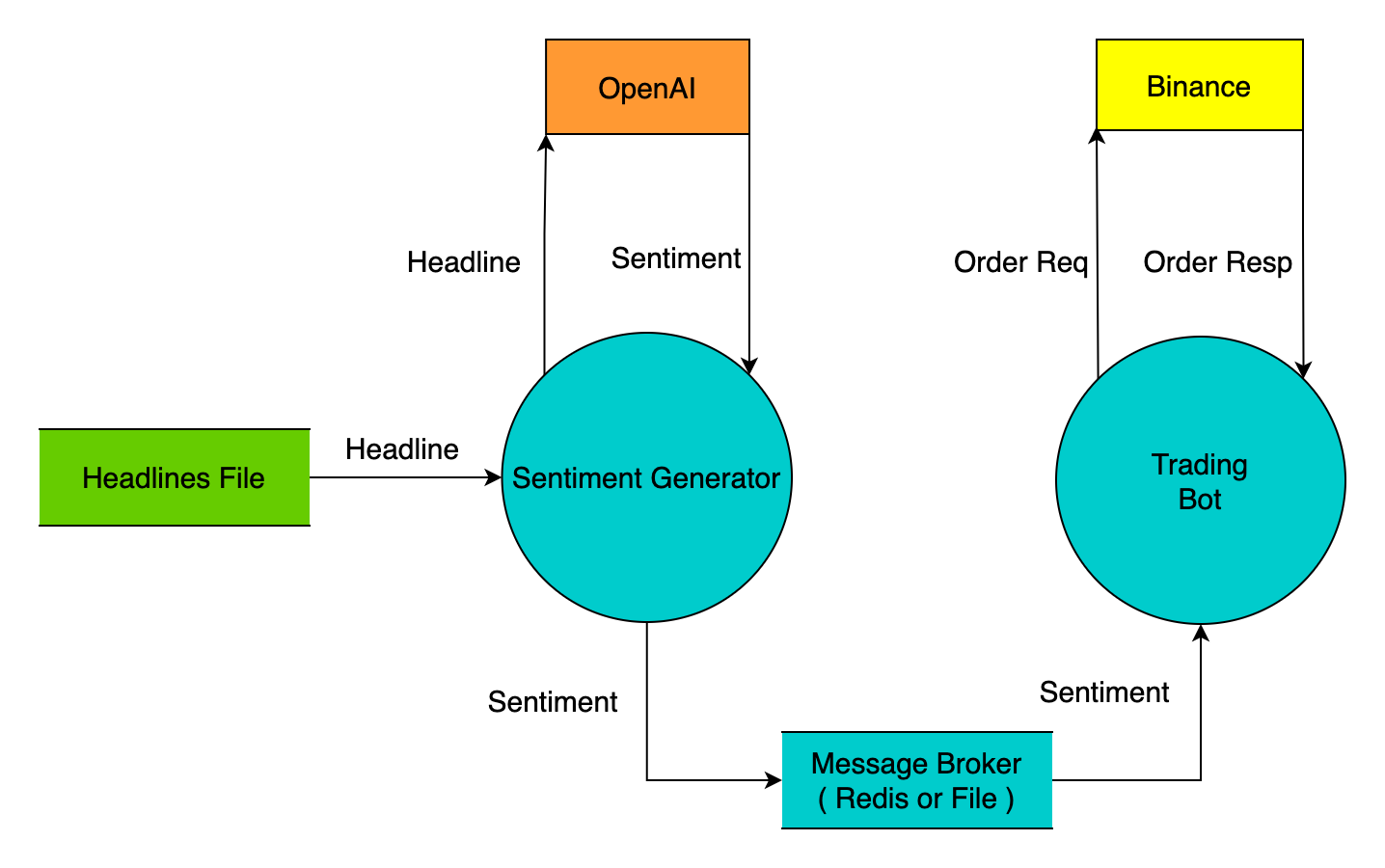
This project uses OpenAI to determine the sentiment of cryptocurrency news headlines and subsequently executes orders on the Binance Spot Market.
It is composed of two main components: Sentiment Generator and Trading Bot.
This project is for demonstration purposes only and has never been executed on a production site. We do not know whether this project can generate profits and don’t hold any responsibility for any losses that may be incurred. You should NOT use this project in your own trading application.
Signature Generator:
gpt-3.5-turbo max 4K context usage. The costs depends on the amount of provided headlines and the length of the same.Trading Bot:
Clone from GitHub:
git clone [email protected]:binance/ai-trading-prototype.git
Install the required libraries:
cd <path_to_cloned_repository>
pip install -r requirements.txt
usage: aitradingprototype [-h] (-sg | -tb) config_file

Free open source AI trading bot prototype

positional arguments:
  config_file           .YAML config file for sentiment_generator or trading_bot process

optional arguments:
  -h, --help            show this help message and exit
  -sg, --sentiment_generator
                        starts the sentiment generator process
  -tb, --trading_bot     starts the trading bot process
The complete AI Trading is achieved by running two processes simultaneously: One to use the Sentiment Generator and the other to use the Trading Bot.
Analyzes user-provided news headlines to generate sentiments (bullish, bearish or unknown) for a predefined cryptocurrency.
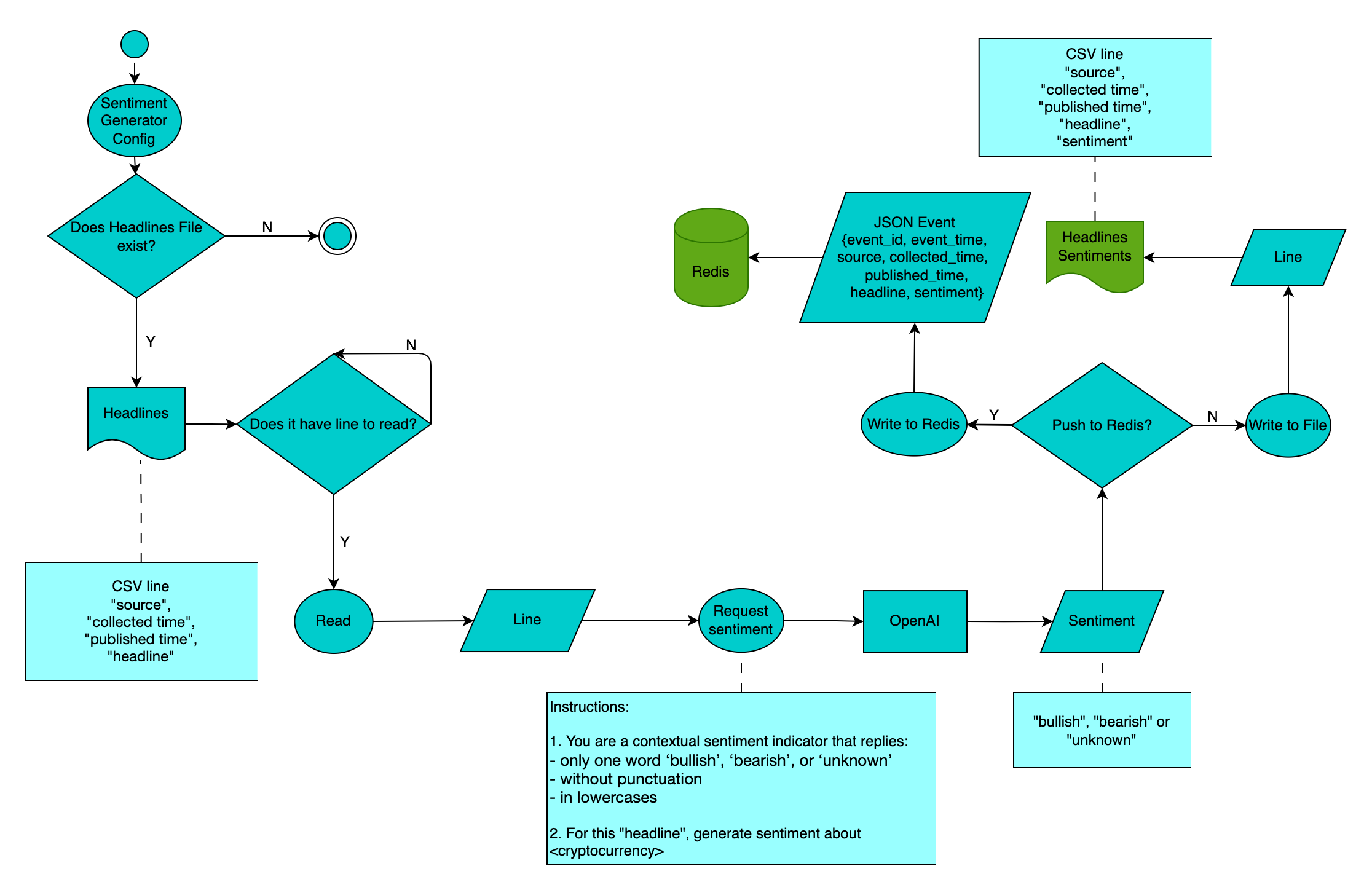
sg_config.yaml by following the instructions provided in the sg_config_example.yaml file.python -m aitradingprototype <sg_config.yaml.example> -sg
The headlines_file in the config file is utilized to locate the headlines file. Remarks on this file:
"headline collected source","headline collected timestamp (ms)","headline published timestamp (ms)","headline"." and can't contain ,".The output_option in the config file, defines where to push results:
redis - (Default) Publishes sentiment events to Redis channel (redis_channel in the config file). This is to allow real-time access to sentiment signals by the Trading Bot or any other subscriber to the same Redis channel.file - The generated sentiments are saved into /output/sentiments_<asset>.csv (line format: "headline collected source","headline collected timestamp (ms)","headline published timestamp (ms)","headline","sentiment") so that user can have the option to self-inspect the accuracy of the headlines sentiments.Executes trading orders on Binance based on received sentiments.
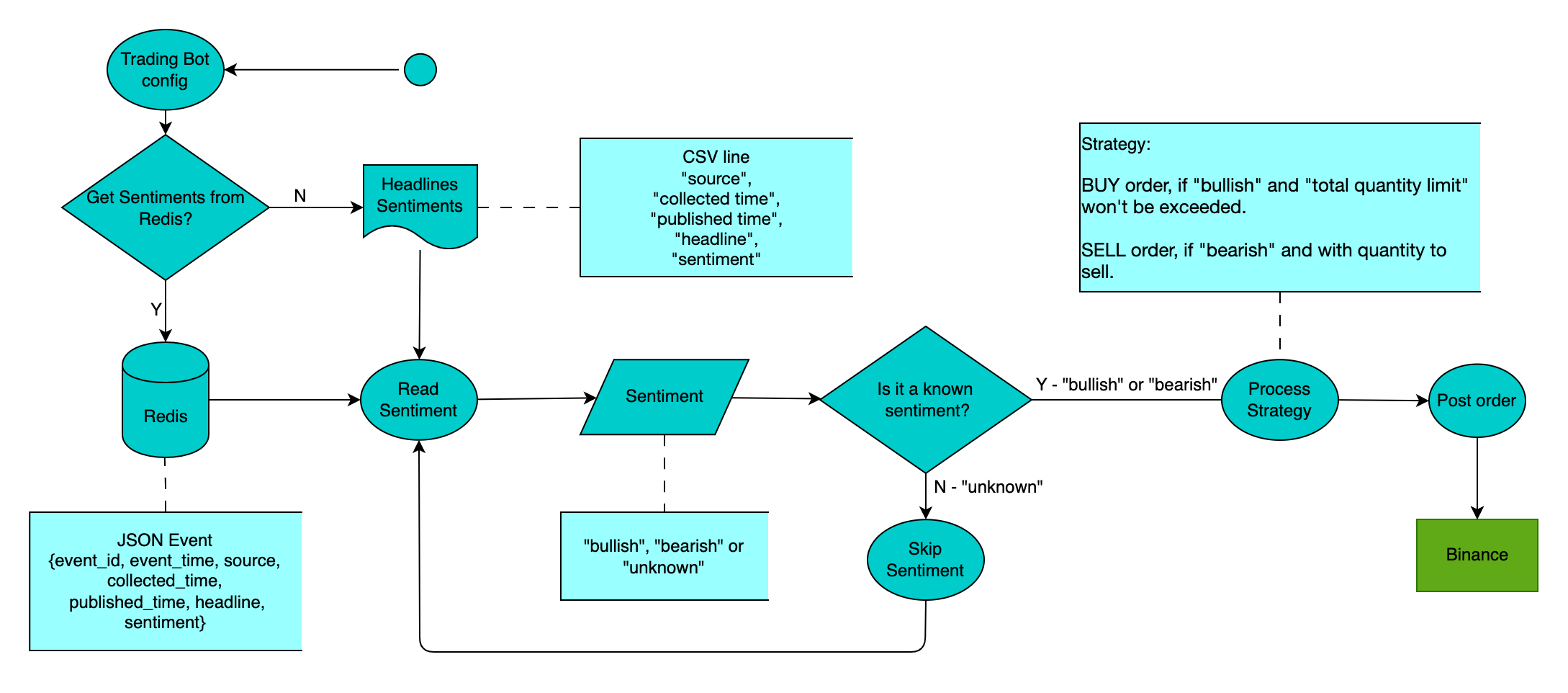
tb_config.yaml by following the instructions provided in the tb_config_example.yaml file.python -m aitradingprototype <tb_config.yaml.example> -tb
The input_option in the config file decides which source to obtain the sentiment, which can be:
redis - (Default) Subscribes and listens to a Redis server channel for sentiments events.file - Read sentiments from config file's sentiments_file (line format:"headline collected source","headline collected timestamp (ms)","headline published timestamp (ms)","headline","sentiment").There's only one default trading strategy, which places MARKET orders to the Binance Spot Market.
Under trading_strategy field in the config file, you can define these trading variables:
symbol - The trading pair Trading Bot places orders.base_asset - The symbol's base asset, buyings and sellings underlying asset.order_quantity - The fixed quantity for every order.total_quantity_limit - The upper limit on the total quantity of 'base_asset' that can be held via the accumulation of BUY orders at any given point.The order placement logic is:
bullish and total_quantity_limit won't be exceeded.bearish and we have holding quantity to sell.unknown/invalid.This is term we use to indicate the total base asset quantiy that is incremented or decremented by trades net quantity:
executedQty - order's commission.commission is the sum of each fill commission from order's response.Please consult FULL order response for fields reference.
At the moment, this project is only doing commission calculation for when the commissionAsset is the base asset!
If this is not your case, you can reconfigure your Binance account's chosen option for commission asset, otherwise the "holding quantity" will be incorrect.
Since the minimum notional changes with market price fluctuations, it's ideal to have an order quantity that'll unlikey to encounter Filter failure: NOTIONAL error, which happens when minNotional value (notional = price * quantity) is not reached.
If a Filter failure: NOTIONAL is received during BUY or SELL order, the trading bot will stop with an indication of a valid minimum quantity.
If Trading Bot is interrupted (maybe due to technical issues or maintenance), the current "holding quantity" is saved in Redis, so that the bot can continue where it left off when it's restarted.
This Redis key format for the "holding quantity" is aitp_<strategyname>_holding_qty_<asset> (ex: aitp_successivestrategy_holding_qty_btc).
The IP and Order rate limits are according to Binance Spot Market Limits.
If you encounter an error, you should do proper adjustments. For example, reduce reduce the number of headline sentiments that you feed to the trading bot or reconfigure the trading_strategy in the config file.
The logging level is adjustable in either the sentiment generator's YAML config or the trading bot's YAML config.
This project uses OpenAI to determine the sentiment of cryptocurrency news headlines and subsequently executes orders on the Binance Spot Market.
It is composed of two main components: Sentiment Generator and Trading Bot.
This project is for demonstration purposes only and has never been executed on a production site. We do not know whether this project can generate profits and don’t hold any responsibility for any losses that may be incurred. You should NOT use this project in your own trading application.
Signature Generator:
gpt-3.5-turbo max 4K context usage. The costs depends on the amount of provided headlines and the length of the same.Trading Bot:
Clone from GitHub:
git clone [email protected]:binance/ai-trading-prototype.git
Install the required libraries:
cd <path_to_cloned_repository>
pip install -r requirements.txt
usage: aitradingprototype [-h] (-sg | -tb) config_file

Free open source AI trading bot prototype

positional arguments:
  config_file           .YAML config file for sentiment_generator or trading_bot process

optional arguments:
  -h, --help            show this help message and exit
  -sg, --sentiment_generator
                        starts the sentiment generator process
  -tb, --trading_bot     starts the trading bot process
The complete AI Trading is achieved by running two processes simultaneously: One to use the Sentiment Generator and the other to use the Trading Bot.
Analyzes user-provided news headlines to generate sentiments (bullish, bearish or unknown) for a predefined cryptocurrency.
sg_config.yaml by following the instructions provided in the sg_config_example.yaml file.python -m aitradingprototype <sg_config.yaml.example> -sg
The headlines_file in the config file is utilized to locate the headlines file. Remarks on this file:
"headline collected source","headline collected timestamp (ms)","headline published timestamp (ms)","headline"." and can't contain ,".The output_option in the config file, defines where to push results:
redis - (Default) Publishes sentiment events to Redis channel (redis_channel in the config file). This is to allow real-time access to sentiment signals by the Trading Bot or any other subscriber to the same Redis channel.file - The generated sentiments are saved into /output/sentiments_<asset>.csv (line format: "headline collected source","headline collected timestamp (ms)","headline published timestamp (ms)","headline","sentiment") so that user can have the option to self-inspect the accuracy of the headlines sentiments.Executes trading orders on Binance based on received sentiments.
tb_config.yaml by following the instructions provided in the tb_config_example.yaml file.python -m aitradingprototype <tb_config.yaml.example> -tb
The input_option in the config file decides which source to obtain the sentiment, which can be:
redis - (Default) Subscribes and listens to a Redis server channel for sentiments events.file - Read sentiments from config file's sentiments_file (line format:"headline collected source","headline collected timestamp (ms)","headline published timestamp (ms)","headline","sentiment").There's only one default trading strategy, which places MARKET orders to the Binance Spot Market.
Under trading_strategy field in the config file, you can define these trading variables:
symbol - The trading pair Trading Bot places orders.base_asset - The symbol's base asset, buyings and sellings underlying asset.order_quantity - The fixed quantity for every order.total_quantity_limit - The upper limit on the total quantity of 'base_asset' that can be held via the accumulation of BUY orders at any given point.The order placement logic is:
bullish and total_quantity_limit won't be exceeded.bearish and we have holding quantity to sell.unknown/invalid.This is term we use to indicate the total base asset quantiy that is incremented or decremented by trades net quantity:
executedQty - order's commission.commission is the sum of each fill commission from order's response.Please consult FULL order response for fields reference.
At the moment, this project is only doing commission calculation for when the commissionAsset is the base asset!
If this is not your case, you can reconfigure your Binance account's chosen option for commission asset, otherwise the "holding quantity" will be incorrect.
Since the minimum notional changes with market price fluctuations, it's ideal to have an order quantity that'll unlikey to encounter Filter failure: NOTIONAL error, which happens when minNotional value (notional = price * quantity) is not reached.
If a Filter failure: NOTIONAL is received during BUY or SELL order, the trading bot will stop with an indication of a valid minimum quantity.
If Trading Bot is interrupted (maybe due to technical issues or maintenance), the current "holding quantity" is saved in Redis, so that the bot can continue where it left off when it's restarted.
This Redis key format for the "holding quantity" is aitp_<strategyname>_holding_qty_<asset> (ex: aitp_successivestrategy_holding_qty_btc).
The IP and Order rate limits are according to Binance Spot Market Limits.
If you encounter an error, you should do proper adjustments. For example, reduce reduce the number of headline sentiments that you feed to the trading bot or reconfigure the trading_strategy in the config file.
The logging level is adjustable in either the sentiment generator's YAML config or the trading bot's YAML config.



