
Crypto trading bot for your Mac that reads the news before it buys. Practice money first, local AI (Novaeon Sentinel 9B), MetaMask + Hyperliquid.
See the codeSee what people are saying
README
NovaeonTradingAI
A crypto trading bot for your Mac that reads the news before it buys. It trades one simple, tested breakout strategy on Hyperliquid, asks a local AI model (Novaeon Sentinel 9B) whether there is serious bad news about a coin before every purchase, and shows everything in a clear app. It starts with practice money, runs entirely on your Mac, and your wallet key never leaves MetaMask.
By Novaeon Studio. Free and open source (GPL-3.0).


Apple Silicon Mac, macOS 14 or newer. All versions: Releases. Prefer Terminal? See Install.
Risk warning. Trading crypto can lose you money, quickly. Backtests and practice results do not guarantee future results. This is not financial advice. Read the disclaimer before using real money.
 |  |
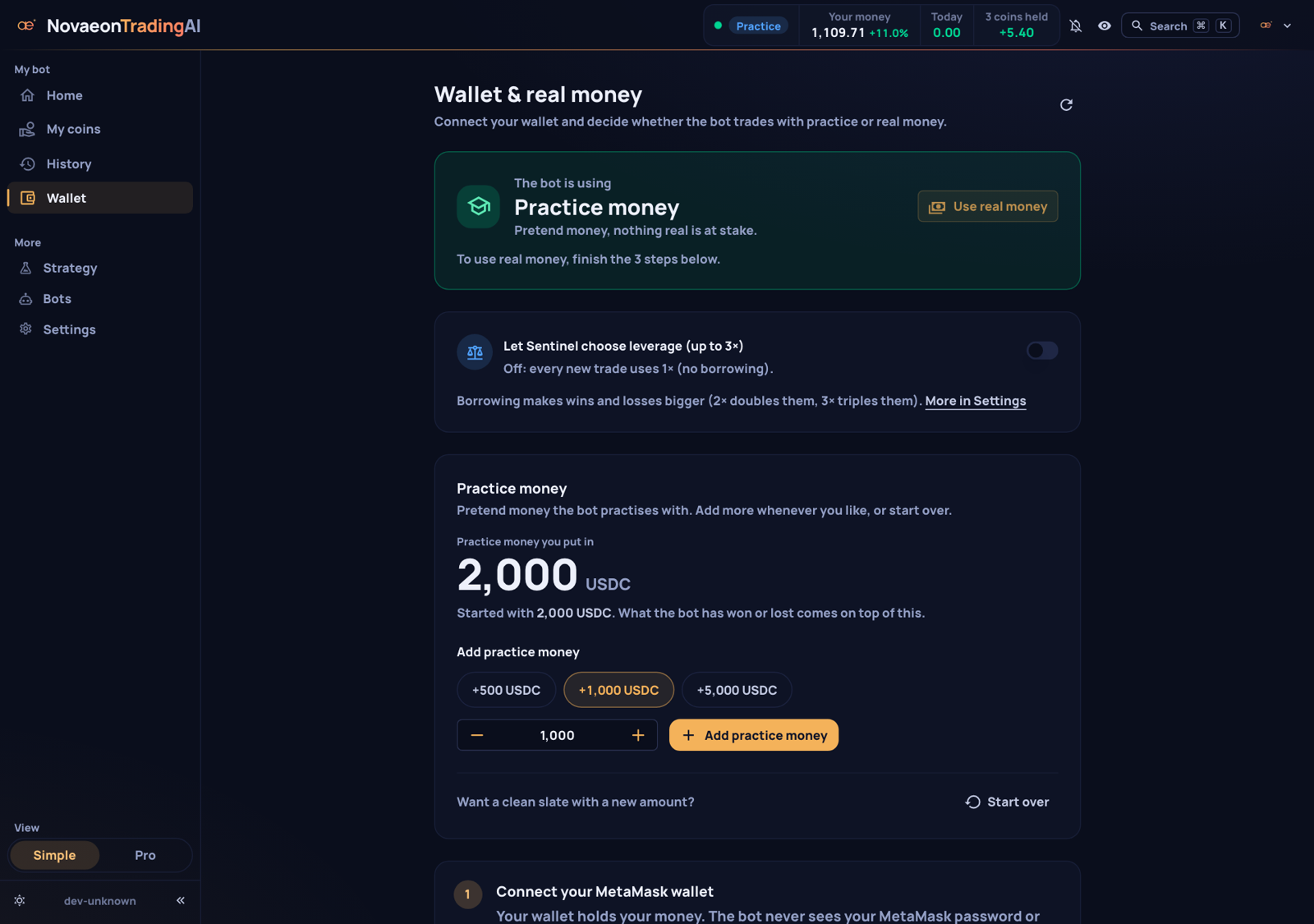 | 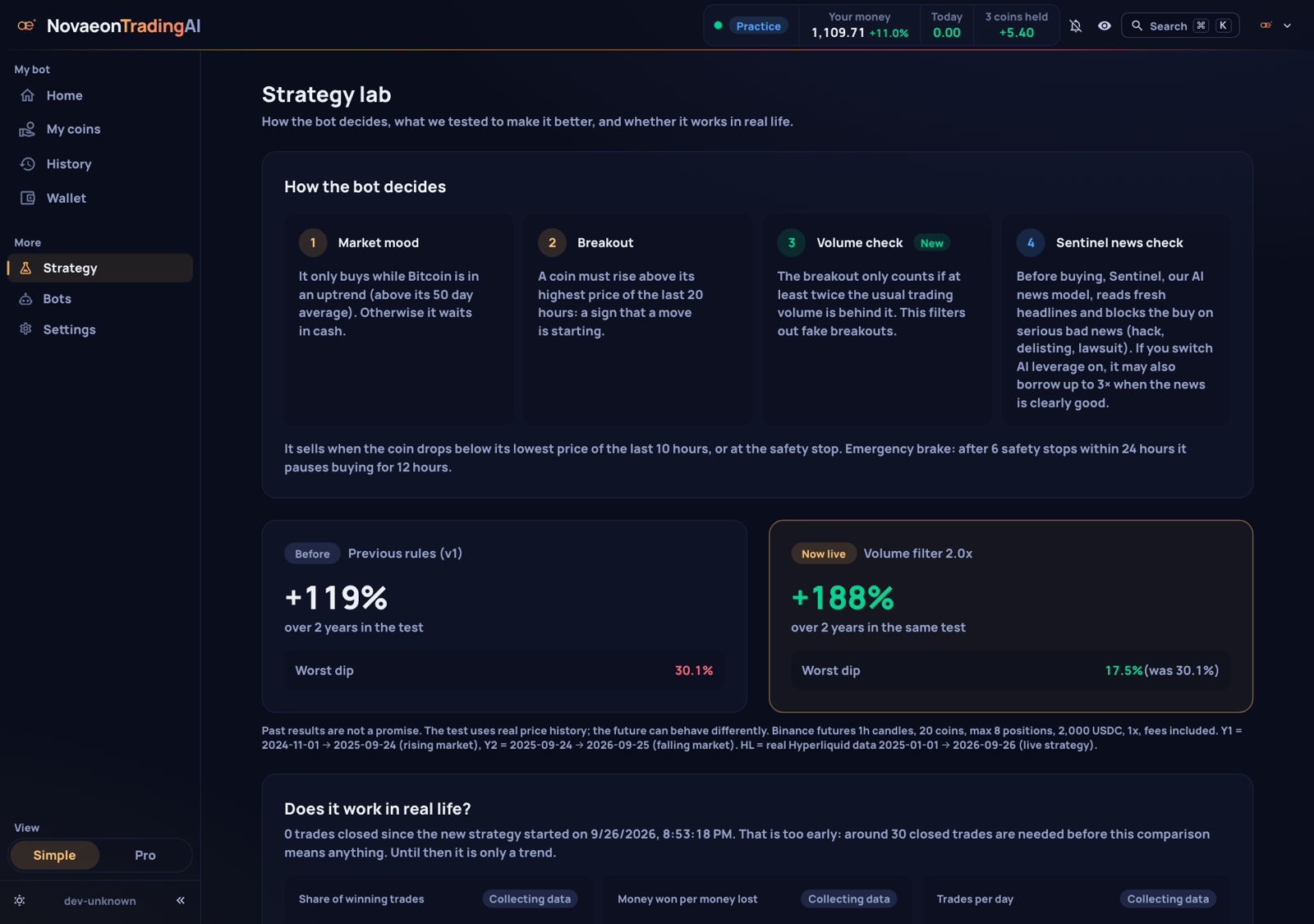 |
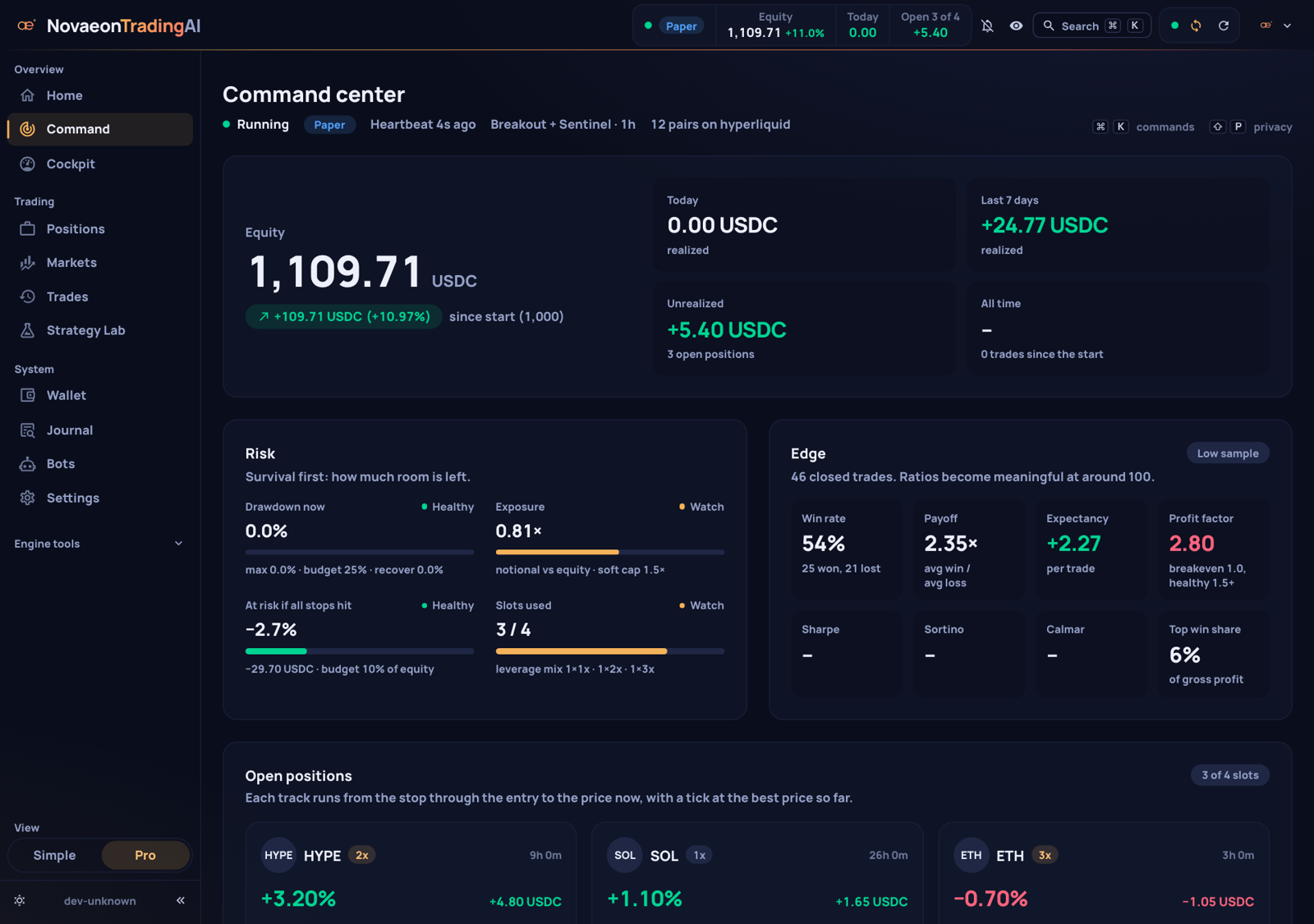
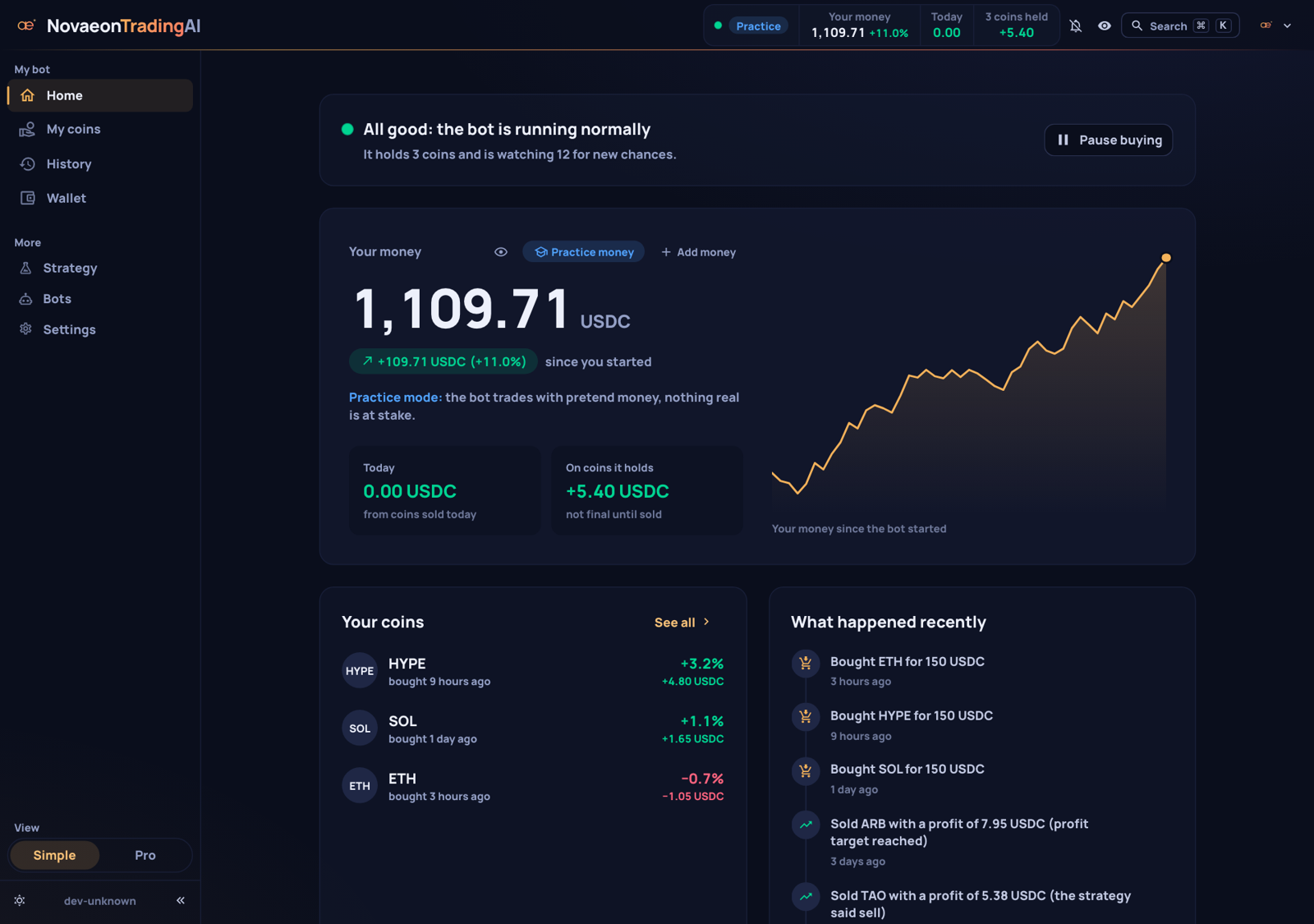
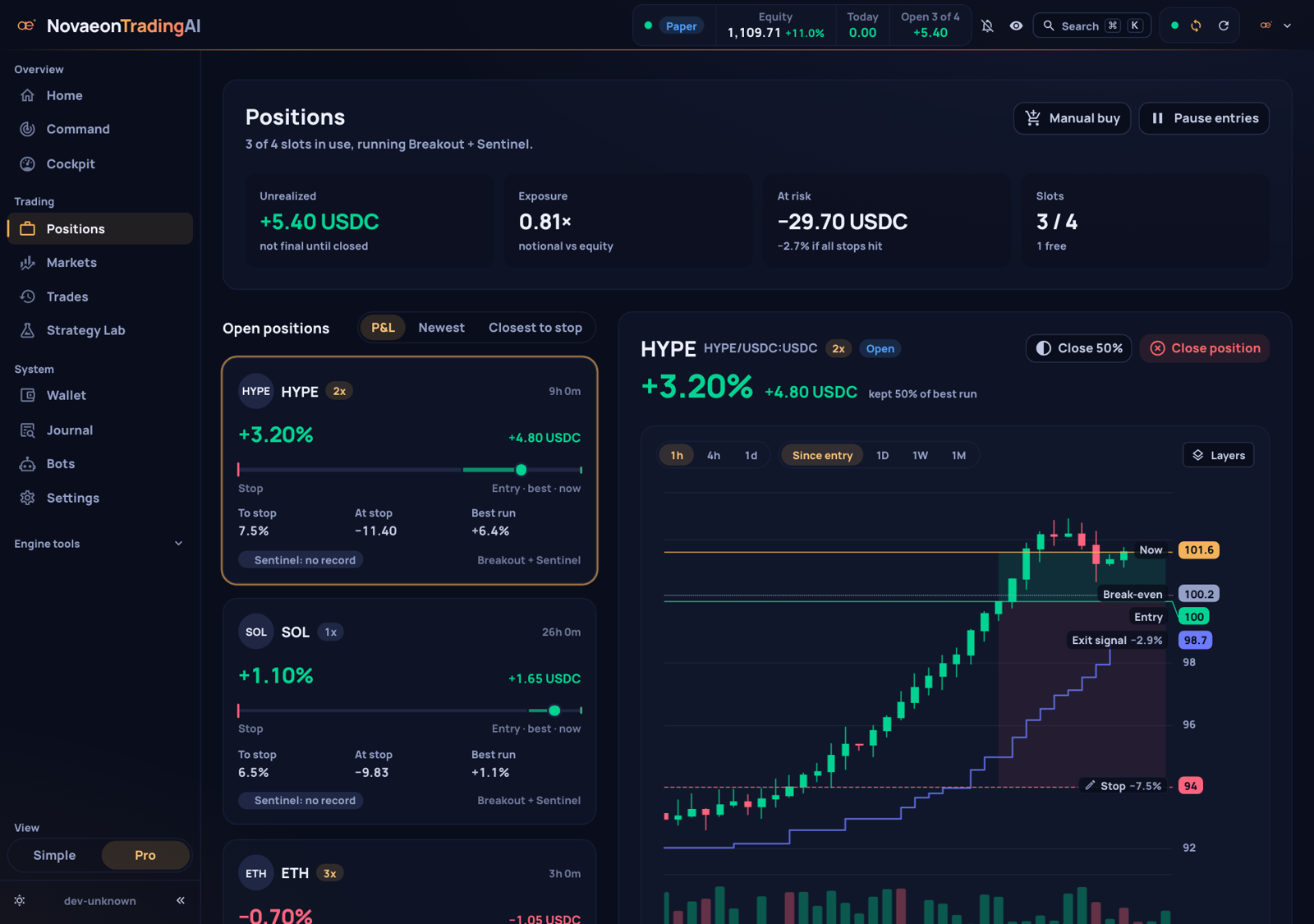
Screenshots use sample data in practice mode.
What it does
- Trades one strategy, openly. 1-hour breakouts on 20 large coins, only while Bitcoin is in an uptrend, only on strong volume. Every rule is in docs/STRATEGY.md, with the backtest numbers and their drawdowns.
- Checks the news first. Before each purchase, Novaeon Sentinel 9B reads the last 48 hours of headlines about the coin and blocks the trade if they report a hack, delisting, lawsuit, chain halt or similar. The model runs on your Mac; headlines are not sent to a cloud AI.
- Starts with practice money. A new install trades 2,000 USDC of practice money against live prices. You can add practice money or start over on the Wallet page.
- Goes live only when you decide. Connect MetaMask, allow a trading-only bot key, set a spending cap, type "REAL MONEY". The bot key can trade but cannot withdraw.
- Explains itself. Simple mode answers three questions at a glance: Is the bot OK? How is my money doing? What is it doing? Pro mode adds charts with entry, stop, break-even and liquidation lines, a trade journal, and a strategy page that compares live results with the backtest.
- Lets you step in. Sell a position, buy more, or move a stop up. Stops can only be tightened, never loosened.
- Stays at 1× leverage unless you turn on AI leverage. With AI leverage on, Sentinel may choose 2× or 3× on clearly good news. It is off by default and not available on 8 GB Macs.
Runs on any Apple Silicon Mac, even with 8 GB
The installer checks your Mac's memory and downloads the Sentinel build that fits.
| Your Mac | Sentinel build | Download | News filter on 495 held-out test cases | AI leverage |
|---|---|---|---|---|
| 16 GB or more | 8-bit | 8.4 GB | Same quality as the full model: caught 23 of 28 bad-news cases, blocked 8 of 467 harmless ones | Available (off by default) |
| 8 GB | 4-bit (distilled) | 4.5 GB | Same filter quality as the full model: caught 23 of 28 bad-news cases, blocked 6 of 467 harmless ones | Locked off (its leverage picks are less precise) |
For comparison, the full-precision model catches 24 of 28 and blocks 6 harmless cases. Method and all numbers: docs/SENTINEL.md.
Honest speed note for 8 GB Macs: the 4-bit model uses about 5 GB of memory while idle. In our stress test, with 495 news checks sent back to back, it peaked at about 7.6 GB. The bot works, but the Mac has little room left: close heavy apps and expect other apps to feel slower. A news check only happens right before a purchase (a few times a day), so trading itself is not slowed down. Seconds per check on a base 8 GB M1/M2 have not been measured yet.
Intel Macs are not supported. The installer is Mac-only today: the app and the bot are portable, but the model builds and background services are made for Apple Silicon.
Install
One line (in Terminal):
curl -fsSL https://raw.githubusercontent.com/NovaeonStudio/novaeon-trading-ai/main/install.sh | bash
Prefer to read it first? Download install.sh, read it, then run bash install.sh.
Or the app: download NovaeonTradingAI-<version>.dmg from the
latest release and drag the app to
Applications. The app is not signed with an Apple developer certificate, so macOS blocks the first launch:
- macOS 14: right-click the app and choose Open, then confirm.
- macOS 15 and later: double-click the app once, close the warning, then open System Settings → Privacy & Security, scroll down and click Open Anyway next to NovaeonTradingAI.
If you prefer not to do this, use the one-line install above instead. On first launch it runs the same installer in Terminal; later launches open the app in your browser. Each release lists SHA-256 checksums of its files.
What the installer does:
- needs macOS 14 or newer, an Apple Silicon Mac with at least 8 GB of memory, and about 12 GB of free disk space; no Homebrew, no Xcode tools, no admin password;
- installs everything into
~/NovaeonTradingAI(its own Python, the trading engine, the app) and starts the engine, the control service and Sentinel as background services, so trading continues when the browser is closed; - downloads the Sentinel build for your Mac from Hugging Face;
- creates a random login password (shown at the end, copied to your clipboard, and kept in
~/NovaeonTradingAI/login.txt); - starts in practice mode at 1× leverage, reachable only from your own Mac, and opens the app in your browser;
- asks once whether it may count the install anonymously. Only if you say yes, it sends the app version, the macOS major version and a memory size class, once. No IDs.
Afterwards, ~/NovaeonTradingAI/bin/novaeon controls everything: status, start, stop, logs, password,
update, uninstall. Running the install command again updates an existing install and keeps your settings and
trades. uninstall asks whether to keep your trade history; the bot key in the Keychain is never deleted
automatically.
First steps
- Open the app (the installer opens it for you) and sign in with the password it showed you.
- Watch it practice. The bot trades practice money against real, live prices. Positions, profits and AI decisions look exactly like the real thing.
- Add practice money on the Wallet page if you want a bigger practice balance, or start over with a fresh practice account (the old history is kept).
- Check the Strategy page. It compares live results with the backtest. Wait for about 30 closed trades before judging anything; fewer trades are mostly noise.
Going live (optional)
Real money runs on Hyperliquid (USDC perpetual futures, isolated margin), connected through MetaMask:
- Deposit USDC into your Hyperliquid account. Hyperliquid only accepts a bot key after a deposit.
- On the Wallet page, click Connect MetaMask.
- The app creates a bot key (Hyperliquid calls it an "API wallet") and stores it in your Mac's Keychain.
MetaMask asks you to sign one message that allows this key to trade for your account.
- Your MetaMask key never leaves MetaMask. The app never sees it.
- The bot key can place and cancel orders. It cannot withdraw or transfer your funds.
- You can remove the bot's permission at any time on Hyperliquid's API page, or disconnect the wallet in the app.
- Choose how much the bot may use (at least 20 USDC, at most your balance), confirm the warnings and type
REAL MONEY. - In live mode, stop-losses are also placed on the exchange, so open positions stay protected when your Mac is off. Switching back to practice is only possible after all real positions are sold.
Start small. Only use money you can afford to lose.
How the strategy works
Checked against the code in bot/strategies/. Full rules and research:
docs/STRATEGY.md.
- Market: 20 large coins on Hyperliquid (BTC, ETH, SOL, BNB, XRP, ADA, DOGE, AVAX, LINK, NEAR, ZEC, ONDO, ENA, LTC, TAO, SUI, UNI, ARB, WLD, AAVE), 1-hour candles, long only, at most 8 positions, money split across free slots.
- Only in an uptrend: new trades only while Bitcoin's daily close is above its 50-day exponential average (EMA50). When Bitcoin closes below it, the bot sells and waits in cash.
- Buy: the hourly close breaks above the highest high of the previous 20 hours, on at least twice the average volume of the last 20 hours.
- News check: Sentinel blocks the purchase if P(major negative news) ≥ 0.30. No recent headlines about the coin means no check.
- Sell: the hourly close falls below the lowest low of the previous 10 hours, or the Bitcoin trend flips.
- Stop-loss: 10% of the position's margin (at 1× that is a 10% price drop). You can tighten it by hand.
- Emergency brake: after 6 stop-losses within 24 hours, no new purchases for 12 hours.
- AI leverage (opt-in): 2× if P(clearly positive news) ≥ 0.50; 3× if ≥ 0.75 and Bitcoin's daily close is at least 5% above its EMA50. Otherwise 1×. Never more than 3×.
- If Sentinel is not reachable: the bot keeps trading at 1× without the news check (fail-open) and records that in the decision log.
Backtest of these rules (1×, 20 coins, 8 slots, 2,000 USDC start, trading fees and funding included; the news filter and AI leverage cannot be backtested and are not part of these numbers):
| Period | Data | Return | Max drawdown | Trades | Win rate | Profit factor |
|---|---|---|---|---|---|---|
| 2024-11-01 to 2025-09-24 | Binance USDT futures | +64.9% | 16.1% | 663 | 40% | 1.34 |
| 2025-09-24 to 2026-09-25 | Binance USDT futures | +74.5% | 17.5% | 397 | 37% | 2.00 |
| 2025-01-01 to 2026-09-26 | Hyperliquid* | +82.9% | 9.1% | 340 | 38% | 2.27 |
* Hyperliquid only serves about 5,000 hourly candles per coin: 9 of the 20 coins have data for the whole period, the other 11 only from March 2026.
Most trades lose; the strategy lives on a few large moves. Expect long flat or losing stretches (the Hyperliquid test had one that lasted 90 days). Past results do not guarantee future results. Not financial advice.
Novaeon Sentinel 9B
Sentinel is the news judge. It is a fine-tune of Kev-9B by Jared Palmer, which is built on Qwen3.5-9B-Base. It does not write text: it reads the headlines and answers two typed questions with probabilities. Is there major negative news about this coin? Is the outlook clearly positive, neutral or mixed, or negative?
- Model and card: NovaeonStudio/novaeon-sentinel-9b (Apache-2.0)
- How it was trained and tested, and how to reproduce it: docs/SENTINEL.md
- Training pipeline and labeling guide:
novaeon-kev/. The raw training dataset is not published.
Why fine-tune: on 248 held-out test cases the untuned Kev-9B flagged 26 harmless cases as major bad news and was right about "clearly positive" only 41% of the time. Sentinel flagged 4 harmless cases and was right about "clearly positive" 83% of the time. At the bot's settings, across 495 held-out cases, it catches 24 of 28 bad-news cases and blocks 6 of 467 harmless ones.
Safety and risk
- Practice mode, 1× leverage and local-only access are the defaults.
- Real money needs four deliberate steps: deposit, MetaMask signature, spending cap, typed confirmation.
- The bot key lives in the macOS Keychain and cannot withdraw. See docs/SECURITY.md.
- The bot only trades while your Mac is on and awake. In live mode, stop-losses also sit on the exchange.
- Sentinel can be wrong in both directions: it can miss bad news, and it can block good trades.
- Leverage multiplies losses as well as gains.
- Hyperliquid is a decentralized exchange; check that using it is legal where you live. Taxes are your responsibility.
Read the full disclaimer.
Architecture
flowchart LR
    subgraph Mac["Your Mac (services listen on 127.0.0.1 only)"]
        UI["App<br/>simple and pro mode"]
        ENG["Trading engine<br/>+ strategy"]
        CTL["Control service<br/>wallet, practice money,<br/>manual buys and stops"]
        SEN["Novaeon Sentinel 9B<br/>MLX, 8-bit or 4-bit"]
        KC[("macOS Keychain<br/>bot key")]
        DB[("SQLite<br/>trades")]
    end
    MM["MetaMask<br/>(your key)"]
    HL["Hyperliquid<br/>prices and orders"]
    RSS["News RSS feeds"]

    UI -- REST --> ENG
    UI -- REST --> CTL
    UI -- "sign ApproveAgent" --> MM
    ENG -- "before each buy" --> SEN
    ENG -- "headlines" --> RSS
    ENG --> DB
    ENG -- "prices, orders in live mode" --> HL
    CTL --> KC
    CTL -- "register bot key" --> HL
More detail: docs/ARCHITECTURE.md.
Repository layout
| Path | What it is |
|---|---|
src/, public/, tests/, e2e/ | The app (Vue 3, TypeScript, Nuxt UI, ECharts) and its tests |
bot/strategies/ | The strategy |
bot/bin/ | Control service, start script, watchdog, data tools |
bot/config/ | Configs without keys (dry_run: true) |
novaeon-kev/ | Sentinel training pipeline, labeling guide, evaluation, metrics, model card |
docs/ | Strategy, Sentinel, architecture, security, disclaimer, contributing |
Development
Requirements: Node.js 22 or newer (CI uses 24 and 26) and pnpm (the version is pinned in package.json;
corepack enable picks it up).
pnpm install --frozen-lockfile
pnpm run dev                 # app with hot reload
pnpm run typecheck
pnpm run lint
pnpm run test:unit
pnpm run build               # production build in dist/
pnpm run test:e2e-chromium   # browser tests (needs Google Chrome)
The bot side is Python 3.12. Backtests, the Sentinel pipeline and the MLX builds are described in docs/STRATEGY.md and docs/SENTINEL.md. Contributions are welcome: see CONTRIBUTING and the Code of Conduct. Please report security issues privately, as described in SECURITY.
License
- App, bot and scripts: GPL-3.0, see LICENSE and NOTICE. Copyright (C) 2026 Novaeon Studio and contributors.
- Novaeon Sentinel 9B weights: Apache-2.0, like Kev-9B and Qwen3.5-9B-Base, which they are built on.
- The Novaeon name and logo are not licensed for use in other products.
Built on
NovaeonTradingAI stands on open-source work, and we are grateful for it:
- The app is a heavily modified fork of FreqUI (GPL-3.0).
- The trading engine is Freqtrade (GPL-3.0); our strategy and a small engine patch run on top of it.
- Sentinel is fine-tuned from Kev-9B and served with Kev by Jared Palmer (Apache-2.0), built on Qwen3.5-9B-Base by the Qwen team (Apache-2.0). The Mac builds use MLX.
NovaeonTradingAI is independent and not affiliated with or endorsed by these projects.
Credits
Made by Novaeon Studio. Market data and trading via Hyperliquid. News from the public RSS feeds of CoinDesk, Cointelegraph, Decrypt and The Block.
Similar repos


Languages
Vue
55.8%
TypeScript
28.7%
Python
11.5%
Shell
3.0%
Crypto trading bot for your Mac that reads the news before it buys. Practice money first, local AI (Novaeon Sentinel 9B), MetaMask + Hyperliquid.
See the codeSee what people are saying
README
NovaeonTradingAI
A crypto trading bot for your Mac that reads the news before it buys. It trades one simple, tested breakout strategy on Hyperliquid, asks a local AI model (Novaeon Sentinel 9B) whether there is serious bad news about a coin before every purchase, and shows everything in a clear app. It starts with practice money, runs entirely on your Mac, and your wallet key never leaves MetaMask.
By Novaeon Studio. Free and open source (GPL-3.0).
Apple Silicon Mac, macOS 14 or newer. All versions: Releases. Prefer Terminal? See Install.
Risk warning. Trading crypto can lose you money, quickly. Backtests and practice results do not guarantee future results. This is not financial advice. Read the disclaimer before using real money.
| |
| |
Screenshots use sample data in practice mode.
What it does
- Trades one strategy, openly. 1-hour breakouts on 20 large coins, only while Bitcoin is in an uptrend, only on strong volume. Every rule is in docs/STRATEGY.md, with the backtest numbers and their drawdowns.
- Checks the news first. Before each purchase, Novaeon Sentinel 9B reads the last 48 hours of headlines about the coin and blocks the trade if they report a hack, delisting, lawsuit, chain halt or similar. The model runs on your Mac; headlines are not sent to a cloud AI.
- Starts with practice money. A new install trades 2,000 USDC of practice money against live prices. You can add practice money or start over on the Wallet page.
- Goes live only when you decide. Connect MetaMask, allow a trading-only bot key, set a spending cap, type "REAL MONEY". The bot key can trade but cannot withdraw.
- Explains itself. Simple mode answers three questions at a glance: Is the bot OK? How is my money doing? What is it doing? Pro mode adds charts with entry, stop, break-even and liquidation lines, a trade journal, and a strategy page that compares live results with the backtest.
- Lets you step in. Sell a position, buy more, or move a stop up. Stops can only be tightened, never loosened.
- Stays at 1× leverage unless you turn on AI leverage. With AI leverage on, Sentinel may choose 2× or 3× on clearly good news. It is off by default and not available on 8 GB Macs.
Runs on any Apple Silicon Mac, even with 8 GB
The installer checks your Mac's memory and downloads the Sentinel build that fits.
| Your Mac | Sentinel build | Download | News filter on 495 held-out test cases | AI leverage |
|---|---|---|---|---|
| 16 GB or more | 8-bit | 8.4 GB | Same quality as the full model: caught 23 of 28 bad-news cases, blocked 8 of 467 harmless ones | Available (off by default) |
| 8 GB | 4-bit (distilled) | 4.5 GB | Same filter quality as the full model: caught 23 of 28 bad-news cases, blocked 6 of 467 harmless ones | Locked off (its leverage picks are less precise) |
For comparison, the full-precision model catches 24 of 28 and blocks 6 harmless cases. Method and all numbers: docs/SENTINEL.md.
Honest speed note for 8 GB Macs: the 4-bit model uses about 5 GB of memory while idle. In our stress test, with 495 news checks sent back to back, it peaked at about 7.6 GB. The bot works, but the Mac has little room left: close heavy apps and expect other apps to feel slower. A news check only happens right before a purchase (a few times a day), so trading itself is not slowed down. Seconds per check on a base 8 GB M1/M2 have not been measured yet.
Intel Macs are not supported. The installer is Mac-only today: the app and the bot are portable, but the model builds and background services are made for Apple Silicon.
Install
One line (in Terminal):
curl -fsSL https://raw.githubusercontent.com/NovaeonStudio/novaeon-trading-ai/main/install.sh | bash
Prefer to read it first? Download install.sh, read it, then run bash install.sh.
Or the app: download NovaeonTradingAI-<version>.dmg from the
latest release and drag the app to
Applications. The app is not signed with an Apple developer certificate, so macOS blocks the first launch:
- macOS 14: right-click the app and choose Open, then confirm.
- macOS 15 and later: double-click the app once, close the warning, then open System Settings → Privacy & Security, scroll down and click Open Anyway next to NovaeonTradingAI.
If you prefer not to do this, use the one-line install above instead. On first launch it runs the same installer in Terminal; later launches open the app in your browser. Each release lists SHA-256 checksums of its files.
What the installer does:
- needs macOS 14 or newer, an Apple Silicon Mac with at least 8 GB of memory, and about 12 GB of free disk space; no Homebrew, no Xcode tools, no admin password;
- installs everything into
~/NovaeonTradingAI(its own Python, the trading engine, the app) and starts the engine, the control service and Sentinel as background services, so trading continues when the browser is closed; - downloads the Sentinel build for your Mac from Hugging Face;
- creates a random login password (shown at the end, copied to your clipboard, and kept in
~/NovaeonTradingAI/login.txt); - starts in practice mode at 1× leverage, reachable only from your own Mac, and opens the app in your browser;
- asks once whether it may count the install anonymously. Only if you say yes, it sends the app version, the macOS major version and a memory size class, once. No IDs.
Afterwards, ~/NovaeonTradingAI/bin/novaeon controls everything: status, start, stop, logs, password,
update, uninstall. Running the install command again updates an existing install and keeps your settings and
trades. uninstall asks whether to keep your trade history; the bot key in the Keychain is never deleted
automatically.
First steps
- Open the app (the installer opens it for you) and sign in with the password it showed you.
- Watch it practice. The bot trades practice money against real, live prices. Positions, profits and AI decisions look exactly like the real thing.
- Add practice money on the Wallet page if you want a bigger practice balance, or start over with a fresh practice account (the old history is kept).
- Check the Strategy page. It compares live results with the backtest. Wait for about 30 closed trades before judging anything; fewer trades are mostly noise.
Going live (optional)
Real money runs on Hyperliquid (USDC perpetual futures, isolated margin), connected through MetaMask:
- Deposit USDC into your Hyperliquid account. Hyperliquid only accepts a bot key after a deposit.
- On the Wallet page, click Connect MetaMask.
- The app creates a bot key (Hyperliquid calls it an "API wallet") and stores it in your Mac's Keychain.
MetaMask asks you to sign one message that allows this key to trade for your account.
- Your MetaMask key never leaves MetaMask. The app never sees it.
- The bot key can place and cancel orders. It cannot withdraw or transfer your funds.
- You can remove the bot's permission at any time on Hyperliquid's API page, or disconnect the wallet in the app.
- Choose how much the bot may use (at least 20 USDC, at most your balance), confirm the warnings and type
REAL MONEY. - In live mode, stop-losses are also placed on the exchange, so open positions stay protected when your Mac is off. Switching back to practice is only possible after all real positions are sold.
Start small. Only use money you can afford to lose.
How the strategy works
Checked against the code in bot/strategies/. Full rules and research:
docs/STRATEGY.md.
- Market: 20 large coins on Hyperliquid (BTC, ETH, SOL, BNB, XRP, ADA, DOGE, AVAX, LINK, NEAR, ZEC, ONDO, ENA, LTC, TAO, SUI, UNI, ARB, WLD, AAVE), 1-hour candles, long only, at most 8 positions, money split across free slots.
- Only in an uptrend: new trades only while Bitcoin's daily close is above its 50-day exponential average (EMA50). When Bitcoin closes below it, the bot sells and waits in cash.
- Buy: the hourly close breaks above the highest high of the previous 20 hours, on at least twice the average volume of the last 20 hours.
- News check: Sentinel blocks the purchase if P(major negative news) ≥ 0.30. No recent headlines about the coin means no check.
- Sell: the hourly close falls below the lowest low of the previous 10 hours, or the Bitcoin trend flips.
- Stop-loss: 10% of the position's margin (at 1× that is a 10% price drop). You can tighten it by hand.
- Emergency brake: after 6 stop-losses within 24 hours, no new purchases for 12 hours.
- AI leverage (opt-in): 2× if P(clearly positive news) ≥ 0.50; 3× if ≥ 0.75 and Bitcoin's daily close is at least 5% above its EMA50. Otherwise 1×. Never more than 3×.
- If Sentinel is not reachable: the bot keeps trading at 1× without the news check (fail-open) and records that in the decision log.
Backtest of these rules (1×, 20 coins, 8 slots, 2,000 USDC start, trading fees and funding included; the news filter and AI leverage cannot be backtested and are not part of these numbers):
| Period | Data | Return | Max drawdown | Trades | Win rate | Profit factor |
|---|---|---|---|---|---|---|
| 2024-11-01 to 2025-09-24 | Binance USDT futures | +64.9% | 16.1% | 663 | 40% | 1.34 |
| 2025-09-24 to 2026-09-25 | Binance USDT futures | +74.5% | 17.5% | 397 | 37% | 2.00 |
| 2025-01-01 to 2026-09-26 | Hyperliquid* | +82.9% | 9.1% | 340 | 38% | 2.27 |
* Hyperliquid only serves about 5,000 hourly candles per coin: 9 of the 20 coins have data for the whole period, the other 11 only from March 2026.
Most trades lose; the strategy lives on a few large moves. Expect long flat or losing stretches (the Hyperliquid test had one that lasted 90 days). Past results do not guarantee future results. Not financial advice.
Novaeon Sentinel 9B
Sentinel is the news judge. It is a fine-tune of Kev-9B by Jared Palmer, which is built on Qwen3.5-9B-Base. It does not write text: it reads the headlines and answers two typed questions with probabilities. Is there major negative news about this coin? Is the outlook clearly positive, neutral or mixed, or negative?
- Model and card: NovaeonStudio/novaeon-sentinel-9b (Apache-2.0)
- How it was trained and tested, and how to reproduce it: docs/SENTINEL.md
- Training pipeline and labeling guide:
novaeon-kev/. The raw training dataset is not published.
Why fine-tune: on 248 held-out test cases the untuned Kev-9B flagged 26 harmless cases as major bad news and was right about "clearly positive" only 41% of the time. Sentinel flagged 4 harmless cases and was right about "clearly positive" 83% of the time. At the bot's settings, across 495 held-out cases, it catches 24 of 28 bad-news cases and blocks 6 of 467 harmless ones.
Safety and risk
- Practice mode, 1× leverage and local-only access are the defaults.
- Real money needs four deliberate steps: deposit, MetaMask signature, spending cap, typed confirmation.
- The bot key lives in the macOS Keychain and cannot withdraw. See docs/SECURITY.md.
- The bot only trades while your Mac is on and awake. In live mode, stop-losses also sit on the exchange.
- Sentinel can be wrong in both directions: it can miss bad news, and it can block good trades.
- Leverage multiplies losses as well as gains.
- Hyperliquid is a decentralized exchange; check that using it is legal where you live. Taxes are your responsibility.
Read the full disclaimer.
Architecture
flowchart LR
    subgraph Mac["Your Mac (services listen on 127.0.0.1 only)"]
        UI["App<br/>simple and pro mode"]
        ENG["Trading engine<br/>+ strategy"]
        CTL["Control service<br/>wallet, practice money,<br/>manual buys and stops"]
        SEN["Novaeon Sentinel 9B<br/>MLX, 8-bit or 4-bit"]
        KC[("macOS Keychain<br/>bot key")]
        DB[("SQLite<br/>trades")]
    end
    MM["MetaMask<br/>(your key)"]
    HL["Hyperliquid<br/>prices and orders"]
    RSS["News RSS feeds"]

    UI -- REST --> ENG
    UI -- REST --> CTL
    UI -- "sign ApproveAgent" --> MM
    ENG -- "before each buy" --> SEN
    ENG -- "headlines" --> RSS
    ENG --> DB
    ENG -- "prices, orders in live mode" --> HL
    CTL --> KC
    CTL -- "register bot key" --> HL
More detail: docs/ARCHITECTURE.md.
Repository layout
| Path | What it is |
|---|---|
src/, public/, tests/, e2e/ | The app (Vue 3, TypeScript, Nuxt UI, ECharts) and its tests |
bot/strategies/ | The strategy |
bot/bin/ | Control service, start script, watchdog, data tools |
bot/config/ | Configs without keys (dry_run: true) |
novaeon-kev/ | Sentinel training pipeline, labeling guide, evaluation, metrics, model card |
docs/ | Strategy, Sentinel, architecture, security, disclaimer, contributing |
Development
Requirements: Node.js 22 or newer (CI uses 24 and 26) and pnpm (the version is pinned in package.json;
corepack enable picks it up).
pnpm install --frozen-lockfile
pnpm run dev                 # app with hot reload
pnpm run typecheck
pnpm run lint
pnpm run test:unit
pnpm run build               # production build in dist/
pnpm run test:e2e-chromium   # browser tests (needs Google Chrome)
The bot side is Python 3.12. Backtests, the Sentinel pipeline and the MLX builds are described in docs/STRATEGY.md and docs/SENTINEL.md. Contributions are welcome: see CONTRIBUTING and the Code of Conduct. Please report security issues privately, as described in SECURITY.
License
- App, bot and scripts: GPL-3.0, see LICENSE and NOTICE. Copyright (C) 2026 Novaeon Studio and contributors.
- Novaeon Sentinel 9B weights: Apache-2.0, like Kev-9B and Qwen3.5-9B-Base, which they are built on.
- The Novaeon name and logo are not licensed for use in other products.
Built on
NovaeonTradingAI stands on open-source work, and we are grateful for it:
- The app is a heavily modified fork of FreqUI (GPL-3.0).
- The trading engine is Freqtrade (GPL-3.0); our strategy and a small engine patch run on top of it.
- Sentinel is fine-tuned from Kev-9B and served with Kev by Jared Palmer (Apache-2.0), built on Qwen3.5-9B-Base by the Qwen team (Apache-2.0). The Mac builds use MLX.
NovaeonTradingAI is independent and not affiliated with or endorsed by these projects.
Credits
Made by Novaeon Studio. Market data and trading via Hyperliquid. News from the public RSS feeds of CoinDesk, Cointelegraph, Decrypt and The Block.
Similar repos
Languages
Vue
55.8%
TypeScript
28.7%
Python
11.5%
Shell
3.0%