An iOS drop down menu with pretty animation and easy to customize.
See the codeAn iOS drop down menu with pretty animation.
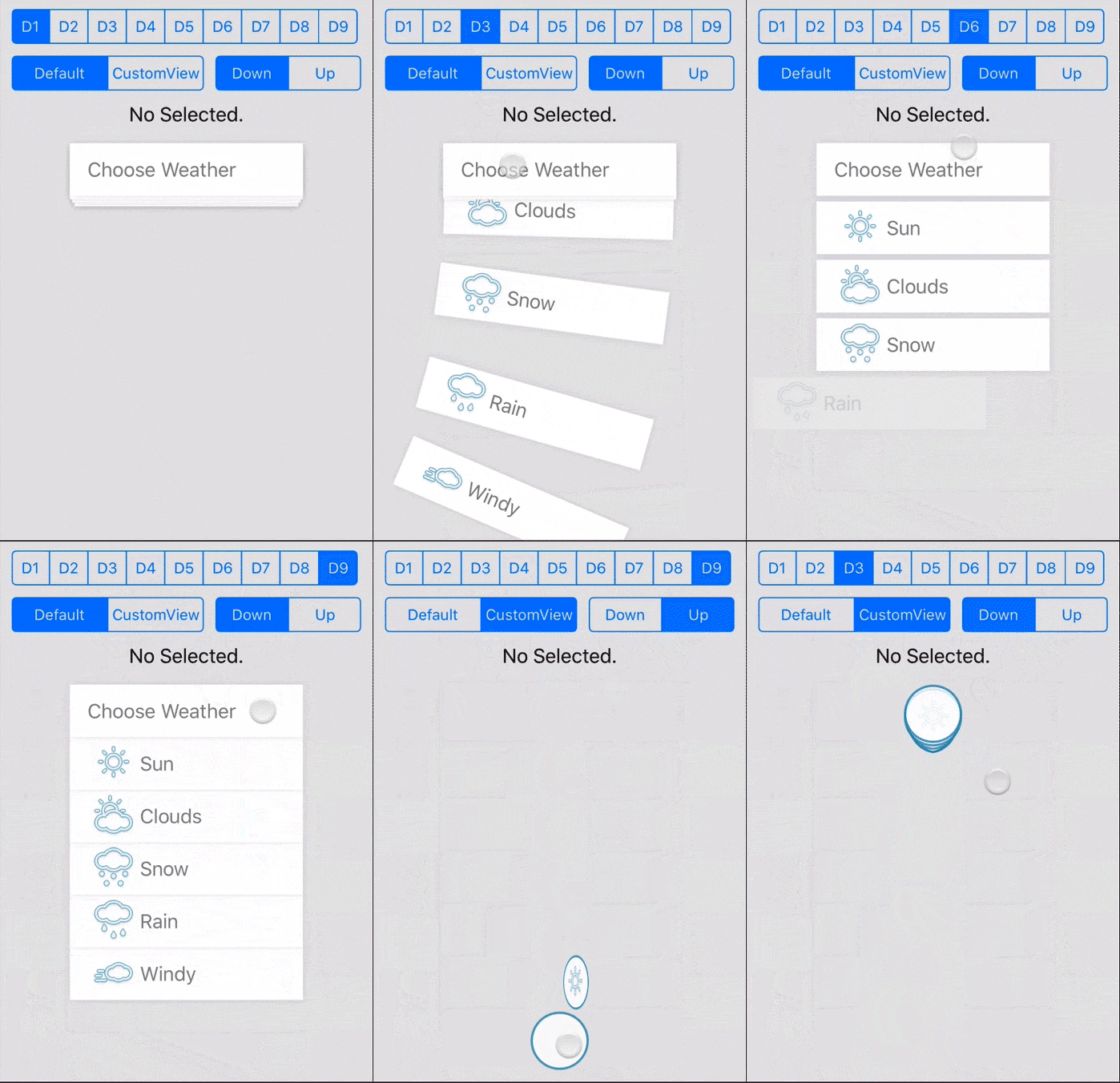
pod 'IGLDropDownMenu'
Just drap the files in folder IGLDropDownMenu to your project.
####!Try the demo. It's really helpful!
Create your IGLDropDownItem array and set up
NSMutableArray *dropdownItems = [[NSMutableArray alloc] init];
IGLDropDownItem *item = [[IGLDropDownItem alloc] init];
[item setIconImage:[UIImage imageNamed:@"icon.png"]];
[item setText:@"title"];
[dropdownItems addObject:item];
Create your IGLDropDownMenu and set the up the parameter name dropDownItems
IGLDropDownMenu *dropDownMenu = [[IGLDropDownMenu alloc] init];
[dropDownMenu setFrame:CGRectMake(0, 0, 200, 45)];
dropDownMenu.menuText = @"Choose Weather";
dropDownMenu.menuIconImage = [UIImage imageNamed:@"chooserIcon.png"];
dropDownMenu.paddingLeft = 15;  // padding left for the content of the button
modify the params of IGLDropDownMenu
dropDownMenu.type = IGLDropDownMenuTypeStack;
dropDownMenu.gutterY = 5;
dropDownMenu.itemAnimationDelay = 0.1;
dropDownMenu.rotate = IGLDropDownMenuRotateRandom;
Call the reloadView method (Very Important!)
// every time you change the params you should call reloadView method
[dropDownMenu reloadView];
These are just some of the parameters you can use, you can find more(or make more) in the code.
####For IGLDropDownMenu
animationDuration set the duration(s) of the animation in second
animationOption set the UIViewAnimationOptions for the animation
itemAnimationDelay set the delay(s) before each of item start to animate
direction set the direction when the menu expand
IGLDropDownMenuDirectionDowndefault value, expand downwardIGLDropDownMenuDirectionUpexpand upward
rotate set the rotate style when the menu on expand
IGLDropDownMenuRotateNonedefault value, for no rotateIGLDropDownMenuRotateLeftrotate to left on expandIGLDropDownMenuRotateRightrotate to right on expandIGLDropDownMenuRotateRandomrotate random on expand every single time
type set the menu type (remember when you set the type to SlidingIn* you can't have the rotate type at the same time.)
IGLDropDownMenuTypeNormaldefault value, item will hide behind the menu button on foldIGLDropDownMenuTypeStackitem will hide behind the menu button and make a stack like lookIGLDropDownMenuTypeSlidingInBothitem will slide in and out from both sidesIGLDropDownMenuTypeSlidingInFromLeftitem will slide in from leftIGLDropDownMenuTypeSlidingInFromRightitem will slide in from rightIGLDropDownMenuTypeFlipVerticalitem will flip verticalIGLDropDownMenuTypeFlipFromLeftitem will flip from leftIGLDropDownMenuTypeFlipFromRightitem will flip from right
slidingInOffset set the offset value for the items slide in and outgutterY set the Y gutter between itemsalphaOnFold set the item alpha value when menu on fold, only use this when the style won't fit your mindflipWhenToggleView when you set this to true, the menu button will flip up when you clickuseSpringAnimation use the spring animation for iOS7 or higher version, default is truemenuButtonStatic keeps the menu button static regardless of selected menu item, default is NO####For IGLDropDownItem
iconImage set the icon image for the itemtext set the text string for the itemtextLabel for you to adjust the text label styleobject you can store your custom item in this propertyindex the item indexpaddingLeft the left padding of the image view or only textshowBackgroundShadow you can hide the drop down shadow with this propertybackgroundColor you can change the background color with this propertyRemember the menuButton in IGLDropDownMenu is also an IGLDropDownItem.
If you want to control the view by yourself, you can use the initWithMenuButtonCustomView of IGLDropDownMenu and initWithCustomView of IGLDropDownItem.
If you use customView, the customView will auto set userInteractionEnabled = NO and the menu menuButtonStatic = YES and some style parameters will be invalid. You need to handle it yourself. I make a customView in the demo, try it!
####For IGLDropDownMenu
- (void)dropDownMenu:(IGLDropDownMenu*)dropDownMenu selectedItemAtIndex:(NSInteger)index;- (void)dropDownMenu:(IGLDropDownMenu *)dropDownMenu expandingChanged:(BOOL)isExpanding;This drop-down menu idea is come from here, I found this demo one day and just implement it on iOS.
The MIT License (MIT)
Copyright (c) 2014 Galvin Li
Permission is hereby granted, free of charge, to any person obtaining a copy of this software and associated documentation files (the "Software"), to deal in the Software without restriction, including without limitation the rights to use, copy, modify, merge, publish, distribute, sublicense, and/or sell copies of the Software, and to permit persons to whom the Software is furnished to do so, subject to the following conditions:
The above copyright notice and this permission notice shall be included in all copies or substantial portions of the Software.
THE SOFTWARE IS PROVIDED "AS IS", WITHOUT WARRANTY OF ANY KIND, EXPRESS OR IMPLIED, INCLUDING BUT NOT LIMITED TO THE WARRANTIES OF MERCHANTABILITY, FITNESS FOR A PARTICULAR PURPOSE AND NONINFRINGEMENT. IN NO EVENT SHALL THE AUTHORS OR COPYRIGHT HOLDERS BE LIABLE FOR ANY CLAIM, DAMAGES OR OTHER LIABILITY, WHETHER IN AN ACTION OF CONTRACT, TORT OR OTHERWISE, ARISING FROM, OUT OF OR IN CONNECTION WITH THE SOFTWARE OR THE USE OR OTHER DEALINGS IN THE SOFTWARE.
15 followers · starred May 2015
104 followers · starred Mar 2016
An iOS drop down menu with pretty animation and easy to customize.
See the codeAn iOS drop down menu with pretty animation.
pod 'IGLDropDownMenu'
Just drap the files in folder IGLDropDownMenu to your project.
####!Try the demo. It's really helpful!
Create your IGLDropDownItem array and set up
NSMutableArray *dropdownItems = [[NSMutableArray alloc] init];
IGLDropDownItem *item = [[IGLDropDownItem alloc] init];
[item setIconImage:[UIImage imageNamed:@"icon.png"]];
[item setText:@"title"];
[dropdownItems addObject:item];
Create your IGLDropDownMenu and set the up the parameter name dropDownItems
IGLDropDownMenu *dropDownMenu = [[IGLDropDownMenu alloc] init];
[dropDownMenu setFrame:CGRectMake(0, 0, 200, 45)];
dropDownMenu.menuText = @"Choose Weather";
dropDownMenu.menuIconImage = [UIImage imageNamed:@"chooserIcon.png"];
dropDownMenu.paddingLeft = 15;  // padding left for the content of the button
modify the params of IGLDropDownMenu
dropDownMenu.type = IGLDropDownMenuTypeStack;
dropDownMenu.gutterY = 5;
dropDownMenu.itemAnimationDelay = 0.1;
dropDownMenu.rotate = IGLDropDownMenuRotateRandom;
Call the reloadView method (Very Important!)
// every time you change the params you should call reloadView method
[dropDownMenu reloadView];
These are just some of the parameters you can use, you can find more(or make more) in the code.
####For IGLDropDownMenu
animationDuration set the duration(s) of the animation in second
animationOption set the UIViewAnimationOptions for the animation
itemAnimationDelay set the delay(s) before each of item start to animate
direction set the direction when the menu expand
IGLDropDownMenuDirectionDowndefault value, expand downwardIGLDropDownMenuDirectionUpexpand upward
rotate set the rotate style when the menu on expand
IGLDropDownMenuRotateNonedefault value, for no rotateIGLDropDownMenuRotateLeftrotate to left on expandIGLDropDownMenuRotateRightrotate to right on expandIGLDropDownMenuRotateRandomrotate random on expand every single time
type set the menu type (remember when you set the type to SlidingIn* you can't have the rotate type at the same time.)
IGLDropDownMenuTypeNormaldefault value, item will hide behind the menu button on foldIGLDropDownMenuTypeStackitem will hide behind the menu button and make a stack like lookIGLDropDownMenuTypeSlidingInBothitem will slide in and out from both sidesIGLDropDownMenuTypeSlidingInFromLeftitem will slide in from leftIGLDropDownMenuTypeSlidingInFromRightitem will slide in from rightIGLDropDownMenuTypeFlipVerticalitem will flip verticalIGLDropDownMenuTypeFlipFromLeftitem will flip from leftIGLDropDownMenuTypeFlipFromRightitem will flip from right
slidingInOffset set the offset value for the items slide in and outgutterY set the Y gutter between itemsalphaOnFold set the item alpha value when menu on fold, only use this when the style won't fit your mindflipWhenToggleView when you set this to true, the menu button will flip up when you clickuseSpringAnimation use the spring animation for iOS7 or higher version, default is truemenuButtonStatic keeps the menu button static regardless of selected menu item, default is NO####For IGLDropDownItem
iconImage set the icon image for the itemtext set the text string for the itemtextLabel for you to adjust the text label styleobject you can store your custom item in this propertyindex the item indexpaddingLeft the left padding of the image view or only textshowBackgroundShadow you can hide the drop down shadow with this propertybackgroundColor you can change the background color with this propertyRemember the menuButton in IGLDropDownMenu is also an IGLDropDownItem.
If you want to control the view by yourself, you can use the initWithMenuButtonCustomView of IGLDropDownMenu and initWithCustomView of IGLDropDownItem.
If you use customView, the customView will auto set userInteractionEnabled = NO and the menu menuButtonStatic = YES and some style parameters will be invalid. You need to handle it yourself. I make a customView in the demo, try it!
####For IGLDropDownMenu
- (void)dropDownMenu:(IGLDropDownMenu*)dropDownMenu selectedItemAtIndex:(NSInteger)index;- (void)dropDownMenu:(IGLDropDownMenu *)dropDownMenu expandingChanged:(BOOL)isExpanding;This drop-down menu idea is come from here, I found this demo one day and just implement it on iOS.
The MIT License (MIT)
Copyright (c) 2014 Galvin Li
Permission is hereby granted, free of charge, to any person obtaining a copy of this software and associated documentation files (the "Software"), to deal in the Software without restriction, including without limitation the rights to use, copy, modify, merge, publish, distribute, sublicense, and/or sell copies of the Software, and to permit persons to whom the Software is furnished to do so, subject to the following conditions:
The above copyright notice and this permission notice shall be included in all copies or substantial portions of the Software.
THE SOFTWARE IS PROVIDED "AS IS", WITHOUT WARRANTY OF ANY KIND, EXPRESS OR IMPLIED, INCLUDING BUT NOT LIMITED TO THE WARRANTIES OF MERCHANTABILITY, FITNESS FOR A PARTICULAR PURPOSE AND NONINFRINGEMENT. IN NO EVENT SHALL THE AUTHORS OR COPYRIGHT HOLDERS BE LIABLE FOR ANY CLAIM, DAMAGES OR OTHER LIABILITY, WHETHER IN AN ACTION OF CONTRACT, TORT OR OTHERWISE, ARISING FROM, OUT OF OR IN CONNECTION WITH THE SOFTWARE OR THE USE OR OTHER DEALINGS IN THE SOFTWARE.
15 followers · starred May 2015
104 followers · starred Mar 2016



