All RTL9210(A/B) firmwares, tools, dump, infos ect...
Python
579
104 commits
updated Sep 23, 2026
Firmware and tools for RTL9210A and RTL9210B USB to NVMe/SATA bridge controller. They are provided by station-drivers.com, Realtek, etc.
Don't hesitate to support station-drivers.com, they are a great source for drivers and firmware.
All procedures described in this Git repository are at your own risk. In case of software issues, you can find some solutions in the Unbrick section.
It cannot be emphasized strongly enough that a device running firmware version v1.32.87 in conjunction with an RTL9210B could put your data at risk due to instabilities at the USB protocol level. An update to at least v1.33.44 is therefore considered absolutely necessary.
The table below lists all known firmware versions available in this git repository's firmware folder.
| Firmware version | RTL9201(A) | RTL9210(A) | RTL9210B | RTL9220A | RTL9210C(N) | RTL9220VA | Links |
|---|---|---|---|---|---|---|---|
| 1.20.12 | ❓ | ✅ | ❌ | ❌ | ❓ | ❓ | Download |
| 1.23.5 | ❓ | ❓ | ❓ | ❌ | ❓ | ❓ | Not found yet |
| 1.23.9 | ❓ | ✅ | ❌ | ❌ | ❓ | ❓ | Download |
| 1.23.15 | ❓ | ✅ | ❌ | ❌ | ❓ | ❓ | Download |
| 1.24.2 | ❓ | ❓ | ✅ | ❓ | ❓ | ❓ | Not found yet |
| 1.25.7 | ❓ | ✅ | ❌ | ❌ | ❓ | ❓ | Download |
| 1.25.14 | ❓ | ✅ | ❌ | ❌ | ❓ | ❓ | Download |
| 1.25.18 | ❓ | ✅ | ❓ | ❌ | ❓ | ❓ | Download |
| 1.27.24 | ❓ | ✅ | ❌ | ❌ | ❓ | ❓ | Download |
| 1.27.25 | ✅ | ❌ | ❌ | ❓ | ❓ | Download | |
| 1.28.17 | ❓ | ✅ | ❌ | ❌ | ❓ | ❓ | Download |
| 1.29.8 | ❓ | ✅ | ❌ | ❌ | ❓ | ❓ | Download |
| 1.29.12 | ✅ | ❌ | ❌ | ❓ | ❓ | Download | |
| 1.29.12.011122 | ✅ | ❓ | ✅ | ❓ | ❓ | ❓ | Download |
| 1.29.391 | ❓ | ✅ | ❌ | ❓ | ❓ | ❓ | Download |
| 1.30.17 | ❓ | ❓ | ✅ | ❓ | ❓ | ❓ | Download |
| 1.30.21.070622 | ❓ | ✅ | ✅ | ❓ | ❓ | ❓ | Download |
| 1.30.24.030822 | ❓ | ❓ | ✅ | ❓ | ❓ | ❓ | Download |
| 1.30.28.081022 | ❓ | ❓ | ✅ | ❓ | ❓ | ❓ | Download |
| 1.31.17.102022 | ❓ | ❓ | ✅ | ❓ | ❓ | ❓ | Download |
| 1.31.17.102022 (2) | ❓ | ❓ | ✅ | ❓ | ❓ | ❓ | Download |
| 1.32.16.010923 | ❓ | ❓ | ✅ | ❓ | ❓ | ❓ | Download |
| 1.32.45.041323 | ❓ | ❓ | ✅ | ❓ | ❓ | ❓ | Download |
| 1.32.49.140423 | ❓ | ❓ | ✅ | ❓ | ❓ | ❓ | Download |
| 1.32.49.140423 (Lcd) | ❓ | ❓ | ✅ | ❓ | ❓ | ❓ | Download |
| 1.32.68.062623 | ❓ | ❓ | ✅ | ❓ | ❓ | ❓ | Download |
| 1.32.87.082923 | ❓ | ❓ | ✅ | ❓ | ❓ | ❓ | Download |
| 1.32.901.120722 | ❓ | ❓ | ✅ | ❓ | ❓ | ❓ | Download |
| 1.33.5.100623 | ❓ | ❓ | ✅ | ❓ | ❓ | ❓ | - |
| 1.33.7.191023 | ❓ | ❌ | ✅ | ❓ | ❓ | ❓ | Download |
| 1.33.44.011824 | ❓ | ❓ | ✅ | ❓ | ❓ | ❓ | Download |
| 1.33.98.090324 | ❓ | ❌ | ✅ | ❓ | ❓ | ❓ | Download |
| 1.34.29.011325 | ❓ | ❌ | ✅ | ❓ | ❓ | ❓ | Download |
| 1.34.39.032625 | ❓ | ❌ | ✅ | ❓ | ❓ | ❓ | Download |
| 9.34.74.091125 | ❓ | ❓ | ❓ | ❓ | ✅ | ✅ | Download |
| 1.35.6.040126 | ❓ | ❌ | ✅ | ❓ | ❓ | ❓ | Download |
| Hardware | USB | PCIe/NVMe | SATA | Others features |
|---|---|---|---|---|
| RTL9201(A) | 3.x 10Gbps | - | SATA 3 | Many bugs |
| RTL9201R | 3.x 10Gbps | - | SATA 3 | |
| RTL9210(A) | 3.x 10Gbps | 3.0x2 | SATA 3 | Some enclosure only support NVMe or SATA |
| RTL9210VA | 3.x 10Gbps | 3.0x2 | SATA 3 | |
| RTL9210B | 3.x 10Gbps | 3.0x2 | SATA 3 | RTL9210B-CG |
| RTL9210VB | 3.x 10Gbps | 3.0x2 | SATA 3 | |
| RTL9210BPD | 3.x 10Gbps | 3.0x2 | SATA 3 | Power Delivery support, RTL9210BPD-CG |
| RTL9220 (A) | 3.2 20Gbps | 3.0x4 ? | - | |
| RTL9220VA | 3.2 20Gbps ? | 3.0x4 ? | - | |
| RTL9220DP | 3.2 40Gbps | 3.0x4 | - | RAID0, RAID1 |
There are dozens of devices with the RTL9210B, I have gathered in this git repository some firmware configs found on the www.station-drivers.com forums.
You can check in the configure folder or use values from the dump folder to create your own configuration.
| Brand | Model | Controller | config file | dump | Notes |
|---|---|---|---|---|---|
| Fideco | M211CP | RTL9210B | config | dump | |
| Inateck | FE2025 | RTL9210B | config | dump | |
| Sabrent | EC-SNVE | RTL9210B | config | ||
| Mokin | MOUD0501 | RTL9210B | dump | ||
| Ugreen | CM559 | RTL9210B | config | dump | |
| SmallRig | SD-01 | RTL9210B | dump | ||
| MKUO | SD-01 | RTL9210(B ?) | |||
| Orico | M2PJM-C3 | RTL9210 | config | dump | |
| Orico | PWDM2-G2(A) | RTL9210B | config | dump | |
| Orico | AM2C3-G2 | RTL9210B | config | dump | |
| Orico | TCM2M-C3 | RTL9210B | config | dump | |
| Orico | HM2-G2 | RTL9210B | config | dump | Tested with firmware 1.34.39. Select latest FW from selection since its not default one |
| Unionsime | MD202 | RTL9210B | config | dump | |
| UniAccessories | ? | RTL9210B | config | dump | |
| Lexar | E300 | RTL9210B | config | dump | |
| Fideco | M210 | RTL9210C(N) | default config low power boot drive config |
Warning: Flashing the firmware can brick or permanently damage your device. Do it at your own risk. The author of this Git repository is not responsible for any damage to your device. If you brick your device, you can try to unbrick it with the Unbrick section.
Info: The firmware update tool is only available for Windows and does not work well on Linux with Wine or in a virtual machine.
firmware folder..cfg) of your device from the configure folder to the configure folder where the firmware update tool is located.SERIAL in the configuration file to match your dump file if it is defined. (Optional but recommended)DISK_IPS_THRES with a ; in the configuration file. (Optional but recommended).cfg) of your device.This section describes how to configure (in cfg files) the firmware for your device, all configurations are in the configure folder or use values from the dump folder to create your own configuration.
Each configuration are unique to the device, your enclosure may not work properly if you have not the right configuration.
| Variable name | Value example | Description |
|---|---|---|
| U2PHY | 02 f4 9b e0 e1 | USB 2.0 Physical Layer settings |
| U3PHY | 02 d4 09 00 d5 00 80 | USB 3.0 Physical Layer settings |
| VID | 0x0bda | Vendor ID |
| PID | 0x9210 | Product ID |
| MANUFACTURE | "Unionsine" | Manufacturer name |
| PRODUCT | "MD202" | Product name |
| SERIAL | "012345679545" | Serial number, 12 characters and unique per device |
| SCSI_PRODUCT | "Unionsine MD202 " | SCSI Product name |
| SCSI_VENDOR | "n/a" | SCSI Vendor name |
| CFEXPRESS | 0x0 | Enable CFExpress card reader (Always 0x0) |
| USB_SELF_PWR | 0x0 | If the device is self-powered ? |
| LED | 0x1 | Set to 0x1 if the device has a LED |
| DISK_HOTPLUG | 0x0 | Enable device supports hot-plugging (Very often 0x0) |
| PINMUX1 | 0x0 | Pin multiplexing settings (first set) |
| PINMUX2 | 0x0 | Pin multiplexing settings (second set) |
| U2_MAXPWR | 0xfa | Comunicates expected power consumption to parent system / O/S USB 2.0 mode, set to 0xfa to limit to 2.5w (as defined by the USB 2.0 USB-A ports standard), does not reflect effective consumption |
| U3_MAXPWR | 0x70 | Comunicates expected power consumption to parent system / O/S at USB 3.x, set to 0x70 to limit to 4.5w (as defined by the USB 3.0 for USB-A ports standard), does not reflect effective consumption |
| ASPMDIS | 0x0 | Enable or disable active power management |
| PCIE_REFCLK | 0x0 | PCIe reference clock |
| PCIE_PWRCUT_THRES | 0x5 | Suspends the PCIe power after 5 minutes of idle time (1 unit = 1 minute),, it recommended to comment this line |
| DISK_IPS_THRES | 0x1 | Responsible for powering down the PCI bus after a timeout to conserve energy, can be removed by ; |
| SWR_1_2V | 0x0 | ? |
| EN_U1U2 | 0x1 | Set to 0x1 to enable USB 3.0 Link Power Management |
| EN_UPS | 0x1 | Enable USB Power Saving ? |
| PD | 0x1 | Power Down |
| CUSTOMIZED_LED | 02 01 07 | To customize the LED behavior |
| SUSPEND_LED_OFF | 0x1 | ? |
| FORCE_USB_SPEED | 0x0 | Force specific USB speed ? |
| FORCE_PCIE_SPEED | 0x0 | Force specific PCIe speed ? |
| FORCE_USB_QUIRK | 0x0 | ? |
| FORCE_PCIE_QUIRK | 0x0 | ? |
| FAN | 0x0 | Set to 0x1 if the device has a fan |
| DIS_SHOW_EMPTY_DISK | 0x1 | Set to 0x1 to show the enclosure when no NVMe/SATA drive is connected |
| FORCE_SATA_NORMAL_DMA | 0x0 | Force SATA to use normal DMA |
| RM_INTERNAL_RD | 0x0 | ? |
| HS_AUTO_SWITCH | 0x0 | ? |
| UART_DBG_PIN | 0x0 | UART Debug pin |
| UART_BAUD_RATE | 0x0 | UART Baud rate |
| FINGER_PRINT_EN | 0x0 | Enable fingerprint authentication |
| CUSTOMIZED_DISK_IDENTIFY | 0x0 | ? |
| HW_LED_CFG | 0x0 | ? |
| CDROM_CFG | 0x0 | ? |
| SUPPORT_HID | 0x0 | ? |
| LATE_INIT_DISK | 0x0 | Forces the controller to fully initilize itself first and disk second before presenting disk to UEFI / O/S. |
| SCSI_WP_PIN | 0x0 | Write Protect SCSI pin ? |
| SD_MMC_TYPE | 0x0 | ? |
| FORCE_PORT_TYPE | 0x0 | ? |
| BCDDEVICE | 0x0 | ? |
| SUSPEND_DISK_OFF | 0x7 | ? |
| SCSI_WB_PIN | 0x0 | ? |
| CUSTOMIZED_FEATURE | 0x0 | ? |
| PERIPH_API | 0x0 | ? |
| RAID_CFG | 0x0 | ? |
The device will check available power upon connection and power on and negotiate from USB 3.0 down to USB 2.0 if it deems not enough power to available. This leads to multiple drawbacks:
The implications are a much quicker wearout of the media if not rectified, apart from the obvious speed loss.
If the device is used on an internal server port without external power U3_MAXPWR and U2_MAXPWR should be set to the port standard limits (see table above).
The following table indicates the max power and configuration of a standard USB-A port for USB 2.0 and 3.x. I personally would recommend testing the USB support on a server before putting the disk into operation. A good tool to use is shredOS combined with the linux arch commands to verify via lsusb -t USB protocol used and if UASP is supported.
| USB Generation | U2_MAXPWR / U3_MAXPWR | Standard Hex Value | Max Current | Max Power | Note |
|---|---|---|---|---|---|
| USB 2.0 | U2_MAXPWR | 0xfa | 500 mA | 2.5 W | Borderline value for any drive (Sata or NVME not recommended) |
| USB 3.0, 3.1 & 3.2 | U3_MAXPWR | 0x70 | 896 mA | 4.5 W | Low Energy SATA Drives are ok |
MAXPWR hereby solely communicates to the parent controller (mainboard chipset) the expected consumption.
To effectively reduce consumption, further steps need to be taken:
The .cfg setting LATE_INIT_DISK : 0x1 allows the controller to separate the initialization of ASIC (the RTL9210) and disk sequentially giving all components the time to:
The change seems also to trigger a more verbose communication avoiding a stuck system on boot phases during the control of available devices on USB-Bus. When receiving power the SSD boots its internal flash controller, loads its flash translation layer (FTL) into its internal cache, and responds to the motherboard's SATA handshake. Oscilloscope testing shows that booting a SATA SSD mimics an active read cycle, pulsing briefly between 2.0W and 3.5W before dropping down to an idle state of less than 0.5W once the operating system takes over. The non sequential, but parallel, default procedure of the controller can lead to excess requirements beyond the standard power of 4.5W available when controller and disk startup at the same time.
Tested only with nvme drives. Linux has proven to be very hesitant in adopting Trim Support for RTL9210(x) enclosures, often the support needs to be manually enforced. In addition, for booting from USB you will want to increase the Grub timeout to boot to give the system the needed time to pull up all devices. 20 seconds should suffice.
Check first if support is given (irrelevant drives have been removed):
root@mypve:~# lsblk -D | grep sde
NAME               DISC-ALN DISC-GRAN DISC-MAX DISC-ZERO
sde                       0         0        0         0
├─sde1                    0         0        0         0
├─sde2                    0         0        0         0
└─sde3                    0         0        0         0
  ├─pve-swap              0         0        0         0
  ├─pve-root              0         0        0         0
  ├─pve-data_tmeta        0         0        0         0
  │ └─pve-data            0         0        0         0
  └─pve-data_tdata        0         0        0         0
    └─pve-data            0         0        0         0
The 0 indicates that neither the block device (the disk), nor the partitions currently support trim.
To change that we will enforce recognition on system level: First retrieve the device name (irrelevant information has been removed):
root@mypve:~# lsusb -v
Bus 003 Device 002: ID 0bda:9210 Realtek Semiconductor Corp. RTL9210 M.2 NVME Adapter
Negotiated speed: SuperSpeed (5Gbps)
Device Descriptor:
  bLength                18
  bDescriptorType         1
  bcdUSB               3.20
  bDeviceClass            0 [unknown]
  bDeviceSubClass         0 [unknown]
  bDeviceProtocol         0
  bMaxPacketSize0         9
  idVendor           0x0bda Realtek Semiconductor Corp.
  idProduct          0x9210 RTL9210 M.2 NVME Adapter
  bcdDevice           22.ca
  iManufacturer           1 Realtek
  iProduct                2 RTL9210CN
  iSerial                 3 012345678922
  bNumConfigurations      1
Take note of the iProduct value RTL9210CN, we will need it to create following file for a custom dev rule:
root@mypve:~# nano /etc/udev/rules.d/10-usb-trim.rules
ACTION=="add|change", ATTRS{product}=="RTL9210CN", SUBSYSTEM=="scsi_disk", ATTR{provisioning_mode}="unmap"
Now we enforce the rule:
root@mypve:~# udevadm control --reload-rules
root@mypve:~# udevadm trigger
As a result the device should now successfully present itself with trim support, the partitions not yet.
root@mypve:~# lsblk -D | grep sde
sde                       0      512B       4G         0
├─sde1                    0      512B       4G         0
├─sde2                    0      512B       4G         0
└─sde3                    0      512B       4G         0
  ├─pve-swap              0        0B       0B         0
  ├─pve-root              0        0B       0B         0
  ├─pve-data_tmeta        0        0B       0B         0
  │ └─pve-data            0        0B       0B         0
  └─pve-data_tdata        0        0B       0B         0
    └─pve-data            0        0B       0B         0
To create your own configuration, you can use the dump folder to get the values of your device.
dump folder or on the internet.configure folder with the name of your device and the extension .cfg.*, contain the device name on the second line, and have another line of * on the third line.n/a. (Optional): with = for variable definitions.DISK_IPS_THRES by changing it to ;DISK_IPS_THRES = 0x1 if you want. (Optional)When you have bricked your device, you can try to unbrick it with the following steps:
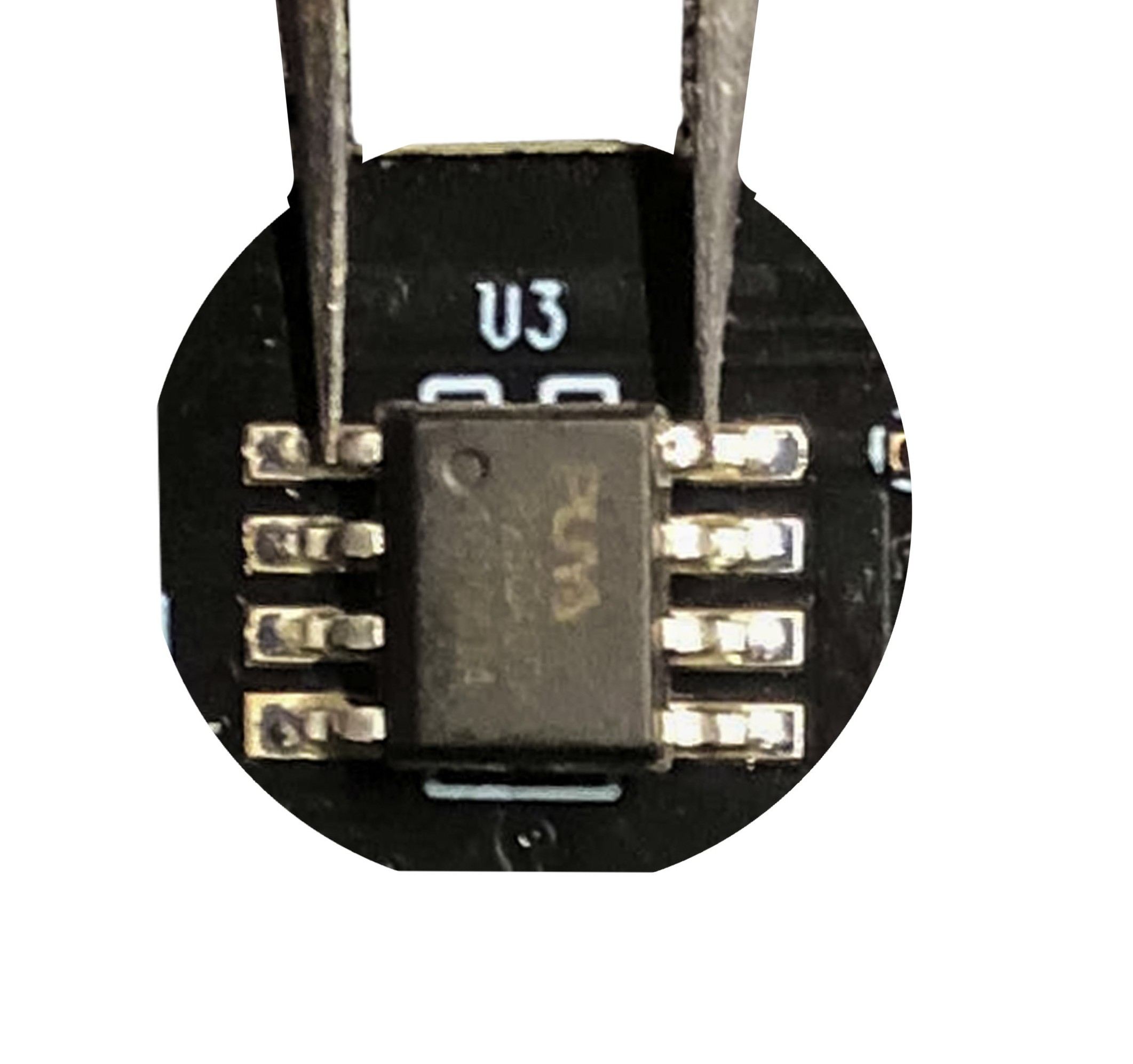
Don't hesitate to contribute to this git repository by creating a pull request or by contacting me by email: bensuperpc [at] gmail.com (I didn't accept exec files for security reasons).
580 followers · starred Jan 2026
233 followers · starred Feb 2025
2,427 followers · starred Jun 2026
247 followers · starred Jan 2025
All RTL9210(A/B) firmwares, tools, dump, infos ect...
Python
579
104 commits
updated Sep 23, 2026
Firmware and tools for RTL9210A and RTL9210B USB to NVMe/SATA bridge controller. They are provided by station-drivers.com, Realtek, etc.
Don't hesitate to support station-drivers.com, they are a great source for drivers and firmware.
All procedures described in this Git repository are at your own risk. In case of software issues, you can find some solutions in the Unbrick section.
It cannot be emphasized strongly enough that a device running firmware version v1.32.87 in conjunction with an RTL9210B could put your data at risk due to instabilities at the USB protocol level. An update to at least v1.33.44 is therefore considered absolutely necessary.
The table below lists all known firmware versions available in this git repository's firmware folder.
| Firmware version | RTL9201(A) | RTL9210(A) | RTL9210B | RTL9220A | RTL9210C(N) | RTL9220VA | Links |
|---|---|---|---|---|---|---|---|
| 1.20.12 | ❓ | ✅ | ❌ | ❌ | ❓ | ❓ | Download |
| 1.23.5 | ❓ | ❓ | ❓ | ❌ | ❓ | ❓ | Not found yet |
| 1.23.9 | ❓ | ✅ | ❌ | ❌ | ❓ | ❓ | Download |
| 1.23.15 | ❓ | ✅ | ❌ | ❌ | ❓ | ❓ | Download |
| 1.24.2 | ❓ | ❓ | ✅ | ❓ | ❓ | ❓ | Not found yet |
| 1.25.7 | ❓ | ✅ | ❌ | ❌ | ❓ | ❓ | Download |
| 1.25.14 | ❓ | ✅ | ❌ | ❌ | ❓ | ❓ | Download |
| 1.25.18 | ❓ | ✅ | ❓ | ❌ | ❓ | ❓ | Download |
| 1.27.24 | ❓ | ✅ | ❌ | ❌ | ❓ | ❓ | Download |
| 1.27.25 | ✅ | ❌ | ❌ | ❓ | ❓ | Download | |
| 1.28.17 | ❓ | ✅ | ❌ | ❌ | ❓ | ❓ | Download |
| 1.29.8 | ❓ | ✅ | ❌ | ❌ | ❓ | ❓ | Download |
| 1.29.12 | ✅ | ❌ | ❌ | ❓ | ❓ | Download | |
| 1.29.12.011122 | ✅ | ❓ | ✅ | ❓ | ❓ | ❓ | Download |
| 1.29.391 | ❓ | ✅ | ❌ | ❓ | ❓ | ❓ | Download |
| 1.30.17 | ❓ | ❓ | ✅ | ❓ | ❓ | ❓ | Download |
| 1.30.21.070622 | ❓ | ✅ | ✅ | ❓ | ❓ | ❓ | Download |
| 1.30.24.030822 | ❓ | ❓ | ✅ | ❓ | ❓ | ❓ | Download |
| 1.30.28.081022 | ❓ | ❓ | ✅ | ❓ | ❓ | ❓ | Download |
| 1.31.17.102022 | ❓ | ❓ | ✅ | ❓ | ❓ | ❓ | Download |
| 1.31.17.102022 (2) | ❓ | ❓ | ✅ | ❓ | ❓ | ❓ | Download |
| 1.32.16.010923 | ❓ | ❓ | ✅ | ❓ | ❓ | ❓ | Download |
| 1.32.45.041323 | ❓ | ❓ | ✅ | ❓ | ❓ | ❓ | Download |
| 1.32.49.140423 | ❓ | ❓ | ✅ | ❓ | ❓ | ❓ | Download |
| 1.32.49.140423 (Lcd) | ❓ | ❓ | ✅ | ❓ | ❓ | ❓ | Download |
| 1.32.68.062623 | ❓ | ❓ | ✅ | ❓ | ❓ | ❓ | Download |
| 1.32.87.082923 | ❓ | ❓ | ✅ | ❓ | ❓ | ❓ | Download |
| 1.32.901.120722 | ❓ | ❓ | ✅ | ❓ | ❓ | ❓ | Download |
| 1.33.5.100623 | ❓ | ❓ | ✅ | ❓ | ❓ | ❓ | - |
| 1.33.7.191023 | ❓ | ❌ | ✅ | ❓ | ❓ | ❓ | Download |
| 1.33.44.011824 | ❓ | ❓ | ✅ | ❓ | ❓ | ❓ | Download |
| 1.33.98.090324 | ❓ | ❌ | ✅ | ❓ | ❓ | ❓ | Download |
| 1.34.29.011325 | ❓ | ❌ | ✅ | ❓ | ❓ | ❓ | Download |
| 1.34.39.032625 | ❓ | ❌ | ✅ | ❓ | ❓ | ❓ | Download |
| 9.34.74.091125 | ❓ | ❓ | ❓ | ❓ | ✅ | ✅ | Download |
| 1.35.6.040126 | ❓ | ❌ | ✅ | ❓ | ❓ | ❓ | Download |
| Hardware | USB | PCIe/NVMe | SATA | Others features |
|---|---|---|---|---|
| RTL9201(A) | 3.x 10Gbps | - | SATA 3 | Many bugs |
| RTL9201R | 3.x 10Gbps | - | SATA 3 | |
| RTL9210(A) | 3.x 10Gbps | 3.0x2 | SATA 3 | Some enclosure only support NVMe or SATA |
| RTL9210VA | 3.x 10Gbps | 3.0x2 | SATA 3 | |
| RTL9210B | 3.x 10Gbps | 3.0x2 | SATA 3 | RTL9210B-CG |
| RTL9210VB | 3.x 10Gbps | 3.0x2 | SATA 3 | |
| RTL9210BPD | 3.x 10Gbps | 3.0x2 | SATA 3 | Power Delivery support, RTL9210BPD-CG |
| RTL9220 (A) | 3.2 20Gbps | 3.0x4 ? | - | |
| RTL9220VA | 3.2 20Gbps ? | 3.0x4 ? | - | |
| RTL9220DP | 3.2 40Gbps | 3.0x4 | - | RAID0, RAID1 |
There are dozens of devices with the RTL9210B, I have gathered in this git repository some firmware configs found on the www.station-drivers.com forums.
You can check in the configure folder or use values from the dump folder to create your own configuration.
| Brand | Model | Controller | config file | dump | Notes |
|---|---|---|---|---|---|
| Fideco | M211CP | RTL9210B | config | dump | |
| Inateck | FE2025 | RTL9210B | config | dump | |
| Sabrent | EC-SNVE | RTL9210B | config | ||
| Mokin | MOUD0501 | RTL9210B | dump | ||
| Ugreen | CM559 | RTL9210B | config | dump | |
| SmallRig | SD-01 | RTL9210B | dump | ||
| MKUO | SD-01 | RTL9210(B ?) | |||
| Orico | M2PJM-C3 | RTL9210 | config | dump | |
| Orico | PWDM2-G2(A) | RTL9210B | config | dump | |
| Orico | AM2C3-G2 | RTL9210B | config | dump | |
| Orico | TCM2M-C3 | RTL9210B | config | dump | |
| Orico | HM2-G2 | RTL9210B | config | dump | Tested with firmware 1.34.39. Select latest FW from selection since its not default one |
| Unionsime | MD202 | RTL9210B | config | dump | |
| UniAccessories | ? | RTL9210B | config | dump | |
| Lexar | E300 | RTL9210B | config | dump | |
| Fideco | M210 | RTL9210C(N) | default config low power boot drive config |
Warning: Flashing the firmware can brick or permanently damage your device. Do it at your own risk. The author of this Git repository is not responsible for any damage to your device. If you brick your device, you can try to unbrick it with the Unbrick section.
Info: The firmware update tool is only available for Windows and does not work well on Linux with Wine or in a virtual machine.
firmware folder..cfg) of your device from the configure folder to the configure folder where the firmware update tool is located.SERIAL in the configuration file to match your dump file if it is defined. (Optional but recommended)DISK_IPS_THRES with a ; in the configuration file. (Optional but recommended).cfg) of your device.This section describes how to configure (in cfg files) the firmware for your device, all configurations are in the configure folder or use values from the dump folder to create your own configuration.
Each configuration are unique to the device, your enclosure may not work properly if you have not the right configuration.
| Variable name | Value example | Description |
|---|---|---|
| U2PHY | 02 f4 9b e0 e1 | USB 2.0 Physical Layer settings |
| U3PHY | 02 d4 09 00 d5 00 80 | USB 3.0 Physical Layer settings |
| VID | 0x0bda | Vendor ID |
| PID | 0x9210 | Product ID |
| MANUFACTURE | "Unionsine" | Manufacturer name |
| PRODUCT | "MD202" | Product name |
| SERIAL | "012345679545" | Serial number, 12 characters and unique per device |
| SCSI_PRODUCT | "Unionsine MD202 " | SCSI Product name |
| SCSI_VENDOR | "n/a" | SCSI Vendor name |
| CFEXPRESS | 0x0 | Enable CFExpress card reader (Always 0x0) |
| USB_SELF_PWR | 0x0 | If the device is self-powered ? |
| LED | 0x1 | Set to 0x1 if the device has a LED |
| DISK_HOTPLUG | 0x0 | Enable device supports hot-plugging (Very often 0x0) |
| PINMUX1 | 0x0 | Pin multiplexing settings (first set) |
| PINMUX2 | 0x0 | Pin multiplexing settings (second set) |
| U2_MAXPWR | 0xfa | Comunicates expected power consumption to parent system / O/S USB 2.0 mode, set to 0xfa to limit to 2.5w (as defined by the USB 2.0 USB-A ports standard), does not reflect effective consumption |
| U3_MAXPWR | 0x70 | Comunicates expected power consumption to parent system / O/S at USB 3.x, set to 0x70 to limit to 4.5w (as defined by the USB 3.0 for USB-A ports standard), does not reflect effective consumption |
| ASPMDIS | 0x0 | Enable or disable active power management |
| PCIE_REFCLK | 0x0 | PCIe reference clock |
| PCIE_PWRCUT_THRES | 0x5 | Suspends the PCIe power after 5 minutes of idle time (1 unit = 1 minute),, it recommended to comment this line |
| DISK_IPS_THRES | 0x1 | Responsible for powering down the PCI bus after a timeout to conserve energy, can be removed by ; |
| SWR_1_2V | 0x0 | ? |
| EN_U1U2 | 0x1 | Set to 0x1 to enable USB 3.0 Link Power Management |
| EN_UPS | 0x1 | Enable USB Power Saving ? |
| PD | 0x1 | Power Down |
| CUSTOMIZED_LED | 02 01 07 | To customize the LED behavior |
| SUSPEND_LED_OFF | 0x1 | ? |
| FORCE_USB_SPEED | 0x0 | Force specific USB speed ? |
| FORCE_PCIE_SPEED | 0x0 | Force specific PCIe speed ? |
| FORCE_USB_QUIRK | 0x0 | ? |
| FORCE_PCIE_QUIRK | 0x0 | ? |
| FAN | 0x0 | Set to 0x1 if the device has a fan |
| DIS_SHOW_EMPTY_DISK | 0x1 | Set to 0x1 to show the enclosure when no NVMe/SATA drive is connected |
| FORCE_SATA_NORMAL_DMA | 0x0 | Force SATA to use normal DMA |
| RM_INTERNAL_RD | 0x0 | ? |
| HS_AUTO_SWITCH | 0x0 | ? |
| UART_DBG_PIN | 0x0 | UART Debug pin |
| UART_BAUD_RATE | 0x0 | UART Baud rate |
| FINGER_PRINT_EN | 0x0 | Enable fingerprint authentication |
| CUSTOMIZED_DISK_IDENTIFY | 0x0 | ? |
| HW_LED_CFG | 0x0 | ? |
| CDROM_CFG | 0x0 | ? |
| SUPPORT_HID | 0x0 | ? |
| LATE_INIT_DISK | 0x0 | Forces the controller to fully initilize itself first and disk second before presenting disk to UEFI / O/S. |
| SCSI_WP_PIN | 0x0 | Write Protect SCSI pin ? |
| SD_MMC_TYPE | 0x0 | ? |
| FORCE_PORT_TYPE | 0x0 | ? |
| BCDDEVICE | 0x0 | ? |
| SUSPEND_DISK_OFF | 0x7 | ? |
| SCSI_WB_PIN | 0x0 | ? |
| CUSTOMIZED_FEATURE | 0x0 | ? |
| PERIPH_API | 0x0 | ? |
| RAID_CFG | 0x0 | ? |
The device will check available power upon connection and power on and negotiate from USB 3.0 down to USB 2.0 if it deems not enough power to available. This leads to multiple drawbacks:
The implications are a much quicker wearout of the media if not rectified, apart from the obvious speed loss.
If the device is used on an internal server port without external power U3_MAXPWR and U2_MAXPWR should be set to the port standard limits (see table above).
The following table indicates the max power and configuration of a standard USB-A port for USB 2.0 and 3.x. I personally would recommend testing the USB support on a server before putting the disk into operation. A good tool to use is shredOS combined with the linux arch commands to verify via lsusb -t USB protocol used and if UASP is supported.
| USB Generation | U2_MAXPWR / U3_MAXPWR | Standard Hex Value | Max Current | Max Power | Note |
|---|---|---|---|---|---|
| USB 2.0 | U2_MAXPWR | 0xfa | 500 mA | 2.5 W | Borderline value for any drive (Sata or NVME not recommended) |
| USB 3.0, 3.1 & 3.2 | U3_MAXPWR | 0x70 | 896 mA | 4.5 W | Low Energy SATA Drives are ok |
MAXPWR hereby solely communicates to the parent controller (mainboard chipset) the expected consumption.
To effectively reduce consumption, further steps need to be taken:
The .cfg setting LATE_INIT_DISK : 0x1 allows the controller to separate the initialization of ASIC (the RTL9210) and disk sequentially giving all components the time to:
The change seems also to trigger a more verbose communication avoiding a stuck system on boot phases during the control of available devices on USB-Bus. When receiving power the SSD boots its internal flash controller, loads its flash translation layer (FTL) into its internal cache, and responds to the motherboard's SATA handshake. Oscilloscope testing shows that booting a SATA SSD mimics an active read cycle, pulsing briefly between 2.0W and 3.5W before dropping down to an idle state of less than 0.5W once the operating system takes over. The non sequential, but parallel, default procedure of the controller can lead to excess requirements beyond the standard power of 4.5W available when controller and disk startup at the same time.
Tested only with nvme drives. Linux has proven to be very hesitant in adopting Trim Support for RTL9210(x) enclosures, often the support needs to be manually enforced. In addition, for booting from USB you will want to increase the Grub timeout to boot to give the system the needed time to pull up all devices. 20 seconds should suffice.
Check first if support is given (irrelevant drives have been removed):
root@mypve:~# lsblk -D | grep sde
NAME               DISC-ALN DISC-GRAN DISC-MAX DISC-ZERO
sde                       0         0        0         0
├─sde1                    0         0        0         0
├─sde2                    0         0        0         0
└─sde3                    0         0        0         0
  ├─pve-swap              0         0        0         0
  ├─pve-root              0         0        0         0
  ├─pve-data_tmeta        0         0        0         0
  │ └─pve-data            0         0        0         0
  └─pve-data_tdata        0         0        0         0
    └─pve-data            0         0        0         0
The 0 indicates that neither the block device (the disk), nor the partitions currently support trim.
To change that we will enforce recognition on system level: First retrieve the device name (irrelevant information has been removed):
root@mypve:~# lsusb -v
Bus 003 Device 002: ID 0bda:9210 Realtek Semiconductor Corp. RTL9210 M.2 NVME Adapter
Negotiated speed: SuperSpeed (5Gbps)
Device Descriptor:
  bLength                18
  bDescriptorType         1
  bcdUSB               3.20
  bDeviceClass            0 [unknown]
  bDeviceSubClass         0 [unknown]
  bDeviceProtocol         0
  bMaxPacketSize0         9
  idVendor           0x0bda Realtek Semiconductor Corp.
  idProduct          0x9210 RTL9210 M.2 NVME Adapter
  bcdDevice           22.ca
  iManufacturer           1 Realtek
  iProduct                2 RTL9210CN
  iSerial                 3 012345678922
  bNumConfigurations      1
Take note of the iProduct value RTL9210CN, we will need it to create following file for a custom dev rule:
root@mypve:~# nano /etc/udev/rules.d/10-usb-trim.rules
ACTION=="add|change", ATTRS{product}=="RTL9210CN", SUBSYSTEM=="scsi_disk", ATTR{provisioning_mode}="unmap"
Now we enforce the rule:
root@mypve:~# udevadm control --reload-rules
root@mypve:~# udevadm trigger
As a result the device should now successfully present itself with trim support, the partitions not yet.
root@mypve:~# lsblk -D | grep sde
sde                       0      512B       4G         0
├─sde1                    0      512B       4G         0
├─sde2                    0      512B       4G         0
└─sde3                    0      512B       4G         0
  ├─pve-swap              0        0B       0B         0
  ├─pve-root              0        0B       0B         0
  ├─pve-data_tmeta        0        0B       0B         0
  │ └─pve-data            0        0B       0B         0
  └─pve-data_tdata        0        0B       0B         0
    └─pve-data            0        0B       0B         0
To create your own configuration, you can use the dump folder to get the values of your device.
dump folder or on the internet.configure folder with the name of your device and the extension .cfg.*, contain the device name on the second line, and have another line of * on the third line.n/a. (Optional): with = for variable definitions.DISK_IPS_THRES by changing it to ;DISK_IPS_THRES = 0x1 if you want. (Optional)When you have bricked your device, you can try to unbrick it with the following steps:
Don't hesitate to contribute to this git repository by creating a pull request or by contacting me by email: bensuperpc [at] gmail.com (I didn't accept exec files for security reasons).
580 followers · starred Jan 2026
233 followers · starred Feb 2025
2,427 followers · starred Jun 2026
247 followers · starred Jan 2025