AT0myks/reolink-fw-archive

History of official firmwares for Reolink devices.

Python

488

350 commits

updated Sep 20, 2026

See the code

README

Reolink firmware archive

This is an unofficial and incomplete collection of Reolink firmware download links.

I made this for a few reasons:

  • I like having a firmware history that I can upgrade/downgrade to
  • might help in case of reverse engineering
  • only the latest firmware for a product is displayed on Reolink's download center, for some reason
  • this means that in case a new firmware causes issues for you, you can't even rollback unless you kept the previous one or manage to find a link to it somewhere on the internet
  • I think it's easier than their website and it shows everything in one place
  • I've seen a fair amount of people asking "Do I have the latest firmware for my device?"
  • allows users not to have to search or ask for a specific firmware
  • easier than using the Wayback Machine

I started working on this around the beginning of August 2022 so from then on all the firmware information comes directly from the live Reolink website. Older firmwares mainly come from the Wayback Machine. The rest comes from searching through both subreddits (using Async PRAW) and from a bit of manual search. The code used can be found in main.py, except the Reddit part which is not included here.

missing.txt contains some firmwares that I'm pretty sure exist (if the users correctly reported their device info) but do not appear here.

I cannot guarantee that the info shown here is completely accurate. All I can say is that it comes straight from the sources with minimal edits in some cases.

How it works

Twice a day at around 4:20 AM and PM UTC, information about the devices and their firmwares is pulled from Reolink's website. New items are merged into the existing devices.json and firmwares_live.json files. Then, for each new firmware, details about the PAK file are retrieved with reolinkfw and added to pak_info.json. If there are new firmwares, the readme is recreated and a new release is made.

Download guide

Disclaimer: a small number of links have not been provided by Reolink

Most of the links are original ones, that point to files hosted by Reolink. They mainly come from the live website, and archives of old website pages (like their support pages). There is also a certain amount of official links from Google Drive, which they sometimes use for beta firmwares. The rest are links that are either shared by Reolink, or by users who have been sent links (via email after contacting support for example). When the link comes from an archived page, the source is available in the notes.

The non-original links are files hosted by third-party users. A few are hosted by myself on Google Drive. These are files that were provided by Reolink but that we don't have the original link to anymore. When there is no original link for a firmware, a warning is shown in the notes. You are free to not trust these files and ignore them. If you want to play it safe, simply go to the Download Center.

Be careful as some firmwares are beta. You should not apply a beta firmware unless you are a beta tester and/or know what you're doing. Check the notes and sources before updating. A warning will appear for beta firmwares.

As long as you make sure to check that the firmware you're looking at matches your device's model AND hardware version, you should have no problem updating*. Usually the hardware version here will be the exact same as shown in your device's info, but sometimes one or the other will have a few characters missing at the end. This is normal and can be ignored, unless you have a RLC-510A, RLC-520A, D500, D800, B500 or B800 in which case they have hardware versions that have the same name but with the _V2 suffix.

A few things:

  • models are sorted in alphanumeric order
  • firmwares are sorted by date first and then by version, in descending order
  • the date shown is not the release date of the firmware but its build date
  • a PAK file is a firmware file
  • a PAK file targets a single combination of device model/hardware version. Sometimes you can install a firmware on another device and it will "work" (because they have very similar hardware) but it is obviously not recommended
  • some links (I think 3) point to a ZIP that has multiple PAK files. Make sure to pick the right one
  • some ZIPs (I think also 3) have twice the same PAK
  • most download links are direct download
  • any link might die at any time

Install at your own risk. I do not (and cannot) go out of my way to check if every firmware is stable. If a firmware is unstable you can use the discussions to report it. If enough people report the same problem and it is not an isolated case, an issue can be opened and a note could be added to the firmware to warn future users.

I offer no guarantee, and I am not Reolink support, so please do not open issues related to the firmwares themselves. If you encounter a problem after a firmware update you can discuss it but you should submit a request. You can also check the official subreddit to see if other users are reporting a similar issue.

* I have read about cases where even with the right firmware, the device rejects the file. I am not sure if this is user error or a bug in the device's current firmware. Some users report success after renaming the file. If you encounter this issue, please describe it in the discussions as I would like to know more about it.

Contributing

If you see a problem or something missing, feel free to open an issue/PR to add/fix things.

  • do not directly edit README.md, it is auto-generated from readme_header.md and the list of firmwares. Edit readme_header.md instead
  • devices.json can be modified to include a model or hardware version that does not appear yet on the live website (this must be done before adding a firmware for a new device). Pick a unique id > 100000 for each model and hardware version (see here for an example)
  • firmwares_manual.json can be modified to manually add a firmware, for example a beta firmware. It can also be used to add additional info to an existing firmware like its changelog
  • the main reason to edit pak_info.json is to manually add info for a firmware when an error occurs. This used to be the case for RLN36 firmwares (more info here). It could also be used to mark a firmware as beta and/or unstable
  • there shouldn't be anything to fix in firmwares_live.json
  • if you want to manually add a firmware for a PR, clone the repo and run main.py add url (see main.py add -h for help)

Reolink support can provide firmwares when contacted. If you have a firmware (or just a mirror link) that does not appear here, you can open a PR or put in in the discussions so that it can be added. This can help other users who won't have to contact Reolink. If you can give details about what changes have been made to the firmware, it would be a nice bonus.

Issues

  • Reolink Duo PoE product URL is wrong, it points to Reolink Duo 2 PoE (to be fixed on their side)
  • for some reason some images are not displayed in the readme (GitHub only?)

Get notified of new firmwares

This requires a GitHub account.

In the top right of the page click Watch, then Custom, tick Releases and apply.
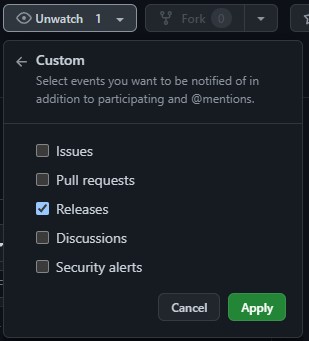
notif

You should receive an email next time new firmwares are published by Reolink.

Download all the firmwares

See here.

Firmwares

* means the device is discontinued.

Total: 910

B1200 (Add-ons)

Product page

IPC_52316M12MP

Firmwares for this hardware version: 3

VersionDateChangesNotes
v3.1.0.5036_25062792222025‑06‑27
  1. Cloud storage supported (Actural service provided depends on the subscription plan).
  2. Perimeter Protection Added.
  3. Smart Event Detection Added.
  4. Day/night mode switching enhanced.
  5. Other known bugs resolved.
v3.1.0.2174_230508002023‑05‑08
  1. Add four-in-one (binning_mode) function, which provides image mode selection in night mode. This function can be found in the Advanced settings of the Display interface.
  2. Optimize the clarity of OSD strokes; solve the problem that the OSD display is not clear in some scenarios.
  3. Optimize the day and night switching function.
  4. Optimize the Smart detection function.
    1. Upgrade the smart model.
    2. Improve the recognition accuracy of person, vehicle, and pets, and optimize the problem of static smart false positives.
  5. Solve the problem of deviation in adjusting the brightness of the screen.
  6. Solve the problem that the detection area does not fit after the mirror image is flipped.
  7. Fix the bug that the night vision frame rate is incorrect in some scenes.
v3.1.0.1105_230309002023‑03‑09Optimized the image quality of some scenes and fixed other known bugs
B400 (Add-ons) *

Product page

IPC_5128M

Firmwares for this hardware version: 3

VersionDateChangesNotes
v3.0.0.183_21012800
v3.0.0.183_21012800
2021‑01‑28
  1. Optimize the effect of the day and night switch.
  2. Optimize network transmission.
  3. Optimize the alert caused by the Day and Night switching.
  4. When obtaining the IP address by DHCP, the hostname will be changed to the device name (OSD name).
  5. Fixed the bug that IPC failed to reconnect to the NVR after powering off when setting certain time zones.
  6. Fixed some known bugs.
If your camera B400's hardware version does not begin with IPC_5128M, please wait for the new firmware release.
If you don't want to restore your camera settings to factory status, please uncheck/ don't enable the" update configuration File" option.
v3.0.0.136_201209002020‑12‑09
  1. Optimize the effect of the day and night switch.
  2. Optimize network transmission.
  3. Optimize the alert caused by the Day and Night switching.
  4. When obtaining the IP address by DHCP, the hostname will be changed to the device name (OSD name).
  5. Fixed some known bugs.
Archive
v2.0.0.16_200415602020‑04‑15
  1. Fixed the freezing issue under the complex environment of live view and playback.
  2. Optimized system performance.
Archive

IPC_5174MP8M

Firmwares for this hardware version: 3

VersionDateChangesNotes
v3.0.0.183_210128002021‑01‑28
  1. Optimize the effect of the day and night switch.
  2. Optimize network transmission.
  3. Optimize the alert caused by the Day and Night switching.
  4. When obtaining the IP address by DHCP, the hostname will be changed to the device name (OSD name).
  5. Fixed the bug that IPC failed to reconnect to the NVR after powering off when setting certain time zones.
  6. Fixed some known bugs.
Archive
v3.0.0.136_201210002020‑12‑10
  1. Optimize the effect of the day and night switch.
  2. Optimize network transmission.
  3. Optimize the alert caused by the Day and Night switching.
  4. When obtaining the IP address by DHCP, the hostname will be changed to the device name (OSD name).
  5. Fixed some known bugs.
Archive
v2.0.0.16_200415502020‑04‑15
  1. Fixed the freezing issue under the complex environment of live view and playback.
  2. Optimized system performance.
Archive
B500 (Add-ons) *

IPC_5158M5M

Firmwares for this hardware version: 2

VersionDateChangesNotes
v3.0.0.183_21012814
v3.0.0.183_21012814
2021‑01‑28
  1. Optimize the effect of the day and night switch.
  2. Optimize network transmission.
  3. Optimize the alert caused by the Day and Night switching.
  4. When obtaining the IP address by DHCP, the hostname will be changed to the device name (OSD name).
  5. Fixed the bug that IPC failed to reconnect to the NVR after powering off when setting certain time zones.
  6. Fixed some known bugs.
If your camera B500's hardware version does not begin with IPC_5158M5M, please wait for the new firmware release.
v3.0.0.136_201209142020‑12‑09
  1. Optimize the effect of the day and night switch.
  2. Optimize network transmission.
  3. Optimize the alert caused by the Day and Night switching.
  4. When obtaining the IP address by DHCP, the hostname will be changed to the device name (OSD name).
  5. Fixed some known bugs.
Archive

IPC_515B8M5M

Firmwares for this hardware version: 2

VersionDateChangesNotes
v3.0.0.183_21012814
v3.0.0.183_21012814
2021‑01‑28
  1. Optimize the effect of the day and night switch.
  2. Optimize network transmission.
  3. Optimize the alert caused by the Day and Night switching.
  4. When obtaining the IP address by DHCP, the hostname will be changed to the device name (OSD name).
  5. Fixed the bug that IPC failed to reconnect to the NVR after powering off when setting certain time zones.
  6. Fixed some known bugs.
If your camera B500's hardware version does not begin with IPC_515B8M5M, please wait for the new firmware release.
.If you don't want to restore your camera settings to factory status, please uncheck/ don't enable the" update configuration File" option.
v3.0.0.136_201209142020‑12‑09
  1. Optimize the effect of the day and night switch.
  2. Optimize network transmission.
  3. Optimize the alert caused by the Day and Night switching.
  4. When obtaining the IP address by DHCP, the hostname will be changed to the device name (OSD name).
  5. Fixed some known bugs.
Archive

IPC_515B8M5M_V2

Firmwares for this hardware version: 1

VersionDateChangesNotes
v3.1.0.2379_23062900
2023‑06‑29
  1. Optimize smart detection. Animal detction is added.
  2. Optimize recording.
  3. Optimize night vision.
  4. Optimize the detection zone setting.
  5. Optimze the Brightness & Shadows setting.
  6. Optimize some network features and fix some bugs
B500W (Add-ons)

IPC_MS1NO25MP

Firmwares for this hardware version: 1

VersionDateChangesNotes
v3.0.0.3078_24070313442024‑07‑031. Resolve known bugs
B800 (Add-ons) *

Product page

IPC_5158M8M_V2

Firmwares for this hardware version: 3

VersionDateChangesNotes
v3.1.0.4057_24091321312024‑09‑131.Other known bugs resolved.
v3.1.0.3702_24070873422024‑07‑08
  1. Optimize smart detection. Animal detction is added.
  2. Optimize recording.
  3. Optimize night vision.
  4. Optimize the detection zone setting.
  5. Optimze the Brightness & Shadows setting.
  6. Optimize some network features and fix some bugs
v3.1.0.2379_230627022023‑06‑27
  1. Optimize smart detection. Animal detction is added.
  2. Optimize recording.
  3. Optimize night vision.
  4. Optimize the detection zone setting.
  5. Optimze the Brightness & Shadows setting.
  6. Optimize some network features and fix some bugs

IPC_5158MP8M

Firmwares for this hardware version: 3

VersionDateChangesNotes
v3.0.0.183_21012800
v3.0.0.183_21012800
2021‑01‑28
  1. Optimize the effect of the day and night switch.
  2. Optimize network transmission.
  3. Optimize the alert caused by the Day and Night switching.
  4. When obtaining the IP address by DHCP, the hostname will be changed to the device name (OSD name).
  5. Fixed the bug that IPC failed to reconnect to the NVR after powering off when setting certain time zones.
  6. Fixed some known bugs.
If your camera B800's hardware version does not begin with IPC_5158MP8M, please wait for the new firmware release.
.If you don't want to restore your camera settings to factory status, please uncheck/ don't enable the" update configuration File" option.
v3.0.0.136_201209002020‑12‑09
  1. Optimize the effect of the day and night switch.
  2. Optimize network transmission.
  3. Optimize the alert caused by the Day and Night switching.
  4. When obtaining the IP address by DHCP, the hostname will be changed to the device name (OSD name).
  5. Fixed some known bugs.
Archive
v2.0.0.17_200422002020‑04‑22
  1. Fixed the freezing issue under the complex environment of live view and playback.
  2. Optimized system performance.
Archive
B800W (Add-ons)

IPC_MS2NO28MP

Firmwares for this hardware version: 2

VersionDateChangesNotes
v3.0.0.5031_25062705162025‑06‑27
  1. Image quality optimized.
  2. Wi-Fi performance improved.
  3. Other known bugs resolved.
v3.0.0.3078_24070313282024‑07‑031. Resolve known bugs
C1 *

Product page

IPC_36S16MHSM

Firmwares for this hardware version: 5

C1-Pro *

Product page

IPC_3816MPT

Firmwares for this hardware version: 4

IPC_51316M

Firmwares for this hardware version: 3

VersionDateChangesNotes
v3.0.0.136_201211032020‑12‑11Source 1
Source 2
v3.0.0.121_20111903
v3.0.0.121_20111903
2020‑11‑19Source 1
v2.0.0.448_190614052019‑06‑14
  1. Fixed the issue where the WiFi can't reconnect after rebooting.
  2. Fixed the issue where the sound becomes smaller after frequently switching the audio.
  3. Add the smart home feature (Google Home).
  4. Optimize the breathing effect.
  5. Fixed the drop issue where RTSP previewing.
  6. Fixed the IR-cut switching failure problem on part of cameras.
  7. Add power LED control function to C1 Pro.
  8. Add manually trigger and automatic voice alarm function to C1 Pro.
Archive
C2 *

Product page

IPC_3816MPT

Firmwares for this hardware version: 6

C2-Pro *

Product page

IPC_51516M5M

Firmwares for this hardware version: 3

VersionDateChangesNotes
v3.0.0.136_201211072020‑12‑11Source 1
Source 2
v2.0.0.654_200409082020‑04‑09
  1. Extended the max password length of Email, FTP, and DDNS to 128 digits.
  2. Updated the max cruise time to 300 seconds.
Archive
v2.0.0.477_190715042019‑07‑15
  1. Add the smart home feature (Google Home).
  2. Fixed AF learning table compatibility issues.
  3. Improved P2P connectivity.
  4. Fixed the IR-cut switching failure problem on part of cameras.
  5. Modified the AF library and optimize the AF focus.
  6. Optimize noise problems of PTZ audio.
  7. Add power LED control function to C2 Pro.
  8. Add manually trigger and automatic voice alarm function to C2 Pro.
  9. Fixed the issue where the WiFi can't reconnect after rebooting.
Archive
CX410

Product page

IPC_NT1NA44MP

Firmwares for this hardware version: 6

VersionDateChangesNotes
v3.1.0.3429_24041813132024‑04‑18
  1. Optimize HDR effect
  2. Solve other known bugs
v3.1.0.2948_231127032023‑11‑27
  1. Add Motion Mark
  2. Optimize audio
  3. Optimize smart detection
  4. Fix some known bugs
v3.1.0.2501_230725032023‑07‑25
  1. Optimize the Spolight modes
  2. Optimize the night vision
  3. Add HDR switch
  4. Fix some known bugs
v3.1.0.2447_230712632023‑07‑12:warning: The only available links for this firmware are hosted by users and not Reolink themselves
Source 1
Source 2
v3.1.0.2272_23053066
2023‑05‑30:warning: The only available links for this firmware are hosted by users and not Reolink themselves
Source 1
v3.1.0.2207_23051803
2023‑05‑18:warning: The only available links for this firmware are hosted by users and not Reolink themselves
:information_source: Subsequent firmwares don't have proper settings for the light.
Check the source for details
Source 1
CX410W

Product page

IPC_NT1NA44MP

Firmwares for this hardware version: 3

VersionDateChangesNotes
v3.1.0.4366_24120214792024‑12‑021.Other known bugs resolved.
v3.1.0.3429_24092354022024‑09‑231.Cloud storage supported (Actural service provided depends on the subscription plan).
v3.1.0.3429_24041813162024‑04‑18
  1. Optimize HDR effect
  2. Solve other known bugs
CX810

IPC_NT2NA48MPB28

Firmwares for this hardware version: 4

VersionDateChangesNotes
v3.1.0.5129_25102221542025‑10‑221. White light alarm setting issues fixed.
v3.1.0.5129_25071722222025‑07‑17
  1. Perimeter Protection added.
  2. Cloud storage supported (Actural service depends on the subscription plan).
  3. Other known bugs resolved.
v3.1.0.4666_25030720602025‑03‑07
  1. HDR feature toggle added.
  2. Other known bugs resolved.
v3.1.0.3909_24080645162024‑08‑06
  1. Add audio noise reduction function
  2. Add binning mode function
  3. Optimize image effects
  4. Solve other known BUGs
CX820

IPC_NT16NA48MP

Firmwares for this hardware version: 1

VersionDateChangesNotes
v3.2.0.5375_25091623862025‑09‑16
  1. Cloud storage supported (actual service provided depends on the subscription plan).
  2. Two-way talk performance enhanced.
  3. Security patches optimized.
  4. Local AI video search experience improved.
  5. Other known bugs resolved.
ColorX Series P330X

IPC_NT2NA48MPB28

Firmwares for this hardware version: 2

VersionDateChangesNotes
v3.1.0.5129_25102221552025‑10‑221. White light alarm setting issues fixed.
v3.1.0.5129_25071722232025‑07‑17
  1. Perimeter Protection added.
  2. Cloud storage supported (Actural service depends on the subscription plan).
  3. Other known bugs resolved.
ColorX Series P335X

IPC_NT16NA48MP

Firmwares for this hardware version: 1

VersionDateChangesNotes
v3.2.0.5375_25091623482025‑09‑16
  1. Cloud storage supported (actual service provided depends on the subscription plan).
  2. Two-way talk performance enhanced.
  3. Security patches optimized.
  4. Local AI video search experience improved.
  5. Other known bugs resolved.
ColorX Series W320X

IPC_NT1NA44MP

Firmwares for this hardware version: 1

VersionDateChangesNotes
v3.1.0.4366_24120214802024‑12‑02Known Bugs Fixed
D1200 (Add-ons)

Product page

IPC_52316M12MP

Firmwares for this hardware version: 2

VersionDateChangesNotes
v3.1.0.2174_230508012023‑05‑08
  1. Add four-in-one (binning_mode) function, which provides image mode selection in night mode. This function can be found in the Advanced settings of the Display interface.
  2. Optimize the clarity of OSD strokes; solve the problem that the OSD display is not clear in some scenarios.
  3. Optimize the day and night switching function.
  4. Optimize the Smart detection function.
    1. Upgrade the smart model.
    2. Improve the recognition accuracy of person, vehicle, and pets, and optimize the problem of static smart false positives.
  5. Solve the problem of deviation in adjusting the brightness of the screen.
  6. Solve the problem that the detection area does not fit after the mirror image is flipped.
  7. Fix the bug that the night vision frame rate is incorrect in some scenes.
v3.1.0.1105_230309012023‑03‑09Optimized the image quality of some scenes and fixed other known bugs
D340P

DB_566128M5MP_P

Firmwares for this hardware version: 3

VersionDateChangesNotes
v3.0.0.6460_26052714962026‑05‑27
  1. Updated World Cup element reply kit, including button audio.
  2. Added animated GIF push notification function (cloud plan required).
  3. Added video recording encryption function.
  4. Fixed some known bugs.
  5. Please update the app to the latest version. If the doorbell is connected to a HUB or NVR, the HUB or NVR firmware also needs to be updated.
v3.0.0.4662_25081312832025‑08‑13
  1. Fixed the image overexposure issue.
  2. App two-way audio interrupt smart home two-way audio.
  3. Updated the photosensitive model.
  4. Supplemented and fixed some general bugs.
v3.0.0.4662_25031822712025‑03‑18
  1. Support HDR function optimized image parameters.
  2. Support conversation recording and video deletion function.
  3. Support AI-animals.
  4. Recommend upgrade the app version to 4.52 or above.
D340P-White

DB_566128M5MP_P_W

Firmwares for this hardware version: 3

VersionDateChangesNotes
v3.0.0.6460_26052717172026‑05‑27
  1. Updated World Cup element reply kit, including button audio.
  2. Added animated GIF push notification function (cloud plan required).
  3. Added video recording encryption function.
  4. Fixed some known bugs.
  5. Please update the app to the latest version. If the doorbell is connected to a HUB or NVR, the HUB or NVR firmware also needs to be updated.
v3.0.0.4662_25081313022025‑08‑13
  1. Fixed the image overexposure issue.
  2. App two-way audio interrupt smart home two-way audio.
  3. Updated the photosensitive model.
  4. Supplemented and fixed some general bugs.
v3.0.0.4662_25032022842025‑03‑20
  1. Support HDR function optimized image parameters.
  2. Support conversation recording and video deletion function.
  3. Support AI-animals.
  4. Recommend upgrade the app version to 4.52 or above.
D340W

DB_566128M5MP_W

Firmwares for this hardware version: 3

VersionDateChangesNotes
v3.0.0.6460_26052717082026‑05‑27
  1. Updated World Cup element reply kit, including button audio.
  2. Added animated GIF push notification function (cloud plan required).
  3. Added video recording encryption function.
  4. Fixed some known bugs.
  5. Please update the app to the latest version. If the doorbell is connected to a HUB or NVR, the HUB or NVR firmware also needs to be updated.
v3.0.0.4662_25081312822025‑08‑13
  1. Fixed the image overexposure issue.
  2. App two-way audio interrupt smart home two-way audio.
  3. Updated the photosensitive model.
  4. Supplemented and fixed some general bugs.
v3.0.0.4662_25031822702025‑03‑18
  1. Support HDR function optimized image parameters.
  2. Support conversation recording and video deletion function.
  3. Support AI-animals.
  4. Recommend upgrade the app version to 4.52 or above.
D340W-White

DB_566128M5MP_W_W

Firmwares for this hardware version: 3

VersionDateChangesNotes
v3.0.0.6460_26052717192026‑05‑27
  1. Updated World Cup element reply kit, including button audio.
  2. Added animated GIF push notification function (cloud plan required).
  3. Added video recording encryption function.
  4. Fixed some known bugs.
  5. Please update the app to the latest version. If the doorbell is connected to a HUB or NVR, the HUB or NVR firmware also needs to be updated.
v3.0.0.4662_25081313012025‑08‑13
  1. Fixed the image overexposure issue.
  2. App two-way audio interrupt smart home two-way audio.
  3. Updated the photosensitive model.
  4. Supplemented and fixed some general bugs.
v3.0.0.4662_25032022832025‑03‑20
  1. Support HDR function optimized image parameters.
  2. Support conversation recording and video deletion function.
  3. Support AI-animals.
  4. Recommend upgrade the app version to 4.52 or above.
D400 (Add-ons) *

Product page

IPC_5128M

Firmwares for this hardware version: 3

VersionDateChangesNotes
v3.0.0.183_21012801
v3.0.0.183_21012801
2021‑01‑28
  1. Optimize the effect of the day and night switch.
  2. Optimize network transmission.
  3. Optimize the alert caused by the Day and Night switching.
  4. When obtaining the IP address by DHCP, the hostname will be changed to the device name (OSD name).
  5. Fixed the bug that IPC failed to reconnect to the NVR after powering off when setting certain time zones.
  6. Fixed some known bugs.
If your camera D400's hardware version does not begin with IPC_5128M, please wait for the new firmware release.
If you don't want to restore your camera settings to factory status, please uncheck/ don't enable the" update configuration File" option.
v3.0.0.136_201209012020‑12‑09
  1. Optimize the effect of the day and night switch.
  2. Optimize network transmission.
  3. Optimize the alert caused by the Day and Night switching.
  4. When obtaining the IP address by DHCP, the hostname will be changed to the device name (OSD name).
  5. Fixed some known bugs.
Archive
v2.0.0.16_200415612020‑04‑15
  1. Fixed the freezing issue under the complex environment of live view and playback.
  2. Optimized system performance.
Archive

IPC_5174MP8M

Firmwares for this hardware version: 3

VersionDateChangesNotes
v3.0.0.183_210128012021‑01‑28
  1. Optimize the effect of the day and night switch.
  2. Optimize network transmission.
  3. Optimize the alert caused by the Day and Night switching.
  4. When obtaining the IP address by DHCP, the hostname will be changed to the device name (OSD name).
  5. Fixed the bug that IPC failed to reconnect to the NVR after powering off when setting certain time zones.
  6. Fixed some known bugs.
Archive
v3.0.0.136_201210012020‑12‑10
  1. Optimize the effect of the day and night switch.
  2. Optimize network transmission.
  3. Optimize the alert caused by the Day and Night switching.
  4. When obtaining the IP address by DHCP, the hostname will be changed to the device name (OSD name).
  5. Fixed some known bugs.
Archive
v2.0.0.16_200415512020‑04‑15
  1. Fixed the freezing issue under the complex environment of live view and playback.
  2. Optimized system performance.
Archive
D420 *

IPC_5128M

Firmwares for this hardware version: 2

VersionDateChangesNotes
v3.0.0.183_210128022021‑01‑28
  1. Optimize the effect of the day and night switch.
  2. Optimize network transmission.
  3. Optimize the alert caused by the Day and Night switching.
  4. When obtaining the IP address by DHCP, the hostname will be changed to the device name (OSD name).
  5. Fixed the bug that IPC failed to reconnect to the NVR after powering off when setting certain time zones.
  6. Fixed some known bugs.
Archive
v2.0.0.16_200415622020‑04‑15
  1. Fixed the freezing issue under the complex environment of live view and playback.
  2. Optimized system performance.
Archive

IPC_5174MP8M

Firmwares for this hardware version: 1

VersionDateChangesNotes
v3.0.0.183_210128022021‑01‑28
  1. Optimize the effect of the day and night switch.
  2. Optimize network transmission.
  3. Optimize the alert caused by the Day and Night switching.
  4. When obtaining the IP address by DHCP, the hostname will be changed to the device name (OSD name).
  5. Fixed the bug that IPC failed to reconnect to the NVR after powering off when setting certain time zones.
  6. Fixed some known bugs.
Archive
D500 (Add-ons) *

IPC_5158M5M

Firmwares for this hardware version: 2

VersionDateChangesNotes
v3.0.0.183_21012815
v3.0.0.183_21012815
2021‑01‑28
  1. Optimize the effect of the day and night switch.
  2. Optimize network transmission.
  3. Optimize the alert caused by the Day and Night switching.
  4. When obtaining the IP address by DHCP, the hostname will be changed to the device name (OSD name).
  5. Fixed some known bugs.
If your cameraD500's hardware version does not begin with IPC_5158M5M, please wait for the new firmware release.
v3.0.0.136_201209152020‑12‑09
  1. Optimize the effect of the day and night switch.
  2. Optimize network transmission.
  3. Optimize the alert caused by the Day and Night switching.
  4. When obtaining the IP address by DHCP, the hostname will be changed to the device name (OSD name).
  5. Fixed some known bugs.
Archive

IPC_515B8M5M

Firmwares for this hardware version: 2

VersionDateChangesNotes
v3.0.0.183_21012815
v3.0.0.183_21012815
2021‑01‑28
  1. Optimize the effect of the day and night switch.
  2. Optimize network transmission.
  3. Optimize the alert caused by the Day and Night switching.
  4. When obtaining the IP address by DHCP, the hostname will be changed to the device name (OSD name).
  5. Fixed the bug that IPC failed to reconnect to the NVR after powering off when setting certain time zones.
  6. Fixed some known bugs.
If your cameraD500's hardware version does not begin with IPC_515B8M5M, please wait for the new firmware release.
v3.0.0.136_20120915
v3.0.0.136_20120915
2020‑12‑09
  1. Optimize the effect of the day and night switch.
  2. Optimize network transmission.
  3. Optimize the alert caused by the Day and Night switching.
  4. When obtaining the IP address by DHCP, the hostname will be changed to the device name (OSD name).
  5. Fixed the bug that IPC failed to reconnect to the NVR after powering off when setting certain time zones.
  6. Fixed some known bugs.
Archive

IPC_515B8M5M_V2

Firmwares for this hardware version: 2

VersionDateChangesNotes
v3.1.0.2379_24122497912024‑12‑241.Other known bugs resolved.
v3.1.0.2379_23062901
2023‑06‑29
  1. Optimize smart detection. Animal detction is added.
  2. Optimize recording.
  3. Optimize night vision.
  4. Optimize the detection zone setting.
  5. Optimze the Brightness & Shadows setting.
  6. Optimize some network features and fix some bugs
D800 (Add-ons) *

Product page

IPC_5158M8M_V2

Firmwares for this hardware version: 2

VersionDateChangesNotes
v3.1.0.4057_24091321322024‑09‑131.Other known bugs resolved.
v3.1.0.2379_23062703
2023‑06‑27
  1. Optimize smart detection. Animal detction is added.
  2. Optimize recording.
  3. Optimize night vision.
  4. Optimize the detection zone setting.
  5. Optimze the Brightness & Shadows setting.
  6. Optimize some network features and fix some bugs

IPC_5158MP8M

Firmwares for this hardware version: 3

VersionDateChangesNotes
v3.0.0.183_21012801
v3.0.0.183_21012801
2021‑01‑28
  1. Optimize the effect of the day and night switch.
  2. Optimize network transmission.
  3. Optimize the alert caused by the Day and Night switching.
  4. When obtaining the IP address by DHCP, the hostname will be changed to the device name (OSD name).
  5. Fixed the bug that IPC failed to reconnect to the NVR after powering off when setting certain time zones.
  6. Fixed some known bugs.
If your camera D800's hardware version does not begin with IPC_5158MP8M, please wait for the new firmware release.
v3.0.0.136_201209012020‑12‑09
  1. Optimize the effect of the day and night switch.
  2. Optimize network transmission.
  3. Optimize the alert caused by the Day and Night switching.
  4. When obtaining the IP address by DHCP, the hostname will be changed to the device name (OSD name).
  5. Fixed some known bugs.
Archive
v2.0.0.17_200422012020‑04‑22
  1. Fixed the freezing issue under the complex environment of live view and playback.
  2. Optimized system performance.
Archive
Duo Series P730

IPC_529B17B8MP

Firmwares for this hardware version: 2

VersionDateChangesNotes
v3.0.0.5586_25102917862025‑10‑29
  1. Connection with third-party platforms enhanced.
  2. Other known bugs resolved.
v3.0.0.3471_24061157602024‑06‑11
  1. Add Bitrate Mode function
  2. Optimize smart detection
  3. The https function is disabled by default
  4. Support webhook function on web browser
  5. Optimize day and night switching effect
  6. Add audio noise reduction function
  7. Solve other known bugs

IPC_NT18NA68MP

Firmwares for this hardware version: 1

VersionDateChangesNotes
v3.2.0.5467_25101411982025‑10‑14
  1. Cloud storage supported (Actural service depends on the subscription plan)
  2. Other known bugs resolved.
Duo Series P737

IPC_NT18NA68MP

Firmwares for this hardware version: 1

VersionDateChangesNotes
v3.2.0.5467_25101412002025‑10‑14
  1. Cloud storage supported (Actural service depends on the subscription plan)
  2. Other known bugs resolved.
Duo Series P750

IPC_NT13NA416MP

Firmwares for this hardware version: 1

VersionDateChangesNotes
v3.0.0.5049_25063021892025‑06‑30
  1. Cloud storage supported (Actural service provided depends on the subscription plan).
  2. Local Video Encryption feature added.
  3. Perimeter Protection feature supported.
  4. Smart Event Detection Added.
  5. Other known bugs resolved.

IPC_NT15NA416MP

Firmwares for this hardware version: 1

VersionDateChangesNotes
v3.0.0.4867_25050721252025‑05‑07
  1. Perimeter Protection Added.
  2. Smart Event Detection Added.
  3. Connection with third-party platforms enhanced.
  4. Cloud storage supported (Actural service provided depends on the subscription plan).
  5. Other known bugs resolved.

IPC_NT17NA616MP

Firmwares for this hardware version: 2

VersionDateChangesNotes
v3.2.0.5770_25122313072025‑12‑23
  1. Image stitching effect optimized
  2. Other known bugs resolved.
v3.2.0.4989_25091114482025‑09‑11System Bugs Fixed
Duo Series P757

IPC_NT17NA616MP

Firmwares for this hardware version: 1

VersionDateChangesNotes
v3.2.0.5770_25122313112025‑12‑23
  1. Image stitching effect optimized
  2. Other known bugs resolved.
Duo Series W730

IPC_529B17B8MP

Firmwares for this hardware version: 1

VersionDateChangesNotes
v3.0.0.4428_24121834192024‑12‑18
  1. Added support for Reolink Cloud Service.
  2. Optimized the image stitching performance.
  3. Fixed some known bugs.

IPC_NT18NA68MP

Firmwares for this hardware version: 1

VersionDateChangesNotes
v3.2.0.5467_25101412142025‑10‑14
  1. Cloud storage supported (Actural service depends on the subscription plan)
  2. Other known bugs resolved.
Duo Series W750

IPC_NT17NA616MPW

Firmwares for this hardware version: 2

VersionDateChangesNotes
v3.2.0.5770_25122313092025‑12‑23
  1. Image stitching effect optimized
  2. Other known bugs resolved.
v3.2.0.4989_25091114502025‑09‑11System Bugs Fixed
Duo Series P757

IPC_NT17NA616MP

Firmwares for this hardware version: 1

VersionDateChangesNotes
v3.2.0.5119_25091114762025‑09‑11System Bugs Fixed
E Series E321

IPC_MS4NO23MPW

Firmwares for this hardware version: 1

VersionDateChangesNotes
v3.2.0.4858_25082734152025‑08‑271.Fixed some known bugs.
E Series E330

IPC_566SD54MP

Firmwares for this hardware version: 1

VersionDateChangesNotes
v3.1.0.5112_25070814762025‑07‑08
  1. Privacy Mode supported.
  2. ONVIF protocol supported.
  3. Other known bugs resolved.
E Series E331

IPC_NT1NA45MPSD18V2

Firmwares for this hardware version: 2

VersionDateChangesNotes
v3.1.0.5714_25112713562025‑11‑27
  1. Cloud storage supported (actual service provided depends on the subscription plan).
  2. Other known bugs resolved.
v3.1.0.5352_25090516952025‑09‑05Known Bugs Fixed
E Series E340

IPC_566SD664M5MP

Firmwares for this hardware version: 1

VersionDateChangesNotes
v3.1.0.4417_24121221792024‑12‑12
  1. Privacy Mode added.
  2. Other known bugs resolved.

IPC_NT14NA48MPSD6

Firmwares for this hardware version: 2

VersionDateChangesNotes
v3.2.0.6932_26081119092026‑08‑11
  1. Polygonal privacy masks supported.
  2. Rich notifications supported.
  3. Other known issues resolved.
v3.2.0.4741_25032819932025‑03‑28
  1. Tracking performance optimized.
  2. Wi-Fi connection improved.
  3. Day/night mode switching enhanced.
  4. Other known bugs resolved.
E Series E530X

IPC_MS1NA44MP

Firmwares for this hardware version: 1

VersionDateChangesNotes
v3.0.0.3281_24030617492024‑03‑06Known Bugs Fixed
E Series E540

IPC_566SD85MP

Firmwares for this hardware version: 1

VersionDateChangesNotes
v3.1.0.4366_24120214832024‑12‑02Other known bugs resolved.
E Series E550

IPC_NT2NA48MPSD8V3

Firmwares for this hardware version: 1

VersionDateChangesNotes
v3.1.0.5502_2510231295
2025‑10‑23Known Bugs Fixed
E Series E560

IPC_560SD88MP

Firmwares for this hardware version: 1

VersionDateChangesNotes
v3.1.0.4020_24091167972024‑09‑11Known Bugs Fixed

IPC_560SD88MPW

Firmwares for this hardware version: 1

VersionDateChangesNotes
v3.1.0.4523_25021233902025‑02‑12Known Bugs Fixed
E Series E560P

IPC_560SD88MP

Firmwares for this hardware version: 2

VersionDateChangesNotes
v3.1.0.5223_25080720822025‑08‑07
  1. H.265/H.264 switching supported.
  2. Day/night mode switching enhanced.
  3. Other known bugs resolved.
v3.1.0.4020_24091168812024‑09‑11Other known bugs resolved.
E1

Product page

IPC_517SD5

Firmwares for this hardware version: 4

VersionDateChangesNotes
v3.0.0.2356_230620002023‑06‑20
  1. Optimize the network feature
  2. Update the web UI version
  3. Optimize the PTZ function
  4. Optimize the WiFi connection
  5. Fix some known bugs
v3.0.0.597_210910452021‑09‑10Source 1
Source 2
v3.0.0.115_20102200
v3.0.0.115_20102200
2020‑10‑22
  1. Added the preset feature.
  2. Fixed the problem that the email test fails when the email password is blank.
  3. Optimized cloud transmission performance.
  4. Optimized the network transmission protocol.
  5. Fixed some known bugs.
This firmware is ONLY for E1(with hardware version IPC_517SD5).
If you don't want to restore your camera settings to factory status, please uncheck/ don't enable the" update configuration File" option.
v3.0.0.42_200629002020‑06‑29
  1. Added multiple languages for the voice prompt when scanning the QR code to set up the camera.
  2. Added the thumbnail function-Reolink APP will display the image of each motion event during playback.
  3. Fixed the bug when connecting the camera in different Vlan via Reolink app/client.
Archive

IPC_566SD53MP

Firmwares for this hardware version: 2

VersionDateChangesNotes
v3.1.0.3126_24010224592024‑01‑02
  1. Optimize smart detection.
  2. Enhance firmware upgrade speed.
  3. Improve recording audio and two-way audio effects.
  4. Optimize PT (Pan-Tilt), addressing inaccuracies in PT positioning in certain scenarios.
v3.1.0.2647_230831002023‑08‑31
  1. Optimize smart detection
  2. Optimize the network module
  3. Optimize calibration
  4. Optimize recording
  5. Fix some known bugs

IPC_MS4NO24MPW

Firmwares for this hardware version: 1

VersionDateChangesNotes
v3.2.0.4858_25082735312025‑08‑271.Fixed some known bugs.
E1 Outdoor

Product page

IPC_523SD8

Firmwares for this hardware version: 10

VersionDateChangesNotes
v3.1.0.3514_24060396342024‑06‑03
  1. Improve smart detection, adding pet recognition.
  2. Improve self-calibration.
  3. Enhance tracking performance.
  4. Optimize QR code scanning functionality.
  5. Improve recording feature.
  6. Address inaccuracies in guard position.
  7. Resolve other known bugs.
v3.1.0.1643_230411002023‑04‑11
v3.1.0.1643_221224002022‑12‑24Source 1
v3.1.0.1584_221209662022‑12‑09Source 1
v3.1.0.1348_2209226602022‑09‑22Source 1
v3.1.0.989_220713062022‑07‑13Source 1
v3.1.0.956_220415062022‑04‑15:warning: The only available links for this firmware are hosted by users and not Reolink themselves
Source 1
v3.1.0.804_220124062022‑01‑24Supports animal detectionSource 1
v3.1.0.804_220115062022‑01‑15Source 1
v3.0.0.197_210227062021‑02‑27
  1. Solved the problem that some APP versions are not compatible with the automatic tracking function and the spotlight function.
  2. Optimized the auto tracking function.
  3. Optimized the PTZ function.
  4. Optimized Person and Vehicle Detection.
Archive

IPC_566SD85MP

Firmwares for this hardware version: 4

VersionDateChangesNotes
v3.1.0.5714_25112713582025‑11‑27
  1. Cloud storage supported (actual service provided depends on the subscription plan).
  2. Other known bugs resolved.
v3.1.0.4366_24120214822024‑12‑02
  1. Pan & Tilt performance optimized.
  2. Other known bugs resolved.
v3.1.0.3429_24041813192024‑04‑181.Improve version compatibility between cameras
v3.1.0.2649_230831022023‑08‑31
  1. Optimize smart detection
  2. Optimize auto-tracking
  3. Optimize the network module
  4. Optimize calibration
  5. Optimize recording
  6. Fix some known bugs

IPC_NT1NA45MPSD8W

Firmwares for this hardware version: 1

VersionDateChangesNotes
v3.1.0.5714_25112713522025‑11‑27
  1. Cloud storage supported (actual service provided depends on the subscription plan).
  2. Other known bugs resolved.
E1 Outdoor CX

Product page

IPC_MS1NA44MP

Firmwares for this hardware version: 2

VersionDateChangesNotes
v3.0.0.4348_24112618832024‑11‑26
  1. Camera security improved.
  2. Overall camera performance optimized.
v3.0.0.3715_24062712902024‑06‑27
  1. Optimize night vision image effects.
  2. Optimize tracking effects.
  3. Solve some known bugs in live view and pre-record.
  4. Optimize snapshot effects.
  5. Solve other known bugs.
E1 Outdoor PoE

Product page

IPC_560SD88MP

Firmwares for this hardware version: 5

VersionDateChangesNotes
v3.1.0.5223_25101721002025‑10‑17White light alarm setting issues fixed
v3.1.0.5223_25080720812025‑08‑07
  1. H.265/H.264 switching supported.
  2. Day/night mode switching enhanced.
  3. Other known bugs resolved.
v3.1.0.4020_24091168322024‑09‑11
  1. Abnormal AI detection issues fixed.
  2. Image processing optimized.
  3. Two-way talk issues resolved.
  4. ONVIF compatibility improved.
  5. Other known bugs fixed.
v3.1.0.3872_24072620572024‑07‑26
  1. Optimize tracking effect;
  2. Optimize autofocus effect;
  3. Optimize image effect;
  4. Solve other known bugs
v3.1.0.2448_230712002023‑07‑12
  1. Opitmize Auto Focus
  2. Optimize Smart Detetion and Auto Tracking
  3. Fix some known bugs
E1 Outdoor Pro

Product page

IPC_560SD88MP

Firmwares for this hardware version: 4

VersionDateChangesNotes
v3.1.0.4289_24121767622024‑12‑171.Known Bugs Fixed.
v3.1.0.3872_24073047812024‑07‑30
  1. Optimize tracking effect;
  2. Optimize autofocus effect;
  3. Optimize image effect;
  4. Solve other known bugs
v3.1.0.2838_231025102023‑10‑25
  1. Optimize smart detection
  2. Optimize Auto Focus and Auto Tracking
  3. Optimize night vision
  4. Optimize switch between day and night mode
  5. Fix some bugs related to the FTP feature
  6. Optimize Audio
  7. Fix some other known bugs
v3.1.0.2515_230728092023‑07‑281. Optimize and solve some known bugs of the WiFi connection
2. Optimize Auto-tracking
3. Optimize Auto-focus
4. Optimzie Email Alert
5. Solve other known bugs

IPC_560SD88MPW

Firmwares for this hardware version: 1

VersionDateChangesNotes
v3.1.0.5714_25112713662025‑11‑27
  1. Cloud storage supported (actual service provided depends on the subscription plan).
  2. Other known bugs resolved.
E1 Outdoor S

IPC_NT2NA48MPSD8V3

Firmwares for this hardware version: 1

VersionDateChangesNotes
v3.1.0.5502_2510231294
2025‑10‑23Known Bugs Fixed
E1 Outdoor SE PoE

IPC_NT2NA48MPSD8V3

Firmwares for this hardware version: 2

VersionDateChangesNotes
v3.1.0.5223_25101721042025‑10‑17White light alarm setting issues fixed
v3.1.0.5223_25080720852025‑08‑07
  1. Day/night mode switching enhanced.
  2. Cloud storage supported (Actural service depends on the subscription plan).
  3. Other known bugs resolved.
E1 Pro

Product page

IPC_513SD5

Firmwares for this hardware version: 10

VersionDateChangesNotes
v3.0.0.2356_230620042023‑06‑20
  1. Optimize the network feature
  2. Optimize the PTZ function
  3. Optimize the WiFi connection
  4. Fix some known bugs
v3.0.0.716_211124042021‑11‑24
  1. Modify the initialization process, prompting the scan to be modified from the sound effect to five languages.
  2. Optimize the P2P connection and modify the P2P connection failure problem in some scenarios.
  3. Modify the blueish problem of the image in some specific scenes.
This firmware is ONLY for E1 Pro(with hardware version IPC_513SD5).
If you don't want to restore your camera settings to factory status, please uncheck/ don't enable the" update configuration File" option.
v3.0.0.660_211020012021‑10‑20I-frame beta test. Check the source for details:warning: This is a beta firmware
Source 1
Source 2
v3.0.0.597_210910012021‑09‑10Source 1
Source 2
v3.0.0.183_21012804
v3.0.0.183_21012804
2021‑01‑28
  1. Fixed the problem that the email test fails when the email password is blank.
  2. Optimized cloud transmission performance.
  3. Optimized the network transmission protocol.
  4. Solved the problem that you cannot use VLAN to access the camera after setting a static IP when the camera is connected by WiFi.
  5. Fixed the bug that IPC failed to reconnect to the NVR after powering off when setting certain time zones.
  6. Fixed some known bugs.
Archive
v3.0.0.116_201102042020‑11‑02
  1. Fixed the problem that the email test fails when the email password is blank.
  2. Optimized cloud transmission performance.
  3. Optimized the network transmission protocol.
  4. Solved the problem that you cannot use VLAN to access the camera after setting a static IP when the camera is connected by WiFi.
  5. Fixed some known bugs.
Archive
v3.0.0.115_201022042020‑10‑22
  1. Fixed the problem that the email test fails when the email password is blank.
  2. Optimized cloud transmission performance.
  3. Optimized the network transmission protocol.
  4. Fixed some known bugs.
Archive
v3.0.0.102_200916042020‑09‑16
  1. Optimized the day and night mode switching function
  2. Added the preset feature
  3. Fixed the problem that the email-test failed with the empty email password
  4. Optimize network delay when previewing the camera
  5. Fixed some known bugs
Archive
v3.0.0.93_200904002020‑09‑04
  1. Optimized the day and night mode switching function
  2. Added the preset feature
  3. Fixed the problem that the email-test failed with the empty email password
  4. Optimize network delay when previewing the camera
  5. Fixed the bug that FTP uploading may fail sometimes
  6. Fixed some known bugs
Archive
v3.0.0.42_200629042020‑06‑29
  1. Added multiple languages for the voice prompt when scanning the QR code to set up the camera.
  2. Added the thumbnail function-Reolink APP will display the image of each motion event during playback.
  3. Fixed the bug when connecting the camera in different Vlan via Reolink app/client.
Archive

IPC_515SD5

Firmwares for this hardware version: 3

VersionDateChangesNotes
v3.0.0.2356_230620132023‑06‑20
  1. Optimize the network feature
  2. Optimize the PTZ function
  3. Optimize the WiFi connection
  4. Fix some known bugs
v3.0.0.716_211124132021‑11‑24
  1. Modify the initialization process, prompting the scan to be modified from the sound effect to five languages.
  2. Optimize the P2P connection and modify the P2P connection failure problem in some scenarios.
  3. Modify the blueish problem of the image in some specific scenes.
This firmware is ONLY for E1 Pro(with hardware version IPC_515SD5).
If you don't want to restore your camera settings to factory status, please uncheck/ don't enable the" update configuration File" option.
v3.0.0.597_210910022021‑09‑10Source 1
Source 2

IPC_566SD54MP

Firmwares for this hardware version: 3

VersionDateChangesNotes
v3.1.0.5112_25070814752025‑07‑08
  1. Privacy Mode supported.
  2. ONVIF protocol supported.
  3. Other known bugs resolved.
v3.1.0.3149_24010924782024‑01‑09
  1. Optimize smart detection.
  2. Support two-way audio under ONVIF connection.
  3. Enhance firmware upgrade speed.
  4. Improve recording audio and two-way audio effects.
  5. Optimize PT (Pan-Tilt), addressing inaccuracies in PT positioning in certain scenarios.
v3.1.0.2647_230831002023‑08‑31
  1. Optimize smart detection
  2. Optimize auto-tracking
  3. Optimize the network module
  4. Optimize calibration
  5. Optimize recording
  6. Fix some known bugs

IPC_NT1NA45MP

Firmwares for this hardware version: 1

VersionDateChangesNotes
v3.1.0.4417_24121221302024‑12‑12
  1. Crying Sound Detection feature added.
  2. Privacy Mode added.
  3. Noise reduction performance improved.
  4. Smart Playback performance enhanced.
E1 Zoom

Product page

IPC_515BSD6

Firmwares for this hardware version: 6

VersionDateChangesNotes
v3.0.0.2356_230620082023‑06‑20
  1. Optimize the network feature
  2. Update the web UI version
  3. Optimize the PTZ function
  4. Optimize the WiFi connection
  5. Fix some known bugs
v3.0.0.1107_220705082022‑07‑05Optimized related network protocols and fixed some known bugsThis firmware is ONLY for E1 Zoom(with hardware version IPC_515BSD6)
If you don't want to restore your camera settings to factory status, please uncheck/ don't enable the" update configuration File" option.
v3.0.0.716_211124082021‑11‑24
v3.0.0.597_210910092021‑09‑10Source 1
Source 2
v3.0.0.247_210407082021‑04‑07
  1. Solved the problem that the camera switches back and forth between day and night mode in some specific scenarios.
  2. Solved the problem that the camera cannot connect to WIFI with some specific channels.
  3. Fixed other bugs.
Archive
v3.0.0.136_20121108
v3.0.0.136_20121108
2020‑12‑11
  1. Added the new web terminal that supports the HTML5 player, which mainly solved the Flash expiring problem.
  2. Added preset function.
  3. Optimized network transmission protocol.
  4. Optimized day and night switching effect.
  5. Solved the problem that FTP recording doesn't have a pre-recorded function.
  6. Solved the problem of an email test with an empty password.
  7. Optimized Cloud Storage function.
  8. Solved the problem that the DHCP hostname is eth0 on the router.
  9. Solved the problem of copywriting in the received email when only pictures are configured as an email attachment.
  10. Solved other known bugs.
Archive

IPC_515SD6

Firmwares for this hardware version: 7

VersionDateChangesNotes
v3.0.0.2356_230620082023‑06‑20
  1. Optimize the network feature
  2. Update the web UI version
  3. Optimize the PTZ function
  4. Optimize the WiFi connection
  5. Fix some known bugs
v3.0.0.1107_220705082022‑07‑05Optimized related network protocols and fixed some known bugsThis firmware is ONLY for E1 Zoom(with hardware version IPC_515SD6)
If you don't want to restore your camera settings to factory status, please uncheck/ don't enable the" update configuration File" option.
v3.0.0.716_211124082021‑11‑24:warning: The only available links for this firmware are hosted by users and not Reolink themselves
Source 1
v3.0.0.597_210910012021‑09‑10Source 1
Source 2
v3.0.0.247_21040708
v3.0.0.247_21040708
2021‑04‑07
  1. Solved the problem that the camera switches back and forth between day and night mode in some specific scenarios.
  2. Solved the problem that the camera cannot connect to WIFI with some specific channels.
  3. Fixed other bugs.
Archive
v3.0.0.136_201211082020‑12‑11
  1. Added the new web terminal that supports the HTML5 player, which mainly solved the Flash expiring problem.
  2. Added preset function.
  3. Optimized network transmission protocol.
  4. Optimized day and night switching effect.
  5. Solved the problem that FTP recording doesn't have a pre-recorded function.
  6. Solved the problem of an email test with an empty password.
  7. Optimized Cloud Storage function.
  8. Solved the problem that the DHCP hostname is eth0 on the router.
  9. Solved the problem of copywriting in the received email when only pictures are configured as an email attachment.
  10. Solved other known bugs.
Archive
v3.0.0.65_200710082020‑07‑10
  1. Added multiple languages for the voice prompt when scanning the QR code to set up the camera.
  2. Added the thumbnail function-Reolink APP will display the image of each motion event during playback.
  3. Fixed the bug when connecting the camera in different Vlan via Reolink app/client.
  4. Fixed the bug that FTP upload file failed.
Archive

IPC_566SD65MP

Firmwares for this hardware version: 3

VersionDateChangesNotes
v3.1.0.3382_24041779332024‑04‑17
  1. Optimize cloud storage function
  2. Upgrade push version
  3. Optimize focus function
  4. Support two-way audio by ONVIF
  5. Solve bugs related with PT function
  6. Solve other known bugs
v3.1.0.2649_230831022023‑08‑31
  1. Optimize smart detection
  2. Optimize auto-tracking
  3. Optimize the network module
  4. Optimize calibration
  5. Optimize recording
  6. Fix some known bugs
v3.1.0.1975_230421022023‑04‑21
  1. Optimize the focusing effect under night vision.
  2. Solve other known bugs.

IPC_566SD664M5MP

Firmwares for this hardware version: 5

VersionDateChangesNotes
v3.1.0.4417_24121221782024‑12‑12
  1. Privacy Mode added.
  2. Other known bugs resolved.
v3.1.0.4187_24110718682024‑11‑07
  1. Crying Sound Detection feature added
  2. Auto-Tracking performance improved
  3. Bugs on some third-party clients fixed
  4. Other known bugs resolved
v3.1.0.3382_24041780242024‑04‑17
  1. Optimize cloud storage function
  2. Upgrade push version
  3. Optimize focus function
  4. Support two-way audio by ONVIF
  5. Solve bugs related with PT function
  6. Solve other known bugs
v3.1.0.2649_230831012023‑08‑31
  1. Optimize smart detection
  2. Optimize auto-tracking
  3. Optimize the network module
  4. Optimize calibration
  5. Optimize recording
  6. Fix some known bugs
v3.1.0.1975_230412002023‑04‑12
  1. Optimize the focusing effect under night vision.
  2. Optimize some network functions.
  3. Optimize the PTZ function.
  4. Solve other known bugs.

IPC_NT14NA48MPSD6

Firmwares for this hardware version: 2

VersionDateChangesNotes
v3.2.0.6932_26081119082026‑08‑11
  1. Polygonal privacy masks supported.
  2. Rich notifications supported.
  3. Other known issues resolved.
v3.2.0.4741_25032819922025‑03‑28
  1. Tracking performance optimized.
  2. Wi-Fi connection improved.
  3. Day/night mode switching enhanced.
  4. Other known bugs resolved.
Elite Floodlight WiFi

Product page

IPC_NT15NA68MPW

Firmwares for this hardware version: 3

VersionDateChangesNotes
v3.2.0.6530_26062321912026‑06‑23
  1. Direct deletion supported for videos on the microSD card.
  2. Dynamic image exposure available: See in Display -> Image Settings.
v3.2.0.5607_25110419962025‑11‑04
  1. Added video deletion feature.
  2. Optimized light activation speed.
  3. Improved the timing for turning on lights at dusk.
v3.2.0.5026_25071014192025‑07‑10
  1. Add AI Video Search function.
  2. Solve other known bugs.
Elite Pro Floodlight PoE

Product page

IPC_NT17NA616MP

Firmwares for this hardware version: 1

VersionDateChangesNotes
v3.2.0.5932_26012019592026‑01‑20
  1. AI-triggered lighting alarm added.
  2. Other known bugs resolved.
Elite Series W740

IPC_NT15NA58MPW

Firmwares for this hardware version: 1

VersionDateChangesNotes
v3.2.0.4558_25031420262025‑03‑14
  1. Cloud storage supported (Actural service depends on the subscription plan).
  2. Solve other known bugs.
FE-P

Product page

FE_529128M6MP_P

Firmwares for this hardware version: 3

VersionDateChangesNotes
v3.0.0.5512_26042818222026‑04‑28
  1. P2P connectivity improved.
  2. Faster video preview in the Reolink app.
v3.0.0.5336_25090219152025‑09‑021. Dual Panoramic View supported.
v3.0.0.1901_230322022023‑03‑22:warning: The only available links for this firmware are hosted by users and not Reolink themselves
Source 1
Source 2
FE-W

FE_529128M6MP_W

Firmwares for this hardware version: 2

VersionDateChangesNotes
v3.0.0.5512_26042818202026‑04‑28
  1. Wi-Fi performance optimized.
  2. P2P connectivity improved.
  3. Faster video preview in the Reolink app.
v3.0.0.5336_25090219132025‑09‑021.Dual Panoramic View supported.
Fisheye Series P520

FE_529128M6MP_P

Firmwares for this hardware version: 2

VersionDateChangesNotes
v3.0.0.5512_26042818232026‑04‑28
  1. P2P connectivity improved.
  2. Faster video preview in the Reolink app.
v3.0.0.5336_25090219162025‑09‑021. Dual Panoramic View supported.
Fisheye Series W520

FE_529128M6MP_W

Firmwares for this hardware version: 2

VersionDateChangesNotes
v3.0.0.5512_26042818212026‑04‑28
  1. Wi-Fi performance optimized.
  2. P2P connectivity improved.
  3. Faster video preview in the Reolink app.
v3.0.0.5336_25090219142025‑09‑021. Dual Panoramic View supported.
Floodlight Series F750W

IPC_529B17B8MP

Firmwares for this hardware version: 1

VersionDateChangesNotes
v3.0.0.4428_24121835322024‑12‑18
  1. Cloud storage supported (Actural service provided depends on the subscription plan).
  2. Optimized the image stitching performance.
  3. Fixed some known bugs.
Floodlight Series F751W

IPC_NT15NA68MPW

Firmwares for this hardware version: 1

VersionDateChangesNotes
v3.2.0.5607_25110419972025‑11‑04
  1. Added video deletion feature.
  2. Optimized light activation speed.
  3. Improved the timing for turning on lights at dusk.
Floodlight Series F760P

IPC_NT17NA616MP

Firmwares for this hardware version: 1

VersionDateChangesNotes
v3.2.0.5932_26012019602026‑01‑20
  1. AI-triggered lighting alarm added.
  2. Other known bugs resolved.
Floodlight-Series-F850P

IPC_NT18NA68MP

Firmwares for this hardware version: 1

VersionDateChangesNotes
v3.2.0.5943_26013032912026‑01‑30
  1. Optimized image clarity in specific scenarios.
  2. Solve other known bugs
Floodlight-Series-F850W

IPC_NT18NA68MPW

Firmwares for this hardware version: 1

VersionDateChangesNotes
v3.2.0.5946_26013020192026‑01‑30
  1. Optimized image clarity in specific scenarios.
  2. Solve other known bugs
Hub 1 (NVR)

BASE_WENNT6NA5

Firmwares for this hardware version: 3

VersionDateChangesNotes
v3.3.0.601_260829442026‑08‑29
  1. Adaptation for power/battery-powered bullet and PTZ cameras.
  2. Adaptation for Argus MagiCams.
  3. Adaptation for the Reolink Video Doorbell's anti-tamper alarm and power/battery modes.
  4. Adaptation for the doorbell button sound.
v3.3.0.456_260319132026‑03‑19
  1. Battery-powered video doorbells supported
  2. Added support for AI-based adaptive floodlight mode on Reolink Solar Floodlight Cam
  3. Power-on mode supported
  4. Security patches improved
v3.3.0.387_250417722025‑04‑17
  1. Doorbell and Chime connection supported.
  2. Time-lapse recording for Altas PT Ultra supported.
  3. Repeater connection supported.
  4. Other known bugs resolved.

BASE_WUNNT6NA5

Firmwares for this hardware version: 3

VersionDateChangesNotes
v3.3.0.601_260829432026‑08‑29
  1. Adaptation for power/battery-powered bullet and PTZ cameras.
  2. Adaptation for Argus MagiCams.
  3. Adaptation for the Reolink Video Doorbell's anti-tamper alarm and power/battery modes.
  4. Adaptation for the doorbell button sound.
v3.3.0.456_260319122026‑03‑19
  1. Battery-powered video doorbells supported
  2. Added support for AI-based adaptive floodlight mode on Reolink Solar Floodlight Cam
  3. Power-on mode supported
  4. Security patches improved
v3.3.0.387_250417452025‑04‑17
  1. Doorbell and Chime connection supported.
  2. Time-lapse recording for Altas PT Ultra supported.
  3. Repeater connection supported.
  4. Other known bugs resolved.
Hub 1 Lite (NVR)

BASE_FH3NA4

Firmwares for this hardware version: 1

VersionDateChangesNotes
v3.3.0.441_260227222026‑02‑27
Hub P1 (NVR)

BASE_WENNT3NA5

Firmwares for this hardware version: 2

VersionDateChangesNotes
v3.3.0.466_260408522026‑04‑08
  1. Added support for the Out-of-View Detection feature on TrackFlex Floodlight PoE, TrackFlex Floodlight WiFi.
  2. Added support for battery mode on Argus MagiCam.
  3. Added support for the Pinpoint feature on OMVI 3i PoE.
  4. Added support for Rich Notification on the cameras connected to a Hub.
v3.3.0.369_241202812024‑12‑02The first version

BASE_WUNNT3NA5

Firmwares for this hardware version: 2

VersionDateChangesNotes
v3.3.0.466_260408512026‑04‑08
  1. Added support for the Out-of-View Detection feature on TrackFlex Floodlight PoE, TrackFlex Floodlight WiFi.
  2. Added support for battery mode on Argus MagiCam.
  3. Added support for the Pinpoint feature on OMVI 3i PoE.
  4. Added support for Rich Notification on the cameras connected to a Hub.
v3.3.0.369_241202562024‑12‑02The first version
Lumus Series E430

IPC_NT1NO24MP

Firmwares for this hardware version: 2

VersionDateChangesNotes
v3.1.0.5047_25062714112025‑06‑27
  1. ONVIF supported.
  2. Day/night mode switching enhanced.
v3.1.0.4713_25031913842025‑03‑19
  1. Wi-Fi connection process streamlined.
  2. Day-to-night transition effect improved.
Lumus Series E450

IPC_FH1NA48MPC7

Firmwares for this hardware version: 1

VersionDateChangesNotes
v3.2.0.4243_25070798972025‑07‑071. Solve known issues
NVC-D12M

IPC_NT5NO212MP

Firmwares for this hardware version: 1

VersionDateChangesNotes
v3.1.0.3702_25012090082025‑01‑20
  1. Update watermark Reolink logo
  2. Support motion mark
  3. Fix some software bugs
NVS12W (NVR)

Product page

NVR_NNT3NA58W_E

Firmwares for this hardware version: 2

VersionDateChangesNotes
v3.6.4.484_260328302026‑03‑28
  1. Dark Mode and Light Mode color themes added.
  2. Smart home integration with Alexa and Google Home supported on NVR.
  3. Detection Angle settings for Out-of-View Detection added for TrackFlex Floodlight WiFi, Floodlight Series F850W, TrackFlex Floodlight PoE, Floodlight Series F850P.
  4. Screen Resolution up to 2560×1440 supported.
  5. Dual preview (top and bottom display) added.
  6. H.265+ support for RP-PCV8MZ, RP-PCB8MZ, RP-WCB8MZ.
  7. Doorbell calls, answering/unanswered calls, and holiday audio configurable in App.
  8. Battery Mode for Reolink Atlas PT Ultra and Reolink Atlas added in App.
  9. Heatmap interface updated.
  10. Special characters added to on-screen keyboard.
  11. Initialization interface updated.
  12. Performance for select components optimized.
  13. Latest NVR push notifications supported via App.
  14. Other known bugs resolved.
v3.5.1.368_241206112024‑12‑06
  1. User interactions optimized and upgraded.
  2. Compatible with battery-powered WiFi cameras (the camera also needs to be upgraded to a firmware version that supports NVR).
  3. Compatible with Reolink WiFi Extender.
  4. Channel selection supported.
  5. Event History feature added.
  6. Pattern Unlock feature added.
  7. Screen resolution recommendation added for HDMI display (monitor support required).
  8. Safe Ejection feature for USB drives added.
  9. Network Topology page added.
  10. Configurations retained by default during version upgrade (option to retain UID).
  11. Physical keyboard support added (limited to English and numeric input).
  12. Corridor Mode supported for some IPC models (IPC must be updated and compatible with this mode).
  13. Motion track image sending available on Reolink Duo 3 PoE and Reolink Duo 3V PoE.
  14. Wireless chime pairing added for battery doorbell.
  15. Continuous recording schedule for battery-powered camera model Reolink Altas PT Ultra supported.
  16. Setup wizard optimized.
  17. Live view interface optimized.
  18. Network settings interface optimized.
  19. Email feature interface and interactions optimized.
  20. Video loss push notification disabled.
  21. Fixed issue with camera name changes not applying reliably in Reolink App.
  22. Web client updated.
  23. Other known bugs fixed.

NVR_NNT3NA58W_U

Firmwares for this hardware version: 2

VersionDateChangesNotes
v3.6.4.484_260328292026‑03‑28
  1. Dark Mode and Light Mode color themes added.
  2. Smart home integration with Alexa and Google Home supported on NVR.
  3. Detection Angle settings for Out-of-View Detection added for TrackFlex Floodlight WiFi, Floodlight Series F850W, TrackFlex Floodlight PoE, Floodlight Series F850P.
  4. Screen Resolution up to 2560×1440 supported.
  5. Dual preview (top and bottom display) added.
  6. H.265+ support for RP-PCV8MZ, RP-PCB8MZ, RP-WCB8MZ.
  7. Doorbell calls, answering/unanswered calls, and holiday audio configurable in App.
  8. Battery Mode for Reolink Atlas PT Ultra and Reolink Atlas added in App.
  9. Heatmap interface updated.
  10. Special characters added to on-screen keyboard.
  11. Initialization interface updated.
  12. Performance for select components optimized.
  13. Latest NVR push notifications supported via App.
  14. Other known bugs resolved.
v3.5.1.368_241206102024‑12‑06
  1. User interactions optimized and upgraded.
  2. Compatible with battery-powered WiFi cameras (the camera also needs to be upgraded to a firmware version that supports NVR).
  3. Compatible with Reolink WiFi Extender.
  4. Channel selection supported.
  5. Event History feature added.
  6. Pattern Unlock feature added.
  7. Screen resolution recommendation added for HDMI display (monitor support required).
  8. Safe Ejection feature for USB drives added.
  9. Network Topology page added.
  10. Configurations retained by default during version upgrade (option to retain UID).
  11. Physical keyboard support added (limited to English and numeric input).
  12. Corridor Mode supported for some IPC models (IPC must be updated and compatible with this mode).
  13. Motion track image sending available on Reolink Duo 3 PoE and Reolink Duo 3V PoE.
  14. Wireless chime pairing added for battery doorbell.
  15. Continuous recording schedule for battery-powered camera model Reolink Altas PT Ultra supported.
  16. Setup wizard optimized.
  17. Live view interface optimized.
  18. Network settings interface optimized.
  19. Email feature interface and interactions optimized.
  20. Video loss push notification disabled.
  21. Fixed issue with camera name changes not applying reliably in Reolink App.
  22. Web client updated.
  23. Other known bugs fixed.
NVS16 (NVR)

N6MB01

Firmwares for this hardware version: 7

VersionDateChangesNotes
v3.6.5.562_260701732026‑07‑01
  1. Top Bar added for an improved NVR GUI user experience.
  2. AI Video Search added, available when the cameras support AI Video Search. Download the model before using it.
  3. Tamper Alert and Visitor Message added, available on Reolink Video Doorbell, Reolink Doorbell PoE, and Reolink Video Doorbell WiFi.
  4. Auto Framing feature added on OMVI Series W931, OMVl Series P931, OMVI 3i PoE, and OMVI 3i WiFi.
  5. Pinpoint added, applicable to the OMVI Series W931, OMVl Series P931, OMVI 3i PoE, and OMVI 3i WiFi.
  6. Theme settings added (including customized lighting, doorbell ringtone, and quick response), applicable to doorbells connected to an NVR, configurable in the Reolink App.
  7. Battery Mode and Wired Power Mode added, applicable to Reolink Video Doorbell, Argus MagiCam, and Argus Series B210, configurable in the Reolink App (via NVR connection).
  8. Lighting modes added, applicable to Reolink Solar Floodlight Cam, Floodlight Series F310B, configurable in the Reolink App (via NVR connection).
  9. Notification switch added in the Reolink App to manage NVR push notifications overall.
v3.6.4.473_260303492026‑03‑03
  1. OMVI 3i WiFi and OMVI 3i PoE supported.
  2. Dark Mode and Light Mode color themes added.
  3. Smart home integration with Alexa and Google Home supported on NVR.
  4. , Detection Angle settings for Out-of-View Detection added for TrackFlex Floodlight WiFi, Floodlight Series F850W, TrackFlex Floodlight PoE, Floodlight Series F850P.
  5. Screen Resolution up to 2560×1440 supported.
  6. Dual preview (top and bottom display) added.
  7. H.265+ support for RP-PCV8MZ, RP-PCB8MZ, RP-WCB8MZ.
  8. Doorbell calls, answering/unanswered calls, and holiday audio configurable in App.
  9. Battery Mode for Reolink Atlas PT Ultra and Reolink Atlas added in App.
  10. Heatmap interface updated.
  11. Special characters added to on-screen keyboard.
  12. Initialization interface updated.
  13. Performance for select components optimized.
  14. Latest NVR push notifications supported via App.
  15. Other known bugs resolved.
v3.6.3.422_250829532025‑08‑29
  1. Added language support for Turkish, Ukrainian, Croatian, Czech, Romanian, Slovenian, Bulgarian, Lithuanian, Norwegian, Finnish, Swedish, and Arabic.
  2. Heatmap feature added.
  3. Select models support Line Crossing, Zone Intrusion, Zone Loitering, Forgotten Object (Beta), and Object Removal (Beta).
  4. The NVR supports New Surveillance Rule. Note: This update is only supported on specific IPC models.
  5. Alarm I/O supported on select models.
  6. Light Alarm feature added for Elite Floodlight WiFi, Floodlight Series F751W, Elite Pro Floodlight PoE, and Floodlight Series F760P.
  7. Out-of-View Detection feature added for TrackFlex Floodlight WiFi, Floodlight Series F850W, TrackFlex Floodlight PoE, and Floodlight Series F850P.
  8. AI features optimized by adjusting configurations to improve interaction experience.
  9. Other known bugs resolved.
v3.6.0.384_250519372025‑05‑19
  1. File Encryption feature added.
  2. Home Page for settings added.
  3. -screen live view supported.
  4. Password recovery via recovery email supported.
  5. Independent USB Flash Drive management page added.
  6. Supported Devices list page added.
  7. Long-press to clear input via soft keyboard enabled.
  8. Device offline status supported.
  9. Dual mouse support added.
  10. Crying Sound Detection feature for some IPC models supported.
  11. UI and interaction experience optimized.
  12. Device sharing from app supported.
  13. Chime mute for doorbells from app supported.
  14. Battery modes for battery-powered doorbells from app supported.
  15. Privacy Mode for some IPC models from app supported.
  16. Smart Event Detection for some IPC models from app supported.
  17. Patrol surveillance for some IPC models like RLC-823S1 from app supported.
  18. Other known bugs resolved.
v3.5.1.368_241202072024‑12‑02
  1. User interactions optimized and upgraded.
  2. Compatible with battery-powered WiFi cameras (the camera also needs to be upgraded to a firmware version that supports NVR)
  3. Event History feature added.
  4. HyBridge Mode added.
  5. Pattern Unlock feature added.
  6. Screen resolution recommendation added for HDMI display (monitor support required).
  7. Safe Ejection feature for USB drives added.
  8. Network Topology page added.
  9. Configurations retained by default during version upgrade (option to retain UID).
  10. Physical keyboard support added (limited to English and numeric input).
  11. Corridor Mode supported for some IPC models (IPC must be updated and compatible with this mode).
  12. Motion track image sending available on Reolink Duo 3 PoE and Reolink Duo 3V PoE
  13. Wireless chime pairing added for battery doorbell.
  14. Continuous recording schedule for battery-powered camera model Reolink Altas PT Ultra supported.
  15. Setup wizard optimized.
  16. Live view interface optimized.
  17. Network settings interface optimized.
  18. Email feature interface and interactions optimized.
  19. Video loss push notification disabled.
  20. Fixed issue with camera name changes not applying reliably in Reolink App.
  21. Web client updated.
  22. Other known bugs fixed.
v3.4.0.304_240318232024‑03‑18
  1. Add Motion Mark.
  2. Preview and playback in full screen support mode selection: Full-Frame mode, 1:1 mode, Panning mode.
  3. When DUO 3 PoE is added, the preview layout will be automatically adjusted to make sure that the camera shows two lenses (under expanded mode).
  4. Solved other known bugs.
  5. Optimize the interface and interaction.
v3.3.0.282_231031542023‑10‑31
  1. Optimize the interface and interaction.
  2. Support setting up Night Mode Focus Enhancement for the camera RLC-823A-16X.
  3. Support setting up Bining Mode for 12MP cameras (only for cetain models).
  4. Support setting up spolight mode and HDR for cameras like CX410.
  5. Support Time Lapse.
  6. Support setting up Interframe Space and Bitrate Mode for cameras.
  7. Optimize the thumbnail pictures of Horizontal Tracking Range.
  8. Optimize TrackMix series and the model RLC-81MA when working with the NVR.
  9. Support upgrading firmware via the Reolink Client for those cameras added to the NVR.
  10. Support importing HTTPS certicate for the NVR via the Reolink Client.
  11. Update web client.
  12. Solved other known bugs.
Recommendation for upgrade: Because there are many updates in this version, it is recommended to check the Reset Configuration option when upgrading.

NVR_NNT4NA716P

Firmwares for this hardware version: 2

VersionDateChangesNotes
v3.6.5.562_260629512026‑06‑29
  1. Tamper Alert and Visitor Message added, available on Reolink Video Doorbell, Reolink Doorbell PoE, and Reolink Video Doorbell WiFi.
  2. Auto Framing feature added on OMVI Series W931, OMVl Series P931, OMVI 3i PoE, and OMVI 3i WiFi.
  3. Pinpoint added, applicable to the OMVI Series W931, OMVl Series P931, OMVI 3i PoE, and OMVI 3i WiFi.
  4. Theme settings added (including customized lighting, doorbell ringtone, and quick response), applicable to doorbells connected to an NVR, configurable in the Reolink App.
  5. Battery Mode and Wired Power Mode added, applicable to Reolink Video Doorbell, Argus MagiCam, and Argus Series B210, configurable in the Reolink App (via NVR connection).
  6. Lighting modes added, applicable to Reolink Solar Floodlight Cam, Floodlight Series F310B, configurable in the Reolink App (via NVR connection).
  7. Notification switch added in the Reolink App to manage NVR push notifications overall.
v3.6.4.473_260304432026‑03‑04
  1. OMVI 3i WiFi and OMVI 3i PoE supported.
  2. Dark Mode and Light Mode color themes added.
  3. Smart home integration with Alexa and Google Home supported on NVR.
  4. , Detection Angle settings for Out-of-View Detection added for TrackFlex Floodlight WiFi, Floodlight Series F850W, TrackFlex Floodlight PoE, Floodlight Series F850P.
  5. Screen Resolution up to 2560×1440 supported.
  6. Dual preview (top and bottom display) added.
  7. H.265+ support for RP-PCV8MZ, RP-PCB8MZ, RP-WCB8MZ.
  8. Doorbell calls, answering/unanswered calls, and holiday audio configurable in App.
  9. Battery Mode for Reolink Atlas PT Ultra and Reolink Atlas added in App.
  10. Heatmap interface updated.
  11. Special characters added to on-screen keyboard.
  12. Initialization interface updated.
  13. Performance for select components optimized.
  14. Latest NVR push notifications supported via App.
  15. Other known bugs resolved.
NVS16-S (NVR)

NVR_NNT4NA716P

Firmwares for this hardware version: 1

VersionDateChangesNotes
v3.6.3.422_250902032025‑09‑02
  1. Added language support for Turkish, Ukrainian, Croatian, Czech, Romanian, Slovenian, Bulgarian, Lithuanian, Norwegian, Finnish, Swedish, and Arabic.
  2. AI Video Search interaction improved: category selection removed, keyword suggestions added, and keyframe areas displayed on playback page.
  3. Top bar added for quick switching between main features.
  4. Light Alarm feature added for Elite Floodlight WiFi, Floodlight Series F751W, Elite Pro Floodlight PoE, and Floodlight Series F760P.
  5. Out-of-View Detection feature added for TrackFlex Floodlight WiFi, Floodlight Series F850W, TrackFlex Floodlight PoE, and Floodlight Series F850P.
  6. Other known bugs resolved.
NVS36 (NVR)

N5MB01

Firmwares for this hardware version: 3

VersionDateChangesNotes
v3.6.4.484_260325192026‑03‑25
  1. OMVI 3i WiFi and OMVI 3i PoE supported.
  2. Dark Mode and Light Mode color themes added.
  3. Smart home integration with Alexa and Google Home supported on NVR.
  4. , Detection Angle settings for Out-of-View Detection added for TrackFlex Floodlight WiFi, Floodlight Series F850W, TrackFlex Floodlight PoE, Floodlight Series F850P.
  5. Screen Resolution up to 2560×1440 supported.
  6. Dual preview (top and bottom display) added.
  7. H.265+ support for RP-PCV8MZ, RP-PCB8MZ, RP-WCB8MZ.
  8. 6-screen live view supported on screens below 4K resolution.
  9. Doorbell calls, answering/unanswered calls, and holiday audio configurable in App.
  10. Battery Mode for Reolink Atlas PT Ultra and Reolink Atlas added in App.
  11. Heatmap interface updated.
  12. Special characters added to on-screen keyboard.
  13. Initialization interface updated.
  14. Performance for select components optimized.
  15. Latest NVR push notifications supported via App.
  16. Other known bugs resolved.
v3.6.3.437_251104282025‑11‑04
  1. Added language support for Turkish, Ukrainian, Croatian, Czech, Romanian, Slovenian, Bulgarian, Lithuanian, Norwegian, Finnish, Swedish, and Arabic.
  2. Added new features including Heatmap,Video Encryption, Landing Page Settings, 6-Screen Live View, Password Recovery via Recovery Email, Independent USB Flash Drive Management Page, Devices List Page, Long-press to Clear in Soft Keyboard, Device Offline Status.
  3. Supported features include Dual mouse support, and Crying Sound Detection supported for certain IPC models.
  4. Select models support Line Crossing, Zone Intrusion, Zone Loitering, Forgotten Object (Beta), Object Removal (Beta).
  5. NVR supports New Surveillance Rule (select IPC models only).
  6. Alarm I/O supported on select models.
  7. Light Alarm feature enabled for Elite Floodlight WiFi, Floodlight Series F751W, Elite Pro Floodlight PoE, and Floodlight Series F760P.
  8. Out-of-View Detection supported on TrackFlex Floodlight WiFi、Floodlight Series F850W、TrackFlex Floodlight PoE、Floodlight Series F850P.
  9. APP features supported: Device sharing, Chime mute for doorbells, Battery Mode supported for battery-powered doorbells, Privacy Mode supported for some IPC models, AI features supported for some IPC models, and Patrol surveillance supported for SD12 series.
  10. Other known bugs resolved.
v3.5.1.368_241202392024‑12‑02
  1. User interactions optimized and upgraded.
  2. Compatible with battery-powered WiFi cameras (the camera also needs to be upgraded to a firmware version that supports NVR)
  3. Event History feature added.
  4. Pattern Unlock feature added.
  5. Screen resolution recommendation added for HDMI display (monitor support required).
  6. Safe Ejection feature for USB drives added.
  7. Network Topology page added.
  8. Configurations retained by default during version upgrade (option to retain UID).
  9. Physical keyboard support added (limited to English and numeric input).
  10. Corridor Mode supported for some IPC models (IPC must be updated and compatible with this mode).
  11. Motion track image sending available on Reolink Duo 3 PoE and Reolink Duo 3V PoE
  12. Wireless chime pairing added for battery doorbell.
  13. Continuous recording schedule for battery-powered camera model Reolink Altas PT Ultra supported.
  14. Setup wizard optimized.
  15. Live view interface optimized.
  16. Network settings interface optimized.
  17. Email feature interface and interactions optimized.
  18. Video loss push notification disabled.
  19. Fixed issue with camera name changes not applying reliably in Reolink App.
  20. Web client updated.
  21. Other known bugs fixed.
NVS4 (NVR)

NVR_NNT3NA54P

Firmwares for this hardware version: 2

VersionDateChangesNotes
v3.6.4.473_260211442026‑02‑11
  1. OMVI 3i WiFi and OMVI 3i PoE supported.
  2. Dark Mode and Light Mode color themes added.
  3. Smart home integration with Alexa and Google Home supported on NVR.
  4. , Detection Angle settings for Out-of-View Detection added for TrackFlex Floodlight WiFi, Floodlight Series F850W, TrackFlex Floodlight PoE, Floodlight Series F850P.
  5. Screen Resolution up to 2560×1440 supported.
  6. Dual preview (top and bottom display) added.
  7. H.265+ support for RP-PCV8MZ, RP-PCB8MZ, RP-WCB8MZ.
  8. Doorbell calls, answering/unanswered calls, and holiday audio configurable in App.
  9. Battery Mode for Reolink Atlas PT Ultra and Reolink Atlas added in App.
  10. Heatmap interface updated.
  11. Special characters added to on-screen keyboard.
  12. Initialization interface updated.
  13. Performance for select components optimized.
  14. Latest NVR push notifications supported via App.
  15. Other known bugs resolved.
v3.6.3.437_250920062025‑09‑20
  1. Added language support for Turkish, Ukrainian, Croatian, Czech, Romanian, Slovenian, Bulgarian, Lithuanian, Norwegian, Finnish, Swedish, and Arabic.
  2. Added new features including Heatmap, Event History, HyBridge Mode, Pattern Unlock, HDMI Screen Resolution Recommendation (monitor support required), Safe Ejection for USB Drives, Network Topology Page, Video Encryption, Landing Page Settings, 6-Screen Live View, Password Recovery via Recovery Email, Independent USB Flash Drive Management Page, Devices List Page, Long-press to Clear in Soft Keyboard, Device Offline Status.
  3. Supported features include physical keyboard input (English and numbers only), Corridor Mode for certain IPC models (requires latest firmware and model support), Motion track image sending available on Reolink Duo 3 PoE and Reolink Duo 3V PoE, Wireless chime pairing added for battery doorbell, Dual mouse support, and Crying Sound Detection supported for certain IPC models.
  4. Select models support Line Crossing, Zone Intrusion, Zone Loitering, Forgotten Object (Beta), Object Removal (Beta). Continuous recording schedule for battery-powered camera model Reolink Altas PT Ultra supported.
  5. NVR supports New Surveillance Rule (select IPC models only).
  6. Alarm I/O supported on select models.
  7. Light Alarm feature enabled for Elite Floodlight WiFi, Floodlight Series F751W, Elite Pro Floodlight PoE, and Floodlight Series F760P.
  8. Out-of-View Detection supported on TrackFlex Floodlight WiFi、Floodlight Series F850W、TrackFlex Floodlight PoE、Floodlight Series F850P.
  9. Startup wizard, live view interface, network settings interface, email interface, and related interactions optimized.
  10. APP features supported: Device sharing, Chime mute for doorbells, Battery Mode supported for battery-powered doorbells, Privacy Mode supported for some IPC models, AI features supported for some IPC models, and Patrol surveillance supported for SD12 series.
  11. Configurations retained by default during version upgrade (option to retain UID).
  12. Other known bugs resolved.
NVS4E (NVR)

NVR_SSR1NA54P_C

Firmwares for this hardware version: 1

VersionDateChangesNotes
v3.6.5.557_260622502026‑06‑22The first version
NVS8 (NVR)

N7MB01

Firmwares for this hardware version: 7

VersionDateChangesNotes
v3.6.5.562_260629352026‑06‑29
  1. Top Bar added for an improved NVR GUI user experience.
  2. AI Video Search added, available when the cameras support AI Video Search. Download the model before using it.
  3. Tamper Alert and Visitor Message added, available on Reolink Video Doorbell, Reolink Doorbell PoE, and Reolink Video Doorbell WiFi.
  4. Auto Framing feature added on OMVI Series W931, OMVl Series P931, OMVI 3i PoE, and OMVI 3i WiFi.
  5. Pinpoint added, applicable to the OMVI Series W931, OMVl Series P931, OMVI 3i PoE, and OMVI 3i WiFi.
  6. Theme settings added (including customized lighting, doorbell ringtone, and quick response), applicable to doorbells connected to an NVR, configurable in the Reolink App.
  7. Battery Mode and Wired Power Mode added, applicable to Reolink Video Doorbell, Argus MagiCam, and Argus Series B210, configurable in the Reolink App (via NVR connection).
  8. Lighting modes added, applicable to Reolink Solar Floodlight Cam, Floodlight Series F310B, configurable in the Reolink App (via NVR connection).
  9. Notification switch added in the Reolink App to manage NVR push notifications overall.
v3.6.4.473_260211452026‑02‑11
  1. OMVI 3i WiFi and OMVI 3i PoE supported.
  2. Dark Mode and Light Mode color themes added.
  3. Smart home integration with Alexa and Google Home supported on NVR.
  4. , Detection Angle settings for Out-of-View Detection added for TrackFlex Floodlight WiFi, Floodlight Series F850W, TrackFlex Floodlight PoE, Floodlight Series F850P.
  5. Screen Resolution up to 2560×1440 supported.
  6. Dual preview (top and bottom display) added.
  7. H.265+ support for RP-PCV8MZ, RP-PCB8MZ, RP-WCB8MZ.
  8. Doorbell calls, answering/unanswered calls, and holiday audio configurable in App.
  9. Battery Mode for Reolink Atlas PT Ultra and Reolink Atlas added in App.
  10. Heatmap interface updated.
  11. Special characters added to on-screen keyboard.
  12. Initialization interface updated.
  13. Performance for select components optimized.
  14. Latest NVR push notifications supported via App.
  15. Other known bugs resolved.
v3.6.3.422_250829492025‑08‑29
  1. Added language support for Turkish, Ukrainian, Croatian, Czech, Romanian, Slovenian, Bulgarian, Lithuanian, Norwegian, Finnish, Swedish, and Arabic.
  2. Heatmap feature added.
  3. Select models support Line Crossing, Zone Intrusion, Zone Loitering, Forgotten Object (Beta), and Object Removal (Beta).
  4. The NVR supports New Surveillance Rule. Note: This update is only supported on specific IPC models.
  5. Alarm I/O supported on select models.
  6. Light Alarm feature added for Elite Floodlight WiFi, Floodlight Series F751W, Elite Pro Floodlight PoE, and Floodlight Series F760P.
  7. Out-of-View Detection feature added for TrackFlex Floodlight WiFi, Floodlight Series F850W, TrackFlex Floodlight PoE, and Floodlight Series F850P.
  8. AI features optimized by adjusting configurations to improve interaction experience.
  9. Other known bugs resolved.
v3.6.0.384_250519182025‑05‑19
  1. File Encryption feature added.
  2. Home Page for settings added.
  3. screen live view supported.
  4. Password recovery via recovery email supported.
  5. Independent USB Flash Drive management page added.
  6. Supported Devices list page added.
  7. Long-press to clear input via soft keyboard enabled.
  8. Device offline status supported.
  9. Dual mouse support added.
  10. Crying Sound Detection feature for some IPC models supported.
  11. UI and interaction experience optimized.
  12. Device sharing from app supported.
  13. Chime mute for doorbells from app supported.
  14. Battery modes for battery-powered doorbells from app supported.
  15. Privacy Mode for some IPC models from app supported.
  16. Perimeter Protection for some IPC models from app supported.
  17. Patrol surveillance for some IPC models like RLC-823S1 from app supported.
  18. Other known bugs resolved.
v3.5.1.368_241202432024‑12‑02
  1. User interactions optimized and upgraded.
  2. Compatible with battery-powered WiFi cameras (the camera also needs to be upgraded to a firmware version that supports NVR)
  3. Event History feature added.
  4. HyBridge Mode added.
  5. Pattern Unlock feature added.
  6. Screen resolution recommendation added for HDMI display (monitor support required).
  7. Safe Ejection feature for USB drives added.
  8. Network Topology page added.
  9. Configurations retained by default during version upgrade (option to retain UID).
  10. Physical keyboard support added (limited to English and numeric input).
  11. Corridor Mode supported for some IPC models (IPC must be updated and compatible with this mode).
  12. Motion track image sending available on Reolink Duo 3 PoE and Reolink Duo 3V PoE
  13. Wireless chime pairing added for battery doorbell.
  14. Continuous recording schedule for battery-powered camera model Reolink Altas PT Ultra supported.
  15. Setup wizard optimized.
  16. Live view interface optimized.
  17. Network settings interface optimized.
  18. Email feature interface and interactions optimized.
  19. Video loss push notification disabled.
  20. Fixed issue with camera name changes not applying reliably in Reolink App.
  21. Web client updated.
  22. Other known bugs fixed.
v3.4.0.304_240318192024‑03‑18
  1. Add Motion Mark.
  2. Preview and playback in full screen support mode selection: Full-Frame mode, 1:1 mode, Panning mode.
  3. When DUO 3 PoE is added, the preview layout will be automatically adjusted to make sure that the camera shows two lenses (under expanded mode).
  4. Solved other known bugs.
  5. Optimize the interface and interaction.
v3.3.0.282_231031292023‑10‑31
  1. Optimize the interface and interaction.
  2. Support setting up Night Mode Focus Enhancement for the camera RLC-823A-16X.
  3. Support setting up Bining Mode for 12MP cameras (only for cetain models).
  4. Support setting up spolight mode and HDR for cameras like CX410.
  5. Support Time Lapse.
  6. Support setting up Interframe Space and Bitrate Mode for cameras.
  7. Optimize the thumbnail pictures of Horizontal Tracking Range.
  8. Optimize TrackMix series and the model RLC-81MA when working with the NVR.
  9. Support upgrading firmware via the Reolink Client for those cameras added to the NVR.
  10. Support importing HTTPS certicate for the NVR via the Reolink Client.
  11. Update web client.
  12. Solved other known bugs.
Recommendation for upgrade: Because there are many updates in this version, it is recommended to check the Reset Configuration option when upgrading.

NVR_NNT3NA78P

Firmwares for this hardware version: 2

VersionDateChangesNotes
v3.6.5.562_260629562026‑06‑29
  1. Tamper Alert and Visitor Message added, available on Reolink Video Doorbell, Reolink Doorbell PoE, and Reolink Video Doorbell WiFi.
  2. Auto Framing feature added on OMVI Series W931, OMVl Series P931, OMVI 3i PoE, and OMVI 3i WiFi.
  3. Pinpoint added, applicable to the OMVI Series W931, OMVl Series P931, OMVI 3i PoE, and OMVI 3i WiFi.
  4. Theme settings added (including customized lighting, doorbell ringtone, and quick response), applicable to doorbells connected to an NVR, configurable in the Reolink App.
  5. Battery Mode and Wired Power Mode added, applicable to Reolink Video Doorbell, Argus MagiCam, and Argus Series B210, configurable in the Reolink App (via NVR connection).
  6. Lighting modes added, applicable to Reolink Solar Floodlight Cam, Floodlight Series F310B, configurable in the Reolink App (via NVR connection).
  7. Notification switch added in the Reolink App to manage NVR push notifications overall.
v3.6.4.473_260210602026‑02‑10
  1. OMVI 3i WiFi and OMVI 3i PoE supported.
  2. Dark Mode and Light Mode color themes added.
  3. Smart home integration with Alexa and Google Home supported on NVR.
  4. , Detection Angle settings for Out-of-View Detection added for TrackFlex Floodlight WiFi, Floodlight Series F850W, TrackFlex Floodlight PoE, Floodlight Series F850P.
  5. Screen Resolution up to 2560×1440 supported.
  6. Dual preview (top and bottom display) added.
  7. H.265+ support for RP-PCV8MZ, RP-PCB8MZ, RP-WCB8MZ.
  8. Doorbell calls, answering/unanswered calls, and holiday audio configurable in App.
  9. Battery Mode for Reolink Atlas PT Ultra and Reolink Atlas added in App.
  10. Heatmap interface updated.
  11. Special characters added to on-screen keyboard.
  12. Initialization interface updated.
  13. Performance for select components optimized.
  14. Latest NVR push notifications supported via App.
  15. Other known bugs resolved.
OMVI 2i PoE

IPC_MS5NO35MP

Firmwares for this hardware version: 1

VersionDateChangesNotes
v3.2.0.7034_26090819612026‑09‑08
  1. Fixed image overexposure issues reported by users and tuned image parameters.
  2. Resolved a tracking boundary issue to prevent camera over-rotation.
OMVI 3i PoE

IPC_NT17NA510MP

Firmwares for this hardware version: 2

VersionDateChangesNotes
v3.2.0.6905_26073011722026‑07‑30
  1. AI model updated to reduce false alarms.
  2. Tracking performance optimized.
  3. Image quality of tracking in night vision optimized.
  4. Other known issues resolved.
v3.2.0.6443_26052208822026‑05‑22
  1. PT tracking performance optimized.
  2. Auto Framing supported.

IPC_NT17NA610MP

Firmwares for this hardware version: 3

VersionDateChangesNotes
v3.2.0.6905_26073011622026‑07‑30
  1. AI model updated to reduce false alarms.
  2. Tracking performance optimized.
  3. Image quality of tracking in night vision optimized.
  4. Other known issues resolved.
v3.2.0.6443_26052295592026‑05‑22
  1. PT tracking performance optimized.
  2. Auto Framing supported.
v3.2.0.6443_26050921682026‑05‑09
  1. PT tracking performance optimized.
  2. Auto Framing supported.
OMVI 3i WiFi

IPC_NT17NA510MPW

Firmwares for this hardware version: 2

VersionDateChangesNotes
v3.2.0.6905_26073011632026‑07‑30
  1. AI model updated to reduce false alarms.
  2. Tracking performance optimized.
  3. Image quality of tracking in night vision optimized.
  4. Other known issues resolved.
v3.2.0.6596_26061622572026‑06‑16
  1. PT tracking performance optimized.
  2. Auto Framing supported.
OMVI Series P931

IPC_NT17NA510MP

Firmwares for this hardware version: 2

VersionDateChangesNotes
v3.2.0.6905_26073011732026‑07‑30
  1. AI model updated to reduce false alarms.
  2. Tracking performance optimized.
  3. Image quality of tracking in night vision optimized.
  4. Other known issues resolved.
v3.2.0.6443_26052209562026‑05‑22
  1. PT tracking performance optimized.
  2. Auto Framing supported.
OMVI Series W931

IPC_NT17NA510MPW

Firmwares for this hardware version: 1

VersionDateChangesNotes
v3.2.0.6905_26073011642026‑07‑30
  1. AI model updated to reduce false alarms.
  2. Tracking performance optimized.
  3. Image quality of tracking in night vision optimized.
  4. Other known issues resolved.
P320

IPC_NT1NA45MP

Firmwares for this hardware version: 2

VersionDateChangesNotes
v3.1.0.5046_25062513832025‑06‑25
  1. Cloud storage supported (Actural service provided depends on the subscription plan).
  2. Perimeter Protection Added.
  3. Smart Event Detection Added.
  4. Day/night mode switching enhanced.
  5. Other known bugs resolved.
v3.1.0.3646_24061435922024‑06‑14Other known bugs resolved.
P324

IPC_NT1NA45MP

Firmwares for this hardware version: 1

VersionDateChangesNotes
v3.1.0.4695_25040244542025‑04‑02Other known bugs resolved.
P330

IPC_NT2NA48MP

Firmwares for this hardware version: 2

VersionDateChangesNotes
v3.1.0.4972_25060515672025‑06‑05
  1. H.265/H.264 switching supported for both main and sub-streams.
  2. Cloud storage supported (Actural service provided depends on the subscription plan).
  3. Other known bugs resolved.
v3.1.0.4054_24091411282024‑09‑14Other known bugs resolved.
P330M

IPC_560B218MP_P

Firmwares for this hardware version: 1

VersionDateChangesNotes
v3.0.0.1783_231212012023‑12‑12Known Bugs Fixed
P330P

IPC_56064M8MP

Firmwares for this hardware version: 1

VersionDateChangesNotes
v3.1.0.2557_23121329532023‑12‑13Known Bugs Fixed
P334

IPC_NT2NA48MP

Firmwares for this hardware version: 3

VersionDateChangesNotes
v3.1.0.5223_25101721032025‑10‑17White light alarm setting issues fixed.
v3.1.0.5223_25080720842025‑08‑07
  1. Perimeter Protection and Smart Event Detection feature added.
  2. Cloud storage supported (Actural service depends on the subscription plan).
  3. Day/night mode switching enhanced.
  4. Other known bugs resolved.
v3.1.0.4666_25030719252025‑03‑07Other known bugs resolved.
P337

IPC_NT2NA48MP

Firmwares for this hardware version: 1

VersionDateChangesNotes
v3.1.0.4731_25032122182025‑03‑21
  1. Two-way talk performance enhanced.
  2. Web version updated.
  3. Other known bugs resolved.
P340

IPC_523B18128M12MP

Firmwares for this hardware version: 1

VersionDateChangesNotes
v3.1.0.5036_25062769462025‑06‑27
  1. Cloud storage supported (Actural service provided depends on the subscription plan).
  2. Perimeter Protection Added.
  3. Smart Event Detection Added.
  4. Day/night mode switching enhanced.
  5. Other known bugs resolved.
P347

IPC_NT18NA612MPD11

Firmwares for this hardware version: 1

VersionDateChangesNotes
v3.2.0.5758_25120317652025‑12‑03
  1. Video deletion supported (via Reolink App).
  2. Other known bugs resolved.
P430

IPC_560B158MP

Firmwares for this hardware version: 1

VersionDateChangesNotes
v3.1.0.4695_25043014412025‑04‑30Other known bugs resolved.
P434

IPC_NT2NA48MP

Firmwares for this hardware version: 1

VersionDateChangesNotes
v3.1.0.4972_25102326882025‑10‑23White light alarm setting issues fixed
P437

IPC_NT2NA48MP

Firmwares for this hardware version: 1

VersionDateChangesNotes
v3.1.0.4695_25050522102025‑05‑05Other known bugs resolved.
P840

IPC_NT2NA48MPSD12

Firmwares for this hardware version: 1

VersionDateChangesNotes
v3.1.0.4885_250519052025‑05‑19
  1. Tracking performance optimized by resolving occasional over-tracking and tracking failure during patrol pauses.
  2. H.265/H.264 switching supported.
  3. Cloud service and Cloud File Encryption feature added.
P850

IPC_NT2NA48MPSD12

Firmwares for this hardware version: 2

VersionDateChangesNotes
v3.1.0.4885_250513092025‑05‑13
  1. H.264/H.265 switching supported.
  2. Tracking performance optimized.
  3. Web version updated.
  4. Cloud storage supported (Actural service depends on the subscription plan).
  5. Other known bugs resolved.
v3.1.0.4366_241212192024‑12‑12
  1. Tracking added in patrol mode.
  2. Surveillance settings added in patrol mode.
  3. Audio noise reduction configuration enabled.
  4. Focusing speed improved.
  5. RED certification integrated.
RLC-1210A *

Product page

IPC_523128M12MP

Firmwares for this hardware version: 5

VersionDateChangesNotes
v3.1.0.861_240221042022‑03‑01Optimize related network protocols and some known bugs
v3.1.0.861_220301042022‑03‑01
  1. Optimize the problem of screen flickering under high color temperature, such as under snow illumination
  2. Optimize some other bugs
1.Due to the addition of new functions and the modification of some functions, it's suggested to check the Update Configuration File option when upgrading, or restore the camera after the firmware upgrading
v3.0.0.250_210408042021‑04‑08
v3.0.0.177_210121042021‑01‑21
  1. Corrected the text in the alert email.
  2. Solved the problem that the MD status of API URL always displaying as triggered.
  3. Solved the problem that failed to download videos via the Reolink client.
  4. Solve the problem that online upgrading may fail sometimes.
  5. Added a new web terminal that supports the HTML5 player.
Archive
v3.0.0.160_210113042021‑01‑13
  1. Corrected the text in the alert email.
  2. Solved the problem that the MD status of API URL always displaying as triggered.
  3. Solved the problem that failed to download videos via the Reolink client.
  4. Solve the problem that online upgrading may fail sometimes.
  5. Added a new web terminal that supports the HTML5 player.
Archive
RLC-1212A

Product page

IPC_523B18128M12MP

Firmwares for this hardware version: 2

VersionDateChangesNotes
v3.1.0.5036_25062765042025‑06‑27
  1. Cloud storage supported (Actural service provided depends on the subscription plan).
  2. Perimeter Protection Added.
  3. Smart Event Detection Added.
  4. Day/night mode switching enhanced.
  5. Other known bugs resolved.
v3.1.0.2174_230508152023‑05‑08
  1. Add four-in-one (binning_mode) function, which provides image mode selection in night mode. This function can be found in the Advanced settings of the Display interface.
  2. Update the web Client version.
  3. Require new version of Reolink Client.Reolink Client(versions released before 20210805) connection is not supported.
  4. Optimize RTSP, ONVIF connection performance.
  5. Optimize the clarity of OSD strokes; solve the problem that the OSD display is not clear in some scenarios.
  6. Optimize the day and night switching function.
  7. Optimize video recording strategy.
  8. Optimize email alarm accuracy.
  9. Optimize the Smart detection function.
    1. Upgrade the smart model.
    2. Improve the recognition accuracy of person, vehicle, and pets, and optimize the problem of static smart false positives.
  10. Solve the problem of probabilistic certificate import failure.
  11. Solve the problem of deviation in adjusting the brightness of the screen.
  12. Solve the problem that the detection area does not fit after the mirror image is flipped.
  13. Optimize related network protocols and some known bugs.
  14. Solve the probabilistic problem that the number of videos or pictures generated by time-lapse snapshots is inaccurate.
  15. Fix the bug that the night vision frame rate is incorrect in some scenes.
Recommendation for upgrade: Because there are many updates in this version, it is recommended to check the Reset Configuration option when upgrading.

IPC_523B1812MP

Firmwares for this hardware version: 4

VersionDateChangesNotes
v3.1.0.1109_220707152022‑07‑07:warning: This is a beta firmware
v3.1.0.956_220415152022‑04‑15Source 1
v3.1.0.861_220303652022‑03‑03:warning: The only available links for this firmware are hosted by users and not Reolink themselves
Source 1
v3.1.0.819_220209152022‑02‑09Source 1
RLC-1220A *

Product page

IPC_523128M12MP

Firmwares for this hardware version: 5

VersionDateChangesNotes
v3.1.0.861_240221052022‑03‑01Optimize related network protocols and some known bugs
v3.1.0.861_220301052022‑03‑01
  1. Optimize the problem of screen flickering under high color temperature, such as under snow illumination
  2. Optimize some other bugs
1.Due to the addition of new functions and the modification of some functions, it's suggested to check the Update Configuration File option when upgrading, or restore the camera after the firmware upgrading
v3.0.0.250_210408052021‑04‑08
v3.0.0.177_210121052021‑01‑21
  1. Corrected the text in the alert email.
  2. Solved the problem that the MD status of API URL always displaying as triggered.
  3. Solved the problem that failed to download videos via the Reolink client.
  4. Solve the problem that online upgrading may fail sometimes.
  5. Added a new web terminal that supports the HTML5 player.
Archive
v3.0.0.160_210113052021‑01‑13
  1. Corrected the text in the alert email.
  2. Solved the problem that the MD status of API URL always displaying as triggered.
  3. Solved the problem that failed to download videos via the Reolink client.
  4. Solve the problem that online upgrading may fail sometimes.
  5. Added a new web terminal that supports the HTML5 player.
Archive
RLC-1224A

Product page

IPC_523D8128M12MP

Firmwares for this hardware version: 1

VersionDateChangesNotes
v3.1.0.2174_230508162023‑05‑08
  1. Add four-in-one (binning_mode) function, which provides image mode selection in night mode. This function can be found in the Advanced settings of the Display interface.
  2. Update the web Client version.
  3. Require new version of Reolink Client.Reolink Client(versions released before 20210805) connection is not supported.
  4. Optimize RTSP, ONVIF connection performance.
  5. Optimize the clarity of OSD strokes; solve the problem that the OSD display is not clear in some scenarios.
  6. Optimize the day and night switching function.
  7. Optimize video recording strategy.
  8. Optimize email alarm accuracy.
  9. Optimize the Smart detection function.
    1. Upgrade the smart model.
    2. Improve the recognition accuracy of person, vehicle, and pets, and optimize the problem of static smart false positives.
  10. Solve the problem of probabilistic certificate import failure.
  11. Solve the problem of deviation in adjusting the brightness of the screen.
  12. Solve the problem that the detection area does not fit after the mirror image is flipped.
  13. Optimize related network protocols and some known bugs.
  14. Solve the probabilistic problem that the number of videos or pictures generated by time-lapse snapshots is inaccurate.
  15. Fix the bug that the night vision frame rate is incorrect in some scenes.
Recommendation for upgrade: Because there are many updates in this version, it is recommended to check the Reset Configuration option when upgrading.
RLC-1240A

IPC_NT18NA612MPD11

Firmwares for this hardware version: 1

VersionDateChangesNotes
v3.2.0.5758_25120317642025‑12‑03
  1. Video deletion supported (via Reolink App).
  2. Other known bugs resolved.
RLC-210 *

IPC_36S16M

Firmwares for this hardware version: 1

RLC-210W *

IPC_35S8M

Firmwares for this hardware version: 1

IPC_36S16M

Firmwares for this hardware version: 1

VersionDateChangesNotes
v2.0.0.1270_161026002016‑10‑26
RLC-410 *

Product page

IPC_3816M

Firmwares for this hardware version: 6

VersionDateChangesNotes
v2.0.0.1441_19032101
2019‑03‑21Fixed security flaws.Archive
v2.0.0.1389_18081401
2018‑08‑14
v2.0.0.1288_18020701
2018‑02‑07
v2.0.0.889_170830012017‑08‑30
  1. Adds prompt to choose the suitable video stream type based on your network (except Reolink battery powered IP cameras).
  2. The default stream types for 4MP and 2MP IP camera video preview are Balanced and Fluent respectively (except Reolink battery powered IP cameras).
  3. Fixes some other bugs.
Source 1
v2.0.0.842_170524012017‑05‑24
v2.0.0.675_170327012017‑03‑27

IPC_51316M

Firmwares for this hardware version: 6

VersionDateChangesNotes
v3.0.0.2356_230620002023‑06‑20
  1. Optimize the network feature
  2. Update the web UI version
  3. Fix some known bugs
v3.0.0.136_20121100
v3.0.0.136_20121100
2020‑12‑11
  1. Added the new web terminal that supports HTML5 player, which mainly solved the Flash expiring problem.
  2. Added the SD card 7*24 hours recording function.
  3. Optimized network transmission protocol to improve network security.
  4. Optimized P2P connection.
  5. Solved the problem that FTP recording doesn't have pre-recorded function.
  6. Solved the problem of email test with an empty password and some mail sending bugs.
  7. Solved the problem that FTP test failed and unable to upload pictures under Linux system.
  8. Solved the problem of two default routes, mainly to solve the problem that the camera cannot be connected to the VPN network when it's connected to WiFi
  9. Solved the false alert issue which is caused when using PTZ function.
  10. Optimized day and night switching effect.
  11. Solved the problem that the DHCP hostname is eth0 on the router.
  12. Solved the problem that there is no email interval in the email setting on the web.
  13. Solved the problem of copywriting in the received email when only pictures are configured as email attachment.
  14. Solved other known bugs
If your camera's hardware version does not begin with IPC_51316M, please wait for the new firmware release.
If you don't want to restore your camera settings to factory status, please uncheck/ don't enable the" update configuration File" option.
v3.0.0.121_201119002020‑11‑19
  1. Added the new web terminal that supports HTML5 player, which mainly solved the Flash expiring problem.
  2. Added the SD card 7*24 hours recording function
  3. Optimized network transmission protocol to improve network security
  4. Optimized P2P connection
  5. Solved the problem that FTP recording doesn't have pre-recorded function
  6. Solved the problem of email test with an empty password and some mail sending bugs
  7. Solved the problem that FTP test failed and unable to upload pictures under Linux system
  8. Solved the problem of two default routes, mainly to solve the problem that the camera cannot be connected to the VPN network when the it's connected to WiFi
  9. Solved the false alert issue which is caused when using PTZ function.
  10. Solved other known bugs
Archive
v3.0.0.65_200710002020‑07‑10
  1. Fixed the bug that FTP upload file failed.
  2. Added the thumbnail function-Reolink APP will display the image of each motion event during playback.
  3. Fixed other bugs.
Archive
v2.0.0.448_190614022019‑06‑14
  1. Fixed the issue where the WiFi can't reconnect after rebooting.
  2. Fixed the issue where the sound becomes smaller after frequently switching the audio.
  3. Add the smart home feature (Google Home).
  4. Optimize the breathing effect.
  5. Fixed the drop issue where RTSP previewing.
  6. Fixed the IR-cut switching failure problem on part of cameras.
  7. Add power LED control function to C1 Pro.
  8. Add manually trigger and automatic voice alarm function to C1 Pro.
Archive
v2.0.0.354_190311102019‑03‑11
  1. Add the 30 FPS under the NTSC Standard.
  2. Fix the bugs on the FTP for some servers.
  3. Fix the bug on the WiFi connection.
  4. Fix other bugs.
Archive

IPC_51516M5M

Firmwares for this hardware version: 9

VersionDateChangesNotes
v3.0.0.2356_230620002023‑06‑20
  1. Optimize the network feature
  2. Update the web UI version
  3. Optimize the WiFi connection
  4. Fix some known bugs
v3.0.0.660_211022032021‑10‑22I-frame beta test. Check the source for details:warning: This is a beta firmware
Source 1
Source 2
v3.0.0.136_20121100
v3.0.0.136_20121100
2020‑12‑11
  1. Optimized day and night switching effect.
  2. Optimized network transmission protocol to improve network security.
  3. Solved the problem that the DHCP hostname is eth0 on the router.
  4. Solved the problem that there is no email interval in the email setting on the web.
  5. Solved the problem of copywriting in the received email when only pictures are configured as email attachment.
  6. Solved other known bugs
If your camera's hardware version does not begin with IPC_51516M5M, please wait for the new firmware release.
If you don't want to restore your camera settings to factory status, please uncheck/ don't enable the" update configuration File" option.
v3.0.0.116_201031002020‑10‑31
  1. Added the new web terminal that supports HTML5 player, which mainly solved the Flash expiring problem.
  2. Added the SD card 7*24 hours recording function
  3. Optimized network transmission protocol to improve network security
  4. Optimized P2P connection
  5. Solved the problem that FTP recording doesn't have pre-recorded function
  6. Solved the problem of email test with an empty password and some mail sending bugs
  7. Solved the problem that FTP test failed and unable to upload pictures under Linux system
  8. Solved the problem of two default routes, mainly to solve the problem that the camera cannot be connected to the VPN network when the it's connected to WiFi
  9. Solved the false alert issue which is caused when using PTZ function.
  10. Solved other known bugs
Archive
v3.0.0.65_200710002020‑07‑10
  1. Fixed the bug that FTP upload file failed.
  2. Added the thumbnail function-Reolink APP will display the image of each motion event during playback.
  3. Fixed other bugs.
Archive
v3.0.0.20_200523002020‑05‑23
v2.0.0.647_200314012020‑03‑14
v2.0.0.448_190614072019‑06‑14
  1. Add the smart home feature (Google Home).
  2. Fixed AF learning table compatibility issues.
  3. Improved P2P connectivity.
  4. Fixed the IR-cut switching failure problem on part of cameras.
  5. Modified the AF library and optimize the AF focus.
  6. Optimize noise problems of PTZ audio.
  7. Add power LED control function to C2 Pro.
  8. Add manually trigger and automatic voice alarm function to C2 Pro.
  9. Fixed the issue where the WiFi can't reconnect after rebooting.
Archive
v2.0.0.354_190311002019‑03‑11
  1. Add the 30 FPS under the NTSC Standard.
  2. Fix the bugs on the FTP for some servers.
  3. Fix the bug on the WiFi connection.
  4. Fix other bugs.
Archive

IPC_515B16M5M

Firmwares for this hardware version: 3

VersionDateChangesNotes
v3.0.0.2356_230620002023‑06‑20
  1. Optimize the network feature
  2. Update the web UI version
  3. Fix some known bugs
v3.0.0.625_21101106
v3.0.0.625_21101106
2021‑10‑11I-frame beta test. Check the source for details:warning: This is a beta firmware
Source 1
Source 2
Source 3
Source 4
Source 5
v3.0.0.136_20121100
v3.0.0.136_20121100
2020‑12‑11
  1. Optimized day and night switching effect
  2. Optimized network transmission.
  3. Solved the problem that the DHCP hostname is eth0 on the router.
  4. Solve the problem that there is no interval in the email settings on the web.
  5. Solved the problem of copywriting in the received email when only pictures are configured as email attachment.
  6. Solved other known bugs
This firmware is ONLY for RLC-410-5MP(with hardware version IPC_515B16M5M)
If you don't want to restore your camera settings to factory status, please uncheck/ don't enable the" update configuration File" option.
RLC-410S *

Product page

IPC_3816M

Firmwares for this hardware version: 6

RLC-410W

<img src="https://home-cdn.reolink.us/wp-content/uploads/2022

Truncated — view the full README on GitHub.

archive
camera
firmware
firmware-archive
firmware-update
firmware-updates
reolink

Contributors

AT0myks

128 commits

AT0myks/reolink-fw-archive

History of official firmwares for Reolink devices.

Python

488

350 commits

updated Sep 20, 2026

See the code

README

Reolink firmware archive

This is an unofficial and incomplete collection of Reolink firmware download links.

I made this for a few reasons:

  • I like having a firmware history that I can upgrade/downgrade to
  • might help in case of reverse engineering
  • only the latest firmware for a product is displayed on Reolink's download center, for some reason
  • this means that in case a new firmware causes issues for you, you can't even rollback unless you kept the previous one or manage to find a link to it somewhere on the internet
  • I think it's easier than their website and it shows everything in one place
  • I've seen a fair amount of people asking "Do I have the latest firmware for my device?"
  • allows users not to have to search or ask for a specific firmware
  • easier than using the Wayback Machine

I started working on this around the beginning of August 2022 so from then on all the firmware information comes directly from the live Reolink website. Older firmwares mainly come from the Wayback Machine. The rest comes from searching through both subreddits (using Async PRAW) and from a bit of manual search. The code used can be found in main.py, except the Reddit part which is not included here.

missing.txt contains some firmwares that I'm pretty sure exist (if the users correctly reported their device info) but do not appear here.

I cannot guarantee that the info shown here is completely accurate. All I can say is that it comes straight from the sources with minimal edits in some cases.

How it works

Twice a day at around 4:20 AM and PM UTC, information about the devices and their firmwares is pulled from Reolink's website. New items are merged into the existing devices.json and firmwares_live.json files. Then, for each new firmware, details about the PAK file are retrieved with reolinkfw and added to pak_info.json. If there are new firmwares, the readme is recreated and a new release is made.

Download guide

Disclaimer: a small number of links have not been provided by Reolink

Most of the links are original ones, that point to files hosted by Reolink. They mainly come from the live website, and archives of old website pages (like their support pages). There is also a certain amount of official links from Google Drive, which they sometimes use for beta firmwares. The rest are links that are either shared by Reolink, or by users who have been sent links (via email after contacting support for example). When the link comes from an archived page, the source is available in the notes.

The non-original links are files hosted by third-party users. A few are hosted by myself on Google Drive. These are files that were provided by Reolink but that we don't have the original link to anymore. When there is no original link for a firmware, a warning is shown in the notes. You are free to not trust these files and ignore them. If you want to play it safe, simply go to the Download Center.

Be careful as some firmwares are beta. You should not apply a beta firmware unless you are a beta tester and/or know what you're doing. Check the notes and sources before updating. A warning will appear for beta firmwares.

As long as you make sure to check that the firmware you're looking at matches your device's model AND hardware version, you should have no problem updating*. Usually the hardware version here will be the exact same as shown in your device's info, but sometimes one or the other will have a few characters missing at the end. This is normal and can be ignored, unless you have a RLC-510A, RLC-520A, D500, D800, B500 or B800 in which case they have hardware versions that have the same name but with the _V2 suffix.

A few things:

  • models are sorted in alphanumeric order
  • firmwares are sorted by date first and then by version, in descending order
  • the date shown is not the release date of the firmware but its build date
  • a PAK file is a firmware file
  • a PAK file targets a single combination of device model/hardware version. Sometimes you can install a firmware on another device and it will "work" (because they have very similar hardware) but it is obviously not recommended
  • some links (I think 3) point to a ZIP that has multiple PAK files. Make sure to pick the right one
  • some ZIPs (I think also 3) have twice the same PAK
  • most download links are direct download
  • any link might die at any time

Install at your own risk. I do not (and cannot) go out of my way to check if every firmware is stable. If a firmware is unstable you can use the discussions to report it. If enough people report the same problem and it is not an isolated case, an issue can be opened and a note could be added to the firmware to warn future users.

I offer no guarantee, and I am not Reolink support, so please do not open issues related to the firmwares themselves. If you encounter a problem after a firmware update you can discuss it but you should submit a request. You can also check the official subreddit to see if other users are reporting a similar issue.

* I have read about cases where even with the right firmware, the device rejects the file. I am not sure if this is user error or a bug in the device's current firmware. Some users report success after renaming the file. If you encounter this issue, please describe it in the discussions as I would like to know more about it.

Contributing

If you see a problem or something missing, feel free to open an issue/PR to add/fix things.

  • do not directly edit README.md, it is auto-generated from readme_header.md and the list of firmwares. Edit readme_header.md instead
  • devices.json can be modified to include a model or hardware version that does not appear yet on the live website (this must be done before adding a firmware for a new device). Pick a unique id > 100000 for each model and hardware version (see here for an example)
  • firmwares_manual.json can be modified to manually add a firmware, for example a beta firmware. It can also be used to add additional info to an existing firmware like its changelog
  • the main reason to edit pak_info.json is to manually add info for a firmware when an error occurs. This used to be the case for RLN36 firmwares (more info here). It could also be used to mark a firmware as beta and/or unstable
  • there shouldn't be anything to fix in firmwares_live.json
  • if you want to manually add a firmware for a PR, clone the repo and run main.py add url (see main.py add -h for help)

Reolink support can provide firmwares when contacted. If you have a firmware (or just a mirror link) that does not appear here, you can open a PR or put in in the discussions so that it can be added. This can help other users who won't have to contact Reolink. If you can give details about what changes have been made to the firmware, it would be a nice bonus.

Issues

  • Reolink Duo PoE product URL is wrong, it points to Reolink Duo 2 PoE (to be fixed on their side)
  • for some reason some images are not displayed in the readme (GitHub only?)

Get notified of new firmwares

This requires a GitHub account.

In the top right of the page click Watch, then Custom, tick Releases and apply.

notif

You should receive an email next time new firmwares are published by Reolink.

Download all the firmwares

See here.

Firmwares

* means the device is discontinued.

Total: 910

B1200 (Add-ons)

Product page

IPC_52316M12MP

Firmwares for this hardware version: 3

VersionDateChangesNotes
v3.1.0.5036_25062792222025‑06‑27
  1. Cloud storage supported (Actural service provided depends on the subscription plan).
  2. Perimeter Protection Added.
  3. Smart Event Detection Added.
  4. Day/night mode switching enhanced.
  5. Other known bugs resolved.
v3.1.0.2174_230508002023‑05‑08
  1. Add four-in-one (binning_mode) function, which provides image mode selection in night mode. This function can be found in the Advanced settings of the Display interface.
  2. Optimize the clarity of OSD strokes; solve the problem that the OSD display is not clear in some scenarios.
  3. Optimize the day and night switching function.
  4. Optimize the Smart detection function.
    1. Upgrade the smart model.
    2. Improve the recognition accuracy of person, vehicle, and pets, and optimize the problem of static smart false positives.
  5. Solve the problem of deviation in adjusting the brightness of the screen.
  6. Solve the problem that the detection area does not fit after the mirror image is flipped.
  7. Fix the bug that the night vision frame rate is incorrect in some scenes.
v3.1.0.1105_230309002023‑03‑09Optimized the image quality of some scenes and fixed other known bugs
B400 (Add-ons) *

Product page

IPC_5128M

Firmwares for this hardware version: 3

VersionDateChangesNotes
v3.0.0.183_21012800
v3.0.0.183_21012800
2021‑01‑28
  1. Optimize the effect of the day and night switch.
  2. Optimize network transmission.
  3. Optimize the alert caused by the Day and Night switching.
  4. When obtaining the IP address by DHCP, the hostname will be changed to the device name (OSD name).
  5. Fixed the bug that IPC failed to reconnect to the NVR after powering off when setting certain time zones.
  6. Fixed some known bugs.
If your camera B400's hardware version does not begin with IPC_5128M, please wait for the new firmware release.
If you don't want to restore your camera settings to factory status, please uncheck/ don't enable the" update configuration File" option.
v3.0.0.136_201209002020‑12‑09
  1. Optimize the effect of the day and night switch.
  2. Optimize network transmission.
  3. Optimize the alert caused by the Day and Night switching.
  4. When obtaining the IP address by DHCP, the hostname will be changed to the device name (OSD name).
  5. Fixed some known bugs.
Archive
v2.0.0.16_200415602020‑04‑15
  1. Fixed the freezing issue under the complex environment of live view and playback.
  2. Optimized system performance.
Archive

IPC_5174MP8M

Firmwares for this hardware version: 3

VersionDateChangesNotes
v3.0.0.183_210128002021‑01‑28
  1. Optimize the effect of the day and night switch.
  2. Optimize network transmission.
  3. Optimize the alert caused by the Day and Night switching.
  4. When obtaining the IP address by DHCP, the hostname will be changed to the device name (OSD name).
  5. Fixed the bug that IPC failed to reconnect to the NVR after powering off when setting certain time zones.
  6. Fixed some known bugs.
Archive
v3.0.0.136_201210002020‑12‑10
  1. Optimize the effect of the day and night switch.
  2. Optimize network transmission.
  3. Optimize the alert caused by the Day and Night switching.
  4. When obtaining the IP address by DHCP, the hostname will be changed to the device name (OSD name).
  5. Fixed some known bugs.
Archive
v2.0.0.16_200415502020‑04‑15
  1. Fixed the freezing issue under the complex environment of live view and playback.
  2. Optimized system performance.
Archive
B500 (Add-ons) *

IPC_5158M5M

Firmwares for this hardware version: 2

VersionDateChangesNotes
v3.0.0.183_21012814
v3.0.0.183_21012814
2021‑01‑28
  1. Optimize the effect of the day and night switch.
  2. Optimize network transmission.
  3. Optimize the alert caused by the Day and Night switching.
  4. When obtaining the IP address by DHCP, the hostname will be changed to the device name (OSD name).
  5. Fixed the bug that IPC failed to reconnect to the NVR after powering off when setting certain time zones.
  6. Fixed some known bugs.
If your camera B500's hardware version does not begin with IPC_5158M5M, please wait for the new firmware release.
v3.0.0.136_201209142020‑12‑09
  1. Optimize the effect of the day and night switch.
  2. Optimize network transmission.
  3. Optimize the alert caused by the Day and Night switching.
  4. When obtaining the IP address by DHCP, the hostname will be changed to the device name (OSD name).
  5. Fixed some known bugs.
Archive

IPC_515B8M5M

Firmwares for this hardware version: 2

VersionDateChangesNotes
v3.0.0.183_21012814
v3.0.0.183_21012814
2021‑01‑28
  1. Optimize the effect of the day and night switch.
  2. Optimize network transmission.
  3. Optimize the alert caused by the Day and Night switching.
  4. When obtaining the IP address by DHCP, the hostname will be changed to the device name (OSD name).
  5. Fixed the bug that IPC failed to reconnect to the NVR after powering off when setting certain time zones.
  6. Fixed some known bugs.
If your camera B500's hardware version does not begin with IPC_515B8M5M, please wait for the new firmware release.
.If you don't want to restore your camera settings to factory status, please uncheck/ don't enable the" update configuration File" option.
v3.0.0.136_201209142020‑12‑09
  1. Optimize the effect of the day and night switch.
  2. Optimize network transmission.
  3. Optimize the alert caused by the Day and Night switching.
  4. When obtaining the IP address by DHCP, the hostname will be changed to the device name (OSD name).
  5. Fixed some known bugs.
Archive

IPC_515B8M5M_V2

Firmwares for this hardware version: 1

VersionDateChangesNotes
v3.1.0.2379_23062900
2023‑06‑29
  1. Optimize smart detection. Animal detction is added.
  2. Optimize recording.
  3. Optimize night vision.
  4. Optimize the detection zone setting.
  5. Optimze the Brightness & Shadows setting.
  6. Optimize some network features and fix some bugs
B500W (Add-ons)

IPC_MS1NO25MP

Firmwares for this hardware version: 1

VersionDateChangesNotes
v3.0.0.3078_24070313442024‑07‑031. Resolve known bugs
B800 (Add-ons) *

Product page

IPC_5158M8M_V2

Firmwares for this hardware version: 3

VersionDateChangesNotes
v3.1.0.4057_24091321312024‑09‑131.Other known bugs resolved.
v3.1.0.3702_24070873422024‑07‑08
  1. Optimize smart detection. Animal detction is added.
  2. Optimize recording.
  3. Optimize night vision.
  4. Optimize the detection zone setting.
  5. Optimze the Brightness & Shadows setting.
  6. Optimize some network features and fix some bugs
v3.1.0.2379_230627022023‑06‑27
  1. Optimize smart detection. Animal detction is added.
  2. Optimize recording.
  3. Optimize night vision.
  4. Optimize the detection zone setting.
  5. Optimze the Brightness & Shadows setting.
  6. Optimize some network features and fix some bugs

IPC_5158MP8M

Firmwares for this hardware version: 3

VersionDateChangesNotes
v3.0.0.183_21012800
v3.0.0.183_21012800
2021‑01‑28
  1. Optimize the effect of the day and night switch.
  2. Optimize network transmission.
  3. Optimize the alert caused by the Day and Night switching.
  4. When obtaining the IP address by DHCP, the hostname will be changed to the device name (OSD name).
  5. Fixed the bug that IPC failed to reconnect to the NVR after powering off when setting certain time zones.
  6. Fixed some known bugs.
If your camera B800's hardware version does not begin with IPC_5158MP8M, please wait for the new firmware release.
.If you don't want to restore your camera settings to factory status, please uncheck/ don't enable the" update configuration File" option.
v3.0.0.136_201209002020‑12‑09
  1. Optimize the effect of the day and night switch.
  2. Optimize network transmission.
  3. Optimize the alert caused by the Day and Night switching.
  4. When obtaining the IP address by DHCP, the hostname will be changed to the device name (OSD name).
  5. Fixed some known bugs.
Archive
v2.0.0.17_200422002020‑04‑22
  1. Fixed the freezing issue under the complex environment of live view and playback.
  2. Optimized system performance.
Archive
B800W (Add-ons)

IPC_MS2NO28MP

Firmwares for this hardware version: 2

VersionDateChangesNotes
v3.0.0.5031_25062705162025‑06‑27
  1. Image quality optimized.
  2. Wi-Fi performance improved.
  3. Other known bugs resolved.
v3.0.0.3078_24070313282024‑07‑031. Resolve known bugs
C1 *

Product page

IPC_36S16MHSM

Firmwares for this hardware version: 5

C1-Pro *

Product page

IPC_3816MPT

Firmwares for this hardware version: 4

IPC_51316M

Firmwares for this hardware version: 3

VersionDateChangesNotes
v3.0.0.136_201211032020‑12‑11Source 1
Source 2
v3.0.0.121_20111903
v3.0.0.121_20111903
2020‑11‑19Source 1
v2.0.0.448_190614052019‑06‑14
  1. Fixed the issue where the WiFi can't reconnect after rebooting.
  2. Fixed the issue where the sound becomes smaller after frequently switching the audio.
  3. Add the smart home feature (Google Home).
  4. Optimize the breathing effect.
  5. Fixed the drop issue where RTSP previewing.
  6. Fixed the IR-cut switching failure problem on part of cameras.
  7. Add power LED control function to C1 Pro.
  8. Add manually trigger and automatic voice alarm function to C1 Pro.
Archive
C2 *

Product page

IPC_3816MPT

Firmwares for this hardware version: 6

C2-Pro *

Product page

IPC_51516M5M

Firmwares for this hardware version: 3

VersionDateChangesNotes
v3.0.0.136_201211072020‑12‑11Source 1
Source 2
v2.0.0.654_200409082020‑04‑09
  1. Extended the max password length of Email, FTP, and DDNS to 128 digits.
  2. Updated the max cruise time to 300 seconds.
Archive
v2.0.0.477_190715042019‑07‑15
  1. Add the smart home feature (Google Home).
  2. Fixed AF learning table compatibility issues.
  3. Improved P2P connectivity.
  4. Fixed the IR-cut switching failure problem on part of cameras.
  5. Modified the AF library and optimize the AF focus.
  6. Optimize noise problems of PTZ audio.
  7. Add power LED control function to C2 Pro.
  8. Add manually trigger and automatic voice alarm function to C2 Pro.
  9. Fixed the issue where the WiFi can't reconnect after rebooting.
Archive
CX410

Product page

IPC_NT1NA44MP

Firmwares for this hardware version: 6

VersionDateChangesNotes
v3.1.0.3429_24041813132024‑04‑18
  1. Optimize HDR effect
  2. Solve other known bugs
v3.1.0.2948_231127032023‑11‑27
  1. Add Motion Mark
  2. Optimize audio
  3. Optimize smart detection
  4. Fix some known bugs
v3.1.0.2501_230725032023‑07‑25
  1. Optimize the Spolight modes
  2. Optimize the night vision
  3. Add HDR switch
  4. Fix some known bugs
v3.1.0.2447_230712632023‑07‑12:warning: The only available links for this firmware are hosted by users and not Reolink themselves
Source 1
Source 2
v3.1.0.2272_23053066
2023‑05‑30:warning: The only available links for this firmware are hosted by users and not Reolink themselves
Source 1
v3.1.0.2207_23051803
2023‑05‑18:warning: The only available links for this firmware are hosted by users and not Reolink themselves
:information_source: Subsequent firmwares don't have proper settings for the light.
Check the source for details
Source 1
CX410W

Product page

IPC_NT1NA44MP

Firmwares for this hardware version: 3

VersionDateChangesNotes
v3.1.0.4366_24120214792024‑12‑021.Other known bugs resolved.
v3.1.0.3429_24092354022024‑09‑231.Cloud storage supported (Actural service provided depends on the subscription plan).
v3.1.0.3429_24041813162024‑04‑18
  1. Optimize HDR effect
  2. Solve other known bugs
CX810

IPC_NT2NA48MPB28

Firmwares for this hardware version: 4

VersionDateChangesNotes
v3.1.0.5129_25102221542025‑10‑221. White light alarm setting issues fixed.
v3.1.0.5129_25071722222025‑07‑17
  1. Perimeter Protection added.
  2. Cloud storage supported (Actural service depends on the subscription plan).
  3. Other known bugs resolved.
v3.1.0.4666_25030720602025‑03‑07
  1. HDR feature toggle added.
  2. Other known bugs resolved.
v3.1.0.3909_24080645162024‑08‑06
  1. Add audio noise reduction function
  2. Add binning mode function
  3. Optimize image effects
  4. Solve other known BUGs
CX820

IPC_NT16NA48MP

Firmwares for this hardware version: 1

VersionDateChangesNotes
v3.2.0.5375_25091623862025‑09‑16
  1. Cloud storage supported (actual service provided depends on the subscription plan).
  2. Two-way talk performance enhanced.
  3. Security patches optimized.
  4. Local AI video search experience improved.
  5. Other known bugs resolved.
ColorX Series P330X

IPC_NT2NA48MPB28

Firmwares for this hardware version: 2

VersionDateChangesNotes
v3.1.0.5129_25102221552025‑10‑221. White light alarm setting issues fixed.
v3.1.0.5129_25071722232025‑07‑17
  1. Perimeter Protection added.
  2. Cloud storage supported (Actural service depends on the subscription plan).
  3. Other known bugs resolved.
ColorX Series P335X

IPC_NT16NA48MP

Firmwares for this hardware version: 1

VersionDateChangesNotes
v3.2.0.5375_25091623482025‑09‑16
  1. Cloud storage supported (actual service provided depends on the subscription plan).
  2. Two-way talk performance enhanced.
  3. Security patches optimized.
  4. Local AI video search experience improved.
  5. Other known bugs resolved.
ColorX Series W320X

IPC_NT1NA44MP

Firmwares for this hardware version: 1

VersionDateChangesNotes
v3.1.0.4366_24120214802024‑12‑02Known Bugs Fixed
D1200 (Add-ons)

Product page

IPC_52316M12MP

Firmwares for this hardware version: 2

VersionDateChangesNotes
v3.1.0.2174_230508012023‑05‑08
  1. Add four-in-one (binning_mode) function, which provides image mode selection in night mode. This function can be found in the Advanced settings of the Display interface.
  2. Optimize the clarity of OSD strokes; solve the problem that the OSD display is not clear in some scenarios.
  3. Optimize the day and night switching function.
  4. Optimize the Smart detection function.
    1. Upgrade the smart model.
    2. Improve the recognition accuracy of person, vehicle, and pets, and optimize the problem of static smart false positives.
  5. Solve the problem of deviation in adjusting the brightness of the screen.
  6. Solve the problem that the detection area does not fit after the mirror image is flipped.
  7. Fix the bug that the night vision frame rate is incorrect in some scenes.
v3.1.0.1105_230309012023‑03‑09Optimized the image quality of some scenes and fixed other known bugs
D340P

DB_566128M5MP_P

Firmwares for this hardware version: 3

VersionDateChangesNotes
v3.0.0.6460_26052714962026‑05‑27
  1. Updated World Cup element reply kit, including button audio.
  2. Added animated GIF push notification function (cloud plan required).
  3. Added video recording encryption function.
  4. Fixed some known bugs.
  5. Please update the app to the latest version. If the doorbell is connected to a HUB or NVR, the HUB or NVR firmware also needs to be updated.
v3.0.0.4662_25081312832025‑08‑13
  1. Fixed the image overexposure issue.
  2. App two-way audio interrupt smart home two-way audio.
  3. Updated the photosensitive model.
  4. Supplemented and fixed some general bugs.
v3.0.0.4662_25031822712025‑03‑18
  1. Support HDR function optimized image parameters.
  2. Support conversation recording and video deletion function.
  3. Support AI-animals.
  4. Recommend upgrade the app version to 4.52 or above.
D340P-White

DB_566128M5MP_P_W

Firmwares for this hardware version: 3

VersionDateChangesNotes
v3.0.0.6460_26052717172026‑05‑27
  1. Updated World Cup element reply kit, including button audio.
  2. Added animated GIF push notification function (cloud plan required).
  3. Added video recording encryption function.
  4. Fixed some known bugs.
  5. Please update the app to the latest version. If the doorbell is connected to a HUB or NVR, the HUB or NVR firmware also needs to be updated.
v3.0.0.4662_25081313022025‑08‑13
  1. Fixed the image overexposure issue.
  2. App two-way audio interrupt smart home two-way audio.
  3. Updated the photosensitive model.
  4. Supplemented and fixed some general bugs.
v3.0.0.4662_25032022842025‑03‑20
  1. Support HDR function optimized image parameters.
  2. Support conversation recording and video deletion function.
  3. Support AI-animals.
  4. Recommend upgrade the app version to 4.52 or above.
D340W

DB_566128M5MP_W

Firmwares for this hardware version: 3

VersionDateChangesNotes
v3.0.0.6460_26052717082026‑05‑27
  1. Updated World Cup element reply kit, including button audio.
  2. Added animated GIF push notification function (cloud plan required).
  3. Added video recording encryption function.
  4. Fixed some known bugs.
  5. Please update the app to the latest version. If the doorbell is connected to a HUB or NVR, the HUB or NVR firmware also needs to be updated.
v3.0.0.4662_25081312822025‑08‑13
  1. Fixed the image overexposure issue.
  2. App two-way audio interrupt smart home two-way audio.
  3. Updated the photosensitive model.
  4. Supplemented and fixed some general bugs.
v3.0.0.4662_25031822702025‑03‑18
  1. Support HDR function optimized image parameters.
  2. Support conversation recording and video deletion function.
  3. Support AI-animals.
  4. Recommend upgrade the app version to 4.52 or above.
D340W-White

DB_566128M5MP_W_W

Firmwares for this hardware version: 3

VersionDateChangesNotes
v3.0.0.6460_26052717192026‑05‑27
  1. Updated World Cup element reply kit, including button audio.
  2. Added animated GIF push notification function (cloud plan required).
  3. Added video recording encryption function.
  4. Fixed some known bugs.
  5. Please update the app to the latest version. If the doorbell is connected to a HUB or NVR, the HUB or NVR firmware also needs to be updated.
v3.0.0.4662_25081313012025‑08‑13
  1. Fixed the image overexposure issue.
  2. App two-way audio interrupt smart home two-way audio.
  3. Updated the photosensitive model.
  4. Supplemented and fixed some general bugs.
v3.0.0.4662_25032022832025‑03‑20
  1. Support HDR function optimized image parameters.
  2. Support conversation recording and video deletion function.
  3. Support AI-animals.
  4. Recommend upgrade the app version to 4.52 or above.
D400 (Add-ons) *

Product page

IPC_5128M

Firmwares for this hardware version: 3

VersionDateChangesNotes
v3.0.0.183_21012801
v3.0.0.183_21012801
2021‑01‑28
  1. Optimize the effect of the day and night switch.
  2. Optimize network transmission.
  3. Optimize the alert caused by the Day and Night switching.
  4. When obtaining the IP address by DHCP, the hostname will be changed to the device name (OSD name).
  5. Fixed the bug that IPC failed to reconnect to the NVR after powering off when setting certain time zones.
  6. Fixed some known bugs.
If your camera D400's hardware version does not begin with IPC_5128M, please wait for the new firmware release.
If you don't want to restore your camera settings to factory status, please uncheck/ don't enable the" update configuration File" option.
v3.0.0.136_201209012020‑12‑09
  1. Optimize the effect of the day and night switch.
  2. Optimize network transmission.
  3. Optimize the alert caused by the Day and Night switching.
  4. When obtaining the IP address by DHCP, the hostname will be changed to the device name (OSD name).
  5. Fixed some known bugs.
Archive
v2.0.0.16_200415612020‑04‑15
  1. Fixed the freezing issue under the complex environment of live view and playback.
  2. Optimized system performance.
Archive

IPC_5174MP8M

Firmwares for this hardware version: 3

VersionDateChangesNotes
v3.0.0.183_210128012021‑01‑28
  1. Optimize the effect of the day and night switch.
  2. Optimize network transmission.
  3. Optimize the alert caused by the Day and Night switching.
  4. When obtaining the IP address by DHCP, the hostname will be changed to the device name (OSD name).
  5. Fixed the bug that IPC failed to reconnect to the NVR after powering off when setting certain time zones.
  6. Fixed some known bugs.
Archive
v3.0.0.136_201210012020‑12‑10
  1. Optimize the effect of the day and night switch.
  2. Optimize network transmission.
  3. Optimize the alert caused by the Day and Night switching.
  4. When obtaining the IP address by DHCP, the hostname will be changed to the device name (OSD name).
  5. Fixed some known bugs.
Archive
v2.0.0.16_200415512020‑04‑15
  1. Fixed the freezing issue under the complex environment of live view and playback.
  2. Optimized system performance.
Archive
D420 *

IPC_5128M

Firmwares for this hardware version: 2

VersionDateChangesNotes
v3.0.0.183_210128022021‑01‑28
  1. Optimize the effect of the day and night switch.
  2. Optimize network transmission.
  3. Optimize the alert caused by the Day and Night switching.
  4. When obtaining the IP address by DHCP, the hostname will be changed to the device name (OSD name).
  5. Fixed the bug that IPC failed to reconnect to the NVR after powering off when setting certain time zones.
  6. Fixed some known bugs.
Archive
v2.0.0.16_200415622020‑04‑15
  1. Fixed the freezing issue under the complex environment of live view and playback.
  2. Optimized system performance.
Archive

IPC_5174MP8M

Firmwares for this hardware version: 1

VersionDateChangesNotes
v3.0.0.183_210128022021‑01‑28
  1. Optimize the effect of the day and night switch.
  2. Optimize network transmission.
  3. Optimize the alert caused by the Day and Night switching.
  4. When obtaining the IP address by DHCP, the hostname will be changed to the device name (OSD name).
  5. Fixed the bug that IPC failed to reconnect to the NVR after powering off when setting certain time zones.
  6. Fixed some known bugs.
Archive
D500 (Add-ons) *

IPC_5158M5M

Firmwares for this hardware version: 2

VersionDateChangesNotes
v3.0.0.183_21012815
v3.0.0.183_21012815
2021‑01‑28
  1. Optimize the effect of the day and night switch.
  2. Optimize network transmission.
  3. Optimize the alert caused by the Day and Night switching.
  4. When obtaining the IP address by DHCP, the hostname will be changed to the device name (OSD name).
  5. Fixed some known bugs.
If your cameraD500's hardware version does not begin with IPC_5158M5M, please wait for the new firmware release.
v3.0.0.136_201209152020‑12‑09
  1. Optimize the effect of the day and night switch.
  2. Optimize network transmission.
  3. Optimize the alert caused by the Day and Night switching.
  4. When obtaining the IP address by DHCP, the hostname will be changed to the device name (OSD name).
  5. Fixed some known bugs.
Archive

IPC_515B8M5M

Firmwares for this hardware version: 2

VersionDateChangesNotes
v3.0.0.183_21012815
v3.0.0.183_21012815
2021‑01‑28
  1. Optimize the effect of the day and night switch.
  2. Optimize network transmission.
  3. Optimize the alert caused by the Day and Night switching.
  4. When obtaining the IP address by DHCP, the hostname will be changed to the device name (OSD name).
  5. Fixed the bug that IPC failed to reconnect to the NVR after powering off when setting certain time zones.
  6. Fixed some known bugs.
If your cameraD500's hardware version does not begin with IPC_515B8M5M, please wait for the new firmware release.
v3.0.0.136_20120915
v3.0.0.136_20120915
2020‑12‑09
  1. Optimize the effect of the day and night switch.
  2. Optimize network transmission.
  3. Optimize the alert caused by the Day and Night switching.
  4. When obtaining the IP address by DHCP, the hostname will be changed to the device name (OSD name).
  5. Fixed the bug that IPC failed to reconnect to the NVR after powering off when setting certain time zones.
  6. Fixed some known bugs.
Archive

IPC_515B8M5M_V2

Firmwares for this hardware version: 2

VersionDateChangesNotes
v3.1.0.2379_24122497912024‑12‑241.Other known bugs resolved.
v3.1.0.2379_23062901
2023‑06‑29
  1. Optimize smart detection. Animal detction is added.
  2. Optimize recording.
  3. Optimize night vision.
  4. Optimize the detection zone setting.
  5. Optimze the Brightness & Shadows setting.
  6. Optimize some network features and fix some bugs
D800 (Add-ons) *

Product page

IPC_5158M8M_V2

Firmwares for this hardware version: 2

VersionDateChangesNotes
v3.1.0.4057_24091321322024‑09‑131.Other known bugs resolved.
v3.1.0.2379_23062703
2023‑06‑27
  1. Optimize smart detection. Animal detction is added.
  2. Optimize recording.
  3. Optimize night vision.
  4. Optimize the detection zone setting.
  5. Optimze the Brightness & Shadows setting.
  6. Optimize some network features and fix some bugs

IPC_5158MP8M

Firmwares for this hardware version: 3

VersionDateChangesNotes
v3.0.0.183_21012801
v3.0.0.183_21012801
2021‑01‑28
  1. Optimize the effect of the day and night switch.
  2. Optimize network transmission.
  3. Optimize the alert caused by the Day and Night switching.
  4. When obtaining the IP address by DHCP, the hostname will be changed to the device name (OSD name).
  5. Fixed the bug that IPC failed to reconnect to the NVR after powering off when setting certain time zones.
  6. Fixed some known bugs.
If your camera D800's hardware version does not begin with IPC_5158MP8M, please wait for the new firmware release.
v3.0.0.136_201209012020‑12‑09
  1. Optimize the effect of the day and night switch.
  2. Optimize network transmission.
  3. Optimize the alert caused by the Day and Night switching.
  4. When obtaining the IP address by DHCP, the hostname will be changed to the device name (OSD name).
  5. Fixed some known bugs.
Archive
v2.0.0.17_200422012020‑04‑22
  1. Fixed the freezing issue under the complex environment of live view and playback.
  2. Optimized system performance.
Archive
Duo Series P730

IPC_529B17B8MP

Firmwares for this hardware version: 2

VersionDateChangesNotes
v3.0.0.5586_25102917862025‑10‑29
  1. Connection with third-party platforms enhanced.
  2. Other known bugs resolved.
v3.0.0.3471_24061157602024‑06‑11
  1. Add Bitrate Mode function
  2. Optimize smart detection
  3. The https function is disabled by default
  4. Support webhook function on web browser
  5. Optimize day and night switching effect
  6. Add audio noise reduction function
  7. Solve other known bugs

IPC_NT18NA68MP

Firmwares for this hardware version: 1

VersionDateChangesNotes
v3.2.0.5467_25101411982025‑10‑14
  1. Cloud storage supported (Actural service depends on the subscription plan)
  2. Other known bugs resolved.
Duo Series P737

IPC_NT18NA68MP

Firmwares for this hardware version: 1

VersionDateChangesNotes
v3.2.0.5467_25101412002025‑10‑14
  1. Cloud storage supported (Actural service depends on the subscription plan)
  2. Other known bugs resolved.
Duo Series P750

IPC_NT13NA416MP

Firmwares for this hardware version: 1

VersionDateChangesNotes
v3.0.0.5049_25063021892025‑06‑30
  1. Cloud storage supported (Actural service provided depends on the subscription plan).
  2. Local Video Encryption feature added.
  3. Perimeter Protection feature supported.
  4. Smart Event Detection Added.
  5. Other known bugs resolved.

IPC_NT15NA416MP

Firmwares for this hardware version: 1

VersionDateChangesNotes
v3.0.0.4867_25050721252025‑05‑07
  1. Perimeter Protection Added.
  2. Smart Event Detection Added.
  3. Connection with third-party platforms enhanced.
  4. Cloud storage supported (Actural service provided depends on the subscription plan).
  5. Other known bugs resolved.

IPC_NT17NA616MP

Firmwares for this hardware version: 2

VersionDateChangesNotes
v3.2.0.5770_25122313072025‑12‑23
  1. Image stitching effect optimized
  2. Other known bugs resolved.
v3.2.0.4989_25091114482025‑09‑11System Bugs Fixed
Duo Series P757

IPC_NT17NA616MP

Firmwares for this hardware version: 1

VersionDateChangesNotes
v3.2.0.5770_25122313112025‑12‑23
  1. Image stitching effect optimized
  2. Other known bugs resolved.
Duo Series W730

IPC_529B17B8MP

Firmwares for this hardware version: 1

VersionDateChangesNotes
v3.0.0.4428_24121834192024‑12‑18
  1. Added support for Reolink Cloud Service.
  2. Optimized the image stitching performance.
  3. Fixed some known bugs.

IPC_NT18NA68MP

Firmwares for this hardware version: 1

VersionDateChangesNotes
v3.2.0.5467_25101412142025‑10‑14
  1. Cloud storage supported (Actural service depends on the subscription plan)
  2. Other known bugs resolved.
Duo Series W750

IPC_NT17NA616MPW

Firmwares for this hardware version: 2

VersionDateChangesNotes
v3.2.0.5770_25122313092025‑12‑23
  1. Image stitching effect optimized
  2. Other known bugs resolved.
v3.2.0.4989_25091114502025‑09‑11System Bugs Fixed
Duo Series P757

IPC_NT17NA616MP

Firmwares for this hardware version: 1

VersionDateChangesNotes
v3.2.0.5119_25091114762025‑09‑11System Bugs Fixed
E Series E321

IPC_MS4NO23MPW

Firmwares for this hardware version: 1

VersionDateChangesNotes
v3.2.0.4858_25082734152025‑08‑271.Fixed some known bugs.
E Series E330

IPC_566SD54MP

Firmwares for this hardware version: 1

VersionDateChangesNotes
v3.1.0.5112_25070814762025‑07‑08
  1. Privacy Mode supported.
  2. ONVIF protocol supported.
  3. Other known bugs resolved.
E Series E331

IPC_NT1NA45MPSD18V2

Firmwares for this hardware version: 2

VersionDateChangesNotes
v3.1.0.5714_25112713562025‑11‑27
  1. Cloud storage supported (actual service provided depends on the subscription plan).
  2. Other known bugs resolved.
v3.1.0.5352_25090516952025‑09‑05Known Bugs Fixed
E Series E340

IPC_566SD664M5MP

Firmwares for this hardware version: 1

VersionDateChangesNotes
v3.1.0.4417_24121221792024‑12‑12
  1. Privacy Mode added.
  2. Other known bugs resolved.

IPC_NT14NA48MPSD6

Firmwares for this hardware version: 2

VersionDateChangesNotes
v3.2.0.6932_26081119092026‑08‑11
  1. Polygonal privacy masks supported.
  2. Rich notifications supported.
  3. Other known issues resolved.
v3.2.0.4741_25032819932025‑03‑28
  1. Tracking performance optimized.
  2. Wi-Fi connection improved.
  3. Day/night mode switching enhanced.
  4. Other known bugs resolved.
E Series E530X

IPC_MS1NA44MP

Firmwares for this hardware version: 1

VersionDateChangesNotes
v3.0.0.3281_24030617492024‑03‑06Known Bugs Fixed
E Series E540

IPC_566SD85MP

Firmwares for this hardware version: 1

VersionDateChangesNotes
v3.1.0.4366_24120214832024‑12‑02Other known bugs resolved.
E Series E550

IPC_NT2NA48MPSD8V3

Firmwares for this hardware version: 1

VersionDateChangesNotes
v3.1.0.5502_2510231295
2025‑10‑23Known Bugs Fixed
E Series E560

IPC_560SD88MP

Firmwares for this hardware version: 1

VersionDateChangesNotes
v3.1.0.4020_24091167972024‑09‑11Known Bugs Fixed

IPC_560SD88MPW

Firmwares for this hardware version: 1

VersionDateChangesNotes
v3.1.0.4523_25021233902025‑02‑12Known Bugs Fixed
E Series E560P

IPC_560SD88MP

Firmwares for this hardware version: 2

VersionDateChangesNotes
v3.1.0.5223_25080720822025‑08‑07
  1. H.265/H.264 switching supported.
  2. Day/night mode switching enhanced.
  3. Other known bugs resolved.
v3.1.0.4020_24091168812024‑09‑11Other known bugs resolved.
E1

Product page

IPC_517SD5

Firmwares for this hardware version: 4

VersionDateChangesNotes
v3.0.0.2356_230620002023‑06‑20
  1. Optimize the network feature
  2. Update the web UI version
  3. Optimize the PTZ function
  4. Optimize the WiFi connection
  5. Fix some known bugs
v3.0.0.597_210910452021‑09‑10Source 1
Source 2
v3.0.0.115_20102200
v3.0.0.115_20102200
2020‑10‑22
  1. Added the preset feature.
  2. Fixed the problem that the email test fails when the email password is blank.
  3. Optimized cloud transmission performance.
  4. Optimized the network transmission protocol.
  5. Fixed some known bugs.
This firmware is ONLY for E1(with hardware version IPC_517SD5).
If you don't want to restore your camera settings to factory status, please uncheck/ don't enable the" update configuration File" option.
v3.0.0.42_200629002020‑06‑29
  1. Added multiple languages for the voice prompt when scanning the QR code to set up the camera.
  2. Added the thumbnail function-Reolink APP will display the image of each motion event during playback.
  3. Fixed the bug when connecting the camera in different Vlan via Reolink app/client.
Archive

IPC_566SD53MP

Firmwares for this hardware version: 2

VersionDateChangesNotes
v3.1.0.3126_24010224592024‑01‑02
  1. Optimize smart detection.
  2. Enhance firmware upgrade speed.
  3. Improve recording audio and two-way audio effects.
  4. Optimize PT (Pan-Tilt), addressing inaccuracies in PT positioning in certain scenarios.
v3.1.0.2647_230831002023‑08‑31
  1. Optimize smart detection
  2. Optimize the network module
  3. Optimize calibration
  4. Optimize recording
  5. Fix some known bugs

IPC_MS4NO24MPW

Firmwares for this hardware version: 1

VersionDateChangesNotes
v3.2.0.4858_25082735312025‑08‑271.Fixed some known bugs.
E1 Outdoor

Product page

IPC_523SD8

Firmwares for this hardware version: 10

VersionDateChangesNotes
v3.1.0.3514_24060396342024‑06‑03
  1. Improve smart detection, adding pet recognition.
  2. Improve self-calibration.
  3. Enhance tracking performance.
  4. Optimize QR code scanning functionality.
  5. Improve recording feature.
  6. Address inaccuracies in guard position.
  7. Resolve other known bugs.
v3.1.0.1643_230411002023‑04‑11
v3.1.0.1643_221224002022‑12‑24Source 1
v3.1.0.1584_221209662022‑12‑09Source 1
v3.1.0.1348_2209226602022‑09‑22Source 1
v3.1.0.989_220713062022‑07‑13Source 1
v3.1.0.956_220415062022‑04‑15:warning: The only available links for this firmware are hosted by users and not Reolink themselves
Source 1
v3.1.0.804_220124062022‑01‑24Supports animal detectionSource 1
v3.1.0.804_220115062022‑01‑15Source 1
v3.0.0.197_210227062021‑02‑27
  1. Solved the problem that some APP versions are not compatible with the automatic tracking function and the spotlight function.
  2. Optimized the auto tracking function.
  3. Optimized the PTZ function.
  4. Optimized Person and Vehicle Detection.
Archive

IPC_566SD85MP

Firmwares for this hardware version: 4

VersionDateChangesNotes
v3.1.0.5714_25112713582025‑11‑27
  1. Cloud storage supported (actual service provided depends on the subscription plan).
  2. Other known bugs resolved.
v3.1.0.4366_24120214822024‑12‑02
  1. Pan & Tilt performance optimized.
  2. Other known bugs resolved.
v3.1.0.3429_24041813192024‑04‑181.Improve version compatibility between cameras
v3.1.0.2649_230831022023‑08‑31
  1. Optimize smart detection
  2. Optimize auto-tracking
  3. Optimize the network module
  4. Optimize calibration
  5. Optimize recording
  6. Fix some known bugs

IPC_NT1NA45MPSD8W

Firmwares for this hardware version: 1

VersionDateChangesNotes
v3.1.0.5714_25112713522025‑11‑27
  1. Cloud storage supported (actual service provided depends on the subscription plan).
  2. Other known bugs resolved.
E1 Outdoor CX

Product page

IPC_MS1NA44MP

Firmwares for this hardware version: 2

VersionDateChangesNotes
v3.0.0.4348_24112618832024‑11‑26
  1. Camera security improved.
  2. Overall camera performance optimized.
v3.0.0.3715_24062712902024‑06‑27
  1. Optimize night vision image effects.
  2. Optimize tracking effects.
  3. Solve some known bugs in live view and pre-record.
  4. Optimize snapshot effects.
  5. Solve other known bugs.
E1 Outdoor PoE

Product page

IPC_560SD88MP

Firmwares for this hardware version: 5

VersionDateChangesNotes
v3.1.0.5223_25101721002025‑10‑17White light alarm setting issues fixed
v3.1.0.5223_25080720812025‑08‑07
  1. H.265/H.264 switching supported.
  2. Day/night mode switching enhanced.
  3. Other known bugs resolved.
v3.1.0.4020_24091168322024‑09‑11
  1. Abnormal AI detection issues fixed.
  2. Image processing optimized.
  3. Two-way talk issues resolved.
  4. ONVIF compatibility improved.
  5. Other known bugs fixed.
v3.1.0.3872_24072620572024‑07‑26
  1. Optimize tracking effect;
  2. Optimize autofocus effect;
  3. Optimize image effect;
  4. Solve other known bugs
v3.1.0.2448_230712002023‑07‑12
  1. Opitmize Auto Focus
  2. Optimize Smart Detetion and Auto Tracking
  3. Fix some known bugs
E1 Outdoor Pro

Product page

IPC_560SD88MP

Firmwares for this hardware version: 4

VersionDateChangesNotes
v3.1.0.4289_24121767622024‑12‑171.Known Bugs Fixed.
v3.1.0.3872_24073047812024‑07‑30
  1. Optimize tracking effect;
  2. Optimize autofocus effect;
  3. Optimize image effect;
  4. Solve other known bugs
v3.1.0.2838_231025102023‑10‑25
  1. Optimize smart detection
  2. Optimize Auto Focus and Auto Tracking
  3. Optimize night vision
  4. Optimize switch between day and night mode
  5. Fix some bugs related to the FTP feature
  6. Optimize Audio
  7. Fix some other known bugs
v3.1.0.2515_230728092023‑07‑281. Optimize and solve some known bugs of the WiFi connection
2. Optimize Auto-tracking
3. Optimize Auto-focus
4. Optimzie Email Alert
5. Solve other known bugs

IPC_560SD88MPW

Firmwares for this hardware version: 1

VersionDateChangesNotes
v3.1.0.5714_25112713662025‑11‑27
  1. Cloud storage supported (actual service provided depends on the subscription plan).
  2. Other known bugs resolved.
E1 Outdoor S

IPC_NT2NA48MPSD8V3

Firmwares for this hardware version: 1

VersionDateChangesNotes
v3.1.0.5502_2510231294
2025‑10‑23Known Bugs Fixed
E1 Outdoor SE PoE

IPC_NT2NA48MPSD8V3

Firmwares for this hardware version: 2

VersionDateChangesNotes
v3.1.0.5223_25101721042025‑10‑17White light alarm setting issues fixed
v3.1.0.5223_25080720852025‑08‑07
  1. Day/night mode switching enhanced.
  2. Cloud storage supported (Actural service depends on the subscription plan).
  3. Other known bugs resolved.
E1 Pro

Product page

IPC_513SD5

Firmwares for this hardware version: 10

VersionDateChangesNotes
v3.0.0.2356_230620042023‑06‑20
  1. Optimize the network feature
  2. Optimize the PTZ function
  3. Optimize the WiFi connection
  4. Fix some known bugs
v3.0.0.716_211124042021‑11‑24
  1. Modify the initialization process, prompting the scan to be modified from the sound effect to five languages.
  2. Optimize the P2P connection and modify the P2P connection failure problem in some scenarios.
  3. Modify the blueish problem of the image in some specific scenes.
This firmware is ONLY for E1 Pro(with hardware version IPC_513SD5).
If you don't want to restore your camera settings to factory status, please uncheck/ don't enable the" update configuration File" option.
v3.0.0.660_211020012021‑10‑20I-frame beta test. Check the source for details:warning: This is a beta firmware
Source 1
Source 2
v3.0.0.597_210910012021‑09‑10Source 1
Source 2
v3.0.0.183_21012804
v3.0.0.183_21012804
2021‑01‑28
  1. Fixed the problem that the email test fails when the email password is blank.
  2. Optimized cloud transmission performance.
  3. Optimized the network transmission protocol.
  4. Solved the problem that you cannot use VLAN to access the camera after setting a static IP when the camera is connected by WiFi.
  5. Fixed the bug that IPC failed to reconnect to the NVR after powering off when setting certain time zones.
  6. Fixed some known bugs.
Archive
v3.0.0.116_201102042020‑11‑02
  1. Fixed the problem that the email test fails when the email password is blank.
  2. Optimized cloud transmission performance.
  3. Optimized the network transmission protocol.
  4. Solved the problem that you cannot use VLAN to access the camera after setting a static IP when the camera is connected by WiFi.
  5. Fixed some known bugs.
Archive
v3.0.0.115_201022042020‑10‑22
  1. Fixed the problem that the email test fails when the email password is blank.
  2. Optimized cloud transmission performance.
  3. Optimized the network transmission protocol.
  4. Fixed some known bugs.
Archive
v3.0.0.102_200916042020‑09‑16
  1. Optimized the day and night mode switching function
  2. Added the preset feature
  3. Fixed the problem that the email-test failed with the empty email password
  4. Optimize network delay when previewing the camera
  5. Fixed some known bugs
Archive
v3.0.0.93_200904002020‑09‑04
  1. Optimized the day and night mode switching function
  2. Added the preset feature
  3. Fixed the problem that the email-test failed with the empty email password
  4. Optimize network delay when previewing the camera
  5. Fixed the bug that FTP uploading may fail sometimes
  6. Fixed some known bugs
Archive
v3.0.0.42_200629042020‑06‑29
  1. Added multiple languages for the voice prompt when scanning the QR code to set up the camera.
  2. Added the thumbnail function-Reolink APP will display the image of each motion event during playback.
  3. Fixed the bug when connecting the camera in different Vlan via Reolink app/client.
Archive

IPC_515SD5

Firmwares for this hardware version: 3

VersionDateChangesNotes
v3.0.0.2356_230620132023‑06‑20
  1. Optimize the network feature
  2. Optimize the PTZ function
  3. Optimize the WiFi connection
  4. Fix some known bugs
v3.0.0.716_211124132021‑11‑24
  1. Modify the initialization process, prompting the scan to be modified from the sound effect to five languages.
  2. Optimize the P2P connection and modify the P2P connection failure problem in some scenarios.
  3. Modify the blueish problem of the image in some specific scenes.
This firmware is ONLY for E1 Pro(with hardware version IPC_515SD5).
If you don't want to restore your camera settings to factory status, please uncheck/ don't enable the" update configuration File" option.
v3.0.0.597_210910022021‑09‑10Source 1
Source 2

IPC_566SD54MP

Firmwares for this hardware version: 3

VersionDateChangesNotes
v3.1.0.5112_25070814752025‑07‑08
  1. Privacy Mode supported.
  2. ONVIF protocol supported.
  3. Other known bugs resolved.
v3.1.0.3149_24010924782024‑01‑09
  1. Optimize smart detection.
  2. Support two-way audio under ONVIF connection.
  3. Enhance firmware upgrade speed.
  4. Improve recording audio and two-way audio effects.
  5. Optimize PT (Pan-Tilt), addressing inaccuracies in PT positioning in certain scenarios.
v3.1.0.2647_230831002023‑08‑31
  1. Optimize smart detection
  2. Optimize auto-tracking
  3. Optimize the network module
  4. Optimize calibration
  5. Optimize recording
  6. Fix some known bugs

IPC_NT1NA45MP

Firmwares for this hardware version: 1

VersionDateChangesNotes
v3.1.0.4417_24121221302024‑12‑12
  1. Crying Sound Detection feature added.
  2. Privacy Mode added.
  3. Noise reduction performance improved.
  4. Smart Playback performance enhanced.
E1 Zoom

Product page

IPC_515BSD6

Firmwares for this hardware version: 6

VersionDateChangesNotes
v3.0.0.2356_230620082023‑06‑20
  1. Optimize the network feature
  2. Update the web UI version
  3. Optimize the PTZ function
  4. Optimize the WiFi connection
  5. Fix some known bugs
v3.0.0.1107_220705082022‑07‑05Optimized related network protocols and fixed some known bugsThis firmware is ONLY for E1 Zoom(with hardware version IPC_515BSD6)
If you don't want to restore your camera settings to factory status, please uncheck/ don't enable the" update configuration File" option.
v3.0.0.716_211124082021‑11‑24
v3.0.0.597_210910092021‑09‑10Source 1
Source 2
v3.0.0.247_210407082021‑04‑07
  1. Solved the problem that the camera switches back and forth between day and night mode in some specific scenarios.
  2. Solved the problem that the camera cannot connect to WIFI with some specific channels.
  3. Fixed other bugs.
Archive
v3.0.0.136_20121108
v3.0.0.136_20121108
2020‑12‑11
  1. Added the new web terminal that supports the HTML5 player, which mainly solved the Flash expiring problem.
  2. Added preset function.
  3. Optimized network transmission protocol.
  4. Optimized day and night switching effect.
  5. Solved the problem that FTP recording doesn't have a pre-recorded function.
  6. Solved the problem of an email test with an empty password.
  7. Optimized Cloud Storage function.
  8. Solved the problem that the DHCP hostname is eth0 on the router.
  9. Solved the problem of copywriting in the received email when only pictures are configured as an email attachment.
  10. Solved other known bugs.
Archive

IPC_515SD6

Firmwares for this hardware version: 7

VersionDateChangesNotes
v3.0.0.2356_230620082023‑06‑20
  1. Optimize the network feature
  2. Update the web UI version
  3. Optimize the PTZ function
  4. Optimize the WiFi connection
  5. Fix some known bugs
v3.0.0.1107_220705082022‑07‑05Optimized related network protocols and fixed some known bugsThis firmware is ONLY for E1 Zoom(with hardware version IPC_515SD6)
If you don't want to restore your camera settings to factory status, please uncheck/ don't enable the" update configuration File" option.
v3.0.0.716_211124082021‑11‑24:warning: The only available links for this firmware are hosted by users and not Reolink themselves
Source 1
v3.0.0.597_210910012021‑09‑10Source 1
Source 2
v3.0.0.247_21040708
v3.0.0.247_21040708
2021‑04‑07
  1. Solved the problem that the camera switches back and forth between day and night mode in some specific scenarios.
  2. Solved the problem that the camera cannot connect to WIFI with some specific channels.
  3. Fixed other bugs.
Archive
v3.0.0.136_201211082020‑12‑11
  1. Added the new web terminal that supports the HTML5 player, which mainly solved the Flash expiring problem.
  2. Added preset function.
  3. Optimized network transmission protocol.
  4. Optimized day and night switching effect.
  5. Solved the problem that FTP recording doesn't have a pre-recorded function.
  6. Solved the problem of an email test with an empty password.
  7. Optimized Cloud Storage function.
  8. Solved the problem that the DHCP hostname is eth0 on the router.
  9. Solved the problem of copywriting in the received email when only pictures are configured as an email attachment.
  10. Solved other known bugs.
Archive
v3.0.0.65_200710082020‑07‑10
  1. Added multiple languages for the voice prompt when scanning the QR code to set up the camera.
  2. Added the thumbnail function-Reolink APP will display the image of each motion event during playback.
  3. Fixed the bug when connecting the camera in different Vlan via Reolink app/client.
  4. Fixed the bug that FTP upload file failed.
Archive

IPC_566SD65MP

Firmwares for this hardware version: 3

VersionDateChangesNotes
v3.1.0.3382_24041779332024‑04‑17
  1. Optimize cloud storage function
  2. Upgrade push version
  3. Optimize focus function
  4. Support two-way audio by ONVIF
  5. Solve bugs related with PT function
  6. Solve other known bugs
v3.1.0.2649_230831022023‑08‑31
  1. Optimize smart detection
  2. Optimize auto-tracking
  3. Optimize the network module
  4. Optimize calibration
  5. Optimize recording
  6. Fix some known bugs
v3.1.0.1975_230421022023‑04‑21
  1. Optimize the focusing effect under night vision.
  2. Solve other known bugs.

IPC_566SD664M5MP

Firmwares for this hardware version: 5

VersionDateChangesNotes
v3.1.0.4417_24121221782024‑12‑12
  1. Privacy Mode added.
  2. Other known bugs resolved.
v3.1.0.4187_24110718682024‑11‑07
  1. Crying Sound Detection feature added
  2. Auto-Tracking performance improved
  3. Bugs on some third-party clients fixed
  4. Other known bugs resolved
v3.1.0.3382_24041780242024‑04‑17
  1. Optimize cloud storage function
  2. Upgrade push version
  3. Optimize focus function
  4. Support two-way audio by ONVIF
  5. Solve bugs related with PT function
  6. Solve other known bugs
v3.1.0.2649_230831012023‑08‑31
  1. Optimize smart detection
  2. Optimize auto-tracking
  3. Optimize the network module
  4. Optimize calibration
  5. Optimize recording
  6. Fix some known bugs
v3.1.0.1975_230412002023‑04‑12
  1. Optimize the focusing effect under night vision.
  2. Optimize some network functions.
  3. Optimize the PTZ function.
  4. Solve other known bugs.

IPC_NT14NA48MPSD6

Firmwares for this hardware version: 2

VersionDateChangesNotes
v3.2.0.6932_26081119082026‑08‑11
  1. Polygonal privacy masks supported.
  2. Rich notifications supported.
  3. Other known issues resolved.
v3.2.0.4741_25032819922025‑03‑28
  1. Tracking performance optimized.
  2. Wi-Fi connection improved.
  3. Day/night mode switching enhanced.
  4. Other known bugs resolved.
Elite Floodlight WiFi

Product page

IPC_NT15NA68MPW

Firmwares for this hardware version: 3

VersionDateChangesNotes
v3.2.0.6530_26062321912026‑06‑23
  1. Direct deletion supported for videos on the microSD card.
  2. Dynamic image exposure available: See in Display -> Image Settings.
v3.2.0.5607_25110419962025‑11‑04
  1. Added video deletion feature.
  2. Optimized light activation speed.
  3. Improved the timing for turning on lights at dusk.
v3.2.0.5026_25071014192025‑07‑10
  1. Add AI Video Search function.
  2. Solve other known bugs.
Elite Pro Floodlight PoE

Product page

IPC_NT17NA616MP

Firmwares for this hardware version: 1

VersionDateChangesNotes
v3.2.0.5932_26012019592026‑01‑20
  1. AI-triggered lighting alarm added.
  2. Other known bugs resolved.
Elite Series W740

IPC_NT15NA58MPW

Firmwares for this hardware version: 1

VersionDateChangesNotes
v3.2.0.4558_25031420262025‑03‑14
  1. Cloud storage supported (Actural service depends on the subscription plan).
  2. Solve other known bugs.
FE-P

Product page

FE_529128M6MP_P

Firmwares for this hardware version: 3

VersionDateChangesNotes
v3.0.0.5512_26042818222026‑04‑28
  1. P2P connectivity improved.
  2. Faster video preview in the Reolink app.
v3.0.0.5336_25090219152025‑09‑021. Dual Panoramic View supported.
v3.0.0.1901_230322022023‑03‑22:warning: The only available links for this firmware are hosted by users and not Reolink themselves
Source 1
Source 2
FE-W

FE_529128M6MP_W

Firmwares for this hardware version: 2

VersionDateChangesNotes
v3.0.0.5512_26042818202026‑04‑28
  1. Wi-Fi performance optimized.
  2. P2P connectivity improved.
  3. Faster video preview in the Reolink app.
v3.0.0.5336_25090219132025‑09‑021.Dual Panoramic View supported.
Fisheye Series P520

FE_529128M6MP_P

Firmwares for this hardware version: 2

VersionDateChangesNotes
v3.0.0.5512_26042818232026‑04‑28
  1. P2P connectivity improved.
  2. Faster video preview in the Reolink app.
v3.0.0.5336_25090219162025‑09‑021. Dual Panoramic View supported.
Fisheye Series W520

FE_529128M6MP_W

Firmwares for this hardware version: 2

VersionDateChangesNotes
v3.0.0.5512_26042818212026‑04‑28
  1. Wi-Fi performance optimized.
  2. P2P connectivity improved.
  3. Faster video preview in the Reolink app.
v3.0.0.5336_25090219142025‑09‑021. Dual Panoramic View supported.
Floodlight Series F750W

IPC_529B17B8MP

Firmwares for this hardware version: 1

VersionDateChangesNotes
v3.0.0.4428_24121835322024‑12‑18
  1. Cloud storage supported (Actural service provided depends on the subscription plan).
  2. Optimized the image stitching performance.
  3. Fixed some known bugs.
Floodlight Series F751W

IPC_NT15NA68MPW

Firmwares for this hardware version: 1

VersionDateChangesNotes
v3.2.0.5607_25110419972025‑11‑04
  1. Added video deletion feature.
  2. Optimized light activation speed.
  3. Improved the timing for turning on lights at dusk.
Floodlight Series F760P

IPC_NT17NA616MP

Firmwares for this hardware version: 1

VersionDateChangesNotes
v3.2.0.5932_26012019602026‑01‑20
  1. AI-triggered lighting alarm added.
  2. Other known bugs resolved.
Floodlight-Series-F850P

IPC_NT18NA68MP

Firmwares for this hardware version: 1

VersionDateChangesNotes
v3.2.0.5943_26013032912026‑01‑30
  1. Optimized image clarity in specific scenarios.
  2. Solve other known bugs
Floodlight-Series-F850W

IPC_NT18NA68MPW

Firmwares for this hardware version: 1

VersionDateChangesNotes
v3.2.0.5946_26013020192026‑01‑30
  1. Optimized image clarity in specific scenarios.
  2. Solve other known bugs
Hub 1 (NVR)

BASE_WENNT6NA5

Firmwares for this hardware version: 3

VersionDateChangesNotes
v3.3.0.601_260829442026‑08‑29
  1. Adaptation for power/battery-powered bullet and PTZ cameras.
  2. Adaptation for Argus MagiCams.
  3. Adaptation for the Reolink Video Doorbell's anti-tamper alarm and power/battery modes.
  4. Adaptation for the doorbell button sound.
v3.3.0.456_260319132026‑03‑19
  1. Battery-powered video doorbells supported
  2. Added support for AI-based adaptive floodlight mode on Reolink Solar Floodlight Cam
  3. Power-on mode supported
  4. Security patches improved
v3.3.0.387_250417722025‑04‑17
  1. Doorbell and Chime connection supported.
  2. Time-lapse recording for Altas PT Ultra supported.
  3. Repeater connection supported.
  4. Other known bugs resolved.

BASE_WUNNT6NA5

Firmwares for this hardware version: 3

VersionDateChangesNotes
v3.3.0.601_260829432026‑08‑29
  1. Adaptation for power/battery-powered bullet and PTZ cameras.
  2. Adaptation for Argus MagiCams.
  3. Adaptation for the Reolink Video Doorbell's anti-tamper alarm and power/battery modes.
  4. Adaptation for the doorbell button sound.
v3.3.0.456_260319122026‑03‑19
  1. Battery-powered video doorbells supported
  2. Added support for AI-based adaptive floodlight mode on Reolink Solar Floodlight Cam
  3. Power-on mode supported
  4. Security patches improved
v3.3.0.387_250417452025‑04‑17
  1. Doorbell and Chime connection supported.
  2. Time-lapse recording for Altas PT Ultra supported.
  3. Repeater connection supported.
  4. Other known bugs resolved.
Hub 1 Lite (NVR)

BASE_FH3NA4

Firmwares for this hardware version: 1

VersionDateChangesNotes
v3.3.0.441_260227222026‑02‑27
Hub P1 (NVR)

BASE_WENNT3NA5

Firmwares for this hardware version: 2

VersionDateChangesNotes
v3.3.0.466_260408522026‑04‑08
  1. Added support for the Out-of-View Detection feature on TrackFlex Floodlight PoE, TrackFlex Floodlight WiFi.
  2. Added support for battery mode on Argus MagiCam.
  3. Added support for the Pinpoint feature on OMVI 3i PoE.
  4. Added support for Rich Notification on the cameras connected to a Hub.
v3.3.0.369_241202812024‑12‑02The first version

BASE_WUNNT3NA5

Firmwares for this hardware version: 2

VersionDateChangesNotes
v3.3.0.466_260408512026‑04‑08
  1. Added support for the Out-of-View Detection feature on TrackFlex Floodlight PoE, TrackFlex Floodlight WiFi.
  2. Added support for battery mode on Argus MagiCam.
  3. Added support for the Pinpoint feature on OMVI 3i PoE.
  4. Added support for Rich Notification on the cameras connected to a Hub.
v3.3.0.369_241202562024‑12‑02The first version
Lumus Series E430

IPC_NT1NO24MP

Firmwares for this hardware version: 2

VersionDateChangesNotes
v3.1.0.5047_25062714112025‑06‑27
  1. ONVIF supported.
  2. Day/night mode switching enhanced.
v3.1.0.4713_25031913842025‑03‑19
  1. Wi-Fi connection process streamlined.
  2. Day-to-night transition effect improved.
Lumus Series E450

IPC_FH1NA48MPC7

Firmwares for this hardware version: 1

VersionDateChangesNotes
v3.2.0.4243_25070798972025‑07‑071. Solve known issues
NVC-D12M

IPC_NT5NO212MP

Firmwares for this hardware version: 1

VersionDateChangesNotes
v3.1.0.3702_25012090082025‑01‑20
  1. Update watermark Reolink logo
  2. Support motion mark
  3. Fix some software bugs
NVS12W (NVR)

Product page

NVR_NNT3NA58W_E

Firmwares for this hardware version: 2

VersionDateChangesNotes
v3.6.4.484_260328302026‑03‑28
  1. Dark Mode and Light Mode color themes added.
  2. Smart home integration with Alexa and Google Home supported on NVR.
  3. Detection Angle settings for Out-of-View Detection added for TrackFlex Floodlight WiFi, Floodlight Series F850W, TrackFlex Floodlight PoE, Floodlight Series F850P.
  4. Screen Resolution up to 2560×1440 supported.
  5. Dual preview (top and bottom display) added.
  6. H.265+ support for RP-PCV8MZ, RP-PCB8MZ, RP-WCB8MZ.
  7. Doorbell calls, answering/unanswered calls, and holiday audio configurable in App.
  8. Battery Mode for Reolink Atlas PT Ultra and Reolink Atlas added in App.
  9. Heatmap interface updated.
  10. Special characters added to on-screen keyboard.
  11. Initialization interface updated.
  12. Performance for select components optimized.
  13. Latest NVR push notifications supported via App.
  14. Other known bugs resolved.
v3.5.1.368_241206112024‑12‑06
  1. User interactions optimized and upgraded.
  2. Compatible with battery-powered WiFi cameras (the camera also needs to be upgraded to a firmware version that supports NVR).
  3. Compatible with Reolink WiFi Extender.
  4. Channel selection supported.
  5. Event History feature added.
  6. Pattern Unlock feature added.
  7. Screen resolution recommendation added for HDMI display (monitor support required).
  8. Safe Ejection feature for USB drives added.
  9. Network Topology page added.
  10. Configurations retained by default during version upgrade (option to retain UID).
  11. Physical keyboard support added (limited to English and numeric input).
  12. Corridor Mode supported for some IPC models (IPC must be updated and compatible with this mode).
  13. Motion track image sending available on Reolink Duo 3 PoE and Reolink Duo 3V PoE.
  14. Wireless chime pairing added for battery doorbell.
  15. Continuous recording schedule for battery-powered camera model Reolink Altas PT Ultra supported.
  16. Setup wizard optimized.
  17. Live view interface optimized.
  18. Network settings interface optimized.
  19. Email feature interface and interactions optimized.
  20. Video loss push notification disabled.
  21. Fixed issue with camera name changes not applying reliably in Reolink App.
  22. Web client updated.
  23. Other known bugs fixed.

NVR_NNT3NA58W_U

Firmwares for this hardware version: 2

VersionDateChangesNotes
v3.6.4.484_260328292026‑03‑28
  1. Dark Mode and Light Mode color themes added.
  2. Smart home integration with Alexa and Google Home supported on NVR.
  3. Detection Angle settings for Out-of-View Detection added for TrackFlex Floodlight WiFi, Floodlight Series F850W, TrackFlex Floodlight PoE, Floodlight Series F850P.
  4. Screen Resolution up to 2560×1440 supported.
  5. Dual preview (top and bottom display) added.
  6. H.265+ support for RP-PCV8MZ, RP-PCB8MZ, RP-WCB8MZ.
  7. Doorbell calls, answering/unanswered calls, and holiday audio configurable in App.
  8. Battery Mode for Reolink Atlas PT Ultra and Reolink Atlas added in App.
  9. Heatmap interface updated.
  10. Special characters added to on-screen keyboard.
  11. Initialization interface updated.
  12. Performance for select components optimized.
  13. Latest NVR push notifications supported via App.
  14. Other known bugs resolved.
v3.5.1.368_241206102024‑12‑06
  1. User interactions optimized and upgraded.
  2. Compatible with battery-powered WiFi cameras (the camera also needs to be upgraded to a firmware version that supports NVR).
  3. Compatible with Reolink WiFi Extender.
  4. Channel selection supported.
  5. Event History feature added.
  6. Pattern Unlock feature added.
  7. Screen resolution recommendation added for HDMI display (monitor support required).
  8. Safe Ejection feature for USB drives added.
  9. Network Topology page added.
  10. Configurations retained by default during version upgrade (option to retain UID).
  11. Physical keyboard support added (limited to English and numeric input).
  12. Corridor Mode supported for some IPC models (IPC must be updated and compatible with this mode).
  13. Motion track image sending available on Reolink Duo 3 PoE and Reolink Duo 3V PoE.
  14. Wireless chime pairing added for battery doorbell.
  15. Continuous recording schedule for battery-powered camera model Reolink Altas PT Ultra supported.
  16. Setup wizard optimized.
  17. Live view interface optimized.
  18. Network settings interface optimized.
  19. Email feature interface and interactions optimized.
  20. Video loss push notification disabled.
  21. Fixed issue with camera name changes not applying reliably in Reolink App.
  22. Web client updated.
  23. Other known bugs fixed.
NVS16 (NVR)

N6MB01

Firmwares for this hardware version: 7

VersionDateChangesNotes
v3.6.5.562_260701732026‑07‑01
  1. Top Bar added for an improved NVR GUI user experience.
  2. AI Video Search added, available when the cameras support AI Video Search. Download the model before using it.
  3. Tamper Alert and Visitor Message added, available on Reolink Video Doorbell, Reolink Doorbell PoE, and Reolink Video Doorbell WiFi.
  4. Auto Framing feature added on OMVI Series W931, OMVl Series P931, OMVI 3i PoE, and OMVI 3i WiFi.
  5. Pinpoint added, applicable to the OMVI Series W931, OMVl Series P931, OMVI 3i PoE, and OMVI 3i WiFi.
  6. Theme settings added (including customized lighting, doorbell ringtone, and quick response), applicable to doorbells connected to an NVR, configurable in the Reolink App.
  7. Battery Mode and Wired Power Mode added, applicable to Reolink Video Doorbell, Argus MagiCam, and Argus Series B210, configurable in the Reolink App (via NVR connection).
  8. Lighting modes added, applicable to Reolink Solar Floodlight Cam, Floodlight Series F310B, configurable in the Reolink App (via NVR connection).
  9. Notification switch added in the Reolink App to manage NVR push notifications overall.
v3.6.4.473_260303492026‑03‑03
  1. OMVI 3i WiFi and OMVI 3i PoE supported.
  2. Dark Mode and Light Mode color themes added.
  3. Smart home integration with Alexa and Google Home supported on NVR.
  4. , Detection Angle settings for Out-of-View Detection added for TrackFlex Floodlight WiFi, Floodlight Series F850W, TrackFlex Floodlight PoE, Floodlight Series F850P.
  5. Screen Resolution up to 2560×1440 supported.
  6. Dual preview (top and bottom display) added.
  7. H.265+ support for RP-PCV8MZ, RP-PCB8MZ, RP-WCB8MZ.
  8. Doorbell calls, answering/unanswered calls, and holiday audio configurable in App.
  9. Battery Mode for Reolink Atlas PT Ultra and Reolink Atlas added in App.
  10. Heatmap interface updated.
  11. Special characters added to on-screen keyboard.
  12. Initialization interface updated.
  13. Performance for select components optimized.
  14. Latest NVR push notifications supported via App.
  15. Other known bugs resolved.
v3.6.3.422_250829532025‑08‑29
  1. Added language support for Turkish, Ukrainian, Croatian, Czech, Romanian, Slovenian, Bulgarian, Lithuanian, Norwegian, Finnish, Swedish, and Arabic.
  2. Heatmap feature added.
  3. Select models support Line Crossing, Zone Intrusion, Zone Loitering, Forgotten Object (Beta), and Object Removal (Beta).
  4. The NVR supports New Surveillance Rule. Note: This update is only supported on specific IPC models.
  5. Alarm I/O supported on select models.
  6. Light Alarm feature added for Elite Floodlight WiFi, Floodlight Series F751W, Elite Pro Floodlight PoE, and Floodlight Series F760P.
  7. Out-of-View Detection feature added for TrackFlex Floodlight WiFi, Floodlight Series F850W, TrackFlex Floodlight PoE, and Floodlight Series F850P.
  8. AI features optimized by adjusting configurations to improve interaction experience.
  9. Other known bugs resolved.
v3.6.0.384_250519372025‑05‑19
  1. File Encryption feature added.
  2. Home Page for settings added.
  3. -screen live view supported.
  4. Password recovery via recovery email supported.
  5. Independent USB Flash Drive management page added.
  6. Supported Devices list page added.
  7. Long-press to clear input via soft keyboard enabled.
  8. Device offline status supported.
  9. Dual mouse support added.
  10. Crying Sound Detection feature for some IPC models supported.
  11. UI and interaction experience optimized.
  12. Device sharing from app supported.
  13. Chime mute for doorbells from app supported.
  14. Battery modes for battery-powered doorbells from app supported.
  15. Privacy Mode for some IPC models from app supported.
  16. Smart Event Detection for some IPC models from app supported.
  17. Patrol surveillance for some IPC models like RLC-823S1 from app supported.
  18. Other known bugs resolved.
v3.5.1.368_241202072024‑12‑02
  1. User interactions optimized and upgraded.
  2. Compatible with battery-powered WiFi cameras (the camera also needs to be upgraded to a firmware version that supports NVR)
  3. Event History feature added.
  4. HyBridge Mode added.
  5. Pattern Unlock feature added.
  6. Screen resolution recommendation added for HDMI display (monitor support required).
  7. Safe Ejection feature for USB drives added.
  8. Network Topology page added.
  9. Configurations retained by default during version upgrade (option to retain UID).
  10. Physical keyboard support added (limited to English and numeric input).
  11. Corridor Mode supported for some IPC models (IPC must be updated and compatible with this mode).
  12. Motion track image sending available on Reolink Duo 3 PoE and Reolink Duo 3V PoE
  13. Wireless chime pairing added for battery doorbell.
  14. Continuous recording schedule for battery-powered camera model Reolink Altas PT Ultra supported.
  15. Setup wizard optimized.
  16. Live view interface optimized.
  17. Network settings interface optimized.
  18. Email feature interface and interactions optimized.
  19. Video loss push notification disabled.
  20. Fixed issue with camera name changes not applying reliably in Reolink App.
  21. Web client updated.
  22. Other known bugs fixed.
v3.4.0.304_240318232024‑03‑18
  1. Add Motion Mark.
  2. Preview and playback in full screen support mode selection: Full-Frame mode, 1:1 mode, Panning mode.
  3. When DUO 3 PoE is added, the preview layout will be automatically adjusted to make sure that the camera shows two lenses (under expanded mode).
  4. Solved other known bugs.
  5. Optimize the interface and interaction.
v3.3.0.282_231031542023‑10‑31
  1. Optimize the interface and interaction.
  2. Support setting up Night Mode Focus Enhancement for the camera RLC-823A-16X.
  3. Support setting up Bining Mode for 12MP cameras (only for cetain models).
  4. Support setting up spolight mode and HDR for cameras like CX410.
  5. Support Time Lapse.
  6. Support setting up Interframe Space and Bitrate Mode for cameras.
  7. Optimize the thumbnail pictures of Horizontal Tracking Range.
  8. Optimize TrackMix series and the model RLC-81MA when working with the NVR.
  9. Support upgrading firmware via the Reolink Client for those cameras added to the NVR.
  10. Support importing HTTPS certicate for the NVR via the Reolink Client.
  11. Update web client.
  12. Solved other known bugs.
Recommendation for upgrade: Because there are many updates in this version, it is recommended to check the Reset Configuration option when upgrading.

NVR_NNT4NA716P

Firmwares for this hardware version: 2

VersionDateChangesNotes
v3.6.5.562_260629512026‑06‑29
  1. Tamper Alert and Visitor Message added, available on Reolink Video Doorbell, Reolink Doorbell PoE, and Reolink Video Doorbell WiFi.
  2. Auto Framing feature added on OMVI Series W931, OMVl Series P931, OMVI 3i PoE, and OMVI 3i WiFi.
  3. Pinpoint added, applicable to the OMVI Series W931, OMVl Series P931, OMVI 3i PoE, and OMVI 3i WiFi.
  4. Theme settings added (including customized lighting, doorbell ringtone, and quick response), applicable to doorbells connected to an NVR, configurable in the Reolink App.
  5. Battery Mode and Wired Power Mode added, applicable to Reolink Video Doorbell, Argus MagiCam, and Argus Series B210, configurable in the Reolink App (via NVR connection).
  6. Lighting modes added, applicable to Reolink Solar Floodlight Cam, Floodlight Series F310B, configurable in the Reolink App (via NVR connection).
  7. Notification switch added in the Reolink App to manage NVR push notifications overall.
v3.6.4.473_260304432026‑03‑04
  1. OMVI 3i WiFi and OMVI 3i PoE supported.
  2. Dark Mode and Light Mode color themes added.
  3. Smart home integration with Alexa and Google Home supported on NVR.
  4. , Detection Angle settings for Out-of-View Detection added for TrackFlex Floodlight WiFi, Floodlight Series F850W, TrackFlex Floodlight PoE, Floodlight Series F850P.
  5. Screen Resolution up to 2560×1440 supported.
  6. Dual preview (top and bottom display) added.
  7. H.265+ support for RP-PCV8MZ, RP-PCB8MZ, RP-WCB8MZ.
  8. Doorbell calls, answering/unanswered calls, and holiday audio configurable in App.
  9. Battery Mode for Reolink Atlas PT Ultra and Reolink Atlas added in App.
  10. Heatmap interface updated.
  11. Special characters added to on-screen keyboard.
  12. Initialization interface updated.
  13. Performance for select components optimized.
  14. Latest NVR push notifications supported via App.
  15. Other known bugs resolved.
NVS16-S (NVR)

NVR_NNT4NA716P

Firmwares for this hardware version: 1

VersionDateChangesNotes
v3.6.3.422_250902032025‑09‑02
  1. Added language support for Turkish, Ukrainian, Croatian, Czech, Romanian, Slovenian, Bulgarian, Lithuanian, Norwegian, Finnish, Swedish, and Arabic.
  2. AI Video Search interaction improved: category selection removed, keyword suggestions added, and keyframe areas displayed on playback page.
  3. Top bar added for quick switching between main features.
  4. Light Alarm feature added for Elite Floodlight WiFi, Floodlight Series F751W, Elite Pro Floodlight PoE, and Floodlight Series F760P.
  5. Out-of-View Detection feature added for TrackFlex Floodlight WiFi, Floodlight Series F850W, TrackFlex Floodlight PoE, and Floodlight Series F850P.
  6. Other known bugs resolved.
NVS36 (NVR)

N5MB01

Firmwares for this hardware version: 3

VersionDateChangesNotes
v3.6.4.484_260325192026‑03‑25
  1. OMVI 3i WiFi and OMVI 3i PoE supported.
  2. Dark Mode and Light Mode color themes added.
  3. Smart home integration with Alexa and Google Home supported on NVR.
  4. , Detection Angle settings for Out-of-View Detection added for TrackFlex Floodlight WiFi, Floodlight Series F850W, TrackFlex Floodlight PoE, Floodlight Series F850P.
  5. Screen Resolution up to 2560×1440 supported.
  6. Dual preview (top and bottom display) added.
  7. H.265+ support for RP-PCV8MZ, RP-PCB8MZ, RP-WCB8MZ.
  8. 6-screen live view supported on screens below 4K resolution.
  9. Doorbell calls, answering/unanswered calls, and holiday audio configurable in App.
  10. Battery Mode for Reolink Atlas PT Ultra and Reolink Atlas added in App.
  11. Heatmap interface updated.
  12. Special characters added to on-screen keyboard.
  13. Initialization interface updated.
  14. Performance for select components optimized.
  15. Latest NVR push notifications supported via App.
  16. Other known bugs resolved.
v3.6.3.437_251104282025‑11‑04
  1. Added language support for Turkish, Ukrainian, Croatian, Czech, Romanian, Slovenian, Bulgarian, Lithuanian, Norwegian, Finnish, Swedish, and Arabic.
  2. Added new features including Heatmap,Video Encryption, Landing Page Settings, 6-Screen Live View, Password Recovery via Recovery Email, Independent USB Flash Drive Management Page, Devices List Page, Long-press to Clear in Soft Keyboard, Device Offline Status.
  3. Supported features include Dual mouse support, and Crying Sound Detection supported for certain IPC models.
  4. Select models support Line Crossing, Zone Intrusion, Zone Loitering, Forgotten Object (Beta), Object Removal (Beta).
  5. NVR supports New Surveillance Rule (select IPC models only).
  6. Alarm I/O supported on select models.
  7. Light Alarm feature enabled for Elite Floodlight WiFi, Floodlight Series F751W, Elite Pro Floodlight PoE, and Floodlight Series F760P.
  8. Out-of-View Detection supported on TrackFlex Floodlight WiFi、Floodlight Series F850W、TrackFlex Floodlight PoE、Floodlight Series F850P.
  9. APP features supported: Device sharing, Chime mute for doorbells, Battery Mode supported for battery-powered doorbells, Privacy Mode supported for some IPC models, AI features supported for some IPC models, and Patrol surveillance supported for SD12 series.
  10. Other known bugs resolved.
v3.5.1.368_241202392024‑12‑02
  1. User interactions optimized and upgraded.
  2. Compatible with battery-powered WiFi cameras (the camera also needs to be upgraded to a firmware version that supports NVR)
  3. Event History feature added.
  4. Pattern Unlock feature added.
  5. Screen resolution recommendation added for HDMI display (monitor support required).
  6. Safe Ejection feature for USB drives added.
  7. Network Topology page added.
  8. Configurations retained by default during version upgrade (option to retain UID).
  9. Physical keyboard support added (limited to English and numeric input).
  10. Corridor Mode supported for some IPC models (IPC must be updated and compatible with this mode).
  11. Motion track image sending available on Reolink Duo 3 PoE and Reolink Duo 3V PoE
  12. Wireless chime pairing added for battery doorbell.
  13. Continuous recording schedule for battery-powered camera model Reolink Altas PT Ultra supported.
  14. Setup wizard optimized.
  15. Live view interface optimized.
  16. Network settings interface optimized.
  17. Email feature interface and interactions optimized.
  18. Video loss push notification disabled.
  19. Fixed issue with camera name changes not applying reliably in Reolink App.
  20. Web client updated.
  21. Other known bugs fixed.
NVS4 (NVR)

NVR_NNT3NA54P

Firmwares for this hardware version: 2

VersionDateChangesNotes
v3.6.4.473_260211442026‑02‑11
  1. OMVI 3i WiFi and OMVI 3i PoE supported.
  2. Dark Mode and Light Mode color themes added.
  3. Smart home integration with Alexa and Google Home supported on NVR.
  4. , Detection Angle settings for Out-of-View Detection added for TrackFlex Floodlight WiFi, Floodlight Series F850W, TrackFlex Floodlight PoE, Floodlight Series F850P.
  5. Screen Resolution up to 2560×1440 supported.
  6. Dual preview (top and bottom display) added.
  7. H.265+ support for RP-PCV8MZ, RP-PCB8MZ, RP-WCB8MZ.
  8. Doorbell calls, answering/unanswered calls, and holiday audio configurable in App.
  9. Battery Mode for Reolink Atlas PT Ultra and Reolink Atlas added in App.
  10. Heatmap interface updated.
  11. Special characters added to on-screen keyboard.
  12. Initialization interface updated.
  13. Performance for select components optimized.
  14. Latest NVR push notifications supported via App.
  15. Other known bugs resolved.
v3.6.3.437_250920062025‑09‑20
  1. Added language support for Turkish, Ukrainian, Croatian, Czech, Romanian, Slovenian, Bulgarian, Lithuanian, Norwegian, Finnish, Swedish, and Arabic.
  2. Added new features including Heatmap, Event History, HyBridge Mode, Pattern Unlock, HDMI Screen Resolution Recommendation (monitor support required), Safe Ejection for USB Drives, Network Topology Page, Video Encryption, Landing Page Settings, 6-Screen Live View, Password Recovery via Recovery Email, Independent USB Flash Drive Management Page, Devices List Page, Long-press to Clear in Soft Keyboard, Device Offline Status.
  3. Supported features include physical keyboard input (English and numbers only), Corridor Mode for certain IPC models (requires latest firmware and model support), Motion track image sending available on Reolink Duo 3 PoE and Reolink Duo 3V PoE, Wireless chime pairing added for battery doorbell, Dual mouse support, and Crying Sound Detection supported for certain IPC models.
  4. Select models support Line Crossing, Zone Intrusion, Zone Loitering, Forgotten Object (Beta), Object Removal (Beta). Continuous recording schedule for battery-powered camera model Reolink Altas PT Ultra supported.
  5. NVR supports New Surveillance Rule (select IPC models only).
  6. Alarm I/O supported on select models.
  7. Light Alarm feature enabled for Elite Floodlight WiFi, Floodlight Series F751W, Elite Pro Floodlight PoE, and Floodlight Series F760P.
  8. Out-of-View Detection supported on TrackFlex Floodlight WiFi、Floodlight Series F850W、TrackFlex Floodlight PoE、Floodlight Series F850P.
  9. Startup wizard, live view interface, network settings interface, email interface, and related interactions optimized.
  10. APP features supported: Device sharing, Chime mute for doorbells, Battery Mode supported for battery-powered doorbells, Privacy Mode supported for some IPC models, AI features supported for some IPC models, and Patrol surveillance supported for SD12 series.
  11. Configurations retained by default during version upgrade (option to retain UID).
  12. Other known bugs resolved.
NVS4E (NVR)

NVR_SSR1NA54P_C

Firmwares for this hardware version: 1

VersionDateChangesNotes
v3.6.5.557_260622502026‑06‑22The first version
NVS8 (NVR)

N7MB01

Firmwares for this hardware version: 7

VersionDateChangesNotes
v3.6.5.562_260629352026‑06‑29
  1. Top Bar added for an improved NVR GUI user experience.
  2. AI Video Search added, available when the cameras support AI Video Search. Download the model before using it.
  3. Tamper Alert and Visitor Message added, available on Reolink Video Doorbell, Reolink Doorbell PoE, and Reolink Video Doorbell WiFi.
  4. Auto Framing feature added on OMVI Series W931, OMVl Series P931, OMVI 3i PoE, and OMVI 3i WiFi.
  5. Pinpoint added, applicable to the OMVI Series W931, OMVl Series P931, OMVI 3i PoE, and OMVI 3i WiFi.
  6. Theme settings added (including customized lighting, doorbell ringtone, and quick response), applicable to doorbells connected to an NVR, configurable in the Reolink App.
  7. Battery Mode and Wired Power Mode added, applicable to Reolink Video Doorbell, Argus MagiCam, and Argus Series B210, configurable in the Reolink App (via NVR connection).
  8. Lighting modes added, applicable to Reolink Solar Floodlight Cam, Floodlight Series F310B, configurable in the Reolink App (via NVR connection).
  9. Notification switch added in the Reolink App to manage NVR push notifications overall.
v3.6.4.473_260211452026‑02‑11
  1. OMVI 3i WiFi and OMVI 3i PoE supported.
  2. Dark Mode and Light Mode color themes added.
  3. Smart home integration with Alexa and Google Home supported on NVR.
  4. , Detection Angle settings for Out-of-View Detection added for TrackFlex Floodlight WiFi, Floodlight Series F850W, TrackFlex Floodlight PoE, Floodlight Series F850P.
  5. Screen Resolution up to 2560×1440 supported.
  6. Dual preview (top and bottom display) added.
  7. H.265+ support for RP-PCV8MZ, RP-PCB8MZ, RP-WCB8MZ.
  8. Doorbell calls, answering/unanswered calls, and holiday audio configurable in App.
  9. Battery Mode for Reolink Atlas PT Ultra and Reolink Atlas added in App.
  10. Heatmap interface updated.
  11. Special characters added to on-screen keyboard.
  12. Initialization interface updated.
  13. Performance for select components optimized.
  14. Latest NVR push notifications supported via App.
  15. Other known bugs resolved.
v3.6.3.422_250829492025‑08‑29
  1. Added language support for Turkish, Ukrainian, Croatian, Czech, Romanian, Slovenian, Bulgarian, Lithuanian, Norwegian, Finnish, Swedish, and Arabic.
  2. Heatmap feature added.
  3. Select models support Line Crossing, Zone Intrusion, Zone Loitering, Forgotten Object (Beta), and Object Removal (Beta).
  4. The NVR supports New Surveillance Rule. Note: This update is only supported on specific IPC models.
  5. Alarm I/O supported on select models.
  6. Light Alarm feature added for Elite Floodlight WiFi, Floodlight Series F751W, Elite Pro Floodlight PoE, and Floodlight Series F760P.
  7. Out-of-View Detection feature added for TrackFlex Floodlight WiFi, Floodlight Series F850W, TrackFlex Floodlight PoE, and Floodlight Series F850P.
  8. AI features optimized by adjusting configurations to improve interaction experience.
  9. Other known bugs resolved.
v3.6.0.384_250519182025‑05‑19
  1. File Encryption feature added.
  2. Home Page for settings added.
  3. screen live view supported.
  4. Password recovery via recovery email supported.
  5. Independent USB Flash Drive management page added.
  6. Supported Devices list page added.
  7. Long-press to clear input via soft keyboard enabled.
  8. Device offline status supported.
  9. Dual mouse support added.
  10. Crying Sound Detection feature for some IPC models supported.
  11. UI and interaction experience optimized.
  12. Device sharing from app supported.
  13. Chime mute for doorbells from app supported.
  14. Battery modes for battery-powered doorbells from app supported.
  15. Privacy Mode for some IPC models from app supported.
  16. Perimeter Protection for some IPC models from app supported.
  17. Patrol surveillance for some IPC models like RLC-823S1 from app supported.
  18. Other known bugs resolved.
v3.5.1.368_241202432024‑12‑02
  1. User interactions optimized and upgraded.
  2. Compatible with battery-powered WiFi cameras (the camera also needs to be upgraded to a firmware version that supports NVR)
  3. Event History feature added.
  4. HyBridge Mode added.
  5. Pattern Unlock feature added.
  6. Screen resolution recommendation added for HDMI display (monitor support required).
  7. Safe Ejection feature for USB drives added.
  8. Network Topology page added.
  9. Configurations retained by default during version upgrade (option to retain UID).
  10. Physical keyboard support added (limited to English and numeric input).
  11. Corridor Mode supported for some IPC models (IPC must be updated and compatible with this mode).
  12. Motion track image sending available on Reolink Duo 3 PoE and Reolink Duo 3V PoE
  13. Wireless chime pairing added for battery doorbell.
  14. Continuous recording schedule for battery-powered camera model Reolink Altas PT Ultra supported.
  15. Setup wizard optimized.
  16. Live view interface optimized.
  17. Network settings interface optimized.
  18. Email feature interface and interactions optimized.
  19. Video loss push notification disabled.
  20. Fixed issue with camera name changes not applying reliably in Reolink App.
  21. Web client updated.
  22. Other known bugs fixed.
v3.4.0.304_240318192024‑03‑18
  1. Add Motion Mark.
  2. Preview and playback in full screen support mode selection: Full-Frame mode, 1:1 mode, Panning mode.
  3. When DUO 3 PoE is added, the preview layout will be automatically adjusted to make sure that the camera shows two lenses (under expanded mode).
  4. Solved other known bugs.
  5. Optimize the interface and interaction.
v3.3.0.282_231031292023‑10‑31
  1. Optimize the interface and interaction.
  2. Support setting up Night Mode Focus Enhancement for the camera RLC-823A-16X.
  3. Support setting up Bining Mode for 12MP cameras (only for cetain models).
  4. Support setting up spolight mode and HDR for cameras like CX410.
  5. Support Time Lapse.
  6. Support setting up Interframe Space and Bitrate Mode for cameras.
  7. Optimize the thumbnail pictures of Horizontal Tracking Range.
  8. Optimize TrackMix series and the model RLC-81MA when working with the NVR.
  9. Support upgrading firmware via the Reolink Client for those cameras added to the NVR.
  10. Support importing HTTPS certicate for the NVR via the Reolink Client.
  11. Update web client.
  12. Solved other known bugs.
Recommendation for upgrade: Because there are many updates in this version, it is recommended to check the Reset Configuration option when upgrading.

NVR_NNT3NA78P

Firmwares for this hardware version: 2

VersionDateChangesNotes
v3.6.5.562_260629562026‑06‑29
  1. Tamper Alert and Visitor Message added, available on Reolink Video Doorbell, Reolink Doorbell PoE, and Reolink Video Doorbell WiFi.
  2. Auto Framing feature added on OMVI Series W931, OMVl Series P931, OMVI 3i PoE, and OMVI 3i WiFi.
  3. Pinpoint added, applicable to the OMVI Series W931, OMVl Series P931, OMVI 3i PoE, and OMVI 3i WiFi.
  4. Theme settings added (including customized lighting, doorbell ringtone, and quick response), applicable to doorbells connected to an NVR, configurable in the Reolink App.
  5. Battery Mode and Wired Power Mode added, applicable to Reolink Video Doorbell, Argus MagiCam, and Argus Series B210, configurable in the Reolink App (via NVR connection).
  6. Lighting modes added, applicable to Reolink Solar Floodlight Cam, Floodlight Series F310B, configurable in the Reolink App (via NVR connection).
  7. Notification switch added in the Reolink App to manage NVR push notifications overall.
v3.6.4.473_260210602026‑02‑10
  1. OMVI 3i WiFi and OMVI 3i PoE supported.
  2. Dark Mode and Light Mode color themes added.
  3. Smart home integration with Alexa and Google Home supported on NVR.
  4. , Detection Angle settings for Out-of-View Detection added for TrackFlex Floodlight WiFi, Floodlight Series F850W, TrackFlex Floodlight PoE, Floodlight Series F850P.
  5. Screen Resolution up to 2560×1440 supported.
  6. Dual preview (top and bottom display) added.
  7. H.265+ support for RP-PCV8MZ, RP-PCB8MZ, RP-WCB8MZ.
  8. Doorbell calls, answering/unanswered calls, and holiday audio configurable in App.
  9. Battery Mode for Reolink Atlas PT Ultra and Reolink Atlas added in App.
  10. Heatmap interface updated.
  11. Special characters added to on-screen keyboard.
  12. Initialization interface updated.
  13. Performance for select components optimized.
  14. Latest NVR push notifications supported via App.
  15. Other known bugs resolved.
OMVI 2i PoE

IPC_MS5NO35MP

Firmwares for this hardware version: 1

VersionDateChangesNotes
v3.2.0.7034_26090819612026‑09‑08
  1. Fixed image overexposure issues reported by users and tuned image parameters.
  2. Resolved a tracking boundary issue to prevent camera over-rotation.
OMVI 3i PoE

IPC_NT17NA510MP

Firmwares for this hardware version: 2

VersionDateChangesNotes
v3.2.0.6905_26073011722026‑07‑30
  1. AI model updated to reduce false alarms.
  2. Tracking performance optimized.
  3. Image quality of tracking in night vision optimized.
  4. Other known issues resolved.
v3.2.0.6443_26052208822026‑05‑22
  1. PT tracking performance optimized.
  2. Auto Framing supported.

IPC_NT17NA610MP

Firmwares for this hardware version: 3

VersionDateChangesNotes
v3.2.0.6905_26073011622026‑07‑30
  1. AI model updated to reduce false alarms.
  2. Tracking performance optimized.
  3. Image quality of tracking in night vision optimized.
  4. Other known issues resolved.
v3.2.0.6443_26052295592026‑05‑22
  1. PT tracking performance optimized.
  2. Auto Framing supported.
v3.2.0.6443_26050921682026‑05‑09
  1. PT tracking performance optimized.
  2. Auto Framing supported.
OMVI 3i WiFi

IPC_NT17NA510MPW

Firmwares for this hardware version: 2

VersionDateChangesNotes
v3.2.0.6905_26073011632026‑07‑30
  1. AI model updated to reduce false alarms.
  2. Tracking performance optimized.
  3. Image quality of tracking in night vision optimized.
  4. Other known issues resolved.
v3.2.0.6596_26061622572026‑06‑16
  1. PT tracking performance optimized.
  2. Auto Framing supported.
OMVI Series P931

IPC_NT17NA510MP

Firmwares for this hardware version: 2

VersionDateChangesNotes
v3.2.0.6905_26073011732026‑07‑30
  1. AI model updated to reduce false alarms.
  2. Tracking performance optimized.
  3. Image quality of tracking in night vision optimized.
  4. Other known issues resolved.
v3.2.0.6443_26052209562026‑05‑22
  1. PT tracking performance optimized.
  2. Auto Framing supported.
OMVI Series W931

IPC_NT17NA510MPW

Firmwares for this hardware version: 1

VersionDateChangesNotes
v3.2.0.6905_26073011642026‑07‑30
  1. AI model updated to reduce false alarms.
  2. Tracking performance optimized.
  3. Image quality of tracking in night vision optimized.
  4. Other known issues resolved.
P320

IPC_NT1NA45MP

Firmwares for this hardware version: 2

VersionDateChangesNotes
v3.1.0.5046_25062513832025‑06‑25
  1. Cloud storage supported (Actural service provided depends on the subscription plan).
  2. Perimeter Protection Added.
  3. Smart Event Detection Added.
  4. Day/night mode switching enhanced.
  5. Other known bugs resolved.
v3.1.0.3646_24061435922024‑06‑14Other known bugs resolved.
P324

IPC_NT1NA45MP

Firmwares for this hardware version: 1

VersionDateChangesNotes
v3.1.0.4695_25040244542025‑04‑02Other known bugs resolved.
P330

IPC_NT2NA48MP

Firmwares for this hardware version: 2

VersionDateChangesNotes
v3.1.0.4972_25060515672025‑06‑05
  1. H.265/H.264 switching supported for both main and sub-streams.
  2. Cloud storage supported (Actural service provided depends on the subscription plan).
  3. Other known bugs resolved.
v3.1.0.4054_24091411282024‑09‑14Other known bugs resolved.
P330M

IPC_560B218MP_P

Firmwares for this hardware version: 1

VersionDateChangesNotes
v3.0.0.1783_231212012023‑12‑12Known Bugs Fixed
P330P

IPC_56064M8MP

Firmwares for this hardware version: 1

VersionDateChangesNotes
v3.1.0.2557_23121329532023‑12‑13Known Bugs Fixed
P334

IPC_NT2NA48MP

Firmwares for this hardware version: 3

VersionDateChangesNotes
v3.1.0.5223_25101721032025‑10‑17White light alarm setting issues fixed.
v3.1.0.5223_25080720842025‑08‑07
  1. Perimeter Protection and Smart Event Detection feature added.
  2. Cloud storage supported (Actural service depends on the subscription plan).
  3. Day/night mode switching enhanced.
  4. Other known bugs resolved.
v3.1.0.4666_25030719252025‑03‑07Other known bugs resolved.
P337

IPC_NT2NA48MP

Firmwares for this hardware version: 1

VersionDateChangesNotes
v3.1.0.4731_25032122182025‑03‑21
  1. Two-way talk performance enhanced.
  2. Web version updated.
  3. Other known bugs resolved.
P340

IPC_523B18128M12MP

Firmwares for this hardware version: 1

VersionDateChangesNotes
v3.1.0.5036_25062769462025‑06‑27
  1. Cloud storage supported (Actural service provided depends on the subscription plan).
  2. Perimeter Protection Added.
  3. Smart Event Detection Added.
  4. Day/night mode switching enhanced.
  5. Other known bugs resolved.
P347

IPC_NT18NA612MPD11

Firmwares for this hardware version: 1

VersionDateChangesNotes
v3.2.0.5758_25120317652025‑12‑03
  1. Video deletion supported (via Reolink App).
  2. Other known bugs resolved.
P430

IPC_560B158MP

Firmwares for this hardware version: 1

VersionDateChangesNotes
v3.1.0.4695_25043014412025‑04‑30Other known bugs resolved.
P434

IPC_NT2NA48MP

Firmwares for this hardware version: 1

VersionDateChangesNotes
v3.1.0.4972_25102326882025‑10‑23White light alarm setting issues fixed
P437

IPC_NT2NA48MP

Firmwares for this hardware version: 1

VersionDateChangesNotes
v3.1.0.4695_25050522102025‑05‑05Other known bugs resolved.
P840

IPC_NT2NA48MPSD12

Firmwares for this hardware version: 1

VersionDateChangesNotes
v3.1.0.4885_250519052025‑05‑19
  1. Tracking performance optimized by resolving occasional over-tracking and tracking failure during patrol pauses.
  2. H.265/H.264 switching supported.
  3. Cloud service and Cloud File Encryption feature added.
P850

IPC_NT2NA48MPSD12

Firmwares for this hardware version: 2

VersionDateChangesNotes
v3.1.0.4885_250513092025‑05‑13
  1. H.264/H.265 switching supported.
  2. Tracking performance optimized.
  3. Web version updated.
  4. Cloud storage supported (Actural service depends on the subscription plan).
  5. Other known bugs resolved.
v3.1.0.4366_241212192024‑12‑12
  1. Tracking added in patrol mode.
  2. Surveillance settings added in patrol mode.
  3. Audio noise reduction configuration enabled.
  4. Focusing speed improved.
  5. RED certification integrated.
RLC-1210A *

Product page

IPC_523128M12MP

Firmwares for this hardware version: 5

VersionDateChangesNotes
v3.1.0.861_240221042022‑03‑01Optimize related network protocols and some known bugs
v3.1.0.861_220301042022‑03‑01
  1. Optimize the problem of screen flickering under high color temperature, such as under snow illumination
  2. Optimize some other bugs
1.Due to the addition of new functions and the modification of some functions, it's suggested to check the Update Configuration File option when upgrading, or restore the camera after the firmware upgrading
v3.0.0.250_210408042021‑04‑08
v3.0.0.177_210121042021‑01‑21
  1. Corrected the text in the alert email.
  2. Solved the problem that the MD status of API URL always displaying as triggered.
  3. Solved the problem that failed to download videos via the Reolink client.
  4. Solve the problem that online upgrading may fail sometimes.
  5. Added a new web terminal that supports the HTML5 player.
Archive
v3.0.0.160_210113042021‑01‑13
  1. Corrected the text in the alert email.
  2. Solved the problem that the MD status of API URL always displaying as triggered.
  3. Solved the problem that failed to download videos via the Reolink client.
  4. Solve the problem that online upgrading may fail sometimes.
  5. Added a new web terminal that supports the HTML5 player.
Archive
RLC-1212A

Product page

IPC_523B18128M12MP

Firmwares for this hardware version: 2

VersionDateChangesNotes
v3.1.0.5036_25062765042025‑06‑27
  1. Cloud storage supported (Actural service provided depends on the subscription plan).
  2. Perimeter Protection Added.
  3. Smart Event Detection Added.
  4. Day/night mode switching enhanced.
  5. Other known bugs resolved.
v3.1.0.2174_230508152023‑05‑08
  1. Add four-in-one (binning_mode) function, which provides image mode selection in night mode. This function can be found in the Advanced settings of the Display interface.
  2. Update the web Client version.
  3. Require new version of Reolink Client.Reolink Client(versions released before 20210805) connection is not supported.
  4. Optimize RTSP, ONVIF connection performance.
  5. Optimize the clarity of OSD strokes; solve the problem that the OSD display is not clear in some scenarios.
  6. Optimize the day and night switching function.
  7. Optimize video recording strategy.
  8. Optimize email alarm accuracy.
  9. Optimize the Smart detection function.
    1. Upgrade the smart model.
    2. Improve the recognition accuracy of person, vehicle, and pets, and optimize the problem of static smart false positives.
  10. Solve the problem of probabilistic certificate import failure.
  11. Solve the problem of deviation in adjusting the brightness of the screen.
  12. Solve the problem that the detection area does not fit after the mirror image is flipped.
  13. Optimize related network protocols and some known bugs.
  14. Solve the probabilistic problem that the number of videos or pictures generated by time-lapse snapshots is inaccurate.
  15. Fix the bug that the night vision frame rate is incorrect in some scenes.
Recommendation for upgrade: Because there are many updates in this version, it is recommended to check the Reset Configuration option when upgrading.

IPC_523B1812MP

Firmwares for this hardware version: 4

VersionDateChangesNotes
v3.1.0.1109_220707152022‑07‑07:warning: This is a beta firmware
v3.1.0.956_220415152022‑04‑15Source 1
v3.1.0.861_220303652022‑03‑03:warning: The only available links for this firmware are hosted by users and not Reolink themselves
Source 1
v3.1.0.819_220209152022‑02‑09Source 1
RLC-1220A *

Product page

IPC_523128M12MP

Firmwares for this hardware version: 5

VersionDateChangesNotes
v3.1.0.861_240221052022‑03‑01Optimize related network protocols and some known bugs
v3.1.0.861_220301052022‑03‑01
  1. Optimize the problem of screen flickering under high color temperature, such as under snow illumination
  2. Optimize some other bugs
1.Due to the addition of new functions and the modification of some functions, it's suggested to check the Update Configuration File option when upgrading, or restore the camera after the firmware upgrading
v3.0.0.250_210408052021‑04‑08
v3.0.0.177_210121052021‑01‑21
  1. Corrected the text in the alert email.
  2. Solved the problem that the MD status of API URL always displaying as triggered.
  3. Solved the problem that failed to download videos via the Reolink client.
  4. Solve the problem that online upgrading may fail sometimes.
  5. Added a new web terminal that supports the HTML5 player.
Archive
v3.0.0.160_210113052021‑01‑13
  1. Corrected the text in the alert email.
  2. Solved the problem that the MD status of API URL always displaying as triggered.
  3. Solved the problem that failed to download videos via the Reolink client.
  4. Solve the problem that online upgrading may fail sometimes.
  5. Added a new web terminal that supports the HTML5 player.
Archive
RLC-1224A

Product page

IPC_523D8128M12MP

Firmwares for this hardware version: 1

VersionDateChangesNotes
v3.1.0.2174_230508162023‑05‑08
  1. Add four-in-one (binning_mode) function, which provides image mode selection in night mode. This function can be found in the Advanced settings of the Display interface.
  2. Update the web Client version.
  3. Require new version of Reolink Client.Reolink Client(versions released before 20210805) connection is not supported.
  4. Optimize RTSP, ONVIF connection performance.
  5. Optimize the clarity of OSD strokes; solve the problem that the OSD display is not clear in some scenarios.
  6. Optimize the day and night switching function.
  7. Optimize video recording strategy.
  8. Optimize email alarm accuracy.
  9. Optimize the Smart detection function.
    1. Upgrade the smart model.
    2. Improve the recognition accuracy of person, vehicle, and pets, and optimize the problem of static smart false positives.
  10. Solve the problem of probabilistic certificate import failure.
  11. Solve the problem of deviation in adjusting the brightness of the screen.
  12. Solve the problem that the detection area does not fit after the mirror image is flipped.
  13. Optimize related network protocols and some known bugs.
  14. Solve the probabilistic problem that the number of videos or pictures generated by time-lapse snapshots is inaccurate.
  15. Fix the bug that the night vision frame rate is incorrect in some scenes.
Recommendation for upgrade: Because there are many updates in this version, it is recommended to check the Reset Configuration option when upgrading.
RLC-1240A

IPC_NT18NA612MPD11

Firmwares for this hardware version: 1

VersionDateChangesNotes
v3.2.0.5758_25120317642025‑12‑03
  1. Video deletion supported (via Reolink App).
  2. Other known bugs resolved.
RLC-210 *

IPC_36S16M

Firmwares for this hardware version: 1

RLC-210W *

IPC_35S8M

Firmwares for this hardware version: 1

IPC_36S16M

Firmwares for this hardware version: 1

VersionDateChangesNotes
v2.0.0.1270_161026002016‑10‑26
RLC-410 *

Product page

IPC_3816M

Firmwares for this hardware version: 6

VersionDateChangesNotes
v2.0.0.1441_19032101
2019‑03‑21Fixed security flaws.Archive
v2.0.0.1389_18081401
2018‑08‑14
v2.0.0.1288_18020701
2018‑02‑07
v2.0.0.889_170830012017‑08‑30
  1. Adds prompt to choose the suitable video stream type based on your network (except Reolink battery powered IP cameras).
  2. The default stream types for 4MP and 2MP IP camera video preview are Balanced and Fluent respectively (except Reolink battery powered IP cameras).
  3. Fixes some other bugs.
Source 1
v2.0.0.842_170524012017‑05‑24
v2.0.0.675_170327012017‑03‑27

IPC_51316M

Firmwares for this hardware version: 6

VersionDateChangesNotes
v3.0.0.2356_230620002023‑06‑20
  1. Optimize the network feature
  2. Update the web UI version
  3. Fix some known bugs
v3.0.0.136_20121100
v3.0.0.136_20121100
2020‑12‑11
  1. Added the new web terminal that supports HTML5 player, which mainly solved the Flash expiring problem.
  2. Added the SD card 7*24 hours recording function.
  3. Optimized network transmission protocol to improve network security.
  4. Optimized P2P connection.
  5. Solved the problem that FTP recording doesn't have pre-recorded function.
  6. Solved the problem of email test with an empty password and some mail sending bugs.
  7. Solved the problem that FTP test failed and unable to upload pictures under Linux system.
  8. Solved the problem of two default routes, mainly to solve the problem that the camera cannot be connected to the VPN network when it's connected to WiFi
  9. Solved the false alert issue which is caused when using PTZ function.
  10. Optimized day and night switching effect.
  11. Solved the problem that the DHCP hostname is eth0 on the router.
  12. Solved the problem that there is no email interval in the email setting on the web.
  13. Solved the problem of copywriting in the received email when only pictures are configured as email attachment.
  14. Solved other known bugs
If your camera's hardware version does not begin with IPC_51316M, please wait for the new firmware release.
If you don't want to restore your camera settings to factory status, please uncheck/ don't enable the" update configuration File" option.
v3.0.0.121_201119002020‑11‑19
  1. Added the new web terminal that supports HTML5 player, which mainly solved the Flash expiring problem.
  2. Added the SD card 7*24 hours recording function
  3. Optimized network transmission protocol to improve network security
  4. Optimized P2P connection
  5. Solved the problem that FTP recording doesn't have pre-recorded function
  6. Solved the problem of email test with an empty password and some mail sending bugs
  7. Solved the problem that FTP test failed and unable to upload pictures under Linux system
  8. Solved the problem of two default routes, mainly to solve the problem that the camera cannot be connected to the VPN network when the it's connected to WiFi
  9. Solved the false alert issue which is caused when using PTZ function.
  10. Solved other known bugs
Archive
v3.0.0.65_200710002020‑07‑10
  1. Fixed the bug that FTP upload file failed.
  2. Added the thumbnail function-Reolink APP will display the image of each motion event during playback.
  3. Fixed other bugs.
Archive
v2.0.0.448_190614022019‑06‑14
  1. Fixed the issue where the WiFi can't reconnect after rebooting.
  2. Fixed the issue where the sound becomes smaller after frequently switching the audio.
  3. Add the smart home feature (Google Home).
  4. Optimize the breathing effect.
  5. Fixed the drop issue where RTSP previewing.
  6. Fixed the IR-cut switching failure problem on part of cameras.
  7. Add power LED control function to C1 Pro.
  8. Add manually trigger and automatic voice alarm function to C1 Pro.
Archive
v2.0.0.354_190311102019‑03‑11
  1. Add the 30 FPS under the NTSC Standard.
  2. Fix the bugs on the FTP for some servers.
  3. Fix the bug on the WiFi connection.
  4. Fix other bugs.
Archive

IPC_51516M5M

Firmwares for this hardware version: 9

VersionDateChangesNotes
v3.0.0.2356_230620002023‑06‑20
  1. Optimize the network feature
  2. Update the web UI version
  3. Optimize the WiFi connection
  4. Fix some known bugs
v3.0.0.660_211022032021‑10‑22I-frame beta test. Check the source for details:warning: This is a beta firmware
Source 1
Source 2
v3.0.0.136_20121100
v3.0.0.136_20121100
2020‑12‑11
  1. Optimized day and night switching effect.
  2. Optimized network transmission protocol to improve network security.
  3. Solved the problem that the DHCP hostname is eth0 on the router.
  4. Solved the problem that there is no email interval in the email setting on the web.
  5. Solved the problem of copywriting in the received email when only pictures are configured as email attachment.
  6. Solved other known bugs
If your camera's hardware version does not begin with IPC_51516M5M, please wait for the new firmware release.
If you don't want to restore your camera settings to factory status, please uncheck/ don't enable the" update configuration File" option.
v3.0.0.116_201031002020‑10‑31
  1. Added the new web terminal that supports HTML5 player, which mainly solved the Flash expiring problem.
  2. Added the SD card 7*24 hours recording function
  3. Optimized network transmission protocol to improve network security
  4. Optimized P2P connection
  5. Solved the problem that FTP recording doesn't have pre-recorded function
  6. Solved the problem of email test with an empty password and some mail sending bugs
  7. Solved the problem that FTP test failed and unable to upload pictures under Linux system
  8. Solved the problem of two default routes, mainly to solve the problem that the camera cannot be connected to the VPN network when the it's connected to WiFi
  9. Solved the false alert issue which is caused when using PTZ function.
  10. Solved other known bugs
Archive
v3.0.0.65_200710002020‑07‑10
  1. Fixed the bug that FTP upload file failed.
  2. Added the thumbnail function-Reolink APP will display the image of each motion event during playback.
  3. Fixed other bugs.
Archive
v3.0.0.20_200523002020‑05‑23
v2.0.0.647_200314012020‑03‑14
v2.0.0.448_190614072019‑06‑14
  1. Add the smart home feature (Google Home).
  2. Fixed AF learning table compatibility issues.
  3. Improved P2P connectivity.
  4. Fixed the IR-cut switching failure problem on part of cameras.
  5. Modified the AF library and optimize the AF focus.
  6. Optimize noise problems of PTZ audio.
  7. Add power LED control function to C2 Pro.
  8. Add manually trigger and automatic voice alarm function to C2 Pro.
  9. Fixed the issue where the WiFi can't reconnect after rebooting.
Archive
v2.0.0.354_190311002019‑03‑11
  1. Add the 30 FPS under the NTSC Standard.
  2. Fix the bugs on the FTP for some servers.
  3. Fix the bug on the WiFi connection.
  4. Fix other bugs.
Archive

IPC_515B16M5M

Firmwares for this hardware version: 3

VersionDateChangesNotes
v3.0.0.2356_230620002023‑06‑20
  1. Optimize the network feature
  2. Update the web UI version
  3. Fix some known bugs
v3.0.0.625_21101106
v3.0.0.625_21101106
2021‑10‑11I-frame beta test. Check the source for details:warning: This is a beta firmware
Source 1
Source 2
Source 3
Source 4
Source 5
v3.0.0.136_20121100
v3.0.0.136_20121100
2020‑12‑11
  1. Optimized day and night switching effect
  2. Optimized network transmission.
  3. Solved the problem that the DHCP hostname is eth0 on the router.
  4. Solve the problem that there is no interval in the email settings on the web.
  5. Solved the problem of copywriting in the received email when only pictures are configured as email attachment.
  6. Solved other known bugs
This firmware is ONLY for RLC-410-5MP(with hardware version IPC_515B16M5M)
If you don't want to restore your camera settings to factory status, please uncheck/ don't enable the" update configuration File" option.
RLC-410S *

Product page

IPC_3816M

Firmwares for this hardware version: 6

RLC-410W

<img src="https://home-cdn.reolink.us/wp-content/uploads/2022

Truncated — view the full README on GitHub.

archive
camera
firmware
firmware-archive
firmware-update
firmware-updates
reolink

Contributors

AT0myks

128 commits

Languages

Python

100.0%