
A streaming Mixture-of-Experts (MoE) inference engine written in pure C, that runs models larger than your RAM on ordinary consumer hardware - MiniMax-M2 (230B) - GPT-OSS (20B and 120B) and Qwen3-MoE
C
10
122 commits
updated Oct 6, 2026
See what people are saying
README








The woodpecker drums a hundred times a second on a huge trunk; we drum 128 experts on a huge disk.
A streaming Mixture-of-Experts (MoE) inference engine written in pure C, that runs models larger than your RAM on ordinary consumer hardware - GPT-OSS (20B and 120B), Qwen3-MoE, and MiniMax-M2 (230 B).
Most of a MoE model's weight is in its experts, and only a handful of experts are used for each token. Picchio keeps only the small "dense" part of the model permanently in memory and streams the experts from disk on demand, caching the ones it has recently used. This is what lets a 14 GB model (20B) run comfortably on a 16 GB laptop, and makes the 66 GB model (120B) runnable at all without a datacenter GPU.
Inspired by Colibri (GLM), adapted for the GPT-OSS architecture.
[!NOTE] Contributors welcome - especially if your hardware is not like mine. Everything here was measured on two Intel/Windows laptops. Whole code paths have therefore never executed on real silicon: the ARM NEON/SDOT kernels have never even been compiled, and the AVX-VNNI integer kernel cannot dispatch on my Comet Lake CPU. Linux and macOS I/O, Zen 4+, Apple Silicon, SATA versus high-end NVMe, larger RAM - all unmeasured.
You do not need to download a 100 GB model to help.
picchio --self-testexercises every SIMD kernel against a synthetic model in a few seconds, with no dependencies and nothing to download. See Help wanted: hardware coverage for what is missing and how to report it.
Measured performance
Warm, greedy decode on a 6-core AVX2 laptop, 16 GB RAM, internal NVMe, GTX 1650
4 GB (idle) - no datacenter GPU. The lever is INT8 attention (--dense-bits 8):
attention was the largest chunk of per-token byte movement, and quantizing it
near-losslessly roughly halves it and frees RAM for the expert cache.
| Model | Converted size | F32 attention | INT8 attention | |
|---|---|---|---|---|
| gpt-oss-20b | ~14 GB | 1.4 tok/s | 3.3 tok/s | +136% - matches/beats Ollama here |
| Qwen3-30B-A3B | ~20 GB | 2.2 tok/s | 2.9 tok/s | +32%, dense resident 4.3 → 1.6 GB |
| gpt-oss-120b | ~66 GB | 0.5 tok/s | 1.24 tok/s | streamed from disk; prefill ~60 s |
| MiniMax-M2 † | ~122 GB | - | 0.48 tok/s | 230 B / ~10 B active; fully disk-bound |
† MiniMax-M2 does not fit the 16 GB machine above at all, so it was measured on a
12-core AVX2 laptop, 32 GB RAM, entry-level NVMe, with
--pin-gb 20 --async-moe --direct. Its number is therefore not comparable
with the three rows above it. Breakdown, including what did not help, is in
Measured performance (MiniMax-M2).
The 120B - 66 GB of weights on a 16 GB machine - runs at over a token per second by streaming its experts. Full methodology, a cold-start worst case, and the GPU analysis are in Measured performance.
Supported models
The same streaming core serves three MoE families. The engine reads every dimension
from config.json and flips the family-specific behaviors from the model's
model_type, so each new family left the earlier paths byte-for-byte unchanged.
| Family | Models | Converted size | Chat bridge |
|---|---|---|---|
| GPT-OSS | gpt-oss-20b, gpt-oss-120b | ~14 GB / ~66 GB | chat.py (Harmony) |
| Qwen3-MoE | e.g. Qwen3-30B-A3B | ~20 GB | chat_qwen.py (ChatML) |
| MiniMax-M2 | MiniMax-M2 (230B / 10B active) | ~122 GB | chat_minimax.py |
The Qwen3 support is config-gated: QK-Norm, plain SwiGLU, softmax-normalized
top-k routing, and full attention (no sinks, no sliding window) are switched on
only for Qwen checkpoints. See Running a Qwen3-MoE model
and PORTING_QWEN3.md.
MiniMax-M2 is gated the same way, on three quirks of its own: partial RoPE
(only the first rotary_dim=64 of each 128-wide head rotates), whole-vector
QK-Norm (one RMSNorm across the entire concatenated multi-head Q or K, not per
head), and sigmoid routing where the correction bias selects the top-k but
the mixing weight is the unbiased sigmoid score, renormalized. It is by far the
largest model here - 122 GB converted, so it streams from disk on any consumer
machine. See Running a MiniMax-M2 model.
The converter and complete runtime path are covered by both a synthetic Qwen3-MoE
smoke test and a short end-to-end run on a converted Qwen3-30B-A3B checkpoint.
The remaining validation gap is a token/logit comparison with transformers on
the original full-precision model, not basic loading, generation, or ChatML chat.
It can also split inference across two machines on a LAN. Each node loads only its assigned dense layers and KV state, although both currently still need the converted model files on local disk. Only the small residual-stream vector crosses the network, and the output is byte-identical to a single node. See Distributed inference across two machines.
New to this? Read the sections in order. Every command below is complete: nothing is assumed. Windows commands are shown for PowerShell; Linux/macOS equivalents are given where they differ.
Table of contents
- What you need (hardware & software)
- Install the toolchain
- Build the engine
- Download and convert a model
- Run it: the chat bridge (recommended)
- Run it: an OpenAI-compatible API server
- Running the big model (120B)
- Tuning & environment variables
- Troubleshooting
- Verifying correctness (optional)
- How it works & project layout
- Running a Qwen3-MoE model
- Running a MiniMax-M2 model
- Distributed inference across two machines
- License
1. What you need
Hardware
| Resource | Minimum | Recommended (20B) | Notes |
|---|---|---|---|
| CPU | x86-64 with AVX2 | 6+ cores with AVX2/FMA | Almost every desktop/laptop CPU since ~2013 has AVX2. Without it the build fails or runs very slowly. |
| RAM | 8 GB | 16 GB | The 20B needs ~3 GB always resident + expert cache. More RAM = more cache = less disk reading = faster. |
| Disk | ~30 GB free | SSD/NVMe, ~30 GB free | The model is read from disk constantly, so an internal SSD matters a lot. A slow USB bridge can more than double the I/O time. |
The 120B model additionally needs ~70 GB of free disk and benefits from as much RAM as you can give it (see section 7).
Software
- A C compiler (GCC or Clang). On Windows this means MSYS2/MinGW.
- Python 3.9+ (for converting the model and for the chat/server bridges).
- An internet connection to download the model once from Hugging Face.
2. Install the toolchain
Windows
a) Install MSYS2 (provides the GCC compiler).
- Download and run the installer from https://www.msys2.org.
- Accept the default install location
C:\msys64. - Open the "MSYS2 MinGW 64-bit" terminal from the Start menu and install GCC:
pacman -S mingw-w64-x86_64-gcc make build.batexpects the compiler atC:\msys64\mingw64\bin\gcc.exe(the default). If you installed elsewhere, edit theGCC=line inbuild.bat.
b) Install Python from https://www.python.org/downloads/ (tick "Add Python to PATH" during setup).
Linux
sudo apt install build-essential python3 python3-pip # Debian/Ubuntu
macOS
xcode-select --install          # gives you clang + make
brew install python             # if you don't already have Python 3
3. Build the engine
From the project folder (C:\picchio or wherever you cloned it):
Prebuilt binary (no compiler needed)
If you would rather not build from source, download the prebuilt Windows binary from the Releases page:
- Download
picchio.exeand place it in the project folder. Release assets use this exact stable name, so every command below works without renaming it. - It is a static build: no MinGW DLLs, runs from anywhere.
- Releases can lag the source tree. Version 0.8.0 adds the MiniMax-M2 family
(230 B / ~10 B active) with its converter and chat bridge, on top of 0.7.0's
INT8 attention (
--dense-bits 8), dense-model conversion and speculative-decoding scaffolding, and 0.6.0's.picchioflat, direct I/O,ASYNC_MOE, INT3, Qwen3-MoE, and two-node pipeline; compile from source only when you need changes newer than the latest release. - Requires Windows x64 with an AVX2/FMA CPU (2013 or newer). The binary is unsigned, so Windows SmartScreen may warn on first run ("More info" then "Run anyway").
- Verify the download against
SHA256SUMS.txtpublished on the release.
Then skip to section 4 to get a model. To compile it yourself instead (any OS), continue below.
Windows
.\build.bat
This produces a self-contained picchio.exe (statically linked, it does not
need any MinGW DLLs and runs from anywhere).
The GPU-guided I/O path is also built into this executable. It loads the
installed NVIDIA driver (nvcuda.dll) dynamically and JITs embedded PTX; using
GPU_PREFETCH=1 or GPU_DENSE=1 does not require the CUDA Toolkit, CUDA Runtime, or
picchio_cuda.dll. The separate CUDA DLL is needed only by the experimental
GPU_EXPERTS/GPU_LMHEAD paths.
Or compile by hand from the MSYS2 MinGW terminal:
gcc -O2 -Wall -fopenmp -mavx2 -mfma -Wno-misleading-indentation \
    -Wno-unused-function -static -Wl,--stack,8388608 \
    -o picchio.exe picchio.c -lm -lpsapi
Linux / macOS
make
Why these flags (don't skip them)
-fopenmp: enables multi-core. Without it, all matmuls run on one core and everything is several times slower.-mavx2 -mfma: enables the SIMD kernels. Without them the math falls back to slow scalar code. Your CPU must support AVX2.-static(Windows): bakes the OpenMP/pthread runtime into the exe so you don't needlibgomp-1.dll/libwinpthread-1.dllnext to it.
Verify the build
.\picchio.exe --self-test        # Windows
.\picchio.exe --gpu-router-test  # NVIDIA router kernel, no model required
.\picchio.exe --gpu-dense-test   # FP16 attention GEMV, real 4096x2880 shape
./picchio --self-test            # Linux/macOS
To benchmark the production INT3 gs64 expert kernel at the exact GPT-OSS-120B dimensions, without loading a model:
$env:OMP_NUM_THREADS = "8"
.\picchio.exe --bench-int3 100
Before loading a large checkpoint, inspect its minimum memory requirement without opening any weight shard:
.\picchio.exe --plan D:\gptoss_i3
Exit status 2 means the model is valid but the currently available RAM is
below the safe minimum; close other applications and run the plan again.
This runs the full forward pass on a tiny synthetic model, no model download
needed. You should see ── self-test PASSED ──. If you
do, the engine works.
4. Download and convert a model
GPT-OSS ships in a format Picchio can't read directly (MXFP4). You convert it once into Picchio's INT4 format. We'll use the 20B model, which is the recommended choice for 16 GB machines.
a) Install the conversion dependencies
pip install torch safetensors numpy huggingface_hub
b) Download + convert in one step
python convert.py --model openai/gpt-oss-20b --output C:\models\gptoss20b_i4 --download
--model: the Hugging Face repo id (openai/gpt-oss-20b).--output: a folder you choose where the converted model will be written. Put it on your fastest internal disk. Use any path you like (e.g.C:\models\gptoss20b_i4or~/gptoss20b_i4).--download: fetch the model from Hugging Face automatically. Omit this if you already downloaded the raw model yourself and pointed--modelat a local folder.
This downloads several GB and writes a converted model of about 14 GB to the output folder. It only needs to be done once.
Smaller experts (
--expert-bits 3). By default experts are INT4 (gs64). Adding--expert-bits 3packs them at INT3 gs64 instead - about 22% fewer expert bytes on disk and in RAM (~26% on the experts, ~16% on the whole model), at a small quality cost. The INT3 matmul is AVX2-vectorized (the bit-plane layout is chosen for SIMD), so the smaller experts can actually run faster than INT4 when I/O-bound (measured ~1.6 vs ~0.9 tok/s on a 20B). The runtime detects the format from the convertedconfig.json; nothing else changes on the command line.No re-download: transcode an existing INT4 model. If you already converted to INT4 and don't want to fetch the original again, requantize the experts in place with
transcode_i4_to_i3.py:python transcode_i4_to_i3.py --input C:\models\gptoss20b_i8h --output C:\models\gptoss20b_i3It dequantizes each INT4 expert and repacks it as INT3 (INT8 head, F32 attention, etc. copied unchanged), writing a marked container - no download. Slightly lower quality than converting from the original (INT4→INT3 compounds a little error), but validated to keep answers correct on a real 20B.
Faster attention (
--dense-bits 8). By default attention (Q/K/V/O) is kept F32. Adding--dense-bits 8stores it as INT8 (per-row scales) - near-lossless, ~4× fewer attention bytes. Attention is the single largest chunk of per-token byte movement, so this is the biggest measured speedup lever: +32% decode on Qwen3-30B-A3B, +~130% on gpt-oss-20b (where attention dominates), plus a few GB of resident RAM freed for the expert cache. The runtime executes INT8 attention viamatmul_q8; no runtime flag is needed, and quality is preserved (validated on 30B and 120B). Combine with--expert-bits 3/4freely.No re-download: transcode attention to INT8. Retrofit an existing converted model with
transcode_attn_to_int8.py- it requantizes only the attention weights (experts copied unchanged), no download:python transcode_attn_to_int8.py --input C:\models\gptoss20b_i4 --output C:\models\gptoss20b_i4d8
Reclaim space after converting. The raw Hugging Face download is left in a sibling folder named
<output>_raw(e.g.C:\models\gptoss20b_i4_raw). Only the--outputfolder is needed to run Picchio, so once the conversion finishes you can delete<output>_rawto free that extra space.
Hugging Face access: the GPT-OSS models are openly licensed and normally download without an account. If you ever get a
401/gated error, runpip install huggingface_hubandhuggingface-cli loginonce with a free token from https://huggingface.co/settings/tokens.
c) Build the tokenizer file
Picchio needs a small binary tokenizer file next to the model:
python export_vocab.py C:\models\gptoss20b_i4\tokenizer.json C:\models\gptoss20b_i4\picchio_vocab.bin
(The two arguments are: the tokenizer.json that came with the model, and the
output path for the binary vocab. export_vocab.py has no dependencies.)
Your model folder is now ready to use.
5. Run it: the chat bridge (recommended)
chat.py is the recommended way to talk to the model. It uses OpenAI's
official "Harmony" library to format the conversation exactly the way GPT-OSS
expects, so the output is correct token-for-token.
a) Install the chat dependency
pip install -r requirements-chat.txt
(That installs openai-harmony, the only extra package needed to chat.)
b) Ask a single question
python chat.py "Write a short greeting in English." --model C:\models\gptoss20b_i4 --pin-gb 4 --ctx 1024
--model: the folder you converted in step 4. You must pass this (the built-in default points at a 120B path and won't match your setup).--pin-gb: how many GB of RAM to spend on the expert cache. More = faster (fewer disk reads).4is a good start on a 16 GB machine.--ctx: context window in tokens (how much conversation history fits).1024is fine to start.
c) Interactive multi-turn chat
Omit the prompt to get a chat loop that keeps the model and its cache in memory between turns:
python chat.py --model C:\models\gptoss20b_i4 --pin-gb 4 --ctx 1024 --max-tokens 200 --temperature 0.7
For the Windows 120B INT3 setup in this repository, start the preconfigured
launcher from C:\gpu:
.\scripts\chat-gptoss120b.ps1
It reads C:\gpu\models\gptoss_i3 directly from SafeTensors (--flat 0),
enables asynchronous direct I/O and GPU-guided prefetch, and keeps the engine
process alive across turns.
Type your message after the blue YOU prompt. Type /exit or /quit to leave.
The interactive chat also accepts /help, /clear, /reset, /stats, and
/settings. /reset clears conversation history and the engine KV cache
without unloading the model.
Both model families use the same terminal interface, with a compact model
summary, live generation status, and per-response performance metrics.
Useful chat options
| Option | What it does |
|---|---|
--temperature 0.7 | Randomness. Use ~0.7 for normal conversation. The default 0 (greedy) is deterministic but can make the model loop in its "thinking" channel without answering. |
--max-tokens 200 | Maximum length of the reply. |
--no-reasoning | Skip the internal "analysis" (chain-of-thought) and answer directly. Faster, but can degrade multi-turn chats on large models (see Troubleshooting) - prefer --reasoning low if answers deteriorate after a few turns. |
--show-analysis | Deprecated: the reasoning is now always streamed live (dimmed, under a thinking ❯ header) next to the answer. |
--top-p, --top-k, --seed | Standard sampling controls. |
--async-moe --direct | Experimental decode pipeline: overlap unbuffered expert reads with CPU expert compute. Tune read concurrency with --io-threads (start from 4). |
--flat 0 | Disable the flat store and read the original SafeTensors shards. |
--gpu-router | Run the resident layer routers on the native CUDA Driver backend. |
--gpu-prefetch | Use the GPU router to predict layer L+1 and prefetch experts while the current layer runs. Recommended for the 4 GB GTX 1650. |
--gpu-dense | Keep all 144 attention Q/K/V/O matrices resident as FP16 in VRAM and execute their GEMVs through embedded PTX. Uses about 1.78 GiB on GPT-OSS-120B. |
--gpu-experts | Experimental full expert offload; not recommended on a 4 GB GPU. |
--reasoning low|medium|high | How much the model thinks before answering. |
--json | Print the structured reply as JSON. |
--dry-run | Show the exact tokens that would be sent, without loading the model (handy for debugging). |
Reproducible multi-turn benchmark
The repository-level Windows launcher runs a deterministic three-turn memory test in one persistent service and writes complete JSON plus per-turn CSV:
Set-Location C:\gpu
.\scripts\bench-chat-gptoss120b.ps1
The service protocol's STATS command exposes cumulative engine counters. The
benchmark snapshots it around every turn to report TTFT, KV reuse, expert-cache
hits, expert loads, async wait, attention/MoE time, GPU-router cost and prefetch
accuracy. Default answers are also checked for the expected remembered values.
The bare-metal path (advanced / quick test)
You can run the engine directly without Python. This uses a built-in
approximate tokenizer (not token-exact; prefer chat.py for real use):
$env:MODEL = "C:\models\gptoss20b_i4"
$env:INPUT = "The capital of Italy is"
$env:MAX   = "40"
.\picchio.exe
On Linux/macOS:
MODEL=~/gptoss20b_i4 INPUT="The capital of Italy is" MAX=40 ./picchio
6. Run it: an OpenAI-compatible API server
server.py exposes the model over HTTP with the same API shape as OpenAI, so any
OpenAI-compatible client or tool can talk to it. It uses only the Python standard
library plus openai-harmony (already installed in step 5a).
Start the server
python server.py --model C:\models\gptoss20b_i4 --port 8000 --pin-gb 4 --ctx 1024
It prints [server in ascolto su http://127.0.0.1:8000 ...] when ready.
Endpoints
POST /v1/chat/completions: streaming (SSE) and non-streaming.GET /v1/modelsGET /health
Use it from the official OpenAI Python client
from openai import OpenAI
client = OpenAI(base_url="http://127.0.0.1:8000/v1", api_key="not-needed")

resp = client.chat.completions.create(
    model="gptoss20b",
    messages=[{"role": "user", "content": "Say hello in one sentence."}],
    max_tokens=64,
    temperature=0.7,
)
print(resp.choices[0].message.content)
Use it with curl
curl http://127.0.0.1:8000/v1/chat/completions \
  -H "Content-Type: application/json" \
  -d '{"model":"gptoss20b","messages":[{"role":"user","content":"Hello"}],"max_tokens":64}'
Per-request options (in the JSON body): temperature, top_p, top_k,
max_tokens, reasoning_effort ("low"/"medium"/"high"), and
no_reasoning: true.
Note: the model is a single process with one KV-cache, so requests are handled one at a time (serialized). This is meant for personal/local use, not for serving many users concurrently.
7. Running the big model (120B)
The 120B converts to about 66 GB and runs on the same machine as the 20B, only much more slowly, because far more must be streamed from disk. It is a "works, with patience" model, not a daily driver: expect well under 1 token/s (see Measured performance below for real numbers on consumer hardware). For everyday use the 20B is the better choice.
Before you start
- Disk space: you need about 70 GB free on the output drive.
On Windows, "used space" can be inflated by hidden shadow copies (System
Restore) under
System Volume Information: if a drive looks full but your files don't add up, reclaim it with Disk Cleanup, or from an Administrator prompt:vssadmin delete shadows /for=D: /all. - Dependencies (same as section 4, plus the fast downloader):
pip install torch safetensors numpy huggingface_hub hf_transfer
Download + convert, shard by shard
convert_streaming.py downloads and converts one shard at a time, never
keeping more than one raw shard (~4.6 GB) on disk. hf_transfer makes the
download several times faster (multi-connection: ~5 MB/s vs ~0.7 MB/s in testing):
$env:PYTHONUTF8 = "1"                  # progress symbols print correctly
$env:HF_HUB_ENABLE_HF_TRANSFER = "1"   # multi-connection downloads (much faster)
$env:PICCHIO_OUTPUT = "D:\gptoss120b_i4"   # where the converted shards go (~66 GB)
$env:PICCHIO_RAW    = "D:\gptoss_tmp"       # scratch for the single raw shard
python convert_streaming.py
PICCHIO_OUTPUT,PICCHIO_RAW, andPICCHIO_REPOare read from the environment; point them at a disk with room (defaults are set in the script).- Resumable: already-converted shards are skipped, so if the download drops or you stop it, just run the same command again and it continues.
- Do not use an HF mirror here.
HF_ENDPOINT=hf-mirror.comserves the small config files but fails on the large LFS shards. Download from Hugging Face directly (the default).
When it finishes, the output folder holds model-00000.safetensors through
model-00014.safetensors, plus config.json, tokenizer.json, and
picchio_vocab.bin (the vocab is generated for you). The expert biases are
baked into the shards (F32), so no separate sidecar is needed.
Run it
Keep the context and cache modest on 16 GB (the dense part alone is ~5 GB):
$env:PYTHONUTF8 = "1"
python chat.py --model D:\gptoss120b_i4 --no-reasoning --ctx 1024 --pin-gb 6 --max-tokens 200 --temperature 0.7
On startup Picchio reads the architecture from config.json, opens all 15
shards, and loads only the ~5 GB dense part into RAM; the experts stay on disk
and are streamed on demand:
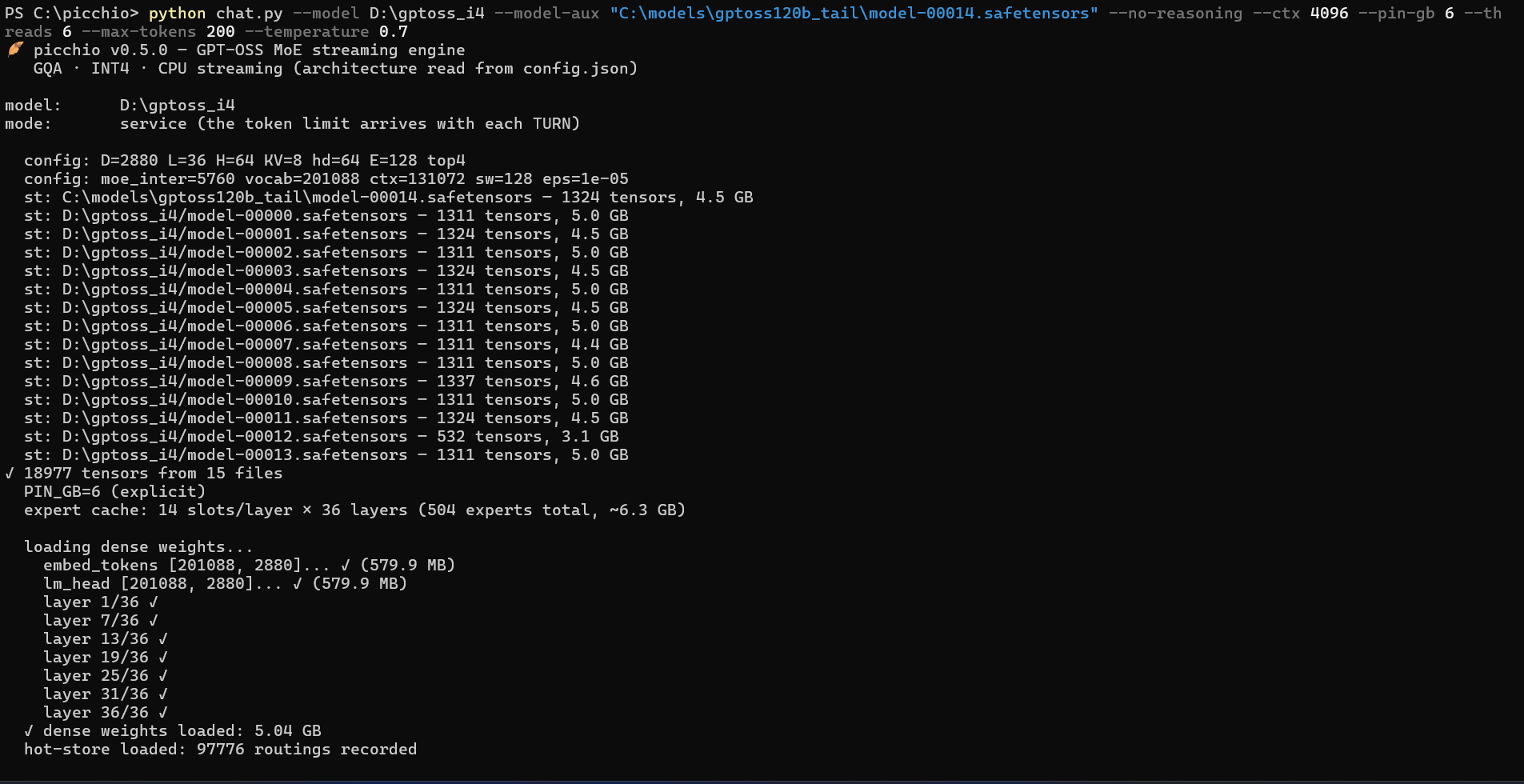
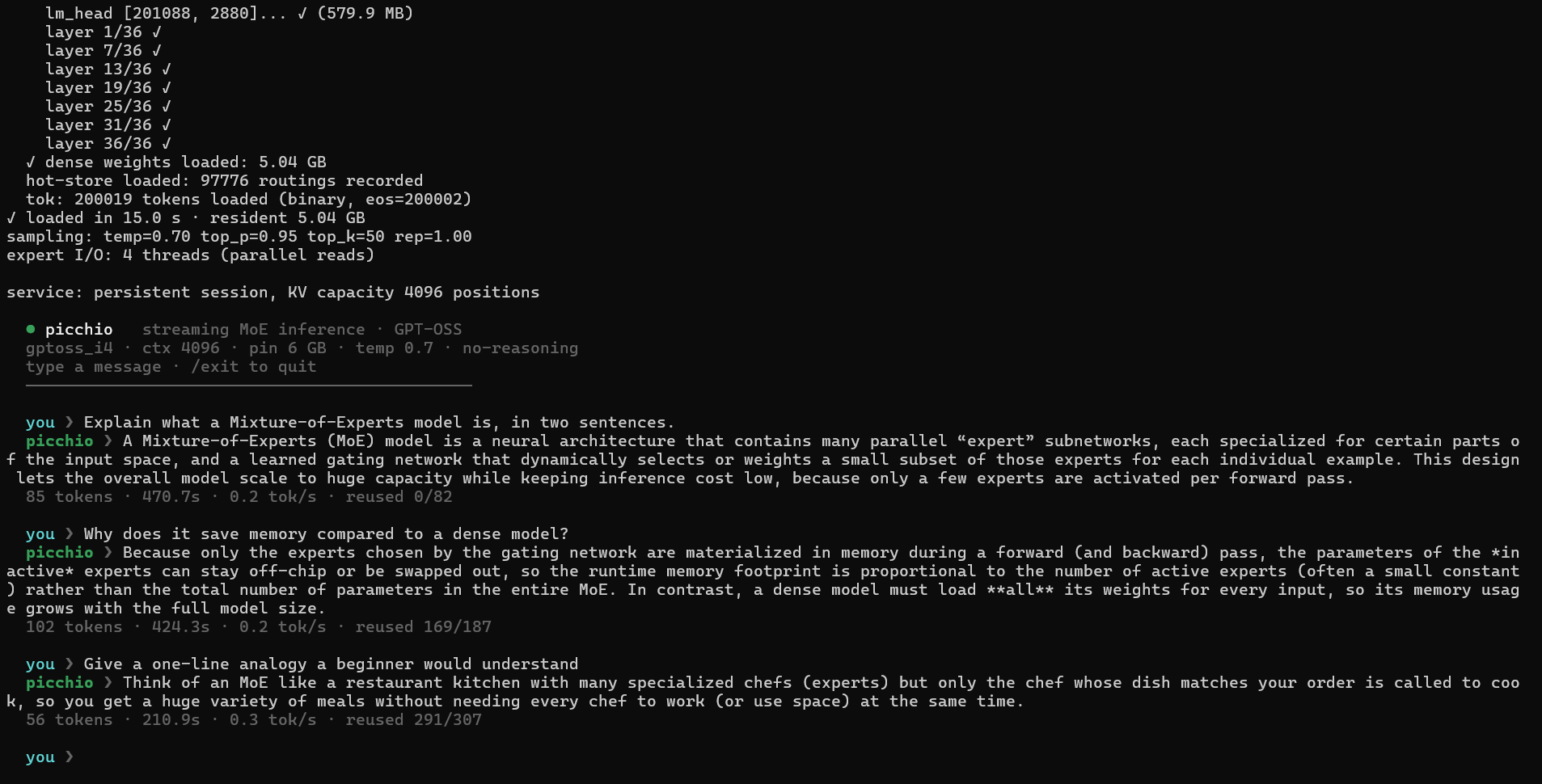
The first turn is slow (it streams every expert from disk); later turns reuse the
KV prefix and the learned hot-store, so they speed up. You can see this in a real
three-turn session: the reused counter on each stats line climbs from 0/82 to
169/187 to 291/307 as the KV-cache prefix is carried over between turns.
Measured performance (a deliberate worst case)
The numbers below are a deliberate stress test: the whole point of Picchio is
to prove a 117B-parameter MoE model can run at all on a consumer laptop with
limited RAM, streaming the experts from an external SSD. This is the hardest
case on purpose, not a representative one. On an internal NVMe drive, or with more
RAM devoted to the expert cache (--pin-gb), the rates are higher.
Test configuration:
| Model | GPT-OSS-120B, INT4 (gs64) experts, F32 attention (~66 GB) |
| Storage | external SSD (shards split across two drives via --model-aux) |
| Launch | --no-reasoning --ctx 4096 --pin-gb 6 --threads 6 --temperature 0 |
| Expert cache | 6 GB pinned (--pin-gb 6), 4 parallel I/O threads |
Three-turn chat, generating 16 tokens per turn:
| Turn | KV reused | Prefill | Time-to-first-token | Decode rate | Overall rate |
|---|---|---|---|---|---|
| 1 (cold) | 0 / 86 | 86 tok | 218 s | 0.22 tok/s | 0.038 tok/s |
| 2 (warm) | 95 / 110 | 15 tok | 37 s | 0.24 tok/s | 0.16 tok/s |
| 3 (warm) | 126 / 147 | 21 tok | 54 s | 0.29 tok/s | 0.15 tok/s |
Two things to read from this:
- Steady-state decode is stable at ~0.25 tok/s and is the real hardware ceiling: every token routes to 4 of 128 experts per layer, streamed from the SSD. This barely changes turn to turn.
- Perceived (overall) speed depends almost entirely on the prefill. The first turn must process the entire prompt from scratch (86 tokens, 218 s before the first token), so its overall rate collapses to ~0.04 tok/s. From the second turn on, Picchio reuses the KV-cache prefix (95/110, 126/147 positions reused), so only the small delta is re-processed and the overall rate jumps about 4x, to ~0.15 tok/s. Short, continuous turns stay close to the decode ceiling; long new prompts pay the prefill cost up front.
In short: on this hardware the 120B is usable for careful, patient exchanges, not interactive chat. If you want responsiveness, run the 20B.
Measured on internal NVMe with INT8 attention
A second, more representative sweep on internal NVMe with INT8 attention
(--dense-bits 8). Machine: 6-core AVX2 CPU, 16 GB RAM, internal NVMe, GTX 1650
4 GB (left idle - on this GPU the CPU path was fastest; see the GPU notes below).
Decode is warm, greedy; the small models are RAM-resident, the 120B streams.
| Model | experts | attention | Decode | Note |
|---|---|---|---|---|
| gpt-oss-20b | INT4 | F32 | 1.4 tok/s | attention-dominated |
| gpt-oss-20b | INT4 | INT8 | 3.3 tok/s | +136%; matches/beats Ollama here |
| Qwen3-30B-A3B | INT4 | F32 | 2.2 tok/s | |
| Qwen3-30B-A3B | INT4 | INT8 | 2.9 tok/s | +32%, dense resident 4.3 → 1.6 GB |
| gpt-oss-120b | INT3 | F32 | 0.5 tok/s | streams; prefill ~108 s |
| gpt-oss-120b | INT3 | INT8 | 1.24 tok/s | INT8-attn + faster drive; prefill ~60 s |
Why INT8 attention helps so much: attention (Q/K/V/O) is the single largest chunk
of per-token byte movement, and it was F32. Quantizing it to INT8 (near-lossless)
roughly halves t_attn and frees a few GB of resident RAM. The gain is biggest
where attention dominates (the 20B), and it also frees RAM for the expert cache.
The 120B is disk-bound, so its decode also scales with drive speed - moving it
from a slower to a faster internal NVMe roughly doubled it (0.6 → 1.24 tok/s),
confirming the "faster SSD → higher throughput" scaling on this streaming design.
GPU note (GTX 1650 4 GB). On this small card the GPU paths did not help and were left off:
GPU_DENSE/GPU_EXPERTSlose to PCIe overhead on 4 GB, andGPU_PREFETCHraised the expert-cache hit rate but the GPU-router overhead exceeded the disk it saved (the async CPU path already hides the I/O), so decode was net slower. On this hardware the real levers are RAM residency and byte reduction (INT8 attention / INT3 experts), not the GPU. A larger GPU that fits the model in VRAM is a different regime where the GPU paths do pay off.
If it doesn't fit on one drive
You can spread the shards across two disks and pass the ones on the second disk
with --model-aux (semicolon-separated). For example, if the last shard lives on C::
python chat.py --model D:\gptoss120b_i4 --model-aux "C:\gptoss120b_extra\model-00014.safetensors" --no-reasoning --ctx 1024 --pin-gb 6
--model-aux also carries any other loose files a model may need.
Legacy note (bias sidecar). Containers converted with older code quantized the expert biases by mistake and needed a separate F32 sidecar (
python download_expert_biases.pywritesexpert_biases.safetensors, passed via--model-aux). A fresh conversion with the currentconvert.pyincludes the biases in the shards, so you can ignore this.
8. Tuning & environment variables
Picchio is configured through environment variables (the chat.py/server.py
flags map onto these). The most useful:
| Variable | Default | Meaning |
|---|---|---|
MODEL | (none) | Path to the converted model folder (or pass it as the first argument). |
PIN_GB | auto | GB of RAM for the expert cache. The single biggest performance knob. Auto-sizing considers physical RAM, RAM currently available, the estimated dense allocation, and the exact INT3/INT4 expert size. A bigger cache means fewer disk reads. Setting a value overrides the auto-sizing. |
CTX | 512 | KV-cache size in tokens (max prompt+generation length). |
OMP_NUM_THREADS | all cores | Number of CPU threads for the matmuls. |
MAX | 128 | Max tokens to generate (bare-metal run only). |
TEMPERATURE | 1.0 | Sampling temperature (0 = greedy). |
TOPP / TOPK | 0.95 / 50 | Nucleus / top-k sampling. |
SEED | fixed | RNG seed for reproducible sampling. |
IO_THREADS | 4 | Threads used for reading experts from disk in parallel. |
ASYNC_MOE | 0 | 1 = experimental completion-driven pipeline: compute ready CPU experts while the remaining routed experts are still being read. The final reduction keeps canonical top-k order. |
FLAT | auto | Auto-detects <model>/experts.picchioflat; set a path to override or 0 to disable. Build it with FLAT_MODEL=<model> python flat_pack.py. |
FLAT_VERIFY | 0 | 1 = verify the truncated SHA-256 of every flat expert payload while loading (diagnostic; index SHA-256 is always verified). |
GPU_ROUTER | 0 | 1 = keep every router resident in VRAM and compute routing logits on the GPU. Expert compute stays on the CPU. |
GPU_PREFETCH | 0 | 1 = GPU router predicts layer L+1 before current MoE I/O/compute, then the prefetch thread populates the RAM LRU concurrently. Implies the router backend and prefetch. |
GPU_DENSE | 0 | 1 = keep Q/K/V/O projections resident as FP16 and run attention GEMVs on the dependency-free native CUDA Driver backend. |
GPU_DENSE_RELEASE_HOST | 0 | With GPU_DENSE=1, free F32 host projection weights after all uploads succeed (about 3.56 GiB on this 120B). GPU errors terminate inference; CPU fallback is unavailable. Failed startup uploads reject this mode. Chat flag: --gpu-dense-release-host. |
EXPERT_REUSE | 1 | Reuse aligned cache-slot storage for converted gs64 INT3/INT4 experts and read shard tensors directly into it. Unsupported layouts retain the legacy loader. Set 0 for allocating-reader comparisons; chat: --no-expert-reuse. |
TENSOR_INDEX | 1 | Immutable tensor-name hash index built after opening shards; preserves first-match lookup semantics. Set 0 for linear lookup comparisons; chat: --no-tensor-index. |
GPU_EXPERTS | 0 | 1 = experimental full expert offload. Separate from GPU_PREFETCH; not recommended on a 4 GB GTX 1650. |
PIN_VRAM_GB | auto | VRAM budget only for GPU_EXPERTS; router-only mode uses about 53 MB for GPT-OSS-120B. |
MODEL_AUX | (none) | Extra model files on other disks (semicolon-separated). |
IDOT | 0 | 1 = integer expert kernel (int8 activation × int4 weight). Uses AVX-VNNI (dpbusd) where the CPU supports it, else AVX2; a small approximation, so off by default. |
DROP | 0 | 1 = drop just-read pages from the OS page cache after each read (Linux), keeping peak RAM at "dense + cache" when streaming a model larger than RAM. |
DIRECT | 0 | 1 = unbuffered expert reads (O_DIRECT / FILE_FLAG_NO_BUFFERING), bypassing the OS page cache. A win on fast internal NVMe where the buffered path is page-cache-bound; little effect on a USB bridge. Opt-in, with a buffered fallback per read. |
ECAP | auto | Expert cache slots per layer (override of the auto-sizing derived from PIN_GB). Set = num_experts to keep the whole expert tier resident once the model fits in RAM (e.g. ECAP=32 for a 20B) - after a warm-up pass no expert is streamed again. |
DRAFT_MODEL | (none) | Path to a small draft model for speculative decoding (bare-metal path). The draft is a tiny dense model converted as a 1-expert MoE (see convert.py on a dense checkpoint) and is loaded fully resident. Experimental. |
SPEC_K | 4 | Draft tokens proposed per verify round when DRAFT_MODEL is set. |
SPEC_PROBE | 0 | Diagnostic (no effect on generation): records per-token expert routing + token stream, then reports n-gram acceptance and expert-union at exit. |
SELF_DRAFT_PROBE / SELF_DRAFT_K | 0 / 1 | Diagnostic: measures how often a reduced top-k routing (a free self-draft) matches the full top-k next token. |
Speculative decoding (experimental). With
DRAFT_MODELset, a small draft proposesSPEC_Ktokens that the target verifies in one batched forward (forward_verify), accepting the longest matching prefix + one bonus token; output is byte-identical to greedy. It wins only when the target is memory-resident (so batching amortizes RAM/compute) and the draft has high acceptance. On a disk-bound target whereASYNC_MOEalready hides the I/O, the batched verify's expert-union I/O is exposed and speculation is a net loss - measured on this hardware. Kept as scaffolding for larger-RAM / GPU setups.
Performance notes:
- On the tested 6-core machine with the 20B on internal NVMe, observed decode rates span roughly 0.8-1.7 tok/s, depending on INT3/INT4, cache size, and storage path; treat these as local measurements, not a hardware guarantee.
- Keep the model on an internal SSD. From USB the I/O time roughly doubles.
- More RAM devoted to
PIN_GBis almost always the best speedup: going from a small cache to full residency on the 20B cut disk reads by ~53% in testing.
To build the optional aligned expert store after conversion (about the size of the converted expert tensors, so check free disk space first):
$env:FLAT_MODEL = "C:\models\gptoss20b_i4"
python flat_pack.py
Picchio discovers the resulting experts.picchioflat automatically. Pair it
with DIRECT=1 ASYNC_MOE=1 (or --direct --async-moe in the Python frontends)
to exercise the full aligned decode path. On the tested GPT-OSS-20B, a complete
flat store averaged 1.206 tok/s versus 1.104 tok/s through safetensors with the
same asynchronous pipeline (+9.2% over two runs per path). Against one
synchronous safetensors reference it was about 43% faster. These results do
not predict the gain on a different SSD, cache size, or model.
For the design rationale and measurements, see DESIGN.md.
9. Troubleshooting
picchio.exe exits immediately / "libgomp-1.dll not found".
You built without -static. Either rebuild with .\build.bat (which uses
-static), or run from the MSYS2 MinGW terminal / add C:\msys64\mingw64\bin to
your PATH.
"Illegal instruction" crash on startup. Your CPU lacks AVX2, or you built for a different CPU. Rebuild on the machine you run on. AVX2 is required.
The model keeps "thinking" and never gives an answer.
You're in greedy mode. Add --temperature 0.7 (chat) or set TEMPERATURE=0.7.
A multi-turn chat degrades after a few turns (especially the 120B).
This is usually --no-reasoning. GPT-OSS is trained to reason before answering;
forcing the final channel confuses the model as the conversation grows (it
flounders into . . . … or leaks its reasoning). The bigger models are more
sensitive than the 20B. Fix: drop --no-reasoning and let it think, e.g.
--reasoning low (the reasoning is hidden by default but now also streamed live,
dimmed, so you can see what it is doing). Note --rep 1.1 does not rescue
this: the degenerate run alternates different punctuation tokens, which a
per-token repetition penalty cannot catch.
Output is gibberish / degenerates in long replies.
Make sure you converted with the current convert.py (it keeps the embedding and
output head at INT8 as required). Models converted with older code must be
reconverted. You can check a container quickly: embed_tokens/lm_head must be
I8 in the shard header, not U8 (the old INT4-packed layout collapses into a
mix of languages and repetitions on long texts).
Out of memory / very slow.
Lower PIN_GB (e.g. --pin-gb 2) and/or lower --ctx. Streaming still works with
a small cache; it just reads from disk more often.
Conversion download is extremely slow (120B).
See the mirror tip in section 7
(HF_ENDPOINT=https://hf-mirror.com).
Garbled accented characters in terminal output (Windows).
Set PYTHONUTF8=1 before running Python scripts.
10. Verifying correctness (optional)
If you want to confirm the math matches a reference implementation, there's a
lightweight numeric oracle (needs only numpy and safetensors):
pip install safetensors numpy
python make_test_model.py            # writes a tiny synthetic model to ./test_model
python test_forward.py test_model    # validates the forward pass against the oracle
The built-in picchio --self-test (section 3) is the quickest sanity check and
needs nothing at all.
Exercising each model family without downloading a model
Every supported family has a tiny synthetic fixture, so the whole engine can be run end to end on a laptop with no checkpoint at all:
| What | Command | Needs | Covers |
|---|---|---|---|
| All SIMD kernels | picchio --self-test | nothing | RMSNorm, softmax, F32/INT4/INT3 matmul, SiLU, RoPE, async-MoE reduction, pipeline byte-identity. The forward pass it runs is GPT-OSS-shaped. |
| GPT-OSS path | python make_test_model.py then picchio test_model | numpy, safetensors | sliding+full attention, attention sinks, clipped SwiGLU |
| Qwen3-MoE path | python test_qwen_smoke.py | torch, transformers | per-head QK-Norm, softmax-normalised routing, and the converter, flat store, DIRECT/ASYNC_MOE and SERVICE paths |
| MiniMax-M2 path | python fuse_minimax_test_model.py minimax_test_model minimax_test_model_picchio then picchio minimax_test_model_picchio | numpy, safetensors | partial RoPE, whole-vector QK-Norm, sigmoid routing |
The MiniMax fixture (minimax_test_model/, ~132 KB) is committed because it is not
safely regenerable - see the note in section 13. The other two are generated
locally and are gitignored.
Note what --self-test does not reach: its synthetic model sets the GPT-OSS
flags, so the Qwen3 and MiniMax branches of the forward pass are only covered by
their own fixtures above.
Help wanted: hardware coverage
Picchio's throughput is dominated by RAM size and storage speed, and its hottest loops are hand-written SIMD. All published numbers come from two Intel/Windows laptops, which leaves real gaps:
| Gap | Status |
|---|---|
ARM NEON + SDOT kernels (quant.h) | Never compiled, let alone run - Apple Silicon, ARM servers, Raspberry Pi |
AVX-VNNI integer kernel (idot_rows_vnni) | Compiled, but cannot dispatch on my Comet Lake CPU. Needs Intel Ice Lake / Alder Lake+ or AMD Zen 4+ |
Linux / macOS I/O (pread, mmap, O_DIRECT in st.h) | Only the Windows branch has been exercised |
| Storage | One entry-level NVMe. SATA SSD, high-end NVMe, RAID and network storage are unknown |
| RAM | Only 16 GB and 32 GB measured, and the expert-cache hit rate is the single biggest performance lever |
| GPU | The experimental paths were only tried on a 4 GB card |
The lowest-effort contribution is genuinely useful: run picchio --self-test on
anything unusual and report whether it builds and passes. On an ARM machine that
alone compiles and runs the NEON kernels for the first time.
If you can go further, any real run prints a stats block (tok/s, expert-cache hit
rate, disk reads, t_attn / t_moe / t_head, RSS) - that, plus your CPU, RAM,
storage and OS, is exactly what is missing. Please open an
issue;
there is a template that asks for these fields.
11. How it works & project layout
The idea in one paragraph: the dense weights (attention, router, embedding, output head) stay resident in RAM. For each token the router picks the top-k of the layer's experts (4 of 128 on GPT-OSS-120B, 4 of 32 on the 20B, 8 of 128 on Qwen3-30B-A3B); Picchio loads just those experts, computing them while an LRU cache keeps recently-used experts around and a learned hot-store keeps the most frequently used ones pinned. Because only a few experts are touched per token, total disk traffic is a fraction of the model size.
Engine schema
PER-TOKEN FLOW (one decode step)
================================

 token ─► embed ─►┌──────────────── for each of the N layers ────────────────┐
                  │                                                            │
                  │  RMSNorm ─► ATTENTION  (Wq/Wk/Wv/Wo resident, INT8 or F32) │
                  │             GQA + RoPE, reads/writes the KV cache          │
                  │                        └─► + residual                      │
                  │                                                            │
                  │  RMSNorm ─► ROUTER (resident) ─► top-k expert ids          │
                  │                     │                                      │
                  │            ┌────────┴─ expert in RAM LRU cache? ─┐         │
                  │           HIT                                   MISS       │
                  │            │                          async read from SSD  │
                  │            │                          (DIRECT, QD>1,       │
                  │            │                           overlapped w/ compute)
                  │            ▼                                   │           │
                  │   INT4/INT3 dequant + dot  ◄────────────────────┘          │
                  │   SwiGLU ─► down ─► Σ(weight·expert) ─► + residual         │
                  └───────────────────────────┬────────────────────────────────┘
                                               ▼
                                RMSNorm ─► lm_head (INT8) ─► sample ─► next token

MEMORY HIERARCHY
================
  GPU VRAM (optional) │ resident routers + GPU-guided prefetch      small, fast
  RAM                 │ dense (attn+router+embed+head) + expert LRU  hot experts
                      │ + learned hot-store (pins frequent experts)
  SSD / NVMe          │ the remaining "cold" experts (bulk of model) streamed
The dense part is loaded once at startup. Experts are pulled on demand: a cache
hit stays in RAM; a miss is read from the SSD by parallel I/O threads and
overlapped with the current layer's compute (ASYNC_MOE). Only ~top-k experts
per layer are touched per token, so disk traffic is a fraction of the model size.
Everything on the streaming path (INT3/INT4 experts, INT8/F32 attention, INT8
head) is chosen so the CPU kernels read the fewest bytes that preserve quality.
Architecture
| Property | GPT-OSS 20B | GPT-OSS 120B | Qwen3 30B-A3B | MiniMax-M2 |
|---|---|---|---|---|
| Total parameters | 21 B | 117 B | 30.5 B | 230 B |
| Active per token | ~3.6 B | ~5.1 B | ~3.3 B | ~10 B |
| Hidden size | 2880 | 2880 | 2048 | 3072 |
| Layers (all MoE) | 24 | 36 | 48 | 62 |
| Experts / layer | 32 | 128 | 128 | 256 |
| Active experts / token | 4 (top-4) | 4 (top-4) | 8 (top-8) | 8 (top-8) |
| Attention | GQA, sliding-window + full, attention sinks, YaRN | same | GQA + QK-Norm, full only | GQA, full only, partial RoPE (64/128) + whole-vector QK-Norm |
| Routing | softmax top-k | softmax top-k | softmax-normalized top-k | sigmoid; bias selects, unbiased score weights |
| Activation | clipped SwiGLU | clipped SwiGLU | plain SwiGLU (SiLU) | plain SwiGLU (SiLU) |
| Converted size | ~14 GB | ~66 GB | ~20 GB | ~122 GB |
Quantization (all families): experts are INT4 (group-scaled, 64) - or INT3 gs64
with --expert-bits 3, which convert_minimax.py does not yet offer; the embedding
and output head are INT8; attention is F32 by default, or INT8 with
--dense-bits 8 (near-lossless, the biggest speedup lever - see section 4). The
engine reads every dimension from config.json and flips the family-specific
behaviors from the model's model_type, so the GPT-OSS path is byte-for-byte
unchanged. A dense (non-MoE) checkpoint is converted as a 1-expert MoE
(single MLP as expert 0 + a zero router), so the streaming engine runs it
unchanged, which is handy for a small resident draft model.
Files in this repository
picchio.c              The engine (single translation unit)
flat.h                 Aligned `.picchioflat` reader and integrity checks
quant.h                Quantized matmul kernels (F32 / INT8 / INT4) with AVX2/NEON
st.h                   safetensors reader (multi-shard, multi-disk)
json.h                 config.json parser
tok.h                  Built-in approximate tokenizer (fallback for bare-metal runs)
Makefile / build.bat   Build for Linux/macOS and Windows

convert.py             Convert a GPT-OSS (MXFP4/BF16) or Qwen3-MoE (BF16) model to INT4
convert_minimax.py     Convert a MiniMax-M2 GPTQ-INT4 checkpoint to Picchio INT4
convert_streaming.py   Shard-by-shard download+convert for the GPT-OSS 120B
convert_streaming_qwen.py  Shard-by-shard download+convert for a Qwen3-MoE model
export_vocab.py        Build the binary tokenizer file
download_expert_biases.py  Regenerate the 120B expert-bias sidecar
transcode_i4_to_i3.py  Requantize experts INT4 -> INT3 in place (no re-download)
transcode_attn_to_int8.py  Requantize attention F32 -> INT8 in place (no re-download)

chat.py                Token-exact GPT-OSS chat bridge (Harmony)
chat_qwen.py           Qwen3-MoE chat bridge (ChatML via transformers)
chat_minimax.py        MiniMax-M2 chat bridge (always-on reasoning, think/answer split)
picchio_logo.py        Shared terminal logo/banner for the chat bridges
server.py              OpenAI-compatible HTTP API server
requirements-chat.txt  Dependency for chat.py / server.py (openai-harmony)

make_test_model.py     Generate a tiny synthetic model for validation
test_forward.py        Numeric oracle to validate the forward pass
test_qwen_smoke.py     End-to-end synthetic Qwen3-MoE smoke test (optional deps)
make_minimax_test_model.py  Build a tiny MiniMax-M2 fixture + oracle from upstream code
fuse_minimax_test_model.py  Rewrite that fixture into Picchio's tensor naming
minimax_forward_check.c     Standalone MiniMax-M2 forward pass (validation scratch)
verify_minimax.py           Diff that forward pass against the oracle, logit by logit
reference/minimax_m2/       Vendored upstream MiniMax-M2 modeling code (Apache-2.0)

net_bench.py           Measure LAN latency/throughput (sizing the distributed split)
pipe_node.py           Prototype of the 2-stage pipeline with byte-identity check

flat_common.py         Shared helpers for the .picchioflat store (model-agnostic)
flat_pack.py           Repack converted experts into a flat, block-aligned store
flat_verify.py         Validate flat index/layout and sampled payload hashes
flat_bench.py          Byte-verify the flat store and microbench expert I/O
flat_bench_qd.py       Async high-queue-depth read benchmark (overlapped + IOCP)

DESIGN.md              Design notes, rationale, and measurements
DESIGN_STREAMING_IO.md Storage-bypass I/O roadmap (flat store, O_DIRECT, async QD)
PORTING_QWEN3.md       How the Qwen3-MoE port works and what it changes
For a much deeper dive into the numerics, the streaming/caching design, the
service protocol, and the measured results, read DESIGN.md. The
ongoing work on storage-bypass I/O (a flat block-aligned expert store, unbuffered
reads, and async high-queue-depth streaming), with the prototype harness and its
measured numbers, is in DESIGN_STREAMING_IO.md.
12. Running a Qwen3-MoE model
Picchio runs Qwen3-MoE checkpoints (for example
Qwen/Qwen3-30B-A3B-Instruct-2507)
with the same streaming engine. The 30B-A3B is a good fit for a 16 GB machine: it
converts to about 20 GB and activates only ~3.3 B parameters per token.
a) Install the dependencies
pip install torch safetensors numpy huggingface_hub transformers
transformers is used by the chat bridge to render Qwen's ChatML prompts and to
tokenize. The engine itself still only exchanges raw token IDs.
b) Convert the model
The converter auto-detects Qwen from config.json (no extra flag). Qwen experts
arrive as separate BF16 gate/up/down matrices; Picchio fuses gate and up and
quantizes everything to INT4, exactly the layout the runtime expects.
If the whole raw model fits on disk (about 61 GB for the 30B in BF16):
python convert.py --model Qwen/Qwen3-30B-A3B-Instruct-2507 --output C:\models\qwen3_30b_i4 --download
If disk is tight, convert shard by shard so only the finished INT4 model (~20 GB) ever lands on disk, never the full 61 GB of raw weights:
$env:PYTHONUTF8 = "1"
$env:PICCHIO_OUTPUT = "C:\models\qwen3_30b_i4"   # where the converted shards go
$env:PICCHIO_RAW    = "C:\models\qwen_tmp"       # scratch for one raw shard at a time
python convert_streaming_qwen.py
convert_streaming_qwen.py downloads one shard, converts it, deletes the raw
shard, and moves on. It is resumable, keeps the Hugging Face cache off your system
drive, and adapts the download backend automatically (it uses Hugging Face's fast
Xet path when available and falls back to a plain, reliable download when Xet is
unavailable).
c) Chat
Qwen uses ChatML, not Harmony, so it has its own bridge, chat_qwen.py:
python chat_qwen.py --model C:\models\qwen3_30b_i4 --no-reasoning --ctx 2048 --pin-gb 8 --temperature 0.7
The options mirror chat.py: --no-reasoning disables Qwen's thinking
(enable_thinking=False), --temperature / --top-p / --top-k control
sampling, and --direct --async-moe --io-threads 4 enables the experimental
aligned/overlapped expert path. Omit the prompt for an interactive multi-turn
session with KV-prefix reuse between turns.
What differs under the hood
Detection is by model_type in config.json. For Qwen the engine turns on
QK-Norm (RMSNorm on Q and K per head before RoPE), plain SwiGLU instead of the
clipped GPT-OSS variant, softmax-normalized top-k routing (norm_topk_prob),
full attention on every layer (no sliding window), no attention sinks, and the
ChatML end-of-turn token as the stop id. Everything is config-gated, so the
GPT-OSS path is unchanged. For the full list and the validation status, see
PORTING_QWEN3.md.
Current validation status: a small all-MoE Qwen3 fixture created with the official
transformers architecture converts, loads, and generates successfully. Its
safetensors path and .picchioflat + DIRECT + ASYNC_MOE path produced the same
greedy token sequence. A converted real 30B-A3B checkpoint also loaded all 25,013
tensors and produced identical greedy IDs through synchronous and asynchronous
safetensors paths (2773 12 16 15 for the short regression input). On the test
machine the asynchronous path took 10.77 s versus 12.75 s, about +18.4% tok/s.
Finally, chat_qwen.py rendered a real 10-token ChatML prompt and returned the
coherent, deliberately truncated reply Ciao! Come…. A full-model numeric oracle
comparison against transformers and a long multi-turn session remain pending.
13. Running a MiniMax-M2 model
MiniMax-M2 is a 230 B-parameter MoE that activates only ~10 B per token across 62 layers of 256 experts. Converted it is ~122 GB, so unlike the other families it does not fit in RAM on any consumer machine - it streams from disk end to end. Expect it to be I/O-bound.
a) Install the dependencies
pip install torch safetensors numpy huggingface_hub transformers
b) Get a GPTQ-INT4 checkpoint
The published weights are FP8. The practical route today is the community
GPTQ-INT4 quantization, which convert_minimax.py consumes directly:
$env:PYTHONUTF8 = "1"
$env:HF_HUB_DISABLE_XET = "1"
hf download ModelCloud/MiniMax-M2-GPTQMODEL-W4A16 --local-dir D:\models\MiniMax-M2-GPTQ-INT4 --max-workers 4
That is a 126 GB download. HF_HUB_DISABLE_XET=1 and a bounded
--max-workers are there on purpose: the accelerated Xet path opened dozens of
concurrent connections and stalled on the test machine. The download is
resumable: rerun the same command after an interruption.
c) Convert
$env:PYTHONUTF8 = "1"
python convert_minimax.py --input D:\models\MiniMax-M2-GPTQ-INT4 --output D:\models\minimax_m2_i4 --dense-bits 8
It dequantizes each GPTQ linear, fuses the gate/up expert matrices, and requantizes
to Picchio's native INT4 gs64. On start it prints the checkpoint's zero-point
offset, e.g. GPTQ checkpoint zero-point offset: +1 (v1 'gptq' format) - that line
matters (see What differs under the hood).
Add --delete-source to remove each source shard right after it is read, which
keeps peak disk use near the size of one copy instead of two. It is destructive:
the original checkpoint is gone afterwards, so a reconversion means re-downloading.
The converter copies the metadata the runtime and the bridge need - config.json,
the tokenizer files, chat_template.jinja - so the output directory is
self-contained. One step is left, building the binary vocabulary:
python export_vocab.py D:\models\minimax_m2_i4\tokenizer.json D:\models\minimax_m2_i4\picchio_vocab.bin
d) Chat
python chat_minimax.py --model D:\models\minimax_m2_i4 --ctx 4096 --pin-gb 20 --async-moe --direct
Omit the prompt for an interactive session; /help lists the commands. Options
mirror the other bridges, plus --show-thinking (below).
Reasoning is always on
MiniMax-M2's chat template ends its generation prompt with a literal <think>, so
every reply starts inside a reasoning block: the model emits its reasoning, then
</think>, then the user-facing answer. There is no enable_thinking switch to
turn this off, unlike Qwen3. chat_minimax.py splits the reply on the </think>
token and by default hides the reasoning behind a progress spinner; pass
--show-thinking to stream it under a dim THINKING heading.
Budget for it: --max-tokens has to cover the reasoning and the answer. If the
limit lands mid-reasoning the bridge says so rather than printing nothing.
Measured performance (MiniMax-M2)
On a 12-core AVX2 laptop, 32 GB RAM, D: on an entry-level NVMe (KIOXIA BG4) - a different, larger machine than the 16 GB laptop used for the table at the top of this README, so these numbers are not comparable with those:
| Configuration | tok/s | Expert-cache hit |
|---|---|---|
--pin-gb 12 | 0.34 | 42.9% |
+ --async-moe --direct | 0.40 | 42.9% |
+ --pin-gb 20 | 0.48 | 54.6% |
--pin-gb is the dominant lever here, because the experts total ~119 GB and even
a 20 GB cache holds only ~17% of them while each token touches 496 of them across
62 layers. Raising --io-threads past the default 4 changed nothing - the NVMe is
not queue-depth limited. IDOT=1 bought ~5% but visibly changed the output, which
is expected (the integer expert kernel is approximate) and not a good trade.
Unlike the other families, repeat runs do not get faster: the learned hot-store
converged immediately and the resident expert set stopped changing. For comparison,
gpt-oss-120b reaches ~2 tok/s on this same machine, because it streams roughly 4×
less expert data per token (128 experts × 36 layers at INT3, against 256 × 62 at
INT4).
The remaining lever not yet implemented is INT3 experts (~22% fewer bytes, so
more fit in cache and less to read). The engine already supports it
(picchio_expert_bits: 3, matmul_i3_gs); convert_minimax.py currently hardcodes
INT4 for experts.
What differs under the hood
Detection is by model_type: "minimax" in config.json, and the three
architectural switches are described under
Supported models. Two further details are worth recording,
because both are quiet failure modes:
The GPTQ v1 zero-point. A checkpoint_format: "gptq" checkpoint (v1, as
opposed to "gptq_v2") stores its zero-points pre-decremented by 1; GPTQModel
adds them back at load time. Dequantizing without that +1 biases every weight by
exactly +1 × scale. Per weight that is only ~30% of the weight standard deviation
and looks harmless, but across a matmul it adds c·Σx to every output, and since
x leaves an RMSNorm with positive gains that sum is large and positive - so every
projection picks up a positive bias, RMSNorm never recenters it, and over 62 layers
the hidden state explodes into noise. The symptom is fluent-looking garbage.
convert_minimax.py reads checkpoint_format and refuses to guess. A cheap guard
for any GPTQ conversion: dequantize one weight matrix and assert its mean is ≈ 0.
The tensor-count ceiling. ST_MAX_TENSORS in st.h is a budget for the
whole tensor database, not per shard. MiniMax-M2's 256 experts × 62 layers × 4
tensors is ~63 k on its own; the old 32 768 limit silently stopped registering
tensors partway through loading instead of reporting an error. It is now 131 072.
Current validation status: the C forward pass matches the real upstream
MiniMaxM2ForCausalLM on a synthetic fixture to max|Δlogit| = 1e-6
(minimax_forward_check.c + verify_minimax.py), and the architecture was
cross-checked line by line against llama.cpp's own minimax-m2.cpp, which agrees
on all three switches. The converted 230 B checkpoint loads all 64 349 tensors and
generates coherent text. A full-model numeric oracle comparison against
transformers is still pending.
On reproducing that fixture: minimax_test_model/ is committed (~132 KB)
precisely because it is not safely regenerable today.
transformers' own in-tree MiniMax-M2 support has a RoPE defect
(#48241): the default
RoPE path ignores partial_rotary_factor and rotates the full 128-wide head
instead of MiniMax's 64. On transformers ≥ 5.0 the vendored upstream code hits that
same path, so regenerating the oracle there would quietly produce a wrong
reference and make a correct engine look broken.
make_minimax_test_model.py refuses to run on 5.x for that reason; pin
transformers<5.0 if you really need to rebuild it. The same defect is why
transformers is not currently a trustworthy oracle for this architecture.
14. Distributed inference across two machines
Picchio can split inference across two machines on the same network. The layers are cut at a boundary: the coordinator (machine A) loads the first layers plus the embedding, while the worker (machine B) loads the rest plus the output head. For each token only the small residual-stream vector (a few KB) crosses the network; each machine keeps its own layers' KV cache locally. The result is byte-identical to running the whole model on one node.
When to use it. This experimental mode divides resident dense/KV memory and layer compute between the machines. It does not currently pool disk capacity: both machines need the converted model files. Picchio already streams experts when weights exceed RAM, and a single machine is usually faster when it has enough resident memory because the split adds a network round-trip. Wired Ethernet is strongly preferred over WiFi.
How the split works
- Sampling lives on the coordinator, the single authority for temperature, seed and repetition penalty, so the distributed output matches a single node exactly.
- Each node loads only its own layers (
PIPE_CUTsets the boundary), so a 20B whose dense part is ~3.7 GB on one machine becomes ~1.9 GB on each of two. - The prompt is encoded in batched blocks (one network round-trip per block), then tokens are generated one at a time.
Run it (PowerShell)
Both machines need picchio.exe and the same converted model folder on disk
(each loads only its half into RAM, but both read from the model files).
1. On the WORKER machine (B). Open TCP port 52200 once (Administrator prompt):
New-NetFirewallRule -DisplayName "picchio" -Direction Inbound -Protocol TCP -LocalPort 52200 -Action Allow
Find its LAN IP with ipconfig (the "IPv4 Address", e.g. 192.168.1.14), then start
the worker (it stays listening):
$env:PIPE_ROLE="worker"; $env:PIPE_CUT="16"; $env:PIN_GB="2"; $env:CTX="1024"
.\picchio.exe C:\models\gptoss20b_i8h
Wait for pipe worker (stage B): listening on port 52200.
2. On the COORDINATOR machine (A). Point it at the worker's IP and chat:
$env:PIPE_ROLE="coord"; $env:PIPE_PEER="192.168.1.14:52200"; $env:PIPE_CUT="16"
python chat.py --model C:\models\gptoss20b_i8h --no-reasoning --pin-gb 3 --ctx 1024 --temperature 0.7
chat.py inherits the PIPE_* variables from the environment, so it drives the
two nodes transparently: you type, the two machines answer together.
PIPE_CUTmust be the same on both machines. Give the stronger/larger-RAM machine more layers (a higher cut) to balance the pipeline.- To go back to single-machine mode, clear the variables (
Remove-Item Env:PIPE_ROLE, Env:PIPE_PEER, Env:PIPE_CUT) or open a fresh terminal.
Distributed environment variables
| Variable | Meaning |
|---|---|
PIPE_ROLE | worker (stage B) or coord (stage A). Unset = normal single-node. |
PIPE_CUT | Layer boundary. Coordinator holds [0, cut), worker holds [cut, n_layers). Must match on both nodes. |
PIPE_PEER | Coordinator only: the worker's host:port (e.g. 192.168.1.14:52200). |
PIPE_PORT | Worker only: TCP port to listen on (default 52200). |
Checking it
./picchio --pipe-self-test runs both stages over a loopback socket on a tiny
synthetic model and verifies the distributed tokens equal a single node's. On a
real model, PIPE_SPLIT_CHECK=<cut> ./picchio <model> checks in one process that
the split forward is byte-identical to the monolithic one.
The design notes and the measurement harnesses (net_bench.py for LAN latency,
pipe_node.py for the pipeline prototype) are described in
DESIGN.md.
15. License
MIT. See LICENSE.


A streaming Mixture-of-Experts (MoE) inference engine written in pure C, that runs models larger than your RAM on ordinary consumer hardware - MiniMax-M2 (230B) - GPT-OSS (20B and 120B) and Qwen3-MoE
C
10
122 commits
updated Oct 6, 2026
See what people are saying
README
The woodpecker drums a hundred times a second on a huge trunk; we drum 128 experts on a huge disk.
A streaming Mixture-of-Experts (MoE) inference engine written in pure C, that runs models larger than your RAM on ordinary consumer hardware - GPT-OSS (20B and 120B), Qwen3-MoE, and MiniMax-M2 (230 B).
Most of a MoE model's weight is in its experts, and only a handful of experts are used for each token. Picchio keeps only the small "dense" part of the model permanently in memory and streams the experts from disk on demand, caching the ones it has recently used. This is what lets a 14 GB model (20B) run comfortably on a 16 GB laptop, and makes the 66 GB model (120B) runnable at all without a datacenter GPU.
Inspired by Colibri (GLM), adapted for the GPT-OSS architecture.
[!NOTE] Contributors welcome - especially if your hardware is not like mine. Everything here was measured on two Intel/Windows laptops. Whole code paths have therefore never executed on real silicon: the ARM NEON/SDOT kernels have never even been compiled, and the AVX-VNNI integer kernel cannot dispatch on my Comet Lake CPU. Linux and macOS I/O, Zen 4+, Apple Silicon, SATA versus high-end NVMe, larger RAM - all unmeasured.
You do not need to download a 100 GB model to help.
picchio --self-testexercises every SIMD kernel against a synthetic model in a few seconds, with no dependencies and nothing to download. See Help wanted: hardware coverage for what is missing and how to report it.
Measured performance
Warm, greedy decode on a 6-core AVX2 laptop, 16 GB RAM, internal NVMe, GTX 1650
4 GB (idle) - no datacenter GPU. The lever is INT8 attention (--dense-bits 8):
attention was the largest chunk of per-token byte movement, and quantizing it
near-losslessly roughly halves it and frees RAM for the expert cache.
| Model | Converted size | F32 attention | INT8 attention | |
|---|---|---|---|---|
| gpt-oss-20b | ~14 GB | 1.4 tok/s | 3.3 tok/s | +136% - matches/beats Ollama here |
| Qwen3-30B-A3B | ~20 GB | 2.2 tok/s | 2.9 tok/s | +32%, dense resident 4.3 → 1.6 GB |
| gpt-oss-120b | ~66 GB | 0.5 tok/s | 1.24 tok/s | streamed from disk; prefill ~60 s |
| MiniMax-M2 † | ~122 GB | - | 0.48 tok/s | 230 B / ~10 B active; fully disk-bound |
† MiniMax-M2 does not fit the 16 GB machine above at all, so it was measured on a
12-core AVX2 laptop, 32 GB RAM, entry-level NVMe, with
--pin-gb 20 --async-moe --direct. Its number is therefore not comparable
with the three rows above it. Breakdown, including what did not help, is in
Measured performance (MiniMax-M2).
The 120B - 66 GB of weights on a 16 GB machine - runs at over a token per second by streaming its experts. Full methodology, a cold-start worst case, and the GPU analysis are in Measured performance.
Supported models
The same streaming core serves three MoE families. The engine reads every dimension
from config.json and flips the family-specific behaviors from the model's
model_type, so each new family left the earlier paths byte-for-byte unchanged.
| Family | Models | Converted size | Chat bridge |
|---|---|---|---|
| GPT-OSS | gpt-oss-20b, gpt-oss-120b | ~14 GB / ~66 GB | chat.py (Harmony) |
| Qwen3-MoE | e.g. Qwen3-30B-A3B | ~20 GB | chat_qwen.py (ChatML) |
| MiniMax-M2 | MiniMax-M2 (230B / 10B active) | ~122 GB | chat_minimax.py |
The Qwen3 support is config-gated: QK-Norm, plain SwiGLU, softmax-normalized
top-k routing, and full attention (no sinks, no sliding window) are switched on
only for Qwen checkpoints. See Running a Qwen3-MoE model
and PORTING_QWEN3.md.
MiniMax-M2 is gated the same way, on three quirks of its own: partial RoPE
(only the first rotary_dim=64 of each 128-wide head rotates), whole-vector
QK-Norm (one RMSNorm across the entire concatenated multi-head Q or K, not per
head), and sigmoid routing where the correction bias selects the top-k but
the mixing weight is the unbiased sigmoid score, renormalized. It is by far the
largest model here - 122 GB converted, so it streams from disk on any consumer
machine. See Running a MiniMax-M2 model.
The converter and complete runtime path are covered by both a synthetic Qwen3-MoE
smoke test and a short end-to-end run on a converted Qwen3-30B-A3B checkpoint.
The remaining validation gap is a token/logit comparison with transformers on
the original full-precision model, not basic loading, generation, or ChatML chat.
It can also split inference across two machines on a LAN. Each node loads only its assigned dense layers and KV state, although both currently still need the converted model files on local disk. Only the small residual-stream vector crosses the network, and the output is byte-identical to a single node. See Distributed inference across two machines.
New to this? Read the sections in order. Every command below is complete: nothing is assumed. Windows commands are shown for PowerShell; Linux/macOS equivalents are given where they differ.
Table of contents
- What you need (hardware & software)
- Install the toolchain
- Build the engine
- Download and convert a model
- Run it: the chat bridge (recommended)
- Run it: an OpenAI-compatible API server
- Running the big model (120B)
- Tuning & environment variables
- Troubleshooting
- Verifying correctness (optional)
- How it works & project layout
- Running a Qwen3-MoE model
- Running a MiniMax-M2 model
- Distributed inference across two machines
- License
1. What you need
Hardware
| Resource | Minimum | Recommended (20B) | Notes |
|---|---|---|---|
| CPU | x86-64 with AVX2 | 6+ cores with AVX2/FMA | Almost every desktop/laptop CPU since ~2013 has AVX2. Without it the build fails or runs very slowly. |
| RAM | 8 GB | 16 GB | The 20B needs ~3 GB always resident + expert cache. More RAM = more cache = less disk reading = faster. |
| Disk | ~30 GB free | SSD/NVMe, ~30 GB free | The model is read from disk constantly, so an internal SSD matters a lot. A slow USB bridge can more than double the I/O time. |
The 120B model additionally needs ~70 GB of free disk and benefits from as much RAM as you can give it (see section 7).
Software
- A C compiler (GCC or Clang). On Windows this means MSYS2/MinGW.
- Python 3.9+ (for converting the model and for the chat/server bridges).
- An internet connection to download the model once from Hugging Face.
2. Install the toolchain
Windows
a) Install MSYS2 (provides the GCC compiler).
- Download and run the installer from https://www.msys2.org.
- Accept the default install location
C:\msys64. - Open the "MSYS2 MinGW 64-bit" terminal from the Start menu and install GCC:
pacman -S mingw-w64-x86_64-gcc make build.batexpects the compiler atC:\msys64\mingw64\bin\gcc.exe(the default). If you installed elsewhere, edit theGCC=line inbuild.bat.
b) Install Python from https://www.python.org/downloads/ (tick "Add Python to PATH" during setup).
Linux
sudo apt install build-essential python3 python3-pip # Debian/Ubuntu
macOS
xcode-select --install          # gives you clang + make
brew install python             # if you don't already have Python 3
3. Build the engine
From the project folder (C:\picchio or wherever you cloned it):
Prebuilt binary (no compiler needed)
If you would rather not build from source, download the prebuilt Windows binary from the Releases page:
- Download
picchio.exeand place it in the project folder. Release assets use this exact stable name, so every command below works without renaming it. - It is a static build: no MinGW DLLs, runs from anywhere.
- Releases can lag the source tree. Version 0.8.0 adds the MiniMax-M2 family
(230 B / ~10 B active) with its converter and chat bridge, on top of 0.7.0's
INT8 attention (
--dense-bits 8), dense-model conversion and speculative-decoding scaffolding, and 0.6.0's.picchioflat, direct I/O,ASYNC_MOE, INT3, Qwen3-MoE, and two-node pipeline; compile from source only when you need changes newer than the latest release. - Requires Windows x64 with an AVX2/FMA CPU (2013 or newer). The binary is unsigned, so Windows SmartScreen may warn on first run ("More info" then "Run anyway").
- Verify the download against
SHA256SUMS.txtpublished on the release.
Then skip to section 4 to get a model. To compile it yourself instead (any OS), continue below.
Windows
.\build.bat
This produces a self-contained picchio.exe (statically linked, it does not
need any MinGW DLLs and runs from anywhere).
The GPU-guided I/O path is also built into this executable. It loads the
installed NVIDIA driver (nvcuda.dll) dynamically and JITs embedded PTX; using
GPU_PREFETCH=1 or GPU_DENSE=1 does not require the CUDA Toolkit, CUDA Runtime, or
picchio_cuda.dll. The separate CUDA DLL is needed only by the experimental
GPU_EXPERTS/GPU_LMHEAD paths.
Or compile by hand from the MSYS2 MinGW terminal:
gcc -O2 -Wall -fopenmp -mavx2 -mfma -Wno-misleading-indentation \
    -Wno-unused-function -static -Wl,--stack,8388608 \
    -o picchio.exe picchio.c -lm -lpsapi
Linux / macOS
make
Why these flags (don't skip them)
-fopenmp: enables multi-core. Without it, all matmuls run on one core and everything is several times slower.-mavx2 -mfma: enables the SIMD kernels. Without them the math falls back to slow scalar code. Your CPU must support AVX2.-static(Windows): bakes the OpenMP/pthread runtime into the exe so you don't needlibgomp-1.dll/libwinpthread-1.dllnext to it.
Verify the build
.\picchio.exe --self-test        # Windows
.\picchio.exe --gpu-router-test  # NVIDIA router kernel, no model required
.\picchio.exe --gpu-dense-test   # FP16 attention GEMV, real 4096x2880 shape
./picchio --self-test            # Linux/macOS
To benchmark the production INT3 gs64 expert kernel at the exact GPT-OSS-120B dimensions, without loading a model:
$env:OMP_NUM_THREADS = "8"
.\picchio.exe --bench-int3 100
Before loading a large checkpoint, inspect its minimum memory requirement without opening any weight shard:
.\picchio.exe --plan D:\gptoss_i3
Exit status 2 means the model is valid but the currently available RAM is
below the safe minimum; close other applications and run the plan again.
This runs the full forward pass on a tiny synthetic model, no model download
needed. You should see ── self-test PASSED ──. If you
do, the engine works.
4. Download and convert a model
GPT-OSS ships in a format Picchio can't read directly (MXFP4). You convert it once into Picchio's INT4 format. We'll use the 20B model, which is the recommended choice for 16 GB machines.
a) Install the conversion dependencies
pip install torch safetensors numpy huggingface_hub
b) Download + convert in one step
python convert.py --model openai/gpt-oss-20b --output C:\models\gptoss20b_i4 --download
--model: the Hugging Face repo id (openai/gpt-oss-20b).--output: a folder you choose where the converted model will be written. Put it on your fastest internal disk. Use any path you like (e.g.C:\models\gptoss20b_i4or~/gptoss20b_i4).--download: fetch the model from Hugging Face automatically. Omit this if you already downloaded the raw model yourself and pointed--modelat a local folder.
This downloads several GB and writes a converted model of about 14 GB to the output folder. It only needs to be done once.
Smaller experts (
--expert-bits 3). By default experts are INT4 (gs64). Adding--expert-bits 3packs them at INT3 gs64 instead - about 22% fewer expert bytes on disk and in RAM (~26% on the experts, ~16% on the whole model), at a small quality cost. The INT3 matmul is AVX2-vectorized (the bit-plane layout is chosen for SIMD), so the smaller experts can actually run faster than INT4 when I/O-bound (measured ~1.6 vs ~0.9 tok/s on a 20B). The runtime detects the format from the convertedconfig.json; nothing else changes on the command line.No re-download: transcode an existing INT4 model. If you already converted to INT4 and don't want to fetch the original again, requantize the experts in place with
transcode_i4_to_i3.py:python transcode_i4_to_i3.py --input C:\models\gptoss20b_i8h --output C:\models\gptoss20b_i3It dequantizes each INT4 expert and repacks it as INT3 (INT8 head, F32 attention, etc. copied unchanged), writing a marked container - no download. Slightly lower quality than converting from the original (INT4→INT3 compounds a little error), but validated to keep answers correct on a real 20B.
Faster attention (
--dense-bits 8). By default attention (Q/K/V/O) is kept F32. Adding--dense-bits 8stores it as INT8 (per-row scales) - near-lossless, ~4× fewer attention bytes. Attention is the single largest chunk of per-token byte movement, so this is the biggest measured speedup lever: +32% decode on Qwen3-30B-A3B, +~130% on gpt-oss-20b (where attention dominates), plus a few GB of resident RAM freed for the expert cache. The runtime executes INT8 attention viamatmul_q8; no runtime flag is needed, and quality is preserved (validated on 30B and 120B). Combine with--expert-bits 3/4freely.No re-download: transcode attention to INT8. Retrofit an existing converted model with
transcode_attn_to_int8.py- it requantizes only the attention weights (experts copied unchanged), no download:python transcode_attn_to_int8.py --input C:\models\gptoss20b_i4 --output C:\models\gptoss20b_i4d8
Reclaim space after converting. The raw Hugging Face download is left in a sibling folder named
<output>_raw(e.g.C:\models\gptoss20b_i4_raw). Only the--outputfolder is needed to run Picchio, so once the conversion finishes you can delete<output>_rawto free that extra space.
Hugging Face access: the GPT-OSS models are openly licensed and normally download without an account. If you ever get a
401/gated error, runpip install huggingface_hubandhuggingface-cli loginonce with a free token from https://huggingface.co/settings/tokens.
c) Build the tokenizer file
Picchio needs a small binary tokenizer file next to the model:
python export_vocab.py C:\models\gptoss20b_i4\tokenizer.json C:\models\gptoss20b_i4\picchio_vocab.bin
(The two arguments are: the tokenizer.json that came with the model, and the
output path for the binary vocab. export_vocab.py has no dependencies.)
Your model folder is now ready to use.
5. Run it: the chat bridge (recommended)
chat.py is the recommended way to talk to the model. It uses OpenAI's
official "Harmony" library to format the conversation exactly the way GPT-OSS
expects, so the output is correct token-for-token.
a) Install the chat dependency
pip install -r requirements-chat.txt
(That installs openai-harmony, the only extra package needed to chat.)
b) Ask a single question
python chat.py "Write a short greeting in English." --model C:\models\gptoss20b_i4 --pin-gb 4 --ctx 1024
--model: the folder you converted in step 4. You must pass this (the built-in default points at a 120B path and won't match your setup).--pin-gb: how many GB of RAM to spend on the expert cache. More = faster (fewer disk reads).4is a good start on a 16 GB machine.--ctx: context window in tokens (how much conversation history fits).1024is fine to start.
c) Interactive multi-turn chat
Omit the prompt to get a chat loop that keeps the model and its cache in memory between turns:
python chat.py --model C:\models\gptoss20b_i4 --pin-gb 4 --ctx 1024 --max-tokens 200 --temperature 0.7
For the Windows 120B INT3 setup in this repository, start the preconfigured
launcher from C:\gpu:
.\scripts\chat-gptoss120b.ps1
It reads C:\gpu\models\gptoss_i3 directly from SafeTensors (--flat 0),
enables asynchronous direct I/O and GPU-guided prefetch, and keeps the engine
process alive across turns.
Type your message after the blue YOU prompt. Type /exit or /quit to leave.
The interactive chat also accepts /help, /clear, /reset, /stats, and
/settings. /reset clears conversation history and the engine KV cache
without unloading the model.
Both model families use the same terminal interface, with a compact model
summary, live generation status, and per-response performance metrics.
Useful chat options
| Option | What it does |
|---|---|
--temperature 0.7 | Randomness. Use ~0.7 for normal conversation. The default 0 (greedy) is deterministic but can make the model loop in its "thinking" channel without answering. |
--max-tokens 200 | Maximum length of the reply. |
--no-reasoning | Skip the internal "analysis" (chain-of-thought) and answer directly. Faster, but can degrade multi-turn chats on large models (see Troubleshooting) - prefer --reasoning low if answers deteriorate after a few turns. |
--show-analysis | Deprecated: the reasoning is now always streamed live (dimmed, under a thinking ❯ header) next to the answer. |
--top-p, --top-k, --seed | Standard sampling controls. |
--async-moe --direct | Experimental decode pipeline: overlap unbuffered expert reads with CPU expert compute. Tune read concurrency with --io-threads (start from 4). |
--flat 0 | Disable the flat store and read the original SafeTensors shards. |
--gpu-router | Run the resident layer routers on the native CUDA Driver backend. |
--gpu-prefetch | Use the GPU router to predict layer L+1 and prefetch experts while the current layer runs. Recommended for the 4 GB GTX 1650. |
--gpu-dense | Keep all 144 attention Q/K/V/O matrices resident as FP16 in VRAM and execute their GEMVs through embedded PTX. Uses about 1.78 GiB on GPT-OSS-120B. |
--gpu-experts | Experimental full expert offload; not recommended on a 4 GB GPU. |
--reasoning low|medium|high | How much the model thinks before answering. |
--json | Print the structured reply as JSON. |
--dry-run | Show the exact tokens that would be sent, without loading the model (handy for debugging). |
Reproducible multi-turn benchmark
The repository-level Windows launcher runs a deterministic three-turn memory test in one persistent service and writes complete JSON plus per-turn CSV:
Set-Location C:\gpu
.\scripts\bench-chat-gptoss120b.ps1
The service protocol's STATS command exposes cumulative engine counters. The
benchmark snapshots it around every turn to report TTFT, KV reuse, expert-cache
hits, expert loads, async wait, attention/MoE time, GPU-router cost and prefetch
accuracy. Default answers are also checked for the expected remembered values.
The bare-metal path (advanced / quick test)
You can run the engine directly without Python. This uses a built-in
approximate tokenizer (not token-exact; prefer chat.py for real use):
$env:MODEL = "C:\models\gptoss20b_i4"
$env:INPUT = "The capital of Italy is"
$env:MAX   = "40"
.\picchio.exe
On Linux/macOS:
MODEL=~/gptoss20b_i4 INPUT="The capital of Italy is" MAX=40 ./picchio
6. Run it: an OpenAI-compatible API server
server.py exposes the model over HTTP with the same API shape as OpenAI, so any
OpenAI-compatible client or tool can talk to it. It uses only the Python standard
library plus openai-harmony (already installed in step 5a).
Start the server
python server.py --model C:\models\gptoss20b_i4 --port 8000 --pin-gb 4 --ctx 1024
It prints [server in ascolto su http://127.0.0.1:8000 ...] when ready.
Endpoints
POST /v1/chat/completions: streaming (SSE) and non-streaming.GET /v1/modelsGET /health
Use it from the official OpenAI Python client
from openai import OpenAI
client = OpenAI(base_url="http://127.0.0.1:8000/v1", api_key="not-needed")

resp = client.chat.completions.create(
    model="gptoss20b",
    messages=[{"role": "user", "content": "Say hello in one sentence."}],
    max_tokens=64,
    temperature=0.7,
)
print(resp.choices[0].message.content)
Use it with curl
curl http://127.0.0.1:8000/v1/chat/completions \
  -H "Content-Type: application/json" \
  -d '{"model":"gptoss20b","messages":[{"role":"user","content":"Hello"}],"max_tokens":64}'
Per-request options (in the JSON body): temperature, top_p, top_k,
max_tokens, reasoning_effort ("low"/"medium"/"high"), and
no_reasoning: true.
Note: the model is a single process with one KV-cache, so requests are handled one at a time (serialized). This is meant for personal/local use, not for serving many users concurrently.
7. Running the big model (120B)
The 120B converts to about 66 GB and runs on the same machine as the 20B, only much more slowly, because far more must be streamed from disk. It is a "works, with patience" model, not a daily driver: expect well under 1 token/s (see Measured performance below for real numbers on consumer hardware). For everyday use the 20B is the better choice.
Before you start
- Disk space: you need about 70 GB free on the output drive.
On Windows, "used space" can be inflated by hidden shadow copies (System
Restore) under
System Volume Information: if a drive looks full but your files don't add up, reclaim it with Disk Cleanup, or from an Administrator prompt:vssadmin delete shadows /for=D: /all. - Dependencies (same as section 4, plus the fast downloader):
pip install torch safetensors numpy huggingface_hub hf_transfer
Download + convert, shard by shard
convert_streaming.py downloads and converts one shard at a time, never
keeping more than one raw shard (~4.6 GB) on disk. hf_transfer makes the
download several times faster (multi-connection: ~5 MB/s vs ~0.7 MB/s in testing):
$env:PYTHONUTF8 = "1"                  # progress symbols print correctly
$env:HF_HUB_ENABLE_HF_TRANSFER = "1"   # multi-connection downloads (much faster)
$env:PICCHIO_OUTPUT = "D:\gptoss120b_i4"   # where the converted shards go (~66 GB)
$env:PICCHIO_RAW    = "D:\gptoss_tmp"       # scratch for the single raw shard
python convert_streaming.py
PICCHIO_OUTPUT,PICCHIO_RAW, andPICCHIO_REPOare read from the environment; point them at a disk with room (defaults are set in the script).- Resumable: already-converted shards are skipped, so if the download drops or you stop it, just run the same command again and it continues.
- Do not use an HF mirror here.
HF_ENDPOINT=hf-mirror.comserves the small config files but fails on the large LFS shards. Download from Hugging Face directly (the default).
When it finishes, the output folder holds model-00000.safetensors through
model-00014.safetensors, plus config.json, tokenizer.json, and
picchio_vocab.bin (the vocab is generated for you). The expert biases are
baked into the shards (F32), so no separate sidecar is needed.
Run it
Keep the context and cache modest on 16 GB (the dense part alone is ~5 GB):
$env:PYTHONUTF8 = "1"
python chat.py --model D:\gptoss120b_i4 --no-reasoning --ctx 1024 --pin-gb 6 --max-tokens 200 --temperature 0.7
On startup Picchio reads the architecture from config.json, opens all 15
shards, and loads only the ~5 GB dense part into RAM; the experts stay on disk
and are streamed on demand:
The first turn is slow (it streams every expert from disk); later turns reuse the
KV prefix and the learned hot-store, so they speed up. You can see this in a real
three-turn session: the reused counter on each stats line climbs from 0/82 to
169/187 to 291/307 as the KV-cache prefix is carried over between turns.
Measured performance (a deliberate worst case)
The numbers below are a deliberate stress test: the whole point of Picchio is
to prove a 117B-parameter MoE model can run at all on a consumer laptop with
limited RAM, streaming the experts from an external SSD. This is the hardest
case on purpose, not a representative one. On an internal NVMe drive, or with more
RAM devoted to the expert cache (--pin-gb), the rates are higher.
Test configuration:
| Model | GPT-OSS-120B, INT4 (gs64) experts, F32 attention (~66 GB) |
| Storage | external SSD (shards split across two drives via --model-aux) |
| Launch | --no-reasoning --ctx 4096 --pin-gb 6 --threads 6 --temperature 0 |
| Expert cache | 6 GB pinned (--pin-gb 6), 4 parallel I/O threads |
Three-turn chat, generating 16 tokens per turn:
| Turn | KV reused | Prefill | Time-to-first-token | Decode rate | Overall rate |
|---|---|---|---|---|---|
| 1 (cold) | 0 / 86 | 86 tok | 218 s | 0.22 tok/s | 0.038 tok/s |
| 2 (warm) | 95 / 110 | 15 tok | 37 s | 0.24 tok/s | 0.16 tok/s |
| 3 (warm) | 126 / 147 | 21 tok | 54 s | 0.29 tok/s | 0.15 tok/s |
Two things to read from this:
- Steady-state decode is stable at ~0.25 tok/s and is the real hardware ceiling: every token routes to 4 of 128 experts per layer, streamed from the SSD. This barely changes turn to turn.
- Perceived (overall) speed depends almost entirely on the prefill. The first turn must process the entire prompt from scratch (86 tokens, 218 s before the first token), so its overall rate collapses to ~0.04 tok/s. From the second turn on, Picchio reuses the KV-cache prefix (95/110, 126/147 positions reused), so only the small delta is re-processed and the overall rate jumps about 4x, to ~0.15 tok/s. Short, continuous turns stay close to the decode ceiling; long new prompts pay the prefill cost up front.
In short: on this hardware the 120B is usable for careful, patient exchanges, not interactive chat. If you want responsiveness, run the 20B.
Measured on internal NVMe with INT8 attention
A second, more representative sweep on internal NVMe with INT8 attention
(--dense-bits 8). Machine: 6-core AVX2 CPU, 16 GB RAM, internal NVMe, GTX 1650
4 GB (left idle - on this GPU the CPU path was fastest; see the GPU notes below).
Decode is warm, greedy; the small models are RAM-resident, the 120B streams.
| Model | experts | attention | Decode | Note |
|---|---|---|---|---|
| gpt-oss-20b | INT4 | F32 | 1.4 tok/s | attention-dominated |
| gpt-oss-20b | INT4 | INT8 | 3.3 tok/s | +136%; matches/beats Ollama here |
| Qwen3-30B-A3B | INT4 | F32 | 2.2 tok/s | |
| Qwen3-30B-A3B | INT4 | INT8 | 2.9 tok/s | +32%, dense resident 4.3 → 1.6 GB |
| gpt-oss-120b | INT3 | F32 | 0.5 tok/s | streams; prefill ~108 s |
| gpt-oss-120b | INT3 | INT8 | 1.24 tok/s | INT8-attn + faster drive; prefill ~60 s |
Why INT8 attention helps so much: attention (Q/K/V/O) is the single largest chunk
of per-token byte movement, and it was F32. Quantizing it to INT8 (near-lossless)
roughly halves t_attn and frees a few GB of resident RAM. The gain is biggest
where attention dominates (the 20B), and it also frees RAM for the expert cache.
The 120B is disk-bound, so its decode also scales with drive speed - moving it
from a slower to a faster internal NVMe roughly doubled it (0.6 → 1.24 tok/s),
confirming the "faster SSD → higher throughput" scaling on this streaming design.
GPU note (GTX 1650 4 GB). On this small card the GPU paths did not help and were left off:
GPU_DENSE/GPU_EXPERTSlose to PCIe overhead on 4 GB, andGPU_PREFETCHraised the expert-cache hit rate but the GPU-router overhead exceeded the disk it saved (the async CPU path already hides the I/O), so decode was net slower. On this hardware the real levers are RAM residency and byte reduction (INT8 attention / INT3 experts), not the GPU. A larger GPU that fits the model in VRAM is a different regime where the GPU paths do pay off.
If it doesn't fit on one drive
You can spread the shards across two disks and pass the ones on the second disk
with --model-aux (semicolon-separated). For example, if the last shard lives on C::
python chat.py --model D:\gptoss120b_i4 --model-aux "C:\gptoss120b_extra\model-00014.safetensors" --no-reasoning --ctx 1024 --pin-gb 6
--model-aux also carries any other loose files a model may need.
Legacy note (bias sidecar). Containers converted with older code quantized the expert biases by mistake and needed a separate F32 sidecar (
python download_expert_biases.pywritesexpert_biases.safetensors, passed via--model-aux). A fresh conversion with the currentconvert.pyincludes the biases in the shards, so you can ignore this.
8. Tuning & environment variables
Picchio is configured through environment variables (the chat.py/server.py
flags map onto these). The most useful:
| Variable | Default | Meaning |
|---|---|---|
MODEL | (none) | Path to the converted model folder (or pass it as the first argument). |
PIN_GB | auto | GB of RAM for the expert cache. The single biggest performance knob. Auto-sizing considers physical RAM, RAM currently available, the estimated dense allocation, and the exact INT3/INT4 expert size. A bigger cache means fewer disk reads. Setting a value overrides the auto-sizing. |
CTX | 512 | KV-cache size in tokens (max prompt+generation length). |
OMP_NUM_THREADS | all cores | Number of CPU threads for the matmuls. |
MAX | 128 | Max tokens to generate (bare-metal run only). |
TEMPERATURE | 1.0 | Sampling temperature (0 = greedy). |
TOPP / TOPK | 0.95 / 50 | Nucleus / top-k sampling. |
SEED | fixed | RNG seed for reproducible sampling. |
IO_THREADS | 4 | Threads used for reading experts from disk in parallel. |
ASYNC_MOE | 0 | 1 = experimental completion-driven pipeline: compute ready CPU experts while the remaining routed experts are still being read. The final reduction keeps canonical top-k order. |
FLAT | auto | Auto-detects <model>/experts.picchioflat; set a path to override or 0 to disable. Build it with FLAT_MODEL=<model> python flat_pack.py. |
FLAT_VERIFY | 0 | 1 = verify the truncated SHA-256 of every flat expert payload while loading (diagnostic; index SHA-256 is always verified). |
GPU_ROUTER | 0 | 1 = keep every router resident in VRAM and compute routing logits on the GPU. Expert compute stays on the CPU. |
GPU_PREFETCH | 0 | 1 = GPU router predicts layer L+1 before current MoE I/O/compute, then the prefetch thread populates the RAM LRU concurrently. Implies the router backend and prefetch. |
GPU_DENSE | 0 | 1 = keep Q/K/V/O projections resident as FP16 and run attention GEMVs on the dependency-free native CUDA Driver backend. |
GPU_DENSE_RELEASE_HOST | 0 | With GPU_DENSE=1, free F32 host projection weights after all uploads succeed (about 3.56 GiB on this 120B). GPU errors terminate inference; CPU fallback is unavailable. Failed startup uploads reject this mode. Chat flag: --gpu-dense-release-host. |
EXPERT_REUSE | 1 | Reuse aligned cache-slot storage for converted gs64 INT3/INT4 experts and read shard tensors directly into it. Unsupported layouts retain the legacy loader. Set 0 for allocating-reader comparisons; chat: --no-expert-reuse. |
TENSOR_INDEX | 1 | Immutable tensor-name hash index built after opening shards; preserves first-match lookup semantics. Set 0 for linear lookup comparisons; chat: --no-tensor-index. |
GPU_EXPERTS | 0 | 1 = experimental full expert offload. Separate from GPU_PREFETCH; not recommended on a 4 GB GTX 1650. |
PIN_VRAM_GB | auto | VRAM budget only for GPU_EXPERTS; router-only mode uses about 53 MB for GPT-OSS-120B. |
MODEL_AUX | (none) | Extra model files on other disks (semicolon-separated). |
IDOT | 0 | 1 = integer expert kernel (int8 activation × int4 weight). Uses AVX-VNNI (dpbusd) where the CPU supports it, else AVX2; a small approximation, so off by default. |
DROP | 0 | 1 = drop just-read pages from the OS page cache after each read (Linux), keeping peak RAM at "dense + cache" when streaming a model larger than RAM. |
DIRECT | 0 | 1 = unbuffered expert reads (O_DIRECT / FILE_FLAG_NO_BUFFERING), bypassing the OS page cache. A win on fast internal NVMe where the buffered path is page-cache-bound; little effect on a USB bridge. Opt-in, with a buffered fallback per read. |
ECAP | auto | Expert cache slots per layer (override of the auto-sizing derived from PIN_GB). Set = num_experts to keep the whole expert tier resident once the model fits in RAM (e.g. ECAP=32 for a 20B) - after a warm-up pass no expert is streamed again. |
DRAFT_MODEL | (none) | Path to a small draft model for speculative decoding (bare-metal path). The draft is a tiny dense model converted as a 1-expert MoE (see convert.py on a dense checkpoint) and is loaded fully resident. Experimental. |
SPEC_K | 4 | Draft tokens proposed per verify round when DRAFT_MODEL is set. |
SPEC_PROBE | 0 | Diagnostic (no effect on generation): records per-token expert routing + token stream, then reports n-gram acceptance and expert-union at exit. |
SELF_DRAFT_PROBE / SELF_DRAFT_K | 0 / 1 | Diagnostic: measures how often a reduced top-k routing (a free self-draft) matches the full top-k next token. |
Speculative decoding (experimental). With
DRAFT_MODELset, a small draft proposesSPEC_Ktokens that the target verifies in one batched forward (forward_verify), accepting the longest matching prefix + one bonus token; output is byte-identical to greedy. It wins only when the target is memory-resident (so batching amortizes RAM/compute) and the draft has high acceptance. On a disk-bound target whereASYNC_MOEalready hides the I/O, the batched verify's expert-union I/O is exposed and speculation is a net loss - measured on this hardware. Kept as scaffolding for larger-RAM / GPU setups.
Performance notes:
- On the tested 6-core machine with the 20B on internal NVMe, observed decode rates span roughly 0.8-1.7 tok/s, depending on INT3/INT4, cache size, and storage path; treat these as local measurements, not a hardware guarantee.
- Keep the model on an internal SSD. From USB the I/O time roughly doubles.
- More RAM devoted to
PIN_GBis almost always the best speedup: going from a small cache to full residency on the 20B cut disk reads by ~53% in testing.
To build the optional aligned expert store after conversion (about the size of the converted expert tensors, so check free disk space first):
$env:FLAT_MODEL = "C:\models\gptoss20b_i4"
python flat_pack.py
Picchio discovers the resulting experts.picchioflat automatically. Pair it
with DIRECT=1 ASYNC_MOE=1 (or --direct --async-moe in the Python frontends)
to exercise the full aligned decode path. On the tested GPT-OSS-20B, a complete
flat store averaged 1.206 tok/s versus 1.104 tok/s through safetensors with the
same asynchronous pipeline (+9.2% over two runs per path). Against one
synchronous safetensors reference it was about 43% faster. These results do
not predict the gain on a different SSD, cache size, or model.
For the design rationale and measurements, see DESIGN.md.
9. Troubleshooting
picchio.exe exits immediately / "libgomp-1.dll not found".
You built without -static. Either rebuild with .\build.bat (which uses
-static), or run from the MSYS2 MinGW terminal / add C:\msys64\mingw64\bin to
your PATH.
"Illegal instruction" crash on startup. Your CPU lacks AVX2, or you built for a different CPU. Rebuild on the machine you run on. AVX2 is required.
The model keeps "thinking" and never gives an answer.
You're in greedy mode. Add --temperature 0.7 (chat) or set TEMPERATURE=0.7.
A multi-turn chat degrades after a few turns (especially the 120B).
This is usually --no-reasoning. GPT-OSS is trained to reason before answering;
forcing the final channel confuses the model as the conversation grows (it
flounders into . . . … or leaks its reasoning). The bigger models are more
sensitive than the 20B. Fix: drop --no-reasoning and let it think, e.g.
--reasoning low (the reasoning is hidden by default but now also streamed live,
dimmed, so you can see what it is doing). Note --rep 1.1 does not rescue
this: the degenerate run alternates different punctuation tokens, which a
per-token repetition penalty cannot catch.
Output is gibberish / degenerates in long replies.
Make sure you converted with the current convert.py (it keeps the embedding and
output head at INT8 as required). Models converted with older code must be
reconverted. You can check a container quickly: embed_tokens/lm_head must be
I8 in the shard header, not U8 (the old INT4-packed layout collapses into a
mix of languages and repetitions on long texts).
Out of memory / very slow.
Lower PIN_GB (e.g. --pin-gb 2) and/or lower --ctx. Streaming still works with
a small cache; it just reads from disk more often.
Conversion download is extremely slow (120B).
See the mirror tip in section 7
(HF_ENDPOINT=https://hf-mirror.com).
Garbled accented characters in terminal output (Windows).
Set PYTHONUTF8=1 before running Python scripts.
10. Verifying correctness (optional)
If you want to confirm the math matches a reference implementation, there's a
lightweight numeric oracle (needs only numpy and safetensors):
pip install safetensors numpy
python make_test_model.py            # writes a tiny synthetic model to ./test_model
python test_forward.py test_model    # validates the forward pass against the oracle
The built-in picchio --self-test (section 3) is the quickest sanity check and
needs nothing at all.
Exercising each model family without downloading a model
Every supported family has a tiny synthetic fixture, so the whole engine can be run end to end on a laptop with no checkpoint at all:
| What | Command | Needs | Covers |
|---|---|---|---|
| All SIMD kernels | picchio --self-test | nothing | RMSNorm, softmax, F32/INT4/INT3 matmul, SiLU, RoPE, async-MoE reduction, pipeline byte-identity. The forward pass it runs is GPT-OSS-shaped. |
| GPT-OSS path | python make_test_model.py then picchio test_model | numpy, safetensors | sliding+full attention, attention sinks, clipped SwiGLU |
| Qwen3-MoE path | python test_qwen_smoke.py | torch, transformers | per-head QK-Norm, softmax-normalised routing, and the converter, flat store, DIRECT/ASYNC_MOE and SERVICE paths |
| MiniMax-M2 path | python fuse_minimax_test_model.py minimax_test_model minimax_test_model_picchio then picchio minimax_test_model_picchio | numpy, safetensors | partial RoPE, whole-vector QK-Norm, sigmoid routing |
The MiniMax fixture (minimax_test_model/, ~132 KB) is committed because it is not
safely regenerable - see the note in section 13. The other two are generated
locally and are gitignored.
Note what --self-test does not reach: its synthetic model sets the GPT-OSS
flags, so the Qwen3 and MiniMax branches of the forward pass are only covered by
their own fixtures above.
Help wanted: hardware coverage
Picchio's throughput is dominated by RAM size and storage speed, and its hottest loops are hand-written SIMD. All published numbers come from two Intel/Windows laptops, which leaves real gaps:
| Gap | Status |
|---|---|
ARM NEON + SDOT kernels (quant.h) | Never compiled, let alone run - Apple Silicon, ARM servers, Raspberry Pi |
AVX-VNNI integer kernel (idot_rows_vnni) | Compiled, but cannot dispatch on my Comet Lake CPU. Needs Intel Ice Lake / Alder Lake+ or AMD Zen 4+ |
Linux / macOS I/O (pread, mmap, O_DIRECT in st.h) | Only the Windows branch has been exercised |
| Storage | One entry-level NVMe. SATA SSD, high-end NVMe, RAID and network storage are unknown |
| RAM | Only 16 GB and 32 GB measured, and the expert-cache hit rate is the single biggest performance lever |
| GPU | The experimental paths were only tried on a 4 GB card |
The lowest-effort contribution is genuinely useful: run picchio --self-test on
anything unusual and report whether it builds and passes. On an ARM machine that
alone compiles and runs the NEON kernels for the first time.
If you can go further, any real run prints a stats block (tok/s, expert-cache hit
rate, disk reads, t_attn / t_moe / t_head, RSS) - that, plus your CPU, RAM,
storage and OS, is exactly what is missing. Please open an
issue;
there is a template that asks for these fields.
11. How it works & project layout
The idea in one paragraph: the dense weights (attention, router, embedding, output head) stay resident in RAM. For each token the router picks the top-k of the layer's experts (4 of 128 on GPT-OSS-120B, 4 of 32 on the 20B, 8 of 128 on Qwen3-30B-A3B); Picchio loads just those experts, computing them while an LRU cache keeps recently-used experts around and a learned hot-store keeps the most frequently used ones pinned. Because only a few experts are touched per token, total disk traffic is a fraction of the model size.
Engine schema
PER-TOKEN FLOW (one decode step)
================================

 token ─► embed ─►┌──────────────── for each of the N layers ────────────────┐
                  │                                                            │
                  │  RMSNorm ─► ATTENTION  (Wq/Wk/Wv/Wo resident, INT8 or F32) │
                  │             GQA + RoPE, reads/writes the KV cache          │
                  │                        └─► + residual                      │
                  │                                                            │
                  │  RMSNorm ─► ROUTER (resident) ─► top-k expert ids          │
                  │                     │                                      │
                  │            ┌────────┴─ expert in RAM LRU cache? ─┐         │
                  │           HIT                                   MISS       │
                  │            │                          async read from SSD  │
                  │            │                          (DIRECT, QD>1,       │
                  │            │                           overlapped w/ compute)
                  │            ▼                                   │           │
                  │   INT4/INT3 dequant + dot  ◄────────────────────┘          │
                  │   SwiGLU ─► down ─► Σ(weight·expert) ─► + residual         │
                  └───────────────────────────┬────────────────────────────────┘
                                               ▼
                                RMSNorm ─► lm_head (INT8) ─► sample ─► next token

MEMORY HIERARCHY
================
  GPU VRAM (optional) │ resident routers + GPU-guided prefetch      small, fast
  RAM                 │ dense (attn+router+embed+head) + expert LRU  hot experts
                      │ + learned hot-store (pins frequent experts)
  SSD / NVMe          │ the remaining "cold" experts (bulk of model) streamed
The dense part is loaded once at startup. Experts are pulled on demand: a cache
hit stays in RAM; a miss is read from the SSD by parallel I/O threads and
overlapped with the current layer's compute (ASYNC_MOE). Only ~top-k experts
per layer are touched per token, so disk traffic is a fraction of the model size.
Everything on the streaming path (INT3/INT4 experts, INT8/F32 attention, INT8
head) is chosen so the CPU kernels read the fewest bytes that preserve quality.
Architecture
| Property | GPT-OSS 20B | GPT-OSS 120B | Qwen3 30B-A3B | MiniMax-M2 |
|---|---|---|---|---|
| Total parameters | 21 B | 117 B | 30.5 B | 230 B |
| Active per token | ~3.6 B | ~5.1 B | ~3.3 B | ~10 B |
| Hidden size | 2880 | 2880 | 2048 | 3072 |
| Layers (all MoE) | 24 | 36 | 48 | 62 |
| Experts / layer | 32 | 128 | 128 | 256 |
| Active experts / token | 4 (top-4) | 4 (top-4) | 8 (top-8) | 8 (top-8) |
| Attention | GQA, sliding-window + full, attention sinks, YaRN | same | GQA + QK-Norm, full only | GQA, full only, partial RoPE (64/128) + whole-vector QK-Norm |
| Routing | softmax top-k | softmax top-k | softmax-normalized top-k | sigmoid; bias selects, unbiased score weights |
| Activation | clipped SwiGLU | clipped SwiGLU | plain SwiGLU (SiLU) | plain SwiGLU (SiLU) |
| Converted size | ~14 GB | ~66 GB | ~20 GB | ~122 GB |
Quantization (all families): experts are INT4 (group-scaled, 64) - or INT3 gs64
with --expert-bits 3, which convert_minimax.py does not yet offer; the embedding
and output head are INT8; attention is F32 by default, or INT8 with
--dense-bits 8 (near-lossless, the biggest speedup lever - see section 4). The
engine reads every dimension from config.json and flips the family-specific
behaviors from the model's model_type, so the GPT-OSS path is byte-for-byte
unchanged. A dense (non-MoE) checkpoint is converted as a 1-expert MoE
(single MLP as expert 0 + a zero router), so the streaming engine runs it
unchanged, which is handy for a small resident draft model.
Files in this repository
picchio.c              The engine (single translation unit)
flat.h                 Aligned `.picchioflat` reader and integrity checks
quant.h                Quantized matmul kernels (F32 / INT8 / INT4) with AVX2/NEON
st.h                   safetensors reader (multi-shard, multi-disk)
json.h                 config.json parser
tok.h                  Built-in approximate tokenizer (fallback for bare-metal runs)
Makefile / build.bat   Build for Linux/macOS and Windows

convert.py             Convert a GPT-OSS (MXFP4/BF16) or Qwen3-MoE (BF16) model to INT4
convert_minimax.py     Convert a MiniMax-M2 GPTQ-INT4 checkpoint to Picchio INT4
convert_streaming.py   Shard-by-shard download+convert for the GPT-OSS 120B
convert_streaming_qwen.py  Shard-by-shard download+convert for a Qwen3-MoE model
export_vocab.py        Build the binary tokenizer file
download_expert_biases.py  Regenerate the 120B expert-bias sidecar
transcode_i4_to_i3.py  Requantize experts INT4 -> INT3 in place (no re-download)
transcode_attn_to_int8.py  Requantize attention F32 -> INT8 in place (no re-download)

chat.py                Token-exact GPT-OSS chat bridge (Harmony)
chat_qwen.py           Qwen3-MoE chat bridge (ChatML via transformers)
chat_minimax.py        MiniMax-M2 chat bridge (always-on reasoning, think/answer split)
picchio_logo.py        Shared terminal logo/banner for the chat bridges
server.py              OpenAI-compatible HTTP API server
requirements-chat.txt  Dependency for chat.py / server.py (openai-harmony)

make_test_model.py     Generate a tiny synthetic model for validation
test_forward.py        Numeric oracle to validate the forward pass
test_qwen_smoke.py     End-to-end synthetic Qwen3-MoE smoke test (optional deps)
make_minimax_test_model.py  Build a tiny MiniMax-M2 fixture + oracle from upstream code
fuse_minimax_test_model.py  Rewrite that fixture into Picchio's tensor naming
minimax_forward_check.c     Standalone MiniMax-M2 forward pass (validation scratch)
verify_minimax.py           Diff that forward pass against the oracle, logit by logit
reference/minimax_m2/       Vendored upstream MiniMax-M2 modeling code (Apache-2.0)

net_bench.py           Measure LAN latency/throughput (sizing the distributed split)
pipe_node.py           Prototype of the 2-stage pipeline with byte-identity check

flat_common.py         Shared helpers for the .picchioflat store (model-agnostic)
flat_pack.py           Repack converted experts into a flat, block-aligned store
flat_verify.py         Validate flat index/layout and sampled payload hashes
flat_bench.py          Byte-verify the flat store and microbench expert I/O
flat_bench_qd.py       Async high-queue-depth read benchmark (overlapped + IOCP)

DESIGN.md              Design notes, rationale, and measurements
DESIGN_STREAMING_IO.md Storage-bypass I/O roadmap (flat store, O_DIRECT, async QD)
PORTING_QWEN3.md       How the Qwen3-MoE port works and what it changes
For a much deeper dive into the numerics, the streaming/caching design, the
service protocol, and the measured results, read DESIGN.md. The
ongoing work on storage-bypass I/O (a flat block-aligned expert store, unbuffered
reads, and async high-queue-depth streaming), with the prototype harness and its
measured numbers, is in DESIGN_STREAMING_IO.md.
12. Running a Qwen3-MoE model
Picchio runs Qwen3-MoE checkpoints (for example
Qwen/Qwen3-30B-A3B-Instruct-2507)
with the same streaming engine. The 30B-A3B is a good fit for a 16 GB machine: it
converts to about 20 GB and activates only ~3.3 B parameters per token.
a) Install the dependencies
pip install torch safetensors numpy huggingface_hub transformers
transformers is used by the chat bridge to render Qwen's ChatML prompts and to
tokenize. The engine itself still only exchanges raw token IDs.
b) Convert the model
The converter auto-detects Qwen from config.json (no extra flag). Qwen experts
arrive as separate BF16 gate/up/down matrices; Picchio fuses gate and up and
quantizes everything to INT4, exactly the layout the runtime expects.
If the whole raw model fits on disk (about 61 GB for the 30B in BF16):
python convert.py --model Qwen/Qwen3-30B-A3B-Instruct-2507 --output C:\models\qwen3_30b_i4 --download
If disk is tight, convert shard by shard so only the finished INT4 model (~20 GB) ever lands on disk, never the full 61 GB of raw weights:
$env:PYTHONUTF8 = "1"
$env:PICCHIO_OUTPUT = "C:\models\qwen3_30b_i4"   # where the converted shards go
$env:PICCHIO_RAW    = "C:\models\qwen_tmp"       # scratch for one raw shard at a time
python convert_streaming_qwen.py
convert_streaming_qwen.py downloads one shard, converts it, deletes the raw
shard, and moves on. It is resumable, keeps the Hugging Face cache off your system
drive, and adapts the download backend automatically (it uses Hugging Face's fast
Xet path when available and falls back to a plain, reliable download when Xet is
unavailable).
c) Chat
Qwen uses ChatML, not Harmony, so it has its own bridge, chat_qwen.py:
python chat_qwen.py --model C:\models\qwen3_30b_i4 --no-reasoning --ctx 2048 --pin-gb 8 --temperature 0.7
The options mirror chat.py: --no-reasoning disables Qwen's thinking
(enable_thinking=False), --temperature / --top-p / --top-k control
sampling, and --direct --async-moe --io-threads 4 enables the experimental
aligned/overlapped expert path. Omit the prompt for an interactive multi-turn
session with KV-prefix reuse between turns.
What differs under the hood
Detection is by model_type in config.json. For Qwen the engine turns on
QK-Norm (RMSNorm on Q and K per head before RoPE), plain SwiGLU instead of the
clipped GPT-OSS variant, softmax-normalized top-k routing (norm_topk_prob),
full attention on every layer (no sliding window), no attention sinks, and the
ChatML end-of-turn token as the stop id. Everything is config-gated, so the
GPT-OSS path is unchanged. For the full list and the validation status, see
PORTING_QWEN3.md.
Current validation status: a small all-MoE Qwen3 fixture created with the official
transformers architecture converts, loads, and generates successfully. Its
safetensors path and .picchioflat + DIRECT + ASYNC_MOE path produced the same
greedy token sequence. A converted real 30B-A3B checkpoint also loaded all 25,013
tensors and produced identical greedy IDs through synchronous and asynchronous
safetensors paths (2773 12 16 15 for the short regression input). On the test
machine the asynchronous path took 10.77 s versus 12.75 s, about +18.4% tok/s.
Finally, chat_qwen.py rendered a real 10-token ChatML prompt and returned the
coherent, deliberately truncated reply Ciao! Come…. A full-model numeric oracle
comparison against transformers and a long multi-turn session remain pending.
13. Running a MiniMax-M2 model
MiniMax-M2 is a 230 B-parameter MoE that activates only ~10 B per token across 62 layers of 256 experts. Converted it is ~122 GB, so unlike the other families it does not fit in RAM on any consumer machine - it streams from disk end to end. Expect it to be I/O-bound.
a) Install the dependencies
pip install torch safetensors numpy huggingface_hub transformers
b) Get a GPTQ-INT4 checkpoint
The published weights are FP8. The practical route today is the community
GPTQ-INT4 quantization, which convert_minimax.py consumes directly:
$env:PYTHONUTF8 = "1"
$env:HF_HUB_DISABLE_XET = "1"
hf download ModelCloud/MiniMax-M2-GPTQMODEL-W4A16 --local-dir D:\models\MiniMax-M2-GPTQ-INT4 --max-workers 4
That is a 126 GB download. HF_HUB_DISABLE_XET=1 and a bounded
--max-workers are there on purpose: the accelerated Xet path opened dozens of
concurrent connections and stalled on the test machine. The download is
resumable: rerun the same command after an interruption.
c) Convert
$env:PYTHONUTF8 = "1"
python convert_minimax.py --input D:\models\MiniMax-M2-GPTQ-INT4 --output D:\models\minimax_m2_i4 --dense-bits 8
It dequantizes each GPTQ linear, fuses the gate/up expert matrices, and requantizes
to Picchio's native INT4 gs64. On start it prints the checkpoint's zero-point
offset, e.g. GPTQ checkpoint zero-point offset: +1 (v1 'gptq' format) - that line
matters (see What differs under the hood).
Add --delete-source to remove each source shard right after it is read, which
keeps peak disk use near the size of one copy instead of two. It is destructive:
the original checkpoint is gone afterwards, so a reconversion means re-downloading.
The converter copies the metadata the runtime and the bridge need - config.json,
the tokenizer files, chat_template.jinja - so the output directory is
self-contained. One step is left, building the binary vocabulary:
python export_vocab.py D:\models\minimax_m2_i4\tokenizer.json D:\models\minimax_m2_i4\picchio_vocab.bin
d) Chat
python chat_minimax.py --model D:\models\minimax_m2_i4 --ctx 4096 --pin-gb 20 --async-moe --direct
Omit the prompt for an interactive session; /help lists the commands. Options
mirror the other bridges, plus --show-thinking (below).
Reasoning is always on
MiniMax-M2's chat template ends its generation prompt with a literal <think>, so
every reply starts inside a reasoning block: the model emits its reasoning, then
</think>, then the user-facing answer. There is no enable_thinking switch to
turn this off, unlike Qwen3. chat_minimax.py splits the reply on the </think>
token and by default hides the reasoning behind a progress spinner; pass
--show-thinking to stream it under a dim THINKING heading.
Budget for it: --max-tokens has to cover the reasoning and the answer. If the
limit lands mid-reasoning the bridge says so rather than printing nothing.
Measured performance (MiniMax-M2)
On a 12-core AVX2 laptop, 32 GB RAM, D: on an entry-level NVMe (KIOXIA BG4) - a different, larger machine than the 16 GB laptop used for the table at the top of this README, so these numbers are not comparable with those:
| Configuration | tok/s | Expert-cache hit |
|---|---|---|
--pin-gb 12 | 0.34 | 42.9% |
+ --async-moe --direct | 0.40 | 42.9% |
+ --pin-gb 20 | 0.48 | 54.6% |
--pin-gb is the dominant lever here, because the experts total ~119 GB and even
a 20 GB cache holds only ~17% of them while each token touches 496 of them across
62 layers. Raising --io-threads past the default 4 changed nothing - the NVMe is
not queue-depth limited. IDOT=1 bought ~5% but visibly changed the output, which
is expected (the integer expert kernel is approximate) and not a good trade.
Unlike the other families, repeat runs do not get faster: the learned hot-store
converged immediately and the resident expert set stopped changing. For comparison,
gpt-oss-120b reaches ~2 tok/s on this same machine, because it streams roughly 4×
less expert data per token (128 experts × 36 layers at INT3, against 256 × 62 at
INT4).
The remaining lever not yet implemented is INT3 experts (~22% fewer bytes, so
more fit in cache and less to read). The engine already supports it
(picchio_expert_bits: 3, matmul_i3_gs); convert_minimax.py currently hardcodes
INT4 for experts.
What differs under the hood
Detection is by model_type: "minimax" in config.json, and the three
architectural switches are described under
Supported models. Two further details are worth recording,
because both are quiet failure modes:
The GPTQ v1 zero-point. A checkpoint_format: "gptq" checkpoint (v1, as
opposed to "gptq_v2") stores its zero-points pre-decremented by 1; GPTQModel
adds them back at load time. Dequantizing without that +1 biases every weight by
exactly +1 × scale. Per weight that is only ~30% of the weight standard deviation
and looks harmless, but across a matmul it adds c·Σx to every output, and since
x leaves an RMSNorm with positive gains that sum is large and positive - so every
projection picks up a positive bias, RMSNorm never recenters it, and over 62 layers
the hidden state explodes into noise. The symptom is fluent-looking garbage.
convert_minimax.py reads checkpoint_format and refuses to guess. A cheap guard
for any GPTQ conversion: dequantize one weight matrix and assert its mean is ≈ 0.
The tensor-count ceiling. ST_MAX_TENSORS in st.h is a budget for the
whole tensor database, not per shard. MiniMax-M2's 256 experts × 62 layers × 4
tensors is ~63 k on its own; the old 32 768 limit silently stopped registering
tensors partway through loading instead of reporting an error. It is now 131 072.
Current validation status: the C forward pass matches the real upstream
MiniMaxM2ForCausalLM on a synthetic fixture to max|Δlogit| = 1e-6
(minimax_forward_check.c + verify_minimax.py), and the architecture was
cross-checked line by line against llama.cpp's own minimax-m2.cpp, which agrees
on all three switches. The converted 230 B checkpoint loads all 64 349 tensors and
generates coherent text. A full-model numeric oracle comparison against
transformers is still pending.
On reproducing that fixture: minimax_test_model/ is committed (~132 KB)
precisely because it is not safely regenerable today.
transformers' own in-tree MiniMax-M2 support has a RoPE defect
(#48241): the default
RoPE path ignores partial_rotary_factor and rotates the full 128-wide head
instead of MiniMax's 64. On transformers ≥ 5.0 the vendored upstream code hits that
same path, so regenerating the oracle there would quietly produce a wrong
reference and make a correct engine look broken.
make_minimax_test_model.py refuses to run on 5.x for that reason; pin
transformers<5.0 if you really need to rebuild it. The same defect is why
transformers is not currently a trustworthy oracle for this architecture.
14. Distributed inference across two machines
Picchio can split inference across two machines on the same network. The layers are cut at a boundary: the coordinator (machine A) loads the first layers plus the embedding, while the worker (machine B) loads the rest plus the output head. For each token only the small residual-stream vector (a few KB) crosses the network; each machine keeps its own layers' KV cache locally. The result is byte-identical to running the whole model on one node.
When to use it. This experimental mode divides resident dense/KV memory and layer compute between the machines. It does not currently pool disk capacity: both machines need the converted model files. Picchio already streams experts when weights exceed RAM, and a single machine is usually faster when it has enough resident memory because the split adds a network round-trip. Wired Ethernet is strongly preferred over WiFi.
How the split works
- Sampling lives on the coordinator, the single authority for temperature, seed and repetition penalty, so the distributed output matches a single node exactly.
- Each node loads only its own layers (
PIPE_CUTsets the boundary), so a 20B whose dense part is ~3.7 GB on one machine becomes ~1.9 GB on each of two. - The prompt is encoded in batched blocks (one network round-trip per block), then tokens are generated one at a time.
Run it (PowerShell)
Both machines need picchio.exe and the same converted model folder on disk
(each loads only its half into RAM, but both read from the model files).
1. On the WORKER machine (B). Open TCP port 52200 once (Administrator prompt):
New-NetFirewallRule -DisplayName "picchio" -Direction Inbound -Protocol TCP -LocalPort 52200 -Action Allow
Find its LAN IP with ipconfig (the "IPv4 Address", e.g. 192.168.1.14), then start
the worker (it stays listening):
$env:PIPE_ROLE="worker"; $env:PIPE_CUT="16"; $env:PIN_GB="2"; $env:CTX="1024"
.\picchio.exe C:\models\gptoss20b_i8h
Wait for pipe worker (stage B): listening on port 52200.
2. On the COORDINATOR machine (A). Point it at the worker's IP and chat:
$env:PIPE_ROLE="coord"; $env:PIPE_PEER="192.168.1.14:52200"; $env:PIPE_CUT="16"
python chat.py --model C:\models\gptoss20b_i8h --no-reasoning --pin-gb 3 --ctx 1024 --temperature 0.7
chat.py inherits the PIPE_* variables from the environment, so it drives the
two nodes transparently: you type, the two machines answer together.
PIPE_CUTmust be the same on both machines. Give the stronger/larger-RAM machine more layers (a higher cut) to balance the pipeline.- To go back to single-machine mode, clear the variables (
Remove-Item Env:PIPE_ROLE, Env:PIPE_PEER, Env:PIPE_CUT) or open a fresh terminal.
Distributed environment variables
| Variable | Meaning |
|---|---|
PIPE_ROLE | worker (stage B) or coord (stage A). Unset = normal single-node. |
PIPE_CUT | Layer boundary. Coordinator holds [0, cut), worker holds [cut, n_layers). Must match on both nodes. |
PIPE_PEER | Coordinator only: the worker's host:port (e.g. 192.168.1.14:52200). |
PIPE_PORT | Worker only: TCP port to listen on (default 52200). |
Checking it
./picchio --pipe-self-test runs both stages over a loopback socket on a tiny
synthetic model and verifies the distributed tokens equal a single node's. On a
real model, PIPE_SPLIT_CHECK=<cut> ./picchio <model> checks in one process that
the split forward is byte-identical to the monolithic one.
The design notes and the measurement harnesses (net_bench.py for LAN latency,
pipe_node.py for the pipeline prototype) are described in
DESIGN.md.
15. License
MIT. See LICENSE.