A cute temporary email service built with NextJS + Cloudflare technology stack 🎉 | 一个基于 NextJS + Cloudflare 技术栈构建的可爱临时邮箱服务🎉
See the code

A cute temporary email service built with NextJS + Cloudflare technology stack 🎉
English | 简体中文

Live Demo • Documentation • Features • Tech Stack • Local Run • Deployment • Email Domain Config • Permission System • System Settings • Sending Emails • Webhook Integration • OpenAPI • CLI Tool • MCP Server • Environment Variables • Github OAuth Config • Google OAuth Config • Contribution • License • Community • Support
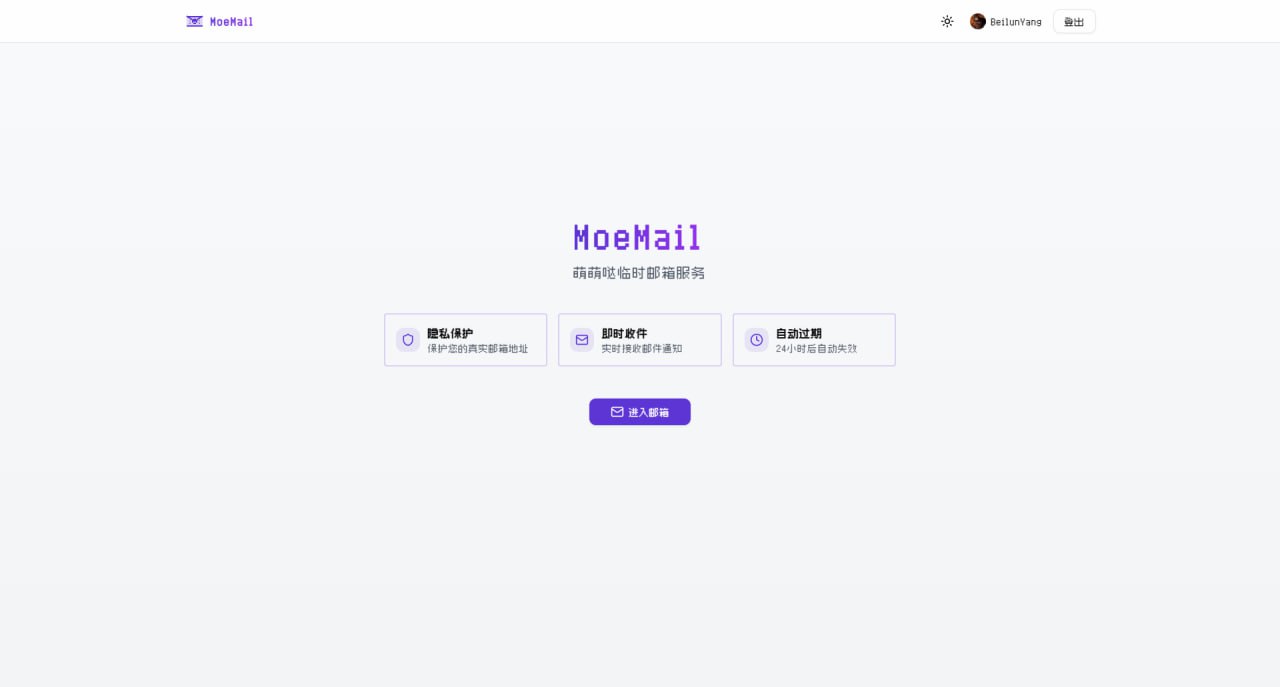
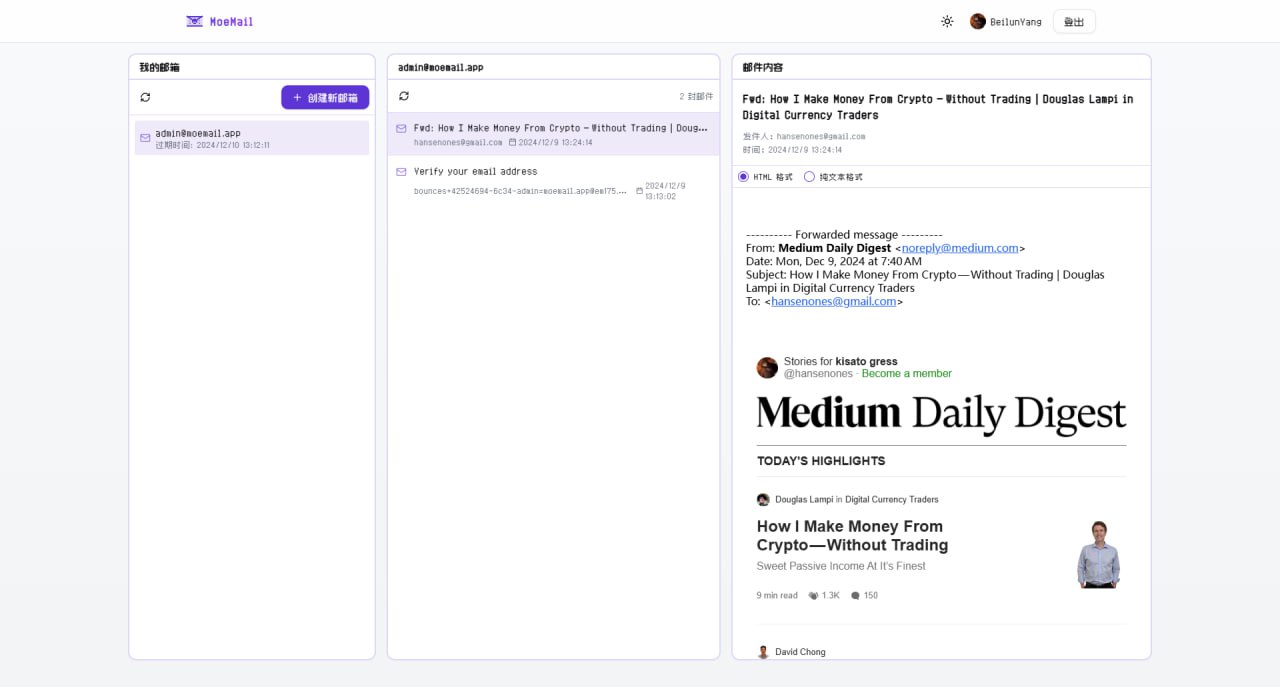
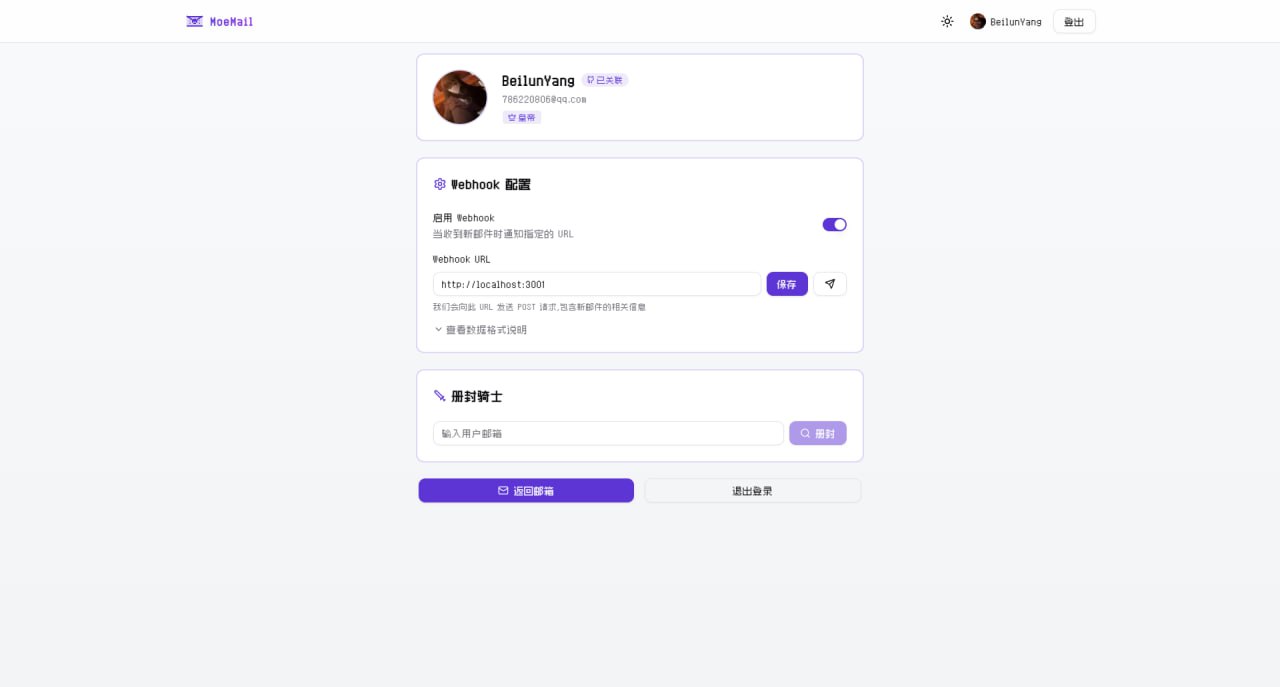
Full Documentation: https://docs.moemail.app
The documentation site contains detailed usage guides, API documentation, deployment tutorials, and other complete information.
git clone https://github.com/beilunyang/moemail.git
cd moemail
pnpm install
cp wrangler.example.json wrangler.json
cp wrangler.email.example.json wrangler.email.json
cp wrangler.cleanup.example.json wrangler.cleanup.json
Set Cloudflare D1 database name and database ID.
cp .env.example .env.local
Set AUTH_GITHUB_ID, AUTH_GITHUB_SECRET, AUTH_SECRET.
pnpm db:migrate-local
pnpm dev
pnpm deploy:email
pnpm dev:cleanup
pnpm test:cleanup
pnpm generate-test-data
https://www.youtube.com/watch?v=Vcw3nqsq2-E
cp .env.example .env
Set Environment Variables in the .env file.
Run deployment script
pnpm dlx tsx ./scripts/deploy/index.ts
This project supports automated deployment using GitHub Actions. It supports the following triggers:
Add the following Secrets in GitHub repository settings:
CLOUDFLARE_API_TOKEN: Cloudflare API TokenCLOUDFLARE_ACCOUNT_ID: Cloudflare Account IDAUTH_GITHUB_ID: GitHub OAuth App IDAUTH_GITHUB_SECRET: GitHub OAuth App SecretAUTH_SECRET: NextAuth Secret, used to encrypt session, please set a random stringCUSTOM_DOMAIN: Custom domain for the website (Optional, if empty, uses Cloudflare Pages default domain)PROJECT_NAME: Pages project name (Optional, if empty, defaults to moemail)DATABASE_NAME: D1 database name (Optional, if empty, defaults to moemail-db)KV_NAMESPACE_NAME: Cloudflare KV namespace name, used for site settings (Optional, if empty, defaults to moemail-kv)Choose trigger method:
Method 1: Push Tag Trigger
# Create a new tag
git tag v1.0.0

# Push tag to remote repository
git push origin v1.0.0
Method 2: Manual Trigger
Deployment progress can be viewed in the Actions tab of the repository.
v (e.g., v1.0.0).In the MoeMail User Profile page, you can configure the site's email domains. Supports multiple domain configurations, separated by commas.
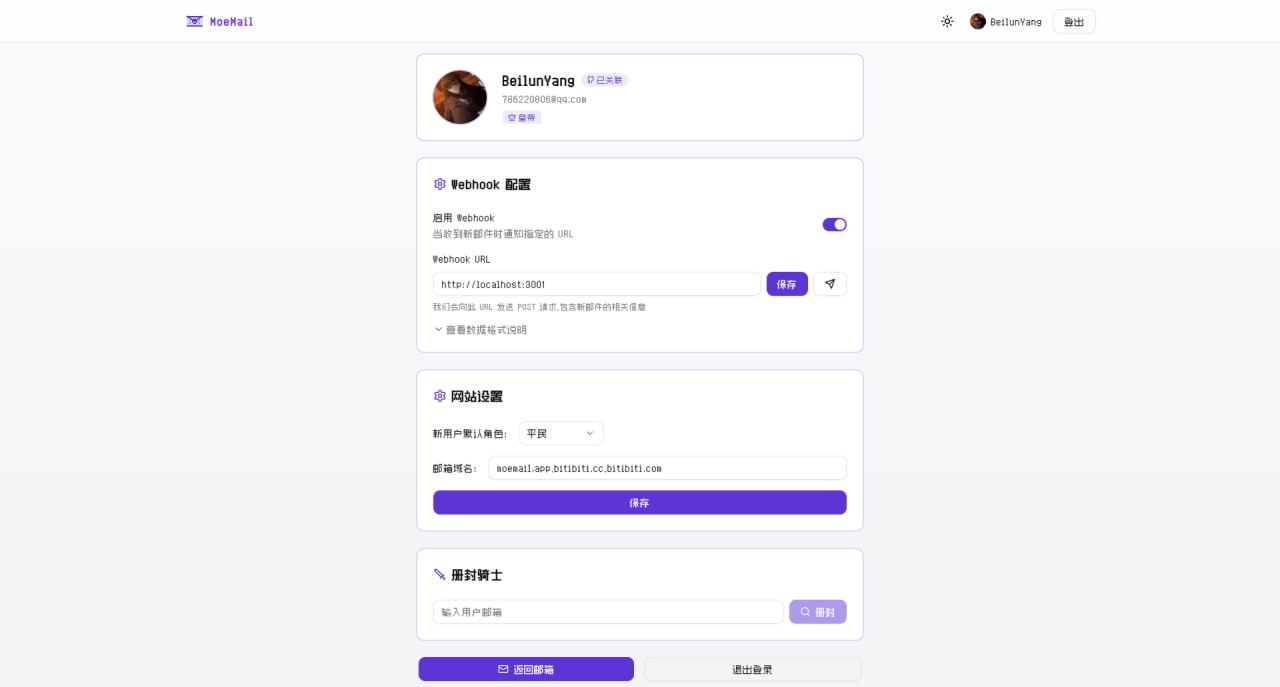
To make email domains effective, you also need to configure email routing in the Cloudflare console to forward received emails to the Email Worker.
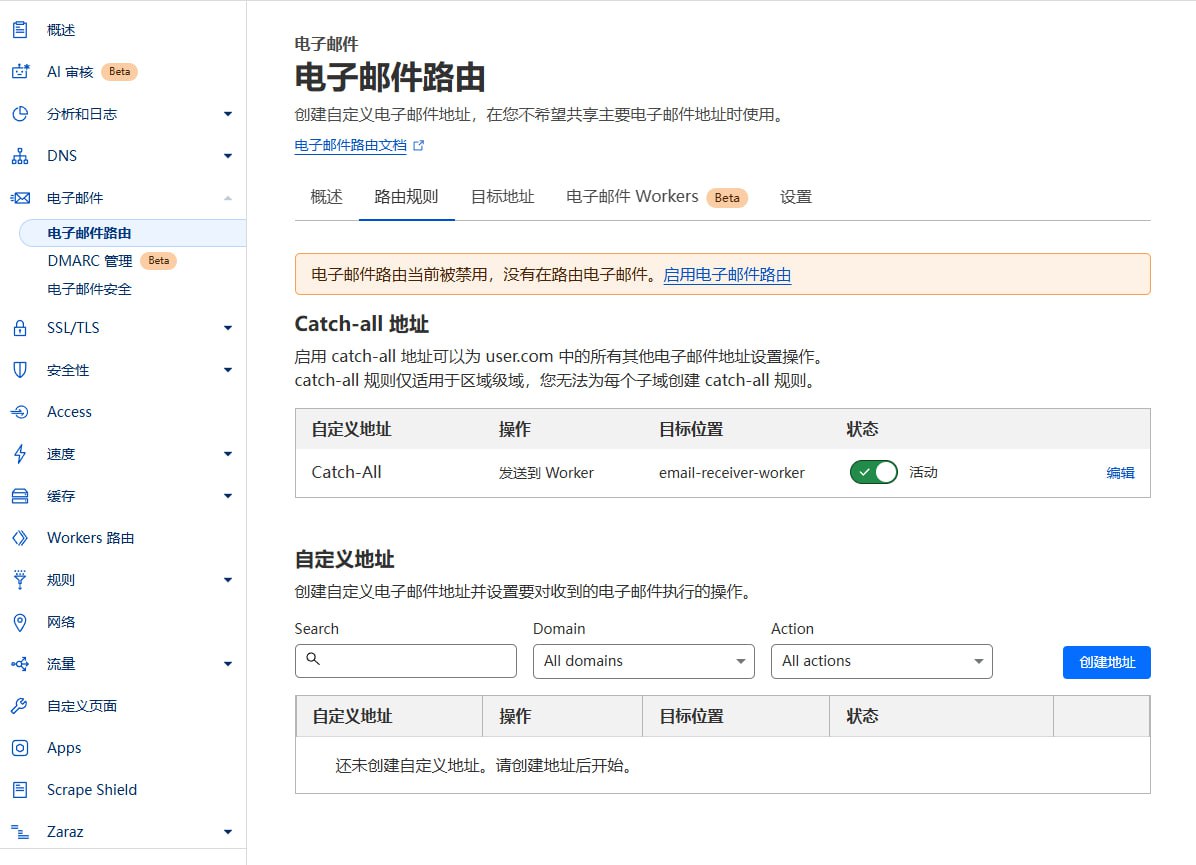
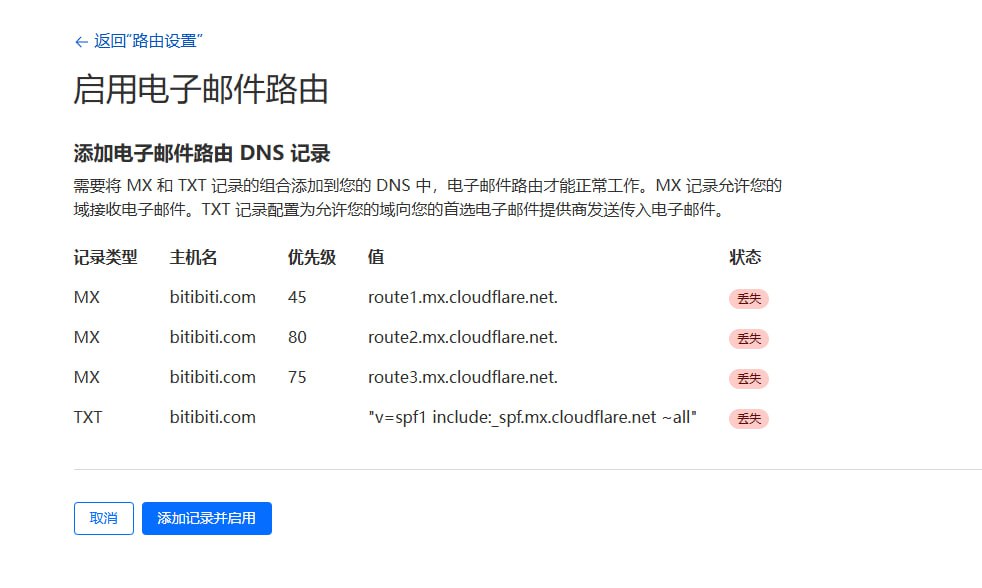
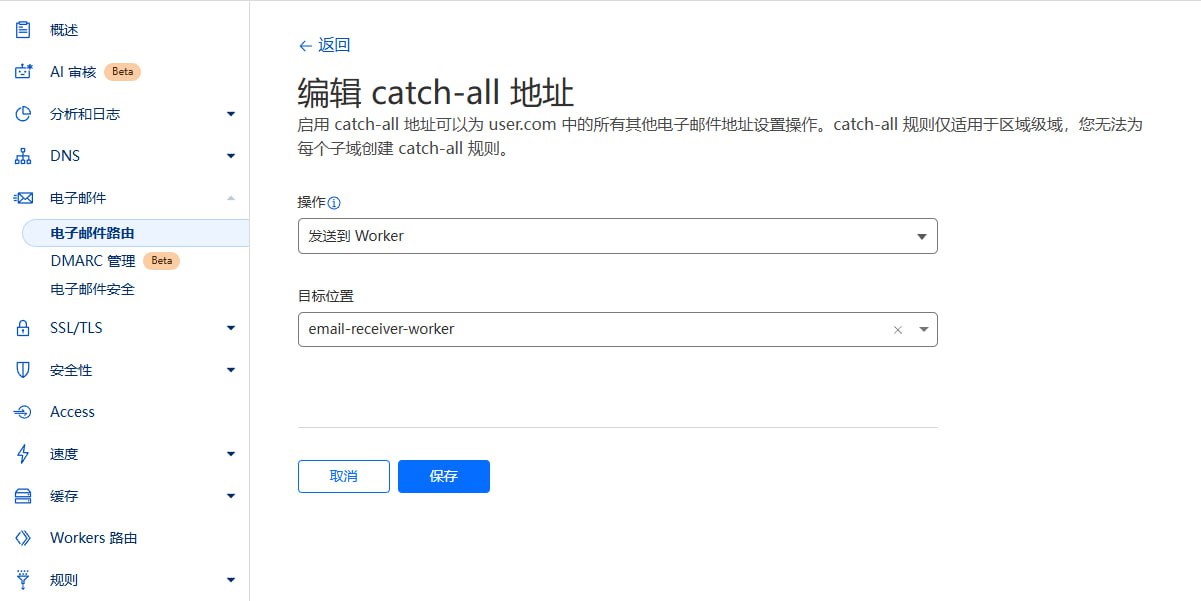
Destination addresses next to Routing rules, and bind an email address there.The project uses a Role-Based Access Control (RBAC) system.
New user default roles are configured by the Emperor in the site settings in the User Profile:
The system includes four role levels:
Emperor
Duke
Knight
Civilian
Become Emperor
/api/roles/init-emperor interface will become the Emperor (Website Owner).Role Changes
System settings are stored in Cloudflare KV, including:
DEFAULT_ROLE: Default role for new users, values: CIVILIAN, KNIGHT, DUKEEMAIL_DOMAINS: Supported email domains, comma-separatedADMIN_CONTACT: Administrator contact infoMAX_EMAILS: Maximum number of emails per userEmperor role can configure these in the User Profile page.
MoeMail supports sending emails using temporary addresses, based on Resend service.
| Role | Daily Limit | Description |
|---|---|---|
| Emperor | Unlimited | Admin has no limits |
| Duke | 5/day | Default 5 emails per day |
| Knight | 2/day | Default 2 emails per day |
| Civilian | Forbidden | No sending permission |
💡 Tip: The Emperor can customize the daily limits for Dukes and Knights in the Mail Service Configuration.
Get Resend API Key
Configure Service
Verify Configuration
Create Temp Email
Send Email
View History
When a new email is received, the system sends a POST request to the configured and enabled Webhook URL.
Content-Type: application/json
X-Webhook-Event: new_message
{
  "emailId": "email-uuid",
  "messageId": "message-uuid",
  "fromAddress": "[email protected]",
  "subject": "Email Subject",
  "content": "Email Text Content",
  "html": "Email HTML Content",
  "receivedAt": "2024-01-01T12:00:00.000Z",
  "toAddress": "[email protected]"
}
The project provides a simple test server:
pnpm webhook-test-server
The test server listens on port 3001 (http://localhost:3001) and prints received Webhook details.
For external testing, use Cloudflare Tunnel:
pnpx cloudflared tunnel --url http://localhost:3001
The project provides OpenAPI interfaces, accessible via API Key. API Keys can be created in User Profile (Requires Duke or Emperor role).
Add API Key to request header:
X-API-Key: YOUR_API_KEY
GET /api/config
Response:
{
  "defaultRole": "CIVILIAN",
  "emailDomains": "moemail.app,example.com",
  "adminContact": "[email protected]",
  "maxEmails": "10"
}
POST /api/emails/generate
Content-Type: application/json

{
  "name": "test",
  "expiryTime": 3600000,
  "domain": "moemail.app"
}
Params:
name: Prefix (optional)expiryTime: Validity in ms. 3600000(1h), 86400000(24h), 604800000(7d), 0(Permanent)domain: From configResponse:
{
  "id": "email-uuid-123",
  "email": "[email protected]"
}
GET /api/emails?cursor=xxx
GET /api/emails/{emailId}?cursor=xxx
DELETE /api/emails/{emailId}
GET /api/emails/{emailId}/{messageId}
POST /api/emails/{emailId}/share
Content-Type: application/json

{
  "expiresIn": 86400000
}
GET /api/emails/{emailId}/share
DELETE /api/emails/{emailId}/share/{shareId}
POST /api/emails/{emailId}/messages/{messageId}/share
Content-Type: application/json

{
  "expiresIn": 86400000
}
GET /api/emails/{emailId}/messages/{messageId}/share
DELETE /api/emails/{emailId}/messages/{messageId}/share/{shareId}
MoeMail provides an agent-first CLI tool for AI agents and automation workflows.
npm i -g @moemail/cli
# Configure API endpoint and key
moemail config set api-url https://moemail.app
moemail config set api-key YOUR_API_KEY

# Create temporary email
moemail create --domain moemail.app --expiry 1h --json

# List mailboxes
moemail list --json

# List messages in a mailbox
moemail list --email-id <id> --json

# Wait for new messages (polling)
moemail wait --email-id <id> --timeout 120 --json

# Read message content
moemail read --email-id <id> --message-id <id> --json

# Send an email from the temporary address
moemail send --email-id <id> --to [email protected] --subject "Hello" --content "Body text" --json

# Delete a single message
moemail delete --email-id <id> --message-id <id>

# Delete the whole mailbox
moemail delete --email-id <id>
A typical AI agent verification flow in 3 tool calls:
# 1. Create mailbox
EMAIL=$(moemail create --domain moemail.app --expiry 1h --json)
EMAIL_ID=$(echo $EMAIL | jq -r '.id')
ADDRESS=$(echo $EMAIL | jq -r '.address')

# 2. Wait for verification email
MSG=$(moemail wait --email-id $EMAIL_ID --timeout 120 --json)
MSG_ID=$(echo $MSG | jq -r '.messageId')

# 3. Read content, extract verification code
CONTENT=$(moemail read --email-id $EMAIL_ID --message-id $MSG_ID --json)
Install the built-in skill so AI agents (Claude Code, Codex, etc.) automatically know how to use MoeMail:
# Auto-detect installed agent platforms and install
moemail skill install

# Or specify a platform
moemail skill install --platform claude
moemail skill install --platform codex
For full documentation, see packages/cli/README.md.
MoeMail also ships an MCP server, so any MCP-capable client (Claude Desktop, Cursor, Cline, …) gets native temporary-email tools without shelling out to the CLI.
| Tool | Description |
|---|---|
create_email | Create a temporary mailbox (1h / 24h / 3d / permanent) |
list_emails | List mailboxes owned by the API key |
list_messages | List messages in a mailbox |
read_message | Read full text/HTML of a message |
wait_for_email | Poll for a new message (bounded; returns status: "timeout" to retry) |
send_email | Send from a temporary address |
delete_email | Delete a mailbox |
delete_message | Delete a single message |
Add the server to your MCP client config (e.g. Claude Desktop claude_desktop_config.json).
Credentials are passed via environment variables:
{
  "mcpServers": {
    "moemail": {
      "command": "npx",
      "args": ["-y", "@moemail/mcp"],
      "env": {
        "MOEMAIL_API_KEY": "YOUR_API_KEY",
        "MOEMAIL_API_URL": "https://moemail.app"
      }
    }
  }
}
For full documentation, see packages/mcp/README.md.
AUTH_GITHUB_ID: GitHub OAuth App IDAUTH_GITHUB_SECRET: GitHub OAuth App SecretAUTH_GOOGLE_ID: Google OAuth App IDAUTH_GOOGLE_SECRET: Google OAuth App SecretAUTH_SECRET: NextAuth SecretCLOUDFLARE_API_TOKEN: Cloudflare API TokenCLOUDFLARE_ACCOUNT_ID: Cloudflare Account IDDATABASE_NAME: D1 Database NameDATABASE_ID: D1 Database ID (Optional, auto-fetched if empty)KV_NAMESPACE_NAME: KV NameKV_NAMESPACE_ID: KV ID (Optional, auto-fetched if empty)CUSTOM_DOMAIN: Custom domainPROJECT_NAME: Pages Project NameClient ID and Client SecretApplication name: <your-app-name>Homepage URL: https://<your-domain>Authorization callback URL: https://<your-domain>/api/auth/callback/githubhttps://<your-domain>https://<your-domain>/api/auth/callback/googleClient ID and Client SecretAUTH_GOOGLE_ID and AUTH_GOOGLE_SECRETWelcome to submit Pull Requests or Issues to help improve this project.

|

|
| Follow official account for more project updates, AI, Blockchain, and Indie Dev news. | Add WeChat, remark "MoeMail" to join the WeChat community group. |
If you like this project, please give it a Star ⭐️
Or sponsor it

75 followers · starred Dec 2024
10 followers · starred Feb 2025
216 followers · starred Jan 2025
11 followers · starred Jan 2025
A cute temporary email service built with NextJS + Cloudflare technology stack 🎉 | 一个基于 NextJS + Cloudflare 技术栈构建的可爱临时邮箱服务🎉
See the code
A cute temporary email service built with NextJS + Cloudflare technology stack 🎉
English | 简体中文
Live Demo • Documentation • Features • Tech Stack • Local Run • Deployment • Email Domain Config • Permission System • System Settings • Sending Emails • Webhook Integration • OpenAPI • CLI Tool • MCP Server • Environment Variables • Github OAuth Config • Google OAuth Config • Contribution • License • Community • Support
Full Documentation: https://docs.moemail.app
The documentation site contains detailed usage guides, API documentation, deployment tutorials, and other complete information.
git clone https://github.com/beilunyang/moemail.git
cd moemail
pnpm install
cp wrangler.example.json wrangler.json
cp wrangler.email.example.json wrangler.email.json
cp wrangler.cleanup.example.json wrangler.cleanup.json
Set Cloudflare D1 database name and database ID.
cp .env.example .env.local
Set AUTH_GITHUB_ID, AUTH_GITHUB_SECRET, AUTH_SECRET.
pnpm db:migrate-local
pnpm dev
pnpm deploy:email
pnpm dev:cleanup
pnpm test:cleanup
pnpm generate-test-data
https://www.youtube.com/watch?v=Vcw3nqsq2-E
cp .env.example .env
Set Environment Variables in the .env file.
Run deployment script
pnpm dlx tsx ./scripts/deploy/index.ts
This project supports automated deployment using GitHub Actions. It supports the following triggers:
Add the following Secrets in GitHub repository settings:
CLOUDFLARE_API_TOKEN: Cloudflare API TokenCLOUDFLARE_ACCOUNT_ID: Cloudflare Account IDAUTH_GITHUB_ID: GitHub OAuth App IDAUTH_GITHUB_SECRET: GitHub OAuth App SecretAUTH_SECRET: NextAuth Secret, used to encrypt session, please set a random stringCUSTOM_DOMAIN: Custom domain for the website (Optional, if empty, uses Cloudflare Pages default domain)PROJECT_NAME: Pages project name (Optional, if empty, defaults to moemail)DATABASE_NAME: D1 database name (Optional, if empty, defaults to moemail-db)KV_NAMESPACE_NAME: Cloudflare KV namespace name, used for site settings (Optional, if empty, defaults to moemail-kv)Choose trigger method:
Method 1: Push Tag Trigger
# Create a new tag
git tag v1.0.0

# Push tag to remote repository
git push origin v1.0.0
Method 2: Manual Trigger
Deployment progress can be viewed in the Actions tab of the repository.
v (e.g., v1.0.0).In the MoeMail User Profile page, you can configure the site's email domains. Supports multiple domain configurations, separated by commas.
To make email domains effective, you also need to configure email routing in the Cloudflare console to forward received emails to the Email Worker.
Destination addresses next to Routing rules, and bind an email address there.The project uses a Role-Based Access Control (RBAC) system.
New user default roles are configured by the Emperor in the site settings in the User Profile:
The system includes four role levels:
Emperor
Duke
Knight
Civilian
Become Emperor
/api/roles/init-emperor interface will become the Emperor (Website Owner).Role Changes
System settings are stored in Cloudflare KV, including:
DEFAULT_ROLE: Default role for new users, values: CIVILIAN, KNIGHT, DUKEEMAIL_DOMAINS: Supported email domains, comma-separatedADMIN_CONTACT: Administrator contact infoMAX_EMAILS: Maximum number of emails per userEmperor role can configure these in the User Profile page.
MoeMail supports sending emails using temporary addresses, based on Resend service.
| Role | Daily Limit | Description |
|---|---|---|
| Emperor | Unlimited | Admin has no limits |
| Duke | 5/day | Default 5 emails per day |
| Knight | 2/day | Default 2 emails per day |
| Civilian | Forbidden | No sending permission |
💡 Tip: The Emperor can customize the daily limits for Dukes and Knights in the Mail Service Configuration.
Get Resend API Key
Configure Service
Verify Configuration
Create Temp Email
Send Email
View History
When a new email is received, the system sends a POST request to the configured and enabled Webhook URL.
Content-Type: application/json
X-Webhook-Event: new_message
{
  "emailId": "email-uuid",
  "messageId": "message-uuid",
  "fromAddress": "[email protected]",
  "subject": "Email Subject",
  "content": "Email Text Content",
  "html": "Email HTML Content",
  "receivedAt": "2024-01-01T12:00:00.000Z",
  "toAddress": "[email protected]"
}
The project provides a simple test server:
pnpm webhook-test-server
The test server listens on port 3001 (http://localhost:3001) and prints received Webhook details.
For external testing, use Cloudflare Tunnel:
pnpx cloudflared tunnel --url http://localhost:3001
The project provides OpenAPI interfaces, accessible via API Key. API Keys can be created in User Profile (Requires Duke or Emperor role).
Add API Key to request header:
X-API-Key: YOUR_API_KEY
GET /api/config
Response:
{
  "defaultRole": "CIVILIAN",
  "emailDomains": "moemail.app,example.com",
  "adminContact": "[email protected]",
  "maxEmails": "10"
}
POST /api/emails/generate
Content-Type: application/json

{
  "name": "test",
  "expiryTime": 3600000,
  "domain": "moemail.app"
}
Params:
name: Prefix (optional)expiryTime: Validity in ms. 3600000(1h), 86400000(24h), 604800000(7d), 0(Permanent)domain: From configResponse:
{
  "id": "email-uuid-123",
  "email": "[email protected]"
}
GET /api/emails?cursor=xxx
GET /api/emails/{emailId}?cursor=xxx
DELETE /api/emails/{emailId}
GET /api/emails/{emailId}/{messageId}
POST /api/emails/{emailId}/share
Content-Type: application/json

{
  "expiresIn": 86400000
}
GET /api/emails/{emailId}/share
DELETE /api/emails/{emailId}/share/{shareId}
POST /api/emails/{emailId}/messages/{messageId}/share
Content-Type: application/json

{
  "expiresIn": 86400000
}
GET /api/emails/{emailId}/messages/{messageId}/share
DELETE /api/emails/{emailId}/messages/{messageId}/share/{shareId}
MoeMail provides an agent-first CLI tool for AI agents and automation workflows.
npm i -g @moemail/cli
# Configure API endpoint and key
moemail config set api-url https://moemail.app
moemail config set api-key YOUR_API_KEY

# Create temporary email
moemail create --domain moemail.app --expiry 1h --json

# List mailboxes
moemail list --json

# List messages in a mailbox
moemail list --email-id <id> --json

# Wait for new messages (polling)
moemail wait --email-id <id> --timeout 120 --json

# Read message content
moemail read --email-id <id> --message-id <id> --json

# Send an email from the temporary address
moemail send --email-id <id> --to [email protected] --subject "Hello" --content "Body text" --json

# Delete a single message
moemail delete --email-id <id> --message-id <id>

# Delete the whole mailbox
moemail delete --email-id <id>
A typical AI agent verification flow in 3 tool calls:
# 1. Create mailbox
EMAIL=$(moemail create --domain moemail.app --expiry 1h --json)
EMAIL_ID=$(echo $EMAIL | jq -r '.id')
ADDRESS=$(echo $EMAIL | jq -r '.address')

# 2. Wait for verification email
MSG=$(moemail wait --email-id $EMAIL_ID --timeout 120 --json)
MSG_ID=$(echo $MSG | jq -r '.messageId')

# 3. Read content, extract verification code
CONTENT=$(moemail read --email-id $EMAIL_ID --message-id $MSG_ID --json)
Install the built-in skill so AI agents (Claude Code, Codex, etc.) automatically know how to use MoeMail:
# Auto-detect installed agent platforms and install
moemail skill install

# Or specify a platform
moemail skill install --platform claude
moemail skill install --platform codex
For full documentation, see packages/cli/README.md.
MoeMail also ships an MCP server, so any MCP-capable client (Claude Desktop, Cursor, Cline, …) gets native temporary-email tools without shelling out to the CLI.
| Tool | Description |
|---|---|
create_email | Create a temporary mailbox (1h / 24h / 3d / permanent) |
list_emails | List mailboxes owned by the API key |
list_messages | List messages in a mailbox |
read_message | Read full text/HTML of a message |
wait_for_email | Poll for a new message (bounded; returns status: "timeout" to retry) |
send_email | Send from a temporary address |
delete_email | Delete a mailbox |
delete_message | Delete a single message |
Add the server to your MCP client config (e.g. Claude Desktop claude_desktop_config.json).
Credentials are passed via environment variables:
{
  "mcpServers": {
    "moemail": {
      "command": "npx",
      "args": ["-y", "@moemail/mcp"],
      "env": {
        "MOEMAIL_API_KEY": "YOUR_API_KEY",
        "MOEMAIL_API_URL": "https://moemail.app"
      }
    }
  }
}
For full documentation, see packages/mcp/README.md.
AUTH_GITHUB_ID: GitHub OAuth App IDAUTH_GITHUB_SECRET: GitHub OAuth App SecretAUTH_GOOGLE_ID: Google OAuth App IDAUTH_GOOGLE_SECRET: Google OAuth App SecretAUTH_SECRET: NextAuth SecretCLOUDFLARE_API_TOKEN: Cloudflare API TokenCLOUDFLARE_ACCOUNT_ID: Cloudflare Account IDDATABASE_NAME: D1 Database NameDATABASE_ID: D1 Database ID (Optional, auto-fetched if empty)KV_NAMESPACE_NAME: KV NameKV_NAMESPACE_ID: KV ID (Optional, auto-fetched if empty)CUSTOM_DOMAIN: Custom domainPROJECT_NAME: Pages Project NameClient ID and Client SecretApplication name: <your-app-name>Homepage URL: https://<your-domain>Authorization callback URL: https://<your-domain>/api/auth/callback/githubhttps://<your-domain>https://<your-domain>/api/auth/callback/googleClient ID and Client SecretAUTH_GOOGLE_ID and AUTH_GOOGLE_SECRETWelcome to submit Pull Requests or Issues to help improve this project.
|
|
|
| Follow official account for more project updates, AI, Blockchain, and Indie Dev news. | Add WeChat, remark "MoeMail" to join the WeChat community group. |
If you like this project, please give it a Star ⭐️
Or sponsor it
75 followers · starred Dec 2024
10 followers · starred Feb 2025
216 followers · starred Jan 2025
11 followers · starred Jan 2025



