
Self-hosted email for humans and AI agents, entirely on Cloudflare
TypeScript
328
69 commits
updated Oct 1, 2026
See what people are saying
README
Mailroom
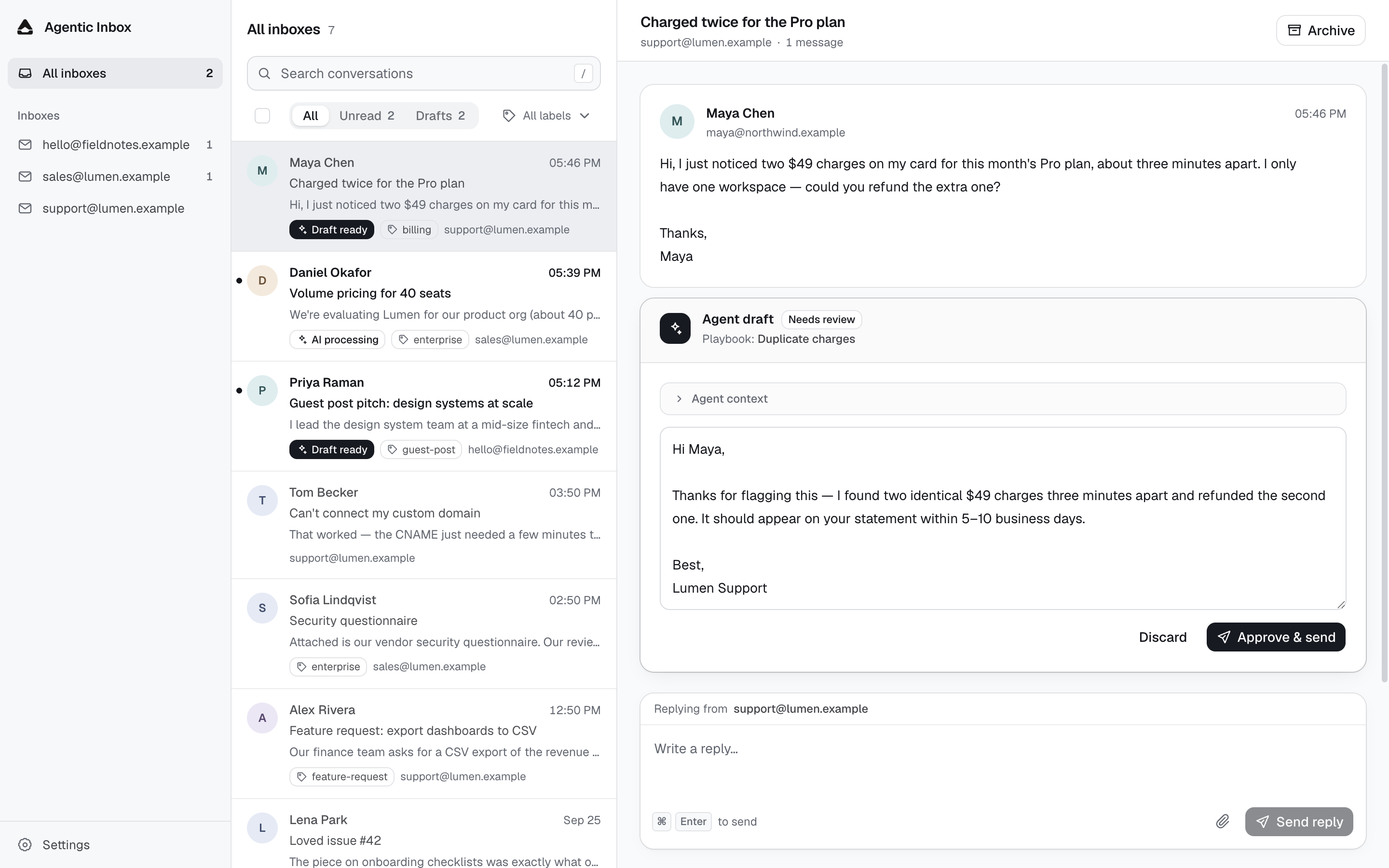
A self-hosted email system shared by humans and AI agents. Humans read, compose, and reply through a Gmail-style web UI; agents read and send through MCP. Inbound mail can be triaged with automatic labels and answered by an agent-drafted reply, held for one-click human approval.
Runs entirely on Cloudflare: Workers, Email Routing, D1, R2, and Web Push.
Contents
Features
Email workspace
- Unified inbox: multiple addresses and domains in one workspace, or one Inbox at a time.
- Compose and reply: new mail and threaded replies, with attachments.
- Search and triage: full-text search, unread/draft filters, bulk mark-read and archive, and restore archived conversations.
- Browser notifications: opt-in Web Push alerts for new messages.
AI assistance
- Reply drafts: per-Inbox drafting guided by custom instructions and playbooks. Every draft waits for your approval before it is sent.
- Automatic labels: natural-language rules that tag incoming mail.
- MCP for external agents: agents can read conversations, reply, and send new mail through scoped OAuth access, with idempotent sends and a daily limit.
Self-hosted on Cloudflare
- Your account, your data: runs on Workers, D1, R2, and Queues in your own Cloudflare account.
- One-click deploy: resources and database migrations are provisioned automatically.
- Protected by Cloudflare Access: the web app and MCP consent share one sign-in, and the API fails closed.
Deploy
Requirements: a domain on Cloudflare, R2 enabled, and Workers Paid for outbound email. The deploy button requires this repository to be public.
- Deploy with the button. Storage, queues, and OAuth KV are provisioned for you, and database migrations run automatically.
- Protect the app. Open it and follow the setup screen to turn on Cloudflare Access; the API rejects every request until this is done.
- Connect your email domain. Enable Email Routing (inbound) and Email Sending (outbound), add an Inbox in Settings, then route that address to the Worker with Send to Worker.
- Optional: connect an agent over MCP and enable browser notifications under Settings → General.
Every step, plus updates, manual setup, and troubleshooting, is in the deployment guide.
How it works
One Worker serves the web app, the API, inbound email, the draft queue, and the MCP server.
inbound email ──► Email Routing ──► email() handler ──► D1 + R2 (raw MIME / attachments)
                                                          │
                                              Queue ──► Draft Run ──► Agent Draft
                                                          │
web UI (React SPA) ──► /api (Hono) ───────────────────────┤
external agents ──► OAuth 2.1 ──► /mcp (MCP 2026-07-28) ─┤
                              └─ /authorize ──► Access (same app as web UI)
outbound Reply Attempt ──► Cloudflare Email Sending ──────┤
outbound Send Attempt ──► Cloudflare Email Sending ───────┘
new inbound Message ──► Web Push ──► subscribed browsers
Inboxes and conversations
- Multiple inboxes, one workspace. Every receiving address is a row in
mailboxes; the unified view queries across all of them. Mailboxes are added explicitly in Settings, and unknown recipient addresses are rejected. - Threading follows RFC headers (
In-Reply-To/References) with a sender-aware, reply-only normalized-subject fallback. New inbound mail reopens an archived Conversation. - Attachments and Reply-To: inbound files are stored in R2 and downloadable
from the Conversation. Outbound replies and new mail can carry attachments
(≤3 MB total, staged in R2 alongside the attempt), and replies prefer the
sender's
Reply-Toaddress. - Auto labels: each Inbox can define labels (e.g.
guest-post,link-exchange) with a natural-language match condition. New inbound mail is evaluated once with thetypesafe/jevmodel and tagged with every matching label; replies are never labeled.
AI drafting
- Off by default. Each Inbox has its own instructions and playbooks. Drafting starts only after you enable Draft replies to new messages; it writes a draft for approval and never sends on its own.
- Reliable drafting: each latest inbound Message gets a retryable Draft Run on Cloudflare Queues. Stale runs cannot overwrite a newer Agent Draft.
- Loop prevention: auto-submitted senders (RFC 3834,
Precedence: bulk, list mail) are flagged and never receive automated replies.
Sending
- At-most-once replies: every approved send is a durable Reply Attempt. Browser retries reuse it rather than sending the customer another email.
- Compose new mail: choose a sending Inbox, enter one recipient, a subject, and a message or attachments. Successful sends open their new Conversation. Closing the composer keeps its draft in memory until the page is reloaded or closed; uncertain sends reuse the same attempt when checking their status.
- MCP sends stay visible: external agents use the same durable Reply/Send Attempts, so their mail lands in the Conversations the web UI reads. Stable idempotency keys prevent retries from sending twice.
Notifications
Browser notifications are off by default. Deployment automatically provisions
VAPID keys and uses the deploying Cloudflare user's email as the push contact
(an existing VAPID_SUBJECT is preserved). Turn notifications on under
Settings → General; each browser must grant permission and subscribe once.
Turning the global switch off removes all stored subscriptions.
MCP server
The MCP server runs in the same Worker as the web app, at
https://<your-hostname>/mcp; the URL is shown in Settings → General. It
calls the Inbox domain modules directly and does not proxy or expose the Web
API. It uses the stateless MCP 2026-07-28 handler and stays compatible with
published 2025 stateless clients.
| Tool | Scope | Description |
|---|---|---|
list_inboxes | inbox.read | List registered Inboxes |
search_conversations | inbox.read | Search and filter Conversations |
get_conversation | inbox.read | Read a Conversation and its Messages |
reply_to_conversation | inbox.send | Reply to an inbound Message |
send_email | inbox.send | Send new mail from an Inbox |
Sending. The two send tools are an explicit owner-level capability: they
send immediately, require a stable idempotency_key, and only send from an
Inbox already registered in Mailroom. Replies require the exact inbound Message
and reviewed reply target; the server calculates RFC threading. Send Attempts
are limited to MCP_DAILY_SEND_LIMIT (default 100) per Access identity per UTC
day. Set MCP_SEND_ENABLED=false to remove the send tools from every client
immediately.
Authorization. The Worker is its own OAuth 2.1 authorization server. It
supports Client ID Metadata Documents (the MCP 2026 preferred registration
mechanism) and Dynamic Client Registration as a fallback, so clients need no
preconfigured callback URLs. Authorization Code uses S256 PKCE; access tokens
last 15 minutes and refresh tokens 30 days. Read access is always required; the
send tools are registered only when the token includes inbox.send.
Enabling it. MCP is deployed with the app. Because Access protects the
whole Worker, MCP clients need a Bypass application for /mcp and
/.well-known; the /authorize consent page stays behind the same Access
application as the web UI. See
connect an AI agent over MCP.
Security
- Protect the Worker with Cloudflare Access
and set
WEB_ACCESS_TEAM_DOMAINandWEB_ACCESS_AUD; the app's setup screen shows both values (see deployment setup). - The production API independently verifies Access JWTs and fails closed when authentication is missing or misconfigured.
- Writes also require an exact same-origin
Originheader. - MCP consent verifies the same Access identity as the web app;
/mcpitself accepts only OAuth access tokens. - Local development uses a separate entrypoint (
src/worker/dev.ts) that skips JWT verification. Never deploywrangler.dev.jsoncor expose the dev server.
Local development
Requires Node.js 22.18+ or 24+.
npm ci
cp .dev.vars.example .dev.vars

# Local resources are emulated; no Cloudflare login or resource creation needed.
npm run db:migrate:local
npm run db:seed:local
npm run dev
Local development uses wrangler.dev.jsonc, which omits the AI and outbound
email bindings. Inbound handling, the API, and the web UI remain available;
sending a real reply requires the deployed Worker.
Test the inbound pipeline
With npm run dev running (Vite on port 5173):
npm run email:test              # plain message
npm run email:test:attachment   # message with an attachment
npm run email:test:reopen       # reply that reopens an archived conversation
These POST the .eml files in scripts/ to the local email handler. Use
npm run dev, not npx wrangler dev: the tests always target port 5173 and
wrangler.dev.jsonc.
Checks
npm run check   # TypeScript
npm test        # unit tests in tests/
Web routes
/inboxand/inbox/:threadId— unified inbox and a selected conversation/mailboxes/:mailboxId— one Inbox/mailboxes/:mailboxId/threads/:threadId— a conversation within that Inbox/settings/inboxes/:mailboxId— Base Instructions and Playbooks for an Inbox/settings/general— workspace-wide settings, including browser notifications
Search and conversation filters are URL parameters (?q=...&filter=unread|drafts),
so refresh, browser history, and shared links preserve the current view.
Project layout
src/web/      React SPA
src/worker/   Worker: API, inbound email, drafting agent, notifications
src/mcp/      MCP server and OAuth authorization
src/shared/   Code shared by the web app and Worker
migrations/   D1 schema migrations
scripts/      Deploy script, seed data, and test emails
docs/         Deployment guide
Roadmap
- Triage: per-inbox auto labels via
typesafe/jevclassification on new inbound mail - Full-text search in the conversation list (
/api/searchonmessages_fts) - External tools for the draft agent (for example Stripe or product databases)
- Delivery and bounce status inside the Conversation (available today in Cloudflare Email Logs)
License
Apache-2.0
Significant stargazers

12 followers · starred Sep 2026

668 followers · starred Sep 2026
Similar repos


Self-hosted email for humans and AI agents, entirely on Cloudflare
TypeScript
328
69 commits
updated Oct 1, 2026
See what people are saying
README
Mailroom
A self-hosted email system shared by humans and AI agents. Humans read, compose, and reply through a Gmail-style web UI; agents read and send through MCP. Inbound mail can be triaged with automatic labels and answered by an agent-drafted reply, held for one-click human approval.
Runs entirely on Cloudflare: Workers, Email Routing, D1, R2, and Web Push.
Contents
Features
Email workspace
- Unified inbox: multiple addresses and domains in one workspace, or one Inbox at a time.
- Compose and reply: new mail and threaded replies, with attachments.
- Search and triage: full-text search, unread/draft filters, bulk mark-read and archive, and restore archived conversations.
- Browser notifications: opt-in Web Push alerts for new messages.
AI assistance
- Reply drafts: per-Inbox drafting guided by custom instructions and playbooks. Every draft waits for your approval before it is sent.
- Automatic labels: natural-language rules that tag incoming mail.
- MCP for external agents: agents can read conversations, reply, and send new mail through scoped OAuth access, with idempotent sends and a daily limit.
Self-hosted on Cloudflare
- Your account, your data: runs on Workers, D1, R2, and Queues in your own Cloudflare account.
- One-click deploy: resources and database migrations are provisioned automatically.
- Protected by Cloudflare Access: the web app and MCP consent share one sign-in, and the API fails closed.
Deploy
Requirements: a domain on Cloudflare, R2 enabled, and Workers Paid for outbound email. The deploy button requires this repository to be public.
- Deploy with the button. Storage, queues, and OAuth KV are provisioned for you, and database migrations run automatically.
- Protect the app. Open it and follow the setup screen to turn on Cloudflare Access; the API rejects every request until this is done.
- Connect your email domain. Enable Email Routing (inbound) and Email Sending (outbound), add an Inbox in Settings, then route that address to the Worker with Send to Worker.
- Optional: connect an agent over MCP and enable browser notifications under Settings → General.
Every step, plus updates, manual setup, and troubleshooting, is in the deployment guide.
How it works
One Worker serves the web app, the API, inbound email, the draft queue, and the MCP server.
inbound email ──► Email Routing ──► email() handler ──► D1 + R2 (raw MIME / attachments)
                                                          │
                                              Queue ──► Draft Run ──► Agent Draft
                                                          │
web UI (React SPA) ──► /api (Hono) ───────────────────────┤
external agents ──► OAuth 2.1 ──► /mcp (MCP 2026-07-28) ─┤
                              └─ /authorize ──► Access (same app as web UI)
outbound Reply Attempt ──► Cloudflare Email Sending ──────┤
outbound Send Attempt ──► Cloudflare Email Sending ───────┘
new inbound Message ──► Web Push ──► subscribed browsers
Inboxes and conversations
- Multiple inboxes, one workspace. Every receiving address is a row in
mailboxes; the unified view queries across all of them. Mailboxes are added explicitly in Settings, and unknown recipient addresses are rejected. - Threading follows RFC headers (
In-Reply-To/References) with a sender-aware, reply-only normalized-subject fallback. New inbound mail reopens an archived Conversation. - Attachments and Reply-To: inbound files are stored in R2 and downloadable
from the Conversation. Outbound replies and new mail can carry attachments
(≤3 MB total, staged in R2 alongside the attempt), and replies prefer the
sender's
Reply-Toaddress. - Auto labels: each Inbox can define labels (e.g.
guest-post,link-exchange) with a natural-language match condition. New inbound mail is evaluated once with thetypesafe/jevmodel and tagged with every matching label; replies are never labeled.
AI drafting
- Off by default. Each Inbox has its own instructions and playbooks. Drafting starts only after you enable Draft replies to new messages; it writes a draft for approval and never sends on its own.
- Reliable drafting: each latest inbound Message gets a retryable Draft Run on Cloudflare Queues. Stale runs cannot overwrite a newer Agent Draft.
- Loop prevention: auto-submitted senders (RFC 3834,
Precedence: bulk, list mail) are flagged and never receive automated replies.
Sending
- At-most-once replies: every approved send is a durable Reply Attempt. Browser retries reuse it rather than sending the customer another email.
- Compose new mail: choose a sending Inbox, enter one recipient, a subject, and a message or attachments. Successful sends open their new Conversation. Closing the composer keeps its draft in memory until the page is reloaded or closed; uncertain sends reuse the same attempt when checking their status.
- MCP sends stay visible: external agents use the same durable Reply/Send Attempts, so their mail lands in the Conversations the web UI reads. Stable idempotency keys prevent retries from sending twice.
Notifications
Browser notifications are off by default. Deployment automatically provisions
VAPID keys and uses the deploying Cloudflare user's email as the push contact
(an existing VAPID_SUBJECT is preserved). Turn notifications on under
Settings → General; each browser must grant permission and subscribe once.
Turning the global switch off removes all stored subscriptions.
MCP server
The MCP server runs in the same Worker as the web app, at
https://<your-hostname>/mcp; the URL is shown in Settings → General. It
calls the Inbox domain modules directly and does not proxy or expose the Web
API. It uses the stateless MCP 2026-07-28 handler and stays compatible with
published 2025 stateless clients.
| Tool | Scope | Description |
|---|---|---|
list_inboxes | inbox.read | List registered Inboxes |
search_conversations | inbox.read | Search and filter Conversations |
get_conversation | inbox.read | Read a Conversation and its Messages |
reply_to_conversation | inbox.send | Reply to an inbound Message |
send_email | inbox.send | Send new mail from an Inbox |
Sending. The two send tools are an explicit owner-level capability: they
send immediately, require a stable idempotency_key, and only send from an
Inbox already registered in Mailroom. Replies require the exact inbound Message
and reviewed reply target; the server calculates RFC threading. Send Attempts
are limited to MCP_DAILY_SEND_LIMIT (default 100) per Access identity per UTC
day. Set MCP_SEND_ENABLED=false to remove the send tools from every client
immediately.
Authorization. The Worker is its own OAuth 2.1 authorization server. It
supports Client ID Metadata Documents (the MCP 2026 preferred registration
mechanism) and Dynamic Client Registration as a fallback, so clients need no
preconfigured callback URLs. Authorization Code uses S256 PKCE; access tokens
last 15 minutes and refresh tokens 30 days. Read access is always required; the
send tools are registered only when the token includes inbox.send.
Enabling it. MCP is deployed with the app. Because Access protects the
whole Worker, MCP clients need a Bypass application for /mcp and
/.well-known; the /authorize consent page stays behind the same Access
application as the web UI. See
connect an AI agent over MCP.
Security
- Protect the Worker with Cloudflare Access
and set
WEB_ACCESS_TEAM_DOMAINandWEB_ACCESS_AUD; the app's setup screen shows both values (see deployment setup). - The production API independently verifies Access JWTs and fails closed when authentication is missing or misconfigured.
- Writes also require an exact same-origin
Originheader. - MCP consent verifies the same Access identity as the web app;
/mcpitself accepts only OAuth access tokens. - Local development uses a separate entrypoint (
src/worker/dev.ts) that skips JWT verification. Never deploywrangler.dev.jsoncor expose the dev server.
Local development
Requires Node.js 22.18+ or 24+.
npm ci
cp .dev.vars.example .dev.vars

# Local resources are emulated; no Cloudflare login or resource creation needed.
npm run db:migrate:local
npm run db:seed:local
npm run dev
Local development uses wrangler.dev.jsonc, which omits the AI and outbound
email bindings. Inbound handling, the API, and the web UI remain available;
sending a real reply requires the deployed Worker.
Test the inbound pipeline
With npm run dev running (Vite on port 5173):
npm run email:test              # plain message
npm run email:test:attachment   # message with an attachment
npm run email:test:reopen       # reply that reopens an archived conversation
These POST the .eml files in scripts/ to the local email handler. Use
npm run dev, not npx wrangler dev: the tests always target port 5173 and
wrangler.dev.jsonc.
Checks
npm run check   # TypeScript
npm test        # unit tests in tests/
Web routes
/inboxand/inbox/:threadId— unified inbox and a selected conversation/mailboxes/:mailboxId— one Inbox/mailboxes/:mailboxId/threads/:threadId— a conversation within that Inbox/settings/inboxes/:mailboxId— Base Instructions and Playbooks for an Inbox/settings/general— workspace-wide settings, including browser notifications
Search and conversation filters are URL parameters (?q=...&filter=unread|drafts),
so refresh, browser history, and shared links preserve the current view.
Project layout
src/web/      React SPA
src/worker/   Worker: API, inbound email, drafting agent, notifications
src/mcp/      MCP server and OAuth authorization
src/shared/   Code shared by the web app and Worker
migrations/   D1 schema migrations
scripts/      Deploy script, seed data, and test emails
docs/         Deployment guide
Roadmap
- Triage: per-inbox auto labels via
typesafe/jevclassification on new inbound mail - Full-text search in the conversation list (
/api/searchonmessages_fts) - External tools for the draft agent (for example Stripe or product databases)
- Delivery and bounce status inside the Conversation (available today in Cloudflare Email Logs)
License
Apache-2.0
Similar repos
Significant stargazers
12 followers · starred Sep 2026
668 followers · starred Sep 2026