A scrolling window manager for macOS, inspired by niri
Swift
19
4 commits
updated Oct 17, 2026

Your windows, on an endless strip.
A scrolling window manager for macOS. No more resizing, overlapping or hunting for windows.
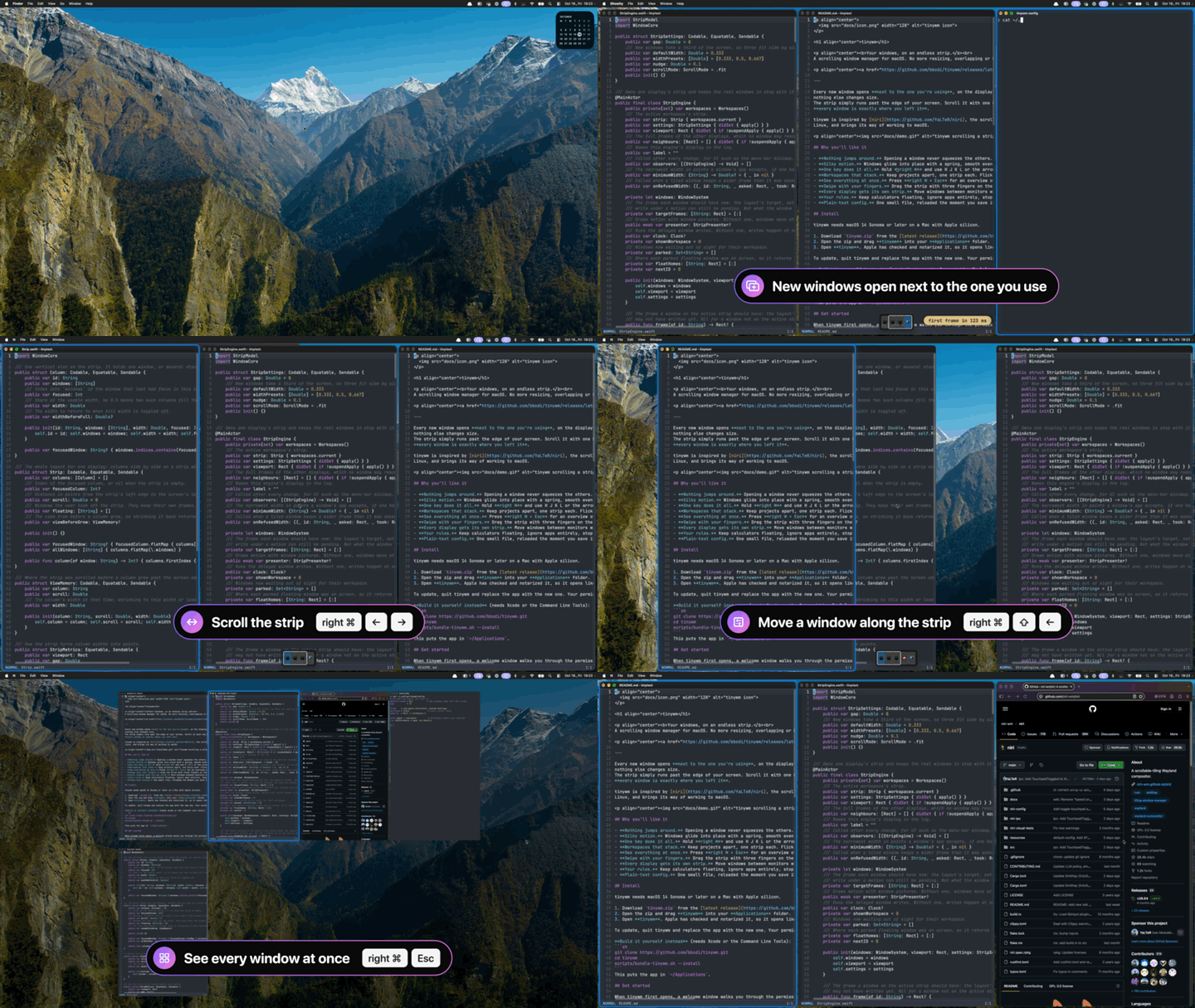
Every new window opens next to the one you're using, on the display you're using, and nothing else changes size. The strip simply runs past the edge of your screen. Scroll it with one key or a swipe, and every window is exactly where you left it.
tinywm is inspired by niri, the scrolling window manager for Linux, and brings its way of working to macOS.
tinywm needs macOS 14 Sonoma or later on a Mac with Apple silicon.
tinywm.zip from the latest release.To update, quit tinywm and replace the app with the new one. Your permissions and settings stay.
Build it yourself instead (needs Xcode or the Command Line Tools):
git clone https://github.com/bbodi/tinywm.git
cd tinywm
scripts/bundle-tinywm.sh --install
This puts the app in ~/Applications.
When tinywm first opens, a welcome window walks you through the permissions:
The welcome window also checks the macOS settings that get in the way: trackpad gestures, Stage Manager, tiling at screen edges, click wallpaper to reveal desktop, other window managers and Open at Login. Reopen it any time from the menu-bar icon (Welcome…).
Hold right ⌘ (the "meta" key) and press:
| Key | Does |
|---|---|
| H J K L or ← ↓ ↑ → | Move between windows |
| ⇧ + the same | Move the window itself |
| U / I, ⌥↓ / ⌥↑ or Page Down / Page Up | Workspace below / above (⇧ takes the window along) |
| . / , | Next / previous display (⇧ takes the window along) |
| W A S D | The display above, left, below or right (⇧ takes the window along) |
| R | Cycle width: ⅓, ½, ⅔ |
| F / C | Full width / centre the window |
| = / − | Wider / narrower |
| [ / ] | Stack the window into its neighbour · ⇧] pops it out |
| T | Float or tile the window |
| V | Focus the floating windows, then the strip again |
| 1 – 9 | Jump to a column |
| Esc | Overview: pick a window with the arrows or Tab, then Return; Esc closes it |
| Q | Close the window |
Drag with the mouse. Hold the meta key and drag any window, anywhere inside it. The other windows make room, and a slot shows exactly where it will land: between two columns, above or below a window in a stack, or on another display. Let go to drop it there, or press Esc to cancel. A floating window simply moves.
Prefer ⌃⌥ over right ⌘, or different keys? Change anything in the config.
Choose Edit Config… from the menu bar icon. A few lines go a long way:
default-width = 0.5            # new windows take half the screen
bind focus-left = n            # remap any key

float    = com.apple.calculator, System Settings
ignore   = com.apple.finder
no-focus = Slack                # never steals focus

send space = cmd+space          # meta+Space opens your launcher
run shift+return = open -na Ghostty
focus-crosses-displays = on     # past the last column, focus moves to the next display
open-on  = Mail -> workspace 2  # an app always opens on a chosen display or workspace
There is more: meta = control-option picks ⌃⌥ as the meta key, gap sets the space between
windows, width-presets sets the widths R cycles through, swipe-fingers = 4 switches swipes
to four fingers, and unbind removes a default key. The config file that tinywm creates lists
every option with a short explanation.
swift run.restore-layout = off in the config.float rules, fixed-size windows) keep their own frame and show
in the overview. Meta+V focuses them one after another and then returns to the strip.See docs/DEVELOPING.md for the architecture, tests and how to build the app.
Copyright (C) 2026 BB.
tinywm is free software under the GNU General Public License v3.0. You may use, change and share it. If you share a changed version, you must share its source under the same license. For a license without these terms, contact [email protected].
A scrolling window manager for macOS, inspired by niri
Swift
19
4 commits
updated Oct 17, 2026
Your windows, on an endless strip.
A scrolling window manager for macOS. No more resizing, overlapping or hunting for windows.
Every new window opens next to the one you're using, on the display you're using, and nothing else changes size. The strip simply runs past the edge of your screen. Scroll it with one key or a swipe, and every window is exactly where you left it.
tinywm is inspired by niri, the scrolling window manager for Linux, and brings its way of working to macOS.
tinywm needs macOS 14 Sonoma or later on a Mac with Apple silicon.
tinywm.zip from the latest release.To update, quit tinywm and replace the app with the new one. Your permissions and settings stay.
Build it yourself instead (needs Xcode or the Command Line Tools):
git clone https://github.com/bbodi/tinywm.git
cd tinywm
scripts/bundle-tinywm.sh --install
This puts the app in ~/Applications.
When tinywm first opens, a welcome window walks you through the permissions:
The welcome window also checks the macOS settings that get in the way: trackpad gestures, Stage Manager, tiling at screen edges, click wallpaper to reveal desktop, other window managers and Open at Login. Reopen it any time from the menu-bar icon (Welcome…).
Hold right ⌘ (the "meta" key) and press:
| Key | Does |
|---|---|
| H J K L or ← ↓ ↑ → | Move between windows |
| ⇧ + the same | Move the window itself |
| U / I, ⌥↓ / ⌥↑ or Page Down / Page Up | Workspace below / above (⇧ takes the window along) |
| . / , | Next / previous display (⇧ takes the window along) |
| W A S D | The display above, left, below or right (⇧ takes the window along) |
| R | Cycle width: ⅓, ½, ⅔ |
| F / C | Full width / centre the window |
| = / − | Wider / narrower |
| [ / ] | Stack the window into its neighbour · ⇧] pops it out |
| T | Float or tile the window |
| V | Focus the floating windows, then the strip again |
| 1 – 9 | Jump to a column |
| Esc | Overview: pick a window with the arrows or Tab, then Return; Esc closes it |
| Q | Close the window |
Drag with the mouse. Hold the meta key and drag any window, anywhere inside it. The other windows make room, and a slot shows exactly where it will land: between two columns, above or below a window in a stack, or on another display. Let go to drop it there, or press Esc to cancel. A floating window simply moves.
Prefer ⌃⌥ over right ⌘, or different keys? Change anything in the config.
Choose Edit Config… from the menu bar icon. A few lines go a long way:
default-width = 0.5            # new windows take half the screen
bind focus-left = n            # remap any key

float    = com.apple.calculator, System Settings
ignore   = com.apple.finder
no-focus = Slack                # never steals focus

send space = cmd+space          # meta+Space opens your launcher
run shift+return = open -na Ghostty
focus-crosses-displays = on     # past the last column, focus moves to the next display
open-on  = Mail -> workspace 2  # an app always opens on a chosen display or workspace
There is more: meta = control-option picks ⌃⌥ as the meta key, gap sets the space between
windows, width-presets sets the widths R cycles through, swipe-fingers = 4 switches swipes
to four fingers, and unbind removes a default key. The config file that tinywm creates lists
every option with a short explanation.
swift run.restore-layout = off in the config.float rules, fixed-size windows) keep their own frame and show
in the overview. Meta+V focuses them one after another and then returns to the strip.See docs/DEVELOPING.md for the architecture, tests and how to build the app.
Copyright (C) 2026 BB.
tinywm is free software under the GNU General Public License v3.0. You may use, change and share it. If you share a changed version, you must share its source under the same license. For a license without these terms, contact [email protected].



