
Tiling that feels like it shipped with macOS. Settings instead of config files, seven layouts incl. PaperWM-style scrolling, native Desktops kept intact, Lua underneath. Accessibility only, never SIP.
See the codeREADME

Tiling that feels like it shipped with macOS.
Flat arrays instead of i3 trees · configured in Lua · seven layouts · never disables SIP.
Start simple. Grow without limits. KiwiDesk tiles your windows the moment you install it — no config required. When you want more, go deeper: custom Lua, profiles, advanced layouts, per-space rules. Powerful when you reach for it, never in your way.












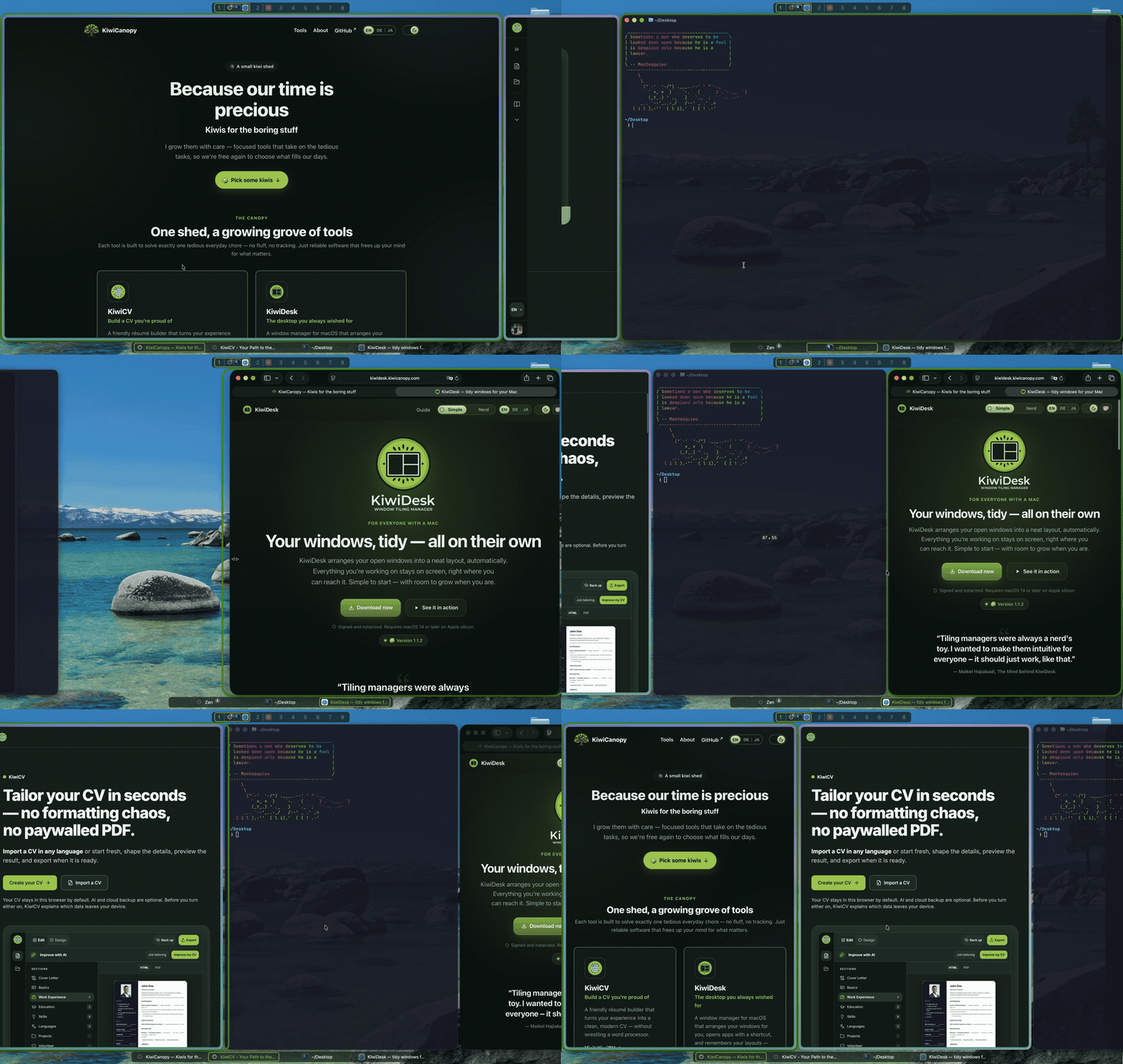
KiwiDesk is written in Swift and configured in Lua. It pairs robust window tracking with smooth, spring-based animations, runs as an ordinary app with no kernel extension, and never requires disabling System Integrity Protection.
Why KiwiDesk?
It feels like it shipped with macOS. Most tiling window managers on the Mac are a Linux idea carried over — a config file, a reload, a terminal, and for some of them SIP switched off. KiwiDesk is a Mac app first: a real Settings window with sliders and live previews, shortcuts that don't fight macOS's own, a mouse that still works, your native Desktops left exactly as they are, and the Accessibility permission and nothing else. Same tiling power — the platform's own feel.
Flat arrays instead of i3 trees. Classic tiling window managers organize windows in split-container trees — powerful, but hard to predict and hard to script. KiwiDesk keeps every space as a flat, one-dimensional list of windows. Layouts are pure functions over that list:
| Layout | Behavior |
|---|---|
bsp | Binary space partitioning (each new window halves a pane) |
stack | Master zone + stack column (master_count) |
scrolling | Niri/PaperWM-style scrolling columns or rows |
monocle | Focused window maximized, rest behind it |
grid | Dynamic (auto-balanced) or rigid rows × columns |
track | Resizable columns (or rows) with per-track control |
floating | macOS default behavior, untouched |
Switching layouts instantly rearranges the same window list with a different formula — no tree surgery, no lost state.
Every layout is fully reconfigurable. Each one carries its own
optional parameters — bsp's split ratios and strategy, stack's
master count, ratio and side, scrolling's column width and
direction, grid's dimensions and fill, track's per-track sizes
— so the shape a layout opens in is yours to set, once, as the
default. Tune them in the Settings app or in Lua, globally or per
space; most tiling window managers give you a layout's formula and
nothing to bend it with.
Key Features
- Spaces: Instant per-space window hiding on top of macOS's own Desktops.
- Native Desktops: Send a window to a Mission Control Desktop, switch to one, or bind a profile to one. Your Desktops keep working; KiwiDesk arranges the windows on them.
- GUI, CLI & Lua: SwiftUI Settings app for simple tweaks; CLI & sandboxed Lua 5.5 VM for advanced workflows.
- Modal Layers & Hotkeys: Vim-style hotkey layers (
define_layer) and smart app switching (pull_or_spawn) via Carbon — zero Input Monitoring needed. - Cascading Profiles: Display- or Desktop-bound profiles with inherited defaults and sparse overrides.
- Sticky Windows: Pin a window so it follows you across Desktops, or just across one screen — with a real tile, not a floating pile.
- Visual Overlays & IPC: Customizable focus rings, App/Space Bar
overlays, and UNIX socket JSON event streams (
kiwidesk subscribe). - Smooth & Lightweight: 60/120 Hz DisplayLink spring animations, zero SIP modifications, and localized out of the box.
- Update-proof: Every private OS symbol is resolved at runtime, and every tiling path has a public Accessibility fallback — a macOS update can slow a fast path, never crash KiwiDesk or stop it tiling. The two things only the OS's own bridge can do (move a window to another Desktop, switch Desktops) switch themselves off until KiwiDesk catches up, instead of failing.
- Accessible: Settings is fully keyboard-driven and narrates itself under VoiceOver — every control announces its name and its value. See the user guide.
Solving macOS Papercuts
- No green-button exile:
monoclemaximizes a window on the current space instead of throwing it onto a far-right Desktop. - No
⌘Tabblack holes:pull_or_spawnopens the app, pulls its windows front-and-center, then cycles them on repeated presses. - Zero layout amnesia: windows moved between spaces tile themselves into the target layout — no manual micro-resizing.
- Predictable spatial memory: spaces stay in fixed slots rather than macOS reshuffling your Desktops.
Installation
Requirements: macOS 14 or later, on Apple silicon.
brew install --cask kiwicanopy/tap/kiwidesk
Or download the .dmg — the
same signed, notarized app; the cask additionally puts the kiwidesk
CLI on your PATH. Either way KiwiDesk keeps itself up to date.
On first launch a wizard walks you through the Accessibility permission, then tiles your windows straight away. Everything past that — Settings, the CLI, Lua — is in the Quick Start.
Building from source
For contributors, or to run an unreleased commit. Requirements: macOS 14+, Xcode 16+ / Swift 6.
git clone https://github.com/KiwiCanopy/KiwiDesk.git
cd KiwiDesk
swift build -c release
.build/release/KiwiDesk           # run the app
Documentation
Full docs live at kiwidesk.kiwicanopy.com (searchable, light/dark):
- User guide — the Settings app, profiles, and the visual editor
- Lua reference — the full init.lua API
- CLI & IPC reference — every command, event stream, socket protocol
- Recipes — SketchyBar, JankyBorders, and more
- Design decisions — the why behind settled behavior
Contributing
KiwiDesk is built to be contributor-friendly (including for AI coding agents — small files, strict lint, exhaustive tests). See CONTRIBUTING.md and AGENTS.md.
./scripts/install-hooks.sh   # once after cloning
swift test                   # the full suite
Security
KiwiDesk needs only the Accessibility permission. It never asks you to disable SIP and never requests Input Monitoring. To report a vulnerability, see SECURITY.md.
License
Business Source License 1.1: the source is public, and using KiwiDesk is free — at home and at work. Offering, selling, bundling or hosting KiwiDesk or a derivative as a product or service needs a commercial license. Each version converts to the MIT License four years after it is first published. Versions published before 1.3.0 were released under MIT and stay MIT. Bundles Lua 5.5 (MIT) and Sparkle (MIT); their notices are in ACKNOWLEDGEMENTS, which the app carries beside its license text and opens from Settings ▸ About.
"KiwiDesk" and the KiwiDesk logo are trademarks of Maikel Hajiabadi; the license grants no right to them.
KiwiDesk's source is public. If you like it, leave a ⭐ — it is the one thing that helps other people find it.
A KiwiCanopy project — Because our time is precious 🥝
Contributors


See what people are saying
Similar repos


Languages
Swift
94.0%
Python
2.3%
Astro
1.5%
Tiling that feels like it shipped with macOS. Settings instead of config files, seven layouts incl. PaperWM-style scrolling, native Desktops kept intact, Lua underneath. Accessibility only, never SIP.
See the codeREADME
Tiling that feels like it shipped with macOS.
Flat arrays instead of i3 trees · configured in Lua · seven layouts · never disables SIP.
Start simple. Grow without limits. KiwiDesk tiles your windows the moment you install it — no config required. When you want more, go deeper: custom Lua, profiles, advanced layouts, per-space rules. Powerful when you reach for it, never in your way.
KiwiDesk is written in Swift and configured in Lua. It pairs robust window tracking with smooth, spring-based animations, runs as an ordinary app with no kernel extension, and never requires disabling System Integrity Protection.
Why KiwiDesk?
It feels like it shipped with macOS. Most tiling window managers on the Mac are a Linux idea carried over — a config file, a reload, a terminal, and for some of them SIP switched off. KiwiDesk is a Mac app first: a real Settings window with sliders and live previews, shortcuts that don't fight macOS's own, a mouse that still works, your native Desktops left exactly as they are, and the Accessibility permission and nothing else. Same tiling power — the platform's own feel.
Flat arrays instead of i3 trees. Classic tiling window managers organize windows in split-container trees — powerful, but hard to predict and hard to script. KiwiDesk keeps every space as a flat, one-dimensional list of windows. Layouts are pure functions over that list:
| Layout | Behavior |
|---|---|
bsp | Binary space partitioning (each new window halves a pane) |
stack | Master zone + stack column (master_count) |
scrolling | Niri/PaperWM-style scrolling columns or rows |
monocle | Focused window maximized, rest behind it |
grid | Dynamic (auto-balanced) or rigid rows × columns |
track | Resizable columns (or rows) with per-track control |
floating | macOS default behavior, untouched |
Switching layouts instantly rearranges the same window list with a different formula — no tree surgery, no lost state.
Every layout is fully reconfigurable. Each one carries its own
optional parameters — bsp's split ratios and strategy, stack's
master count, ratio and side, scrolling's column width and
direction, grid's dimensions and fill, track's per-track sizes
— so the shape a layout opens in is yours to set, once, as the
default. Tune them in the Settings app or in Lua, globally or per
space; most tiling window managers give you a layout's formula and
nothing to bend it with.
Key Features
- Spaces: Instant per-space window hiding on top of macOS's own Desktops.
- Native Desktops: Send a window to a Mission Control Desktop, switch to one, or bind a profile to one. Your Desktops keep working; KiwiDesk arranges the windows on them.
- GUI, CLI & Lua: SwiftUI Settings app for simple tweaks; CLI & sandboxed Lua 5.5 VM for advanced workflows.
- Modal Layers & Hotkeys: Vim-style hotkey layers (
define_layer) and smart app switching (pull_or_spawn) via Carbon — zero Input Monitoring needed. - Cascading Profiles: Display- or Desktop-bound profiles with inherited defaults and sparse overrides.
- Sticky Windows: Pin a window so it follows you across Desktops, or just across one screen — with a real tile, not a floating pile.
- Visual Overlays & IPC: Customizable focus rings, App/Space Bar
overlays, and UNIX socket JSON event streams (
kiwidesk subscribe). - Smooth & Lightweight: 60/120 Hz DisplayLink spring animations, zero SIP modifications, and localized out of the box.
- Update-proof: Every private OS symbol is resolved at runtime, and every tiling path has a public Accessibility fallback — a macOS update can slow a fast path, never crash KiwiDesk or stop it tiling. The two things only the OS's own bridge can do (move a window to another Desktop, switch Desktops) switch themselves off until KiwiDesk catches up, instead of failing.
- Accessible: Settings is fully keyboard-driven and narrates itself under VoiceOver — every control announces its name and its value. See the user guide.
Solving macOS Papercuts
- No green-button exile:
monoclemaximizes a window on the current space instead of throwing it onto a far-right Desktop. - No
⌘Tabblack holes:pull_or_spawnopens the app, pulls its windows front-and-center, then cycles them on repeated presses. - Zero layout amnesia: windows moved between spaces tile themselves into the target layout — no manual micro-resizing.
- Predictable spatial memory: spaces stay in fixed slots rather than macOS reshuffling your Desktops.
Installation
Requirements: macOS 14 or later, on Apple silicon.
brew install --cask kiwicanopy/tap/kiwidesk
Or download the .dmg — the
same signed, notarized app; the cask additionally puts the kiwidesk
CLI on your PATH. Either way KiwiDesk keeps itself up to date.
On first launch a wizard walks you through the Accessibility permission, then tiles your windows straight away. Everything past that — Settings, the CLI, Lua — is in the Quick Start.
Building from source
For contributors, or to run an unreleased commit. Requirements: macOS 14+, Xcode 16+ / Swift 6.
git clone https://github.com/KiwiCanopy/KiwiDesk.git
cd KiwiDesk
swift build -c release
.build/release/KiwiDesk           # run the app
Documentation
Full docs live at kiwidesk.kiwicanopy.com (searchable, light/dark):
- User guide — the Settings app, profiles, and the visual editor
- Lua reference — the full init.lua API
- CLI & IPC reference — every command, event stream, socket protocol
- Recipes — SketchyBar, JankyBorders, and more
- Design decisions — the why behind settled behavior
Contributing
KiwiDesk is built to be contributor-friendly (including for AI coding agents — small files, strict lint, exhaustive tests). See CONTRIBUTING.md and AGENTS.md.
./scripts/install-hooks.sh   # once after cloning
swift test                   # the full suite
Security
KiwiDesk needs only the Accessibility permission. It never asks you to disable SIP and never requests Input Monitoring. To report a vulnerability, see SECURITY.md.
License
Business Source License 1.1: the source is public, and using KiwiDesk is free — at home and at work. Offering, selling, bundling or hosting KiwiDesk or a derivative as a product or service needs a commercial license. Each version converts to the MIT License four years after it is first published. Versions published before 1.3.0 were released under MIT and stay MIT. Bundles Lua 5.5 (MIT) and Sparkle (MIT); their notices are in ACKNOWLEDGEMENTS, which the app carries beside its license text and opens from Settings ▸ About.
"KiwiDesk" and the KiwiDesk logo are trademarks of Maikel Hajiabadi; the license grants no right to them.
KiwiDesk's source is public. If you like it, leave a ⭐ — it is the one thing that helps other people find it.
A KiwiCanopy project — Because our time is precious 🥝
See what people are saying
Similar repos
Contributors
Languages
Swift
94.0%
Python
2.3%
Astro
1.5%