An opinionated Emacs port of the Catppuccin color scheme
Emacs Lisp
43
60 commits
updated Sep 1, 2026


Batppuccin is an opinionated Emacs port of the Catppuccin color scheme. It aims to follow the official Catppuccin style guide closely while being structured idiomatically for Emacs.
The name is a play on my last name (Batsov) + Catppuccin (cat -> bat). So, that's essentially @bbatsov's take on Catppuccin.1
The official catppuccin/emacs port has some fundamental issues that are hard to fix incrementally:
catppuccin theme and switches flavors via a global variable + reload function. This breaks standard load-theme workflows, theme-switching packages like circadian.el, and any tooling that expects one theme = one entry in custom-theme-load-path. Batppuccin defines four proper themes (batppuccin-mocha, batppuccin-latte, etc.) that work with load-theme out of the box.load-file-name, which is nil in certain load-theme code paths (e.g., when Emacs hasn't marked the theme as safe yet). This causes the theme to fail to load entirely for some users.I think this is partly because the official Emacs port uses Catppuccin's Whiskers template tool to generate the Elisp from a .tera template. That's great for keeping ports in sync across editors, but it means the generated code doesn't follow Emacs conventions. It doesn't sit well with me.
font-lock-variable-name-face is set to the default text color, making variables indistinguishable from surrounding text. The style guide assigns distinct colors to variables and properties.outline-* levels use the same blue, so org-mode headings and any outline-based hierarchy look flat. The style guide specifies a rainbow cycle (red, peach, yellow, green, sapphire, lavender).org-block forces a green foreground on all unstyled code inside source blocks, instead of inheriting the default text color.subtext0) instead of a prominent color.Multiple faces (dired+, diredfl, tree-sitter, whitespace, helm) are set to #ff00ff magenta as a "TODO" placeholder. These show up as literal hot pink in real usage.
No support for vertico, marginalia, embark, transient, flycheck, doom-modeline, cider, corfu, or several other widely-used packages.
Batppuccin follows the conventions established in zenburn-emacs and emacs-tokyo-night-theme:
batppuccin-mocha-theme.el, batppuccin-latte-theme.el, etc.) is a thin wrapper that loads the shared infrastructure and applies its palette, so standard Emacs theme machinery works without any special glue.batppuccin.el: color palettes for all four flavors, the face application function, and a defcustom for user color overrides. Adding a new variant means a color alist and a ~10-line wrapper.Batppuccin is available on MELPA. Assuming you've configured MELPA as a package source:
M-x package-install RET batppuccin RET
Then load any flavor:
(load-theme 'batppuccin-mocha t)
Or with use-package:
(use-package batppuccin
  :ensure t
  :config
  (load-theme 'batppuccin-mocha t))
(package-vc-install "https://github.com/bbatsov/batppuccin-emacs")
(load-theme 'batppuccin-mocha t)
(use-package batppuccin
  :vc (:url "https://github.com/bbatsov/batppuccin-emacs" :rev :newest)
  :config
  (load-theme 'batppuccin-mocha t))
(straight-use-package
 '(batppuccin-latte-mocha :host github :repo "bbatsov/batppuccin-emacs"))
(load-theme 'batppuccin-mocha t)
Or with use-package integration.
(use-package batppuccin-mocha
  :straight (:host github :repo "bbatsov/batppuccin-emacs")
  :config (load-theme 'batppuccin-mocha t))
Clone the repo and add it to your load path:
(add-to-list 'custom-theme-load-path "/path/to/batppuccin-emacs")
(load-theme 'batppuccin-mocha t)
| Flavor | Description |
|---|---|
batppuccin-mocha | The darkest variant |
batppuccin-macchiato | Dark |
batppuccin-frappe | Medium-dark |
batppuccin-latte | Light |
batppuccin-mocha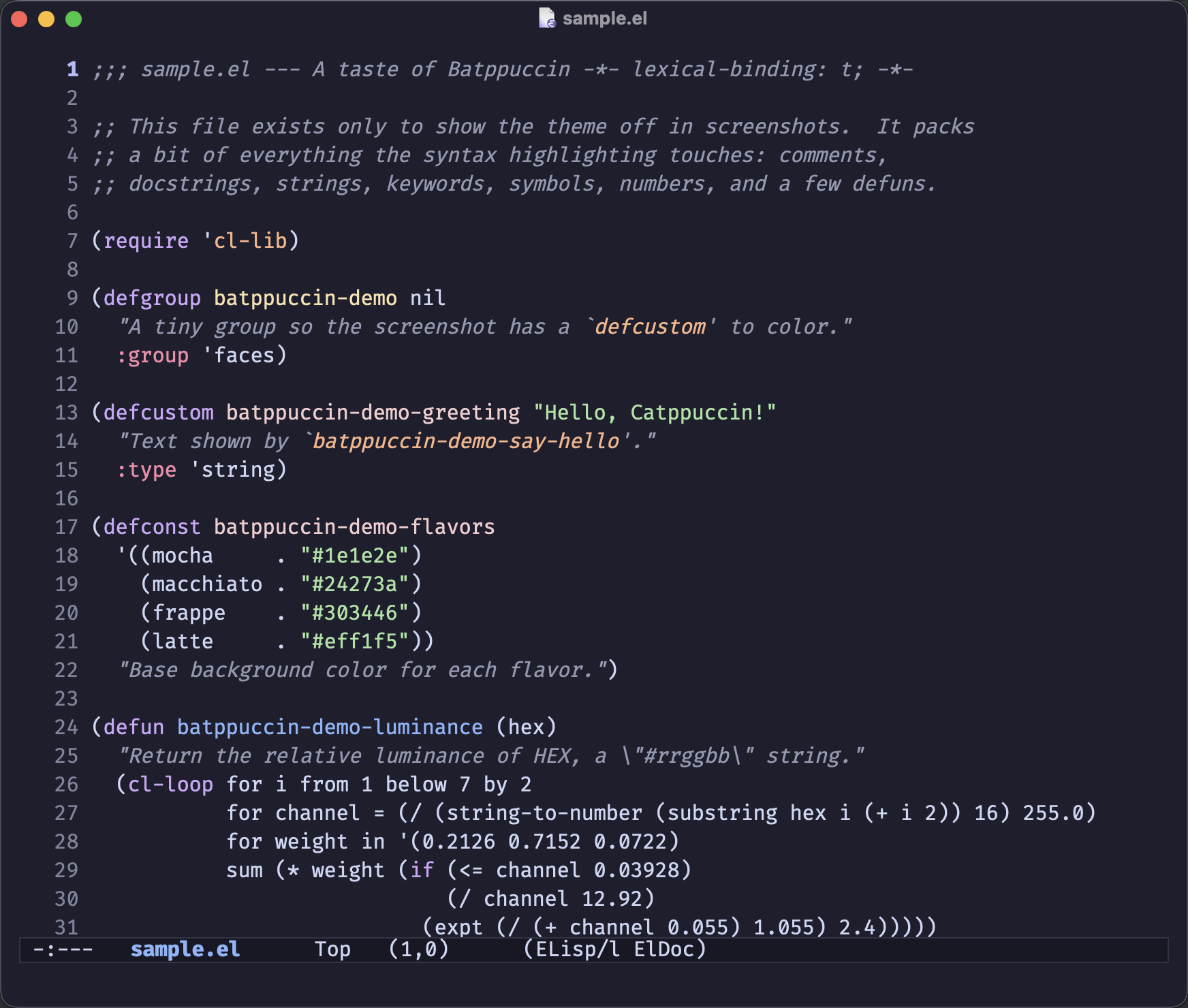 | batppuccin-macchiato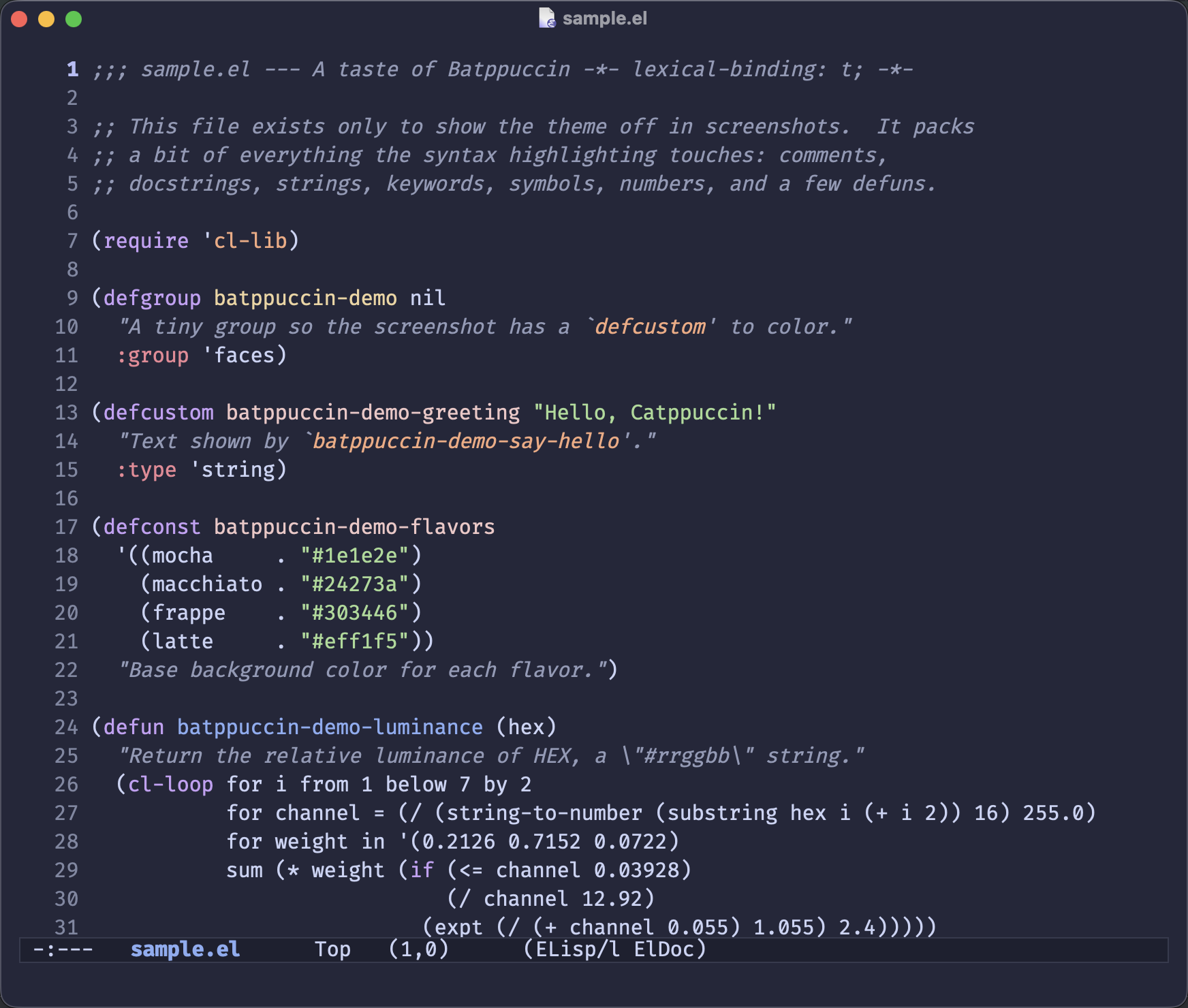 |
batppuccin-frappe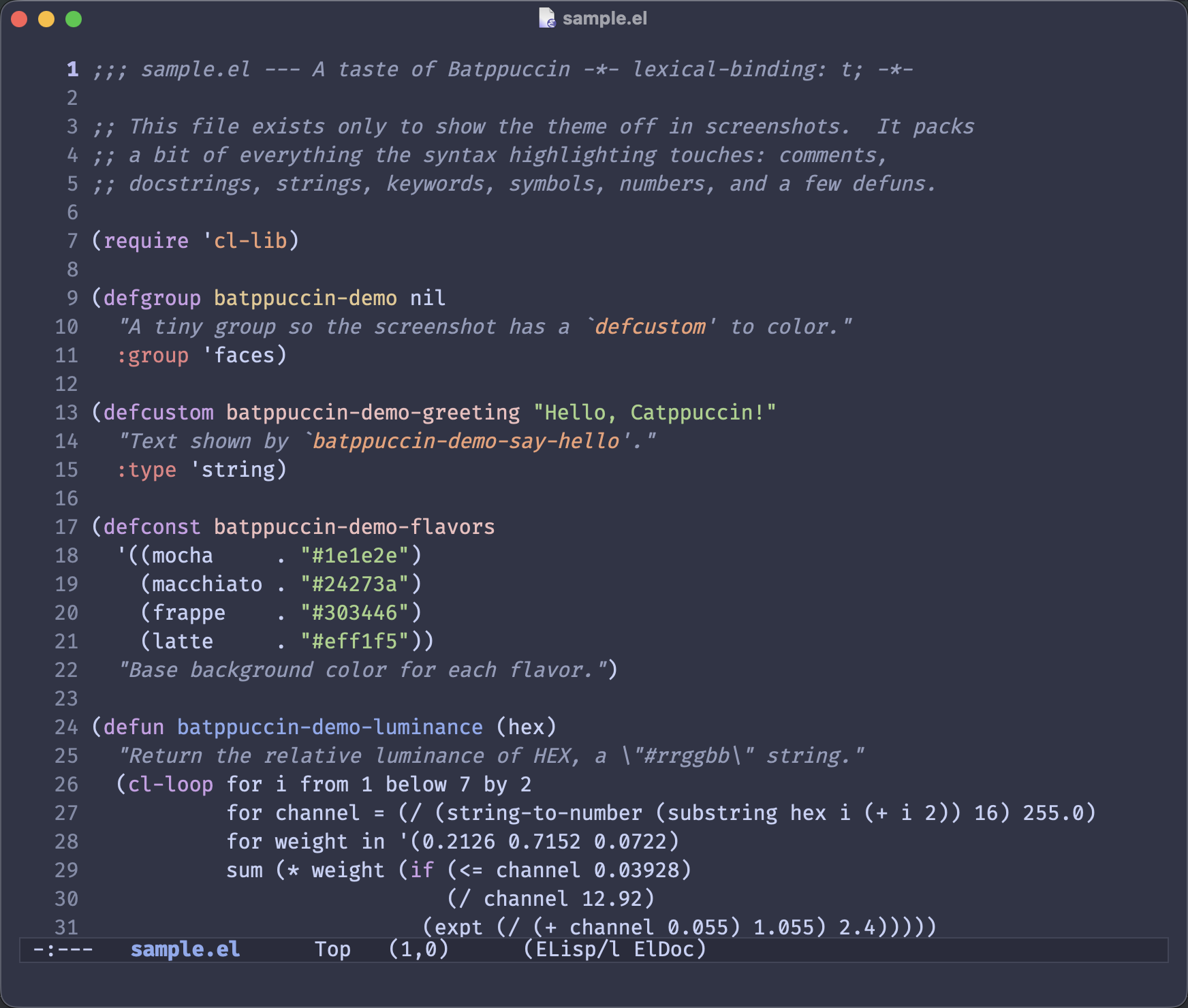 | batppuccin-latte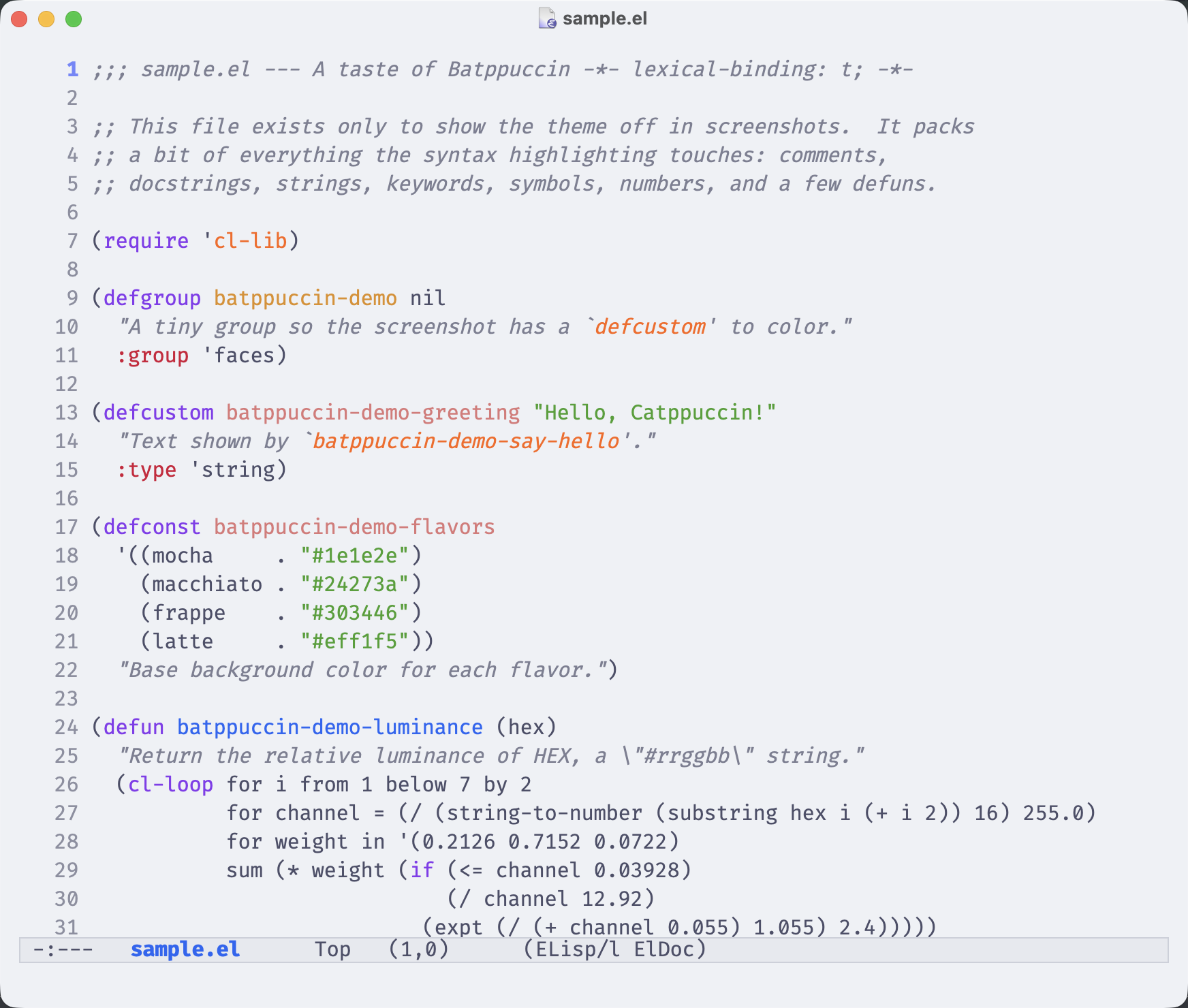 |
Override any color across all flavors:
(setq batppuccin-override-colors-alist
      '(("bat-base" . "#000000")
        ("bat-text" . "#ffffff")))
The override alist takes precedence over the built-in palette. Color names match the canonical Catppuccin names with a bat- prefix (e.g., bat-rosewater, bat-mauve, bat-surface0).
A handful of booleans and numbers adjust the look without forking. They all take effect on the next load-theme (or M-x batppuccin-reload).
Headings in org, outline, markdown, adoc, asciidoc, shr and info are scaled by default. Turn that off for uniform sizes:
(setq batppuccin-scale-headings nil)
Or keep the scaling but tune how much each level grows:
(setq batppuccin-height-doc-title 1.5   ; document titles (default 1.4)
      batppuccin-height-1 1.4           ; level-1 headings (default 1.3)
      batppuccin-height-2 1.2           ; level-2 headings (default 1.2)
      batppuccin-height-3 1.1)          ; level-3 headings (default 1.1)
Render headings in a proportional font, which reads nicely for prose:
(setq batppuccin-use-variable-pitch t)
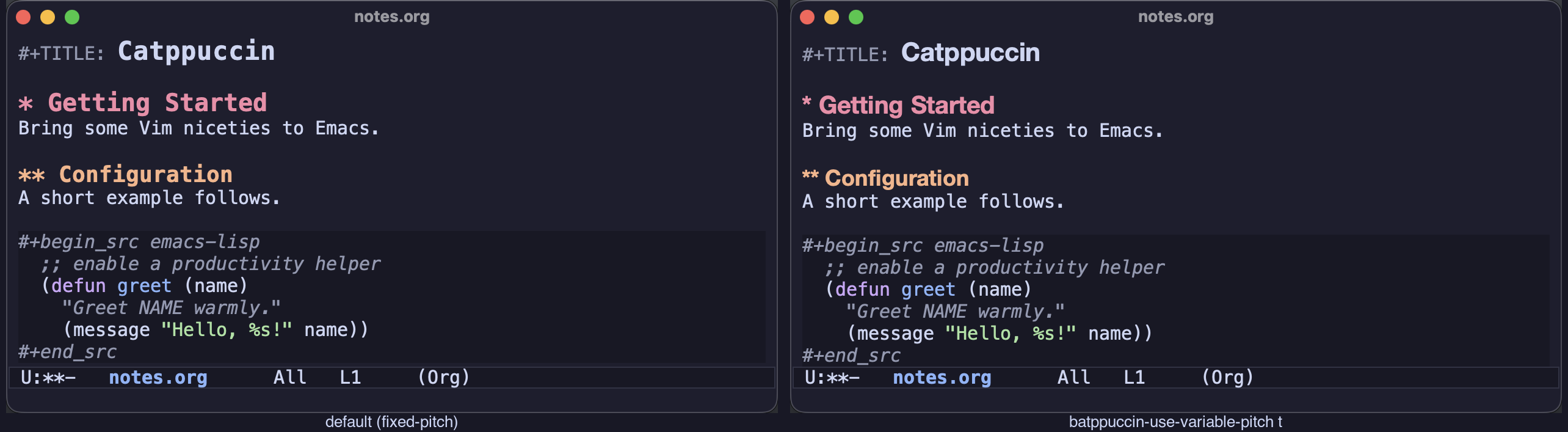
Comments and docstrings are italic by default. If your font renders italics poorly, turn that off:
(setq batppuccin-italic-comments nil)
Drop the box around the mode line for a flat look:
(setq batppuccin-flat-mode-line t)
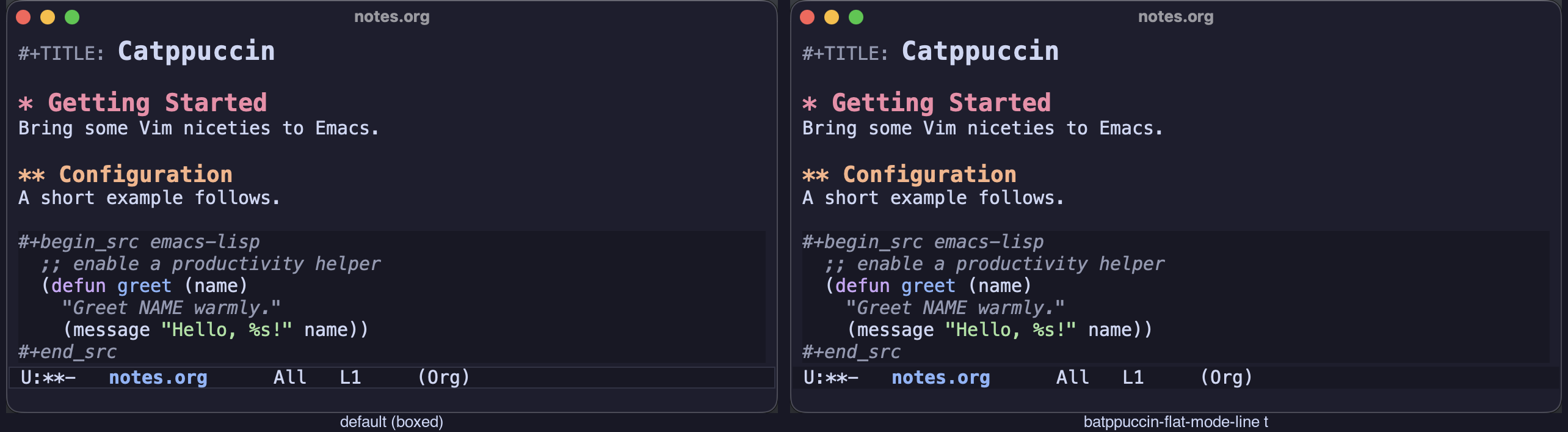
After changing any of these options, run M-x batppuccin-reload to apply them without restarting Emacs.
M-x batppuccin-select - pick a flavor interactively and load itM-x batppuccin-reload - reload the current theme after changing optionsM-x batppuccin-list-colors - display all palette colors with samples (prefix arg to pick a variant)If you need to reference theme colors in your own configuration, there are a couple of options.
Look up a single color:
(batppuccin-get-color "bat-blue")
Or bind the entire palette as local variables with batppuccin-with-colors:
(batppuccin-with-colors
  (set-face-attribute 'some-face nil :foreground bat-blue))
You can also hook into theme loads with batppuccin-after-load-hook. Each function receives the theme name as its argument:
(add-hook 'batppuccin-after-load-hook
          (lambda (_theme)
            (batppuccin-with-colors
              (set-face-attribute 'my-face nil :foreground bat-teal))))
Batppuccin pairs well with packages that switch themes based on the time of day or your OS appearance setting:
(use-package auto-dark
  :config
  (setq auto-dark-themes '((batppuccin-mocha) (batppuccin-latte)))
  (auto-dark-mode 1))
(use-package circadian
  :config
  (setq circadian-themes '((:sunrise . batppuccin-latte)
                            (:sunset  . batppuccin-mocha)))
  (circadian-setup))
See Automatic Light/Dark Theme Switching for a deeper look at both approaches.
GNU General Public License v3.0. See COPYING for details.
Naming is hard, but it should also be fun! ↩
171 followers · starred Apr 2026
100 followers · starred Mar 2026
14 followers · starred Jun 2026
An opinionated Emacs port of the Catppuccin color scheme
Emacs Lisp
43
60 commits
updated Sep 1, 2026
Batppuccin is an opinionated Emacs port of the Catppuccin color scheme. It aims to follow the official Catppuccin style guide closely while being structured idiomatically for Emacs.
The name is a play on my last name (Batsov) + Catppuccin (cat -> bat). So, that's essentially @bbatsov's take on Catppuccin.1
The official catppuccin/emacs port has some fundamental issues that are hard to fix incrementally:
catppuccin theme and switches flavors via a global variable + reload function. This breaks standard load-theme workflows, theme-switching packages like circadian.el, and any tooling that expects one theme = one entry in custom-theme-load-path. Batppuccin defines four proper themes (batppuccin-mocha, batppuccin-latte, etc.) that work with load-theme out of the box.load-file-name, which is nil in certain load-theme code paths (e.g., when Emacs hasn't marked the theme as safe yet). This causes the theme to fail to load entirely for some users.I think this is partly because the official Emacs port uses Catppuccin's Whiskers template tool to generate the Elisp from a .tera template. That's great for keeping ports in sync across editors, but it means the generated code doesn't follow Emacs conventions. It doesn't sit well with me.
font-lock-variable-name-face is set to the default text color, making variables indistinguishable from surrounding text. The style guide assigns distinct colors to variables and properties.outline-* levels use the same blue, so org-mode headings and any outline-based hierarchy look flat. The style guide specifies a rainbow cycle (red, peach, yellow, green, sapphire, lavender).org-block forces a green foreground on all unstyled code inside source blocks, instead of inheriting the default text color.subtext0) instead of a prominent color.Multiple faces (dired+, diredfl, tree-sitter, whitespace, helm) are set to #ff00ff magenta as a "TODO" placeholder. These show up as literal hot pink in real usage.
No support for vertico, marginalia, embark, transient, flycheck, doom-modeline, cider, corfu, or several other widely-used packages.
Batppuccin follows the conventions established in zenburn-emacs and emacs-tokyo-night-theme:
batppuccin-mocha-theme.el, batppuccin-latte-theme.el, etc.) is a thin wrapper that loads the shared infrastructure and applies its palette, so standard Emacs theme machinery works without any special glue.batppuccin.el: color palettes for all four flavors, the face application function, and a defcustom for user color overrides. Adding a new variant means a color alist and a ~10-line wrapper.Batppuccin is available on MELPA. Assuming you've configured MELPA as a package source:
M-x package-install RET batppuccin RET
Then load any flavor:
(load-theme 'batppuccin-mocha t)
Or with use-package:
(use-package batppuccin
  :ensure t
  :config
  (load-theme 'batppuccin-mocha t))
(package-vc-install "https://github.com/bbatsov/batppuccin-emacs")
(load-theme 'batppuccin-mocha t)
(use-package batppuccin
  :vc (:url "https://github.com/bbatsov/batppuccin-emacs" :rev :newest)
  :config
  (load-theme 'batppuccin-mocha t))
(straight-use-package
 '(batppuccin-latte-mocha :host github :repo "bbatsov/batppuccin-emacs"))
(load-theme 'batppuccin-mocha t)
Or with use-package integration.
(use-package batppuccin-mocha
  :straight (:host github :repo "bbatsov/batppuccin-emacs")
  :config (load-theme 'batppuccin-mocha t))
Clone the repo and add it to your load path:
(add-to-list 'custom-theme-load-path "/path/to/batppuccin-emacs")
(load-theme 'batppuccin-mocha t)
| Flavor | Description |
|---|---|
batppuccin-mocha | The darkest variant |
batppuccin-macchiato | Dark |
batppuccin-frappe | Medium-dark |
batppuccin-latte | Light |
batppuccin-mocha | batppuccin-macchiato |
batppuccin-frappe | batppuccin-latte |
Override any color across all flavors:
(setq batppuccin-override-colors-alist
      '(("bat-base" . "#000000")
        ("bat-text" . "#ffffff")))
The override alist takes precedence over the built-in palette. Color names match the canonical Catppuccin names with a bat- prefix (e.g., bat-rosewater, bat-mauve, bat-surface0).
A handful of booleans and numbers adjust the look without forking. They all take effect on the next load-theme (or M-x batppuccin-reload).
Headings in org, outline, markdown, adoc, asciidoc, shr and info are scaled by default. Turn that off for uniform sizes:
(setq batppuccin-scale-headings nil)
Or keep the scaling but tune how much each level grows:
(setq batppuccin-height-doc-title 1.5   ; document titles (default 1.4)
      batppuccin-height-1 1.4           ; level-1 headings (default 1.3)
      batppuccin-height-2 1.2           ; level-2 headings (default 1.2)
      batppuccin-height-3 1.1)          ; level-3 headings (default 1.1)
Render headings in a proportional font, which reads nicely for prose:
(setq batppuccin-use-variable-pitch t)
Comments and docstrings are italic by default. If your font renders italics poorly, turn that off:
(setq batppuccin-italic-comments nil)
Drop the box around the mode line for a flat look:
(setq batppuccin-flat-mode-line t)
After changing any of these options, run M-x batppuccin-reload to apply them without restarting Emacs.
M-x batppuccin-select - pick a flavor interactively and load itM-x batppuccin-reload - reload the current theme after changing optionsM-x batppuccin-list-colors - display all palette colors with samples (prefix arg to pick a variant)If you need to reference theme colors in your own configuration, there are a couple of options.
Look up a single color:
(batppuccin-get-color "bat-blue")
Or bind the entire palette as local variables with batppuccin-with-colors:
(batppuccin-with-colors
  (set-face-attribute 'some-face nil :foreground bat-blue))
You can also hook into theme loads with batppuccin-after-load-hook. Each function receives the theme name as its argument:
(add-hook 'batppuccin-after-load-hook
          (lambda (_theme)
            (batppuccin-with-colors
              (set-face-attribute 'my-face nil :foreground bat-teal))))
Batppuccin pairs well with packages that switch themes based on the time of day or your OS appearance setting:
(use-package auto-dark
  :config
  (setq auto-dark-themes '((batppuccin-mocha) (batppuccin-latte)))
  (auto-dark-mode 1))
(use-package circadian
  :config
  (setq circadian-themes '((:sunrise . batppuccin-latte)
                            (:sunset  . batppuccin-mocha)))
  (circadian-setup))
See Automatic Light/Dark Theme Switching for a deeper look at both approaches.
GNU General Public License v3.0. See COPYING for details.
Naming is hard, but it should also be fun! ↩
171 followers · starred Apr 2026
100 followers · starred Mar 2026
14 followers · starred Jun 2026