PasteFerry (隔空贴): sync the clipboard and files between computers — copy on one, paste on another. Mac, Windows, Linux. Peer-to-peer, end-to-end encrypted, self-hosted. 跨电脑剪贴板同步,Mac、Windows、Linux 互通。
See the code
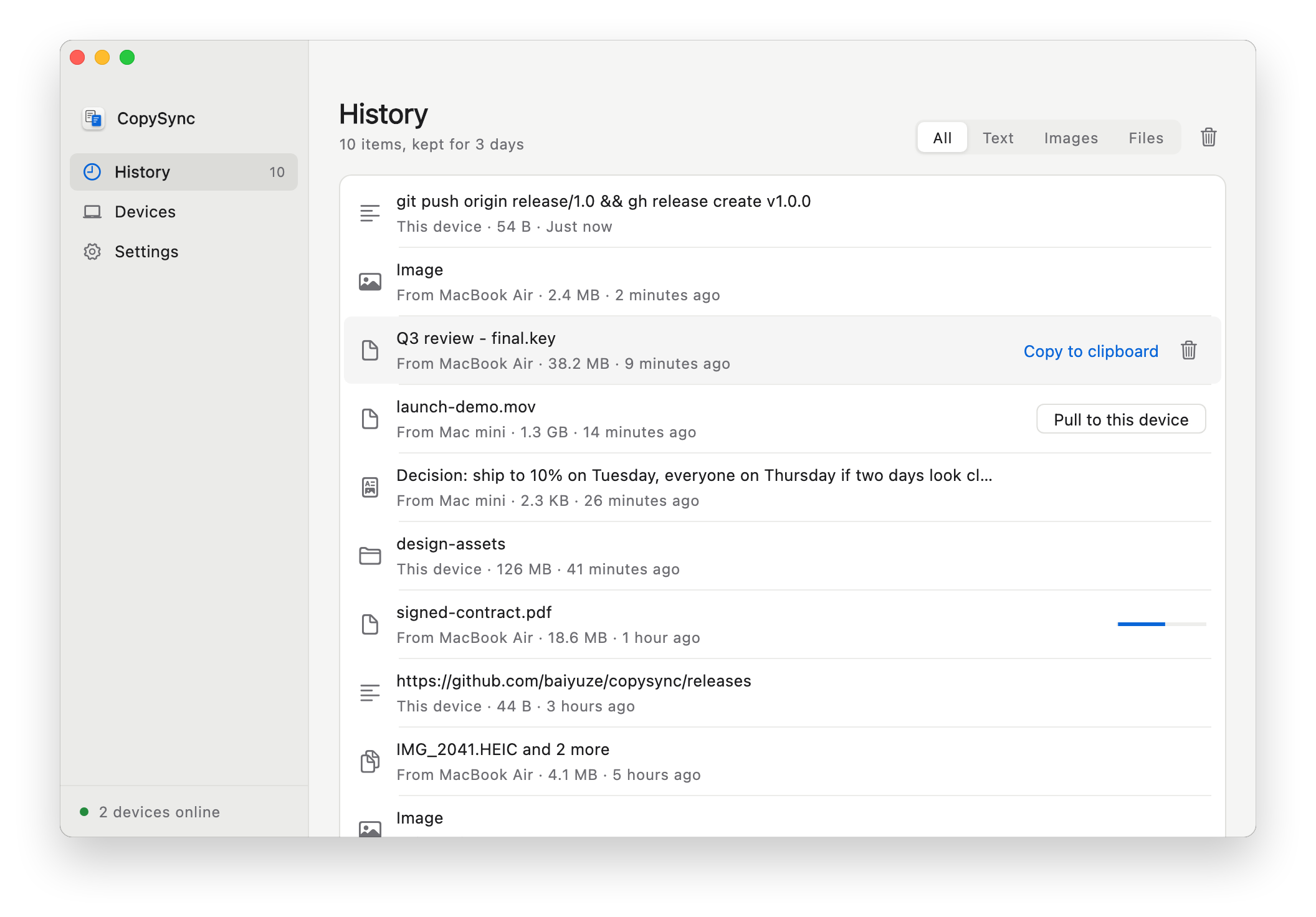
Copy on one computer, paste on the other. Mac, Windows and Linux.
Text, images, files and whole folders — across accounts and across networks.





Universal Clipboard needs the same Apple ID and both Macs close by. AirDrop makes you accept every time and doesn't touch the clipboard. Messaging yourself means manual downloads and your files on someone else's server. With one Mac and one Windows PC, none of the built-in options work.
With CopySync you pair two computers once. After that, copy on one and paste on the other — Mac to Mac, Mac to Windows, or Windows to Windows. On the same network it works with no server at all; across networks, a server you run yourself or Tailscale lets the two find each other. Data goes directly between the devices, end-to-end encrypted; when a direct connection can't be made, it is relayed through your server, which still can't read it.
| CopySync | Universal Clipboard | AirDrop | Chat apps | |
|---|---|---|---|---|
| Different Apple IDs | ✓ | — | Needs accepting | ✓ |
| Different networks (home ↔ office) | ✓ | — | — | ✓ |
| Paste right away, nothing to accept | ✓ | ✓ | — | — |
| Between Mac and Windows | ✓ | — | — | ✓ |
| Files and whole folders | ✓ | Unreliable | ✓ | Zipped |
| History of what you copied | ✓ | — | — | Scroll back |
| Content stays off third-party servers | ✓ | ✓ | ✓ | — |
 |  |
New here? The quick start walks through it with screenshots. You need the app on each computer. On the same network that's all; across networks, add a server or Tailscale.
1. Install the app on each computer from the download page:
.deb for Ubuntu and Debian (x64, ARM64), or tar.gz for other distributions (x64, ARM64) — extract it and run ./CopySync/install.sh to add it to the app menu.The builds aren't notarized or code-signed yet: on Mac, allow it once under System Settings → Privacy & Security → Open Anyway; on Windows, click More info → Run anyway. Then click Turn on background sync, and allow CopySync when Windows Firewall asks, or when macOS asks to find devices on your local network.
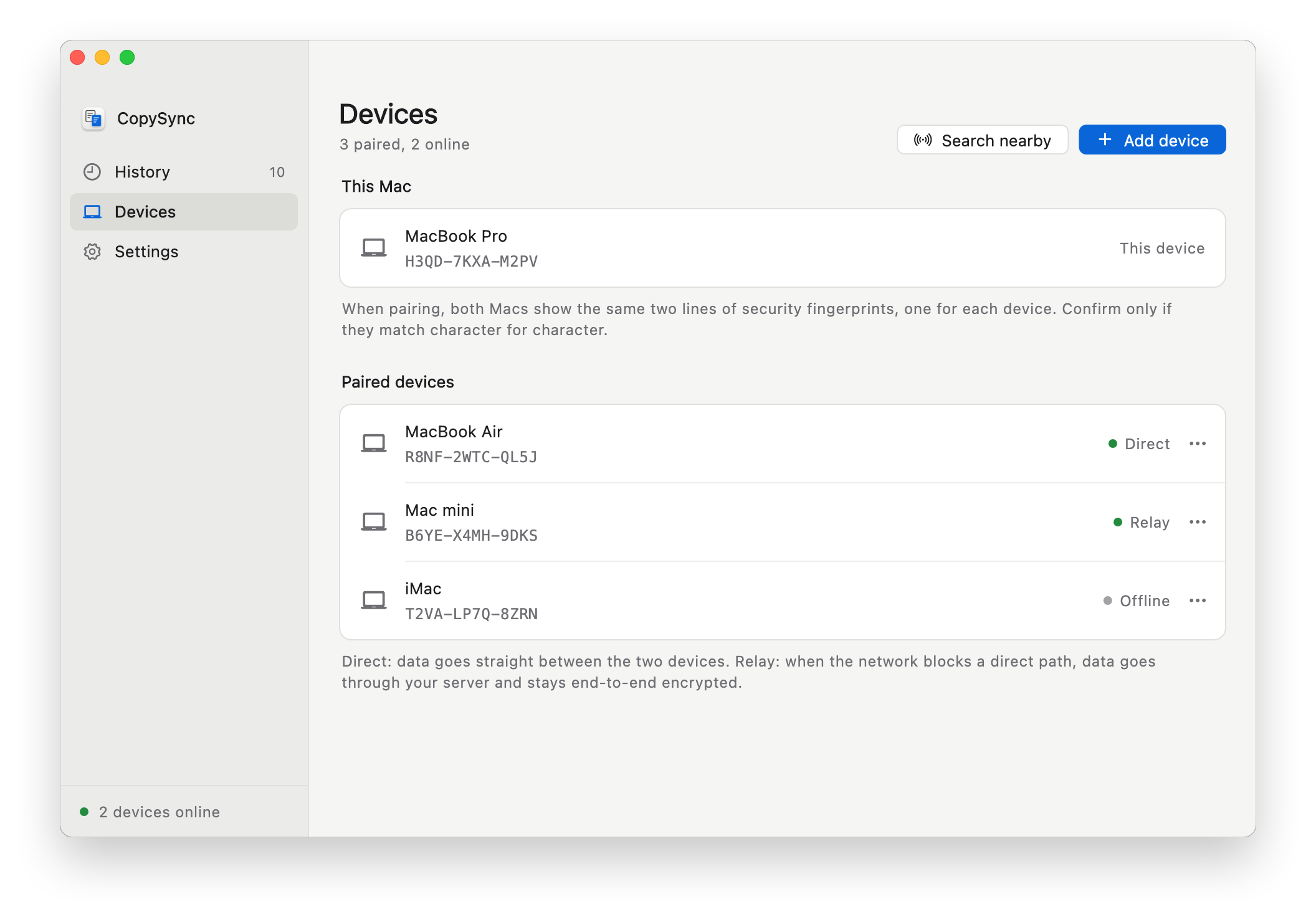
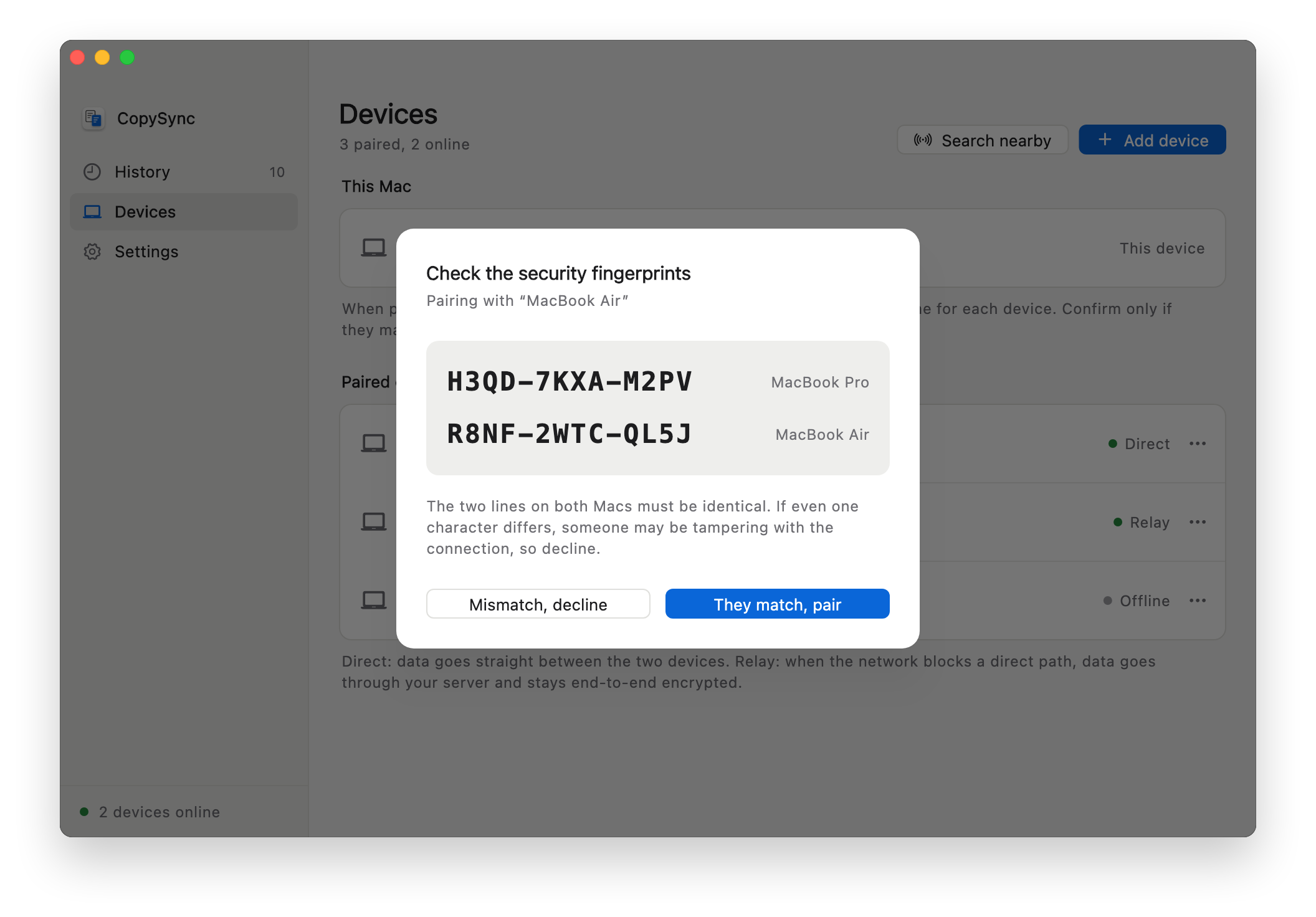
2. Pair. On one computer, Devices → Add device → Show a code; on the other, Enter a code. On a different subnet, click On a different subnet? and also enter the address shown under the code. Confirm only if both screens show the same two fingerprint lines. From then on, copy on either one and paste on the other.
3. Across networks (optional). Three ways to connect, each with a step-by-step guide:
| Way | Best for | You need |
|---|---|---|
| Same network | Computers behind one router, at home or in the office | Nothing |
| Public server | Computers on different networks that should sync from anywhere | A Linux VM with a public IP; the smallest is enough |
| Tailscale | Across networks without a server | Tailscale on every computer; enter the other's Tailscale address when pairing |
On a public server:
curl -LO https://github.com/baiyuze/copysync/releases/latest/download/copysync-server-linux-amd64.tar.gz
tar xzf copysync-server-linux-amd64.tar.gz && cd copysync-server-linux-amd64
sudo ./install.sh <public IP of the server>
Open TCP 8787, UDP 3478 and UDP 32768–60999, then enter ws://<server address>:8787/signal under Settings → Signaling server on each computer. Docker and all options: server deployment guide.
| Requirement | |
|---|---|
| Mac app | macOS 13 Ventura or later; Apple silicon and Intel |
| Windows app | Windows 10 and 11, x64 |
| Linux app | x64 or ARM64; an X11 desktop, or Wayland with XWayland (GNOME and KDE have it by default); GTK 3 |
| Server | Optional, only to sync across networks: Linux (x86_64, ARM64; systemd or Docker), macOS, or Windows 10/11 x64 |
| iPhone / iPad | Not supported: iOS doesn't let apps watch the clipboard in the background |
CopySync is free and open source under the GNU AGPL-3.0: anyone, companies included, can use and modify it, but distributing it or offering a modified version over a network means publishing your source under the same license. See LICENSING.md for details. Versions 1.2.0 and earlier remain under the MIT License.
PasteFerry (隔空贴): sync the clipboard and files between computers — copy on one, paste on another. Mac, Windows, Linux. Peer-to-peer, end-to-end encrypted, self-hosted. 跨电脑剪贴板同步,Mac、Windows、Linux 互通。
See the code
Copy on one computer, paste on the other. Mac, Windows and Linux.
Text, images, files and whole folders — across accounts and across networks.
Universal Clipboard needs the same Apple ID and both Macs close by. AirDrop makes you accept every time and doesn't touch the clipboard. Messaging yourself means manual downloads and your files on someone else's server. With one Mac and one Windows PC, none of the built-in options work.
With CopySync you pair two computers once. After that, copy on one and paste on the other — Mac to Mac, Mac to Windows, or Windows to Windows. On the same network it works with no server at all; across networks, a server you run yourself or Tailscale lets the two find each other. Data goes directly between the devices, end-to-end encrypted; when a direct connection can't be made, it is relayed through your server, which still can't read it.
| CopySync | Universal Clipboard | AirDrop | Chat apps | |
|---|---|---|---|---|
| Different Apple IDs | ✓ | — | Needs accepting | ✓ |
| Different networks (home ↔ office) | ✓ | — | — | ✓ |
| Paste right away, nothing to accept | ✓ | ✓ | — | — |
| Between Mac and Windows | ✓ | — | — | ✓ |
| Files and whole folders | ✓ | Unreliable | ✓ | Zipped |
| History of what you copied | ✓ | — | — | Scroll back |
| Content stays off third-party servers | ✓ | ✓ | ✓ | — |
| |
New here? The quick start walks through it with screenshots. You need the app on each computer. On the same network that's all; across networks, add a server or Tailscale.
1. Install the app on each computer from the download page:
.deb for Ubuntu and Debian (x64, ARM64), or tar.gz for other distributions (x64, ARM64) — extract it and run ./CopySync/install.sh to add it to the app menu.The builds aren't notarized or code-signed yet: on Mac, allow it once under System Settings → Privacy & Security → Open Anyway; on Windows, click More info → Run anyway. Then click Turn on background sync, and allow CopySync when Windows Firewall asks, or when macOS asks to find devices on your local network.
2. Pair. On one computer, Devices → Add device → Show a code; on the other, Enter a code. On a different subnet, click On a different subnet? and also enter the address shown under the code. Confirm only if both screens show the same two fingerprint lines. From then on, copy on either one and paste on the other.
3. Across networks (optional). Three ways to connect, each with a step-by-step guide:
| Way | Best for | You need |
|---|---|---|
| Same network | Computers behind one router, at home or in the office | Nothing |
| Public server | Computers on different networks that should sync from anywhere | A Linux VM with a public IP; the smallest is enough |
| Tailscale | Across networks without a server | Tailscale on every computer; enter the other's Tailscale address when pairing |
On a public server:
curl -LO https://github.com/baiyuze/copysync/releases/latest/download/copysync-server-linux-amd64.tar.gz
tar xzf copysync-server-linux-amd64.tar.gz && cd copysync-server-linux-amd64
sudo ./install.sh <public IP of the server>
Open TCP 8787, UDP 3478 and UDP 32768–60999, then enter ws://<server address>:8787/signal under Settings → Signaling server on each computer. Docker and all options: server deployment guide.
| Requirement | |
|---|---|
| Mac app | macOS 13 Ventura or later; Apple silicon and Intel |
| Windows app | Windows 10 and 11, x64 |
| Linux app | x64 or ARM64; an X11 desktop, or Wayland with XWayland (GNOME and KDE have it by default); GTK 3 |
| Server | Optional, only to sync across networks: Linux (x86_64, ARM64; systemd or Docker), macOS, or Windows 10/11 x64 |
| iPhone / iPad | Not supported: iOS doesn't let apps watch the clipboard in the background |
CopySync is free and open source under the GNU AGPL-3.0: anyone, companies included, can use and modify it, but distributing it or offering a modified version over a network means publishing your source under the same license. See LICENSING.md for details. Versions 1.2.0 and earlier remain under the MIT License.



