b-ruth/Simple-Mac-Uninstaller

macOS app that uninstalls applications with their leftover files and finds orphaned files from apps dragged to the Trash

Swift

1

4 commits

updated Oct 8, 2026

See the code

See what people are saying

SourceMessageScoreDate

Simple Mac Uninstaller: an MIT-licensed macOS app that removes apps with their leftover files and finds orphaned ones (r/opensource)

I built a small native macOS app (Swift/SwiftUI) for uninstalling applications properly. - Select an app to see every file it has scattered around the system, grouped by category, and move the lot to the Trash. - Scan the Library folders for orphaned files left by apps that were removed by dragging…

1

Oct 8, 2026

README

Simple Mac Uninstaller

A macOS app that removes applications together with the files they leave around the system, and finds leftovers from apps that were only dragged to the Trash.
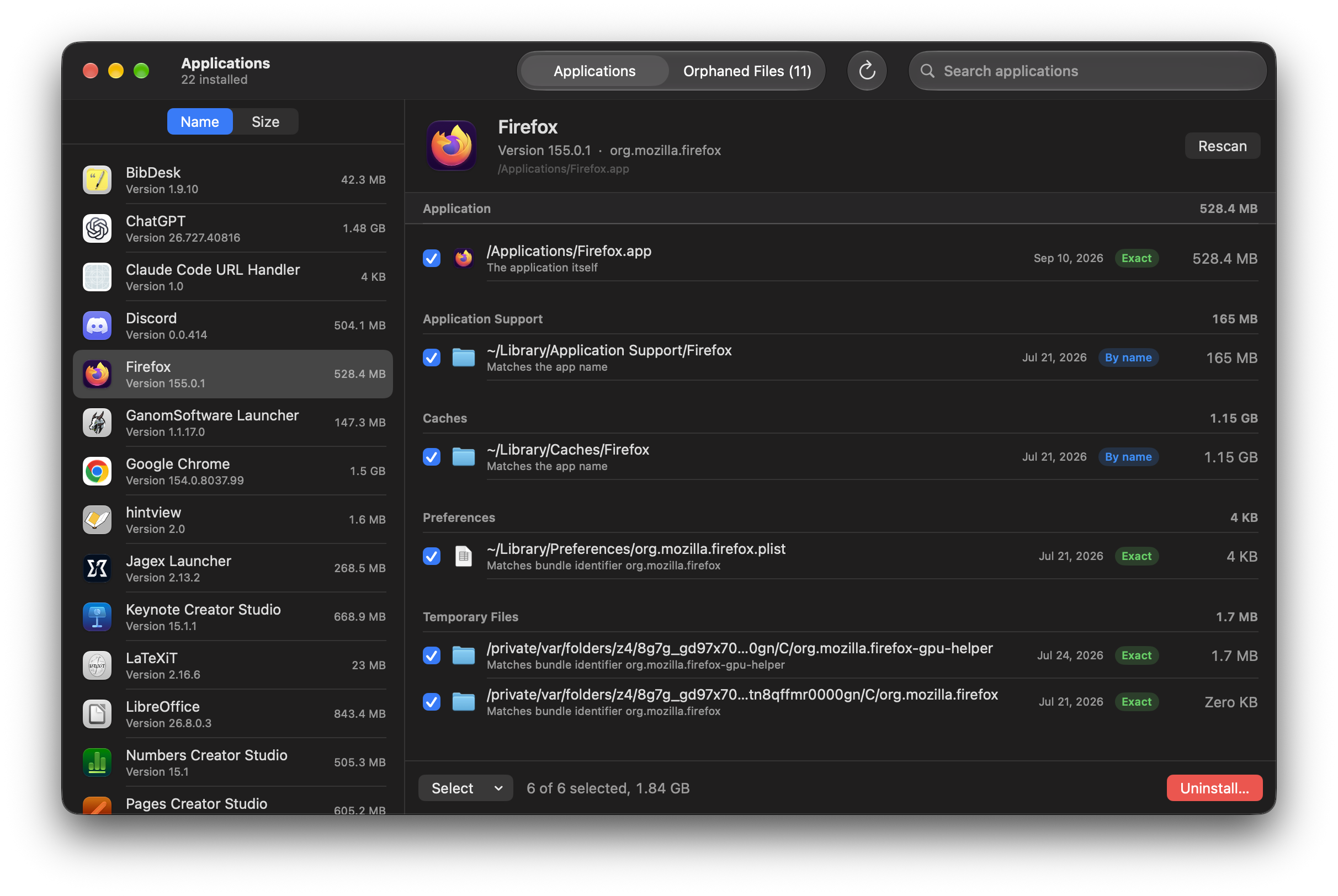
Uninstalling an app: every file it owns, grouped by category

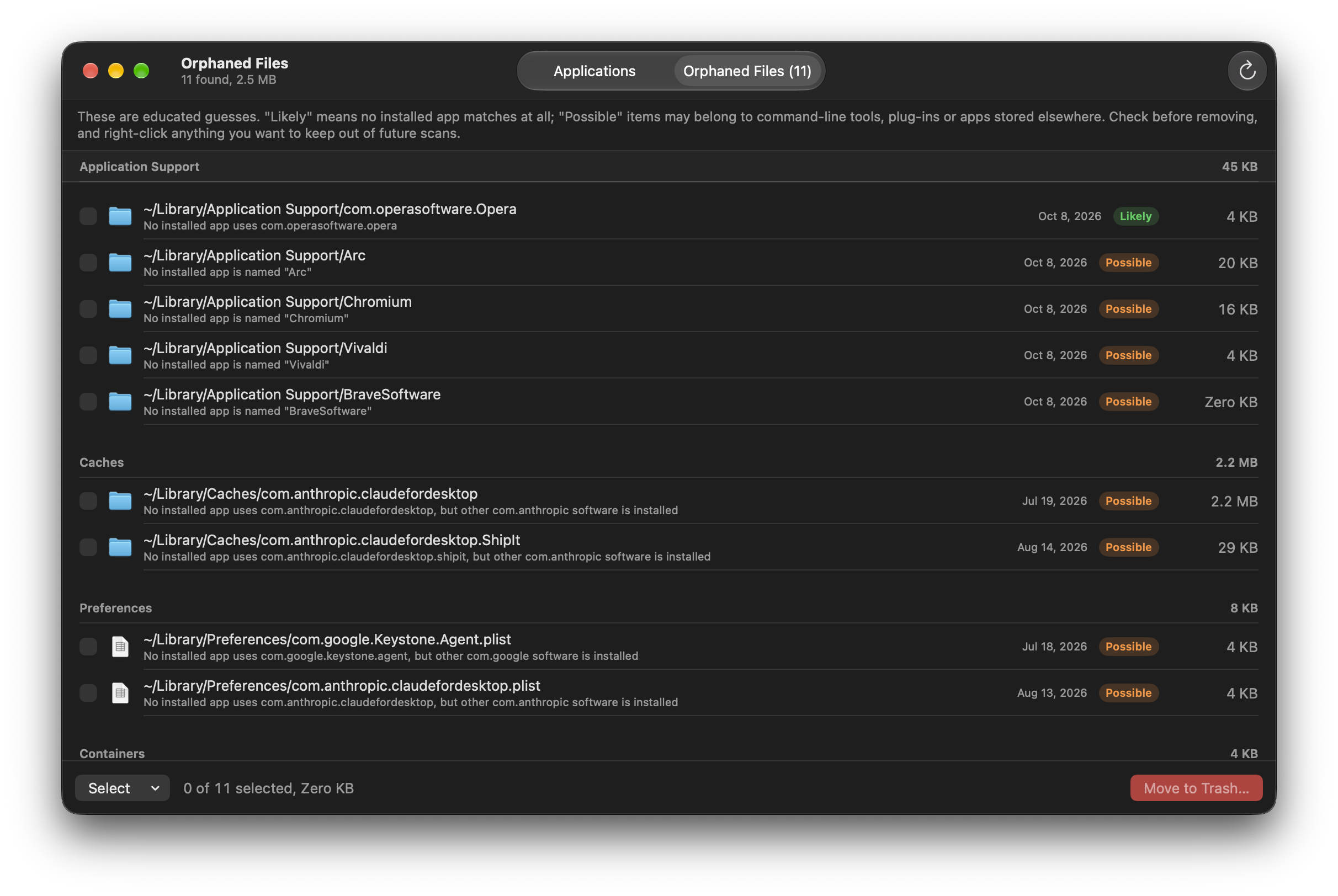
Orphaned files left behind by apps that were dragged to the Trash

Download

Get the latest zipped build from the Releases page. It runs on Apple silicon and Intel Macs with macOS 14 or later.

The build is not notarized by Apple, so macOS blocks it the first time. After unzipping, either:

  • open it once, then go to System Settings → Privacy & Security and click Open Anyway, or
  • run xattr -dr com.apple.quarantine /path/to/Uninstaller.app in Terminal.

Features

  • Uninstall an app completely. Select an app (or drop one onto the window) to see everything it owns: support files, caches, preferences, containers, saved state, cookies, logs, crash reports, launch agents and daemons, privileged helpers, installer receipts and temp files. Each match is labelled Exact (bundle identifier), By name or Maybe.
  • Find orphaned files. Compares the Library folders against every installed app and lists what nothing accounts for, labelled Likely or Possible. Nothing is pre-selected, and items can be ignored in future scans.
  • Nothing is deleted outright. Everything is moved to the Trash. Items that need administrator rights are handed to Finder, which asks for your password.

Orphan detection is heuristic. Review Possible items before removing them.

Building from source

Requirements:

  • macOS 14 or later
  • Xcode 16 or later
  • XcodeGen (brew install xcodegen) if you add or remove source files
xcodegen generate   # only needed after changing project.yml or the file layout
xcodebuild -project Uninstaller.xcodeproj -scheme Uninstaller -configuration Debug -derivedDataPath build build
open build/Build/Products/Debug/Uninstaller.app

project.yml signs with a specific development team. Change DEVELOPMENT_TEAM to your own, or set CODE_SIGN_IDENTITY to "-" for ad-hoc signing.

Full Disk Access

macOS hides other apps' containers unless Uninstaller has Full Disk Access. Add the built app under System Settings → Privacy & Security → Full Disk Access, then relaunch it. The app shows a banner while access is missing.

The binary can print scan results without opening a window or removing anything:

Uninstaller.app/Contents/MacOS/Uninstaller --list-apps
Uninstaller.app/Contents/MacOS/Uninstaller --scan /Applications/Some.app
Uninstaller.app/Contents/MacOS/Uninstaller --orphans

Not covered

  • Dotfolders in the home directory (such as ~/.vscode)
  • Kernel and system extensions
  • Apps under /System, which macOS does not allow removing

Icon

The app icon is drawn by Scripts/make_icon.swift.

License

MIT. See LICENSE.

b-ruth/Simple-Mac-Uninstaller

macOS app that uninstalls applications with their leftover files and finds orphaned files from apps dragged to the Trash

Swift

1

4 commits

updated Oct 8, 2026

See the code

See what people are saying

SourceMessageScoreDate

Simple Mac Uninstaller: an MIT-licensed macOS app that removes apps with their leftover files and finds orphaned ones (r/opensource)

I built a small native macOS app (Swift/SwiftUI) for uninstalling applications properly. - Select an app to see every file it has scattered around the system, grouped by category, and move the lot to the Trash. - Scan the Library folders for orphaned files left by apps that were removed by dragging…

1

Oct 8, 2026

README

Simple Mac Uninstaller

A macOS app that removes applications together with the files they leave around the system, and finds leftovers from apps that were only dragged to the Trash.

Uninstalling an app: every file it owns, grouped by category

Orphaned files left behind by apps that were dragged to the Trash

Download

Get the latest zipped build from the Releases page. It runs on Apple silicon and Intel Macs with macOS 14 or later.

The build is not notarized by Apple, so macOS blocks it the first time. After unzipping, either:

  • open it once, then go to System Settings → Privacy & Security and click Open Anyway, or
  • run xattr -dr com.apple.quarantine /path/to/Uninstaller.app in Terminal.

Features

  • Uninstall an app completely. Select an app (or drop one onto the window) to see everything it owns: support files, caches, preferences, containers, saved state, cookies, logs, crash reports, launch agents and daemons, privileged helpers, installer receipts and temp files. Each match is labelled Exact (bundle identifier), By name or Maybe.
  • Find orphaned files. Compares the Library folders against every installed app and lists what nothing accounts for, labelled Likely or Possible. Nothing is pre-selected, and items can be ignored in future scans.
  • Nothing is deleted outright. Everything is moved to the Trash. Items that need administrator rights are handed to Finder, which asks for your password.

Orphan detection is heuristic. Review Possible items before removing them.

Building from source

Requirements:

  • macOS 14 or later
  • Xcode 16 or later
  • XcodeGen (brew install xcodegen) if you add or remove source files
xcodegen generate   # only needed after changing project.yml or the file layout
xcodebuild -project Uninstaller.xcodeproj -scheme Uninstaller -configuration Debug -derivedDataPath build build
open build/Build/Products/Debug/Uninstaller.app

project.yml signs with a specific development team. Change DEVELOPMENT_TEAM to your own, or set CODE_SIGN_IDENTITY to "-" for ad-hoc signing.

Full Disk Access

macOS hides other apps' containers unless Uninstaller has Full Disk Access. Add the built app under System Settings → Privacy & Security → Full Disk Access, then relaunch it. The app shows a banner while access is missing.

The binary can print scan results without opening a window or removing anything:

Uninstaller.app/Contents/MacOS/Uninstaller --list-apps
Uninstaller.app/Contents/MacOS/Uninstaller --scan /Applications/Some.app
Uninstaller.app/Contents/MacOS/Uninstaller --orphans

Not covered

  • Dotfolders in the home directory (such as ~/.vscode)
  • Kernel and system extensions
  • Apps under /System, which macOS does not allow removing

Icon

The app icon is drawn by Scripts/make_icon.swift.

License

MIT. See LICENSE.
