App written in Dart to convert natural language text to SQL using sqlcoder-7b-2
C++
3
0 commits
updated Jun 26, 2025
Text-to-SQL in the medical domain is a task which converts natural language text to its corresponding SQL syntax. This is aimed at increasing accessibility for medical personnel who is not familiar with SQL syntax, but needs to query a structured database.
This is an app built written in Dart which queries a text-to-SQL model, sqlcoder-7b. Dart allows for cross-platform (IOS and Android) compilation. The code is written with perplexity.AI, DeepSeek-V3 and ChatGPT's help 😊.
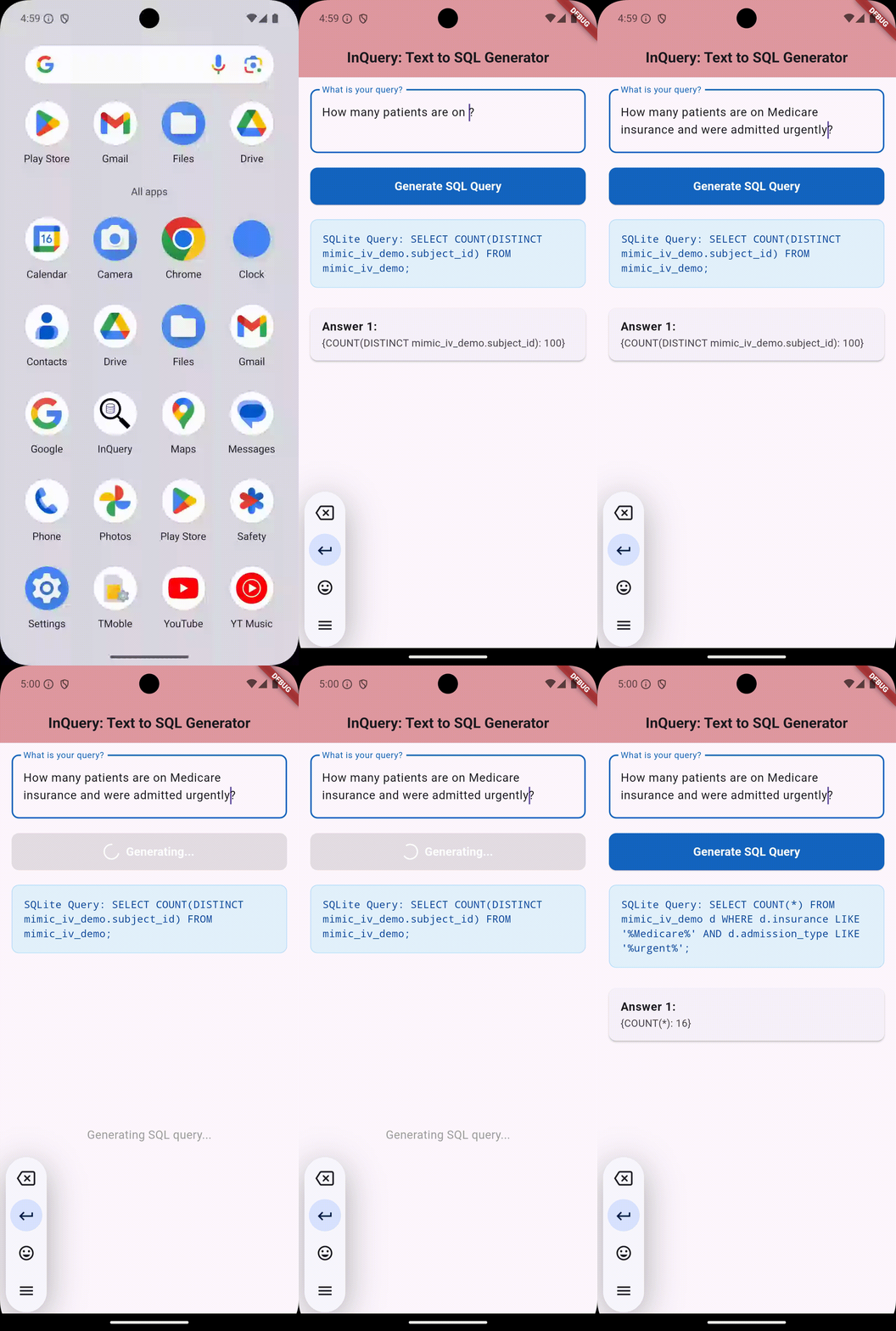
To run it, please:
git clone https://github.com/awxlong/ai_sql_coderpip install -r sql_generator_backend/requirements.txtflask --app app run --debug --host=0.0.0.0 --port=5001lib/main.dart, you can select a virtual device and run the app (flutter pub get; flutter run), and make natural language queries. Feel free to modify the database schema in sql_generator_backend/app.py according to your needs. If you've installed the app in a virtual device or your android/IOS, then you can just run the app and input queries as shown in the demo.A few resources to get you started if this is your first Flutter project:
For help getting started with Flutter development, view the online documentation, which offers tutorials, samples, guidance on mobile development, and a full API reference.
This project is licensed under the MIT License. See the LICENSE file for details.
App written in Dart to convert natural language text to SQL using sqlcoder-7b-2
C++
3
0 commits
updated Jun 26, 2025
Text-to-SQL in the medical domain is a task which converts natural language text to its corresponding SQL syntax. This is aimed at increasing accessibility for medical personnel who is not familiar with SQL syntax, but needs to query a structured database.
This is an app built written in Dart which queries a text-to-SQL model, sqlcoder-7b. Dart allows for cross-platform (IOS and Android) compilation. The code is written with perplexity.AI, DeepSeek-V3 and ChatGPT's help 😊.
To run it, please:
git clone https://github.com/awxlong/ai_sql_coderpip install -r sql_generator_backend/requirements.txtflask --app app run --debug --host=0.0.0.0 --port=5001lib/main.dart, you can select a virtual device and run the app (flutter pub get; flutter run), and make natural language queries. Feel free to modify the database schema in sql_generator_backend/app.py according to your needs. If you've installed the app in a virtual device or your android/IOS, then you can just run the app and input queries as shown in the demo.A few resources to get you started if this is your first Flutter project:
For help getting started with Flutter development, view the online documentation, which offers tutorials, samples, guidance on mobile development, and a full API reference.
This project is licensed under the MIT License. See the LICENSE file for details.