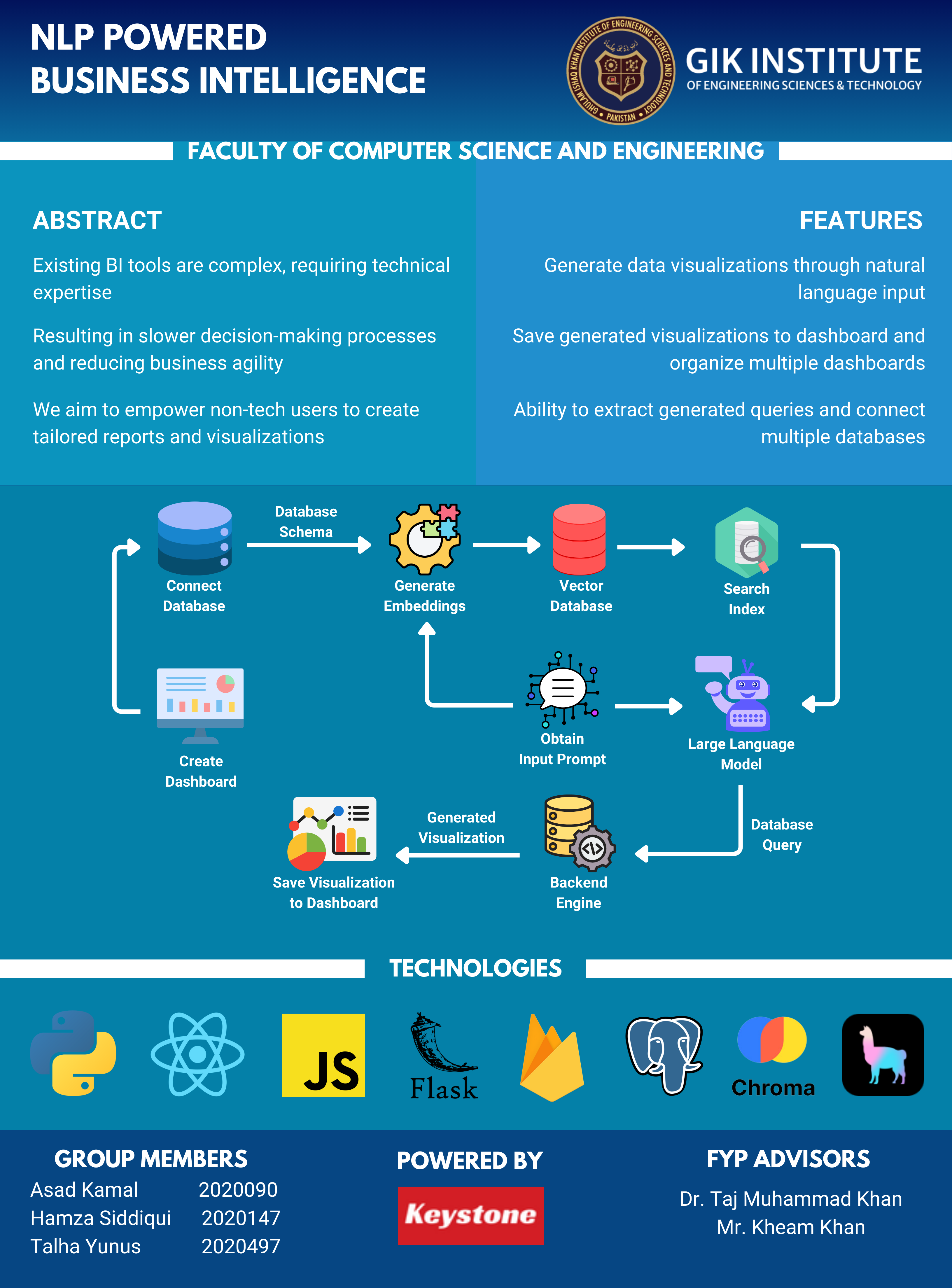



An end-to-end Business Intelligence application that lets users query relational data in natural language, convert those requests into SQL, and transform query results into interactive dashboards and visual analytics.
This project was developed as a Final Year Project and is designed as a proof of concept for making BI systems more accessible to non-technical users. Instead of writing SQL manually, a user can ask questions conversationally, inspect the generated query, preview the returned data, and save charts to custom dashboards.
Demo Video: NLP-Powered-BI-App_Video.mp4
Traditional BI platforms are powerful, but they often require technical expertise to model data, write SQL, or configure reports. This project explores a more accessible workflow:
The goal is to reduce the gap between raw enterprise data and business decision-making.
The system is split into four main layers:
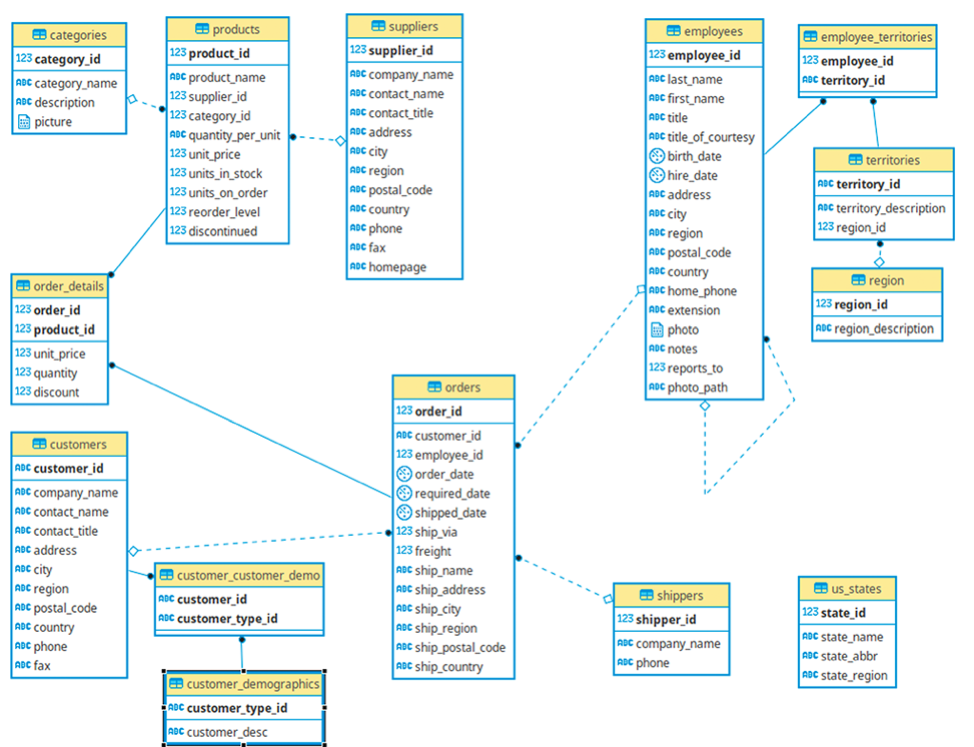
frontend/): Next.js application that handles authentication, database selection, chatbot interaction, charting, and dashboard management.api/): Flask API that manages database connectivity, executes SQL, and coordinates the chatbot pipeline.db/): PostgreSQL schema and sample data used to demonstrate the application end-to-end.The repository already includes the ER diagram for the sample database used in the proof of concept:
db/nlp_bi.sqlNLP-Powered-BI/
|-- api/ Flask backend, chatbot logic, schema utilities
|-- frontend/ Next.js frontend and dashboard UI
|-- db/ Sample PostgreSQL schema, queries, ER diagram
|-- defog/ Additional Defog-related backend code
|-- Thesis.pdf Final year project thesis/report
The user connects a PostgreSQL database from the frontend. The backend stores the connection for the active session and initializes the chatbot with the selected schema.
The backend reads table and column metadata from information_schema, formats it into a schema prompt, and stores it in a ChromaDB collection for lightweight retrieval.
When a user asks a question, the chatbot retrieves the most relevant schema fragments and sends them to the selected model. The model is instructed to return only valid SQL for the available schema.
The generated SQL is executed against PostgreSQL. Results are returned to the UI, where the user can inspect the output, generate a chart, and save the configuration to a dashboard.
The current repository is a research/prototype codebase. Some configuration values are hardcoded in the source, so for a clean public deployment you should replace them with environment variables before sharing production credentials.
git clone <your-repo-url>
cd NLP-Powered-BI
Create a PostgreSQL database and import the SQL dump from db/nlp_bi.sql.
CREATE DATABASE nlp_bi;
Then import the file using your preferred PostgreSQL workflow, for example through psql.
cd api
pip install -r requirements.txt
flask --app app run
The backend is expected to run on http://localhost:5000.
cd frontend
npm install
npm run dev
The frontend is expected to run on http://localhost:3000.
Before using the app, update the Firebase configuration and provide your own database connection details and OpenAI API key.
This project sits at the intersection of:
From an academic perspective, it demonstrates how conversational interfaces can improve access to enterprise analytics for users who are not comfortable with SQL or conventional BI tooling.
For the full academic write-up, methodology, and discussion, see Thesis.pdf.
An end-to-end Business Intelligence application that lets users query relational data in natural language, convert those requests into SQL, and transform query results into interactive dashboards and visual analytics.
This project was developed as a Final Year Project and is designed as a proof of concept for making BI systems more accessible to non-technical users. Instead of writing SQL manually, a user can ask questions conversationally, inspect the generated query, preview the returned data, and save charts to custom dashboards.
Demo Video: NLP-Powered-BI-App_Video.mp4
Traditional BI platforms are powerful, but they often require technical expertise to model data, write SQL, or configure reports. This project explores a more accessible workflow:
The goal is to reduce the gap between raw enterprise data and business decision-making.
The system is split into four main layers:
frontend/): Next.js application that handles authentication, database selection, chatbot interaction, charting, and dashboard management.api/): Flask API that manages database connectivity, executes SQL, and coordinates the chatbot pipeline.db/): PostgreSQL schema and sample data used to demonstrate the application end-to-end.The repository already includes the ER diagram for the sample database used in the proof of concept:
db/nlp_bi.sqlNLP-Powered-BI/
|-- api/ Flask backend, chatbot logic, schema utilities
|-- frontend/ Next.js frontend and dashboard UI
|-- db/ Sample PostgreSQL schema, queries, ER diagram
|-- defog/ Additional Defog-related backend code
|-- Thesis.pdf Final year project thesis/report
The user connects a PostgreSQL database from the frontend. The backend stores the connection for the active session and initializes the chatbot with the selected schema.
The backend reads table and column metadata from information_schema, formats it into a schema prompt, and stores it in a ChromaDB collection for lightweight retrieval.
When a user asks a question, the chatbot retrieves the most relevant schema fragments and sends them to the selected model. The model is instructed to return only valid SQL for the available schema.
The generated SQL is executed against PostgreSQL. Results are returned to the UI, where the user can inspect the output, generate a chart, and save the configuration to a dashboard.
The current repository is a research/prototype codebase. Some configuration values are hardcoded in the source, so for a clean public deployment you should replace them with environment variables before sharing production credentials.
git clone <your-repo-url>
cd NLP-Powered-BI
Create a PostgreSQL database and import the SQL dump from db/nlp_bi.sql.
CREATE DATABASE nlp_bi;
Then import the file using your preferred PostgreSQL workflow, for example through psql.
cd api
pip install -r requirements.txt
flask --app app run
The backend is expected to run on http://localhost:5000.
cd frontend
npm install
npm run dev
The frontend is expected to run on http://localhost:3000.
Before using the app, update the Firebase configuration and provide your own database connection details and OpenAI API key.
This project sits at the intersection of:
From an academic perspective, it demonstrates how conversational interfaces can improve access to enterprise analytics for users who are not comfortable with SQL or conventional BI tooling.
For the full academic write-up, methodology, and discussion, see Thesis.pdf.





