Elm playground in OCaml to make 2d/3d pictures/animations/games easily, and more ...
See the codeCreate pictures, animations, and video games (and even applications) with OCaml, in 2D and 3D!
It started as a port to OCaml of the excellent Elm playground package https://github.com/evancz/elm-playground, and it keeps its spirit:
This is the package I wanted when I was learning programming. Start by putting shapes on screen and work up to making games. I hope this package will be fun for a broad range of ages and backgrounds! - Evan Czaplicki
Evan's package is a library and a handful of examples. This repository goes further: besides the library, it holds 145 games and 53 applications written with it. It is an ode to code: a collection of the programs that made computing history, from Pong, Breakout and Pac-Man to Doom and Quake, from VisiCalc and MacPaint to Turbo Pascal and Smalltalk-80. Each one is rebuilt in miniature but working, and comes with its story: who made the original, when, and what it brought that was new. And each is small, a few hundred lines to a few thousand, so that you can read the whole of it and appreciate it as a piece of art, not only use it; it runs natively on your desktop and in your browser, from the same source file:
| TinyBreakout (play it) | TinyTurboPascal (run it) |
|---|---|
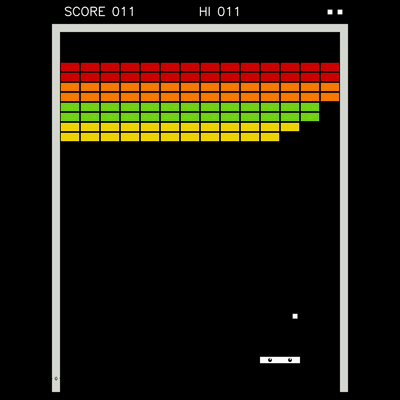 | 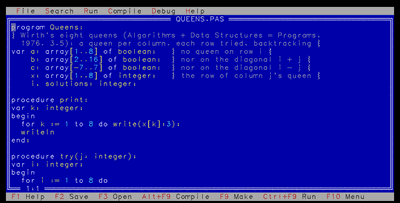 |
| Breakout (Atari, 1976): the wall, the paddle, the ball -- 525 lines, in one file | Turbo Pascal 7 (Borland, 1992): the editor, the compiler and the debugger -- 3,213 lines in 15 files: the IDE, and the Pascal compiler and P-machine under it1 |
They are all in CATALOG.md, and all in one menu,
tinybox
(and by size,
the smallest first). The whole repository can be explored in the
browser in its code map;
the links saying how many lines a program is open it on that
program's own code (w widens it to what it uses, then to everything).
| tinybox (open it) | The code map (open it) |
|---|---|
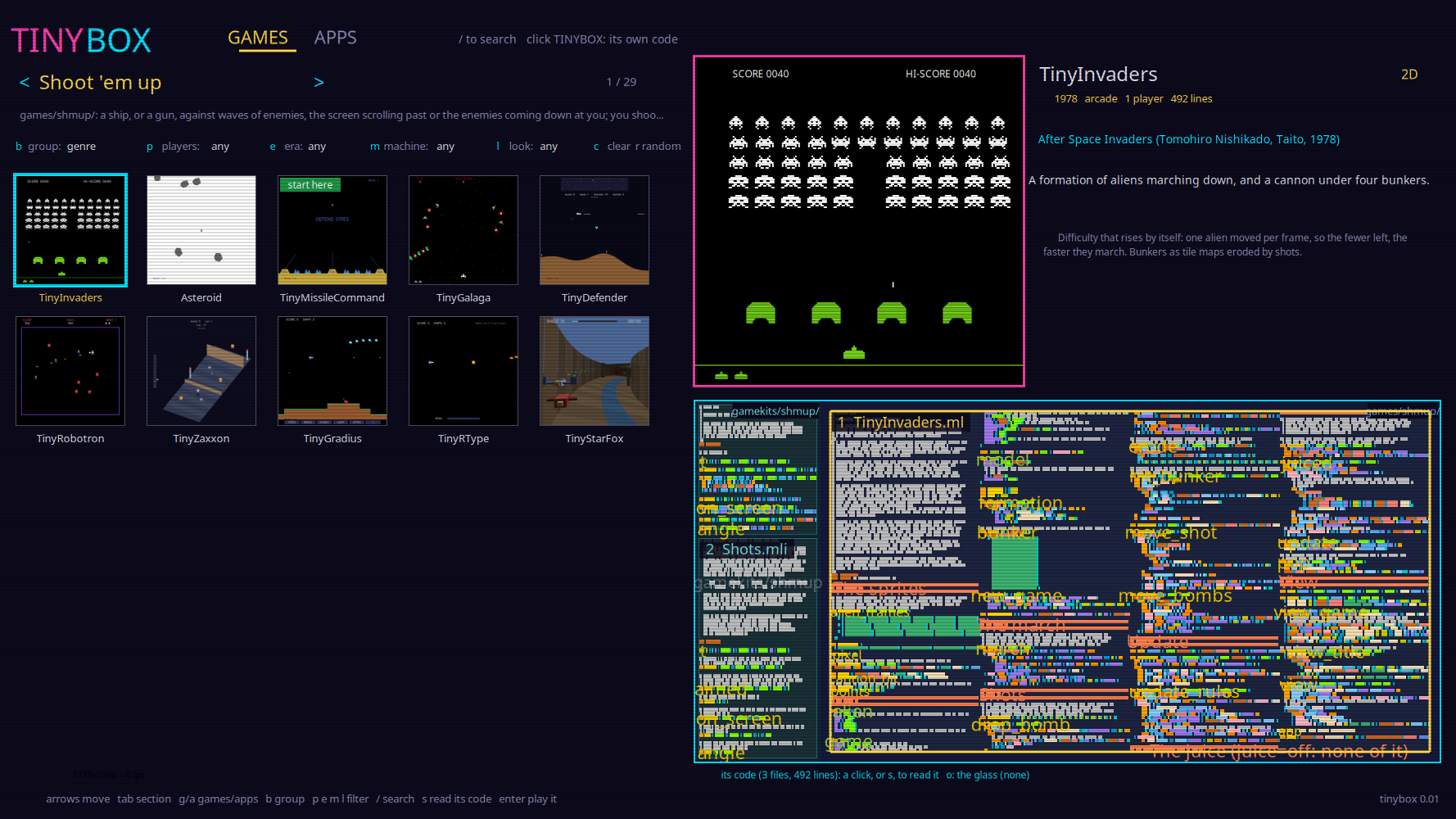 | 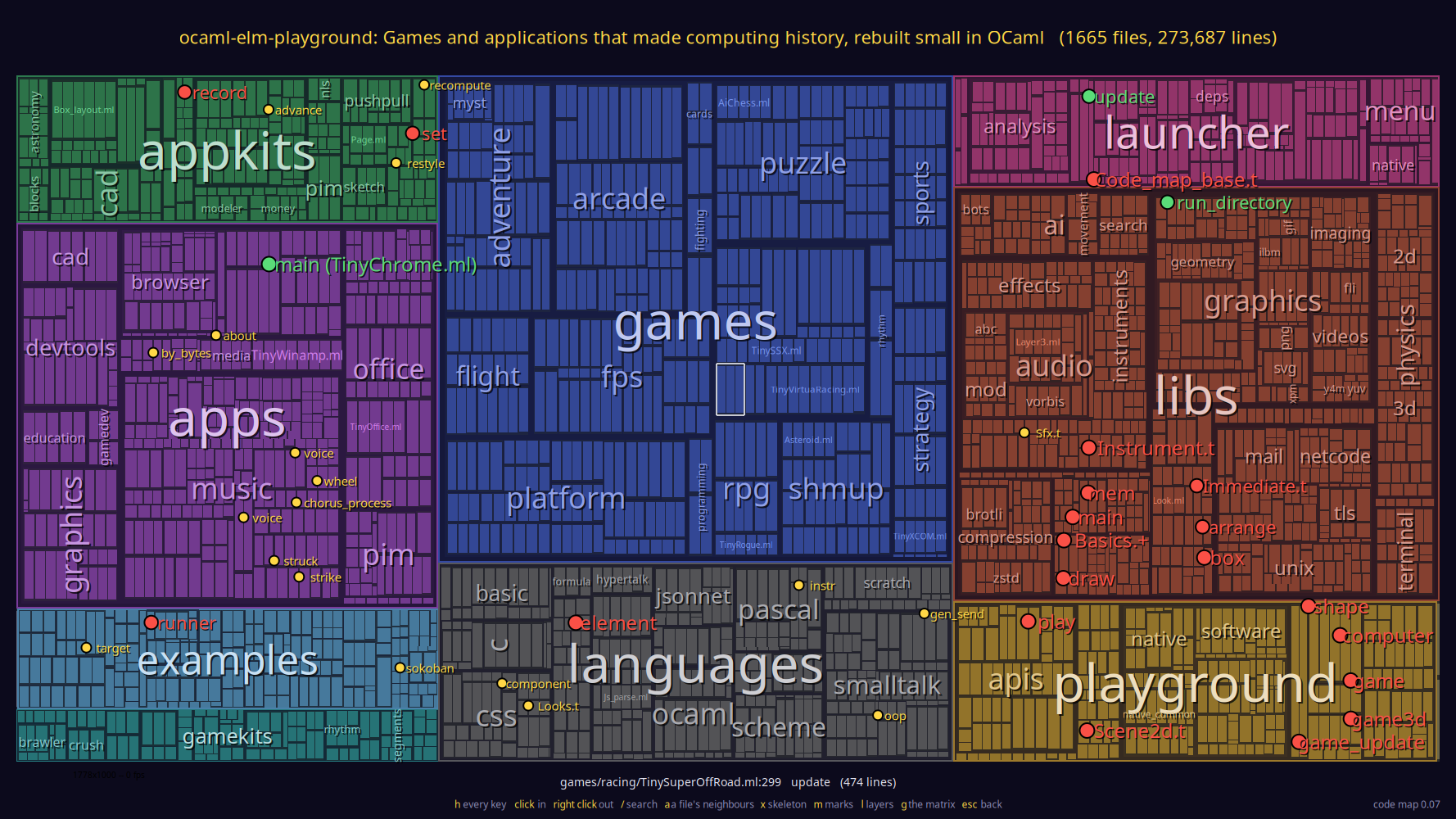 |
| The menu: the programs of a section, the chosen one previewed live, and its code as a map | The whole repository: each folder a region, each file a block the size of its code; zoom in and the blocks are the code itself |
The main goal of all this is to teach people. Almost all of the code, the library as much as the programs, was written by an AI, Claude Code, under the author's direction (see the AI disclaimer), but it was written for people to read, and checked by tests: judge each module by what it explains, as you would a textbook's.
Evan's playground is for learning to write programs. This repository
is also for learning by reading them. Everything a game or an
application needs is written here from scratch, in plain OCaml: the
pixels, the sound, the physics, the AI, the widgets. There is no game
engine, no GPU requirement, and no C library doing the interesting part.
Each module holds one idea, and its .mli explains that idea, often
with an ASCII diagram, the paper or machine it comes from, and a worked
example checked by a test. So when you wonder how a triangle becomes
pixels, how a PNG is decompressed, how a Moog filter gets its sound, or
how a chess program picks its move, the answer is a few hundred lines
you can open and read.
OCaml all the way down. The libraries are written in OCaml, not
bound from C, even where C would be faster: there is not one line of C
in this repository. The one exception is drawing, and it is only half
of one: the default backends draw with Cairo and OpenGL, which are C,
for their speed; but the software backends draw the same programs
with our own 2D and 3D rasterizers, so there is an OCaml-only path
from a game down to its pixels, there to be read. In many languages
the libraries
that matter are written in another one: Python's numerical and AI
libraries are C and Fortran underneath (NumPy), and whoever wants to
know how they work has to change language to find out. Stroustrup made
this a design rule of C++: leave no room for a lower-level language
below it, so that its libraries could be written in it. OCaml is fast
enough to keep that rule here for a long time -- a PNG decoder, a
software rasterizer, a synthesizer, TLS 1.3, a GPT and its automatic
differentiation are all plain OCaml -- and since the purpose is
teaching, we keep it even when it costs speed: the OCaml is the more
readable of the two, and the reader never has to leave the language.
When something is slow we make the OCaml faster, and write down how
(notes_opti_ocaml.md).
The software that usually does this work is not like that. A graphics stack, a game engine, a codec library or a web browser is millions of lines, and nobody understands the whole of it. Here each subject is small enough for one person to read whole. That an AI wrote most of it is the paradox, the same as in IX: the trend these days is to use AI to write more and more code, until only the AI can change the program, and here it rewrites giant programs in far less code, so that humans can understand them again, and extend them. Ultimately these libraries may become literate programs, as in Principia Softwarica: books that tell the code as a story, in the order a reader needs, to teach even better.
AI makes the programs smaller. Humans understand more.
The library (libs/ and playground/) is about 73,000 lines of
OCaml, .mli files and their explanations included; with the kits
and the languages the programs share, about 119,000. That leaves out
the tests, the games and the applications (an area's name leads to its
modules in the API documentation, each with its explanation):
| area | lines | what you can read there |
|---|---|---|
the playground (playground/, libs/core/, libs/random/) | 22,100 | the 2D and 3D APIs and their seven backends (Cairo/SDL, vdom/SVG, OpenGL, WebGL, software), cameras, sprites, tilemaps, 3D characters, ragdolls and portals, and other ways to program: Logo's turtle, HtDP's big-bang and universe, PuzzleScript, Karel, POV-Ray, the teletype and text mode |
graphics (libs/graphics/) | 13,700 | a 2D rasterizer (lines, circles, polygon fill, strokes), a 3D one (projection, clipping, culling, z-buffer and painter's algorithm, flat/Gouraud/Phong shading, texture mapping), a ray tracer (CSG, bounding volumes), Hershey and VGA fonts, image processing (histograms, convolutions, Sobel, blending); image formats: PNG with its own inflate, Huffman and CRC, GIF (LZW), baseline JPEG (DCT) read and written, XPM, the Amiga's ILBM; and video: Y4M, FLI/FLC, AVI with Motion JPEG, MPEG-1 decoded and encoded |
physics (libs/physics/) | 5,300 | 2D and 3D rigid bodies: integrators, broadphase, collision detection, contact resolution, an iterative solver, joints, springs, quaternions, continuous collision, particles, and gravity (Kepler's orbits) |
audio (libs/audio/) | 11,200 | oscillators, noise, envelopes, LFOs, filters (state-variable, Moog and diode ladders), FM synthesis with the DX7's algorithms, Karplus-Strong strings, modal synthesis, a sampler, a step sequencer, a Fourier spectrum, stereo space, a rack of effects (drive, EQ, chorus, phaser, delay, reverb, compressor, a Leslie), a mixer, sound effects and music, and WAV, MIDI, ABC and MOD files, and MP2 and MP3 decoded |
AI (libs/ai/) | 3,600 | pathfinding, state machines, behavior trees, utility AI, steering and flocking, minimax with iterative deepening and Zobrist hashing, Monte Carlo tree search, Q-learning, and neural networks trained by backpropagation and by our own automatic differentiation |
GUI (libs/gui/, libs/juice/) | 4,200 | a toolkit: widgets, layout, focus, text editing, grids and themes, wired four ways (callbacks, MVC, MVU, immediate mode); and game juice: easing, tweens, screen shake, squash and stretch, particles |
networking (libs/networking/, libs/crypto/, libs/compression/) | 11,000 | the protocols as bytes in, bytes out: URLs, HTTP/1.1, WebSocket, IRC, mail (SMTP, POP3, MIME); netcode (lockstep, rollback, prediction and interpolation); TLS 1.3 with X.509 certificates, over SHA-2, HMAC, HKDF, ChaCha20-Poly1305, AES-GCM, X25519, ECDSA and RSA; Huffman codes, inflate and deflate, LZW |
the terminal (libs/terminal/) | 1,500 | a VT100's screen, the tty's line discipline, programs that ask and wait as values, curses, full-screen text programs |
application engines (appkits/) | 19,700 | a spreadsheet (dependency graph, recalculation), rich text poured into pages with Knuth-Plass line breaking, bitmap painting (seed fill, PackBits), structured drawing, compound documents, slides, undo and the clipboard; a web browser's engine (box, flex and table layout, the DOM for scripts); vi and Emacs, and Turbo Pascal's IDE and debugger; Scratch's blocks; CAD (Sketchpad's constraints, AutoCAD's commands and DXF, SketchUp's push/pull); a 3D modeler; a planetarium's astronomy; calendars and address books |
game kits (gamekits/) | 6,200 | how each genre works: Doom's sectors, heightmap terrains, Descent's mines, isometric projection, racing roads and 3D tracks, platformer slopes and ladders, maze chases, hitboxes and frame data for fighting games, animated skeletons, RTS orders, team formations, rhythm charts, a Sokoban solver, playing cards, ... |
languages (languages/) | 19,800 | languages as text, parsed and run: a spreadsheet's formulas, BASIC, Emacs Lisp, Pascal compiled to P-code, HyperTalk, Smalltalk-80 and its bytecode interpreter, Scratch and Snap!, JavaScript, HTML and CSS |
With the library doing the heavy lifting, a program built on it stays short enough to read in one sitting. It is not a toy sketch either, but a working version of a famous original:
A budget. No program may be longer than 5,000 lines of its own
code. That counts its file and every module of its folder, of the
kits (gamekits/, appkits/) and of the languages (languages/)
that it uses, found by following the modules it names; tinybox's code
map shows it, and make test checks it (tests/catalog/, counted by
launcher/codemap/deps/Code_deps). It leaves out the library (libs/,
playground/), and this is not cheating: the library is truly general,
the pixels, sounds, physics and codecs any program could use, while an
appkit, a gamekit or a language is made for a few particular programs,
a spreadsheet's recalculation, a genre's rules, Emacs's Lisp, so it is
theirs and counts. Seven programs are over it, each for a whole language
it carries, and listed as exceptions in the test (which says when one
comes back under): TinySmalltalk80
(Smalltalk-80), TinySqueak (the same,
and its environment written in it), TinyChrome,
TinyFirefox and
TinyNetscape (JavaScript and the
browser's engine), TinyMosaic (the
browser's engine: HTML, CSS and the layout), and
TinyOffice (the spreadsheet's formulas
and HyperTalk).
The biggest, TinyChrome, is 14,991
lines, in 89 files.
Yes, you read that right: 15,000 lines of OCaml for a web browser that
parses HTML and CSS, cascades the styles, lays out blocks, floats,
tables and flexbox, draws SVG, plays <video>, carries its own
JavaScript engine and Chrome's developer tools -- enough to read
Hacker News with it, over the repository's own TLS 1.3:
tinybox chrome url=https://news.ycombinator.com
It runs in your browser too, but there a page may only read the sites that allow it (CORS), and Hacker News does not: on the web it shows its own built-in pages.
There are 145 games and 53 applications like these, listed in CATALOG.md. Each one starts with a header about its original and what it borrows from the library, and the games that fake 3D point out the trick they use. The tutorials in docs/claude_notes/tutorials/ (3D, 2D, physics, audio, synthesizers, AI, images, fonts, GUI, ...) walk through each subject module by module.
The OCaml elm_playground package allows you to easily create
pictures, animations, and even video games in a portable way using an API that
really simplifies how to view the computer and its devices (the screen,
keyboard, and mouse).
The goal is similar to the old graphics package
but goes even further in terms of simplification.
The main API is defined in a single Playground.mli module and is implemented by two backends:
Here is for example a simple Snake game you can run from your browser (use the arrow keys to change the direction of the snake and eat the ball to grow your length). You can run the same game on your desktop without changing a line of code.
The same idea one dimension up is Playground3d
(Playground3d.mli):
shapes in space, a camera, and the same game loop. Its main backend
wraps no OpenGL, Vulkan or WebGL -- the projection, the camera math and
the whole triangle rasterizer are hand-written OCaml, on purpose, so
that you can read every line that turns a 3D shape into pixels (two
other backends then hand the same scenes to a real GPU, for comparison
and for speed). See In 3D below.
Credit where due: Playground3d's API (world-space shapes, an
eye/target camera, and the trick of compiling a 3D scene down to plain
2D shapes for the browser) is adapted from Luca Mugnaini's
elm-playground-3d,
itself built on Evan Czaplicki's original
elm-playground; the
StarCollector3d.ml example's mechanics are adapted from Nate Abele's
elm-3d-playground.
The fuller survey -- VRML, OpenGL, WebGL, Vulkan, Unity -- is in
notes_playground3d_related_work.md.
To install the playground, run opam install elm_playground and then
install one or both backends with opam install elm_playground_native
and/or opam install elm_playground_web. The 3D packages
(elm_playground_3d and its backends elm_playground_3d_opengl,
elm_playground_3d_software, elm_playground_3d_webgl,
elm_playground_3d_web) live in this repository and are released the
same way.
To play the games and use the applications rather than write your own,
install tinybox with opam install tinybox: after BusyBox, every one
of them linked into one binary (2D on Cairo, 3D on OpenGL). tinybox
alone opens a menu to choose one, with its screenshot and its code map,
tinybox list names them all, and tinybox TinyMario runs one
directly, with the same flags as its own executable. From a clone of
this repository, make builds it as ./bin/tinybox; the same menu
runs in your browser.
Here is a very simple application using the playground:
open Playground

(* the (x, y) position of the blue square  *)
type model = (float * float)

let initial_state : model = (0., 0.)

let view _computer (x, y) = [
  square blue 40.
   |> move x y
 ]

let update computer (x, y) =
  (x +. to_x computer.keyboard, y +. to_y computer.keyboard)

let app =
  game view update initial_state

let main = Playground_platform.run_app app
It is a very simple game defining a model type, a view function, and an update function to specify how the game behaves. It is using the
"Model-View-Update" architecture to organize the code of a graphical
interactive application
(see https://guide.elm-lang.org/architecture/ for more information).
To compile this application, simply do:
$ cd docs/toy-native-example
$ opam install --deps-only --yes .
$ dune exec --root . ./Toy.exe
You should then see on your desktop:
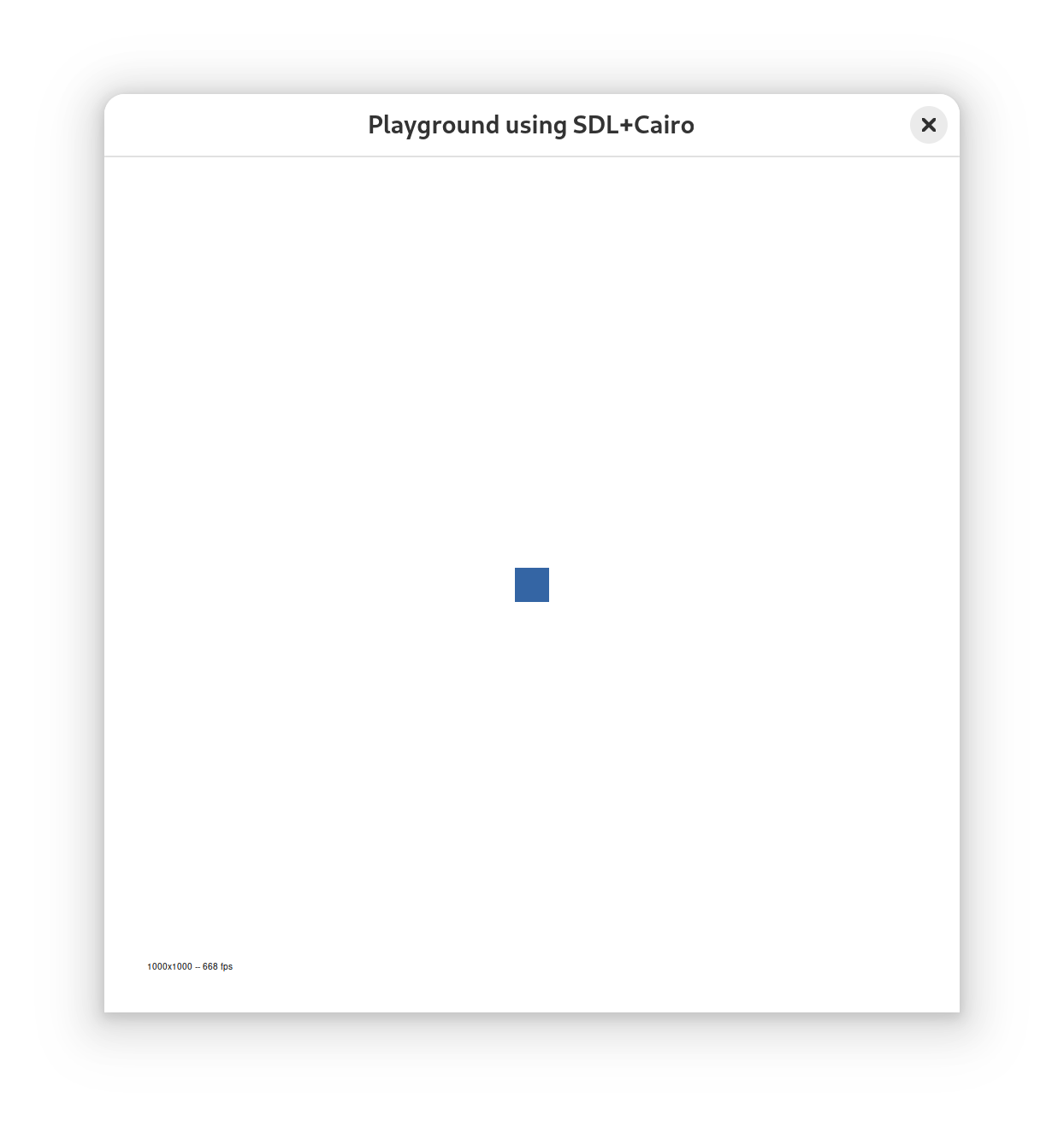
If you type on the arrow keys on your keyboard the blue square should move in the
corresponding direction. If you type q it will exit the game.
Note that with the Playground API the center of the screen is at (0, 0).
To compile this same application for the web, simply do:
$ cd docs/toy-web-example
$ opam install --deps-only --yes .
$ dune build --root .
$ cp _build/default/Toy.bc.js static/
You should then be able to use the web app by going to: https://aryx.github.io/ocaml-elm-playground/toy-web-example/static/Toy.html
By default the generated javascript file can be big so to get a smaller one you can do instead:
$ dune build --root . --profile=release
$ cp _build/default/Toy.bc.js static/
A program can be given parameters, the same way natively and on the
web: name=value (or just name) arguments on the command line, or
the URL's ?name=value&name:
$ dune exec examples/Flags.exe -- color=red speed=3
or Flags.html?color=red&speed=3 in a browser.
Like Elm's flags, they reach the application purely: main reads them
with Playground_platform.flags () and gives them to run_app, and
every view and update then finds them in computer.flags, as
(name, value) pairs:
let update computer (x, y) =
  let speed =
    match List.assoc_opt "speed" computer.flags with
    | Some s -> float_of_string s
    | None -> 1.
  in
  (x +. speed *. to_x computer.keyboard, y +. speed *. to_y computer.keyboard)

let main = Playground_platform.run_app ~flags:(Playground_platform.flags ()) app
(see examples/Flags.ml; a program that doesn't pass
~flags gets none). The arguments starting with a dash (-debug,
-fixed-time 1000, ...) are the playground's own. The same works for
3D programs, with Playground3d_platform.run_app3d ~flags.
The same three functions, with shapes in space and a camera:
open Playground
open Playground3d

let view (computer : Playground.computer) () =
  let angle = spin 6. computer.time in
  let scene = cube purple 1.5 |> rotate3d 0. angle 0. in
  let cam = camera ~eye:(3., 2., 5.) ~target:(0., 0., 0.) () in
  (cam, [ scene ])

let update _computer () = ()

let app = game3d view update ()
let main = Playground3d_platform.run_app3d app
view returns a camera and the shapes it looks at. The camera keeps
(0, 1, 0) as up unless told otherwise; a game whose ship rolls or looks
straight up gives its own (camera ~eye ~target ~up (), see
TinyDescent3d.ml). cube/box/plane are procedurally generated,
single-flat-color shapes -- no assets needed, the same philosophy as
2D's circle/square -- and textured_cube/textured_quad take a
file path or an http(s) URL and sample the image for real, per pixel. A
texture can also travel inside the program, with no file to find at run
time: a dune rule turns the image into base64
(scripts/build/file_to_base64_ml.ml), and
Playground3d.embedded_texture ~name ~base64 gives it a name to use as
a src (see TinyMinecraft.ml and its dune file).
Some to run, from this repository:
dune exec examples/Cubes3d.exe         # a grid of overlapping cubes, orbited by the camera
dune exec examples/TexturedCube3d.exe  # a cube wrapped with a test texture
dune exec examples/software/Corridor3d.exe  # walk down a corridor (up/down arrows)
dune exec examples/StarCollector3d.exe # move a box, collect randomly-spawning stars
dune exec games/flight/TinyDescent3d.exe    # fly a ship through a mine (arrows, a/d, w/s)
dune exec games/fps/TinyQuake.exe      # a Quake level: qbsp, vis and light at startup
In a browser: make serve-build, then e.g.
http://localhost:8001/examples/web/TexturedCube3d.html (the pages must
be served over HTTP, not opened as files, for the WebGL textures to
load; the Makefile's comment above serve-build says why).
An application chooses how it is drawn, portably, with
Playground3d.rendering:
let main =
  Playground3d_platform.run_app3d
    ~rendering:{ default_rendering with shading = Flat } app
shading: No_lighting, Flat (crisp facets), or Smooth (curved
shapes look round; the default);backface_culling: false to also draw the faces turned away from
the camera, e.g. for a lone plane seen from below;smooth_textures: false for sharp texels (pixel-art textures).Each backend does what it can (see below). The 2D playground has the
same idea, Playground.rendering.
The same application code runs on several backends, which is the point
of the two .mli files above: a program names Playground_platform
(or Playground3d_platform) and the dune file chooses who implements
it.
| 2D | 3D | |
|---|---|---|
| native, a library | native: Cairo, SDL for the window | opengl: OpenGL 3.3 and two small shaders |
| native, from scratch | software: our own 2D rasterizer | software: our own 3D rasterizer |
| browser | web: vdom, SVG | webgl: WebGL 1, with the 2D backend's SVG for the HUD |
| svg: the scene compiled to 2D shapes, drawn by the web backend |
The software backends compute every pixel themselves, from
graphics/ -- projection, clipping, culling, a z-buffer, shading,
texture mapping, one module per idea, each .mli explaining its
algorithm with a diagram and a worked example. They use SDL only for
the window, the input and showing the finished image. That is where the
rasterizers of this repository live, and make test compares their
output with golden frames, pixel by pixel.
The svg 3D backend is the cheapest of the four: it turns a 3D scene
into ordinary 2D Playground.shape values every frame (backface-culled
and depth-sorted) and hands them to the unmodified web backend, getting
SVG rendering, the event loop and browser timing for free -- at the
cost of some fidelity (see the limitations below).
Natively, the platform's keys are all Ctrl and a key, so that a plain
key is always the program's (a game's h, a q typed in a field):
Ctrl+Q quits, and the debug keys below are Ctrl and their letter. An
application that wants every key, Ctrl's included, says
run_app ~window:{ Playground.default_window with platform_keys = false }.
A program run with -debug-keys (e.g. dune exec examples/Cubes3d.exe -- -debug-keys) turns a dozen keys, with Ctrl, into live toggles of how
it is drawn: m cycles the shading (no lighting, flat, Gouraud, Phong), f
draws the wireframe, z swaps the z-buffer for the painter's
algorithm, c turns near-plane clipping off, x is a pixel
magnifier, r drops the resolution, o runs the unoptimized code, and
h shows the lot with their current state. Each one is there to make
one idea visible: what every key demonstrates, and why, is section 11
of notes_3d.md. Without the
flag they are off, so a game can use any key it likes. The WebGL pages
take the same toggles as URL parameters (?debug-keys, ?keys=mb,
?fixed-time=1000), since a page has no command line.
Two more flags make a run reproducible, which is how the golden frames
are made: -fixed-time t freezes the clock, and -script "right:1-60,space:30" plays the keys and the mouse frame by frame (see
Input_script.mli).
sphere (no cylinder/cone yet) --
everything else is built from flat polygons.c key, and the
GPU ones in hardware).fade3d is
ignored there): blending needs the faces drawn back to front, which
the z-buffer doesn't give.Read the tutorial at: https://aryx.github.io/ocaml-elm-playground/elm_playground/
Look at the code under examples/ and games/, a directory per genre; every game and application is listed, with the original it is a toy version of, in CATALOG.md.
To see them all running, open the web tinybox, or the galleries of the games and the applications, each with its screenshot, played in your browser with a click.
The playground is still the small library above, but around it this
repository has grown into a place to learn how the things it draws are
made (see A place to learn, by reading
for the numbers), each subject written from scratch, one idea per
module, with the idea explained in its .mli and checked by tests and
golden frames:
libs/graphics/, the 2D and 3D software rasterizers behind
the software backends, and Playground3d for 3D programs;games/, a directory per genre (see
CATALOG.md), 2D, 2.5D (each pseudo-3D trick written out
in its game) and 3D side by side, over the genre kits of gamekits/;libs/physics/,
libs/audio/, libs/ai/, libs/networking/;libs/gui/, a small toolkit with the same widgets
wired four ways (callbacks, MVC, MVU, immediate mode), the engines of
appkits/, and the Tiny applications of apps/ -- TinyVisiCalc and
TinyExcel over one spreadsheet engine, TinyBravo and TinyWord over
one text engine, TinyFrameMaker (the text poured over pages),
TinyMacPaint and TinyMacDraw (dots, and objects),
TinyOpenDoc (a document made of
parts), TinyPowerPoint and TinyHyperCard -- and TinyOffice, the suite
as it is today, where every kind of document holds the others.The plans and tutorial notes for each are in docs/claude_notes/; for the applications, start with notes_gui.md.
The games and applications here are small studies of famous programs, written from scratch to show how much of an original's design fits in a few hundred lines of OCaml. They are for learning, not a substitute for the originals, which we encourage you to play and buy. No code, graphics, music, levels or text were taken from the originals: the pixel art, tunes and levels are our own, in the originals' spirit, and only the ideas and mechanics (which copyright does not cover) are reproduced.
The names of the originals (Super Mario Bros., Zelda, Tetris, Photoshop, Chrome, ...) are trademarks of their owners, used here only to say which program each study is after. This project is not affiliated with, endorsed by, or sponsored by any of them. It is free, non-commercial, and makes no money. If you hold rights to one of these works and object to anything here, please open an issue and it will be changed or removed.
The 2D playground API (Playground.mli) and the ideas behind it are the
work of Evan Czaplicki for Elm at https://github.com/evancz/elm-playground
I (Pad) mostly ported the API and ideas, as well as some of the web backend code,
to OCaml. I then added also a native backend (using tsdl), which was not
in the Elm version (Elm is a web language).
The other APIs, written in the same spirit as Evan's (a few records and
functions, called from the same view and update), are Claude Code's: Physics,
Audio, Ai, Gui, Sprite, Tilemap, Logo, and the rest of
playground/. The exception is Playground3d, which is adapted from
Luca Mugnaini's elm-playground-3d (see the credits above).
The playground itself is still very small: the 2D API with its Cairo
and vdom backends is about 5,000 lines, and the 3D one about 1,000 over
a 1,200-line rasterizer.
I recently (Sep 2026) used Claude Code to fix many small bugs, and then to grow everything around that library: the repository is now about 280,000 lines of OCaml, tests included, and almost all of it was written by Claude Code -- I chose what to build, directed it and reviewed it, but I wrote very little of the code myself. And yet it stays small for what it holds -- 145 games and 53 applications, the 2D and 3D rasterizers, a ray tracer, a physics engine, synthesizers, game AI, a GUI toolkit, a TLS 1.3 stack, a web browser's engine and a dozen languages, all written from scratch, with no engine, no asset pipeline and no dependency doing the work underneath.
Turbo Pascal lives on its function keys (F9 compiles, F10 opens the menus). If yours are taken -- a laptop's top row set to volume and brightness, a Mac, a browser keeping them -- press Esc, then a digit: Esc 9 is F9, Esc 0 is F10. Alt and the digit work too, except on a Mac, and Ctrl and the digit is Ctrl and the F key (Ctrl 9 runs). ↩
324 followers · starred Sep 2026
190 followers · starred Sep 2026
373 followers · starred Feb 2025
186 followers · starred Dec 2024
Elm playground in OCaml to make 2d/3d pictures/animations/games easily, and more ...
See the codeCreate pictures, animations, and video games (and even applications) with OCaml, in 2D and 3D!
It started as a port to OCaml of the excellent Elm playground package https://github.com/evancz/elm-playground, and it keeps its spirit:
This is the package I wanted when I was learning programming. Start by putting shapes on screen and work up to making games. I hope this package will be fun for a broad range of ages and backgrounds! - Evan Czaplicki
Evan's package is a library and a handful of examples. This repository goes further: besides the library, it holds 145 games and 53 applications written with it. It is an ode to code: a collection of the programs that made computing history, from Pong, Breakout and Pac-Man to Doom and Quake, from VisiCalc and MacPaint to Turbo Pascal and Smalltalk-80. Each one is rebuilt in miniature but working, and comes with its story: who made the original, when, and what it brought that was new. And each is small, a few hundred lines to a few thousand, so that you can read the whole of it and appreciate it as a piece of art, not only use it; it runs natively on your desktop and in your browser, from the same source file:
| TinyBreakout (play it) | TinyTurboPascal (run it) |
|---|---|
| |
| Breakout (Atari, 1976): the wall, the paddle, the ball -- 525 lines, in one file | Turbo Pascal 7 (Borland, 1992): the editor, the compiler and the debugger -- 3,213 lines in 15 files: the IDE, and the Pascal compiler and P-machine under it1 |
They are all in CATALOG.md, and all in one menu,
tinybox
(and by size,
the smallest first). The whole repository can be explored in the
browser in its code map;
the links saying how many lines a program is open it on that
program's own code (w widens it to what it uses, then to everything).
| tinybox (open it) | The code map (open it) |
|---|---|
| |
| The menu: the programs of a section, the chosen one previewed live, and its code as a map | The whole repository: each folder a region, each file a block the size of its code; zoom in and the blocks are the code itself |
The main goal of all this is to teach people. Almost all of the code, the library as much as the programs, was written by an AI, Claude Code, under the author's direction (see the AI disclaimer), but it was written for people to read, and checked by tests: judge each module by what it explains, as you would a textbook's.
Evan's playground is for learning to write programs. This repository
is also for learning by reading them. Everything a game or an
application needs is written here from scratch, in plain OCaml: the
pixels, the sound, the physics, the AI, the widgets. There is no game
engine, no GPU requirement, and no C library doing the interesting part.
Each module holds one idea, and its .mli explains that idea, often
with an ASCII diagram, the paper or machine it comes from, and a worked
example checked by a test. So when you wonder how a triangle becomes
pixels, how a PNG is decompressed, how a Moog filter gets its sound, or
how a chess program picks its move, the answer is a few hundred lines
you can open and read.
OCaml all the way down. The libraries are written in OCaml, not
bound from C, even where C would be faster: there is not one line of C
in this repository. The one exception is drawing, and it is only half
of one: the default backends draw with Cairo and OpenGL, which are C,
for their speed; but the software backends draw the same programs
with our own 2D and 3D rasterizers, so there is an OCaml-only path
from a game down to its pixels, there to be read. In many languages
the libraries
that matter are written in another one: Python's numerical and AI
libraries are C and Fortran underneath (NumPy), and whoever wants to
know how they work has to change language to find out. Stroustrup made
this a design rule of C++: leave no room for a lower-level language
below it, so that its libraries could be written in it. OCaml is fast
enough to keep that rule here for a long time -- a PNG decoder, a
software rasterizer, a synthesizer, TLS 1.3, a GPT and its automatic
differentiation are all plain OCaml -- and since the purpose is
teaching, we keep it even when it costs speed: the OCaml is the more
readable of the two, and the reader never has to leave the language.
When something is slow we make the OCaml faster, and write down how
(notes_opti_ocaml.md).
The software that usually does this work is not like that. A graphics stack, a game engine, a codec library or a web browser is millions of lines, and nobody understands the whole of it. Here each subject is small enough for one person to read whole. That an AI wrote most of it is the paradox, the same as in IX: the trend these days is to use AI to write more and more code, until only the AI can change the program, and here it rewrites giant programs in far less code, so that humans can understand them again, and extend them. Ultimately these libraries may become literate programs, as in Principia Softwarica: books that tell the code as a story, in the order a reader needs, to teach even better.
AI makes the programs smaller. Humans understand more.
The library (libs/ and playground/) is about 73,000 lines of
OCaml, .mli files and their explanations included; with the kits
and the languages the programs share, about 119,000. That leaves out
the tests, the games and the applications (an area's name leads to its
modules in the API documentation, each with its explanation):
| area | lines | what you can read there |
|---|---|---|
the playground (playground/, libs/core/, libs/random/) | 22,100 | the 2D and 3D APIs and their seven backends (Cairo/SDL, vdom/SVG, OpenGL, WebGL, software), cameras, sprites, tilemaps, 3D characters, ragdolls and portals, and other ways to program: Logo's turtle, HtDP's big-bang and universe, PuzzleScript, Karel, POV-Ray, the teletype and text mode |
graphics (libs/graphics/) | 13,700 | a 2D rasterizer (lines, circles, polygon fill, strokes), a 3D one (projection, clipping, culling, z-buffer and painter's algorithm, flat/Gouraud/Phong shading, texture mapping), a ray tracer (CSG, bounding volumes), Hershey and VGA fonts, image processing (histograms, convolutions, Sobel, blending); image formats: PNG with its own inflate, Huffman and CRC, GIF (LZW), baseline JPEG (DCT) read and written, XPM, the Amiga's ILBM; and video: Y4M, FLI/FLC, AVI with Motion JPEG, MPEG-1 decoded and encoded |
physics (libs/physics/) | 5,300 | 2D and 3D rigid bodies: integrators, broadphase, collision detection, contact resolution, an iterative solver, joints, springs, quaternions, continuous collision, particles, and gravity (Kepler's orbits) |
audio (libs/audio/) | 11,200 | oscillators, noise, envelopes, LFOs, filters (state-variable, Moog and diode ladders), FM synthesis with the DX7's algorithms, Karplus-Strong strings, modal synthesis, a sampler, a step sequencer, a Fourier spectrum, stereo space, a rack of effects (drive, EQ, chorus, phaser, delay, reverb, compressor, a Leslie), a mixer, sound effects and music, and WAV, MIDI, ABC and MOD files, and MP2 and MP3 decoded |
AI (libs/ai/) | 3,600 | pathfinding, state machines, behavior trees, utility AI, steering and flocking, minimax with iterative deepening and Zobrist hashing, Monte Carlo tree search, Q-learning, and neural networks trained by backpropagation and by our own automatic differentiation |
GUI (libs/gui/, libs/juice/) | 4,200 | a toolkit: widgets, layout, focus, text editing, grids and themes, wired four ways (callbacks, MVC, MVU, immediate mode); and game juice: easing, tweens, screen shake, squash and stretch, particles |
networking (libs/networking/, libs/crypto/, libs/compression/) | 11,000 | the protocols as bytes in, bytes out: URLs, HTTP/1.1, WebSocket, IRC, mail (SMTP, POP3, MIME); netcode (lockstep, rollback, prediction and interpolation); TLS 1.3 with X.509 certificates, over SHA-2, HMAC, HKDF, ChaCha20-Poly1305, AES-GCM, X25519, ECDSA and RSA; Huffman codes, inflate and deflate, LZW |
the terminal (libs/terminal/) | 1,500 | a VT100's screen, the tty's line discipline, programs that ask and wait as values, curses, full-screen text programs |
application engines (appkits/) | 19,700 | a spreadsheet (dependency graph, recalculation), rich text poured into pages with Knuth-Plass line breaking, bitmap painting (seed fill, PackBits), structured drawing, compound documents, slides, undo and the clipboard; a web browser's engine (box, flex and table layout, the DOM for scripts); vi and Emacs, and Turbo Pascal's IDE and debugger; Scratch's blocks; CAD (Sketchpad's constraints, AutoCAD's commands and DXF, SketchUp's push/pull); a 3D modeler; a planetarium's astronomy; calendars and address books |
game kits (gamekits/) | 6,200 | how each genre works: Doom's sectors, heightmap terrains, Descent's mines, isometric projection, racing roads and 3D tracks, platformer slopes and ladders, maze chases, hitboxes and frame data for fighting games, animated skeletons, RTS orders, team formations, rhythm charts, a Sokoban solver, playing cards, ... |
languages (languages/) | 19,800 | languages as text, parsed and run: a spreadsheet's formulas, BASIC, Emacs Lisp, Pascal compiled to P-code, HyperTalk, Smalltalk-80 and its bytecode interpreter, Scratch and Snap!, JavaScript, HTML and CSS |
With the library doing the heavy lifting, a program built on it stays short enough to read in one sitting. It is not a toy sketch either, but a working version of a famous original:
A budget. No program may be longer than 5,000 lines of its own
code. That counts its file and every module of its folder, of the
kits (gamekits/, appkits/) and of the languages (languages/)
that it uses, found by following the modules it names; tinybox's code
map shows it, and make test checks it (tests/catalog/, counted by
launcher/codemap/deps/Code_deps). It leaves out the library (libs/,
playground/), and this is not cheating: the library is truly general,
the pixels, sounds, physics and codecs any program could use, while an
appkit, a gamekit or a language is made for a few particular programs,
a spreadsheet's recalculation, a genre's rules, Emacs's Lisp, so it is
theirs and counts. Seven programs are over it, each for a whole language
it carries, and listed as exceptions in the test (which says when one
comes back under): TinySmalltalk80
(Smalltalk-80), TinySqueak (the same,
and its environment written in it), TinyChrome,
TinyFirefox and
TinyNetscape (JavaScript and the
browser's engine), TinyMosaic (the
browser's engine: HTML, CSS and the layout), and
TinyOffice (the spreadsheet's formulas
and HyperTalk).
The biggest, TinyChrome, is 14,991
lines, in 89 files.
Yes, you read that right: 15,000 lines of OCaml for a web browser that
parses HTML and CSS, cascades the styles, lays out blocks, floats,
tables and flexbox, draws SVG, plays <video>, carries its own
JavaScript engine and Chrome's developer tools -- enough to read
Hacker News with it, over the repository's own TLS 1.3:
tinybox chrome url=https://news.ycombinator.com
It runs in your browser too, but there a page may only read the sites that allow it (CORS), and Hacker News does not: on the web it shows its own built-in pages.
There are 145 games and 53 applications like these, listed in CATALOG.md. Each one starts with a header about its original and what it borrows from the library, and the games that fake 3D point out the trick they use. The tutorials in docs/claude_notes/tutorials/ (3D, 2D, physics, audio, synthesizers, AI, images, fonts, GUI, ...) walk through each subject module by module.
The OCaml elm_playground package allows you to easily create
pictures, animations, and even video games in a portable way using an API that
really simplifies how to view the computer and its devices (the screen,
keyboard, and mouse).
The goal is similar to the old graphics package
but goes even further in terms of simplification.
The main API is defined in a single Playground.mli module and is implemented by two backends:
Here is for example a simple Snake game you can run from your browser (use the arrow keys to change the direction of the snake and eat the ball to grow your length). You can run the same game on your desktop without changing a line of code.
The same idea one dimension up is Playground3d
(Playground3d.mli):
shapes in space, a camera, and the same game loop. Its main backend
wraps no OpenGL, Vulkan or WebGL -- the projection, the camera math and
the whole triangle rasterizer are hand-written OCaml, on purpose, so
that you can read every line that turns a 3D shape into pixels (two
other backends then hand the same scenes to a real GPU, for comparison
and for speed). See In 3D below.
Credit where due: Playground3d's API (world-space shapes, an
eye/target camera, and the trick of compiling a 3D scene down to plain
2D shapes for the browser) is adapted from Luca Mugnaini's
elm-playground-3d,
itself built on Evan Czaplicki's original
elm-playground; the
StarCollector3d.ml example's mechanics are adapted from Nate Abele's
elm-3d-playground.
The fuller survey -- VRML, OpenGL, WebGL, Vulkan, Unity -- is in
notes_playground3d_related_work.md.
To install the playground, run opam install elm_playground and then
install one or both backends with opam install elm_playground_native
and/or opam install elm_playground_web. The 3D packages
(elm_playground_3d and its backends elm_playground_3d_opengl,
elm_playground_3d_software, elm_playground_3d_webgl,
elm_playground_3d_web) live in this repository and are released the
same way.
To play the games and use the applications rather than write your own,
install tinybox with opam install tinybox: after BusyBox, every one
of them linked into one binary (2D on Cairo, 3D on OpenGL). tinybox
alone opens a menu to choose one, with its screenshot and its code map,
tinybox list names them all, and tinybox TinyMario runs one
directly, with the same flags as its own executable. From a clone of
this repository, make builds it as ./bin/tinybox; the same menu
runs in your browser.
Here is a very simple application using the playground:
open Playground

(* the (x, y) position of the blue square  *)
type model = (float * float)

let initial_state : model = (0., 0.)

let view _computer (x, y) = [
  square blue 40.
   |> move x y
 ]

let update computer (x, y) =
  (x +. to_x computer.keyboard, y +. to_y computer.keyboard)

let app =
  game view update initial_state

let main = Playground_platform.run_app app
It is a very simple game defining a model type, a view function, and an update function to specify how the game behaves. It is using the
"Model-View-Update" architecture to organize the code of a graphical
interactive application
(see https://guide.elm-lang.org/architecture/ for more information).
To compile this application, simply do:
$ cd docs/toy-native-example
$ opam install --deps-only --yes .
$ dune exec --root . ./Toy.exe
You should then see on your desktop:
If you type on the arrow keys on your keyboard the blue square should move in the
corresponding direction. If you type q it will exit the game.
Note that with the Playground API the center of the screen is at (0, 0).
To compile this same application for the web, simply do:
$ cd docs/toy-web-example
$ opam install --deps-only --yes .
$ dune build --root .
$ cp _build/default/Toy.bc.js static/
You should then be able to use the web app by going to: https://aryx.github.io/ocaml-elm-playground/toy-web-example/static/Toy.html
By default the generated javascript file can be big so to get a smaller one you can do instead:
$ dune build --root . --profile=release
$ cp _build/default/Toy.bc.js static/
A program can be given parameters, the same way natively and on the
web: name=value (or just name) arguments on the command line, or
the URL's ?name=value&name:
$ dune exec examples/Flags.exe -- color=red speed=3
or Flags.html?color=red&speed=3 in a browser.
Like Elm's flags, they reach the application purely: main reads them
with Playground_platform.flags () and gives them to run_app, and
every view and update then finds them in computer.flags, as
(name, value) pairs:
let update computer (x, y) =
  let speed =
    match List.assoc_opt "speed" computer.flags with
    | Some s -> float_of_string s
    | None -> 1.
  in
  (x +. speed *. to_x computer.keyboard, y +. speed *. to_y computer.keyboard)

let main = Playground_platform.run_app ~flags:(Playground_platform.flags ()) app
(see examples/Flags.ml; a program that doesn't pass
~flags gets none). The arguments starting with a dash (-debug,
-fixed-time 1000, ...) are the playground's own. The same works for
3D programs, with Playground3d_platform.run_app3d ~flags.
The same three functions, with shapes in space and a camera:
open Playground
open Playground3d

let view (computer : Playground.computer) () =
  let angle = spin 6. computer.time in
  let scene = cube purple 1.5 |> rotate3d 0. angle 0. in
  let cam = camera ~eye:(3., 2., 5.) ~target:(0., 0., 0.) () in
  (cam, [ scene ])

let update _computer () = ()

let app = game3d view update ()
let main = Playground3d_platform.run_app3d app
view returns a camera and the shapes it looks at. The camera keeps
(0, 1, 0) as up unless told otherwise; a game whose ship rolls or looks
straight up gives its own (camera ~eye ~target ~up (), see
TinyDescent3d.ml). cube/box/plane are procedurally generated,
single-flat-color shapes -- no assets needed, the same philosophy as
2D's circle/square -- and textured_cube/textured_quad take a
file path or an http(s) URL and sample the image for real, per pixel. A
texture can also travel inside the program, with no file to find at run
time: a dune rule turns the image into base64
(scripts/build/file_to_base64_ml.ml), and
Playground3d.embedded_texture ~name ~base64 gives it a name to use as
a src (see TinyMinecraft.ml and its dune file).
Some to run, from this repository:
dune exec examples/Cubes3d.exe         # a grid of overlapping cubes, orbited by the camera
dune exec examples/TexturedCube3d.exe  # a cube wrapped with a test texture
dune exec examples/software/Corridor3d.exe  # walk down a corridor (up/down arrows)
dune exec examples/StarCollector3d.exe # move a box, collect randomly-spawning stars
dune exec games/flight/TinyDescent3d.exe    # fly a ship through a mine (arrows, a/d, w/s)
dune exec games/fps/TinyQuake.exe      # a Quake level: qbsp, vis and light at startup
In a browser: make serve-build, then e.g.
http://localhost:8001/examples/web/TexturedCube3d.html (the pages must
be served over HTTP, not opened as files, for the WebGL textures to
load; the Makefile's comment above serve-build says why).
An application chooses how it is drawn, portably, with
Playground3d.rendering:
let main =
  Playground3d_platform.run_app3d
    ~rendering:{ default_rendering with shading = Flat } app
shading: No_lighting, Flat (crisp facets), or Smooth (curved
shapes look round; the default);backface_culling: false to also draw the faces turned away from
the camera, e.g. for a lone plane seen from below;smooth_textures: false for sharp texels (pixel-art textures).Each backend does what it can (see below). The 2D playground has the
same idea, Playground.rendering.
The same application code runs on several backends, which is the point
of the two .mli files above: a program names Playground_platform
(or Playground3d_platform) and the dune file chooses who implements
it.
| 2D | 3D | |
|---|---|---|
| native, a library | native: Cairo, SDL for the window | opengl: OpenGL 3.3 and two small shaders |
| native, from scratch | software: our own 2D rasterizer | software: our own 3D rasterizer |
| browser | web: vdom, SVG | webgl: WebGL 1, with the 2D backend's SVG for the HUD |
| svg: the scene compiled to 2D shapes, drawn by the web backend |
The software backends compute every pixel themselves, from
graphics/ -- projection, clipping, culling, a z-buffer, shading,
texture mapping, one module per idea, each .mli explaining its
algorithm with a diagram and a worked example. They use SDL only for
the window, the input and showing the finished image. That is where the
rasterizers of this repository live, and make test compares their
output with golden frames, pixel by pixel.
The svg 3D backend is the cheapest of the four: it turns a 3D scene
into ordinary 2D Playground.shape values every frame (backface-culled
and depth-sorted) and hands them to the unmodified web backend, getting
SVG rendering, the event loop and browser timing for free -- at the
cost of some fidelity (see the limitations below).
Natively, the platform's keys are all Ctrl and a key, so that a plain
key is always the program's (a game's h, a q typed in a field):
Ctrl+Q quits, and the debug keys below are Ctrl and their letter. An
application that wants every key, Ctrl's included, says
run_app ~window:{ Playground.default_window with platform_keys = false }.
A program run with -debug-keys (e.g. dune exec examples/Cubes3d.exe -- -debug-keys) turns a dozen keys, with Ctrl, into live toggles of how
it is drawn: m cycles the shading (no lighting, flat, Gouraud, Phong), f
draws the wireframe, z swaps the z-buffer for the painter's
algorithm, c turns near-plane clipping off, x is a pixel
magnifier, r drops the resolution, o runs the unoptimized code, and
h shows the lot with their current state. Each one is there to make
one idea visible: what every key demonstrates, and why, is section 11
of notes_3d.md. Without the
flag they are off, so a game can use any key it likes. The WebGL pages
take the same toggles as URL parameters (?debug-keys, ?keys=mb,
?fixed-time=1000), since a page has no command line.
Two more flags make a run reproducible, which is how the golden frames
are made: -fixed-time t freezes the clock, and -script "right:1-60,space:30" plays the keys and the mouse frame by frame (see
Input_script.mli).
sphere (no cylinder/cone yet) --
everything else is built from flat polygons.c key, and the
GPU ones in hardware).fade3d is
ignored there): blending needs the faces drawn back to front, which
the z-buffer doesn't give.Read the tutorial at: https://aryx.github.io/ocaml-elm-playground/elm_playground/
Look at the code under examples/ and games/, a directory per genre; every game and application is listed, with the original it is a toy version of, in CATALOG.md.
To see them all running, open the web tinybox, or the galleries of the games and the applications, each with its screenshot, played in your browser with a click.
The playground is still the small library above, but around it this
repository has grown into a place to learn how the things it draws are
made (see A place to learn, by reading
for the numbers), each subject written from scratch, one idea per
module, with the idea explained in its .mli and checked by tests and
golden frames:
libs/graphics/, the 2D and 3D software rasterizers behind
the software backends, and Playground3d for 3D programs;games/, a directory per genre (see
CATALOG.md), 2D, 2.5D (each pseudo-3D trick written out
in its game) and 3D side by side, over the genre kits of gamekits/;libs/physics/,
libs/audio/, libs/ai/, libs/networking/;libs/gui/, a small toolkit with the same widgets
wired four ways (callbacks, MVC, MVU, immediate mode), the engines of
appkits/, and the Tiny applications of apps/ -- TinyVisiCalc and
TinyExcel over one spreadsheet engine, TinyBravo and TinyWord over
one text engine, TinyFrameMaker (the text poured over pages),
TinyMacPaint and TinyMacDraw (dots, and objects),
TinyOpenDoc (a document made of
parts), TinyPowerPoint and TinyHyperCard -- and TinyOffice, the suite
as it is today, where every kind of document holds the others.The plans and tutorial notes for each are in docs/claude_notes/; for the applications, start with notes_gui.md.
The games and applications here are small studies of famous programs, written from scratch to show how much of an original's design fits in a few hundred lines of OCaml. They are for learning, not a substitute for the originals, which we encourage you to play and buy. No code, graphics, music, levels or text were taken from the originals: the pixel art, tunes and levels are our own, in the originals' spirit, and only the ideas and mechanics (which copyright does not cover) are reproduced.
The names of the originals (Super Mario Bros., Zelda, Tetris, Photoshop, Chrome, ...) are trademarks of their owners, used here only to say which program each study is after. This project is not affiliated with, endorsed by, or sponsored by any of them. It is free, non-commercial, and makes no money. If you hold rights to one of these works and object to anything here, please open an issue and it will be changed or removed.
The 2D playground API (Playground.mli) and the ideas behind it are the
work of Evan Czaplicki for Elm at https://github.com/evancz/elm-playground
I (Pad) mostly ported the API and ideas, as well as some of the web backend code,
to OCaml. I then added also a native backend (using tsdl), which was not
in the Elm version (Elm is a web language).
The other APIs, written in the same spirit as Evan's (a few records and
functions, called from the same view and update), are Claude Code's: Physics,
Audio, Ai, Gui, Sprite, Tilemap, Logo, and the rest of
playground/. The exception is Playground3d, which is adapted from
Luca Mugnaini's elm-playground-3d (see the credits above).
The playground itself is still very small: the 2D API with its Cairo
and vdom backends is about 5,000 lines, and the 3D one about 1,000 over
a 1,200-line rasterizer.
I recently (Sep 2026) used Claude Code to fix many small bugs, and then to grow everything around that library: the repository is now about 280,000 lines of OCaml, tests included, and almost all of it was written by Claude Code -- I chose what to build, directed it and reviewed it, but I wrote very little of the code myself. And yet it stays small for what it holds -- 145 games and 53 applications, the 2D and 3D rasterizers, a ray tracer, a physics engine, synthesizers, game AI, a GUI toolkit, a TLS 1.3 stack, a web browser's engine and a dozen languages, all written from scratch, with no engine, no asset pipeline and no dependency doing the work underneath.
Turbo Pascal lives on its function keys (F9 compiles, F10 opens the menus). If yours are taken -- a laptop's top row set to volume and brightness, a Mac, a browser keeping them -- press Esc, then a digit: Esc 9 is F9, Esc 0 is F10. Alt and the digit work too, except on a Mac, and Ctrl and the digit is Ctrl and the F key (Ctrl 9 runs). ↩
324 followers · starred Sep 2026
190 followers · starred Sep 2026
373 followers · starred Feb 2025
186 followers · starred Dec 2024