
Search your OpenCode sessions with full text & fuzzy search; with message and file matching
TypeScript
2
11 commits
updated Sep 24, 2026
See what people are saying
README
opencode-search
A fast, local session-search plugin for OpenCode. Search past conversations by title, message text, tool output, and file references without leaving the terminal.
Features
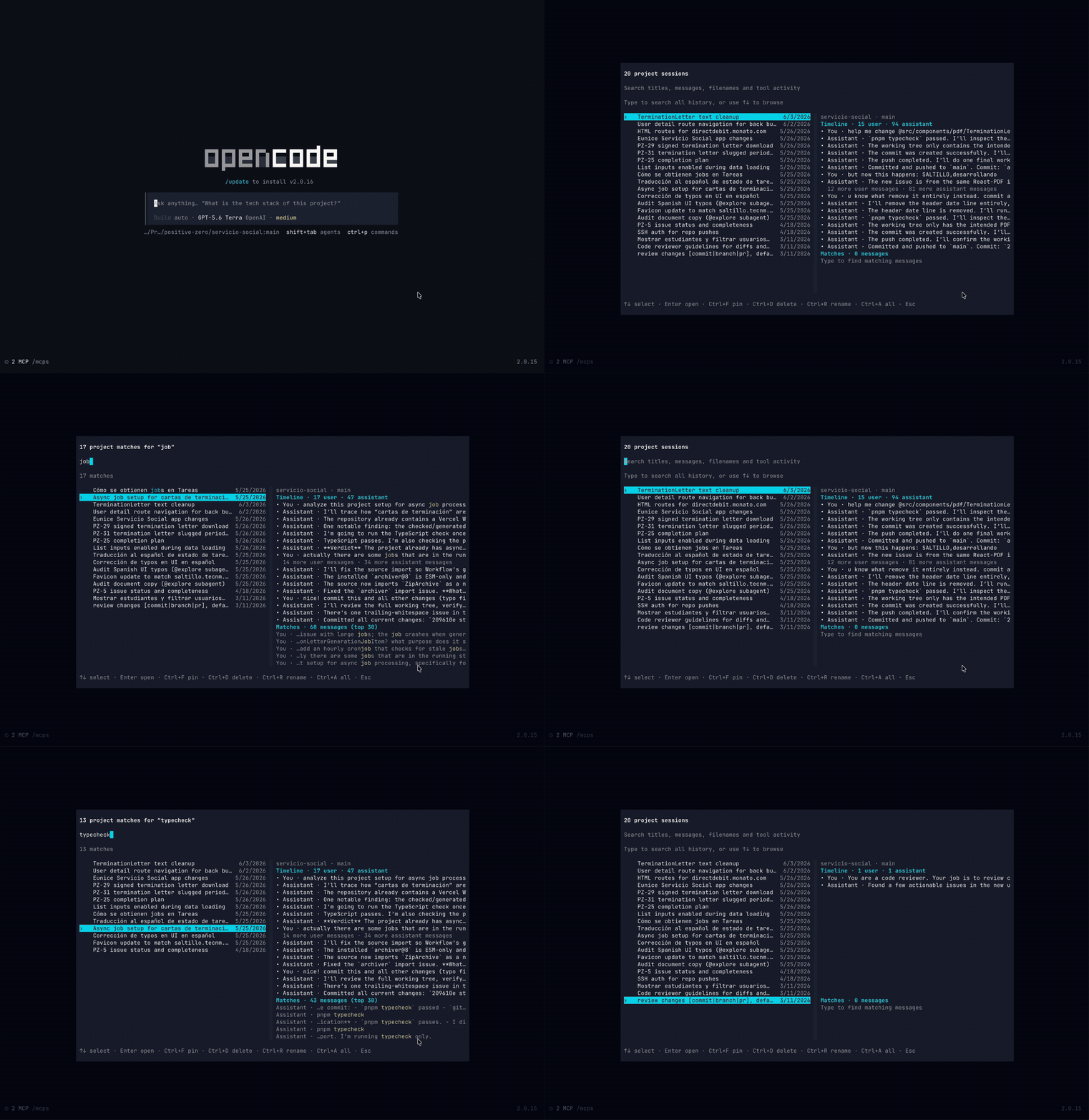
- Full-text search across OpenCode session transcripts, including user messages, assistant responses, tool output, and referenced files.
- Fuzzy matching for small typos and partial terms, with title matches ranked ahead of weaker transcript matches.
- Project-first results so the sessions most relevant to the current workspace stay in focus.
- Cross-project search when you need to find an older conversation anywhere in your local OpenCode history.
- Context preview with matching excerpts and a compact message timeline before opening a result.
- Session actions to pin, rename, or delete sessions from the picker.
- Local SQLite index that is created on first use and incrementally refreshed as sessions change.
Install
Install the versioned Git package with OpenCode:
opencode plugin add github:arvindell/opencode-search#v1.0.3
Restart OpenCode. The installer adds the TUI plugin to your global cli.json.
The plugin searches locally stored OpenCode sessions. It does not send transcript content to an external search service.
Usage
Open the command picker in OpenCode and run:
/search
You can also start with a query:
/search payment webhook
Search begins in the current project by default. Press Ctrl+A to include sessions from every project.
Keyboard shortcuts
| Shortcut | Action |
|---|---|
| ↑ / ↓ | Move through results |
| Enter | Open the selected session |
| Ctrl+A | Toggle current-project / all-project search |
| Ctrl+F | Pin or unpin a session |
| Ctrl+R | Rename the selected session |
| Ctrl+D twice | Delete the selected session |
How search works
The first search builds a local SQLite full-text index from your session history. Later searches reuse that index and refresh only sessions that changed, so the picker stays responsive even when your history gets large.
Results combine exact full-text matches, title matches, prefix matching, and limited typo-tolerant matching. The selected result shows the relevant message excerpts alongside a compact conversation timeline, which makes it easier to recognize the right session before reopening it.
Development
This plugin is written in TypeScript and uses Bun for local checks:
bun test
bun run typecheck
bun run compile
License
MIT — see LICENSE.
Contributors

11 commits


Search your OpenCode sessions with full text & fuzzy search; with message and file matching
TypeScript
2
11 commits
updated Sep 24, 2026
See what people are saying
README
opencode-search
A fast, local session-search plugin for OpenCode. Search past conversations by title, message text, tool output, and file references without leaving the terminal.
Features
- Full-text search across OpenCode session transcripts, including user messages, assistant responses, tool output, and referenced files.
- Fuzzy matching for small typos and partial terms, with title matches ranked ahead of weaker transcript matches.
- Project-first results so the sessions most relevant to the current workspace stay in focus.
- Cross-project search when you need to find an older conversation anywhere in your local OpenCode history.
- Context preview with matching excerpts and a compact message timeline before opening a result.
- Session actions to pin, rename, or delete sessions from the picker.
- Local SQLite index that is created on first use and incrementally refreshed as sessions change.
Install
Install the versioned Git package with OpenCode:
opencode plugin add github:arvindell/opencode-search#v1.0.3
Restart OpenCode. The installer adds the TUI plugin to your global cli.json.
The plugin searches locally stored OpenCode sessions. It does not send transcript content to an external search service.
Usage
Open the command picker in OpenCode and run:
/search
You can also start with a query:
/search payment webhook
Search begins in the current project by default. Press Ctrl+A to include sessions from every project.
Keyboard shortcuts
| Shortcut | Action |
|---|---|
| ↑ / ↓ | Move through results |
| Enter | Open the selected session |
| Ctrl+A | Toggle current-project / all-project search |
| Ctrl+F | Pin or unpin a session |
| Ctrl+R | Rename the selected session |
| Ctrl+D twice | Delete the selected session |
How search works
The first search builds a local SQLite full-text index from your session history. Later searches reuse that index and refresh only sessions that changed, so the picker stays responsive even when your history gets large.
Results combine exact full-text matches, title matches, prefix matching, and limited typo-tolerant matching. The selected result shows the relevant message excerpts alongside a compact conversation timeline, which makes it easier to recognize the right session before reopening it.
Development
This plugin is written in TypeScript and uses Bun for local checks:
bun test
bun run typecheck
bun run compile
License
MIT — see LICENSE.
Similar repos
Contributors
11 commits
Languages
TypeScript
100.0%