
Search your coding-agent sessions, past and live, by any word you remember, then jump to them or resume them
Python
5
17 commits
updated Sep 19, 2026
See what people are saying (1)
README
herdr-transcripts
Search your coding-agent sessions, past and live, by any word you remember, then jump to them or resume them in a Herdr tab. Search by title, prompt, reply or tool call.
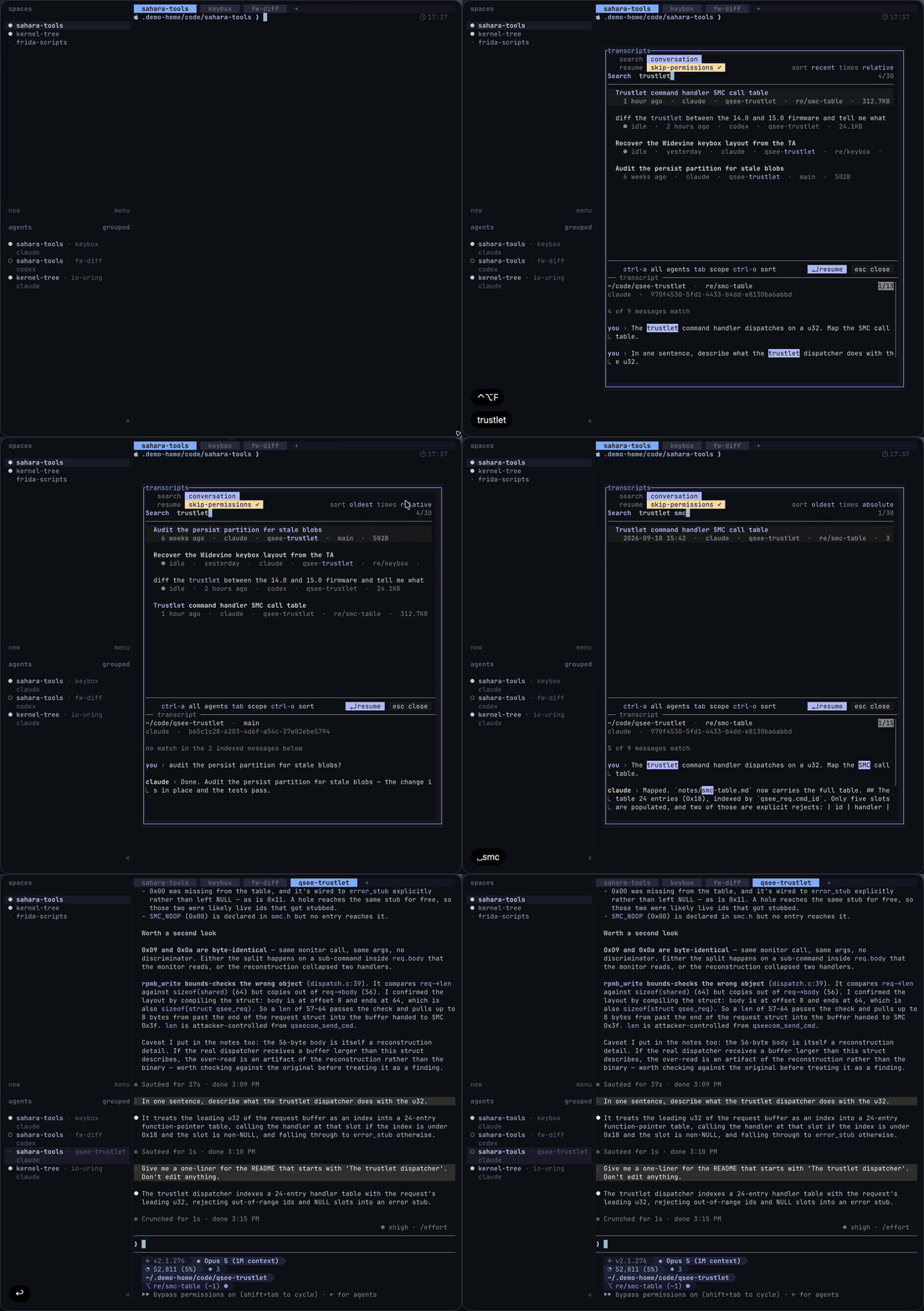
Features
- Covers the main coding agents in one list
- Search words across titles, prompts, replies and tool calls
- Highlighted matches in previews
- Mouse-first like Herdr, with a key for everything
- Filters by agent and cwd
- Incremental index, pre-warmed, parallel parsing: a cold rebuild of 3.8 GiB takes under a second, a warm list about 0.2 s
- Python standard library and
fzf
Supported agents
Claude Code, Codex, OpenCode, Gemini CLI, Droid, Copilot CLI, Kimi Code and Qwen Code.
Ctrl+X toggles each agent's own skip-permissions flag, --yolo,
--allow-all-tools or --auto high as the agent spells it. Ctrl+D shows
where each agent's transcripts are read from and the exact resume command.
A session already running in Herdr shows a status chip, and Enter focuses it
instead of starting it again.
Screenshots
Searched by word across titles, prompts and replies
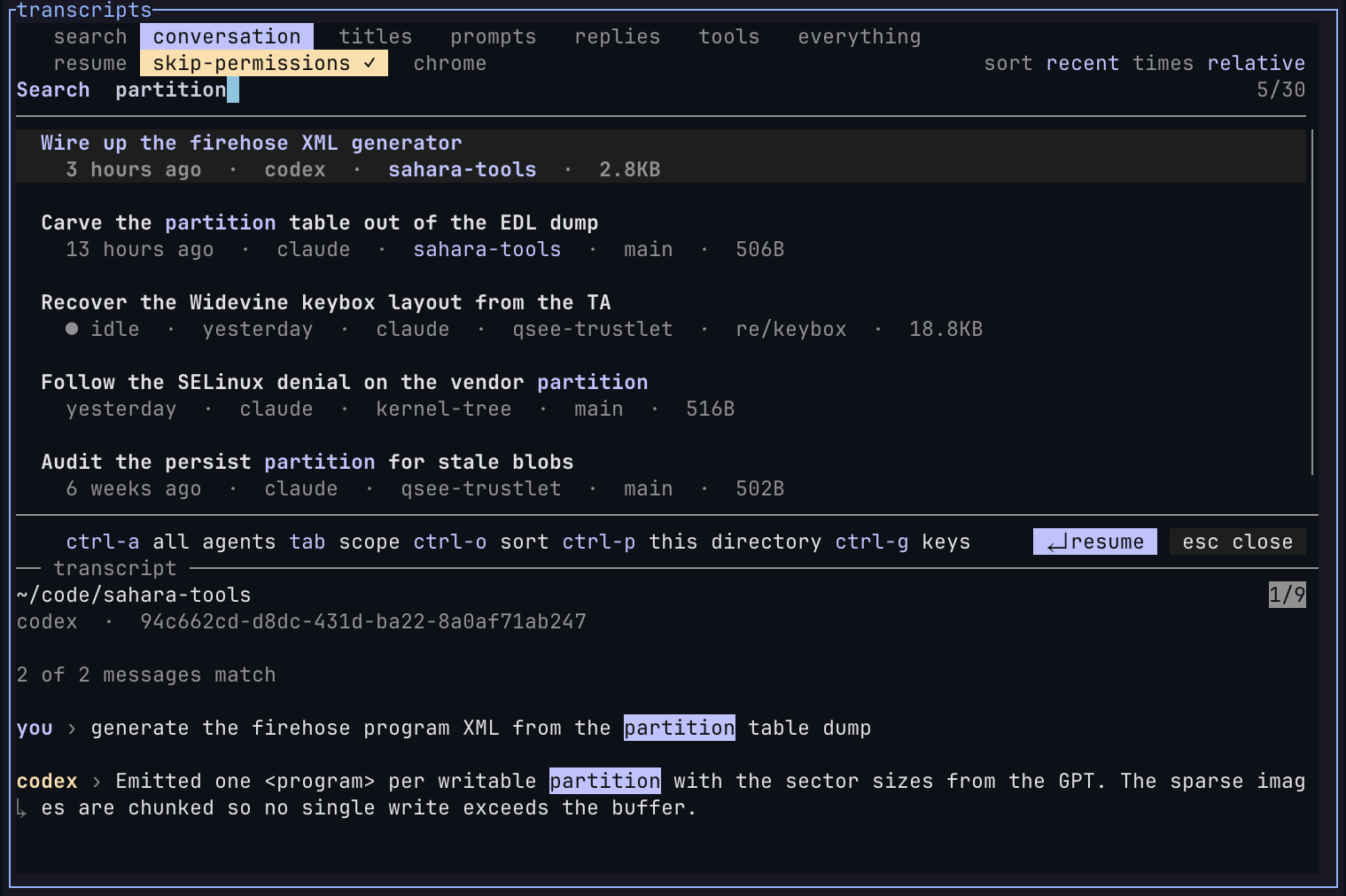
Scoped to replies, matching what the agent said
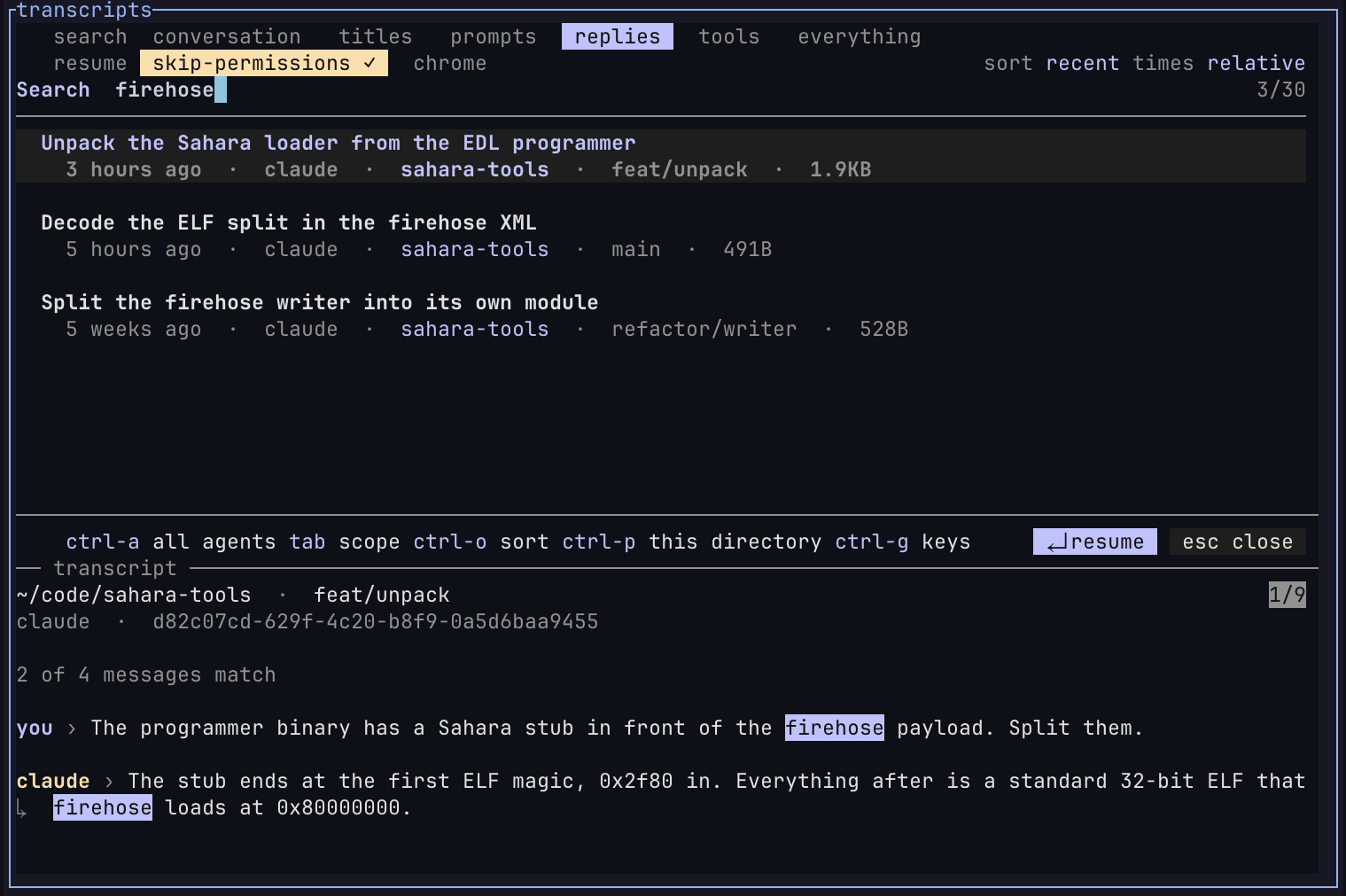
Scoped by agent with absolute dates
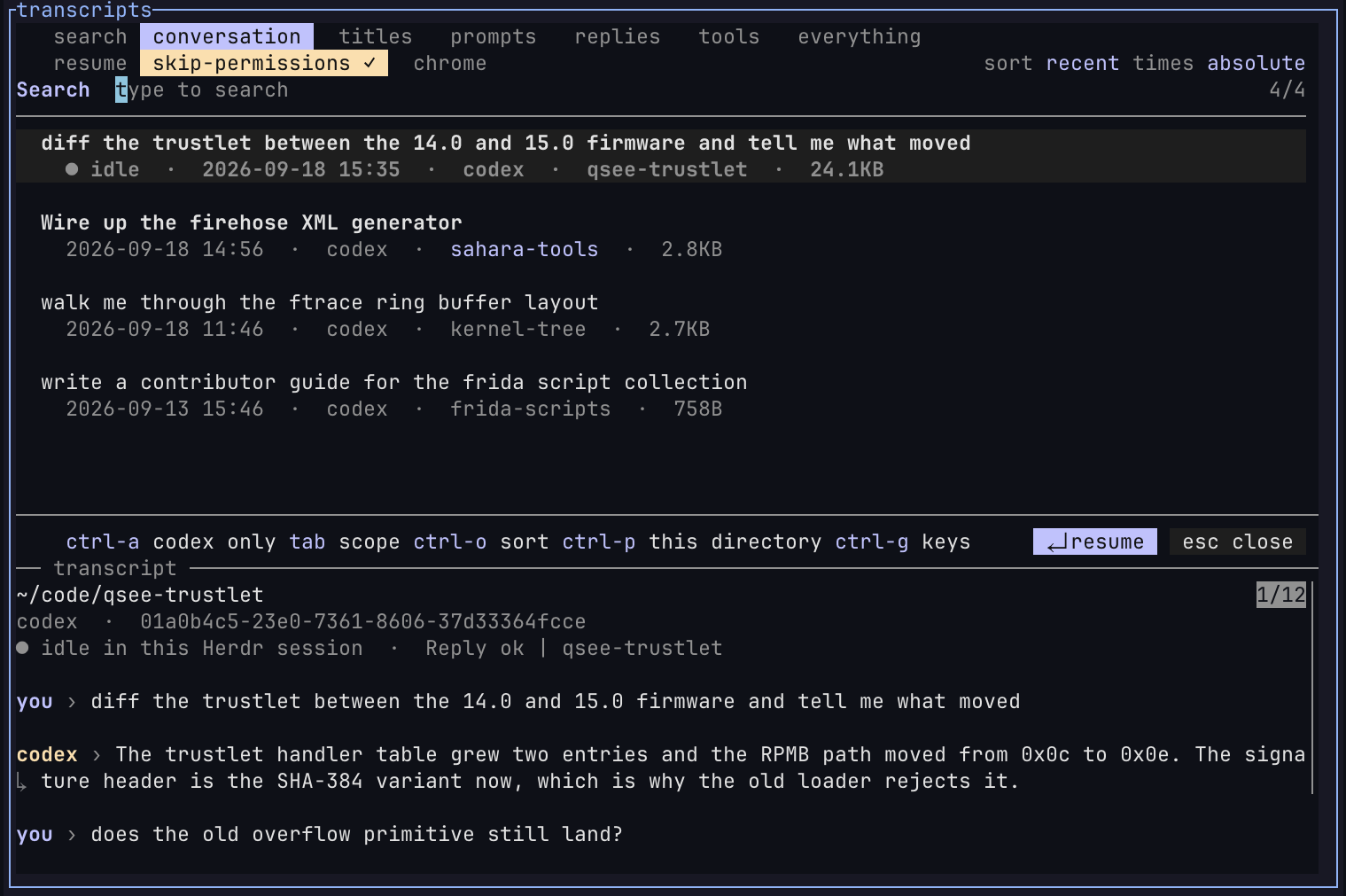
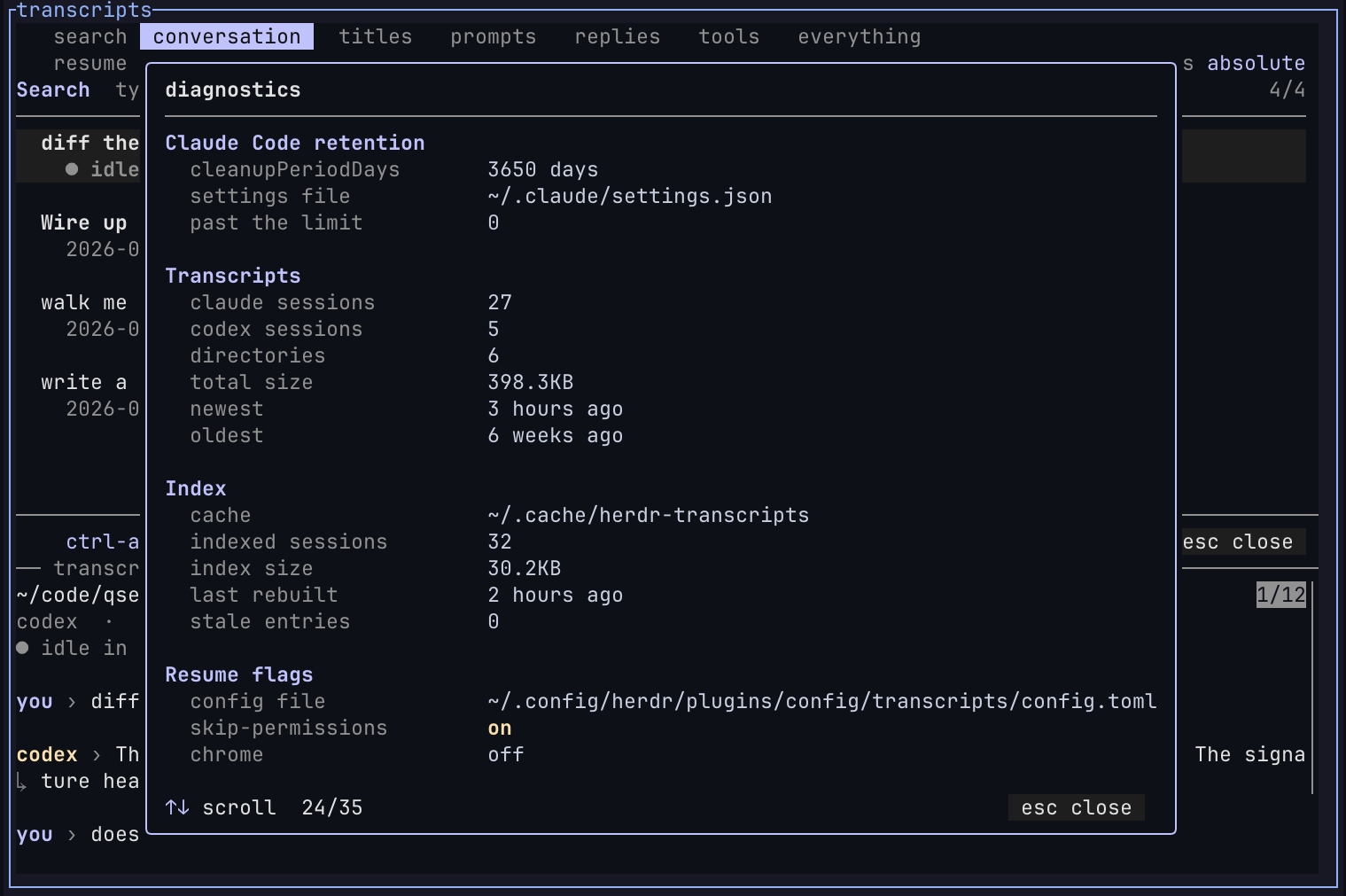
Diagnostics with retention, index state and flags
Requirements
- Linux or macOS
- Herdr ≥ 0.7
fzf≥ 0.66- Python ≥ 3.8
- At least one supported agent, to resume sessions
[!NOTE] Debian and Ubuntu package older
fzfversions. Install a current fzf release if the picker reports an unsupported version.
Install
herdr plugin install hxreborn/herdr-transcripts
Bind a key in ~/.config/herdr/config.toml:
[[keys.command]]
key = "ctrl+alt+f"
type = "shell"
command = "\"$HERDR_BIN_PATH\" plugin pane open --plugin transcripts --entrypoint picker"
description = "Search session transcripts"
Reload Herdr:
herdr server reload-config
Usage
Type a word. Matches are newest first. Enter resumes the session in its own
directory, or focuses its pane if it's already running.
Tab cycles the search scope:
| Scope | Searches |
|---|---|
conversation | titles, prompts, and replies |
titles | session title, directory, and branch |
prompts | your messages |
replies | the assistant's messages |
tools | commands, paths, and patterns in tool calls |
everything | every indexed field |
Words match exactly, in any order. Prefix a word with ' for fuzzy matching
or ! to exclude it. ^ and $ anchor a word.
Ctrl+A narrows to one agent, Ctrl+P to the current directory, and Ctrl+O
changes the sort order.
./transcripts outside Herdr runs the picker in the current terminal.
Keys
| Key | Action |
|---|---|
Enter | resume |
Esc | close |
Tab | next scope |
Ctrl+O | next sort order |
Ctrl+P | only this directory |
Ctrl+A | one agent, or all of them |
Ctrl+T | relative or absolute time |
Ctrl+V, Ctrl+/ | toggle the preview |
Ctrl+X | toggle the agent's skip-permissions flag |
Ctrl+B | toggle --chrome (Claude Code only) |
Ctrl+G | keys overlay |
Ctrl+D | diagnostics |
Configuration
The picker saves scope, sort, time format, agent filter, and resume flags in
~/.config/herdr/plugins/config/transcripts/config.toml.
Colours come from [theme.custom] in the Herdr config, at HERDR_CONFIG_PATH
when Herdr sets it and ~/.config/herdr/config.toml otherwise.
Diagnostics
Ctrl+D reports dependency versions, index state, session counts, active
flags, and Claude Code transcript retention. If cleanupPeriodDays is 30 or
lower, diagnostics offers to set it to 3,650 in ~/.claude/settings.json.
The index lives in ~/.cache/herdr-transcripts. Delete that directory, or run
./transcripts warm, to rebuild it.
Development
tests/tui.py
herdr plugin link .
Licence
Contributors

17 commits
Similar repos


Languages
Python
99.6%
Search your coding-agent sessions, past and live, by any word you remember, then jump to them or resume them
Python
5
17 commits
updated Sep 19, 2026
See what people are saying (1)
README
herdr-transcripts
Search your coding-agent sessions, past and live, by any word you remember, then jump to them or resume them in a Herdr tab. Search by title, prompt, reply or tool call.
Features
- Covers the main coding agents in one list
- Search words across titles, prompts, replies and tool calls
- Highlighted matches in previews
- Mouse-first like Herdr, with a key for everything
- Filters by agent and cwd
- Incremental index, pre-warmed, parallel parsing: a cold rebuild of 3.8 GiB takes under a second, a warm list about 0.2 s
- Python standard library and
fzf
Supported agents
Claude Code, Codex, OpenCode, Gemini CLI, Droid, Copilot CLI, Kimi Code and Qwen Code.
Ctrl+X toggles each agent's own skip-permissions flag, --yolo,
--allow-all-tools or --auto high as the agent spells it. Ctrl+D shows
where each agent's transcripts are read from and the exact resume command.
A session already running in Herdr shows a status chip, and Enter focuses it
instead of starting it again.
Screenshots
Searched by word across titles, prompts and replies
Scoped to replies, matching what the agent said
Scoped by agent with absolute dates
Diagnostics with retention, index state and flags
Requirements
- Linux or macOS
- Herdr ≥ 0.7
fzf≥ 0.66- Python ≥ 3.8
- At least one supported agent, to resume sessions
[!NOTE] Debian and Ubuntu package older
fzfversions. Install a current fzf release if the picker reports an unsupported version.
Install
herdr plugin install hxreborn/herdr-transcripts
Bind a key in ~/.config/herdr/config.toml:
[[keys.command]]
key = "ctrl+alt+f"
type = "shell"
command = "\"$HERDR_BIN_PATH\" plugin pane open --plugin transcripts --entrypoint picker"
description = "Search session transcripts"
Reload Herdr:
herdr server reload-config
Usage
Type a word. Matches are newest first. Enter resumes the session in its own
directory, or focuses its pane if it's already running.
Tab cycles the search scope:
| Scope | Searches |
|---|---|
conversation | titles, prompts, and replies |
titles | session title, directory, and branch |
prompts | your messages |
replies | the assistant's messages |
tools | commands, paths, and patterns in tool calls |
everything | every indexed field |
Words match exactly, in any order. Prefix a word with ' for fuzzy matching
or ! to exclude it. ^ and $ anchor a word.
Ctrl+A narrows to one agent, Ctrl+P to the current directory, and Ctrl+O
changes the sort order.
./transcripts outside Herdr runs the picker in the current terminal.
Keys
| Key | Action |
|---|---|
Enter | resume |
Esc | close |
Tab | next scope |
Ctrl+O | next sort order |
Ctrl+P | only this directory |
Ctrl+A | one agent, or all of them |
Ctrl+T | relative or absolute time |
Ctrl+V, Ctrl+/ | toggle the preview |
Ctrl+X | toggle the agent's skip-permissions flag |
Ctrl+B | toggle --chrome (Claude Code only) |
Ctrl+G | keys overlay |
Ctrl+D | diagnostics |
Configuration
The picker saves scope, sort, time format, agent filter, and resume flags in
~/.config/herdr/plugins/config/transcripts/config.toml.
Colours come from [theme.custom] in the Herdr config, at HERDR_CONFIG_PATH
when Herdr sets it and ~/.config/herdr/config.toml otherwise.
Diagnostics
Ctrl+D reports dependency versions, index state, session counts, active
flags, and Claude Code transcript retention. If cleanupPeriodDays is 30 or
lower, diagnostics offers to set it to 3,650 in ~/.claude/settings.json.
The index lives in ~/.cache/herdr-transcripts. Delete that directory, or run
./transcripts warm, to rebuild it.
Development
tests/tui.py
herdr plugin link .
Licence
Similar repos
Contributors
17 commits
Languages
Python
99.6%