
Bring back the Edge Panel experience! A custom Android app designed as a replacement for Samsung's Edge Panel on unsupported devices.
Kotlin
1
65 commits
updated Oct 5, 2026
See what people are saying
README
EdgeLite Panel




An alternative edge panel for Samsung One UI phones that do not have the built-in Edge Panel.
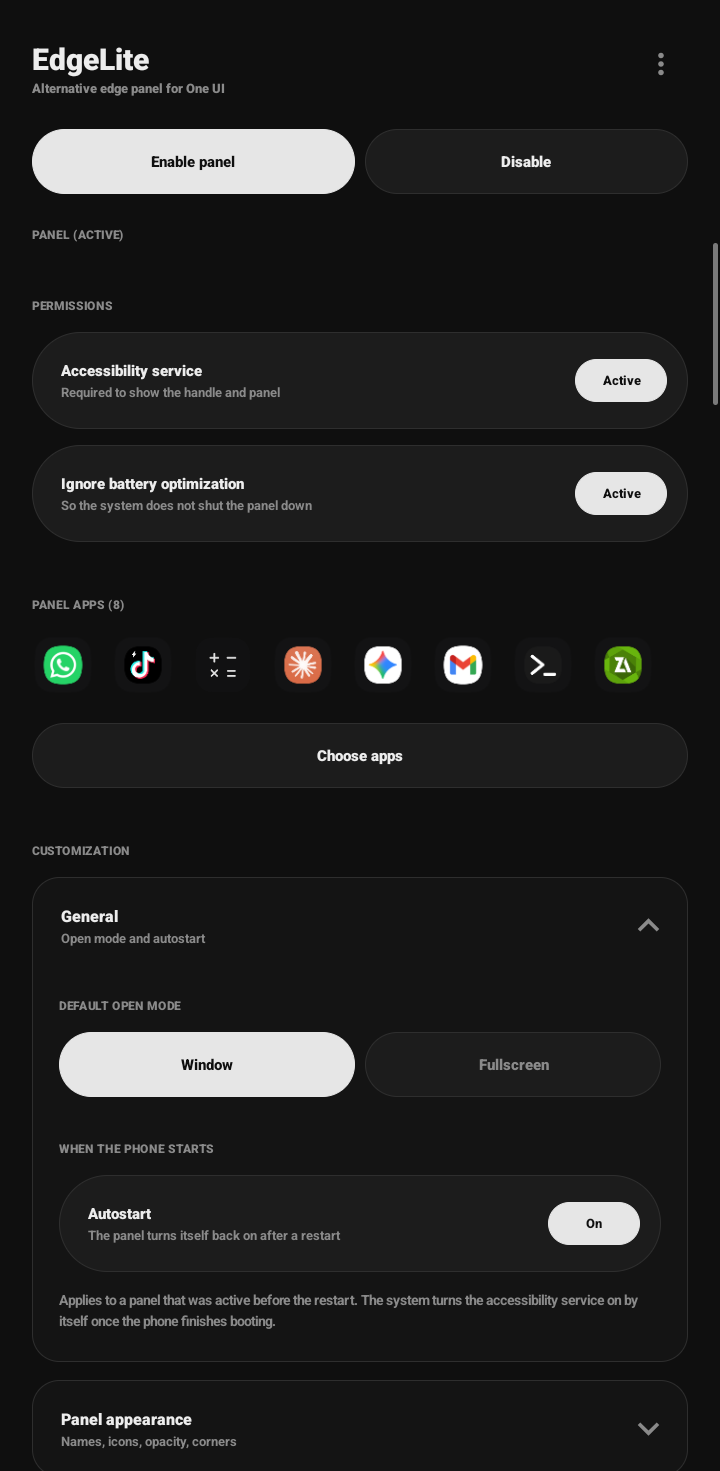
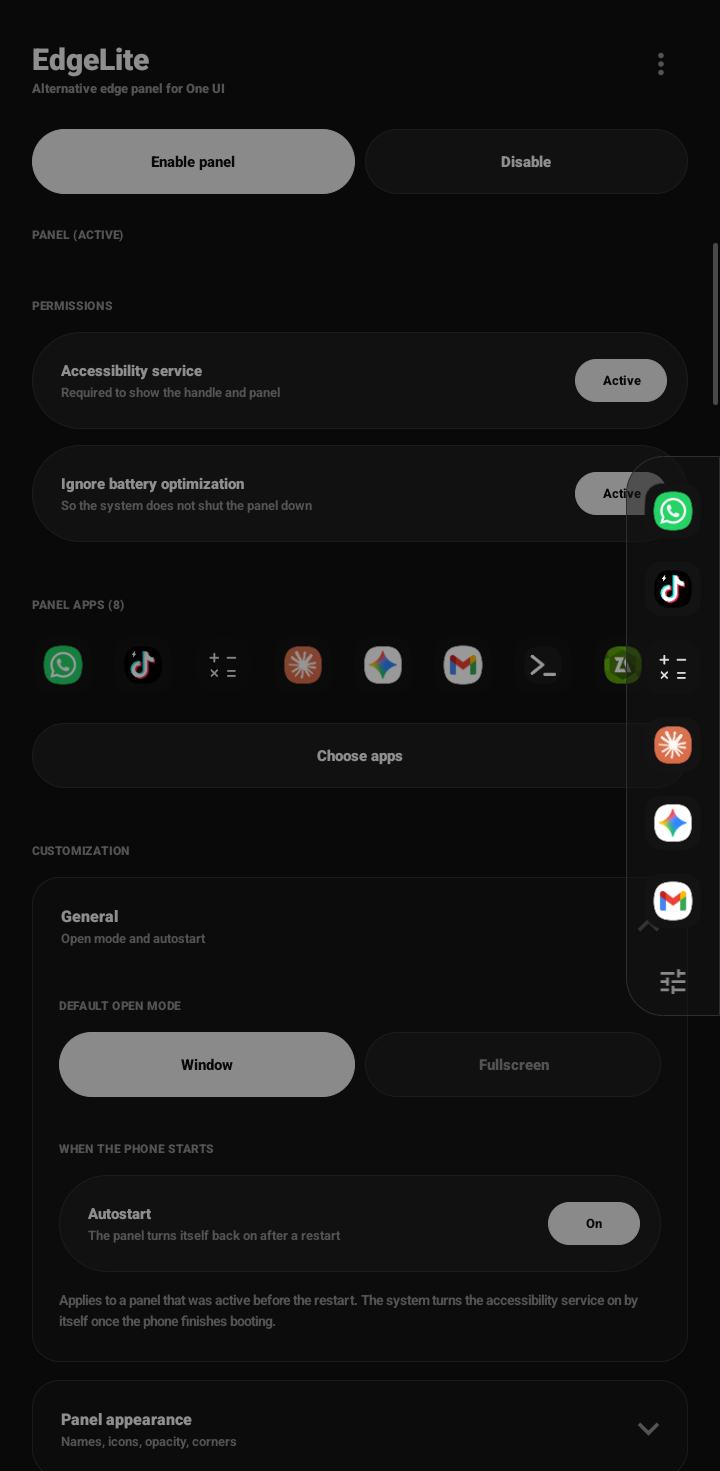
A thin handle sits on the edge of your screen. Swipe it inward (or tap it) and a panel of your favorite apps slides out. Tap an icon to open that app as a floating window or in fullscreen.
Features
- Edge handle and a fixed-size panel with a scrollable app list
- Open apps as a floating window or fullscreen (default: window)
- Separate settings for portrait and landscape: panel side, handle, panel size, window size
- Customizable icon size, app names, opacity, and corner radius
- Quick Settings tile to turn the panel on or off
- No notification and no foreground service, so it stays out of Samsung's "Check background activity"
- Autostart after reboot
- Export and import settings as a JSON file
- English and Indonesian (follows the phone language)
- Quick access page: swipe the panel sideways for a second page with system shortcuts (notifications, quick settings, recent apps, home, back, screenshot, lock screen, power menu)
Screenshot
| Preview 1 | Preview 2 |
|---|---|
 |  |
Install
Download EdgeLite-Panel.apk from the Releases page and open it on your phone.
Blocked by Google Play Protect? Play Protect blocks apps installed outside the Play Store when they use an accessibility service, as EdgeLite does. Open Play Store, tap your profile icon, Play Protect, Settings, and turn off "Scan apps with Play Protect". Install EdgeLite, then turn it back on.
Requires Android 8.0 or newer. Tested on One UI 8.0 and 8.5
Setup
- Tap Enable panel, then in Accessibility, Installed apps, turn on EdgeLite Panel. If the switch is greyed out (Android 13+): Settings, Apps, EdgeLite Panel, three dots, Allow restricted settings.
- Tap Choose apps and pick the apps for the panel.
- Optional: tap Ignore battery optimization until it shows Active.
- For window mode: open the three dot menu, Developer options, and turn on Enable freeform windows and Force activities to be resizable. Restart if nothing changes. If Developer options is hidden, tap Build number 7 times in Settings, About phone, Software information.
Menu names can differ slightly between One UI versions.
Usage
- Open the panel: swipe the handle inward or tap it
- Quick access: in settings, open Quick access and tap Choose shortcuts. Then swipe the panel sideways to see them. The panel size does not change.
- Open an app: tap its icon
- Close the panel: tap the dimmed area outside it
- Turn off: use Disable or the Quick Settings tile (hides the handle only). To stop the service completely, switch it off in Accessibility.
Settings
| Category | What you can change |
|---|---|
| General | Default open mode (Window or Fullscreen), Autostart |
| Panel appearance | App names, icon size (32 to 64 dp), opacity (50 to 100 %), corner radius (0 to 40 dp) |
| Side and handle (per orientation) | Left or right side, handle height (60 to 240 dp) and position (10 to 90 %) |
| Panel size (per orientation) | Height (30 to 95 %) and width (64 to 140 dp) |
| Floating window (per orientation) | Width and height (30 to 100 %), with a live preview |
Slider changes apply when you lift your finger and show after the panel is reopened.
Updating without losing settings
Debug builds are signed with a new key every time, so an update means uninstalling the old version first, which erases settings.
- Open Export and import, tap Export, and save the file.
- Uninstall the old version and install the new one.
- Tap Import and choose the file.
- Turn the EdgeLite Panel accessibility service on again.
Apps from the backup that are not installed on the phone are skipped. Import only accepts valid EdgeLite files and limits values to the slider ranges.
Privacy and permissions
- Accessibility service: only draws the handle and panel. It does not read the screen and listens to no events.
- Ignore battery optimization: optional, helps keep the service alive.
- No network access, no analytics, no storage permission. Settings stay on your phone.
Troubleshooting
| Problem | Fix |
|---|---|
| Accessibility switch is greyed out | Allow restricted settings (see Setup, step 1) |
| Enable panel shows no handle | Make sure the service is on in Accessibility and the label says PANEL (ACTIVE) |
| Panel is off after restart | Keep the service on, turn on Autostart, and do not turn the panel off before restarting. It appears after the phone is unlocked. |
| Service turns itself off | Do not use Force stop. Turn on Ignore battery optimization. On Samsung, move EdgeLite from Sleeping apps to Never sleeping apps (Settings, Battery, Background usage limits). |
| Apps open fullscreen, not in a window | Set Default open mode to Window and enable both freeform options in Developer options. Some apps ignore window sizes, which is an app limit. |
| Handle conflicts with the back gesture | Move the handle up or down, or to the other side |
| Settings do not change | Reopen the panel, or tap Disable then Enable panel |
| App missing from the panel | Check it in Choose apps. Uninstalled apps are skipped. |
| Wrong language | Change the phone language, or on Android 13+ set it in Settings, Apps, EdgeLite Panel, Language |
| Import rejected | Use a file made by Export in EdgeLite |
Known limitations
- Window mode uses hidden Android APIs and the One UI freeform setting, so it may change after system updates.
- Apps with
resizeableActivity=falsecan ignore the window size. - No drag reordering, folders, or shortcuts in the panel yet.
- Split screen is not included because Samsung already provides it.
Disclaimer
EdgeLite is an independent project and is not affiliated with, endorsed by, or sponsored by Samsung Electronics. Samsung, One UI, and Edge Panel are trademarks of their respective owners, mentioned only to describe compatibility.
EdgeLite is built and tested only on Samsung One UI. On other phones or Android skins it may not work as expected, or may not work at all. This includes the accessibility overlay, the floating window mode, and the lock screen behavior. Use it at your own discretion
License
Created by Arion. EdgeLite is free software licensed under the GNU General Public License v3.0 (GPL-3.0-only). You may use, study, modify, and share it under the terms of that license. If you distribute a modified version, it must also be released under GPL-3.0 with its source code.
Versions 1.0.2 and earlier were released under the MIT License, and copies already obtained under MIT stay under MIT. Version 1.0.3 and later are licensed under GPL-3.0.
Unless you state otherwise, any contribution you submit to this project is licensed under GPL-3.0.
Why GPL-3.0?
EdgeLite is licensed under GPL-3.0 to ensure it stays free and open source forever. This prevents anyone from forking the project, closing the source, and selling features as in-app purchases. If you use EdgeLite's code, your project must also be open source.
Similar repos


Bring back the Edge Panel experience! A custom Android app designed as a replacement for Samsung's Edge Panel on unsupported devices.
Kotlin
1
65 commits
updated Oct 5, 2026
See what people are saying
README
EdgeLite Panel
An alternative edge panel for Samsung One UI phones that do not have the built-in Edge Panel.
A thin handle sits on the edge of your screen. Swipe it inward (or tap it) and a panel of your favorite apps slides out. Tap an icon to open that app as a floating window or in fullscreen.
Features
- Edge handle and a fixed-size panel with a scrollable app list
- Open apps as a floating window or fullscreen (default: window)
- Separate settings for portrait and landscape: panel side, handle, panel size, window size
- Customizable icon size, app names, opacity, and corner radius
- Quick Settings tile to turn the panel on or off
- No notification and no foreground service, so it stays out of Samsung's "Check background activity"
- Autostart after reboot
- Export and import settings as a JSON file
- English and Indonesian (follows the phone language)
- Quick access page: swipe the panel sideways for a second page with system shortcuts (notifications, quick settings, recent apps, home, back, screenshot, lock screen, power menu)
Screenshot
| Preview 1 | Preview 2 |
|---|---|
| |
Install
Download EdgeLite-Panel.apk from the Releases page and open it on your phone.
Blocked by Google Play Protect? Play Protect blocks apps installed outside the Play Store when they use an accessibility service, as EdgeLite does. Open Play Store, tap your profile icon, Play Protect, Settings, and turn off "Scan apps with Play Protect". Install EdgeLite, then turn it back on.
Requires Android 8.0 or newer. Tested on One UI 8.0 and 8.5
Setup
- Tap Enable panel, then in Accessibility, Installed apps, turn on EdgeLite Panel. If the switch is greyed out (Android 13+): Settings, Apps, EdgeLite Panel, three dots, Allow restricted settings.
- Tap Choose apps and pick the apps for the panel.
- Optional: tap Ignore battery optimization until it shows Active.
- For window mode: open the three dot menu, Developer options, and turn on Enable freeform windows and Force activities to be resizable. Restart if nothing changes. If Developer options is hidden, tap Build number 7 times in Settings, About phone, Software information.
Menu names can differ slightly between One UI versions.
Usage
- Open the panel: swipe the handle inward or tap it
- Quick access: in settings, open Quick access and tap Choose shortcuts. Then swipe the panel sideways to see them. The panel size does not change.
- Open an app: tap its icon
- Close the panel: tap the dimmed area outside it
- Turn off: use Disable or the Quick Settings tile (hides the handle only). To stop the service completely, switch it off in Accessibility.
Settings
| Category | What you can change |
|---|---|
| General | Default open mode (Window or Fullscreen), Autostart |
| Panel appearance | App names, icon size (32 to 64 dp), opacity (50 to 100 %), corner radius (0 to 40 dp) |
| Side and handle (per orientation) | Left or right side, handle height (60 to 240 dp) and position (10 to 90 %) |
| Panel size (per orientation) | Height (30 to 95 %) and width (64 to 140 dp) |
| Floating window (per orientation) | Width and height (30 to 100 %), with a live preview |
Slider changes apply when you lift your finger and show after the panel is reopened.
Updating without losing settings
Debug builds are signed with a new key every time, so an update means uninstalling the old version first, which erases settings.
- Open Export and import, tap Export, and save the file.
- Uninstall the old version and install the new one.
- Tap Import and choose the file.
- Turn the EdgeLite Panel accessibility service on again.
Apps from the backup that are not installed on the phone are skipped. Import only accepts valid EdgeLite files and limits values to the slider ranges.
Privacy and permissions
- Accessibility service: only draws the handle and panel. It does not read the screen and listens to no events.
- Ignore battery optimization: optional, helps keep the service alive.
- No network access, no analytics, no storage permission. Settings stay on your phone.
Troubleshooting
| Problem | Fix |
|---|---|
| Accessibility switch is greyed out | Allow restricted settings (see Setup, step 1) |
| Enable panel shows no handle | Make sure the service is on in Accessibility and the label says PANEL (ACTIVE) |
| Panel is off after restart | Keep the service on, turn on Autostart, and do not turn the panel off before restarting. It appears after the phone is unlocked. |
| Service turns itself off | Do not use Force stop. Turn on Ignore battery optimization. On Samsung, move EdgeLite from Sleeping apps to Never sleeping apps (Settings, Battery, Background usage limits). |
| Apps open fullscreen, not in a window | Set Default open mode to Window and enable both freeform options in Developer options. Some apps ignore window sizes, which is an app limit. |
| Handle conflicts with the back gesture | Move the handle up or down, or to the other side |
| Settings do not change | Reopen the panel, or tap Disable then Enable panel |
| App missing from the panel | Check it in Choose apps. Uninstalled apps are skipped. |
| Wrong language | Change the phone language, or on Android 13+ set it in Settings, Apps, EdgeLite Panel, Language |
| Import rejected | Use a file made by Export in EdgeLite |
Known limitations
- Window mode uses hidden Android APIs and the One UI freeform setting, so it may change after system updates.
- Apps with
resizeableActivity=falsecan ignore the window size. - No drag reordering, folders, or shortcuts in the panel yet.
- Split screen is not included because Samsung already provides it.
Disclaimer
EdgeLite is an independent project and is not affiliated with, endorsed by, or sponsored by Samsung Electronics. Samsung, One UI, and Edge Panel are trademarks of their respective owners, mentioned only to describe compatibility.
EdgeLite is built and tested only on Samsung One UI. On other phones or Android skins it may not work as expected, or may not work at all. This includes the accessibility overlay, the floating window mode, and the lock screen behavior. Use it at your own discretion
License
Created by Arion. EdgeLite is free software licensed under the GNU General Public License v3.0 (GPL-3.0-only). You may use, study, modify, and share it under the terms of that license. If you distribute a modified version, it must also be released under GPL-3.0 with its source code.
Versions 1.0.2 and earlier were released under the MIT License, and copies already obtained under MIT stay under MIT. Version 1.0.3 and later are licensed under GPL-3.0.
Unless you state otherwise, any contribution you submit to this project is licensed under GPL-3.0.
Why GPL-3.0?
EdgeLite is licensed under GPL-3.0 to ensure it stays free and open source forever. This prevents anyone from forking the project, closing the source, and selling features as in-app purchases. If you use EdgeLite's code, your project must also be open source.