
Use Trivy as a plug-in vulnerability scanner in the Harbor registry
226
stars
317
commits
Go
primary language
Sep 16, 2024
updated
README





IMPORTANT: This repository is no longer maintained. Future development in this project will happen in the repository: https://github.com/goharbor/harbor-scanner-trivy
Harbor Scanner Adapter for Trivy
The Harbor Scanner Adapter for Trivy is a service that translates the Harbor scanning API into Trivy commands and allows Harbor to use Trivy for providing vulnerability reports on images stored in Harbor registry as part of its vulnerability scan feature.
Harbor Scanner Adapter for Trivy is the default static vulnerability scanner in Harbor >= 2.2.
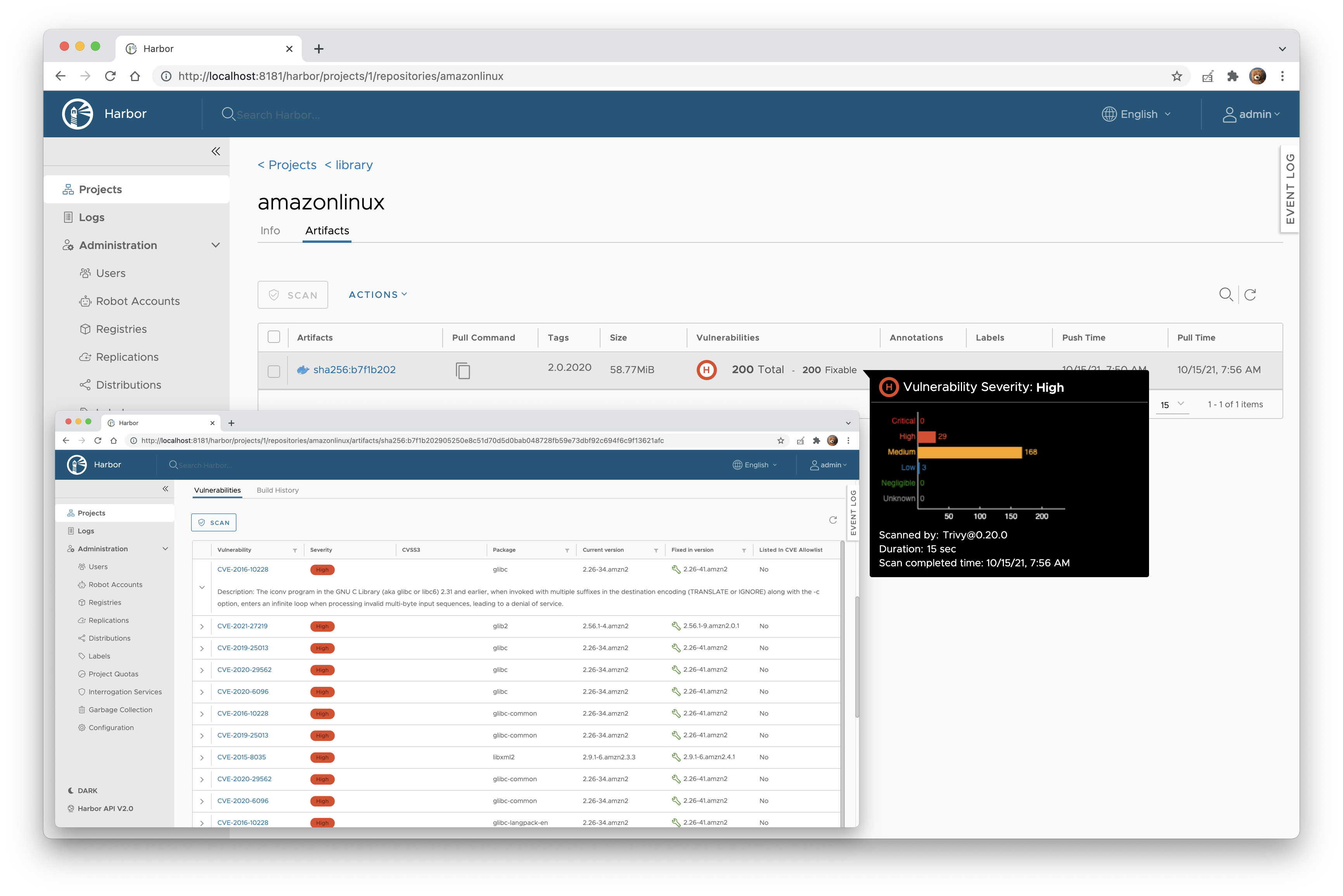
For compliance with core components Harbor builds the adapter service binaries into Docker images based on Photos OS
(goharbor/trivy-adapter-photon), whereas in this repository we build Docker images based on Alpine
(aquasec/harbor-scanner-trivy). There is no difference in functionality though.
TOC
Version Matrix
The following matrix indicates the version of Trivy and Trivy adapter installed in each Harbor release.
Deployment
Harbor >= 2.0 on Kubernetes
In Harbor >= 2.0 Trivy can be configured as the default vulnerability scanner, therefore you can install it with the
official Harbor Helm chart, where HARBOR_CHART_VERSION >= 1.4:
helm repo add harbor https://helm.goharbor.io
helm install harbor harbor/harbor \
  --create-namespace \
  --namespace harbor
The adapter service is automatically registered under the Interrogation Service in the Harbor interface and designated as the default scanner.
Harbor 1.10 on Kubernetes
-
Install the
harbor-scanner-trivychart:helm repo add aqua https://aquasecurity.github.io/helm-chartshelm install harbor-scanner-trivy aqua/harbor-scanner-trivy \ --namespace harbor --create-namespace -
Configure the scanner adapter in the Harbor interface.
- Navigate to Interrogation Services and click + NEW SCANNER.
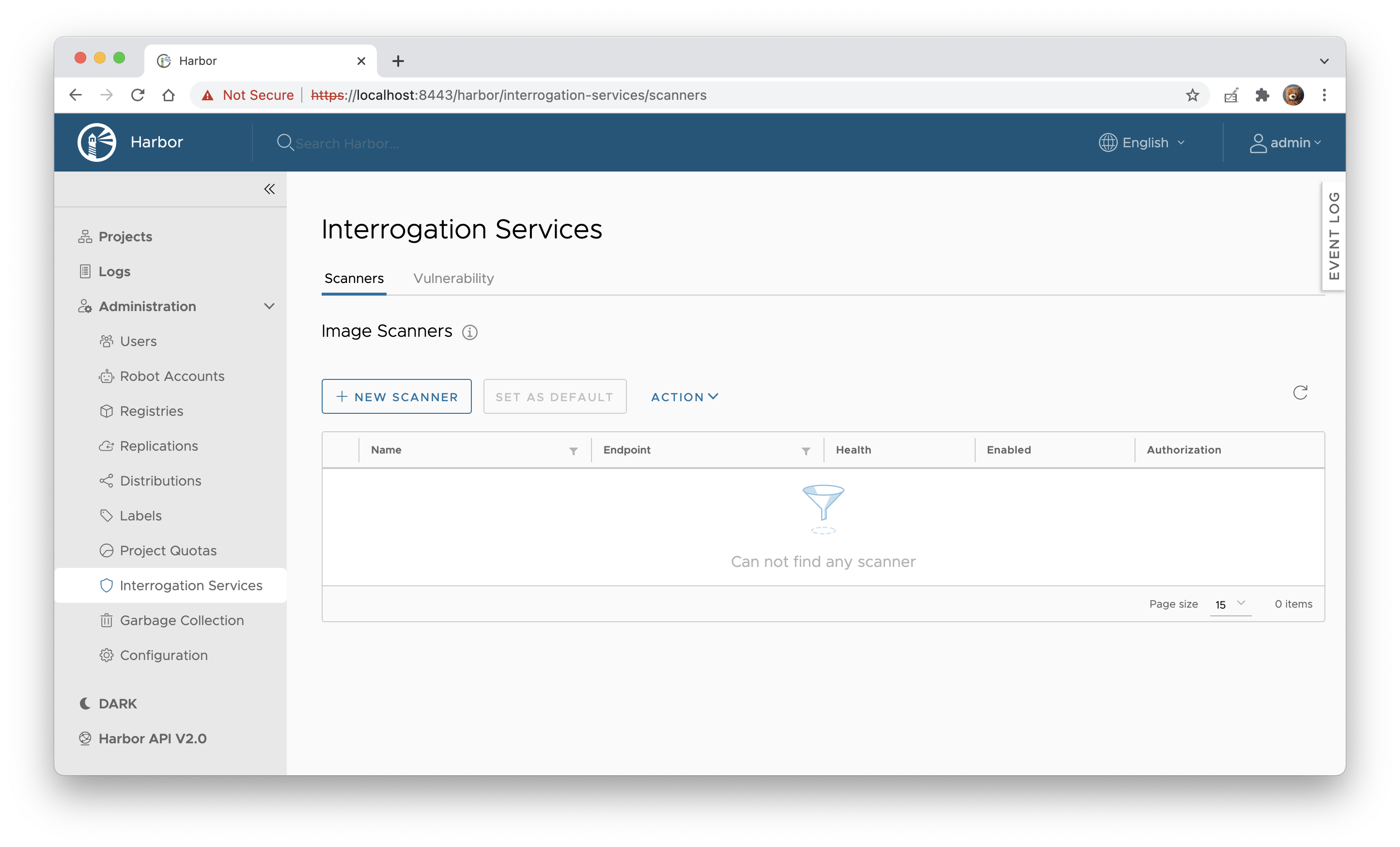
- Enter http://harbor-scanner-trivy.harbor:8080 as the Endpoint URL and click TEST CONNECTION.
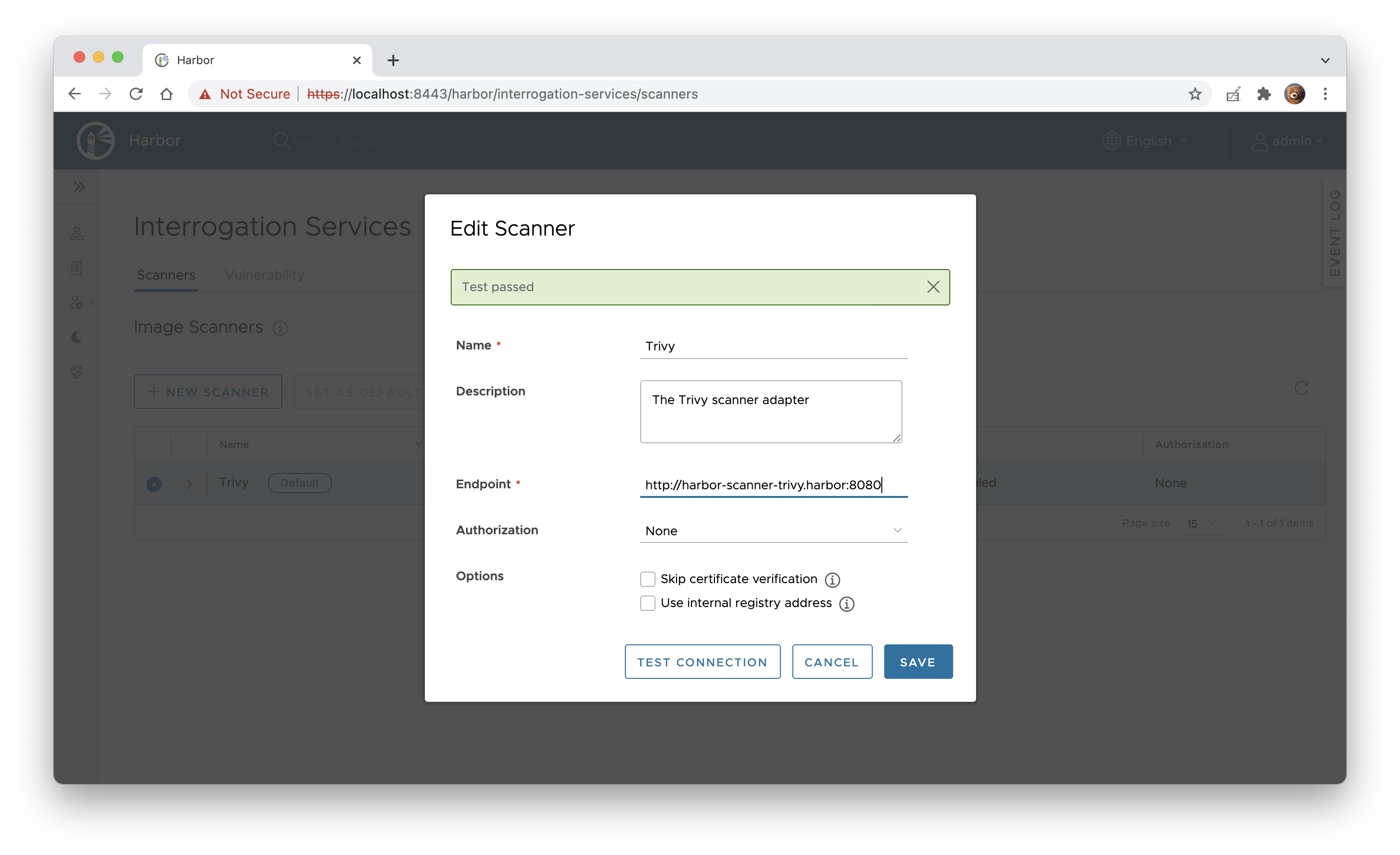
- If everything is fine click ADD to save the configuration.
- Navigate to Interrogation Services and click + NEW SCANNER.
-
Select the Trivy scanner and set it as default by clicking SET AS DEFAULT.
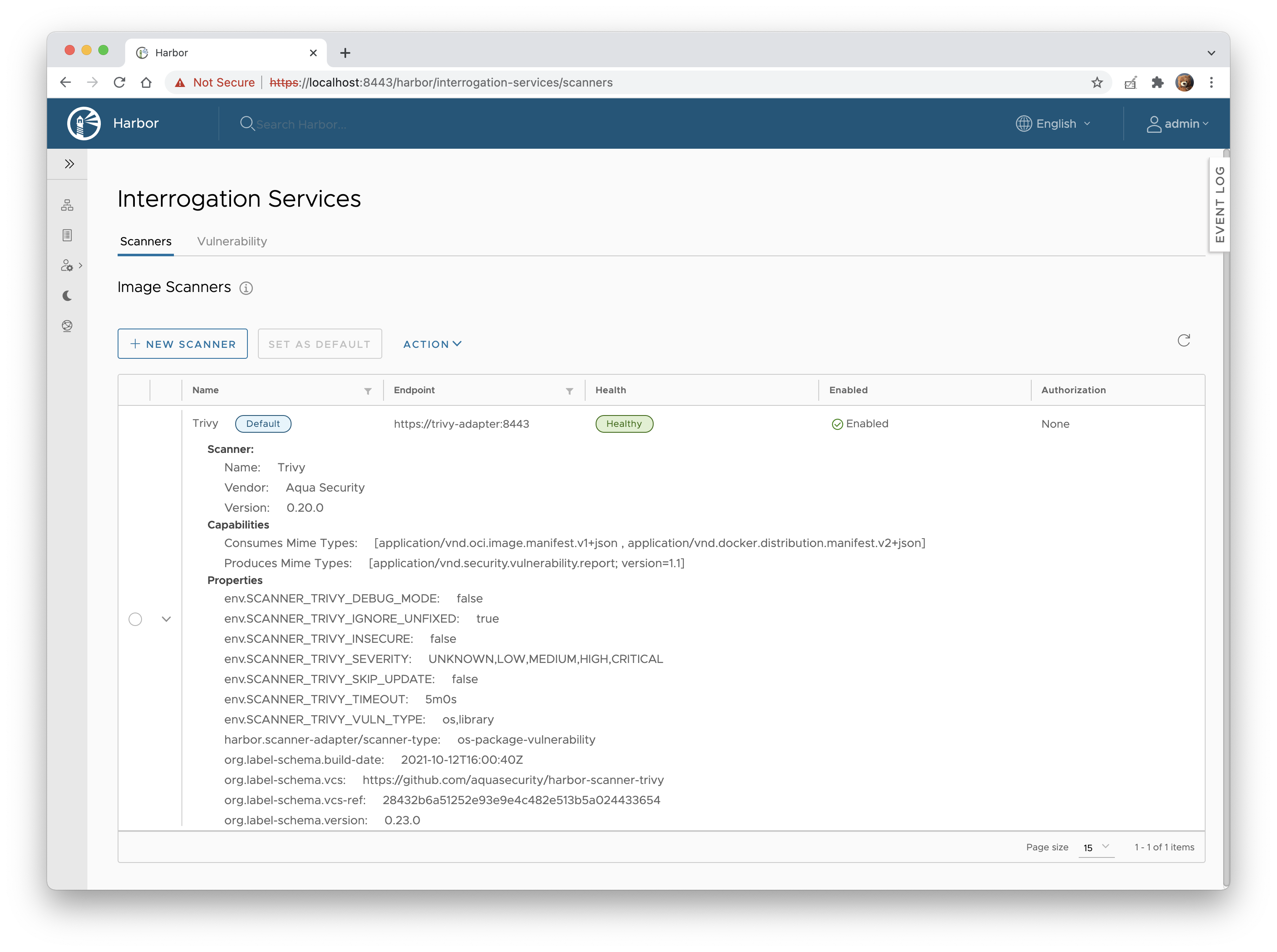 Make sure the Default label is displayed next to the Trivy scanner's name.
Configuration
Configuration of the adapter is done via environment variables at startup.
| Name | Default | Description |
|---|---|---|
SCANNER_LOG_LEVEL | info | The log level of trace, debug, info, warn, warning, error, fatal or panic. The standard logger logs entries with that level or anything above it. |
SCANNER_API_SERVER_ADDR | :8080 | Binding address for the API server |
SCANNER_API_SERVER_TLS_CERTIFICATE | N/A | The absolute path to the x509 certificate file |
SCANNER_API_SERVER_TLS_KEY | N/A | The absolute path to the x509 private key file |
SCANNER_API_SERVER_CLIENT_CAS | N/A | A list of absolute paths to x509 root certificate authorities that the api use if required to verify a client certificate |
SCANNER_API_SERVER_READ_TIMEOUT | 15s | The maximum duration for reading the entire request, including the body |
SCANNER_API_SERVER_WRITE_TIMEOUT | 15s | The maximum duration before timing out writes of the response |
SCANNER_API_SERVER_IDLE_TIMEOUT | 60s | The maximum amount of time to wait for the next request when keep-alives are enabled |
SCANNER_API_SERVER_METRICS_ENABLED | true | Whether to enable metrics |
SCANNER_TRIVY_CACHE_DIR | /home/scanner/.cache/trivy | Trivy cache directory |
SCANNER_TRIVY_REPORTS_DIR | /home/scanner/.cache/reports | Trivy reports directory |
SCANNER_TRIVY_DEBUG_MODE | false | The flag to enable or disable Trivy debug mode |
SCANNER_TRIVY_VULN_TYPE | os,library | Comma-separated list of vulnerability types. Possible values are os and library. |
SCANNER_TRIVY_SECURITY_CHECKS | vuln,config,secret | comma-separated list of what security issues to detect. Possible values are vuln, config and secret. Defaults to vuln. |
SCANNER_TRIVY_SEVERITY | UNKNOWN,LOW,MEDIUM,HIGH,CRITICAL | Comma-separated list of vulnerabilities severities to be displayed |
SCANNER_TRIVY_IGNORE_UNFIXED | false | The flag to display only fixed vulnerabilities |
SCANNER_TRIVY_IGNORE_POLICY | `` | The path for the Trivy ignore policy OPA Rego file |
SCANNER_TRIVY_SKIP_UPDATE | false | The flag to disable Trivy DB downloads. |
SCANNER_TRIVY_SKIP_JAVA_DB_UPDATE | false | The flag to disable [Trivy JAVA DB] downloads. |
SCANNER_TRIVY_OFFLINE_SCAN | false | The flag to disable external API requests to identify dependencies. |
SCANNER_TRIVY_GITHUB_TOKEN | N/A | The GitHub access token to download Trivy DB (see GitHub rate limiting) |
SCANNER_TRIVY_INSECURE | false | The flag to skip verifying registry certificate |
SCANNER_TRIVY_TIMEOUT | 5m0s | The duration to wait for scan completion |
SCANNER_STORE_REDIS_NAMESPACE | harbor.scanner.trivy:store | The namespace for keys in the Redis store |
SCANNER_STORE_REDIS_SCAN_JOB_TTL | 1h | The time to live for persisting scan jobs and associated scan reports |
SCANNER_JOB_QUEUE_REDIS_NAMESPACE | harbor.scanner.trivy:job-queue | The namespace for keys in the scan jobs queue backed by Redis |
SCANNER_JOB_QUEUE_WORKER_CONCURRENCY | 1 | The number of workers to spin-up for the scan jobs queue |
SCANNER_REDIS_URL | redis://harbor-harbor-redis:6379 | The Redis server URI. The URI supports schemas to connect to a standalone Redis server, i.e. redis://:password@standalone_host:port/db-number and Redis Sentinel deployment, i.e. redis+sentinel://:password@sentinel_host1:port1,sentinel_host2:port2/monitor-name/db-number. |
SCANNER_REDIS_POOL_MAX_ACTIVE | 5 | The max number of connections allocated by the Redis connection pool |
SCANNER_REDIS_POOL_MAX_IDLE | 5 | The max number of idle connections in the Redis connection pool |
SCANNER_REDIS_POOL_IDLE_TIMEOUT | 5m | The duration after which idle connections to the Redis server are closed. If the value is zero, then idle connections are not closed. |
SCANNER_REDIS_POOL_CONNECTION_TIMEOUT | 1s | The timeout for connecting to the Redis server |
SCANNER_REDIS_POOL_READ_TIMEOUT | 1s | The timeout for reading a single Redis command reply |
SCANNER_REDIS_POOL_WRITE_TIMEOUT | 1s | The timeout for writing a single Redis command. |
HTTP_PROXY | N/A | The URL of the HTTP proxy server |
HTTPS_PROXY | N/A | The URL of the HTTPS proxy server |
NO_PROXY | N/A | The URLs that the proxy settings do not apply to |
Documentation
- Architecture - architectural decisions behind designing harbor-scanner-trivy.
- Releases - how to release a new version of harbor-scanner-trivy.
Troubleshooting
Error: database error: --skip-db-update cannot be specified on the first run
If you set the value of the SCANNER_TRIVY_SKIP_UPDATE to true, make sure that you download the Trivy DB
and mount it in the /home/scanner/.cache/trivy/db/trivy.db path.
Error: failed to list releases: Get https://api.github.com/repos/aquasecurity/trivy-db/releases: dial tcp: lookup api.github.com on 127.0.0.11:53: read udp 127.0.0.1:39070->127.0.0.11:53: i/o timeout
Most likely it's a Docker DNS server or network firewall configuration issue. Trivy requires internet connection to periodically download vulnerability database from GitHub to show up-to-date risks.
Try adding a DNS server to docker-compose.yml created by Harbor installer.
version: 2
services:
  trivy-adapter:
    # NOTE Adjust IPs to your environment.
    dns:
      - 8.8.8.8
      - 192.168.1.1
Alternatively, configure Docker daemon to use the same DNS server as host operating system. See DNS services section in the Docker container networking documentation for more details.
Error: failed to list releases: GET https://api.github.com/repos/aquasecurity/trivy-db/releases: 403 API rate limit exceeded
Trivy DB downloads from GitHub are subject to rate limiting. Make sure that the Trivy DB is mounted
and cached in the /home/scanner/.cache/trivy/db/trivy.db path. If, for any reason, it's not enough you can set the
value of the SCANNER_TRIVY_GITHUB_TOKEN environment variable (authenticated requests get a higher rate limit).
Contributing
Please read CONTRIBUTING.md for details on our code of conduct, and the process for submitting pull requests.
Harbor Scanner Adapter for Trivy is an Aqua Security open source project.
Learn about our open source work and portfolio here.
Contributors



Similar repos


Languages
Go
97.8%
Mustache
1.0%
Use Trivy as a plug-in vulnerability scanner in the Harbor registry
226
stars
317
commits
Go
primary language
Sep 16, 2024
updated
README
IMPORTANT: This repository is no longer maintained. Future development in this project will happen in the repository: https://github.com/goharbor/harbor-scanner-trivy
Harbor Scanner Adapter for Trivy
The Harbor Scanner Adapter for Trivy is a service that translates the Harbor scanning API into Trivy commands and allows Harbor to use Trivy for providing vulnerability reports on images stored in Harbor registry as part of its vulnerability scan feature.
Harbor Scanner Adapter for Trivy is the default static vulnerability scanner in Harbor >= 2.2.
For compliance with core components Harbor builds the adapter service binaries into Docker images based on Photos OS
(goharbor/trivy-adapter-photon), whereas in this repository we build Docker images based on Alpine
(aquasec/harbor-scanner-trivy). There is no difference in functionality though.
TOC
Version Matrix
The following matrix indicates the version of Trivy and Trivy adapter installed in each Harbor release.
Deployment
Harbor >= 2.0 on Kubernetes
In Harbor >= 2.0 Trivy can be configured as the default vulnerability scanner, therefore you can install it with the
official Harbor Helm chart, where HARBOR_CHART_VERSION >= 1.4:
helm repo add harbor https://helm.goharbor.io
helm install harbor harbor/harbor \
  --create-namespace \
  --namespace harbor
The adapter service is automatically registered under the Interrogation Service in the Harbor interface and designated as the default scanner.
Harbor 1.10 on Kubernetes
-
Install the
harbor-scanner-trivychart:helm repo add aqua https://aquasecurity.github.io/helm-chartshelm install harbor-scanner-trivy aqua/harbor-scanner-trivy \ --namespace harbor --create-namespace -
Configure the scanner adapter in the Harbor interface.
- Navigate to Interrogation Services and click + NEW SCANNER.
- Enter http://harbor-scanner-trivy.harbor:8080 as the Endpoint URL and click TEST CONNECTION.
- If everything is fine click ADD to save the configuration.
- Navigate to Interrogation Services and click + NEW SCANNER.
-
Select the Trivy scanner and set it as default by clicking SET AS DEFAULT.
Make sure the Default label is displayed next to the Trivy scanner's name.
Configuration
Configuration of the adapter is done via environment variables at startup.
| Name | Default | Description |
|---|---|---|
SCANNER_LOG_LEVEL | info | The log level of trace, debug, info, warn, warning, error, fatal or panic. The standard logger logs entries with that level or anything above it. |
SCANNER_API_SERVER_ADDR | :8080 | Binding address for the API server |
SCANNER_API_SERVER_TLS_CERTIFICATE | N/A | The absolute path to the x509 certificate file |
SCANNER_API_SERVER_TLS_KEY | N/A | The absolute path to the x509 private key file |
SCANNER_API_SERVER_CLIENT_CAS | N/A | A list of absolute paths to x509 root certificate authorities that the api use if required to verify a client certificate |
SCANNER_API_SERVER_READ_TIMEOUT | 15s | The maximum duration for reading the entire request, including the body |
SCANNER_API_SERVER_WRITE_TIMEOUT | 15s | The maximum duration before timing out writes of the response |
SCANNER_API_SERVER_IDLE_TIMEOUT | 60s | The maximum amount of time to wait for the next request when keep-alives are enabled |
SCANNER_API_SERVER_METRICS_ENABLED | true | Whether to enable metrics |
SCANNER_TRIVY_CACHE_DIR | /home/scanner/.cache/trivy | Trivy cache directory |
SCANNER_TRIVY_REPORTS_DIR | /home/scanner/.cache/reports | Trivy reports directory |
SCANNER_TRIVY_DEBUG_MODE | false | The flag to enable or disable Trivy debug mode |
SCANNER_TRIVY_VULN_TYPE | os,library | Comma-separated list of vulnerability types. Possible values are os and library. |
SCANNER_TRIVY_SECURITY_CHECKS | vuln,config,secret | comma-separated list of what security issues to detect. Possible values are vuln, config and secret. Defaults to vuln. |
SCANNER_TRIVY_SEVERITY | UNKNOWN,LOW,MEDIUM,HIGH,CRITICAL | Comma-separated list of vulnerabilities severities to be displayed |
SCANNER_TRIVY_IGNORE_UNFIXED | false | The flag to display only fixed vulnerabilities |
SCANNER_TRIVY_IGNORE_POLICY | `` | The path for the Trivy ignore policy OPA Rego file |
SCANNER_TRIVY_SKIP_UPDATE | false | The flag to disable Trivy DB downloads. |
SCANNER_TRIVY_SKIP_JAVA_DB_UPDATE | false | The flag to disable [Trivy JAVA DB] downloads. |
SCANNER_TRIVY_OFFLINE_SCAN | false | The flag to disable external API requests to identify dependencies. |
SCANNER_TRIVY_GITHUB_TOKEN | N/A | The GitHub access token to download Trivy DB (see GitHub rate limiting) |
SCANNER_TRIVY_INSECURE | false | The flag to skip verifying registry certificate |
SCANNER_TRIVY_TIMEOUT | 5m0s | The duration to wait for scan completion |
SCANNER_STORE_REDIS_NAMESPACE | harbor.scanner.trivy:store | The namespace for keys in the Redis store |
SCANNER_STORE_REDIS_SCAN_JOB_TTL | 1h | The time to live for persisting scan jobs and associated scan reports |
SCANNER_JOB_QUEUE_REDIS_NAMESPACE | harbor.scanner.trivy:job-queue | The namespace for keys in the scan jobs queue backed by Redis |
SCANNER_JOB_QUEUE_WORKER_CONCURRENCY | 1 | The number of workers to spin-up for the scan jobs queue |
SCANNER_REDIS_URL | redis://harbor-harbor-redis:6379 | The Redis server URI. The URI supports schemas to connect to a standalone Redis server, i.e. redis://:password@standalone_host:port/db-number and Redis Sentinel deployment, i.e. redis+sentinel://:password@sentinel_host1:port1,sentinel_host2:port2/monitor-name/db-number. |
SCANNER_REDIS_POOL_MAX_ACTIVE | 5 | The max number of connections allocated by the Redis connection pool |
SCANNER_REDIS_POOL_MAX_IDLE | 5 | The max number of idle connections in the Redis connection pool |
SCANNER_REDIS_POOL_IDLE_TIMEOUT | 5m | The duration after which idle connections to the Redis server are closed. If the value is zero, then idle connections are not closed. |
SCANNER_REDIS_POOL_CONNECTION_TIMEOUT | 1s | The timeout for connecting to the Redis server |
SCANNER_REDIS_POOL_READ_TIMEOUT | 1s | The timeout for reading a single Redis command reply |
SCANNER_REDIS_POOL_WRITE_TIMEOUT | 1s | The timeout for writing a single Redis command. |
HTTP_PROXY | N/A | The URL of the HTTP proxy server |
HTTPS_PROXY | N/A | The URL of the HTTPS proxy server |
NO_PROXY | N/A | The URLs that the proxy settings do not apply to |
Documentation
- Architecture - architectural decisions behind designing harbor-scanner-trivy.
- Releases - how to release a new version of harbor-scanner-trivy.
Troubleshooting
Error: database error: --skip-db-update cannot be specified on the first run
If you set the value of the SCANNER_TRIVY_SKIP_UPDATE to true, make sure that you download the Trivy DB
and mount it in the /home/scanner/.cache/trivy/db/trivy.db path.
Error: failed to list releases: Get https://api.github.com/repos/aquasecurity/trivy-db/releases: dial tcp: lookup api.github.com on 127.0.0.11:53: read udp 127.0.0.1:39070->127.0.0.11:53: i/o timeout
Most likely it's a Docker DNS server or network firewall configuration issue. Trivy requires internet connection to periodically download vulnerability database from GitHub to show up-to-date risks.
Try adding a DNS server to docker-compose.yml created by Harbor installer.
version: 2
services:
  trivy-adapter:
    # NOTE Adjust IPs to your environment.
    dns:
      - 8.8.8.8
      - 192.168.1.1
Alternatively, configure Docker daemon to use the same DNS server as host operating system. See DNS services section in the Docker container networking documentation for more details.
Error: failed to list releases: GET https://api.github.com/repos/aquasecurity/trivy-db/releases: 403 API rate limit exceeded
Trivy DB downloads from GitHub are subject to rate limiting. Make sure that the Trivy DB is mounted
and cached in the /home/scanner/.cache/trivy/db/trivy.db path. If, for any reason, it's not enough you can set the
value of the SCANNER_TRIVY_GITHUB_TOKEN environment variable (authenticated requests get a higher rate limit).
Contributing
Please read CONTRIBUTING.md for details on our code of conduct, and the process for submitting pull requests.
Harbor Scanner Adapter for Trivy is an Aqua Security open source project.
Learn about our open source work and portfolio here.
Similar repos
Contributors
Languages
Go
97.8%
Mustache
1.0%