A cross-platform and lightweight, code-first .NET GUI framework aimed at NativeAOT.
See the code









🎗️ In loving memory of my beloved cat and companion, April. Forever in my heart.
2012.04.15 – 2026.06.20
사랑하는 사월아, 내 곁에 와줘서 고마워. 너와 함께한 모든 순간이 행복했단다.
꼭 다시 만나자. 내 보물 송사월.
My beloved April, thank you for coming into my life, and I was always so happy.
We will surely meet again. My treasure, April.
😺 MewUI is a cross-platform, lightweight, code-first .NET GUI framework for building and shipping NativeAOT/Trim-friendly desktop apps without requiring a separate .NET runtime installation.
[!NOTE] The official pronunciation of MewUI is /mjuː aɪ/ (“myoo-eye”).
[!IMPORTANT] MewUI is an actively developed framework with published NuGet packages, cross-platform hosts, multiple rendering backends, and optional extension packages.
The public API surface is still being stabilized, so breaking changes can happen between minor releases. For production apps, pin package versions and review release notes before upgrading.
[!NOTE] This project was developed using an AI prompt–driven workflow.
Design and implementation were performed through iterative prompting without direct manual code edits,
with each step reviewed and refined by the developer.
Build package-based MewUI applications with Codex, Claude Code, or GitHub Copilot using the MewUI agent skill.
Nothing to install. Open the gallery, running on WebAssembly: Run the MewUI Gallery in your browser
No clone. No download. No project setup.
You can run MewUI immediately with a single command on Windows, Linux or macOS. (.NET 10 SDK required)
[!TIP] This is the quickest way to try MewUI without going through the usual repository and project setup steps.
curl -sL https://raw.githubusercontent.com/aprillz/MewUI/refs/heads/main/samples/FBASample/fba_gallery.cs -o - | dotnet run -
[!WARNING] This command downloads and executes code directly from GitHub.
https://github.com/user-attachments/assets/fc2d6ad8-3317-4784-a6e5-a00c68e9ed3b
| Light | Dark |
|---|---|
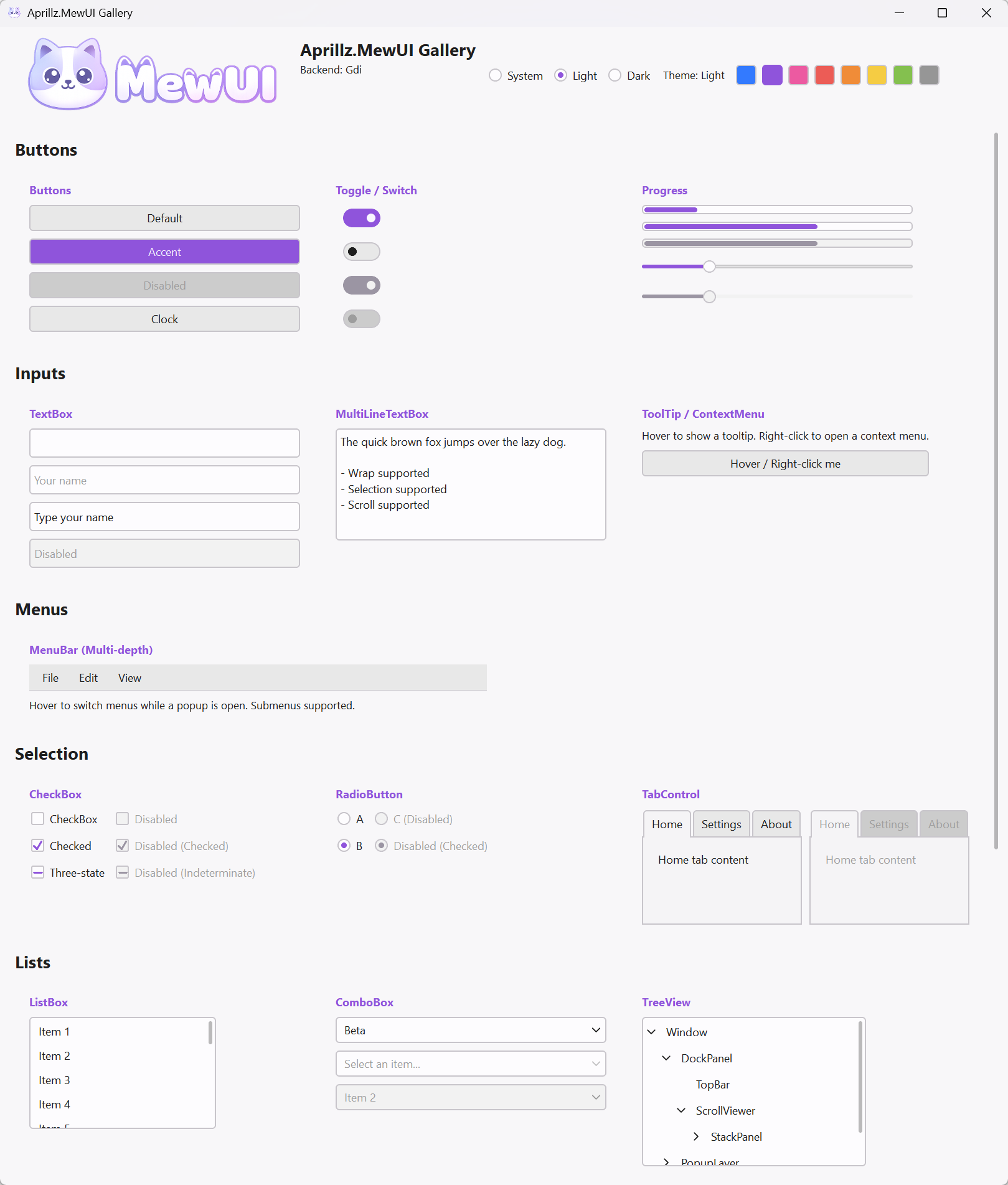 | 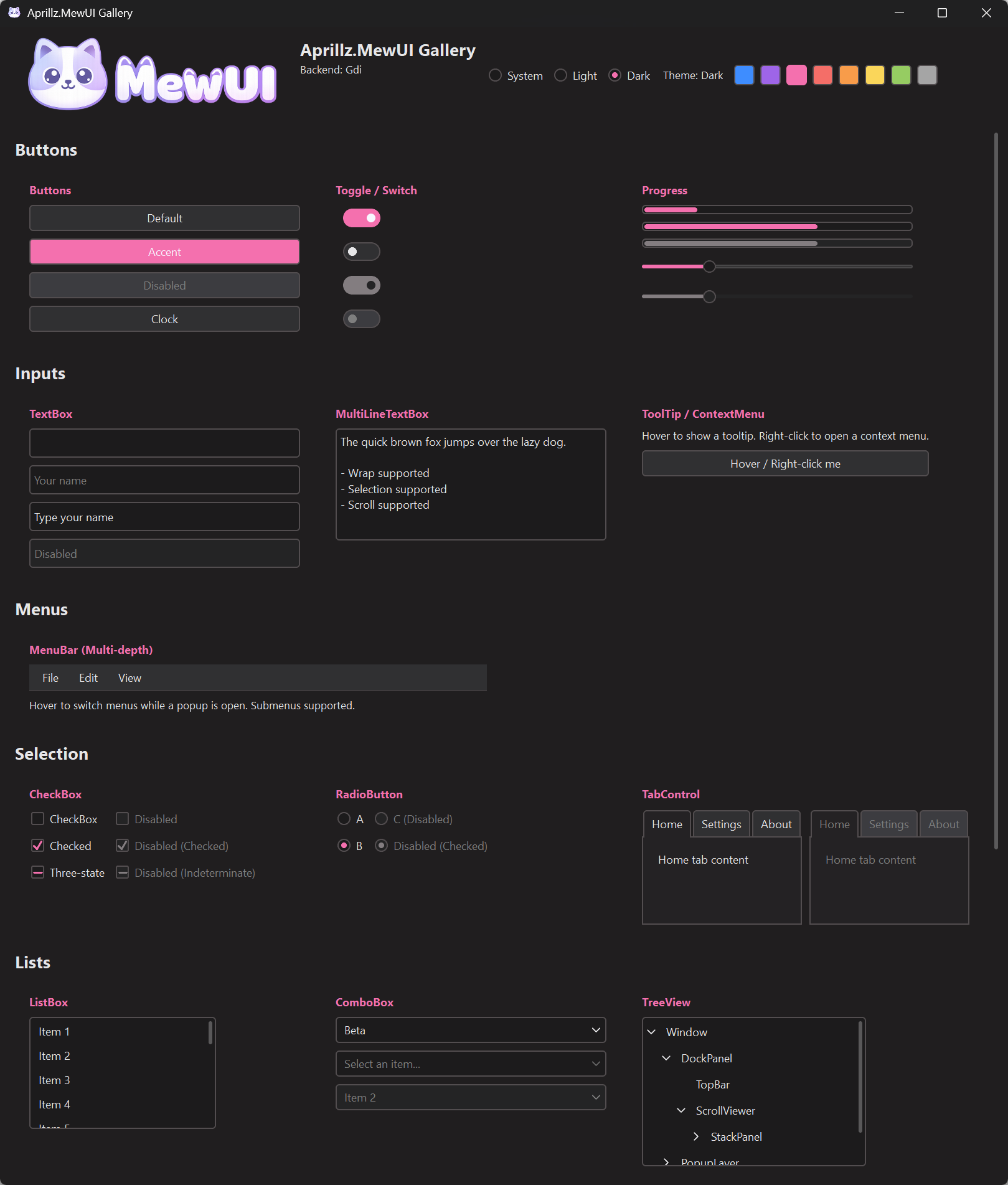 |
NuGet: https://www.nuget.org/packages/Aprillz.MewUI/
Aprillz.MewUI is a metapackage that bundles Core, all platform hosts, and all rendering backends.Aprillz.MewUI.Windows, .Linux, .MacOSdotnet add package Aprillz.MewUIFile-Based App (FBA), VS Code friendly (.NET 10+)
Minimal header (without AOT/Trim options):
#:sdk Microsoft.NET.Sdk
#:property OutputType=Exe
#:property TargetFramework=net10.0

#:package [email protected]

// ...
Run: dotnet run your_app.cs
Sample source: https://github.com/aprillz/MewUI/blob/main/samples/MewUI.Sample/Program.cs
An app registers a platform host and a rendering backend before Application.Run; MewUI does not pick them for you. See Application Lifecycle.
 // Windows here; Linux and macOS register their own host and backend.
 Win32Platform.Register();
 Direct2DBackend.Register();

 var window = new Window()
     .Title("Hello MewUI")
     .Resizable(520, 360)
     .Padding(12)
     .Content(
         new StackPanel()
             .Spacing(8)
             .Children(
                 new Label()
                     .Text("Hello, Aprillz.MewUI")
                     .FontSize(18)
                     .Bold(),
                 new Button()
                     .Content("Exit")
                     .OnClick(Application.Shutdown)
             )
     );

 Application.Run(window);
MewUI is a code-first GUI framework with a small, explicit core and platform-specific hosts/backends.
The core covers common desktop UI patterns; specialized features such as charts and docking ship as extension packages.
LibraryImport) for NativeAOT compatibility.dotnet-sdk-aot-10.0).NativeAOT executable size depends on the platform host, rendering backend, resources, and publish options. The table below measures the main executable only; ZIP is the same executable compressed with the default measurement settings. Sizes use binary units: 1 MB = 1024 KB.
For reproducible size probes, regression budgets, and NativeAOT map analysis, see the NativeAOT size tools.
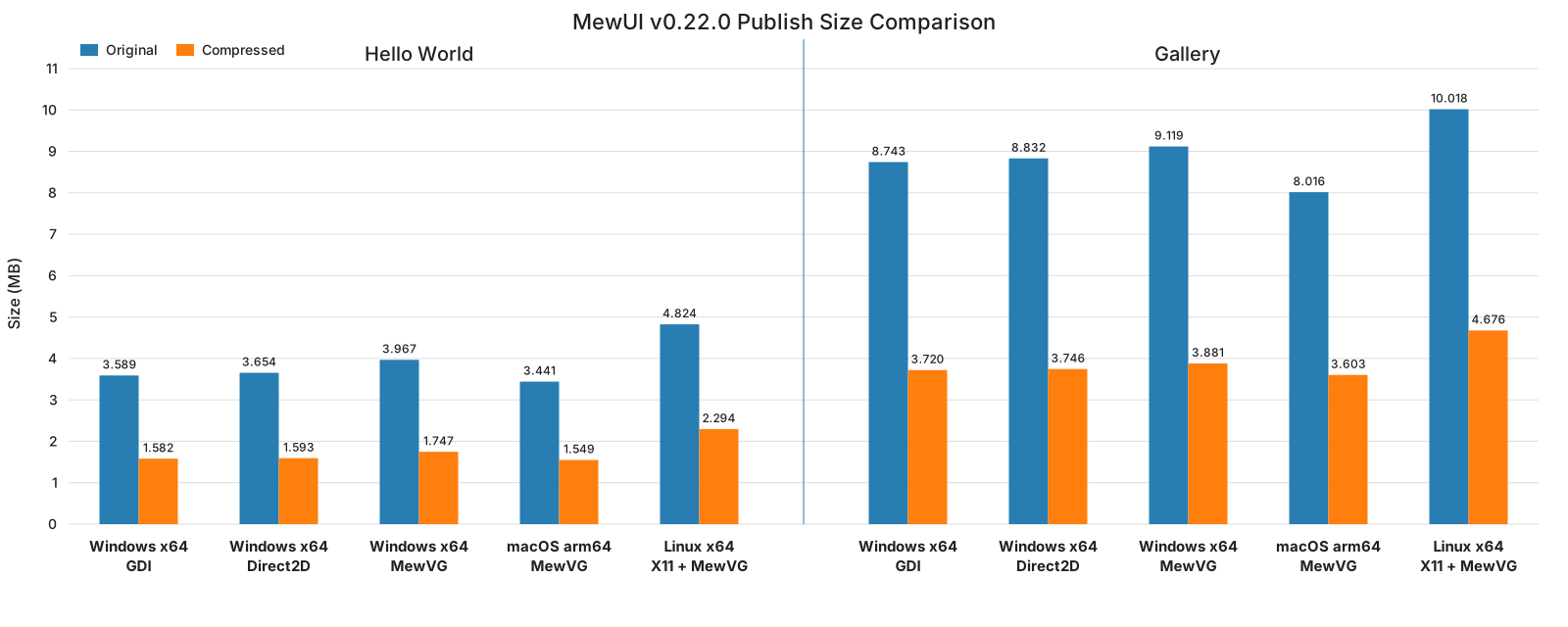
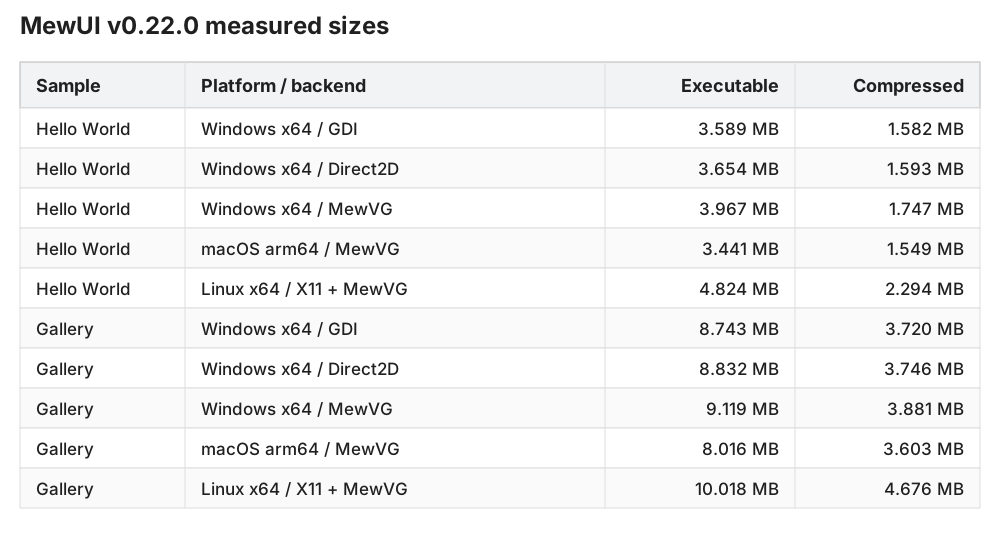
The Gallery is a full-featured showcase sample. Use the Hello World rows as the minimum deployment-size baseline.
Bindings are explicit and delegate-based, with no reflection. Three kinds of source are supported: ObservableValue<T>, a view model implementing INotifyPropertyChanged, and another element's MewProperty<T>. You can mix them within a single path, and INotifyCollectionChanged notifications are picked up as well.
using Aprillz.MewUI.Binding;
using Aprillz.MewUI.Controls;

var percent = new ObservableValue<double>(
    initialValue: 0.25,
    coerce: v => Math.Clamp(v, 0, 1));

var slider = new Slider()
            .BindValue(percent);
var label  = new Label()
            .BindText(percent, v => $"Percent ({v:P0})");
INotifyPropertyChanged - an ordinary MVVM view model is used as-is, with no wrapper. Subscriptions are held weakly, so a view model never keeps UI objects alive in memory.
new Label().Bind(Label.TextProperty, vm, x => x.UserName);

// TextBox is two-way by default, so typed text is written back to the view model
new TextBox().Bind(TextBox.TextProperty, vm, x => x.UserName);
Nested paths - a dotted expression is decomposed into per-step segments at compile time. No strings, no reflection, and when an intermediate value is replaced, every step after it is rewired automatically.
// order.Customer.City
var city = new TextBlock().Bind(TextBlock.TextProperty, order, x => x.Customer.City);

// Indexer. Updates when item 0 changes, or when items are inserted or removed before it
var first = new TextBlock().Bind(TextBlock.TextProperty, order, x => x.Lines[0].ProductName);
Each step picks how to observe from the member's type: PropertyChanged for INotifyPropertyChanged, its own notification for ObservableValue<T>, the matching MewProperty for a MewObject, and CollectionChanged for a notifying collection.
This one-line syntax works when building with a .NET 9 or later SDK. Below that, the same path is written out explicitly with BindingPath and ThenNotifying; what you lose is the syntax, not the capability.
See Binding for segment kinds, null/fallback, TwoWay, collections, and lifetime rules.
Controls (Implemented):
Button, ToggleButton, RepeatButton, SplitButton, DropDownButtonSegmentedControl, ButtonGroupLabel, TextBlock, MarkupTextBlock, ImageTextBox, MultiLineTextBox, SyntaxViewer, PasswordBoxCheckBox, RadioButton, ToggleSwitchComboBox, ListBox, ItemsControl, TreeView, GridViewSlider, ProgressBar, ProgressRing, ProgressIndicator, NumericUpDownTabControl, GroupBox, Expander, BorderColorPicker, DatePicker, CalendarMenuBar, ContextMenu, ToolTip (in-window popups)ToolBar (declared bands of command groups, dragged by their grips)NavigationViewScrollViewerContentControl, UserControl, TransitionContentControlPopup, SeparatorMessageBox, FileDialogWindow, DispatcherTimerPanels:
Grid (rows/columns with Auto, *, pixel)StackPanel (horizontal/vertical)DockPanel (dock edges + last-child fill)UniformGrid (equal cells)WrapPanel (wrap + item size)Canvas (absolute positioning)SplitPanel (drag splitter)All panels except
Canvas(absolute) andSplitPanelsupportSpacing.
Optional packages layered on top of the core - reference only what you need.
| Extension | Description | Package |
|---|---|---|
| MewDock | Visual Studio style docking - document/tool tabs, drag rearranging, splits, auto-hide, maximize, popouts | Aprillz.MewUI.MewDock |
| SVG | Pure C# SVG parsing/rendering (no System.Drawing, AOT compatible) | Aprillz.MewUI.Svg |
| Skia | SkiaCanvasView (draw with SkiaSharp) + GPU zero-copy interop | Aprillz.MewUI.Skia |
| MewCharts | Charts (Cartesian/Pie/Polar) via the LiveChartsCore engine, no SkiaSharp dependency | Aprillz.MewUI.MewCharts |
| Markdown | MarkdownViewer - native Markdown rendering via Markdig: tables, footnotes, task lists, code blocks with copy, links, images, text selection (no web view) | Aprillz.MewUI.Markdown |
| WebView2 | Win32 WebView2 control (requires the Microsoft Edge WebView2 runtime, Windows only) | Aprillz.MewUI.WebView2.Win32 |
Skia interop - add the zero-copy bridge matching your backend to enable the GPU fast path.
| Backend | Package |
|---|---|
| Direct2D | Aprillz.MewUI.Skia.Interop.Direct2D |
| GDI | Aprillz.MewUI.Skia.Interop.Gdi |
| MewVG / Win32 | Aprillz.MewUI.Skia.Interop.MewVG.Win32 |
| MewVG / X11 | Aprillz.MewUI.Skia.Interop.MewVG.X11 |
| MewVG / macOS | Aprillz.MewUI.Skia.Interop.MewVG.MacOS |
Without an interop package, Skia content still renders via the CPU upload fallback. Skia is also bundled as metapackages
Aprillz.MewUI.Skia.Windows/.Linux/.MacOS/.All.
MewDock is a C# port of FlexLayout (MIT). MewCharts bundles the LiveChartsCore engine (MIT). Markdown parses with Markdig (BSD-2-Clause). See
THIRD_PARTY_NOTICES.mdfor license notices.
MewUI uses a Theme object (colors + metrics) and ThemeManager to control defaults and runtime changes.
Application.Run(...) via ThemeManager.Default*Application.Current.SetTheme(...) / Application.Current.SetAccent(...)See: docs/Theme.md
Rendering is abstracted through:
IGraphicsFactory / IGraphicsContextBackends:
| Backend | Platform | Package |
|---|---|---|
| Direct2D | Windows | Aprillz.MewUI.Backend.Direct2D |
| GDI | Windows | Aprillz.MewUI.Backend.Gdi |
| MewVG | Windows | Aprillz.MewUI.Backend.MewVG.Win32 |
| MewVG | Linux/X11 | Aprillz.MewUI.Backend.MewVG.X11 |
| MewVG | macOS | Aprillz.MewUI.Backend.MewVG.MacOS |
| MewVG | Browser (WebAssembly) | Aprillz.MewUI.Backend.MewVG.Browser |
MewVG is a managed port of NanoVG, using OpenGL on Windows/Linux, Metal on macOS and WebGL2 in the browser.
Backends are registered by the referenced backend packages (Trim/AOT-friendly). In app code you typically either:
*Backend.Register() before Application.Run(...), orApplication.Create().Use...().Run(...)When using a metapackage (e.g., Aprillz.MewUI.Windows), you can select a single backend at publish time with -p:MewUIBackend=Direct2D. See Installation & Packages for details.
Windowing and the message loop are abstracted behind a platform layer.
Currently implemented:
Aprillz.MewUI.Platform.Win32)Aprillz.MewUI.Platform.X11)Aprillz.MewUI.Platform.MacOS)Aprillz.MewUI.Platform.Browser) - renders into a canvas; see the live galleryPrompt and file/folder services are routed through the platform abstraction. Managed MewUI MessageBox prompts support both synchronous and asynchronous use and are the recommended cross-platform choice. NativeMessageBox is optional when an OS-provided prompt is specifically desired, and falls back to managed when native integration is unavailable.
MewUI provides cross-platform managed file and folder dialogs. By default, file and folder dialogs prefer native integration (PreferNative = true) and fall back to managed when it is unavailable or fails:
Set PreferNative to false to use the managed dialog directly.
Windows, Linux/X11 and macOS deliver drops from other applications through the same events as drags inside the application. The data lists the standard formats every platform reads the same way (DataFormats.StorageItems, Uris, Text) followed by every format the source offered under the platform's own name, read as bytes with DataFormats.FromPlatformName. The browser platform does not receive drops from other applications. See Drag and Drop.
Platforms
MewUI is licensed under the MIT License.
Third-party software notices are available in THIRD_PARTY_NOTICES.md.
996 followers · starred Apr 2026
1,715 followers · starred Jan 2026
415 followers · starred May 2026
1,043 followers · starred Jan 2026
A cross-platform and lightweight, code-first .NET GUI framework aimed at NativeAOT.
See the code
🎗️ In loving memory of my beloved cat and companion, April. Forever in my heart.
2012.04.15 – 2026.06.20
사랑하는 사월아, 내 곁에 와줘서 고마워. 너와 함께한 모든 순간이 행복했단다.
꼭 다시 만나자. 내 보물 송사월.
My beloved April, thank you for coming into my life, and I was always so happy.
We will surely meet again. My treasure, April.
😺 MewUI is a cross-platform, lightweight, code-first .NET GUI framework for building and shipping NativeAOT/Trim-friendly desktop apps without requiring a separate .NET runtime installation.
[!NOTE] The official pronunciation of MewUI is /mjuː aɪ/ (“myoo-eye”).
[!IMPORTANT] MewUI is an actively developed framework with published NuGet packages, cross-platform hosts, multiple rendering backends, and optional extension packages.
The public API surface is still being stabilized, so breaking changes can happen between minor releases. For production apps, pin package versions and review release notes before upgrading.
[!NOTE] This project was developed using an AI prompt–driven workflow.
Design and implementation were performed through iterative prompting without direct manual code edits,
with each step reviewed and refined by the developer.
Build package-based MewUI applications with Codex, Claude Code, or GitHub Copilot using the MewUI agent skill.
Nothing to install. Open the gallery, running on WebAssembly: Run the MewUI Gallery in your browser
No clone. No download. No project setup.
You can run MewUI immediately with a single command on Windows, Linux or macOS. (.NET 10 SDK required)
[!TIP] This is the quickest way to try MewUI without going through the usual repository and project setup steps.
curl -sL https://raw.githubusercontent.com/aprillz/MewUI/refs/heads/main/samples/FBASample/fba_gallery.cs -o - | dotnet run -
[!WARNING] This command downloads and executes code directly from GitHub.
https://github.com/user-attachments/assets/fc2d6ad8-3317-4784-a6e5-a00c68e9ed3b
| Light | Dark |
|---|---|
| |
NuGet: https://www.nuget.org/packages/Aprillz.MewUI/
Aprillz.MewUI is a metapackage that bundles Core, all platform hosts, and all rendering backends.Aprillz.MewUI.Windows, .Linux, .MacOSdotnet add package Aprillz.MewUIFile-Based App (FBA), VS Code friendly (.NET 10+)
Minimal header (without AOT/Trim options):
#:sdk Microsoft.NET.Sdk
#:property OutputType=Exe
#:property TargetFramework=net10.0

#:package [email protected]

// ...
Run: dotnet run your_app.cs
Sample source: https://github.com/aprillz/MewUI/blob/main/samples/MewUI.Sample/Program.cs
An app registers a platform host and a rendering backend before Application.Run; MewUI does not pick them for you. See Application Lifecycle.
 // Windows here; Linux and macOS register their own host and backend.
 Win32Platform.Register();
 Direct2DBackend.Register();

 var window = new Window()
     .Title("Hello MewUI")
     .Resizable(520, 360)
     .Padding(12)
     .Content(
         new StackPanel()
             .Spacing(8)
             .Children(
                 new Label()
                     .Text("Hello, Aprillz.MewUI")
                     .FontSize(18)
                     .Bold(),
                 new Button()
                     .Content("Exit")
                     .OnClick(Application.Shutdown)
             )
     );

 Application.Run(window);
MewUI is a code-first GUI framework with a small, explicit core and platform-specific hosts/backends.
The core covers common desktop UI patterns; specialized features such as charts and docking ship as extension packages.
LibraryImport) for NativeAOT compatibility.dotnet-sdk-aot-10.0).NativeAOT executable size depends on the platform host, rendering backend, resources, and publish options. The table below measures the main executable only; ZIP is the same executable compressed with the default measurement settings. Sizes use binary units: 1 MB = 1024 KB.
For reproducible size probes, regression budgets, and NativeAOT map analysis, see the NativeAOT size tools.
The Gallery is a full-featured showcase sample. Use the Hello World rows as the minimum deployment-size baseline.
Bindings are explicit and delegate-based, with no reflection. Three kinds of source are supported: ObservableValue<T>, a view model implementing INotifyPropertyChanged, and another element's MewProperty<T>. You can mix them within a single path, and INotifyCollectionChanged notifications are picked up as well.
using Aprillz.MewUI.Binding;
using Aprillz.MewUI.Controls;

var percent = new ObservableValue<double>(
    initialValue: 0.25,
    coerce: v => Math.Clamp(v, 0, 1));

var slider = new Slider()
            .BindValue(percent);
var label  = new Label()
            .BindText(percent, v => $"Percent ({v:P0})");
INotifyPropertyChanged - an ordinary MVVM view model is used as-is, with no wrapper. Subscriptions are held weakly, so a view model never keeps UI objects alive in memory.
new Label().Bind(Label.TextProperty, vm, x => x.UserName);

// TextBox is two-way by default, so typed text is written back to the view model
new TextBox().Bind(TextBox.TextProperty, vm, x => x.UserName);
Nested paths - a dotted expression is decomposed into per-step segments at compile time. No strings, no reflection, and when an intermediate value is replaced, every step after it is rewired automatically.
// order.Customer.City
var city = new TextBlock().Bind(TextBlock.TextProperty, order, x => x.Customer.City);

// Indexer. Updates when item 0 changes, or when items are inserted or removed before it
var first = new TextBlock().Bind(TextBlock.TextProperty, order, x => x.Lines[0].ProductName);
Each step picks how to observe from the member's type: PropertyChanged for INotifyPropertyChanged, its own notification for ObservableValue<T>, the matching MewProperty for a MewObject, and CollectionChanged for a notifying collection.
This one-line syntax works when building with a .NET 9 or later SDK. Below that, the same path is written out explicitly with BindingPath and ThenNotifying; what you lose is the syntax, not the capability.
See Binding for segment kinds, null/fallback, TwoWay, collections, and lifetime rules.
Controls (Implemented):
Button, ToggleButton, RepeatButton, SplitButton, DropDownButtonSegmentedControl, ButtonGroupLabel, TextBlock, MarkupTextBlock, ImageTextBox, MultiLineTextBox, SyntaxViewer, PasswordBoxCheckBox, RadioButton, ToggleSwitchComboBox, ListBox, ItemsControl, TreeView, GridViewSlider, ProgressBar, ProgressRing, ProgressIndicator, NumericUpDownTabControl, GroupBox, Expander, BorderColorPicker, DatePicker, CalendarMenuBar, ContextMenu, ToolTip (in-window popups)ToolBar (declared bands of command groups, dragged by their grips)NavigationViewScrollViewerContentControl, UserControl, TransitionContentControlPopup, SeparatorMessageBox, FileDialogWindow, DispatcherTimerPanels:
Grid (rows/columns with Auto, *, pixel)StackPanel (horizontal/vertical)DockPanel (dock edges + last-child fill)UniformGrid (equal cells)WrapPanel (wrap + item size)Canvas (absolute positioning)SplitPanel (drag splitter)All panels except
Canvas(absolute) andSplitPanelsupportSpacing.
Optional packages layered on top of the core - reference only what you need.
| Extension | Description | Package |
|---|---|---|
| MewDock | Visual Studio style docking - document/tool tabs, drag rearranging, splits, auto-hide, maximize, popouts | Aprillz.MewUI.MewDock |
| SVG | Pure C# SVG parsing/rendering (no System.Drawing, AOT compatible) | Aprillz.MewUI.Svg |
| Skia | SkiaCanvasView (draw with SkiaSharp) + GPU zero-copy interop | Aprillz.MewUI.Skia |
| MewCharts | Charts (Cartesian/Pie/Polar) via the LiveChartsCore engine, no SkiaSharp dependency | Aprillz.MewUI.MewCharts |
| Markdown | MarkdownViewer - native Markdown rendering via Markdig: tables, footnotes, task lists, code blocks with copy, links, images, text selection (no web view) | Aprillz.MewUI.Markdown |
| WebView2 | Win32 WebView2 control (requires the Microsoft Edge WebView2 runtime, Windows only) | Aprillz.MewUI.WebView2.Win32 |
Skia interop - add the zero-copy bridge matching your backend to enable the GPU fast path.
| Backend | Package |
|---|---|
| Direct2D | Aprillz.MewUI.Skia.Interop.Direct2D |
| GDI | Aprillz.MewUI.Skia.Interop.Gdi |
| MewVG / Win32 | Aprillz.MewUI.Skia.Interop.MewVG.Win32 |
| MewVG / X11 | Aprillz.MewUI.Skia.Interop.MewVG.X11 |
| MewVG / macOS | Aprillz.MewUI.Skia.Interop.MewVG.MacOS |
Without an interop package, Skia content still renders via the CPU upload fallback. Skia is also bundled as metapackages
Aprillz.MewUI.Skia.Windows/.Linux/.MacOS/.All.
MewDock is a C# port of FlexLayout (MIT). MewCharts bundles the LiveChartsCore engine (MIT). Markdown parses with Markdig (BSD-2-Clause). See
THIRD_PARTY_NOTICES.mdfor license notices.
MewUI uses a Theme object (colors + metrics) and ThemeManager to control defaults and runtime changes.
Application.Run(...) via ThemeManager.Default*Application.Current.SetTheme(...) / Application.Current.SetAccent(...)See: docs/Theme.md
Rendering is abstracted through:
IGraphicsFactory / IGraphicsContextBackends:
| Backend | Platform | Package |
|---|---|---|
| Direct2D | Windows | Aprillz.MewUI.Backend.Direct2D |
| GDI | Windows | Aprillz.MewUI.Backend.Gdi |
| MewVG | Windows | Aprillz.MewUI.Backend.MewVG.Win32 |
| MewVG | Linux/X11 | Aprillz.MewUI.Backend.MewVG.X11 |
| MewVG | macOS | Aprillz.MewUI.Backend.MewVG.MacOS |
| MewVG | Browser (WebAssembly) | Aprillz.MewUI.Backend.MewVG.Browser |
MewVG is a managed port of NanoVG, using OpenGL on Windows/Linux, Metal on macOS and WebGL2 in the browser.
Backends are registered by the referenced backend packages (Trim/AOT-friendly). In app code you typically either:
*Backend.Register() before Application.Run(...), orApplication.Create().Use...().Run(...)When using a metapackage (e.g., Aprillz.MewUI.Windows), you can select a single backend at publish time with -p:MewUIBackend=Direct2D. See Installation & Packages for details.
Windowing and the message loop are abstracted behind a platform layer.
Currently implemented:
Aprillz.MewUI.Platform.Win32)Aprillz.MewUI.Platform.X11)Aprillz.MewUI.Platform.MacOS)Aprillz.MewUI.Platform.Browser) - renders into a canvas; see the live galleryPrompt and file/folder services are routed through the platform abstraction. Managed MewUI MessageBox prompts support both synchronous and asynchronous use and are the recommended cross-platform choice. NativeMessageBox is optional when an OS-provided prompt is specifically desired, and falls back to managed when native integration is unavailable.
MewUI provides cross-platform managed file and folder dialogs. By default, file and folder dialogs prefer native integration (PreferNative = true) and fall back to managed when it is unavailable or fails:
Set PreferNative to false to use the managed dialog directly.
Windows, Linux/X11 and macOS deliver drops from other applications through the same events as drags inside the application. The data lists the standard formats every platform reads the same way (DataFormats.StorageItems, Uris, Text) followed by every format the source offered under the platform's own name, read as bytes with DataFormats.FromPlatformName. The browser platform does not receive drops from other applications. See Drag and Drop.
Platforms
MewUI is licensed under the MIT License.
Third-party software notices are available in THIRD_PARTY_NOTICES.md.
996 followers · starred Apr 2026
1,715 followers · starred Jan 2026
415 followers · starred May 2026
1,043 followers · starred Jan 2026



