Run MoE open weight models, faster - on local hardware.
Python
1
32 commits
updated Oct 18, 2026
Run larger local models. Get more from the hardware you already own.

A black hole made with Synapse using Qwen3.8-Flash-Next.
SYNAPSE brings local chat, model controls, hardware monitoring and an OpenAI-compatible API into one small app. Its optional experimental MoE engine keeps frequently used experts on the GPU and executes cold experts on the CPU, instead of forcing every operation through the same placement strategy.
For the architecture, methods, benchmark evidence and qualification limits, read the technical white paper (PDF). Editable sources and offline build instructions are included.
Our research has demonstrated substantially faster generation on four larger-than-VRAM models, without changing target weights or skipping selected experts:
| Model | Matched control | Accelerated | Gain |
|---|---|---|---|
| GPT-OSS-120B MXFP4 | 25.69 tok/s | 39.46 tok/s | 54% |
| Qwen3.8-Flash-Next IQ3_S | 25.39 tok/s | 43.88 tok/s | 73% |
| GLM-4.5-Air 106B IQ4_XS | 12.67 tok/s | 17.28 tok/s | 36% |
| Qwen3.6-35B-A3B Q8_0 | 45.50 tok/s | 77.99 tok/s | 71% |
These are three-run, 512-token technical-screen medians at 16K context on a Ryzen 9 9950X, RTX 5070 Ti 16GB and 123.48 GiB usable RAM, with 8 generation / 16 prompt threads. GPT and Qwen3.6 use standard automatic-placement controls; Qwen3.8 uses native CPU experts with a GPU backbone. They are different controls, not a Strata comparison. GLM uses a 6 GiB manual causal cache and the fastest observed non-hybrid control; its 8 GiB attempt failed to fit. GLM measurements, RAM comparison and reproducible settings · Qwen3.6 measurements and verification limits · All conditions and retained failures.
The gains belong to the optional Linux/NVIDIA research backend, not the UI or standard llama.cpp mode. They are not promises for every model or machine. Experimental acceleration is not yet quality-qualified: some strict CPU-reference logit comparisons and an earlier structured-answer check failed. Newer targeted checks pass, but do not establish equivalent answer quality across models and workloads. These failures do not by themselves establish that acceleration caused an incorrect answer.
Release candidate. Experimental acceleration is not quality-qualified. Standard execution remains available. Check important model answers independently.
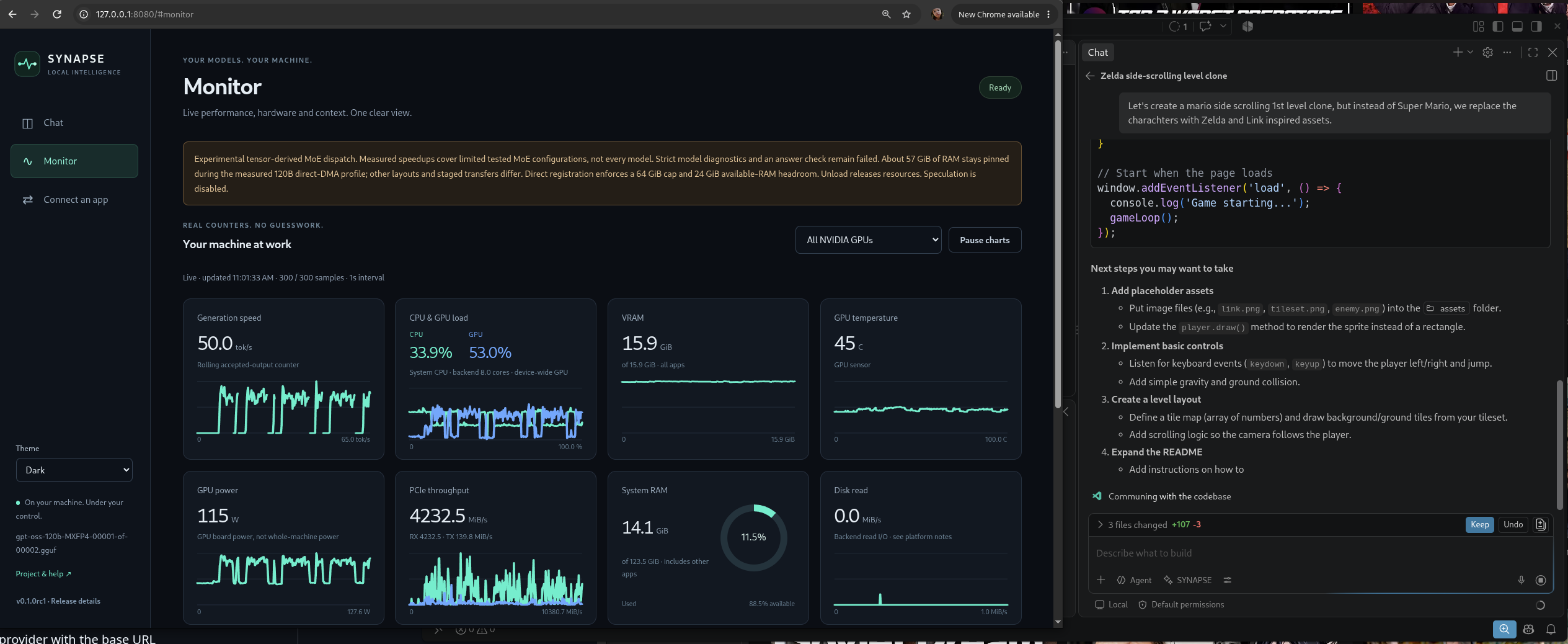
Live monitoring while a local model serves VS Code. Screenshot values are illustrative, not benchmark results.
These are tested text-generation paths, not universal model, fit or quality guarantees.
| Target (GGUF downloads) | Tested accelerated path | Status |
|---|---|---|
| GPT-OSS-120B MXFP4 | Trained/direct-DMA hybrid | Runs; strict reference/quality limits remain. |
| Qwen3.8-Flash-Next IQ3_S | Generic/hybrid expert dispatch | Runs; limited numerical/quality qualification. |
| GLM-4.5-Air IQ4_XS | Manual 6 GiB causal bank at 16K | Runs; 8 GiB attempt and original answer failures retained. |
| Qwen3.6-35B-A3B Q8_0 | 8 GiB causal bank | Targeted answer and same-placement checks pass; not broadly quality-qualified. |
| Mistral Small 4 UD-IQ4_XS | Isolated prototype only; not default installation | Experimental generation/API proof; native equivalence fails. |
Choose the listed quantization and review its model license. Download all shards of a split GGUF and select the first shard in Model Controls. Different repacks are not automatically equivalent to the benchmarked files.
Detailed compatibility status and evidence.
On Linux or macOS, with Python 3.10+ and curl:
curl -fsSL https://raw.githubusercontent.com/appatalks/synapse/main/install.sh | bash -s -- --launch
This installs per-user, without sudo, and opens the app. On Linux it offers experimental NVIDIA acceleration; an existing compatible research profile can be reused. Building that backend requires Git, CMake, a C++ compiler and the CUDA toolkit. Drivers, toolkits and model weights are never installed automatically. macOS uses a separately installed llama.cpp CPU/Metal backend.
The installer prefers a checksummed public release and explicitly labels any
source fallback as a main-branch preview. Prefer to inspect
scripts before running them? Download and review install.sh first.
Already have a backend? Add --llama-server /path/to/llama-server to the
installer arguments. Skip the acceleration offer with --no-accelerated;
request it non-interactively with --accelerated.
Windows: download SYNAPSE.pyz from Releases
and run py SYNAPSE.pyz --llama-server C:\path\to\llama-server.exe.
For a managed Windows install, follow the short source-install instructions.
Those source instructions also work on Linux and macOS.
Auto Tune checks context capacity and recommends app limits. See application notes for runtime requirements, updates and advanced details.
Strata is a direct inspiration. Its practical heterogeneous-inference work and integrated monitoring gave this project a needed push toward a more useful local-model experience.
Strata offers an integrated engine/setup experience centered on its supported lineup. SYNAPSE aims for metadata-driven MoE scheduling across models, with transparent counters and an independently usable local app. It does not bundle Strata, its engine or model packs, is not affiliated with Strata, and does not claim feature parity or superior performance to it.
The experiments, native patches, benchmark methodology and full history live in unified-memory-scheduler.
Local-only API: do not expose it to the network. Details.
Installation · Monitoring · Application notes · Development · MIT license
Run MoE open weight models, faster - on local hardware.
Python
1
32 commits
updated Oct 18, 2026
Run larger local models. Get more from the hardware you already own.
A black hole made with Synapse using Qwen3.8-Flash-Next.
SYNAPSE brings local chat, model controls, hardware monitoring and an OpenAI-compatible API into one small app. Its optional experimental MoE engine keeps frequently used experts on the GPU and executes cold experts on the CPU, instead of forcing every operation through the same placement strategy.
For the architecture, methods, benchmark evidence and qualification limits, read the technical white paper (PDF). Editable sources and offline build instructions are included.
Our research has demonstrated substantially faster generation on four larger-than-VRAM models, without changing target weights or skipping selected experts:
| Model | Matched control | Accelerated | Gain |
|---|---|---|---|
| GPT-OSS-120B MXFP4 | 25.69 tok/s | 39.46 tok/s | 54% |
| Qwen3.8-Flash-Next IQ3_S | 25.39 tok/s | 43.88 tok/s | 73% |
| GLM-4.5-Air 106B IQ4_XS | 12.67 tok/s | 17.28 tok/s | 36% |
| Qwen3.6-35B-A3B Q8_0 | 45.50 tok/s | 77.99 tok/s | 71% |
These are three-run, 512-token technical-screen medians at 16K context on a Ryzen 9 9950X, RTX 5070 Ti 16GB and 123.48 GiB usable RAM, with 8 generation / 16 prompt threads. GPT and Qwen3.6 use standard automatic-placement controls; Qwen3.8 uses native CPU experts with a GPU backbone. They are different controls, not a Strata comparison. GLM uses a 6 GiB manual causal cache and the fastest observed non-hybrid control; its 8 GiB attempt failed to fit. GLM measurements, RAM comparison and reproducible settings · Qwen3.6 measurements and verification limits · All conditions and retained failures.
The gains belong to the optional Linux/NVIDIA research backend, not the UI or standard llama.cpp mode. They are not promises for every model or machine. Experimental acceleration is not yet quality-qualified: some strict CPU-reference logit comparisons and an earlier structured-answer check failed. Newer targeted checks pass, but do not establish equivalent answer quality across models and workloads. These failures do not by themselves establish that acceleration caused an incorrect answer.
Release candidate. Experimental acceleration is not quality-qualified. Standard execution remains available. Check important model answers independently.
Live monitoring while a local model serves VS Code. Screenshot values are illustrative, not benchmark results.
These are tested text-generation paths, not universal model, fit or quality guarantees.
| Target (GGUF downloads) | Tested accelerated path | Status |
|---|---|---|
| GPT-OSS-120B MXFP4 | Trained/direct-DMA hybrid | Runs; strict reference/quality limits remain. |
| Qwen3.8-Flash-Next IQ3_S | Generic/hybrid expert dispatch | Runs; limited numerical/quality qualification. |
| GLM-4.5-Air IQ4_XS | Manual 6 GiB causal bank at 16K | Runs; 8 GiB attempt and original answer failures retained. |
| Qwen3.6-35B-A3B Q8_0 | 8 GiB causal bank | Targeted answer and same-placement checks pass; not broadly quality-qualified. |
| Mistral Small 4 UD-IQ4_XS | Isolated prototype only; not default installation | Experimental generation/API proof; native equivalence fails. |
Choose the listed quantization and review its model license. Download all shards of a split GGUF and select the first shard in Model Controls. Different repacks are not automatically equivalent to the benchmarked files.
Detailed compatibility status and evidence.
On Linux or macOS, with Python 3.10+ and curl:
curl -fsSL https://raw.githubusercontent.com/appatalks/synapse/main/install.sh | bash -s -- --launch
This installs per-user, without sudo, and opens the app. On Linux it offers experimental NVIDIA acceleration; an existing compatible research profile can be reused. Building that backend requires Git, CMake, a C++ compiler and the CUDA toolkit. Drivers, toolkits and model weights are never installed automatically. macOS uses a separately installed llama.cpp CPU/Metal backend.
The installer prefers a checksummed public release and explicitly labels any
source fallback as a main-branch preview. Prefer to inspect
scripts before running them? Download and review install.sh first.
Already have a backend? Add --llama-server /path/to/llama-server to the
installer arguments. Skip the acceleration offer with --no-accelerated;
request it non-interactively with --accelerated.
Windows: download SYNAPSE.pyz from Releases
and run py SYNAPSE.pyz --llama-server C:\path\to\llama-server.exe.
For a managed Windows install, follow the short source-install instructions.
Those source instructions also work on Linux and macOS.
Auto Tune checks context capacity and recommends app limits. See application notes for runtime requirements, updates and advanced details.
Strata is a direct inspiration. Its practical heterogeneous-inference work and integrated monitoring gave this project a needed push toward a more useful local-model experience.
Strata offers an integrated engine/setup experience centered on its supported lineup. SYNAPSE aims for metadata-driven MoE scheduling across models, with transparent counters and an independently usable local app. It does not bundle Strata, its engine or model packs, is not affiliated with Strata, and does not claim feature parity or superior performance to it.
The experiments, native patches, benchmark methodology and full history live in unified-memory-scheduler.
Local-only API: do not expose it to the network. Details.
Installation · Monitoring · Application notes · Development · MIT license



