
Qwen3.8-Flash-Next (125B MoE) on a 8GB+ NVIDIA GPU: one-click install for Windows / Linux. Strata inference engine, OpenAI/Anthropic API on localhost, optional image input.
C++
893
82 commits
updated Sep 28, 2026
See what people are saying
README
Strata
Run a 125-billion-parameter AI model on a normal gaming PC
one NVIDIA card (12-24 GB) + 64 GB of RAM · Windows or Linux · one click to install

A voxel pagoda garden, 1 shot prompt running on an RTX 5070 with Strata (IQ3_S, 128K context) ·
full video (49 s)
Strata runs Qwen3.8-Flash-Next - a large, smart AI model that normally needs a server - on your own PC. It writes its answers at 60-95 tokens per second (a token is about ¾ of a word): faster than you can read.
- Free and open source.
Jump to: How fast? · Which model? · Install · Using it · Problems? · How it works · All the details
How fast is it?
Measured on an RTX 5070 (12 GB), a Ryzen 5 7600 and 64 GB of RAM:
| Size | Writes answers (short chat) | Writes answers (128K context) | Reads your prompt |
|---|---|---|---|
| Q2_0 | 90 tokens/s | 67 tokens/s | 1,310 tokens/s |
| IQ2_XS | 74 tokens/s | 60 tokens/s | 1,240 tokens/s |
| IQ3_XXS | 62 tokens/s | 46 tokens/s | 1,110 tokens/s |
| IQ3_S | 52 tokens/s | 41 tokens/s | 1,070 tokens/s |
| Coder (IQ1_M) | 51 tokens/s | 44 tokens/s | 1,300 tokens/s |
- Writes answers = how fast the reply appears (tokens per second).
- Reads your prompt = how fast it takes in what you send (long documents, code, chat history), measured on a 32K-token prompt; a 4K prompt reads at 740-1,000 tokens/s. A 32K prompt takes about 25 seconds with Q2_0.
A card with more VRAM is faster, because more of the model fits on the GPU: an RTX 3090 (24 GB) should do roughly 100-140 tokens per second. All measurements, long-context numbers and estimates for other cards are in the details.
Which model should I pick?
The size (the same model, compressed more or less):
| Model | RAM+VRAM Requirements | Speed | Quality |
|---|---|---|---|
| Q2_0 | 37.6 GB | fastest | good |
| IQ2_XS | 39.2 GB | fast | better (recommended) |
| IQ3_XXS | 47.0 GB | slower | great |
| IQ3_S | 54.8 GB | slowest | best: matches the full model on the published tests (original model only) |
Will it fit? Shard 1 is the part of the model that gets loaded when it starts: its experts go into your RAM, the rest onto your graphics card (the second shard, a 29 GB lookup table, stays on the SSD). So it fits when your RAM is at least shard 1 + about 10 GB for Windows and your other programs. With 64 GB of RAM every size fits (IQ3_S with little else open); with 48 GB, Q2_0 and IQ2_XS. A bigger graphics card makes it faster, but it doesn't lower the RAM needed.
The version:
- Qwen3.8-Flash-Next - the original.
- Coder - ISTA-DASLab's coding version: half of the experts removed, keeping the ones that code, tool use and images need (91% of the full model's SWE-bench Verified score, 99% of LiveCodeBench, by its authors). One size (IQ1_M: its experts stored like IQ3_S): shard 1 is 29.6 GB, so it fits a PC with 32 GB of RAM, runs 262K context on 64 GB, and reads long prompts the fastest of all. Weaker outside coding.
- Swift 1.5 - a fine-tune by UkisAI that thinks much shorter before answering, so you get the answer sooner, with about the same quality. Same speed per token, and about the same RAM as the same size of the original (no IQ3_S). Its own license applies (see its page).
Not sure? Take IQ2_XS - or the Coder if you mainly write code, or have 32-48 GB of RAM. You can add another
one later with SETUP.bat (the same as START-HERE.bat --setup; on Linux ./setup.sh --setup).
Install
You need: an NVIDIA RTX 30, 40 or 50 card with 12 GB of VRAM or more, enough RAM for the size you pick (above), ~80 GB of free disk space (an SSD makes the first start much faster), and Windows 10/11 or Linux. The only thing you install yourself is a current NVIDIA driver (nvidia.com/drivers or the NVIDIA App). Everything else - Python, the engine, the model - is set up for you.
Windows
- Download this project and unzip it (or
git cloneit). - Double-click
START-HERE.bat. - Answer a few questions - or just press Enter each time for the recommended choice:
- Which model and size? The original or Swift 1.5, and Q2_0, IQ2_XS, IQ3_XXS or IQ3_S - see above
- How much context? How much text it can keep in mind at once (it suggests one for your card)
- Images? Whether it should also read pictures
- Experimental speed projection? Off unless you say yes - read what it does first
Then it downloads everything (the model is ~70 GB, so the first time takes a while - you can stop and it picks up
where it left off) and starts the model. Your browser opens the Strata app at http://127.0.0.1:8080.
While the model starts, your PC can be slow or stop responding for 1-3 minutes (longest the first time): Strata loads 35-55 GB into your RAM and locks part of it for the graphics card. That's normal - wait, and don't close the window. The window tells you what it is doing.
Next time, just double-click START-HERE.bat again: it starts right away, nothing is downloaded twice. Close its
window to stop the model.
Updating: download the new version and unzip it anywhere (or git pull), then run START-HERE.bat in it. The
model files are kept in a Strata-data folder next to your Strata folder, so a new copy finds them and sets itself up
the same way - nothing big is downloaded again.
Linux: run ./setup.sh - same questions, same result.
Using it
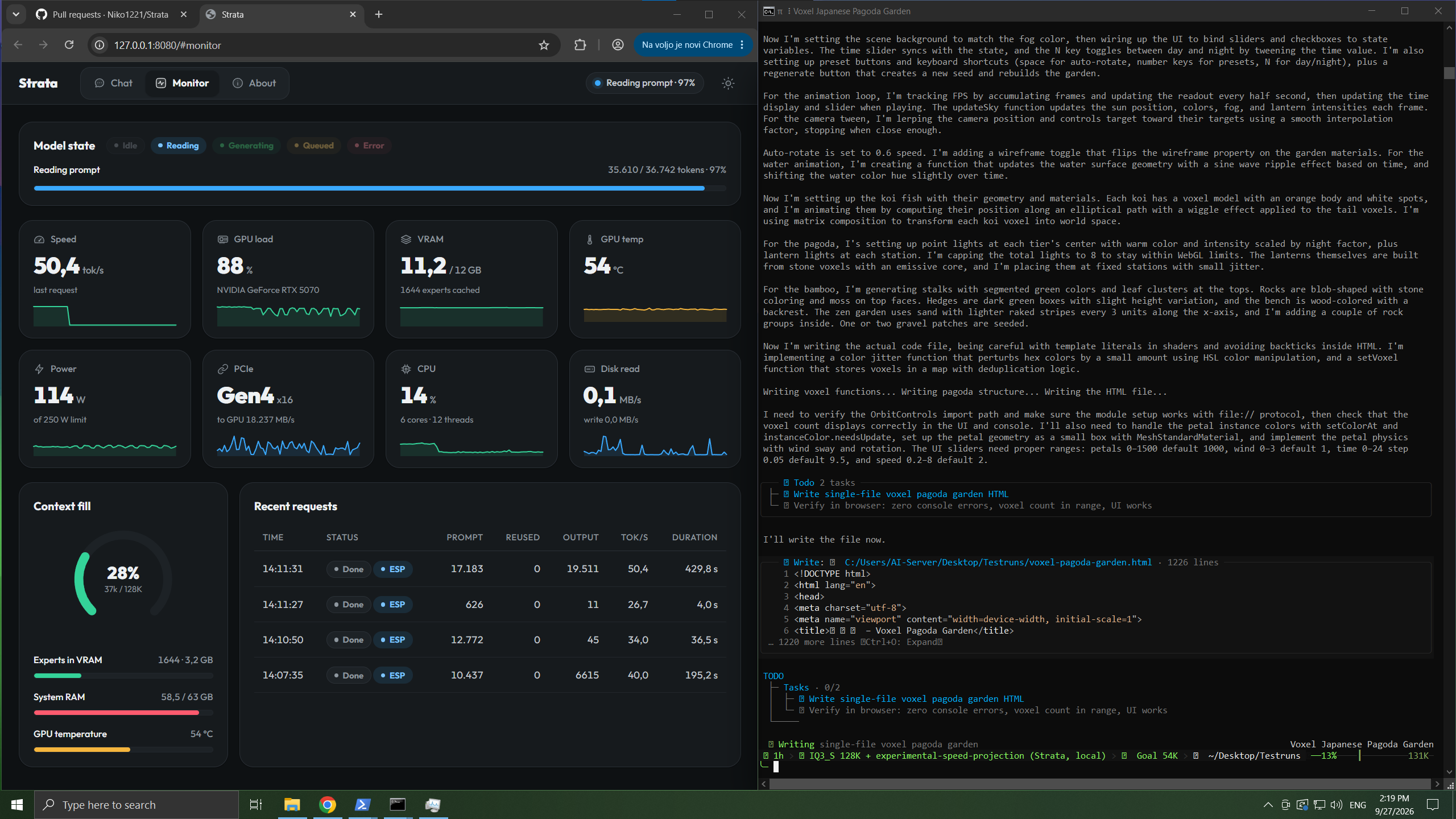
The Strata app's Monitor (left) while a coding agent writes the pagoda garden from the video (right)
- In the browser:
http://127.0.0.1:8080- the Strata app (it opens by itself when the model starts): Chat, a live Monitor of the model and your GPU/CPU/RAM, and About with the settings and addresses. - Chat in the terminal:
.venv\Scripts\python chat.py - Your apps and coding agents: add it as an "OpenAI-compatible" provider with base URL
http://127.0.0.1:8080/v1, any API key and any model name. Apps that use Anthropic's API:http://127.0.0.1:8080/v1/messages. - Thinking: the model thinks before it answers. Choose off, low, medium or high - in the chat page menu, with
/think lowinchat.py, or with your app's "reasoning effort" setting. Off is fastest; high is best for hard questions. - Pictures: in the chat page click Picture; in
chat.pytype/image <path>; in apps just attach them. - From your phone or another PC:
START-HERE.bat --setup --host 0.0.0.0 --api-key <secret>, then open the address the server window prints; see the details. - Experimental speed projection (off by default): an experimental control vector that setup can turn on; it changes how the model answers - read what it does first.
Good to know: it answers one request at a time. The first message of a chat is read in full (about 1 minute per 30,000 tokens); after that it keeps the conversation and reads only what is new, so follow-ups start in seconds.
Something went wrong?
My PC froze, or got very slow, the first time Strata started. That's normal while it starts, most of all the first time. Strata loads 35-55 GB into your RAM, locks part of it for the graphics card, and works out how much of the model fits on your GPU. The mouse can freeze for a few minutes. Wait, and don't close the window. The next starts are much faster. Still frozen after 10 minutes? Restart the PC, close other programs (browsers use a lot of RAM) and try again. If it keeps happening, pick a smaller size (Q2_0 or IQ2_XS).
It stopped while downloading or installing.
Run START-HERE.bat again. It continues where it stopped.
It says the NVIDIA driver is too old.
Update it (NVIDIA App or nvidia.com/drivers), restart the PC, and run
START-HERE.bat again.
It says port 8080 is already in use. Strata is already running. Look for its window.
It's very slow and the disk light keeps blinking. Your PC is out of free RAM. Close other programs, or pick a smaller size (Q2_0 or IQ2_XS).
An answer stopped with "the engine stopped unexpectedly". Usually not enough RAM (on Linux the system then stops the engine). Just send your message again: Strata starts the engine by itself. If it keeps happening, close other programs or pick a smaller size.
It says the prompt exceeds the context.
The conversation is longer than the context you chose. Start a new chat, or run SETUP.bat and pick more
context.
Still stuck? Look in the full troubleshooting table, or open an issue and
attach strata-<model>.log from the Strata folder.
How does it work?
Models like this one normally run on servers with hundreds of gigabytes of graphics memory. Your graphics card has 12-24 GB. Strata makes it fit by sharing the work across your whole PC - the same idea as a kitchen, where the things you use all the time stay on the counter and the rest waits in the pantry.
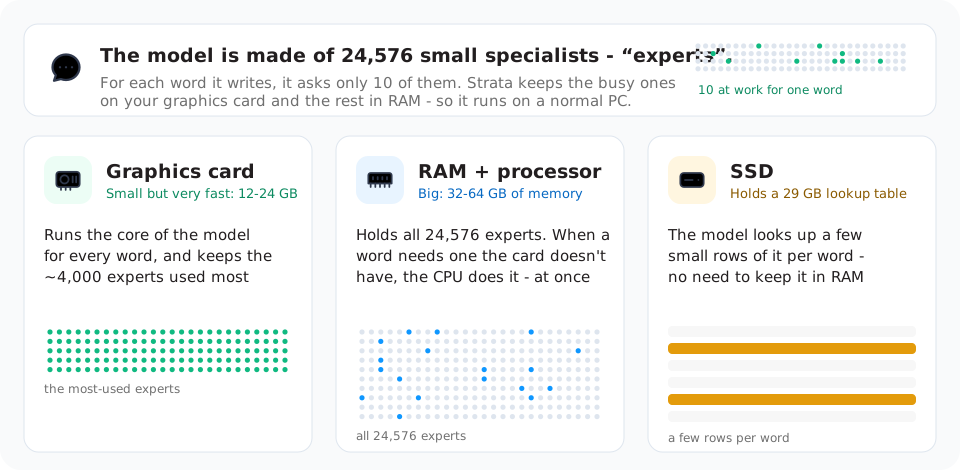
- The model is a team of 24,576 small specialists ("experts"), and each word it writes needs only 10 of them. So it doesn't have to have all of them on the graphics card at once.
- Your graphics card does the part of the work needed for every word, and keeps the few thousand experts that are asked most often. It keeps learning which ones those are while you use it.
- Your RAM holds every expert. When a word needs one the card doesn't have, your processor works on it - at the same time as the graphics card, so neither waits for the other.
- Your SSD holds a big lookup table; the model only reads a few small rows of it per word.
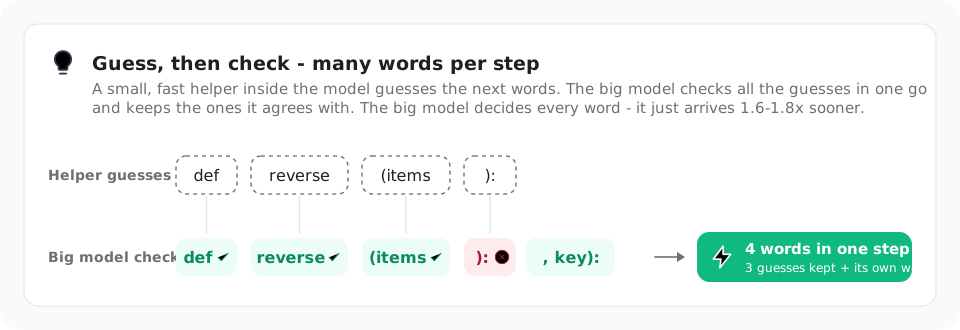
- Guess, then check. A small, fast helper built into the model guesses the next few words, and the big model checks all the guesses in one go. It keeps the ones it agrees with and writes the next word itself - so one step often produces several words. The helper only guesses - the big model decides every word - so you get the same quality answer, 1.6-1.8x sooner.
- Long texts are read in big pieces (up to 8,192 tokens - pieces of words - at a time), which is why a long document or code base is read at over 1,000 tokens per second.
Want the full picture? The details explain every part and its numbers, and the paper tells the whole story, with the measurements behind it.
Credits
- Model: Qwen3.8-Flash-Next by the Qwen team; compressed versions by ISTA-DASLab; Swift 1.5 by UkisAI. Their licenses apply to the model files.
- Built with parts of llama.cpp / ggml (MIT). Ideas from Splash, ninfer and HyperQwen. More in the details.
License
Strata is open source under the MIT License. A few parts carry their own licenses: third_party/ggml
(MIT, llama.cpp / ggml), the web app's font (SIL Open Font License 1.1) and the experimental speed projection's
vector in data/experimental-speed-projection (Qwen Community License 1.0, from the model's activations). The
models are not part of this repository; each model's own license applies to its files.
Significant stargazers

78 followers · starred Sep 2026
Similar repos


Languages
C++
61.3%
Cuda
21.6%
Python
12.7%
JavaScript
1.4%
CMake
1.3%
Qwen3.8-Flash-Next (125B MoE) on a 8GB+ NVIDIA GPU: one-click install for Windows / Linux. Strata inference engine, OpenAI/Anthropic API on localhost, optional image input.
C++
893
82 commits
updated Sep 28, 2026
See what people are saying
README
Strata
Run a 125-billion-parameter AI model on a normal gaming PC
one NVIDIA card (12-24 GB) + 64 GB of RAM · Windows or Linux · one click to install
A voxel pagoda garden, 1 shot prompt running on an RTX 5070 with Strata (IQ3_S, 128K context) ·
full video (49 s)
Strata runs Qwen3.8-Flash-Next - a large, smart AI model that normally needs a server - on your own PC. It writes its answers at 60-95 tokens per second (a token is about ¾ of a word): faster than you can read.
- Free and open source.
Jump to: How fast? · Which model? · Install · Using it · Problems? · How it works · All the details
How fast is it?
Measured on an RTX 5070 (12 GB), a Ryzen 5 7600 and 64 GB of RAM:
| Size | Writes answers (short chat) | Writes answers (128K context) | Reads your prompt |
|---|---|---|---|
| Q2_0 | 90 tokens/s | 67 tokens/s | 1,310 tokens/s |
| IQ2_XS | 74 tokens/s | 60 tokens/s | 1,240 tokens/s |
| IQ3_XXS | 62 tokens/s | 46 tokens/s | 1,110 tokens/s |
| IQ3_S | 52 tokens/s | 41 tokens/s | 1,070 tokens/s |
| Coder (IQ1_M) | 51 tokens/s | 44 tokens/s | 1,300 tokens/s |
- Writes answers = how fast the reply appears (tokens per second).
- Reads your prompt = how fast it takes in what you send (long documents, code, chat history), measured on a 32K-token prompt; a 4K prompt reads at 740-1,000 tokens/s. A 32K prompt takes about 25 seconds with Q2_0.
A card with more VRAM is faster, because more of the model fits on the GPU: an RTX 3090 (24 GB) should do roughly 100-140 tokens per second. All measurements, long-context numbers and estimates for other cards are in the details.
Which model should I pick?
The size (the same model, compressed more or less):
| Model | RAM+VRAM Requirements | Speed | Quality |
|---|---|---|---|
| Q2_0 | 37.6 GB | fastest | good |
| IQ2_XS | 39.2 GB | fast | better (recommended) |
| IQ3_XXS | 47.0 GB | slower | great |
| IQ3_S | 54.8 GB | slowest | best: matches the full model on the published tests (original model only) |
Will it fit? Shard 1 is the part of the model that gets loaded when it starts: its experts go into your RAM, the rest onto your graphics card (the second shard, a 29 GB lookup table, stays on the SSD). So it fits when your RAM is at least shard 1 + about 10 GB for Windows and your other programs. With 64 GB of RAM every size fits (IQ3_S with little else open); with 48 GB, Q2_0 and IQ2_XS. A bigger graphics card makes it faster, but it doesn't lower the RAM needed.
The version:
- Qwen3.8-Flash-Next - the original.
- Coder - ISTA-DASLab's coding version: half of the experts removed, keeping the ones that code, tool use and images need (91% of the full model's SWE-bench Verified score, 99% of LiveCodeBench, by its authors). One size (IQ1_M: its experts stored like IQ3_S): shard 1 is 29.6 GB, so it fits a PC with 32 GB of RAM, runs 262K context on 64 GB, and reads long prompts the fastest of all. Weaker outside coding.
- Swift 1.5 - a fine-tune by UkisAI that thinks much shorter before answering, so you get the answer sooner, with about the same quality. Same speed per token, and about the same RAM as the same size of the original (no IQ3_S). Its own license applies (see its page).
Not sure? Take IQ2_XS - or the Coder if you mainly write code, or have 32-48 GB of RAM. You can add another
one later with SETUP.bat (the same as START-HERE.bat --setup; on Linux ./setup.sh --setup).
Install
You need: an NVIDIA RTX 30, 40 or 50 card with 12 GB of VRAM or more, enough RAM for the size you pick (above), ~80 GB of free disk space (an SSD makes the first start much faster), and Windows 10/11 or Linux. The only thing you install yourself is a current NVIDIA driver (nvidia.com/drivers or the NVIDIA App). Everything else - Python, the engine, the model - is set up for you.
Windows
- Download this project and unzip it (or
git cloneit). - Double-click
START-HERE.bat. - Answer a few questions - or just press Enter each time for the recommended choice:
- Which model and size? The original or Swift 1.5, and Q2_0, IQ2_XS, IQ3_XXS or IQ3_S - see above
- How much context? How much text it can keep in mind at once (it suggests one for your card)
- Images? Whether it should also read pictures
- Experimental speed projection? Off unless you say yes - read what it does first
Then it downloads everything (the model is ~70 GB, so the first time takes a while - you can stop and it picks up
where it left off) and starts the model. Your browser opens the Strata app at http://127.0.0.1:8080.
While the model starts, your PC can be slow or stop responding for 1-3 minutes (longest the first time): Strata loads 35-55 GB into your RAM and locks part of it for the graphics card. That's normal - wait, and don't close the window. The window tells you what it is doing.
Next time, just double-click START-HERE.bat again: it starts right away, nothing is downloaded twice. Close its
window to stop the model.
Updating: download the new version and unzip it anywhere (or git pull), then run START-HERE.bat in it. The
model files are kept in a Strata-data folder next to your Strata folder, so a new copy finds them and sets itself up
the same way - nothing big is downloaded again.
Linux: run ./setup.sh - same questions, same result.
Using it
The Strata app's Monitor (left) while a coding agent writes the pagoda garden from the video (right)
- In the browser:
http://127.0.0.1:8080- the Strata app (it opens by itself when the model starts): Chat, a live Monitor of the model and your GPU/CPU/RAM, and About with the settings and addresses. - Chat in the terminal:
.venv\Scripts\python chat.py - Your apps and coding agents: add it as an "OpenAI-compatible" provider with base URL
http://127.0.0.1:8080/v1, any API key and any model name. Apps that use Anthropic's API:http://127.0.0.1:8080/v1/messages. - Thinking: the model thinks before it answers. Choose off, low, medium or high - in the chat page menu, with
/think lowinchat.py, or with your app's "reasoning effort" setting. Off is fastest; high is best for hard questions. - Pictures: in the chat page click Picture; in
chat.pytype/image <path>; in apps just attach them. - From your phone or another PC:
START-HERE.bat --setup --host 0.0.0.0 --api-key <secret>, then open the address the server window prints; see the details. - Experimental speed projection (off by default): an experimental control vector that setup can turn on; it changes how the model answers - read what it does first.
Good to know: it answers one request at a time. The first message of a chat is read in full (about 1 minute per 30,000 tokens); after that it keeps the conversation and reads only what is new, so follow-ups start in seconds.
Something went wrong?
My PC froze, or got very slow, the first time Strata started. That's normal while it starts, most of all the first time. Strata loads 35-55 GB into your RAM, locks part of it for the graphics card, and works out how much of the model fits on your GPU. The mouse can freeze for a few minutes. Wait, and don't close the window. The next starts are much faster. Still frozen after 10 minutes? Restart the PC, close other programs (browsers use a lot of RAM) and try again. If it keeps happening, pick a smaller size (Q2_0 or IQ2_XS).
It stopped while downloading or installing.
Run START-HERE.bat again. It continues where it stopped.
It says the NVIDIA driver is too old.
Update it (NVIDIA App or nvidia.com/drivers), restart the PC, and run
START-HERE.bat again.
It says port 8080 is already in use. Strata is already running. Look for its window.
It's very slow and the disk light keeps blinking. Your PC is out of free RAM. Close other programs, or pick a smaller size (Q2_0 or IQ2_XS).
An answer stopped with "the engine stopped unexpectedly". Usually not enough RAM (on Linux the system then stops the engine). Just send your message again: Strata starts the engine by itself. If it keeps happening, close other programs or pick a smaller size.
It says the prompt exceeds the context.
The conversation is longer than the context you chose. Start a new chat, or run SETUP.bat and pick more
context.
Still stuck? Look in the full troubleshooting table, or open an issue and
attach strata-<model>.log from the Strata folder.
How does it work?
Models like this one normally run on servers with hundreds of gigabytes of graphics memory. Your graphics card has 12-24 GB. Strata makes it fit by sharing the work across your whole PC - the same idea as a kitchen, where the things you use all the time stay on the counter and the rest waits in the pantry.
- The model is a team of 24,576 small specialists ("experts"), and each word it writes needs only 10 of them. So it doesn't have to have all of them on the graphics card at once.
- Your graphics card does the part of the work needed for every word, and keeps the few thousand experts that are asked most often. It keeps learning which ones those are while you use it.
- Your RAM holds every expert. When a word needs one the card doesn't have, your processor works on it - at the same time as the graphics card, so neither waits for the other.
- Your SSD holds a big lookup table; the model only reads a few small rows of it per word.
- Guess, then check. A small, fast helper built into the model guesses the next few words, and the big model checks all the guesses in one go. It keeps the ones it agrees with and writes the next word itself - so one step often produces several words. The helper only guesses - the big model decides every word - so you get the same quality answer, 1.6-1.8x sooner.
- Long texts are read in big pieces (up to 8,192 tokens - pieces of words - at a time), which is why a long document or code base is read at over 1,000 tokens per second.
Want the full picture? The details explain every part and its numbers, and the paper tells the whole story, with the measurements behind it.
Credits
- Model: Qwen3.8-Flash-Next by the Qwen team; compressed versions by ISTA-DASLab; Swift 1.5 by UkisAI. Their licenses apply to the model files.
- Built with parts of llama.cpp / ggml (MIT). Ideas from Splash, ninfer and HyperQwen. More in the details.
License
Strata is open source under the MIT License. A few parts carry their own licenses: third_party/ggml
(MIT, llama.cpp / ggml), the web app's font (SIL Open Font License 1.1) and the experimental speed projection's
vector in data/experimental-speed-projection (Qwen Community License 1.0, from the model's activations). The
models are not part of this repository; each model's own license applies to its files.
Similar repos
Significant stargazers
78 followers · starred Sep 2026
Languages
C++
61.3%
Cuda
21.6%
Python
12.7%
JavaScript
1.4%
CMake
1.3%