GUI wallpaper manager for Wayland and Xorg Linux systems
See the codeGUI wallpaper setter for Wayland, Xorg, and macOS. It works as a frontend for popular wallpaper backends like swaybg, swww, awww, wallutils, hyprpaper, mpvpaper, gslapper, xwallpaper, feh, linux-wallpaperengine, and macos. See demo and documentation.
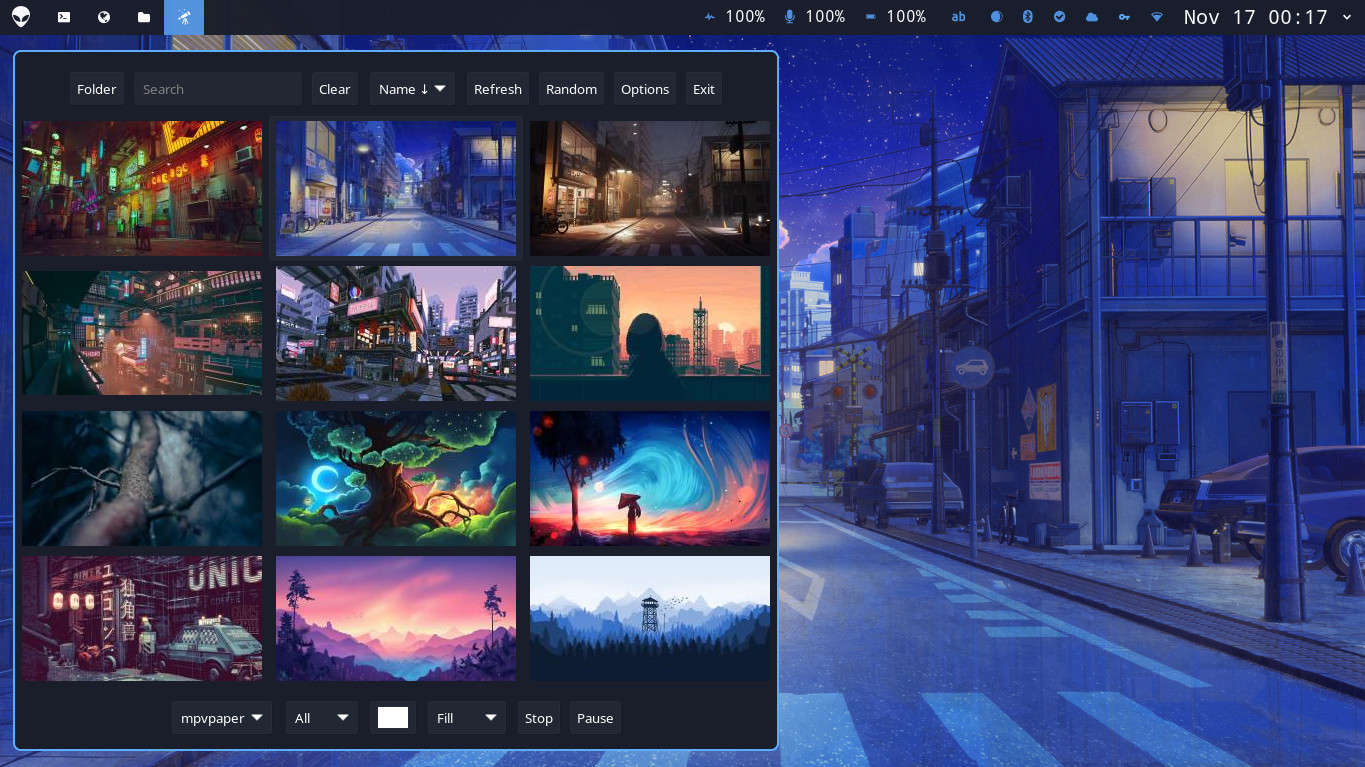
awww or mpvpaper or gslapper)mpvpaper or gslapper)awww or swaybg or hyprpaper or mpvpaper)awww or swww or swaybg or hyprpaper or wallutils or mpvpaper or gslapper)feh, xwallpaper or wallutils)macos)linux-wallpaperengine so you can use your animated wallpapers from Steam's Wallpaper Enginewaypaper --restore)Install at least one of the backends and Waypaper, which works as a frontend.
Install a preferred backend from your package manager: swww (archived) or awww or swaybg or hyprpaper on Wayland or xwallpaper or feh on Xorg or mpvpaper or gslapper or wallutils on both. Install linux-wallpaperengine if you want to use Steam's Wallpaper Engine animated wallpapers. On macOS, use the built-in macos backend.
Install waypaper, which is available in different repositories:
pipx install waypaper
If pipx is not found, you first need to install pipx from your package manager, it's sometimes called python-pipx.
yay -S waypaper
The waypaper package and unstable developer package waypaper-git are available in AUR, thanks to metak. Please upvote to support the project.
The waypaper package is available thanks to Basil Keeler.
Users of OpenSUSE reported issue with installation via pipx install waypaper. This can be resolved by installing the python313-pycairo-devel and python313-gobject-devel packages first.
Waypaper is available in an external repository owned by Solopasha. You can add this repository as sudo dnf copr enable lionheartp/Hyprland and install as sudo dnf install waypaper.
First install GTK3 and PyGObject via Homebrew, then install Waypaper:
brew install gtk+3 pygobject3
pipx install waypaper
If pipx is not installed: brew install pipx && pipx ensurepath.
To make Waypaper accessible from Spotlight and Launchpad, copy the provided app bundle to your Applications folder:
cp -r data/macos/Waypaper.app ~/Applications/
awww or swww or swaybg or xwallpaper or feh or wallutils or hyprpaper or mpvpaper or gslapper or linux-wallpaperengine or macospython-gobject or python3-gi or python3-gobject in your package manager.)python-imageiopython-imageio-ffmpegpython-screeninfopython-platformdirssocat (only required for the mpvpaper backend, used for its IPC socket)waypaper command will run GUI application.
To restore your wallpaper after restart, add waypaper --restore to your WM startup config.
To rotate wallpapers automatically, open the slideshow panel from the options menu in the GUI, set an interval, and start it. For other ways to run the slideshow daemon, see the documentation.
Feel free to propose PR and suggest the improvements. I'll appreciate help with packaging for various distributions. If you wish to contribute with translation into your language, please see the translations.py file. Here are a few guiding principles for contribution:
I am not a professional developer and work on open-source projects in my free time. If you'd like to support the development, consider donations via:
bc1qpkzmutdqfxkce34skt09vll97s5smpa0r2tyzj0x6f1Ce9cA181458Fc153a5f7cBF88044736C3b00C0x40f22c372758E35C905458cAF8BB17f51ac133d1ltc1qtu33qyv2xlzxda5mmrmk943zpksq8q75tuh85p4AHRhpNYUZcPVN78rbUWAzBuvMKQdpwStS5L3kjunnBMWWW2pjYBko1RUF6nQVpgQPdfAkM3jrEWrWKDHz1h4Ucd4gFCZ9j888 followers · starred Sep 2025
168 followers · starred Sep 2023
69 followers · starred Aug 2025
58 followers · starred Jan 2025
GUI wallpaper manager for Wayland and Xorg Linux systems
See the codeGUI wallpaper setter for Wayland, Xorg, and macOS. It works as a frontend for popular wallpaper backends like swaybg, swww, awww, wallutils, hyprpaper, mpvpaper, gslapper, xwallpaper, feh, linux-wallpaperengine, and macos. See demo and documentation.
awww or mpvpaper or gslapper)mpvpaper or gslapper)awww or swaybg or hyprpaper or mpvpaper)awww or swww or swaybg or hyprpaper or wallutils or mpvpaper or gslapper)feh, xwallpaper or wallutils)macos)linux-wallpaperengine so you can use your animated wallpapers from Steam's Wallpaper Enginewaypaper --restore)Install at least one of the backends and Waypaper, which works as a frontend.
Install a preferred backend from your package manager: swww (archived) or awww or swaybg or hyprpaper on Wayland or xwallpaper or feh on Xorg or mpvpaper or gslapper or wallutils on both. Install linux-wallpaperengine if you want to use Steam's Wallpaper Engine animated wallpapers. On macOS, use the built-in macos backend.
Install waypaper, which is available in different repositories:
pipx install waypaper
If pipx is not found, you first need to install pipx from your package manager, it's sometimes called python-pipx.
yay -S waypaper
The waypaper package and unstable developer package waypaper-git are available in AUR, thanks to metak. Please upvote to support the project.
The waypaper package is available thanks to Basil Keeler.
Users of OpenSUSE reported issue with installation via pipx install waypaper. This can be resolved by installing the python313-pycairo-devel and python313-gobject-devel packages first.
Waypaper is available in an external repository owned by Solopasha. You can add this repository as sudo dnf copr enable lionheartp/Hyprland and install as sudo dnf install waypaper.
First install GTK3 and PyGObject via Homebrew, then install Waypaper:
brew install gtk+3 pygobject3
pipx install waypaper
If pipx is not installed: brew install pipx && pipx ensurepath.
To make Waypaper accessible from Spotlight and Launchpad, copy the provided app bundle to your Applications folder:
cp -r data/macos/Waypaper.app ~/Applications/
awww or swww or swaybg or xwallpaper or feh or wallutils or hyprpaper or mpvpaper or gslapper or linux-wallpaperengine or macospython-gobject or python3-gi or python3-gobject in your package manager.)python-imageiopython-imageio-ffmpegpython-screeninfopython-platformdirssocat (only required for the mpvpaper backend, used for its IPC socket)waypaper command will run GUI application.
To restore your wallpaper after restart, add waypaper --restore to your WM startup config.
To rotate wallpapers automatically, open the slideshow panel from the options menu in the GUI, set an interval, and start it. For other ways to run the slideshow daemon, see the documentation.
Feel free to propose PR and suggest the improvements. I'll appreciate help with packaging for various distributions. If you wish to contribute with translation into your language, please see the translations.py file. Here are a few guiding principles for contribution:
I am not a professional developer and work on open-source projects in my free time. If you'd like to support the development, consider donations via:
bc1qpkzmutdqfxkce34skt09vll97s5smpa0r2tyzj0x6f1Ce9cA181458Fc153a5f7cBF88044736C3b00C0x40f22c372758E35C905458cAF8BB17f51ac133d1ltc1qtu33qyv2xlzxda5mmrmk943zpksq8q75tuh85p4AHRhpNYUZcPVN78rbUWAzBuvMKQdpwStS5L3kjunnBMWWW2pjYBko1RUF6nQVpgQPdfAkM3jrEWrWKDHz1h4Ucd4gFCZ9j888 followers · starred Sep 2025
168 followers · starred Sep 2023
69 followers · starred Aug 2025
58 followers · starred Jan 2025



