
GUI for Almamu/linux-wallpaperengine using Go (Backend) and Electron (Frontend) .
Svelte
94
357 commits
updated Oct 7, 2026
See what people are saying
README

✦ LINUX WALLPAPER ENGINE GUI ✦
◈ A graphical user interface for managing wallpapers for [linux-wallpaperengine](https://github.com/Almamu/linux-wallpaperengine) ◈
◈ Powered by Go (Backend) and Electron (Frontend) ◈


CONTENTS
- CONTENTS
- SCREENSHOTS
- FEATURES
- MEMORY EFFICIENCY
- PREREQUISITES
- INSTALLATION
- USAGE
- BUILD FROM SOURCE
- DEVELOPMENT
- STONKS!
[!NOTE] This GUI is also compatible with my linux-wallpaperengine.
It's a C++ (with sokol) implementation of Wallpaper Engine for Linux. It's still in early development and missing some features. Maybe you want to check it out!
SCREENSHOTS
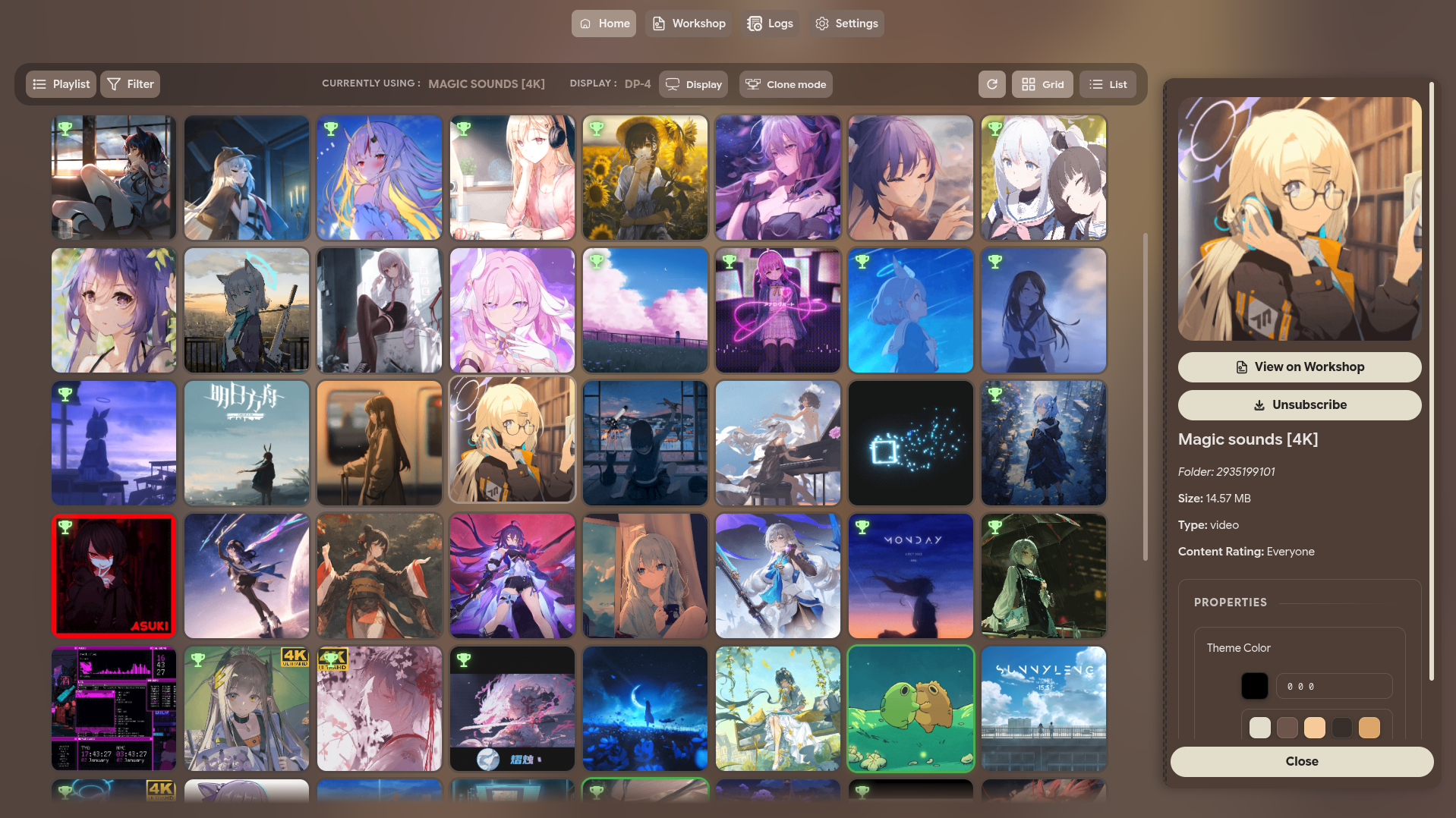
| Main Window |
|---|
 |
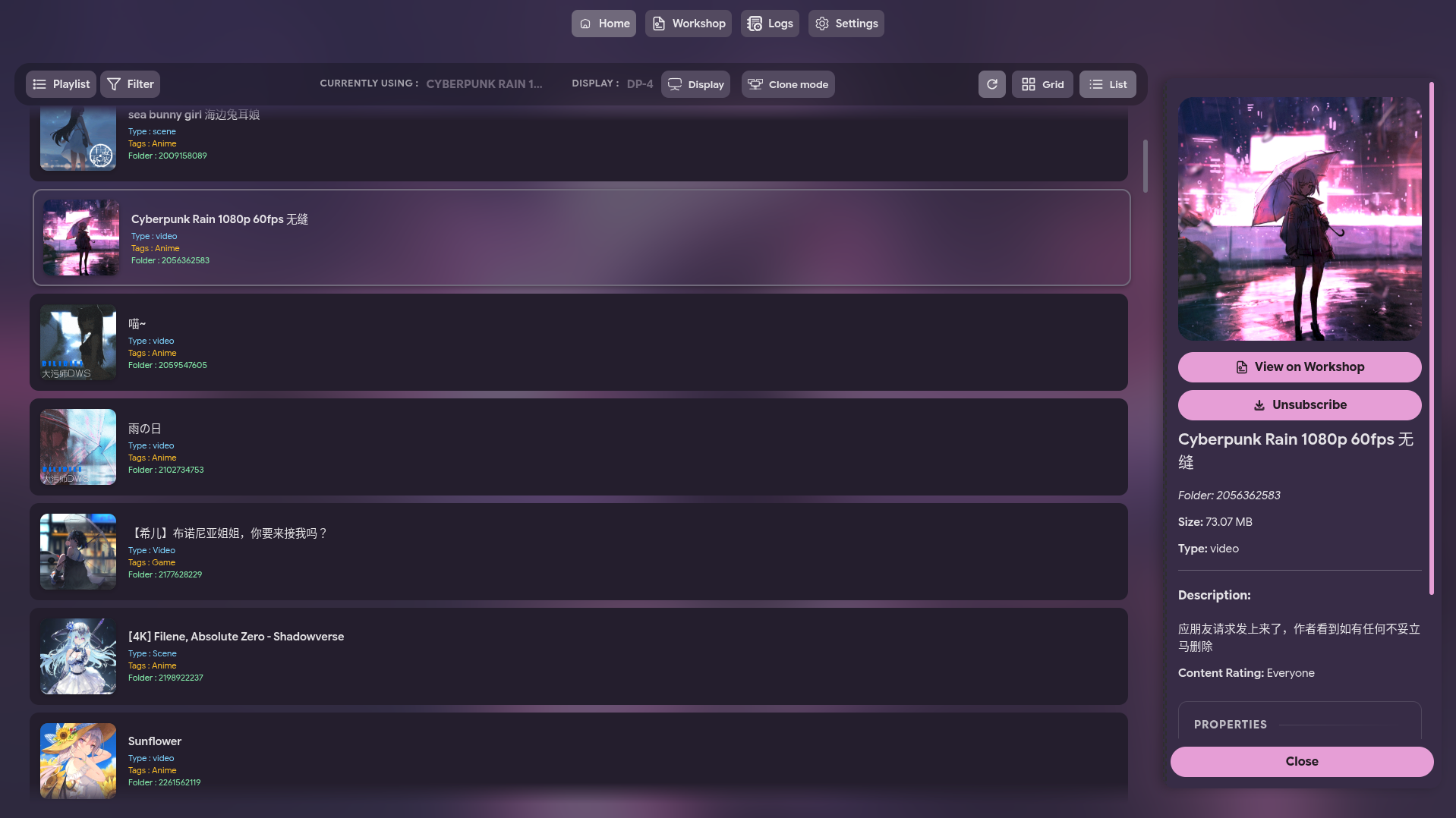
| Main Window (List) |
|---|
 |
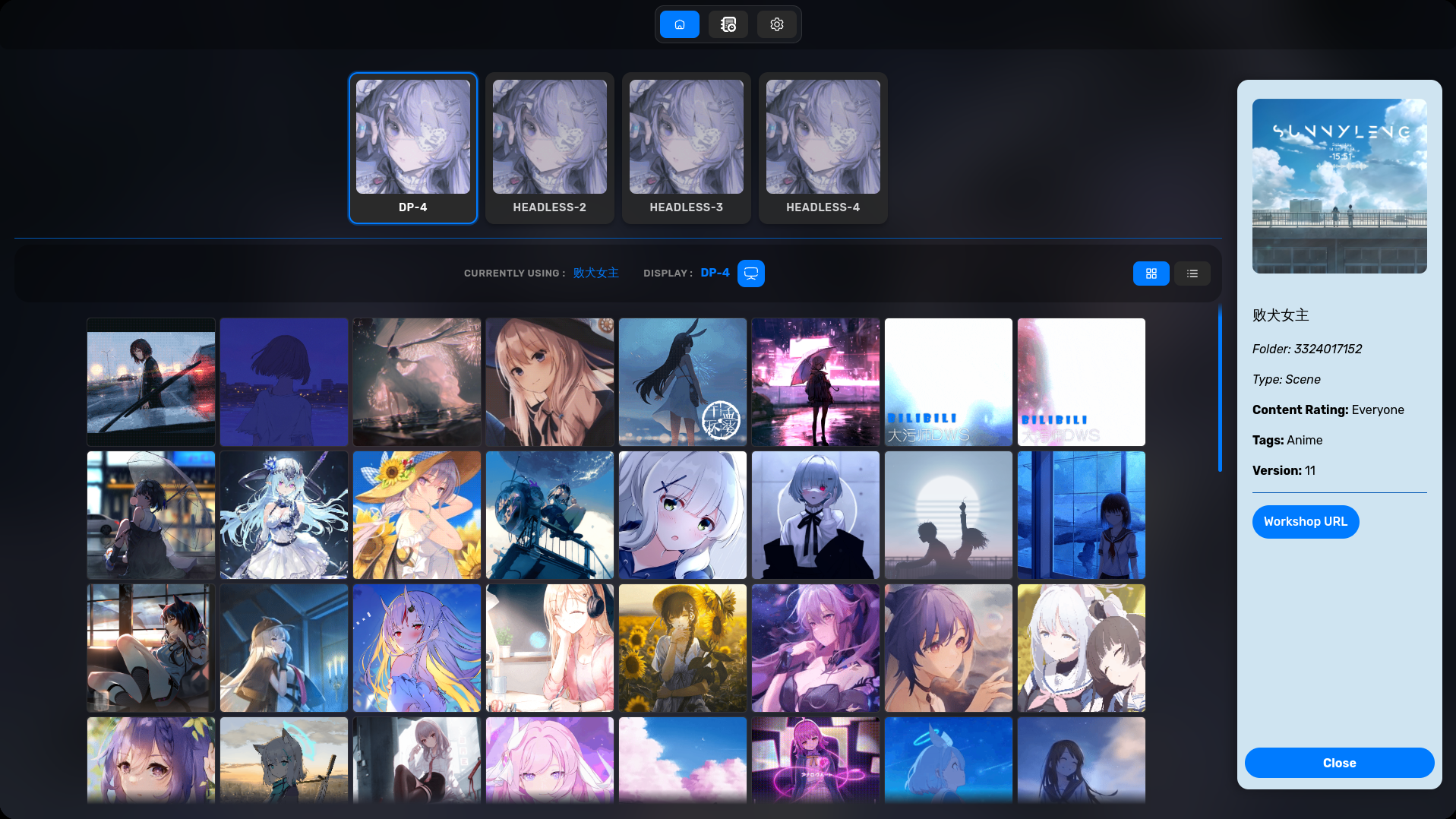
| Display Settings |
|---|
 |
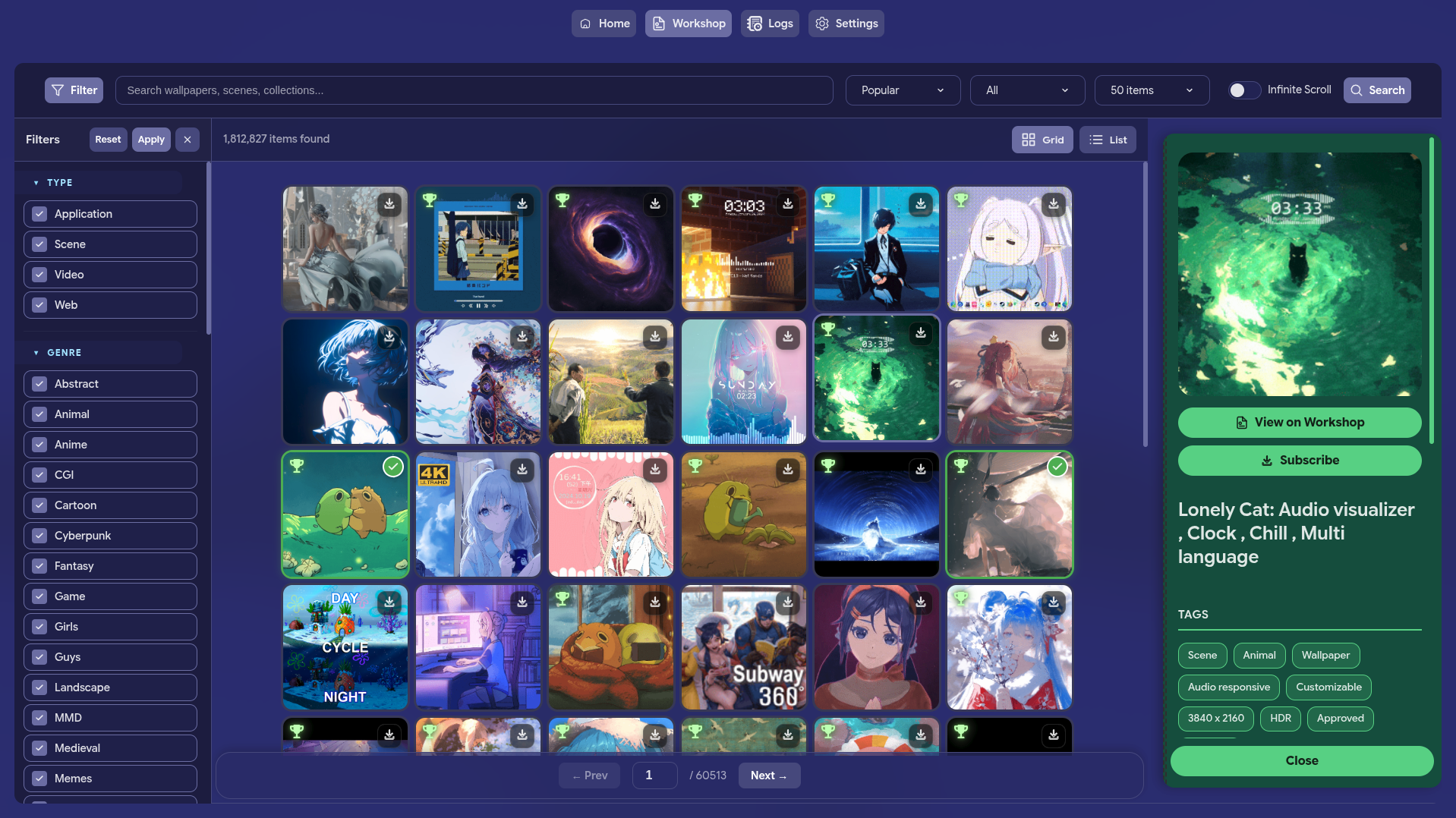
| WORKSHOP |
|---|
 |
| PLAYLIST |
|---|
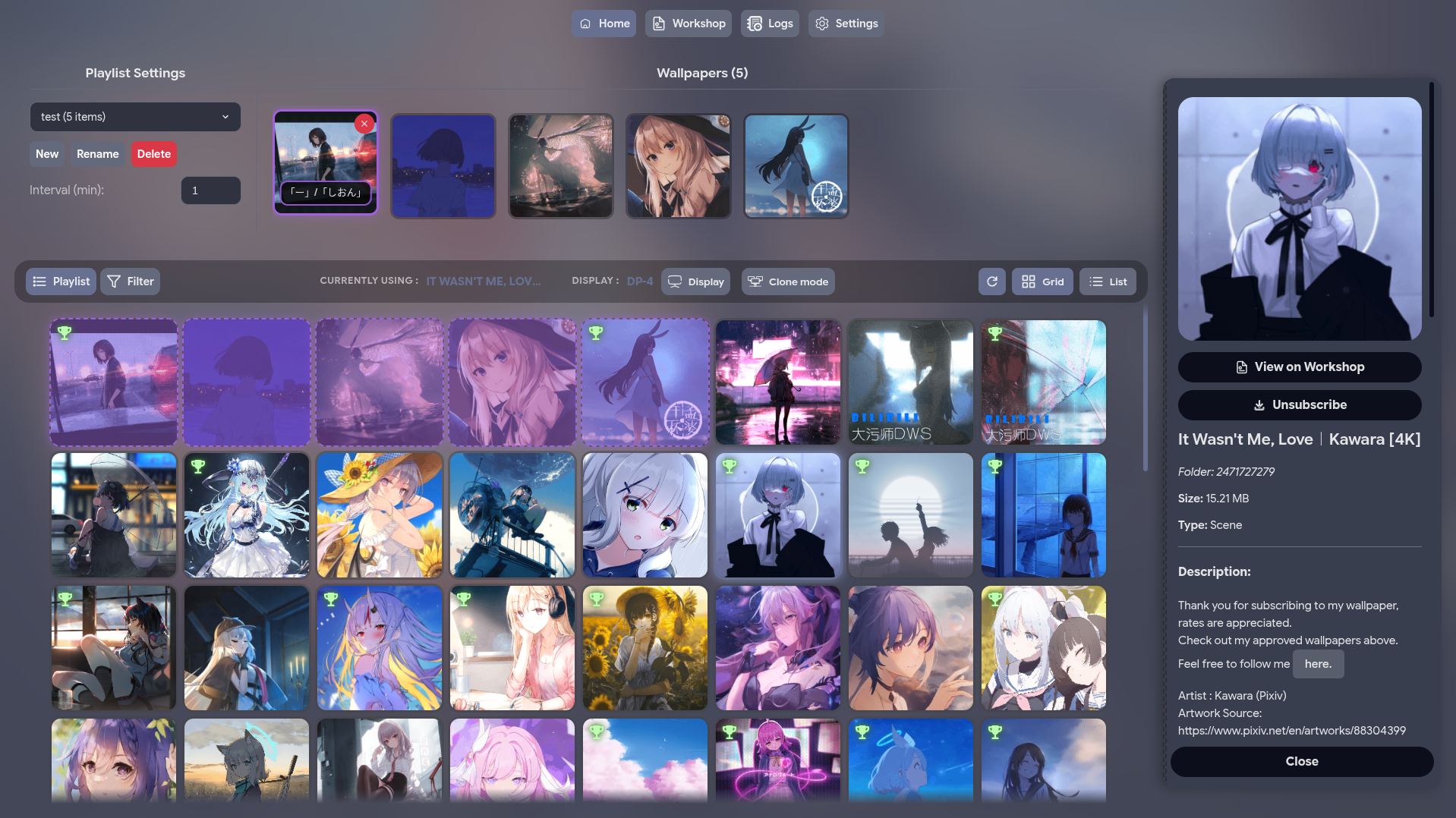 |
| PLAYLIST - SETTING |
|---|
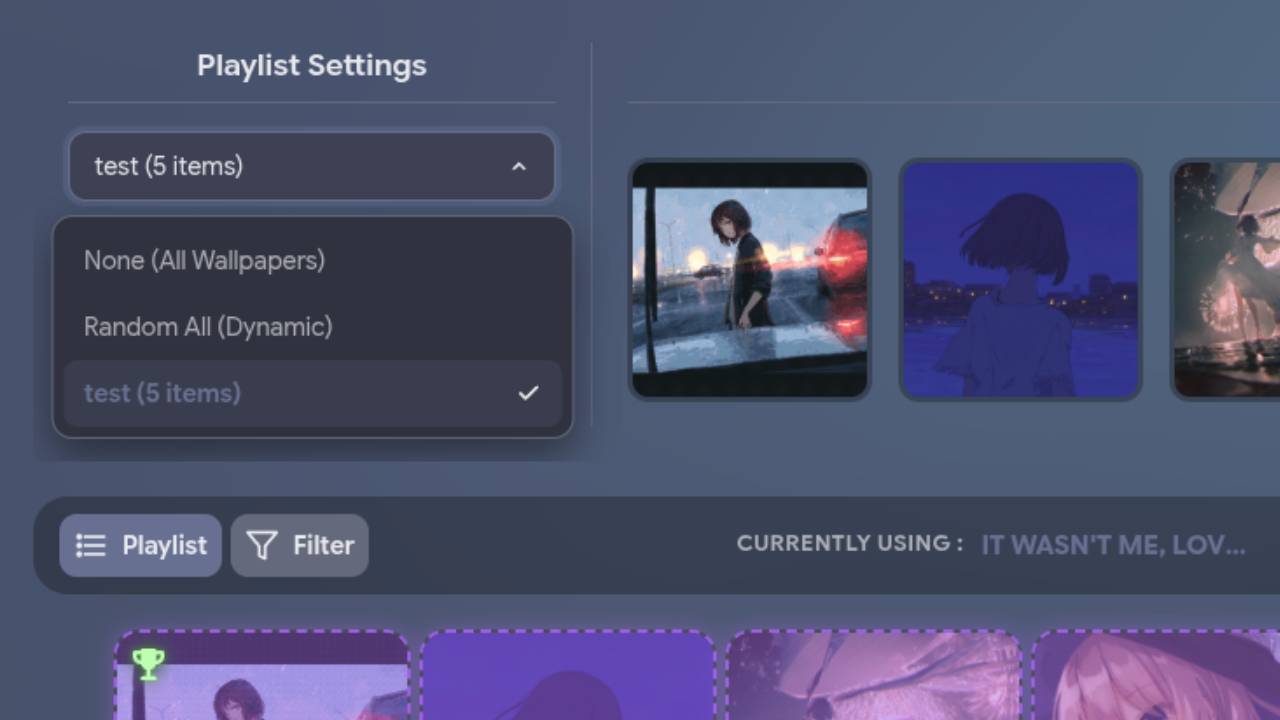 |
| WORKSHOP - DOWNLOADING |
|---|
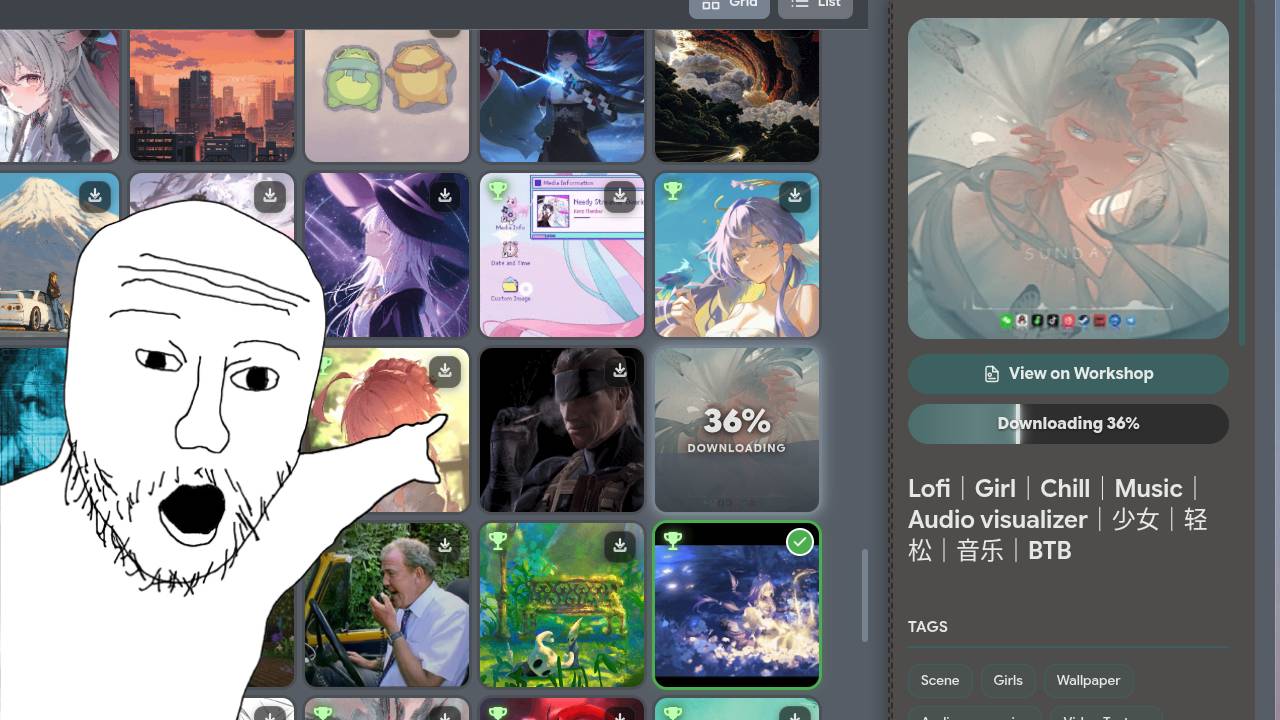 |
| Settings |
|---|
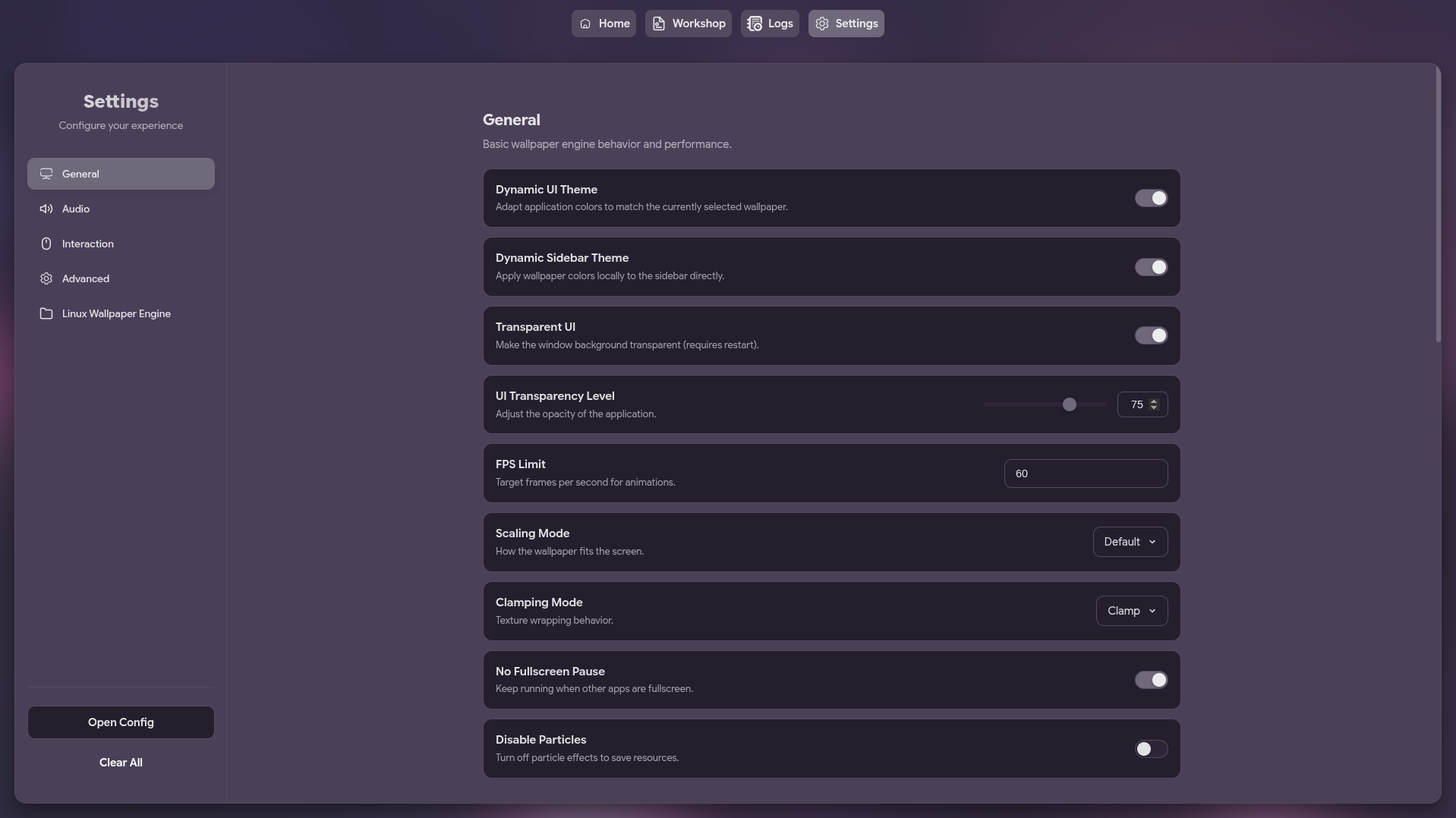 |
FEATURES
| Feature | Description |
|---|---|
| Wallpaper Management | Browse and select wallpapers from your Steam Workshop content |
| Steam Workshop Integration | Search and download wallpapers directly from Steam Workshop |
| Playlist Support | Create and manage playlists including dynamic "Random All" |
| Wallpaper Properties | Adjust individual wallpaper settings |
| Multi-Monitor Support | Choose which screen to apply wallpapers to |
| Auto-Save & Auto-Run | Remembers and applies last used wallpaper on startup |
| Native Wayland Support | Optional native Wayland mode for fixing scaling issues |
| Customizable Settings | Edit settings or raw JSON config |
| System Tray | Minimize to tray for seamless background operation |
MEMORY EFFICIENCY
I know that many users are scared of Electron applications due to their reputation for being "RAM eaters". This GUI is specifically designed for maximum efficiency to address those concerns:
- Go Backend: A lightweight Go process handles the system tray, configuration, and wallpaper management.
- Electron Frontend: The Electron-based UI is only launched when needed. When you minimize the application to the tray, the Electron process is completely terminated, freeing up all the memory it was using.
PREREQUISITES
[!IMPORTANT] This application requires linux-wallpaperengine (Almamu) or linux-wallpaperengine (AzPepoze) (still missing some features) to be installed on your system to function.
INSTALLATION
[!IMPORTANT] Requires (fails without):
- linux-wallpaperengine (Almamu) or linux-wallpaperengine (AzPepoze) (still missing some features) — renders the wallpapers
xrandr— detects connected screens (get-screensfails, no wallpaper applied)libayatana-appindicator3(libayatana-appindicator3.so.1) — system tray support (backend won't start)Optional (feature degraded if missing):
xprop— fullscreen pause detectionnotify-send(libnotify) — desktop notificationskillall(psmisc) — cleanup of stale engine processeszenity(GNOME/GTK) orkdialog(KDE) — prompting dialogsxdg-open(xdg-utils) — open config file in editor
Arch Linux (AUR)
Install using your favorite AUR helper:
# Using yay
yay -S linux-wallpaperengine-gui-git

# Using paru
paru -S linux-wallpaperengine-gui-git
Nix Flakes
If you use Nix, this repository provides a flake.nix with a development shell containing all the build requirements (go, bun, pkg-config, gtk3, libayatana-appindicator), plus golangci-lint for bun run check, so you don't need to install anything manually.
With Nix installed:
nix develop
This drops you into a shell with all the dependencies, continue with bun install, bun run build, or bun run dev as normal.
[!NOTE]
bun run build:allcurrently fails on NixOS under the Nix devShell due to a known NixOS limitation with generic dynamically-linked binaries downloaded by electron-builder (see https://nix.dev/permalink/stub-ld).bun run buildworks fine.
With direnv installed:
direnv allow
This automatically loads the same shell whenever you cd into the project directory.
Thanks to @Maxxavec2x!
Other Distributions
Download the latest pre-built binaries (AppImage, deb, rpm) from the Releases page.
USAGE
Launch it from your application menu or via terminal:
linux-wallpaperengine-gui [options]
[Options]
| Option | Description |
|---|---|
--minimized | Starts the application minimized in the system tray. |
--native-wayland | Makes electron use native Wayland instead of XWayland to solve fractional scaling issues (only works on Wayland sessions) |
--debug-mode | Enables debug mode for the application. |
BUILD FROM SOURCE
Requirements:
- Go (1.21+)
- bun
- GTK3 and libayatana-appindicator development headers, required to compile the systray integration:
- Debian/Ubuntu:
sudo apt install libgtk-3-dev libayatana-appindicator3-dev pkg-config - Other distros: install the packages providing
gtk+-3.0andayatana-appindicator3-0.1viapkg-config
- Debian/Ubuntu:
- Clone & Enter:
git clone https://github.com/AzPepoze/linux-wallpaperengine-gui cd linux-wallpaperengine-gui - Install Deps:
bun install - Build:
The output will be in thebun run builddistdirectory.
DEVELOPMENT
Run with hot-reloading:
bun run dev
STONKS!
✦ Made with ♥︎ by AzPepoze ✦
Significant stargazers

1 followers · starred Feb 2026
Similar repos


GUI for Almamu/linux-wallpaperengine using Go (Backend) and Electron (Frontend) .
Svelte
94
357 commits
updated Oct 7, 2026
See what people are saying
README
✦ LINUX WALLPAPER ENGINE GUI ✦
◈ A graphical user interface for managing wallpapers for [linux-wallpaperengine](https://github.com/Almamu/linux-wallpaperengine) ◈
◈ Powered by Go (Backend) and Electron (Frontend) ◈
CONTENTS
- CONTENTS
- SCREENSHOTS
- FEATURES
- MEMORY EFFICIENCY
- PREREQUISITES
- INSTALLATION
- USAGE
- BUILD FROM SOURCE
- DEVELOPMENT
- STONKS!
[!NOTE] This GUI is also compatible with my linux-wallpaperengine.
It's a C++ (with sokol) implementation of Wallpaper Engine for Linux. It's still in early development and missing some features. Maybe you want to check it out!
SCREENSHOTS
| Main Window |
|---|
|
| Main Window (List) |
|---|
|
| Display Settings |
|---|
|
| WORKSHOP |
|---|
|
| PLAYLIST |
|---|
|
| PLAYLIST - SETTING |
|---|
|
| WORKSHOP - DOWNLOADING |
|---|
|
| Settings |
|---|
|
FEATURES
| Feature | Description |
|---|---|
| Wallpaper Management | Browse and select wallpapers from your Steam Workshop content |
| Steam Workshop Integration | Search and download wallpapers directly from Steam Workshop |
| Playlist Support | Create and manage playlists including dynamic "Random All" |
| Wallpaper Properties | Adjust individual wallpaper settings |
| Multi-Monitor Support | Choose which screen to apply wallpapers to |
| Auto-Save & Auto-Run | Remembers and applies last used wallpaper on startup |
| Native Wayland Support | Optional native Wayland mode for fixing scaling issues |
| Customizable Settings | Edit settings or raw JSON config |
| System Tray | Minimize to tray for seamless background operation |
MEMORY EFFICIENCY
I know that many users are scared of Electron applications due to their reputation for being "RAM eaters". This GUI is specifically designed for maximum efficiency to address those concerns:
- Go Backend: A lightweight Go process handles the system tray, configuration, and wallpaper management.
- Electron Frontend: The Electron-based UI is only launched when needed. When you minimize the application to the tray, the Electron process is completely terminated, freeing up all the memory it was using.
PREREQUISITES
[!IMPORTANT] This application requires linux-wallpaperengine (Almamu) or linux-wallpaperengine (AzPepoze) (still missing some features) to be installed on your system to function.
INSTALLATION
[!IMPORTANT] Requires (fails without):
- linux-wallpaperengine (Almamu) or linux-wallpaperengine (AzPepoze) (still missing some features) — renders the wallpapers
xrandr— detects connected screens (get-screensfails, no wallpaper applied)libayatana-appindicator3(libayatana-appindicator3.so.1) — system tray support (backend won't start)Optional (feature degraded if missing):
xprop— fullscreen pause detectionnotify-send(libnotify) — desktop notificationskillall(psmisc) — cleanup of stale engine processeszenity(GNOME/GTK) orkdialog(KDE) — prompting dialogsxdg-open(xdg-utils) — open config file in editor
Arch Linux (AUR)
Install using your favorite AUR helper:
# Using yay
yay -S linux-wallpaperengine-gui-git

# Using paru
paru -S linux-wallpaperengine-gui-git
Nix Flakes
If you use Nix, this repository provides a flake.nix with a development shell containing all the build requirements (go, bun, pkg-config, gtk3, libayatana-appindicator), plus golangci-lint for bun run check, so you don't need to install anything manually.
With Nix installed:
nix develop
This drops you into a shell with all the dependencies, continue with bun install, bun run build, or bun run dev as normal.
[!NOTE]
bun run build:allcurrently fails on NixOS under the Nix devShell due to a known NixOS limitation with generic dynamically-linked binaries downloaded by electron-builder (see https://nix.dev/permalink/stub-ld).bun run buildworks fine.
With direnv installed:
direnv allow
This automatically loads the same shell whenever you cd into the project directory.
Thanks to @Maxxavec2x!
Other Distributions
Download the latest pre-built binaries (AppImage, deb, rpm) from the Releases page.
USAGE
Launch it from your application menu or via terminal:
linux-wallpaperengine-gui [options]
[Options]
| Option | Description |
|---|---|
--minimized | Starts the application minimized in the system tray. |
--native-wayland | Makes electron use native Wayland instead of XWayland to solve fractional scaling issues (only works on Wayland sessions) |
--debug-mode | Enables debug mode for the application. |
BUILD FROM SOURCE
Requirements:
- Go (1.21+)
- bun
- GTK3 and libayatana-appindicator development headers, required to compile the systray integration:
- Debian/Ubuntu:
sudo apt install libgtk-3-dev libayatana-appindicator3-dev pkg-config - Other distros: install the packages providing
gtk+-3.0andayatana-appindicator3-0.1viapkg-config
- Debian/Ubuntu:
- Clone & Enter:
git clone https://github.com/AzPepoze/linux-wallpaperengine-gui cd linux-wallpaperengine-gui - Install Deps:
bun install - Build:
The output will be in thebun run builddistdirectory.
DEVELOPMENT
Run with hot-reloading:
bun run dev
STONKS!
✦ Made with ♥︎ by AzPepoze ✦
Significant stargazers
1 followers · starred Feb 2026