
⏳ Year Progress Wallpaper — a minimalist desktop wallpaper generator and daily tracker with a dot-grid calendar, Stoic quotes, and automatic midnight updates. Python + PyInstaller · Windows, macOS, Linux
Python
0
11 commits
updated Sep 29, 2026
See what people are saying
README
⏳ Year Progress Wallpaper
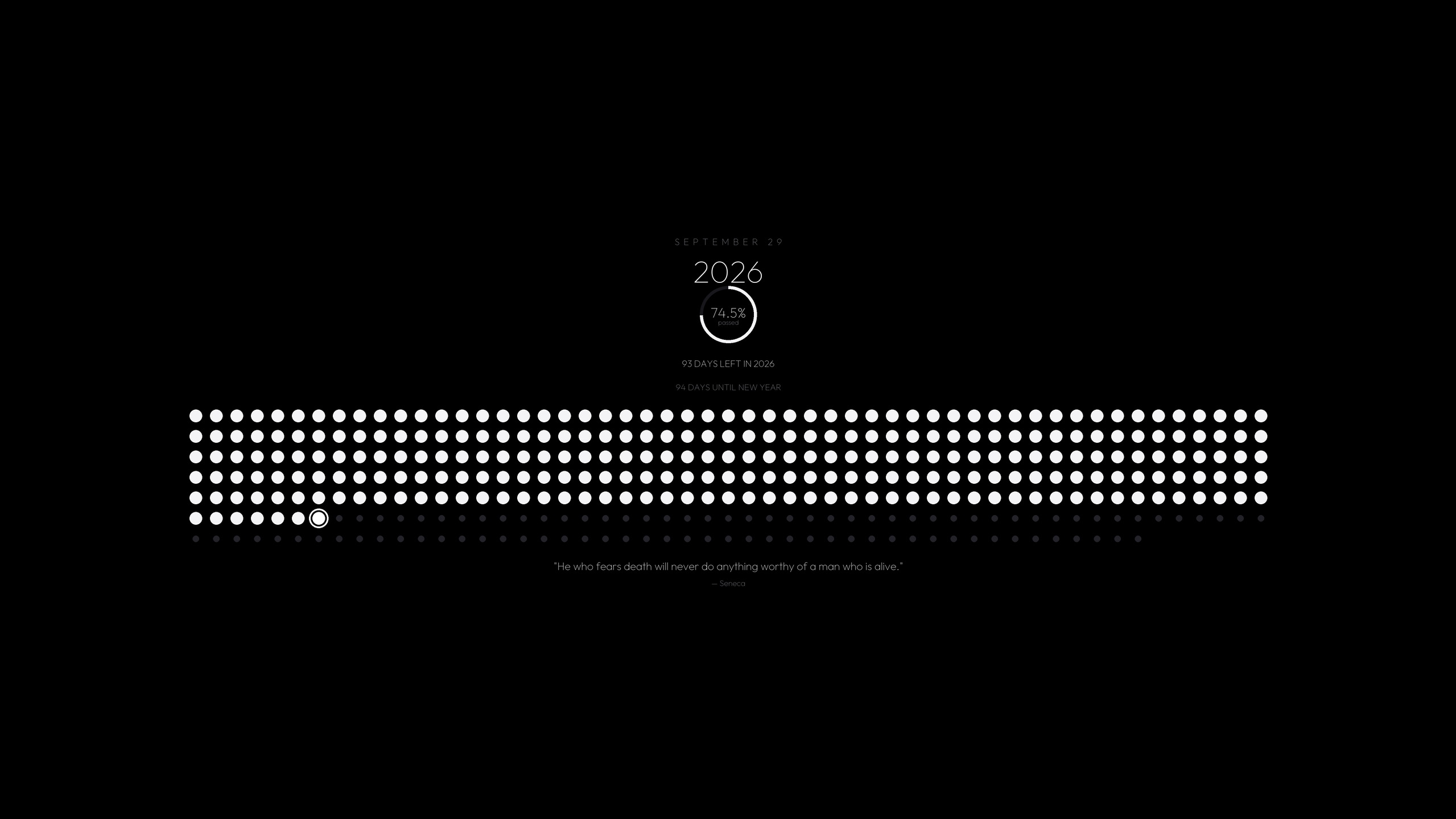
A minimalist, high-definition desktop wallpaper generator and daily tracker for Windows, macOS and Linux. Inspired by the Stoic Memento Mori concept and modern minimalist dashboards.
🖥 Platform Support
| Windows | macOS | Linux | |
|---|---|---|---|
| Generate & apply wallpaper | ✅ Registry + SystemParametersInfo | ✅ NSWorkspace (pyobjc), osascript fallback | ✅ gsettings (GNOME/Cinnamon/MATE), plasma (KDE), xfconf (Xfce), feh/sway fallbacks |
| Per-monitor wallpaper | ✅ IDesktopWallpaper (one render per display) | ✅ per-screen NSWorkspace | — (desktops apply one image across all outputs) |
| Login/startup integration | ✅ HKCU Run key | ✅ Launch Agent | ✅ XDG autostart entry |
| System tray | ✅ | ✅ | ✅ (AppIndicator/GTK backend required) |
| Control panel UI | ✅ pywebview (WebView2) + Tk fallback | ✅ pywebview (WKWebView) + Tk fallback | ✅ pywebview (WebKitGTK) + Tk fallback |
| Lock screen control | ✅ | — (Windows-only, hidden in UI) | — (Windows-only, hidden in UI) |
| Data directory | %LOCALAPPDATA%\YearProgressWallpaper | ~/Library/Application Support/YearProgressWallpaper | $XDG_DATA_HOME/YearProgressWallpaper (default ~/.local/share/...) |
Linux system packages (Debian/Ubuntu names; needed at runtime):
sudo apt install python3-gi gir1.2-appindicator3-0.1 gir1.2-webkit2-4.1
# Tray fallback if AppIndicator is unavailable:
pip install python-xlib
macOS notes: the first wallpaper apply may prompt for automation permission (osascript fallback only — the primary NSWorkspace path needs none). Unsigned builds require right-click → Open on first launch (Gatekeeper); signing/notarization is configured at build time when an Apple Developer ID is available.
✨ Features
- Modern Fluent Dark UI: pywebview-based Studio Control Center (WebView2/WKWebView/WebKitGTK) with clean cards, high-DPI scaling, and live real-time desktop preview; CustomTkinter fallback when pywebview is unavailable.
- Dot Grid Calendar: Displays all 365 (or 366 in leap years) days of the current year.
- Passed Days: Rendered as larger, customizable dots (
⚪). - Today: Highlighted with an accent focus ring (
🔘) marking your exact place in time. - Remaining Days: Displayed as smaller, muted dots (
⚫).
- Passed Days: Rendered as larger, customizable dots (
- 🔍 Dot Grid Zoom Control:
- Interactive zoom slider from 50% to 200%.
- Zoom in for bold, prominent dots, or zoom out for ultra-fine minimalist spacing.
- One-click
Reset Default (100%)button.
- ⏱ Countdown & Days-Left Banner:
- The wallpaper shows the days remaining in the year and an optional countdown to a named target (New Year, a trip, a deadline).
- Manage countdown targets and toggle the banner from the web control panel; the wallpaper picks the change up on the next render.
- Note: the Tk fallback panel doesn't expose the countdown editor — use the web control panel (the default) to manage targets.
- 🎨 Full Color Customization:
- 1-Click Theme Presets: 18 curated palettes, including Monochrome Noir (default), Pure Black OLED (pitch black
#000000), Cyber Midnight, Emerald Zen, Golden Hour, Solar Crimson, Royal Amethyst, Nordic Frost, Matcha, Terracotta, Ocean Abyss, Sepia, Tokyo Rain, Rose Quartz, Titanium, Nord, Solarized Dark, and Cyberpunk. - Custom Color Pickers: Full control over background, passed dots, today's dot/ring, coming dots, and typography colors with HEX entries and visual color dialogs.
- 1-Click Theme Presets: 18 curated palettes, including Monochrome Noir (default), Pure Black OLED (pitch black
- 💬 Motivational & Stoic Quotes:
- Curated Catalog: 40 handpicked timeless quotes (Marcus Aurelius, Seneca, Epictetus, Steve Jobs, Confucius, Mark Twain, etc.).
- Custom Quote: Type any custom quote and author to display on your desktop.
- Daily Random Quote: Automatically rotates to an inspiring new quote every day at midnight.
- Quick Shuffle: Single-click
Shuffle Randombutton.
- Multiple Layout Modes:
Reference (10 Columns): Faithful reproduction of the mobile reference screenshot, centered as an elegant pillar.Balanced (20 Columns): Optimized for 16:9 and 16:10 widescreen desktop displays (20 × 19).Wide Matrix (25 Columns): Sleek compact widescreen grid (25 × 15).Calendar (53 Columns): GitHub contribution matrix style (53 weeks × 7 days).
- ⚡ Automated Daily Updates:
- Automatically regenerates and applies the wallpaper every night at 12:00:00 AM (Midnight).
- Integrated sleep/wake detector: If your PC sleeps through midnight, the wallpaper updates within seconds of waking up in the morning.
- 🚀 Startup Integration:
- Windows: registered in
HKCU\Software\Microsoft\Windows\CurrentVersion\Run. - macOS: installed as a Launch Agent in
~/Library/LaunchAgents. - Linux: installed as an XDG autostart entry in
~/.config/autostart. - Runs silently in the system tray without annoying popups on login.
- Windows: registered in
- Native Resolution & Anti-Aliased Rendering:
- Auto-detects physical screen resolution (1080p, 1440p, 4K, Ultrawide).
- 2× supersampling with Lanczos downsampling ensures crisp typography and smooth circles.
- 🖥 Multi-Monitor Support:
- Renders one correctly-sized image per connected display (Windows/macOS) and applies them individually through
IDesktopWallpaper/ per-screenNSWorkspace. - Falls back to a single image on every display automatically when the per-monitor API is unavailable; toggleable in the System tab of either control panel (
multi_monitor).
- Renders one correctly-sized image per connected display (Windows/macOS) and applies them individually through
- 🔔 Update Checker:
- Checks GitHub Releases once a day at launch and notifies through the system tray when a newer version exists (opt-out via
check_updates; manual Check now button with live status in the System tab of either control panel).
- Checks GitHub Releases once a day at launch and notifies through the system tray when a newer version exists (opt-out via
- System Tray Quick Access:
- Right-click or click tray icon to update wallpaper immediately, skip to the next quote, open the dashboard, or toggle startup.
🚀 How to Run
Option 1: Standalone Executable
- Windows: double-click
YearProgress.exe - macOS: open
YearProgress.app - Linux:
./YearProgress
Option 2: Batch Launcher (Windows only)
Double-click:
run.bat
Option 3: Python
python main.py
📦 Building Releases
PyInstaller cannot cross-compile — build natively on each target OS:
# Windows
pip install -r requirements-dev.txt
pyinstaller --noconfirm YearProgress.spec   # → dist\YearProgress.exe
# macOS  → dist/YearProgress.app
pip install -r requirements-dev.txt
pyinstaller --noconfirm YearProgress.spec

# Linux  → dist/YearProgress  (build on the oldest glibc you support,
# e.g. an Ubuntu 22.04 container, for maximum compatibility)
pip install -r requirements-dev.txt
pyinstaller --noconfirm YearProgress.spec
Before building, run the lint gate that must stay green:
ruff check .
🛠 Command Line Options
python main.py: Launches the full modern Control Panel and starts the background tray + midnight scheduler.python main.py --minimized: Starts directly in the system tray (used by login startup).python main.py --startup: Same as--minimized; marks an OS startup launch.python main.py --update-now: Generates and sets today's wallpaper immediately and exits.python main.py --lockscreen IMAGE: Sets the Windows lock screen toIMAGE(runs elevated; internal use, invoked by the UI).python main.py --lockscreen-clear: Restores the default Windows lock screen (runs elevated; internal use).
⚙️ Configuration & Data Files
- Data Directory: see the table in Platform Support (Windows:
%LOCALAPPDATA%\YearProgressWallpaper, macOS:~/Library/Application Support/YearProgressWallpaper, Linux:$XDG_DATA_HOME/YearProgressWallpaper).- All user data and generated wallpapers are stored here so they persist reliably across reboots (including when running the packaged executable).
settings.json: All user preferences (zoom level, custom colors, layout style, quote choice, countdown banner and its targets, auto-update toggle, multi-monitor toggle, update-check toggle; plus internal stamps the UIs never edit directly:last_rendered_date,daily_seed,last_update_check).quotes.json: Editable database of motivational quotes (auto-seeded from the bundled catalog on first run; edit this copy to customize).wallpaper_YYYY-MM-DD.bmp/.png: Today's generated desktop wallpaper (the.pngis what gets applied on every OS; older days are cleaned up automatically). Multi-monitor runs addwallpaper_YYYY-MM-DD_dN.*siblings sized for each secondary display.preview_thumbnail.png: The live preview image shown in the control panel.
- Bundled resources (read-only, shipped inside the executable or alongside the source):
web/(webview UI),assets/fonts/(typography),app_icon.png/app_icon.ico.
Similar repos


Languages
Python
69.4%
HTML
30.2%
⏳ Year Progress Wallpaper — a minimalist desktop wallpaper generator and daily tracker with a dot-grid calendar, Stoic quotes, and automatic midnight updates. Python + PyInstaller · Windows, macOS, Linux
Python
0
11 commits
updated Sep 29, 2026
See what people are saying
README
⏳ Year Progress Wallpaper
A minimalist, high-definition desktop wallpaper generator and daily tracker for Windows, macOS and Linux. Inspired by the Stoic Memento Mori concept and modern minimalist dashboards.
🖥 Platform Support
| Windows | macOS | Linux | |
|---|---|---|---|
| Generate & apply wallpaper | ✅ Registry + SystemParametersInfo | ✅ NSWorkspace (pyobjc), osascript fallback | ✅ gsettings (GNOME/Cinnamon/MATE), plasma (KDE), xfconf (Xfce), feh/sway fallbacks |
| Per-monitor wallpaper | ✅ IDesktopWallpaper (one render per display) | ✅ per-screen NSWorkspace | — (desktops apply one image across all outputs) |
| Login/startup integration | ✅ HKCU Run key | ✅ Launch Agent | ✅ XDG autostart entry |
| System tray | ✅ | ✅ | ✅ (AppIndicator/GTK backend required) |
| Control panel UI | ✅ pywebview (WebView2) + Tk fallback | ✅ pywebview (WKWebView) + Tk fallback | ✅ pywebview (WebKitGTK) + Tk fallback |
| Lock screen control | ✅ | — (Windows-only, hidden in UI) | — (Windows-only, hidden in UI) |
| Data directory | %LOCALAPPDATA%\YearProgressWallpaper | ~/Library/Application Support/YearProgressWallpaper | $XDG_DATA_HOME/YearProgressWallpaper (default ~/.local/share/...) |
Linux system packages (Debian/Ubuntu names; needed at runtime):
sudo apt install python3-gi gir1.2-appindicator3-0.1 gir1.2-webkit2-4.1
# Tray fallback if AppIndicator is unavailable:
pip install python-xlib
macOS notes: the first wallpaper apply may prompt for automation permission (osascript fallback only — the primary NSWorkspace path needs none). Unsigned builds require right-click → Open on first launch (Gatekeeper); signing/notarization is configured at build time when an Apple Developer ID is available.
✨ Features
- Modern Fluent Dark UI: pywebview-based Studio Control Center (WebView2/WKWebView/WebKitGTK) with clean cards, high-DPI scaling, and live real-time desktop preview; CustomTkinter fallback when pywebview is unavailable.
- Dot Grid Calendar: Displays all 365 (or 366 in leap years) days of the current year.
- Passed Days: Rendered as larger, customizable dots (
⚪). - Today: Highlighted with an accent focus ring (
🔘) marking your exact place in time. - Remaining Days: Displayed as smaller, muted dots (
⚫).
- Passed Days: Rendered as larger, customizable dots (
- 🔍 Dot Grid Zoom Control:
- Interactive zoom slider from 50% to 200%.
- Zoom in for bold, prominent dots, or zoom out for ultra-fine minimalist spacing.
- One-click
Reset Default (100%)button.
- ⏱ Countdown & Days-Left Banner:
- The wallpaper shows the days remaining in the year and an optional countdown to a named target (New Year, a trip, a deadline).
- Manage countdown targets and toggle the banner from the web control panel; the wallpaper picks the change up on the next render.
- Note: the Tk fallback panel doesn't expose the countdown editor — use the web control panel (the default) to manage targets.
- 🎨 Full Color Customization:
- 1-Click Theme Presets: 18 curated palettes, including Monochrome Noir (default), Pure Black OLED (pitch black
#000000), Cyber Midnight, Emerald Zen, Golden Hour, Solar Crimson, Royal Amethyst, Nordic Frost, Matcha, Terracotta, Ocean Abyss, Sepia, Tokyo Rain, Rose Quartz, Titanium, Nord, Solarized Dark, and Cyberpunk. - Custom Color Pickers: Full control over background, passed dots, today's dot/ring, coming dots, and typography colors with HEX entries and visual color dialogs.
- 1-Click Theme Presets: 18 curated palettes, including Monochrome Noir (default), Pure Black OLED (pitch black
- 💬 Motivational & Stoic Quotes:
- Curated Catalog: 40 handpicked timeless quotes (Marcus Aurelius, Seneca, Epictetus, Steve Jobs, Confucius, Mark Twain, etc.).
- Custom Quote: Type any custom quote and author to display on your desktop.
- Daily Random Quote: Automatically rotates to an inspiring new quote every day at midnight.
- Quick Shuffle: Single-click
Shuffle Randombutton.
- Multiple Layout Modes:
Reference (10 Columns): Faithful reproduction of the mobile reference screenshot, centered as an elegant pillar.Balanced (20 Columns): Optimized for 16:9 and 16:10 widescreen desktop displays (20 × 19).Wide Matrix (25 Columns): Sleek compact widescreen grid (25 × 15).Calendar (53 Columns): GitHub contribution matrix style (53 weeks × 7 days).
- ⚡ Automated Daily Updates:
- Automatically regenerates and applies the wallpaper every night at 12:00:00 AM (Midnight).
- Integrated sleep/wake detector: If your PC sleeps through midnight, the wallpaper updates within seconds of waking up in the morning.
- 🚀 Startup Integration:
- Windows: registered in
HKCU\Software\Microsoft\Windows\CurrentVersion\Run. - macOS: installed as a Launch Agent in
~/Library/LaunchAgents. - Linux: installed as an XDG autostart entry in
~/.config/autostart. - Runs silently in the system tray without annoying popups on login.
- Windows: registered in
- Native Resolution & Anti-Aliased Rendering:
- Auto-detects physical screen resolution (1080p, 1440p, 4K, Ultrawide).
- 2× supersampling with Lanczos downsampling ensures crisp typography and smooth circles.
- 🖥 Multi-Monitor Support:
- Renders one correctly-sized image per connected display (Windows/macOS) and applies them individually through
IDesktopWallpaper/ per-screenNSWorkspace. - Falls back to a single image on every display automatically when the per-monitor API is unavailable; toggleable in the System tab of either control panel (
multi_monitor).
- Renders one correctly-sized image per connected display (Windows/macOS) and applies them individually through
- 🔔 Update Checker:
- Checks GitHub Releases once a day at launch and notifies through the system tray when a newer version exists (opt-out via
check_updates; manual Check now button with live status in the System tab of either control panel).
- Checks GitHub Releases once a day at launch and notifies through the system tray when a newer version exists (opt-out via
- System Tray Quick Access:
- Right-click or click tray icon to update wallpaper immediately, skip to the next quote, open the dashboard, or toggle startup.
🚀 How to Run
Option 1: Standalone Executable
- Windows: double-click
YearProgress.exe - macOS: open
YearProgress.app - Linux:
./YearProgress
Option 2: Batch Launcher (Windows only)
Double-click:
run.bat
Option 3: Python
python main.py
📦 Building Releases
PyInstaller cannot cross-compile — build natively on each target OS:
# Windows
pip install -r requirements-dev.txt
pyinstaller --noconfirm YearProgress.spec   # → dist\YearProgress.exe
# macOS  → dist/YearProgress.app
pip install -r requirements-dev.txt
pyinstaller --noconfirm YearProgress.spec

# Linux  → dist/YearProgress  (build on the oldest glibc you support,
# e.g. an Ubuntu 22.04 container, for maximum compatibility)
pip install -r requirements-dev.txt
pyinstaller --noconfirm YearProgress.spec
Before building, run the lint gate that must stay green:
ruff check .
🛠 Command Line Options
python main.py: Launches the full modern Control Panel and starts the background tray + midnight scheduler.python main.py --minimized: Starts directly in the system tray (used by login startup).python main.py --startup: Same as--minimized; marks an OS startup launch.python main.py --update-now: Generates and sets today's wallpaper immediately and exits.python main.py --lockscreen IMAGE: Sets the Windows lock screen toIMAGE(runs elevated; internal use, invoked by the UI).python main.py --lockscreen-clear: Restores the default Windows lock screen (runs elevated; internal use).
⚙️ Configuration & Data Files
- Data Directory: see the table in Platform Support (Windows:
%LOCALAPPDATA%\YearProgressWallpaper, macOS:~/Library/Application Support/YearProgressWallpaper, Linux:$XDG_DATA_HOME/YearProgressWallpaper).- All user data and generated wallpapers are stored here so they persist reliably across reboots (including when running the packaged executable).
settings.json: All user preferences (zoom level, custom colors, layout style, quote choice, countdown banner and its targets, auto-update toggle, multi-monitor toggle, update-check toggle; plus internal stamps the UIs never edit directly:last_rendered_date,daily_seed,last_update_check).quotes.json: Editable database of motivational quotes (auto-seeded from the bundled catalog on first run; edit this copy to customize).wallpaper_YYYY-MM-DD.bmp/.png: Today's generated desktop wallpaper (the.pngis what gets applied on every OS; older days are cleaned up automatically). Multi-monitor runs addwallpaper_YYYY-MM-DD_dN.*siblings sized for each secondary display.preview_thumbnail.png: The live preview image shown in the control panel.
- Bundled resources (read-only, shipped inside the executable or alongside the source):
web/(webview UI),assets/fonts/(typography),app_icon.png/app_icon.ico.
Similar repos
Languages
Python
69.4%
HTML
30.2%