antoniafuchs/PromptDoctor

Python

0

65 commits

updated Jul 29, 2025

See the code

README

PromptDoctor Documentation

Table of Contents

  1. Introduction
  2. System Architecture
  3. Installation Guide
  4. Usage Guide
  5. Experimental Setup
  6. Technical Components
  7. Contributing
  8. Troubleshooting
  9. API Reference

Introduction

PromptDoctor is an experimental platform designed to study the impact of explainability features on medical professionals' interaction with AI language models for clinical reasoning tasks. The system implements an A/B testing framework where users are divided into two groups:

  • Group A: Standard AI chat interface
  • Group B: Enhanced AI chat interface with explainability features including:
    • LIME (Local Interpretable Model-agnostic Explanations)
    • Medical term highlighting
    • Prompt editing capabilities

The platform collects comprehensive interaction data, including prompts, responses, feedback, and survey responses to evaluate how explainability features affect trust, understanding, and effectiveness in medical AI applications.

System Architecture

The PromptDoctor system is built with a modular architecture consisting of several key components:
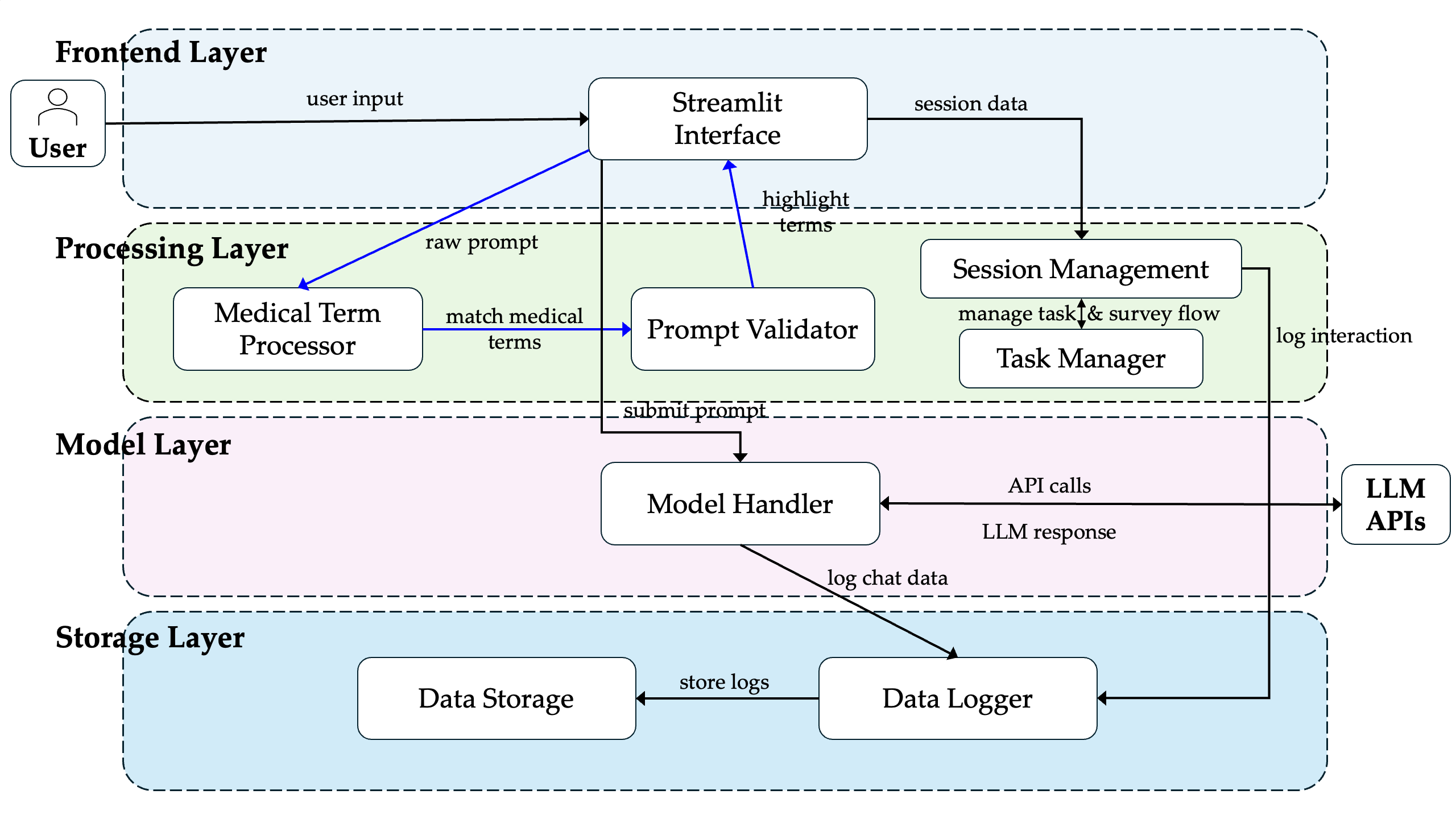
Architecture Diagram

Core Components

  1. User Interface Layer: Streamlit-based web application with:

    • Login/consent system
    • Survey system
    • Chat interfaces (standard and enhanced)
    • Feedback collection
  2. Processing Layer:

    • Medical term processing
    • LIME explainability
    • Task management
    • Session management
  3. Model Layer:

    • Support for multiple model backends:
      • Ollama (local)
      • Together AI (API)
      • Hugging Face (local)
    • Model configuration
    • Model registry
  4. Storage Layer:

    • Data storage
    • Logging system
    • Data merging functionality
  5. Tracking System:

    • Interaction logging
    • Task progression
    • Timer metrics
    • Feedback collection

Installation Guide

Prerequisites

  • Python 3.10+
  • Node.js 16+ (for Ollama support)
  • 8GB+ RAM
  • CUDA-compatible GPU (optional, for local models)

Step 1: Clone the Repository

git clone https://github.com/yourusername/PromptDoctor_MA.git
cd PromptDoctor_MA

Step 2: Environment Setup

# Install Poetry if not installed
curl -sSL https://install.python-poetry.org | python3 -

# Install dependencies
poetry install

# Activate the virtual environment
poetry shell

Option B: Using pip

# Create a virtual environment
python -m venv venv

# Activate the virtual environment
# On macOS/Linux:
source venv/bin/activate
# On Windows:
venv\Scripts\activate

# Install dependencies
pip install -r requirements.txt

Step 3: Set Up Model Backend

Ollama (Local Models)

  1. Install Ollama:

    # macOS
    curl -fsSL https://ollama.com/install.sh | sh
    
    # Linux
    curl -fsSL https://ollama.com/install.sh | sh
    
    # Windows
    # Download from https://ollama.com/download
    
  2. Pull medical models:

    ollama pull llama2:7b-medical
    ollama pull nous-hermes2:8b-med
    

Together API (Cloud Models)

  1. Create an account at Together.ai
  2. Get your API key
  3. Set environment variable:
    export TOGETHER_API_KEY="your_api_key_here"
    

HuggingFace Models (Local)

  1. Install required packages:
    pip install transformers accelerate bitsandbytes
    
  2. Download a model:
    # Set model cache location (optional)
    export TRANSFORMERS_CACHE="/path/to/model/cache"
    
    # Download model (will occur automatically on first use)
    python -c "from transformers import AutoModelForCausalLM, AutoTokenizer; \
    model_name='meta-llama/Llama-2-7b-chat-hf'; \
    tokenizer = AutoTokenizer.from_pretrained(model_name); \
    model = AutoModelForCausalLM.from_pretrained(model_name)"
    

Note: The HuggingFace Endpoint Provider is currently a placeholder and not fully implemented. Use local HuggingFace models or other providers for production use.

Step 4: Initialize Database

python -m src.core.db_utils --init

Usage Guide

Starting the Application

# Using the convenience script
./run.sh

# Manual start
streamlit run src/Home.py

The application will be available at http://localhost:8501 by default.

Activation Modes

PromptDoctor supports the following activation modes:

# Default mode - lets user choose a LLM
streamlit run src/Home.py

# Study mode - enables full experimental protocol and preselects TogetherAI Model meta-llama/Llama-3.3-70B-Instruct-Turbo-Free
streamlit run src/Home.py --study


These modes can be combined with Streamlit's server options for greater flexibility.

Running in Development Mode

streamlit run src/Home.py --server.runOnSave True

Running in Production Mode

streamlit run src/Home.py --server.enableCORS False --server.enableXsrfProtection False

Experimental Setup

PromptDoctor guides users through a structured experimental process:

  1. Consent and Introduction:

    • Information about the study
    • Consent form
    • User ID assignment
  2. Pre-Study Questionnaire:

    • Demographics
    • Medical & clinical experience
    • AI familiarity
    • LLM usage & expectations
  3. Group Assignment:

    • Automatic assignment to Group A or B
    • Group B receives explainability features
  4. Clinical Case Tasks (3 total):

    • Clinical scenario presentation
    • Interaction with AI assistant
    • For Group B: Access to LIME explanations
  5. Post-Task Surveys (after each task):

    • Task experience
    • Clinical accuracy assessment
    • Clinical utility evaluation
  6. Final Feedback Questionnaire:

    • Usability assessment
    • Trust and understanding
    • Explainability features feedback (Group B only)
    • Open-ended feedback
  7. Data Collection:

    • Interaction logging
    • Timer metrics
    • Model responses
    • Survey responses

Technical Components

User Interface (Streamlit)

  • Home.py: Entry point, consent form
  • pages/1_Login.py: User identification
  • pages/2_Survey.py: Pre-study questionnaire
  • pages/3_Chat.py: Enhanced chat (Group B)
  • pages/3_Chat_base.py: Standard chat (Group A)
  • pages/4_Logout.py: Final survey and logout

Core Components

  • core/data_storage.py: Data persistence
  • core/data_merger.py: Data consolidation
  • core/session_manager.py: Session state management
  • core/id_manager.py: User ID management

Model Management

  • models/model_config.py: Model configuration
  • models/model_handler.py: Model interface
  • models/model_registry.py: Model registration
  • models/model_providers/: Backend implementations
    • Implemented Providers:
      • ollama_provider.py: Local Ollama model integration
      • together_provider.py: Together AI API integration
      • huggingface_provider.py: Local HuggingFace models
    • Placeholder Providers (not yet fully implemented):
      • huggingface_endpoint_provider.py: Remote HuggingFace endpoints

Explainability

  • LIME/lime_processor.py: LIME implementation
  • LIME/processing.py: XAI processing
  • LIME/LIME_Chatbot.py: Chatbot interface with LIME

Medical Processing

  • medical/medical_processor.py: Medical term processing
  • medical/prompt_validator.py: Medical prompt validation

Tracking

  • tracking/logging.py: Enhanced logging
  • tracking/task_manager.py: Task management
  • tracking/metrics/timer.py: Performance metrics

Contributing

Contributions to PromptDoctor are welcome. Please follow these steps:

  1. Fork the repository
  2. Create a feature branch (git checkout -b feature/amazing-feature)
  3. Commit your changes (git commit -m 'Add amazing feature')
  4. Push to the branch (git push origin feature/amazing-feature)
  5. Open a Pull Request

Troubleshooting

Common Issues

Model Not Loading

Problem: "Model failed to load" error message.

Solutions:

  • Check if Ollama is running (ollama serve)
  • Verify API keys for cloud models
  • Check internet connection for API-based models
  • Check available memory for local models

Streamlit Interface Issues

Problem: UI components not rendering correctly.

Solutions:

  • Clear browser cache
  • Restart Streamlit server
  • Check for JavaScript errors in browser console

Database Errors

Problem: "Database connection failed" errors.

Solutions:

  • Check database file permissions
  • Initialize database using python -m src.core.db_utils --init
  • Check disk space

Logs

Log files are stored in the logs/ directory:

  • app.log: General application logs
  • error_log.txt: Error logs
  • storage.log: Data storage logs

API Reference

Model APIs

ModelHandler

from src.models.model_handler import ModelHandler

# Initialize handler
handler = ModelHandler()

# Get response
response = handler.get_response(prompt, model_type, model_name)

Medical Term Processor

from src.medical.medical_processor import MedicalTermProcessor

# Initialize processor
processor = MedicalTermProcessor()

# Get highlighted terms
highlighted_text = processor.highlight_medical_terms(text)

LIME Explainer

from src.LIME.lime_processor import LIMEProcessor

# Initialize processor
processor = LIMEProcessor()

# Get explanation
explanation = processor.explain_text(text, model_type)

Data Storage APIs

from src.core.data_storage import DataStorage

# Initialize storage
storage = DataStorage()

# Save interaction
storage.save_interaction(user_id, prompt, response, model)

This documentation is maintained by Antonia Fuchs. For questions or support, please open an issue on the repository.

Last updated: July 23, 2025

antoniafuchs/PromptDoctor

Python

0

65 commits

updated Jul 29, 2025

See the code

README

PromptDoctor Documentation

Table of Contents

  1. Introduction
  2. System Architecture
  3. Installation Guide
  4. Usage Guide
  5. Experimental Setup
  6. Technical Components
  7. Contributing
  8. Troubleshooting
  9. API Reference

Introduction

PromptDoctor is an experimental platform designed to study the impact of explainability features on medical professionals' interaction with AI language models for clinical reasoning tasks. The system implements an A/B testing framework where users are divided into two groups:

  • Group A: Standard AI chat interface
  • Group B: Enhanced AI chat interface with explainability features including:
    • LIME (Local Interpretable Model-agnostic Explanations)
    • Medical term highlighting
    • Prompt editing capabilities

The platform collects comprehensive interaction data, including prompts, responses, feedback, and survey responses to evaluate how explainability features affect trust, understanding, and effectiveness in medical AI applications.

System Architecture

The PromptDoctor system is built with a modular architecture consisting of several key components:

Architecture Diagram

Core Components

  1. User Interface Layer: Streamlit-based web application with:

    • Login/consent system
    • Survey system
    • Chat interfaces (standard and enhanced)
    • Feedback collection
  2. Processing Layer:

    • Medical term processing
    • LIME explainability
    • Task management
    • Session management
  3. Model Layer:

    • Support for multiple model backends:
      • Ollama (local)
      • Together AI (API)
      • Hugging Face (local)
    • Model configuration
    • Model registry
  4. Storage Layer:

    • Data storage
    • Logging system
    • Data merging functionality
  5. Tracking System:

    • Interaction logging
    • Task progression
    • Timer metrics
    • Feedback collection

Installation Guide

Prerequisites

  • Python 3.10+
  • Node.js 16+ (for Ollama support)
  • 8GB+ RAM
  • CUDA-compatible GPU (optional, for local models)

Step 1: Clone the Repository

git clone https://github.com/yourusername/PromptDoctor_MA.git
cd PromptDoctor_MA

Step 2: Environment Setup

# Install Poetry if not installed
curl -sSL https://install.python-poetry.org | python3 -

# Install dependencies
poetry install

# Activate the virtual environment
poetry shell

Option B: Using pip

# Create a virtual environment
python -m venv venv

# Activate the virtual environment
# On macOS/Linux:
source venv/bin/activate
# On Windows:
venv\Scripts\activate

# Install dependencies
pip install -r requirements.txt

Step 3: Set Up Model Backend

Ollama (Local Models)

  1. Install Ollama:

    # macOS
    curl -fsSL https://ollama.com/install.sh | sh
    
    # Linux
    curl -fsSL https://ollama.com/install.sh | sh
    
    # Windows
    # Download from https://ollama.com/download
    
  2. Pull medical models:

    ollama pull llama2:7b-medical
    ollama pull nous-hermes2:8b-med
    

Together API (Cloud Models)

  1. Create an account at Together.ai
  2. Get your API key
  3. Set environment variable:
    export TOGETHER_API_KEY="your_api_key_here"
    

HuggingFace Models (Local)

  1. Install required packages:
    pip install transformers accelerate bitsandbytes
    
  2. Download a model:
    # Set model cache location (optional)
    export TRANSFORMERS_CACHE="/path/to/model/cache"
    
    # Download model (will occur automatically on first use)
    python -c "from transformers import AutoModelForCausalLM, AutoTokenizer; \
    model_name='meta-llama/Llama-2-7b-chat-hf'; \
    tokenizer = AutoTokenizer.from_pretrained(model_name); \
    model = AutoModelForCausalLM.from_pretrained(model_name)"
    

Note: The HuggingFace Endpoint Provider is currently a placeholder and not fully implemented. Use local HuggingFace models or other providers for production use.

Step 4: Initialize Database

python -m src.core.db_utils --init

Usage Guide

Starting the Application

# Using the convenience script
./run.sh

# Manual start
streamlit run src/Home.py

The application will be available at http://localhost:8501 by default.

Activation Modes

PromptDoctor supports the following activation modes:

# Default mode - lets user choose a LLM
streamlit run src/Home.py

# Study mode - enables full experimental protocol and preselects TogetherAI Model meta-llama/Llama-3.3-70B-Instruct-Turbo-Free
streamlit run src/Home.py --study


These modes can be combined with Streamlit's server options for greater flexibility.

Running in Development Mode

streamlit run src/Home.py --server.runOnSave True

Running in Production Mode

streamlit run src/Home.py --server.enableCORS False --server.enableXsrfProtection False

Experimental Setup

PromptDoctor guides users through a structured experimental process:

  1. Consent and Introduction:

    • Information about the study
    • Consent form
    • User ID assignment
  2. Pre-Study Questionnaire:

    • Demographics
    • Medical & clinical experience
    • AI familiarity
    • LLM usage & expectations
  3. Group Assignment:

    • Automatic assignment to Group A or B
    • Group B receives explainability features
  4. Clinical Case Tasks (3 total):

    • Clinical scenario presentation
    • Interaction with AI assistant
    • For Group B: Access to LIME explanations
  5. Post-Task Surveys (after each task):

    • Task experience
    • Clinical accuracy assessment
    • Clinical utility evaluation
  6. Final Feedback Questionnaire:

    • Usability assessment
    • Trust and understanding
    • Explainability features feedback (Group B only)
    • Open-ended feedback
  7. Data Collection:

    • Interaction logging
    • Timer metrics
    • Model responses
    • Survey responses

Technical Components

User Interface (Streamlit)

  • Home.py: Entry point, consent form
  • pages/1_Login.py: User identification
  • pages/2_Survey.py: Pre-study questionnaire
  • pages/3_Chat.py: Enhanced chat (Group B)
  • pages/3_Chat_base.py: Standard chat (Group A)
  • pages/4_Logout.py: Final survey and logout

Core Components

  • core/data_storage.py: Data persistence
  • core/data_merger.py: Data consolidation
  • core/session_manager.py: Session state management
  • core/id_manager.py: User ID management

Model Management

  • models/model_config.py: Model configuration
  • models/model_handler.py: Model interface
  • models/model_registry.py: Model registration
  • models/model_providers/: Backend implementations
    • Implemented Providers:
      • ollama_provider.py: Local Ollama model integration
      • together_provider.py: Together AI API integration
      • huggingface_provider.py: Local HuggingFace models
    • Placeholder Providers (not yet fully implemented):
      • huggingface_endpoint_provider.py: Remote HuggingFace endpoints

Explainability

  • LIME/lime_processor.py: LIME implementation
  • LIME/processing.py: XAI processing
  • LIME/LIME_Chatbot.py: Chatbot interface with LIME

Medical Processing

  • medical/medical_processor.py: Medical term processing
  • medical/prompt_validator.py: Medical prompt validation

Tracking

  • tracking/logging.py: Enhanced logging
  • tracking/task_manager.py: Task management
  • tracking/metrics/timer.py: Performance metrics

Contributing

Contributions to PromptDoctor are welcome. Please follow these steps:

  1. Fork the repository
  2. Create a feature branch (git checkout -b feature/amazing-feature)
  3. Commit your changes (git commit -m 'Add amazing feature')
  4. Push to the branch (git push origin feature/amazing-feature)
  5. Open a Pull Request

Troubleshooting

Common Issues

Model Not Loading

Problem: "Model failed to load" error message.

Solutions:

  • Check if Ollama is running (ollama serve)
  • Verify API keys for cloud models
  • Check internet connection for API-based models
  • Check available memory for local models

Streamlit Interface Issues

Problem: UI components not rendering correctly.

Solutions:

  • Clear browser cache
  • Restart Streamlit server
  • Check for JavaScript errors in browser console

Database Errors

Problem: "Database connection failed" errors.

Solutions:

  • Check database file permissions
  • Initialize database using python -m src.core.db_utils --init
  • Check disk space

Logs

Log files are stored in the logs/ directory:

  • app.log: General application logs
  • error_log.txt: Error logs
  • storage.log: Data storage logs

API Reference

Model APIs

ModelHandler

from src.models.model_handler import ModelHandler

# Initialize handler
handler = ModelHandler()

# Get response
response = handler.get_response(prompt, model_type, model_name)

Medical Term Processor

from src.medical.medical_processor import MedicalTermProcessor

# Initialize processor
processor = MedicalTermProcessor()

# Get highlighted terms
highlighted_text = processor.highlight_medical_terms(text)

LIME Explainer

from src.LIME.lime_processor import LIMEProcessor

# Initialize processor
processor = LIMEProcessor()

# Get explanation
explanation = processor.explain_text(text, model_type)

Data Storage APIs

from src.core.data_storage import DataStorage

# Initialize storage
storage = DataStorage()

# Save interaction
storage.save_interaction(user_id, prompt, response, model)

This documentation is maintained by Antonia Fuchs. For questions or support, please open an issue on the repository.

Last updated: July 23, 2025