OpenConsult — an open-source, locally run AI assistant for the GP consultation: transcription, structured notes, clinical decision support and an experimental spoken history-taking mode.
Python
6
474 commits
updated Oct 16, 2026
A research/educational prototype for AI-assisted medical consultations — fully local, human-in-the-loop, English-only in v1.
Transcribes a doctor–patient consultation live, offers real-time clinical decision support (differentials, questions to ask, signs to elicit), then produces a diarised transcript, a concise doctor-style note with every claim cited to the transcript, referral letters, and evidence-grounded guideline summaries — all running locally on consumer hardware.
⚠️ Status & intent: This is an experimental prototype for research, education, and demonstration purposes only. It is not a medical device, has not undergone any regulatory assessment, and must never be used with real patients or real patient data. All development and demos use synthetic (scripted/acted) consultations.
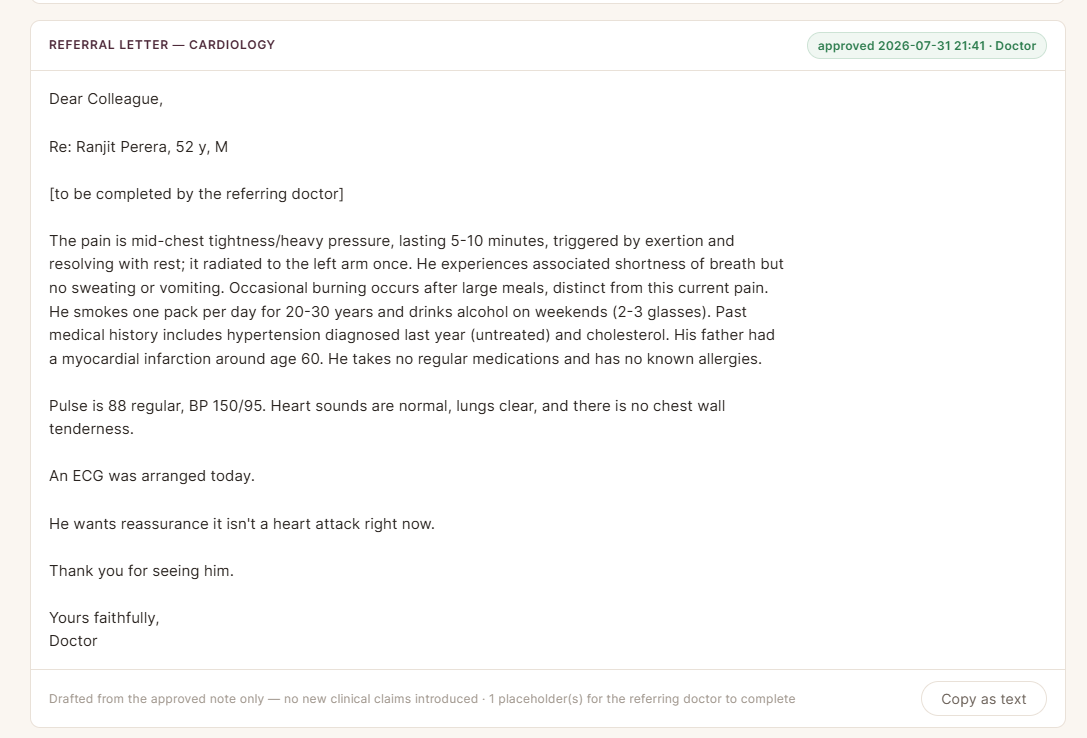
A full consultation, start to finish (5 min 43 s). An acted patient; the doctor supervises throughout. Live transcript and clinical decision support first, then the note with every claim cited to the transcript, and the referral letter.
https://github.com/user-attachments/assets/84bf3635-54de-479d-8caa-2ebf5787e5e9
I am a practising GP and I built this mostly in my own time. I would rather hear what is wrong with it than what is good about it. Three things in particular.
Where it breaks in a real clinic. Everything here has been tested in a quiet room with a scripted or acted patient. That is not a clinic. Background noise, a third person in the room, a patient who talks across the doctor, a cheap microphone, a machine without a 24 GB card — tell me what you think falls over first.
The code, which is mostly AI-written. I wrote the specifications and reviewed the work, an AI assistant wrote most of the code, and I refereed. I have not hidden that, and I have not tidied away what it cost: five runs in a real room turned up four serious defects that the test suite had passed. Each one is written up with the reason no test caught it. If you think the review was not careful enough, the whole history is here to check.
Security. An audit found twelve issues, one of them critical. What they were and what was done about them is in help/08-security.md. I would like to know what that audit missed.
Open a Discussion or an issue. Blunt is welcome.
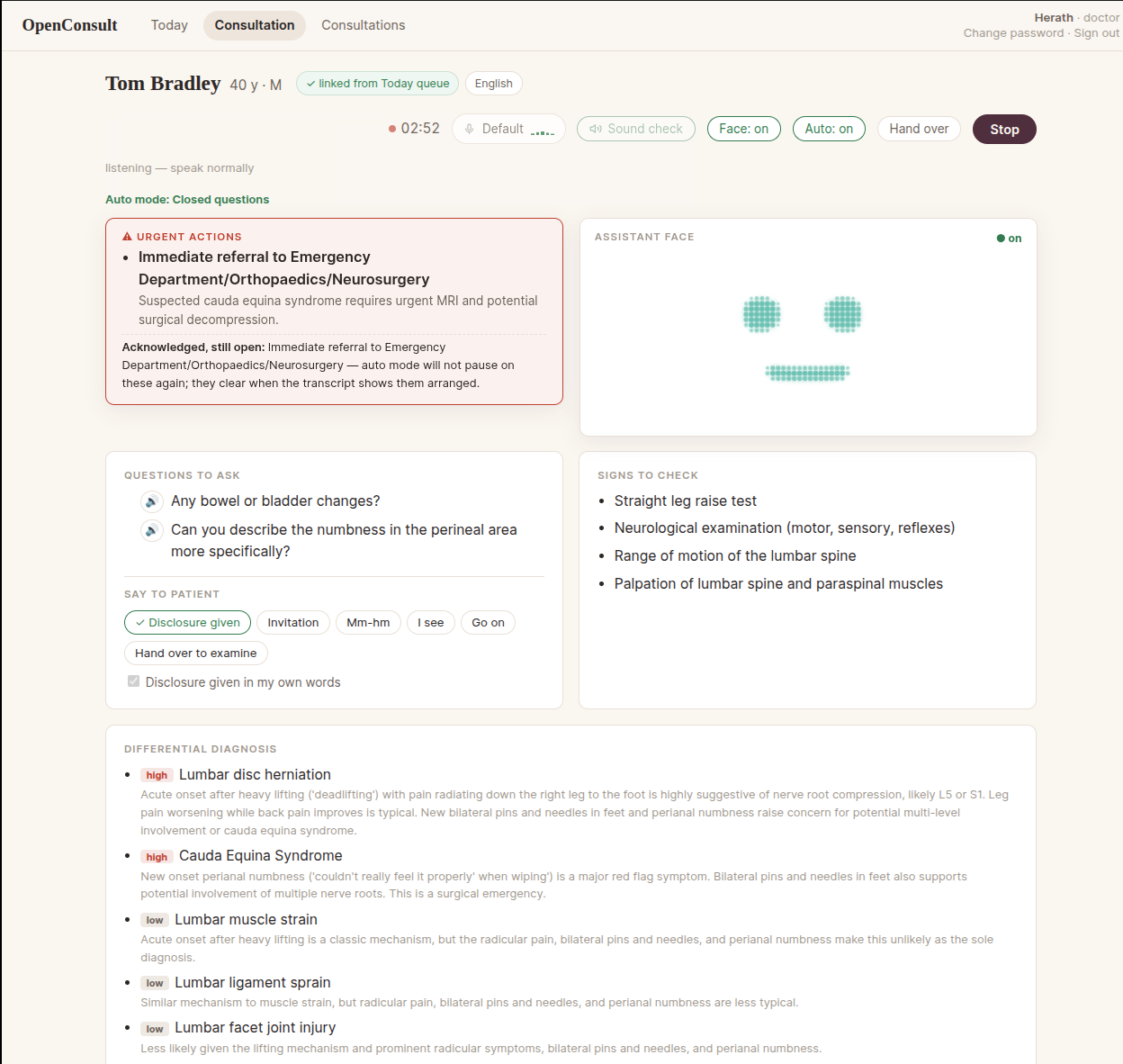
evals/ are kept as a standalone research contribution. Sinhala is out of scope, not postponed.During the consultation (live):
After the consultation (a background job, takes a minute or two):
Around the edges:
The note and letter screens above are from 31 July 2026 and carry the project's earlier name; the help series walks through the same consultation step by step.
New to the project? Start with the help series — a short, diagram-led tour of what the app does, how it's built, and why it works the way it does (including what an independent security audit found). It's written for reading, not installing.
See PROJECT_PLAN.md for the full plan.
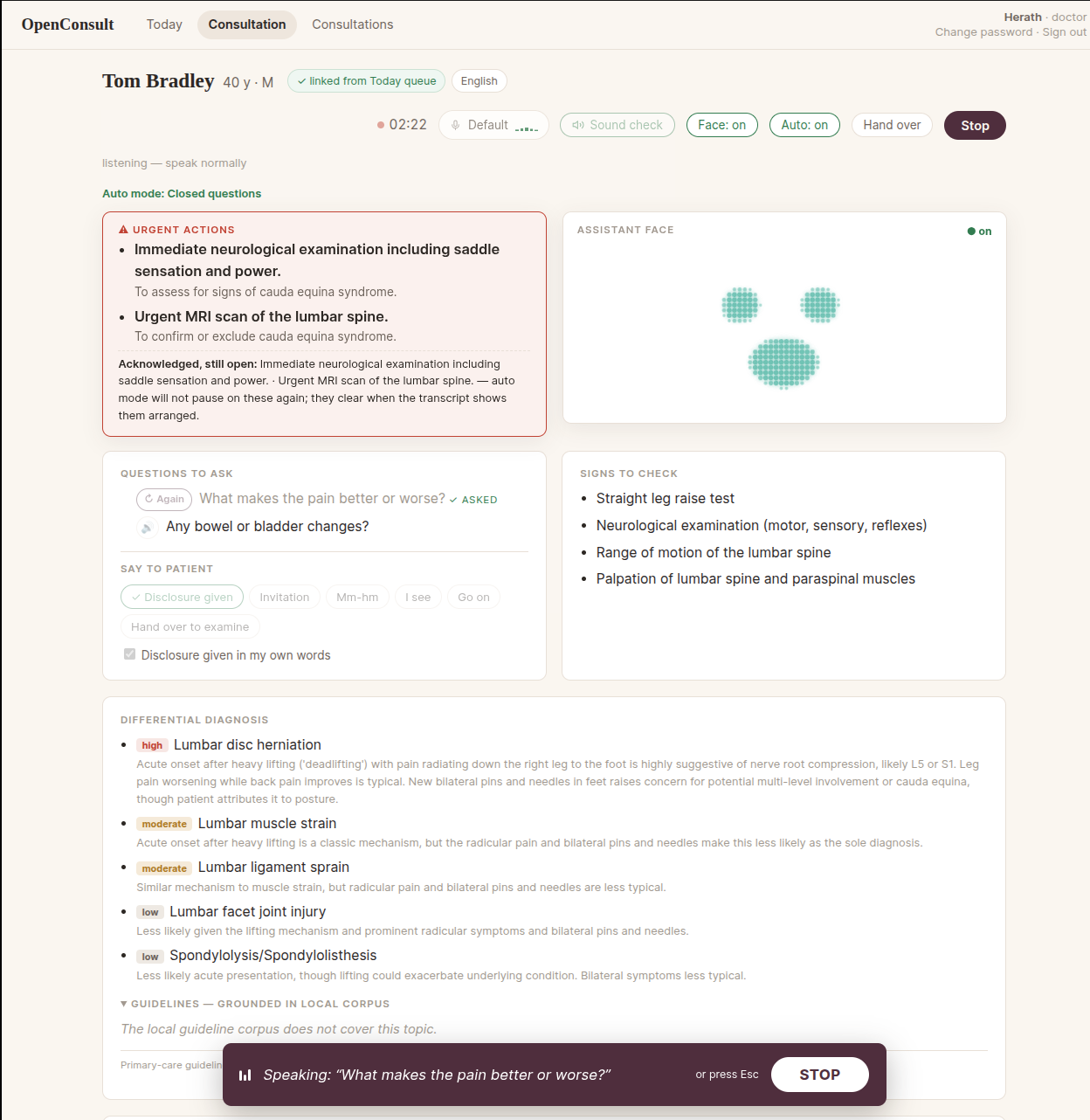
Auto mode lets the assistant conduct the history-taking itself while the
doctor supervises. After the fixed disclosure that it is a computer, it
invites the patient to tell their story, encourages them through silences,
and then asks the panel's questions aloud one at a time, choosing from a
standing queue that every assessment pass feeds and re-orders. The doctor
can take it back with one tap at any moment; an urgency alarm pauses the
questioning until the doctor acknowledges it; and the machine's own voice
is excluded from the transcript. It is experimental: it has been run only
in scripted or acted consultations, and it is off by default behind
AUTO_MODE_ENABLED (see .env.example). The question wording and the
cadence — how long it waits before deciding the patient has finished, how
it phrases the panel's questions, what it says while it thinks — are being
refined for v1.1 from the pilot runs. The design is in
AGENDA_QUEUE_SPEC.md (the queue, the re-ranker, the number to beat) and
PHASE_7C_SPEC.md; the pilot diagnostics that drive the refinements are
kept outside the repository, on the reference machine, in
~/Documents/Consultation-ai/Solo Pilot Documents/.
Requirements: Linux, uv (installs its own
Python 3.12), PostgreSQL 18 with pgvector, an NVIDIA GPU with 24 GB of
VRAM for the full pipeline (the reference machine is one RTX 4090), and
ffmpeg on the PATH. The steps below were followed literally on a fresh
clone on 10 September 2026; every one is copy-paste.
# 1. Install uv (one-time)
curl -LsSf https://astral.sh/uv/install.sh | sh

# 2. Install PostgreSQL + pgvector (one-time), then create the role, the
#    database and the extension. Choose a real password; it goes into
#    .env in step 4. CREATEDB and the extension in template1 are what the
#    test suite needs to build and drop its own disposable database
#    (consultation_ai_test) — it never touches this one.
sudo apt update && sudo apt install -y postgresql postgresql-18-pgvector ffmpeg
sudo -u postgres psql <<'SQL'
CREATE ROLE consultation_app LOGIN PASSWORD 'choose-a-real-password' CREATEDB;
CREATE DATABASE consultation_ai OWNER consultation_app;
\c consultation_ai
CREATE EXTENSION IF NOT EXISTS vector;
\c template1
CREATE EXTENSION IF NOT EXISTS vector;
SQL

# 3. Install project dependencies. On a fresh machine this downloads the
#    CUDA and PyTorch wheels — several GB, once.
uv sync

# 4. Configure: copy the template, then edit .env — put the step-2
#    password into DATABASE_URL, and set SECRET_KEY to a real value
#    (`openssl rand -hex 32`): the app refuses to start on a missing,
#    short, or placeholder key. .env.example documents every setting the
#    app reads, each with its default; nothing else is required.
cp .env.example .env

# 5. Create the first admin from the server shell (password prompted) —
#    public registration can never create an admin
uv run python scripts/manage_users.py create your-username admin "Your Name"

# 6. Run the app — the production invocation, exactly what the systemd
#    unit on the reference machine runs
uv run uvicorn app.main:app --host 0.0.0.0 --port 8000
(--reload is development-only: it auto-restarts on code edits and must
never be used for an internet-exposed app.)
What downloads when. Nothing in the repository is a model. The live
transcriber fetches distil-large-v3 (~1.5 GB) on the first Start. The
first Stop fetches WhisperX large-v3 (~3 GB), its English alignment
model and the silero VAD, and the pyannote diarisation weights (gated —
see the one-time setup below; the first Stop fails without it). MedGemma
(~17 GB) and embeddinggemma (~600 MB) are pulled through Ollama by the
commands further down, under the terms in § Model terms. Expect the
first Stop to take several minutes longer than the second.
Then open http://127.0.0.1:8000/login and register two accounts — one receptionist, one doctor. Registrations start pending: approve both from the admin account you created in step 5 (Users view). The two-role demo flow, per the plan:
Role boundaries are enforced server-side: the receptionist manages the queue but gets 403s on transcripts, notes, and review pages. Admins get an Audit tab (who viewed/edited/approved/acknowledged what, when).
Interactive API docs live at http://127.0.0.1:8000/docs.
Live transcription (Phase 1): open http://127.0.0.1:8000/live, click
Start, allow microphone access, and speak. Confirmed text appears with
timestamps; the grey italic line is the model's provisional guess. Runs
distil-large-v3 on the GPU (override with WHISPER_MODEL, e.g.
WHISPER_MODEL=small.en for CPU-only machines). The first run downloads
the model (~1.5 GB).
Live clinical decision support (Phase 3): the live page shows a CDS panel — differential diagnoses, questions to ask, signs to check — updated as the conversation grows. It needs MedGemma running locally via Ollama:
ollama serve &
ollama pull hf.co/unsloth/medgemma-27b-text-it-GGUF:Q4_K_M   # ~17 GB, needs ~20 GB GPU
Without Ollama running, transcription still works; the CDS panel reports itself unavailable. Replay a mock consultation through the CDS engine without speaking:
uv run python scripts/simulate_cds.py mock_consultations/01_chest_pain_en.md
The mock consultations ship as scripts and frozen reference transcripts; the real two-voice WAV recordings of them are deliberately not distributed — consent covered recording, not publication — so others record their own from the scripts.
Guideline grounding (Phase 4): the live page shows a guidelines panel — a summary grounded ONLY in retrieved guideline passages, each claim cited, with a provenance line (corpus name, version, ingestion date). If the local corpus doesn't cover the topic, the panel declines rather than improvises. The corpus is defined per installation: the repository ships a validated example manifest, and each operator lists the guideline sources they hold licences to use this way. Copy it, edit it, then build:
cp corpus/manifest.example.yaml corpus/manifest.yaml
ollama pull embeddinggemma
uv run python scripts/ingest_guidelines.py
Without a manifest the app still runs; the guidelines panel reports that no corpus is configured and declines every query.
Speaker diarisation (one-time setup): the finalisation pipeline uses
pyannote/speaker-diarization-3.1, which is licence-gated on Hugging
Face. Create a free account, accept the model's terms on its model page,
and authenticate with hf auth login — do this before your first Stop,
not after.
The voice (Phase 7a): the app speaks through Piper, installed deliberately outside the app's environment (see NOTICE for why):
uv tool install piper-tts
# download voice en_GB-alba-medium (.onnx + .json) to ~/.local/share/piper-voices/
Point TTS_COMMAND and TTS_MODEL_PATH at it in .env (absolute
paths — see .env.example). The sound-check button beside Start
confirms the room can hear it.
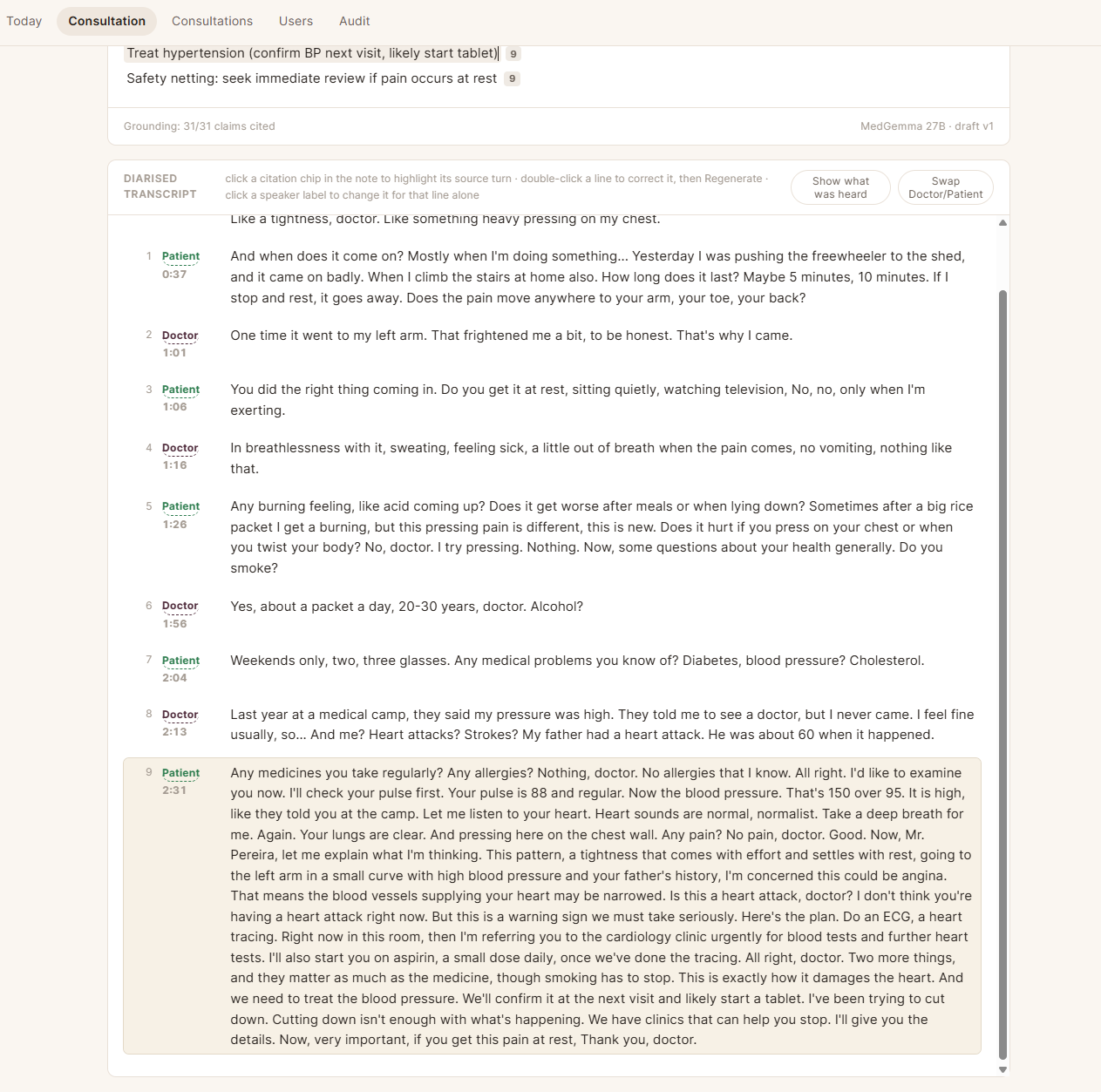
Post-consultation note (Phase 2): pressing Stop triggers the finalisation pipeline — WhisperX re-transcription, pyannote speaker diarisation, Doctor/Patient role attribution — and lands you on a review page with a draft SOAP note. Every claim cites its transcript turns (click to verify); numbers/drugs/laterality resting on low-confidence audio are marked ⚠. Edit in place, Regenerate after transcript corrections, Approve to sign off, or copy as EMR-ready plain text. The heavy models take turns on the GPU (MedGemma is unloaded while WhisperX/pyannote run), so finalisation takes a minute or two.
Evaluations for the CDS urgency alarm, RAG grounding, and note quality
live in evals/, with reusable harnesses in scripts/evaluate_*.py.
Run the tests with:
uv run pytest
For running everything as system services that survive a reboot
(PostgreSQL, Ollama, the app), and for the after-reboot checklist and
known failure modes, see HANDOVER.md — the engineering record. The
reader-facing tour lives in help/.
docker-compose.yml packages the app and its database; see
DOCKER_DEMO_SPEC.md for the design. Prerequisites, honestly stated:
pyannote/speaker-diarization-3.1 on huggingface.co before your
first Stop — that step cannot be automated.OLLAMA_URL points
at it); a bundled service exists behind --profile ollama.cp .env.example .env # then set SECRET_KEY: openssl rand -hex 32
docker compose up -d --build
docker compose run --rm app cp corpus/manifest.example.yaml corpus/manifest.yaml # then edit it in the corpus volume
docker compose run --rm app python scripts/ingest_guidelines.py # first run, validated, re-runnable
docker compose exec app python scripts/manage_users.py create <user> admin "Your Name"
Then open http://localhost:8000/login — localhost is the secure
origin the microphone needs in a single-machine demo; any other
address requires TLS. The suite runs in-container on a fresh clone:
docker compose run --rm app pytest.
This repository redistributes no model weights. Every model is fetched by the operator, under that model's own terms, using the commands in this README; the code only ever calls a model that is already present (the app talks to a local Ollama server and to weights on the local disk, and never downloads MedGemma or embeddinggemma itself).
hf.co/unsloth/medgemma-27b-text-it-GGUF:Q4_K_M,
the community GGUF of Google's medgemma-27b-text-it) is distributed
under Google's Health AI Developer Foundations terms of use
and the Gemma terms of use. You
must accept them — on the model's Hugging Face page,
or by the act of pulling through Ollama, which the terms treat as
acceptance — before use. What the code does: ollama pull fetches the
GGUF onto your machine, and the app then calls it through Ollama's
local API.ollama pull embeddinggemma) is distributed under
the Gemma terms of use; accept them
on Hugging Face or
by pulling through Ollama, as above.distil-large-v3 (distil-whisper,
MIT) for the live path and large-v3 (OpenAI Whisper,
MIT) for the final pass, run through faster-whisper
(MIT) and WhisperX (BSD-2-Clause);
downloaded from Hugging Face on first use.speaker-diarization-3.1 (Hugging Face,
MIT, gated): accept its access agreement on Hugging Face before your
first Stop, as described above.en_GB-alba-medium voice from rhasspy/piper-voices,
whose training data is CC BY 4.0 and whose weights state no licence of
their own — see NOTICE for the exact position.This project's own code is licensed AGPL-3.0-or-later — see
LICENSE. The vendored face engine at vendor/kindalive/ remains MIT
under its upstream licence (vendor/kindalive/LICENSE); NOTICE
records the full third-party picture, including model and corpus terms.
The "never real patients" rule at the top of this README is a research-
scope constraint of the prototype, not a licence term.
OpenConsult — an open-source, locally run AI assistant for the GP consultation: transcription, structured notes, clinical decision support and an experimental spoken history-taking mode.
Python
6
474 commits
updated Oct 16, 2026
A research/educational prototype for AI-assisted medical consultations — fully local, human-in-the-loop, English-only in v1.
Transcribes a doctor–patient consultation live, offers real-time clinical decision support (differentials, questions to ask, signs to elicit), then produces a diarised transcript, a concise doctor-style note with every claim cited to the transcript, referral letters, and evidence-grounded guideline summaries — all running locally on consumer hardware.
⚠️ Status & intent: This is an experimental prototype for research, education, and demonstration purposes only. It is not a medical device, has not undergone any regulatory assessment, and must never be used with real patients or real patient data. All development and demos use synthetic (scripted/acted) consultations.
A full consultation, start to finish (5 min 43 s). An acted patient; the doctor supervises throughout. Live transcript and clinical decision support first, then the note with every claim cited to the transcript, and the referral letter.
https://github.com/user-attachments/assets/84bf3635-54de-479d-8caa-2ebf5787e5e9
I am a practising GP and I built this mostly in my own time. I would rather hear what is wrong with it than what is good about it. Three things in particular.
Where it breaks in a real clinic. Everything here has been tested in a quiet room with a scripted or acted patient. That is not a clinic. Background noise, a third person in the room, a patient who talks across the doctor, a cheap microphone, a machine without a 24 GB card — tell me what you think falls over first.
The code, which is mostly AI-written. I wrote the specifications and reviewed the work, an AI assistant wrote most of the code, and I refereed. I have not hidden that, and I have not tidied away what it cost: five runs in a real room turned up four serious defects that the test suite had passed. Each one is written up with the reason no test caught it. If you think the review was not careful enough, the whole history is here to check.
Security. An audit found twelve issues, one of them critical. What they were and what was done about them is in help/08-security.md. I would like to know what that audit missed.
Open a Discussion or an issue. Blunt is welcome.
evals/ are kept as a standalone research contribution. Sinhala is out of scope, not postponed.During the consultation (live):
After the consultation (a background job, takes a minute or two):
Around the edges:
The note and letter screens above are from 31 July 2026 and carry the project's earlier name; the help series walks through the same consultation step by step.
New to the project? Start with the help series — a short, diagram-led tour of what the app does, how it's built, and why it works the way it does (including what an independent security audit found). It's written for reading, not installing.
See PROJECT_PLAN.md for the full plan.
Auto mode lets the assistant conduct the history-taking itself while the
doctor supervises. After the fixed disclosure that it is a computer, it
invites the patient to tell their story, encourages them through silences,
and then asks the panel's questions aloud one at a time, choosing from a
standing queue that every assessment pass feeds and re-orders. The doctor
can take it back with one tap at any moment; an urgency alarm pauses the
questioning until the doctor acknowledges it; and the machine's own voice
is excluded from the transcript. It is experimental: it has been run only
in scripted or acted consultations, and it is off by default behind
AUTO_MODE_ENABLED (see .env.example). The question wording and the
cadence — how long it waits before deciding the patient has finished, how
it phrases the panel's questions, what it says while it thinks — are being
refined for v1.1 from the pilot runs. The design is in
AGENDA_QUEUE_SPEC.md (the queue, the re-ranker, the number to beat) and
PHASE_7C_SPEC.md; the pilot diagnostics that drive the refinements are
kept outside the repository, on the reference machine, in
~/Documents/Consultation-ai/Solo Pilot Documents/.
Requirements: Linux, uv (installs its own
Python 3.12), PostgreSQL 18 with pgvector, an NVIDIA GPU with 24 GB of
VRAM for the full pipeline (the reference machine is one RTX 4090), and
ffmpeg on the PATH. The steps below were followed literally on a fresh
clone on 10 September 2026; every one is copy-paste.
# 1. Install uv (one-time)
curl -LsSf https://astral.sh/uv/install.sh | sh

# 2. Install PostgreSQL + pgvector (one-time), then create the role, the
#    database and the extension. Choose a real password; it goes into
#    .env in step 4. CREATEDB and the extension in template1 are what the
#    test suite needs to build and drop its own disposable database
#    (consultation_ai_test) — it never touches this one.
sudo apt update && sudo apt install -y postgresql postgresql-18-pgvector ffmpeg
sudo -u postgres psql <<'SQL'
CREATE ROLE consultation_app LOGIN PASSWORD 'choose-a-real-password' CREATEDB;
CREATE DATABASE consultation_ai OWNER consultation_app;
\c consultation_ai
CREATE EXTENSION IF NOT EXISTS vector;
\c template1
CREATE EXTENSION IF NOT EXISTS vector;
SQL

# 3. Install project dependencies. On a fresh machine this downloads the
#    CUDA and PyTorch wheels — several GB, once.
uv sync

# 4. Configure: copy the template, then edit .env — put the step-2
#    password into DATABASE_URL, and set SECRET_KEY to a real value
#    (`openssl rand -hex 32`): the app refuses to start on a missing,
#    short, or placeholder key. .env.example documents every setting the
#    app reads, each with its default; nothing else is required.
cp .env.example .env

# 5. Create the first admin from the server shell (password prompted) —
#    public registration can never create an admin
uv run python scripts/manage_users.py create your-username admin "Your Name"

# 6. Run the app — the production invocation, exactly what the systemd
#    unit on the reference machine runs
uv run uvicorn app.main:app --host 0.0.0.0 --port 8000
(--reload is development-only: it auto-restarts on code edits and must
never be used for an internet-exposed app.)
What downloads when. Nothing in the repository is a model. The live
transcriber fetches distil-large-v3 (~1.5 GB) on the first Start. The
first Stop fetches WhisperX large-v3 (~3 GB), its English alignment
model and the silero VAD, and the pyannote diarisation weights (gated —
see the one-time setup below; the first Stop fails without it). MedGemma
(~17 GB) and embeddinggemma (~600 MB) are pulled through Ollama by the
commands further down, under the terms in § Model terms. Expect the
first Stop to take several minutes longer than the second.
Then open http://127.0.0.1:8000/login and register two accounts — one receptionist, one doctor. Registrations start pending: approve both from the admin account you created in step 5 (Users view). The two-role demo flow, per the plan:
Role boundaries are enforced server-side: the receptionist manages the queue but gets 403s on transcripts, notes, and review pages. Admins get an Audit tab (who viewed/edited/approved/acknowledged what, when).
Interactive API docs live at http://127.0.0.1:8000/docs.
Live transcription (Phase 1): open http://127.0.0.1:8000/live, click
Start, allow microphone access, and speak. Confirmed text appears with
timestamps; the grey italic line is the model's provisional guess. Runs
distil-large-v3 on the GPU (override with WHISPER_MODEL, e.g.
WHISPER_MODEL=small.en for CPU-only machines). The first run downloads
the model (~1.5 GB).
Live clinical decision support (Phase 3): the live page shows a CDS panel — differential diagnoses, questions to ask, signs to check — updated as the conversation grows. It needs MedGemma running locally via Ollama:
ollama serve &
ollama pull hf.co/unsloth/medgemma-27b-text-it-GGUF:Q4_K_M   # ~17 GB, needs ~20 GB GPU
Without Ollama running, transcription still works; the CDS panel reports itself unavailable. Replay a mock consultation through the CDS engine without speaking:
uv run python scripts/simulate_cds.py mock_consultations/01_chest_pain_en.md
The mock consultations ship as scripts and frozen reference transcripts; the real two-voice WAV recordings of them are deliberately not distributed — consent covered recording, not publication — so others record their own from the scripts.
Guideline grounding (Phase 4): the live page shows a guidelines panel — a summary grounded ONLY in retrieved guideline passages, each claim cited, with a provenance line (corpus name, version, ingestion date). If the local corpus doesn't cover the topic, the panel declines rather than improvises. The corpus is defined per installation: the repository ships a validated example manifest, and each operator lists the guideline sources they hold licences to use this way. Copy it, edit it, then build:
cp corpus/manifest.example.yaml corpus/manifest.yaml
ollama pull embeddinggemma
uv run python scripts/ingest_guidelines.py
Without a manifest the app still runs; the guidelines panel reports that no corpus is configured and declines every query.
Speaker diarisation (one-time setup): the finalisation pipeline uses
pyannote/speaker-diarization-3.1, which is licence-gated on Hugging
Face. Create a free account, accept the model's terms on its model page,
and authenticate with hf auth login — do this before your first Stop,
not after.
The voice (Phase 7a): the app speaks through Piper, installed deliberately outside the app's environment (see NOTICE for why):
uv tool install piper-tts
# download voice en_GB-alba-medium (.onnx + .json) to ~/.local/share/piper-voices/
Point TTS_COMMAND and TTS_MODEL_PATH at it in .env (absolute
paths — see .env.example). The sound-check button beside Start
confirms the room can hear it.
Post-consultation note (Phase 2): pressing Stop triggers the finalisation pipeline — WhisperX re-transcription, pyannote speaker diarisation, Doctor/Patient role attribution — and lands you on a review page with a draft SOAP note. Every claim cites its transcript turns (click to verify); numbers/drugs/laterality resting on low-confidence audio are marked ⚠. Edit in place, Regenerate after transcript corrections, Approve to sign off, or copy as EMR-ready plain text. The heavy models take turns on the GPU (MedGemma is unloaded while WhisperX/pyannote run), so finalisation takes a minute or two.
Evaluations for the CDS urgency alarm, RAG grounding, and note quality
live in evals/, with reusable harnesses in scripts/evaluate_*.py.
Run the tests with:
uv run pytest
For running everything as system services that survive a reboot
(PostgreSQL, Ollama, the app), and for the after-reboot checklist and
known failure modes, see HANDOVER.md — the engineering record. The
reader-facing tour lives in help/.
docker-compose.yml packages the app and its database; see
DOCKER_DEMO_SPEC.md for the design. Prerequisites, honestly stated:
pyannote/speaker-diarization-3.1 on huggingface.co before your
first Stop — that step cannot be automated.OLLAMA_URL points
at it); a bundled service exists behind --profile ollama.cp .env.example .env # then set SECRET_KEY: openssl rand -hex 32
docker compose up -d --build
docker compose run --rm app cp corpus/manifest.example.yaml corpus/manifest.yaml # then edit it in the corpus volume
docker compose run --rm app python scripts/ingest_guidelines.py # first run, validated, re-runnable
docker compose exec app python scripts/manage_users.py create <user> admin "Your Name"
Then open http://localhost:8000/login — localhost is the secure
origin the microphone needs in a single-machine demo; any other
address requires TLS. The suite runs in-container on a fresh clone:
docker compose run --rm app pytest.
This repository redistributes no model weights. Every model is fetched by the operator, under that model's own terms, using the commands in this README; the code only ever calls a model that is already present (the app talks to a local Ollama server and to weights on the local disk, and never downloads MedGemma or embeddinggemma itself).
hf.co/unsloth/medgemma-27b-text-it-GGUF:Q4_K_M,
the community GGUF of Google's medgemma-27b-text-it) is distributed
under Google's Health AI Developer Foundations terms of use
and the Gemma terms of use. You
must accept them — on the model's Hugging Face page,
or by the act of pulling through Ollama, which the terms treat as
acceptance — before use. What the code does: ollama pull fetches the
GGUF onto your machine, and the app then calls it through Ollama's
local API.ollama pull embeddinggemma) is distributed under
the Gemma terms of use; accept them
on Hugging Face or
by pulling through Ollama, as above.distil-large-v3 (distil-whisper,
MIT) for the live path and large-v3 (OpenAI Whisper,
MIT) for the final pass, run through faster-whisper
(MIT) and WhisperX (BSD-2-Clause);
downloaded from Hugging Face on first use.speaker-diarization-3.1 (Hugging Face,
MIT, gated): accept its access agreement on Hugging Face before your
first Stop, as described above.en_GB-alba-medium voice from rhasspy/piper-voices,
whose training data is CC BY 4.0 and whose weights state no licence of
their own — see NOTICE for the exact position.This project's own code is licensed AGPL-3.0-or-later — see
LICENSE. The vendored face engine at vendor/kindalive/ remains MIT
under its upstream licence (vendor/kindalive/LICENSE); NOTICE
records the full third-party picture, including model and corpus terms.
The "never real patients" rule at the top of this README is a research-
scope constraint of the prototype, not a licence term.





