Chrome extension for developers & platform engineers: readable logs, dark mode everywhere, and one-click JSON / JWT / Base64 / timestamp tools. 100% local, no data leaves your browser.
TypeScript
2
27 commits
updated Oct 16, 2026

Make logs readable again.





A browser extension for Chrome and Firefox, for developers and platform engineers: a fast log viewer that also catches leaked secrets, dark mode for any site, and the text tools you keep opening random websites for (JSON, JWT, Base64, timestamps, cron). All of it runs locally; no data leaves your browser.
➜ Add to Chrome · ➜ Add to Firefox — free
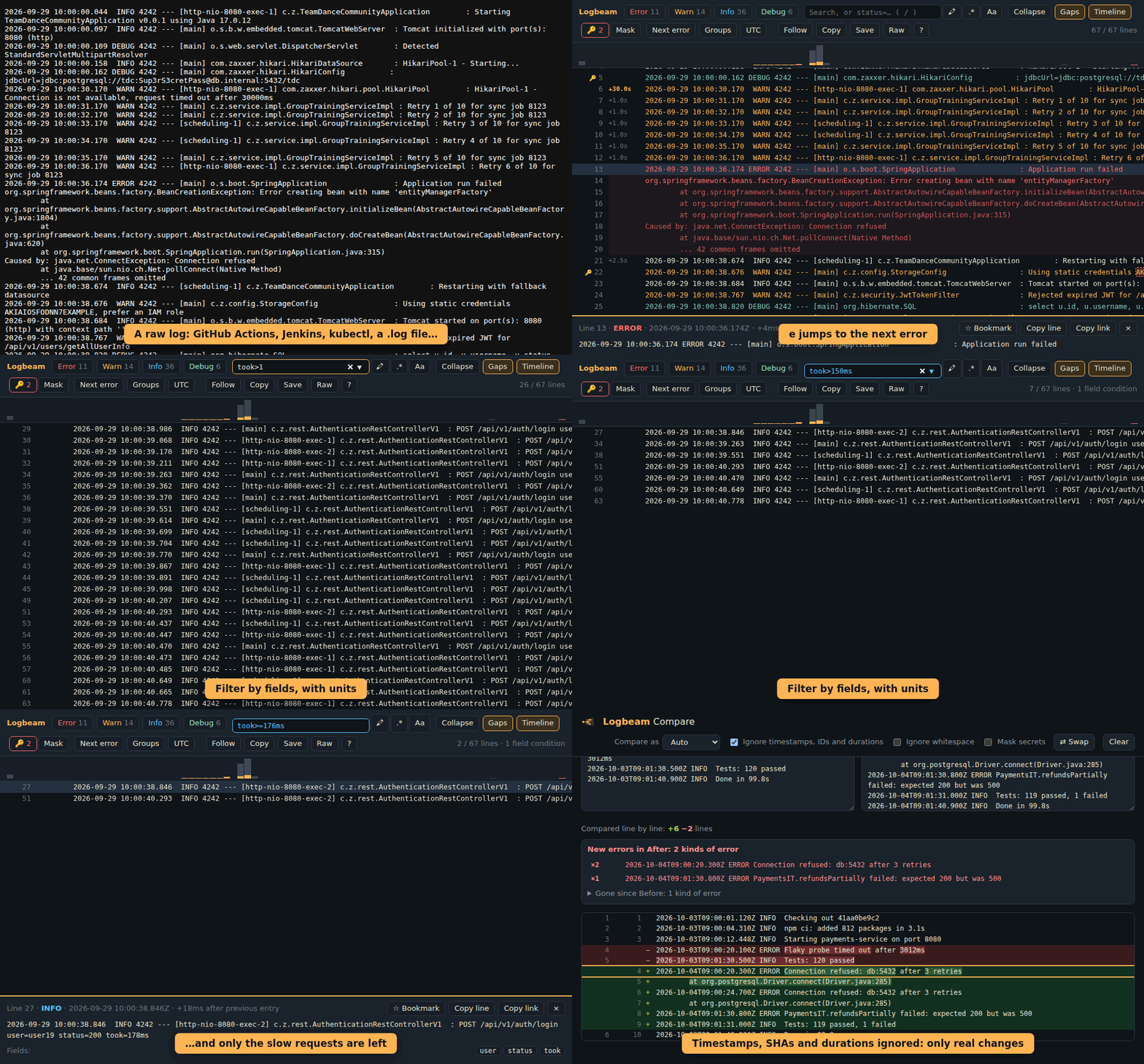
Open any raw log (a .log file, "View raw logs" in GitHub Actions, Jenkins console output, kubectl logs
piped to a file…) with Ctrl+Shift+L (⌃⇧L on Mac) or from the popup:
ERROR, WARN, INFO, DEBUG, TRACE) with counters and one-click filtersat … / Caused by:, Python tracebacks and Go goroutines are
grouped with the entry above, so filtering by ERROR shows the whole tracetime LEVEL message {fields}, including
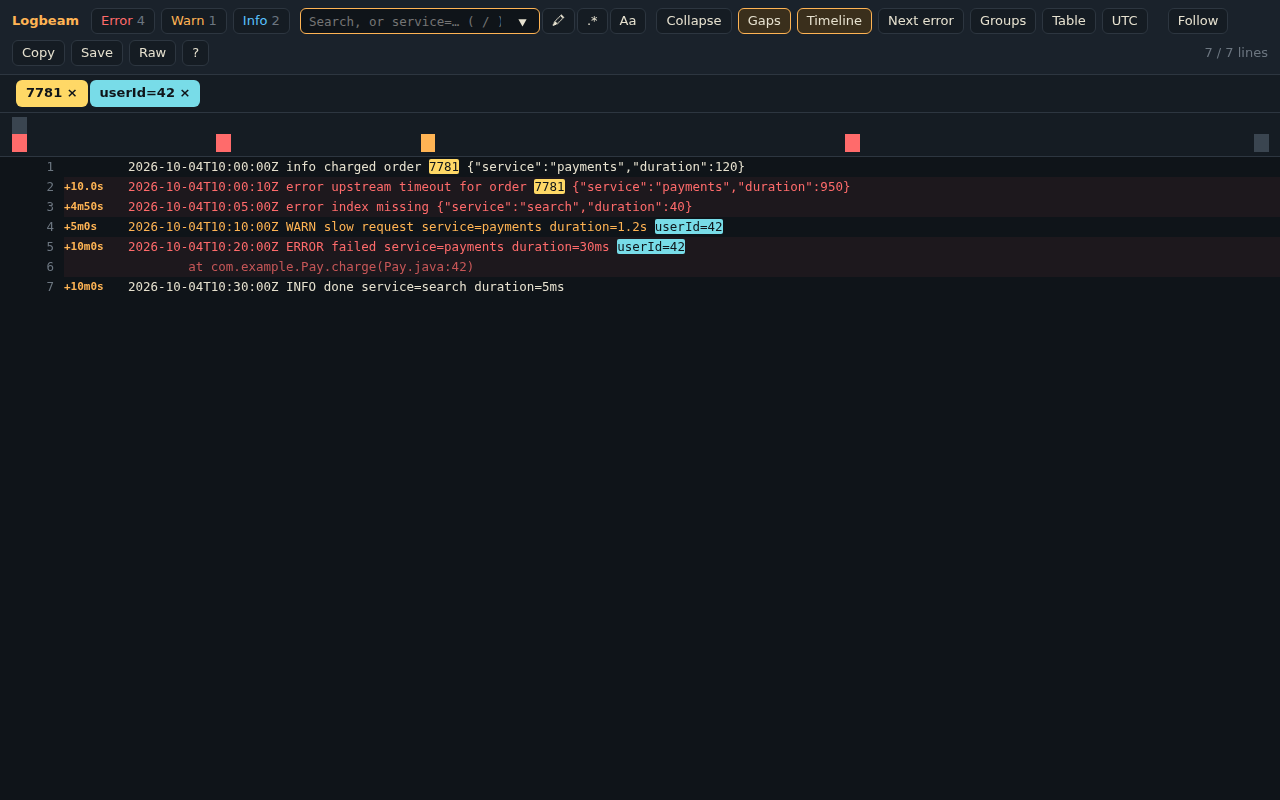
records pretty-printed over several lineslevel=error service=payments duration>500, on JSON logs and key=value lines alike,
with !=, >, <, * wildcards, nested paths (http.status>=500) and units (duration>1.5s)kubectl logs --prefix and docker compose logs get a coloured chip per pod.log / .gz file (unpacked in the
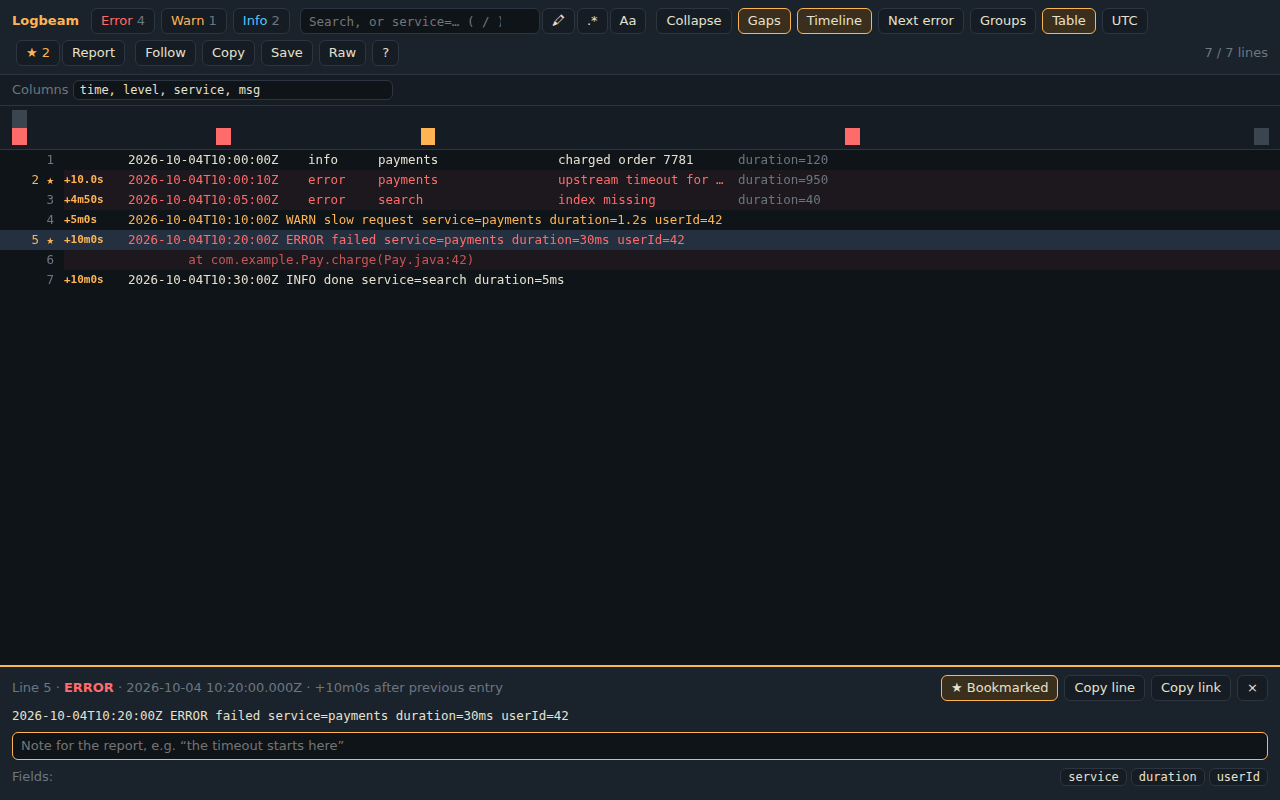
browser); drop a file onto any viewer to open itm, b): Report copies them as Markdown for a ticket, with times and linksstatus: 200 ×1520, 502 ×37), one click to filter;
for numbers and durations also min, median, p95, p99 and max (took: p95 1.2s), one click to see the slow onesALERT → ERROR), and a light theme+5.5s next to lines where the app stalledretry 17 of 50 for job 8123 becomes one line with a ×500 badge#L120 link that opens the viewer right on that linee), search (/), copy visible lines, back to raw; ? lists all the keys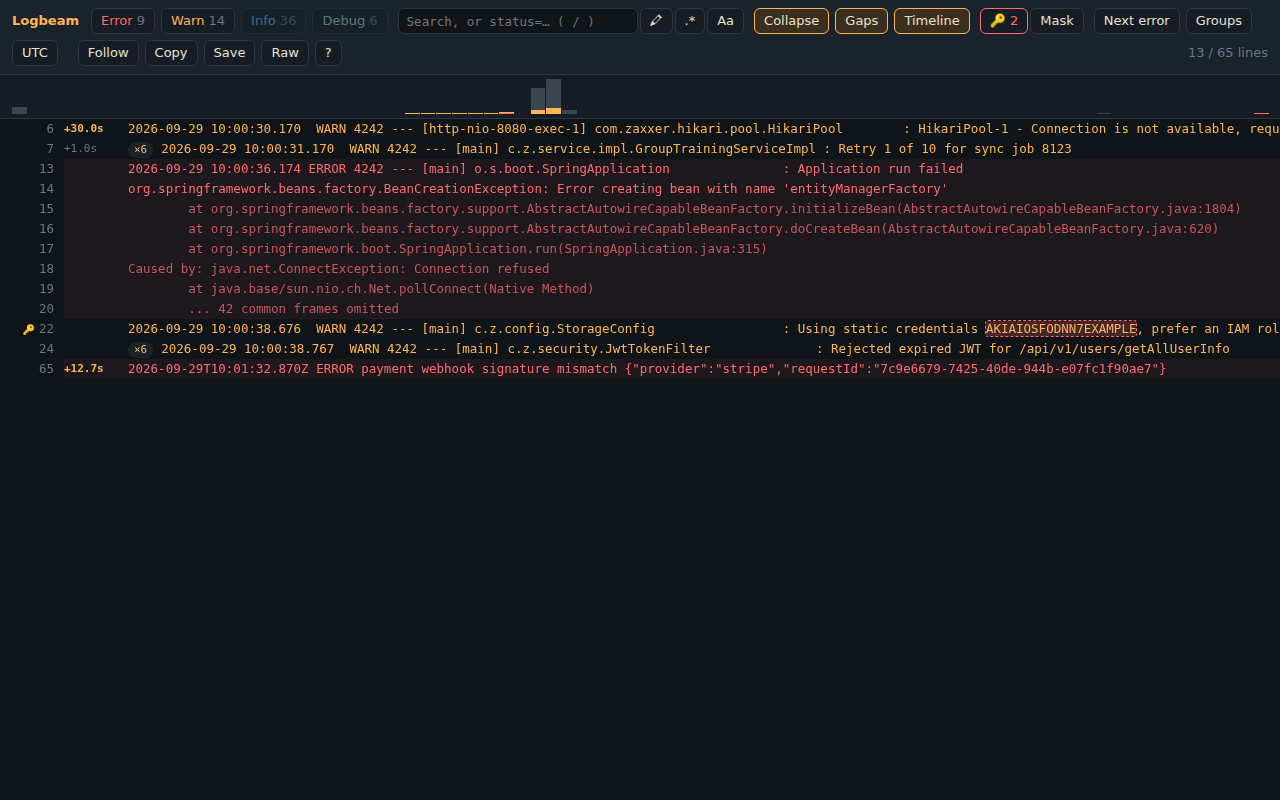
Credentials in logs are how leaks start. Logbeam marks every line that shows one: AWS keys, GitHub, GitLab,
Slack and Stripe tokens, Google API keys, JWTs, private keys, postgres://user:password@… URLs and
password=… / "apiKey": "…" settings (placeholders like ${DB_PASSWORD} are ignored).
s jumps to the next oneAKIA****************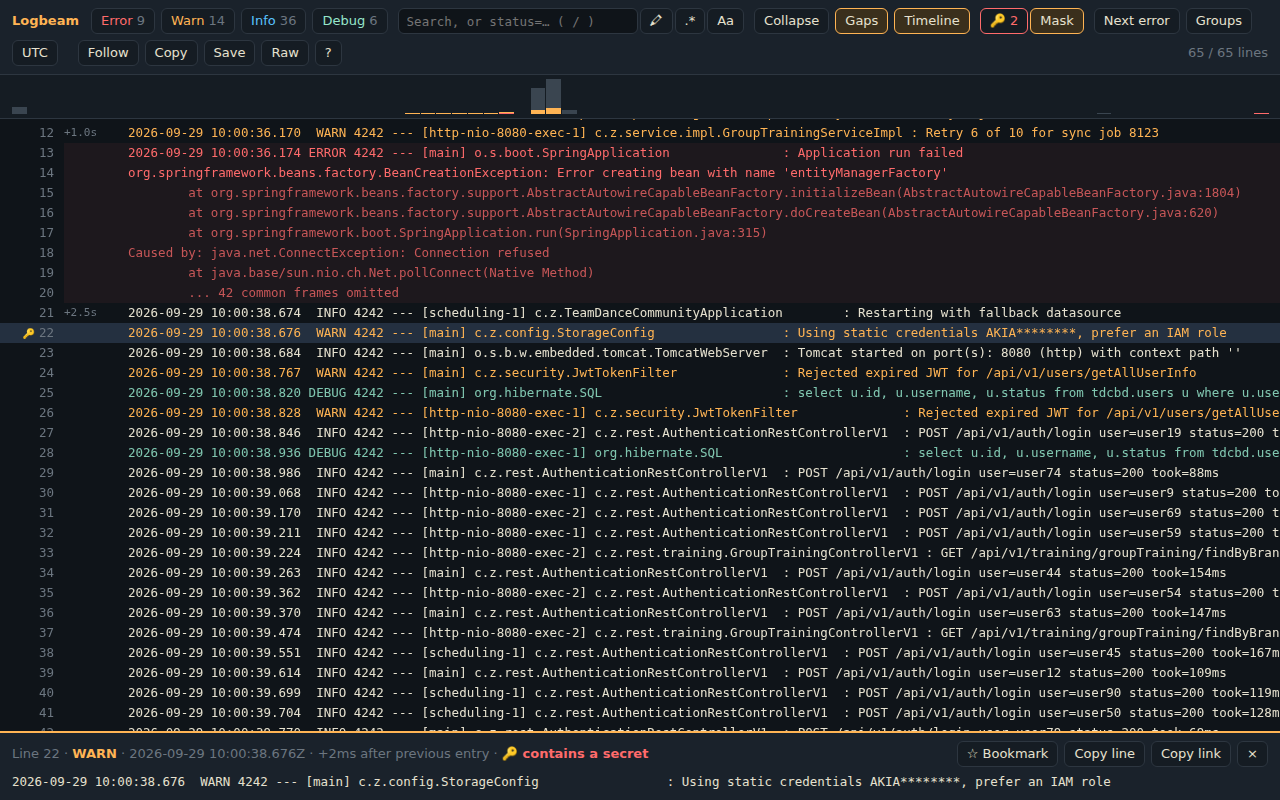
Toggle it from the popup or with Ctrl+Shift+K (⌃⇧K on Mac). Pages that already have a dark theme are detected and left alone, and turning it off never reloads the page. "Remember for this site" asks for access to that one site only, and from then on the dark theme is applied before the page paints, so there's no white flash. Photos and videos keep their real colours.
Select text on any page → right-click → Logbeam, or paste it into the popup:
| Tool | Example |
|---|---|
| Mask secrets | password=hunter2hunter2 → password=******** |
| Format / minify JSON | {"a":1} → pretty-printed, or back to one line |
| Decode JWT | header, payload, iat/exp as dates, "valid for another 59m" / "EXPIRED 3h ago" |
| Base64 encode / decode | UTF-8 safe, understands URL-safe Base64 without padding |
| URL encode / decode | a b&c ⇄ a%20b%26c |
| Timestamp ⇄ date | 1700000000 → 2023-11-14T22:13:20Z, and back |
| Explain cron | 0 */15 * * * * → "Every 15 minutes"; catches */900 in the seconds field |
| Case conversion | userProfileId ⇄ user_profile_id ⇄ user-profile-id ⇄ USER_PROFILE_ID |
| Sort / de-duplicate lines |
In an input, textarea or rich editor, Replace selection writes the result back in place (undo works).
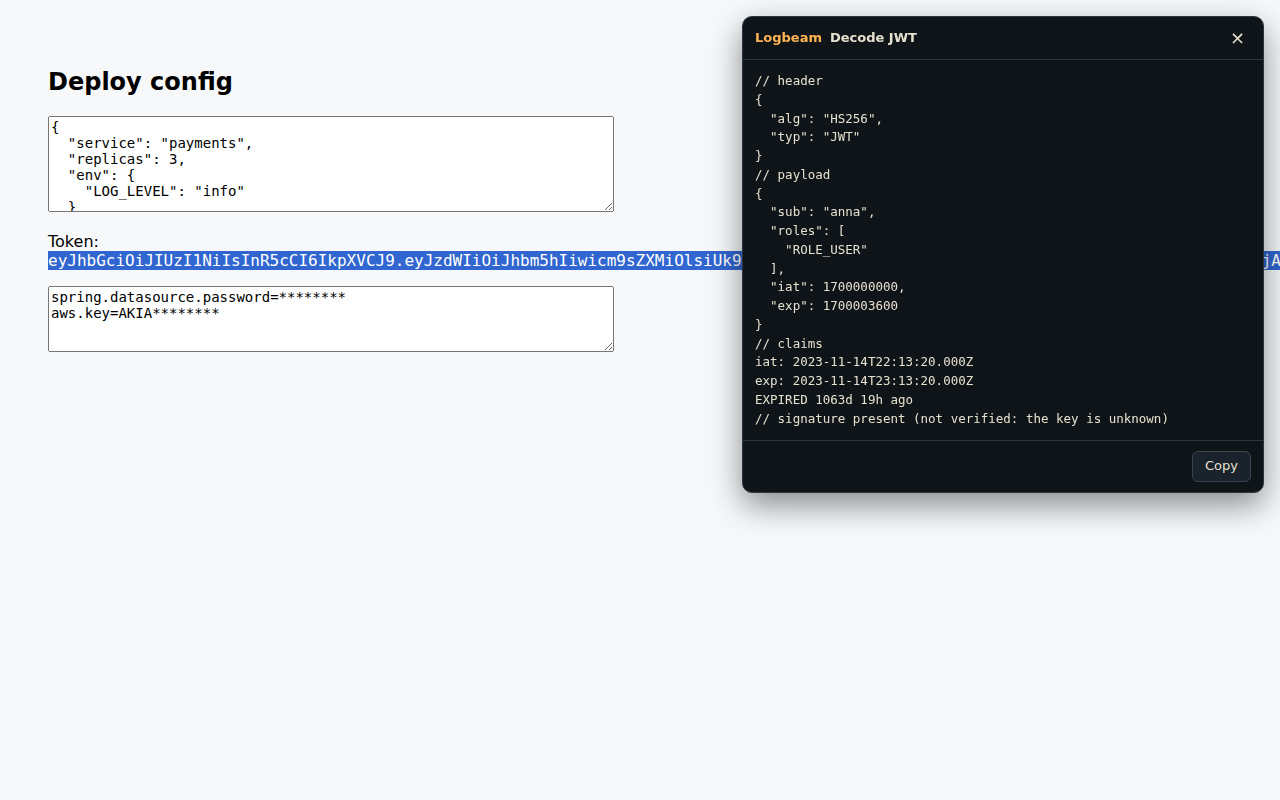
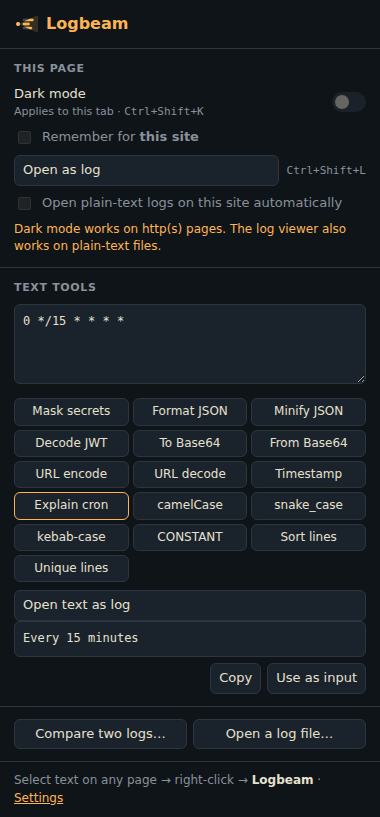
Open Compare from the popup, or use Compare… in the right-click menu (or the log viewer's Compare button) on one text and then on the other:
2026-10-03T09:00:20Z Tests: 120 passed against
2026-10-04T11:30:20Z Tests: 119 passed, 1 failed shows only the test result as changed$.env.LOG_LEVEL,
$.ports[1]) and exact comparison of numbers too big for JavaScript (12345678901234567890)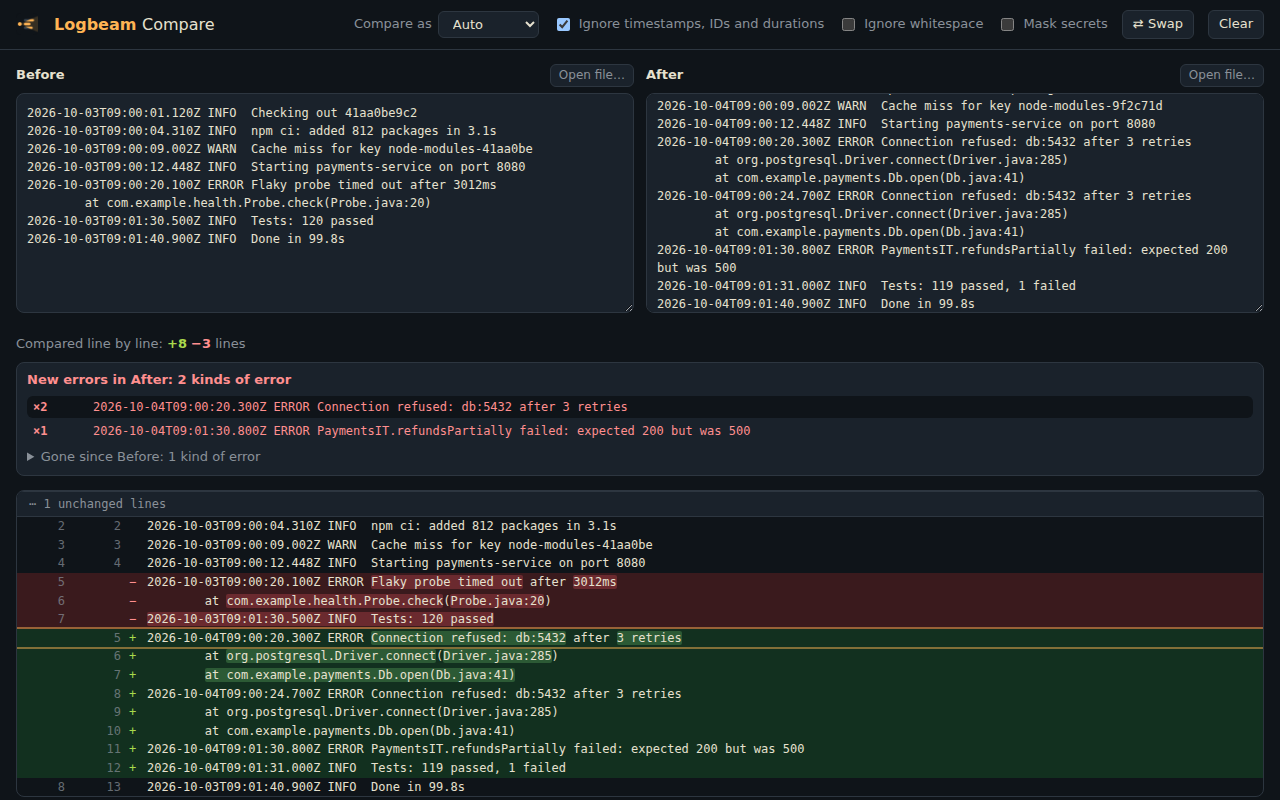
Logbeam has no server and no analytics, and it makes no network requests.
| Permission | Why |
|---|---|
activeTab, scripting | Run the log viewer or a text tool on the tab you clicked, only when you ask |
contextMenus | The right-click menu |
storage | Remember your per-site settings |
| optional host access, per site | Only when you turn on "Remember dark mode" or "Open logs automatically" for a site, and only for that site |
Logbeam never asks for access to all sites up front. See the privacy policy.
From the Chrome Web Store: Logbeam on the Chrome Web Store, one click and it updates itself. Works in Chrome, Edge, Brave, Opera and other Chromium browsers. From Firefox Add-ons: Logbeam on addons.mozilla.org (Firefox 140 or newer). The dark-mode shortcut there is Ctrl+Shift+., because Ctrl+Shift+K opens Firefox's Web Console.
From source:
npm ci
npm run build
Then open chrome://extensions, turn on Developer mode, click Load unpacked and choose the dist/
folder. To open local file:// logs, also enable Allow access to file URLs on the extension's details page.
In Firefox, open about:debugging#/runtime/this-firefox, click Load Temporary Add-on and pick
dist-firefox/manifest.json.
npm run watch         # rebuild on change, then press ↻ on chrome://extensions
npm test              # unit tests (Vitest)
npm run e2e           # load the extension into Chromium with Playwright, click through it, save docs/*.png
npm run e2e:firefox   # the same for the Firefox build, with Selenium (needs Firefox and geckodriver)
npm run lint:firefox  # the checks addons.mozilla.org runs on upload
npm run check         # lint + format + typecheck + unit tests + build (what CI runs)
npm run package       # logbeam-<version>.zip (Chrome), logbeam-firefox-<version>.zip, sources for AMO
npm run store-assets  # Chrome Web Store screenshots and promo tiles from docs/*.png
npm run demo-gif      # docs/demo.gif for this README, recorded in Chromium
npm run icons         # regenerate the PNG icons (drawn in code, no image editor needed)
Releases: bump the version, add a CHANGELOG.md entry and push a vX.Y.Z tag. The release workflow runs every
check including the end-to-end test, attaches the ZIPs to a GitHub Release, and uploads them to the Chrome Web Store
and addons.mozilla.org for review (it can also be started from the Actions tab). Setup and details: docs/PUBLISHING.md.
src/
├── background.ts        service worker: context menu, keyboard shortcuts, permission events
├── content/
│   ├── logViewer.ts     virtualized log viewer: filters, inspector, timeline, secrets, bookmarks, #L links
│   ├── viewerStyles.ts  its CSS, dark and light
│   ├── shortcuts.ts     the ? list of keys
│   ├── parseAsync.ts    Web Worker parsing with a chunked main-thread fallback
│   ├── parseWorker.ts   the parse worker; searchWorker.ts runs regex search with a timeout
│   ├── autoOpen.ts      opt-in per site: opens plain-text logs automatically
│   └── panel.ts         result panel for the text tools (Shadow DOM, no style clashes)
├── lib/                 pure logic, fully unit-tested
│   ├── logs.ts          incremental parser: levels, timestamps, JSON, stack traces, pods, filters, repeats
│   ├── ansi.ts          ANSI colour codes → plain text and colour spans
│   ├── fields.ts        field filters: level=error duration>1.5s
│   ├── insights.ts      bookmark reports, field statistics and percentiles, error groups, JSON table
│   ├── diff.ts          line and JSON diff for Compare
│   ├── secrets.ts       credential detection and masking
│   ├── regexSafety.ts   rejects regexes prone to catastrophic backtracking
│   ├── timeline.ts      error/warning histogram
│   ├── segments.ts      overlapping highlights (search matches inside secrets)
│   ├── files.ts         .log and .gz files
│   ├── transforms.ts    JSON, JWT, Base64, URL, timestamps, case, lines, mask secrets
│   └── cron.ts          cron → plain English (5 and 6 field, macros, names)
├── shared/
│   ├── settings.ts      the options, in chrome.storage.sync
│   ├── i18n.ts          translations from _locales
│   ├── theme.ts         dark / light / like the system
│   ├── darkMode.ts      per-site dark mode with dynamic content scripts
│   ├── autoOpen.ts      per-site auto-open registration
│   └── inject.ts        on-demand script injection
├── popup/               toolbar popup
├── viewer/              the viewer page for pasted text and files
├── diff/                Compare
├── options/             Settings
└── dark.css             the dark theme itself
activeTab on a click or a shortcut. Remembered dark-mode
sites use chrome.permissions.request for a single origin plus chrome.scripting.registerContentScripts,
so the extension never holds <all_urls>.chrome.storage, not in variables.innerHTML, so they work
on sites that enforce Trusted Types, like GitHub and Google.chrome.* dependencies, which keeps
them easy to test: 139 unit tests, plus over 100 end-to-end checks in a real Chromium and 28 in Firefox.text/plain logs in the viewer automatically (opt-in per site).gz filesj / k between lines, context around matches, filters in the link, line ranges
(good first issues and more)Chrome extension for developers & platform engineers: readable logs, dark mode everywhere, and one-click JSON / JWT / Base64 / timestamp tools. 100% local, no data leaves your browser.
TypeScript
2
27 commits
updated Oct 16, 2026
Make logs readable again.
A browser extension for Chrome and Firefox, for developers and platform engineers: a fast log viewer that also catches leaked secrets, dark mode for any site, and the text tools you keep opening random websites for (JSON, JWT, Base64, timestamps, cron). All of it runs locally; no data leaves your browser.
➜ Add to Chrome · ➜ Add to Firefox — free
Open any raw log (a .log file, "View raw logs" in GitHub Actions, Jenkins console output, kubectl logs
piped to a file…) with Ctrl+Shift+L (⌃⇧L on Mac) or from the popup:
ERROR, WARN, INFO, DEBUG, TRACE) with counters and one-click filtersat … / Caused by:, Python tracebacks and Go goroutines are
grouped with the entry above, so filtering by ERROR shows the whole tracetime LEVEL message {fields}, including
records pretty-printed over several lineslevel=error service=payments duration>500, on JSON logs and key=value lines alike,
with !=, >, <, * wildcards, nested paths (http.status>=500) and units (duration>1.5s)kubectl logs --prefix and docker compose logs get a coloured chip per pod.log / .gz file (unpacked in the
browser); drop a file onto any viewer to open itm, b): Report copies them as Markdown for a ticket, with times and linksstatus: 200 ×1520, 502 ×37), one click to filter;
for numbers and durations also min, median, p95, p99 and max (took: p95 1.2s), one click to see the slow onesALERT → ERROR), and a light theme+5.5s next to lines where the app stalledretry 17 of 50 for job 8123 becomes one line with a ×500 badge#L120 link that opens the viewer right on that linee), search (/), copy visible lines, back to raw; ? lists all the keys
Credentials in logs are how leaks start. Logbeam marks every line that shows one: AWS keys, GitHub, GitLab,
Slack and Stripe tokens, Google API keys, JWTs, private keys, postgres://user:password@… URLs and
password=… / "apiKey": "…" settings (placeholders like ${DB_PASSWORD} are ignored).
s jumps to the next oneAKIA****************
Toggle it from the popup or with Ctrl+Shift+K (⌃⇧K on Mac). Pages that already have a dark theme are detected and left alone, and turning it off never reloads the page. "Remember for this site" asks for access to that one site only, and from then on the dark theme is applied before the page paints, so there's no white flash. Photos and videos keep their real colours.
Select text on any page → right-click → Logbeam, or paste it into the popup:
| Tool | Example |
|---|---|
| Mask secrets | password=hunter2hunter2 → password=******** |
| Format / minify JSON | {"a":1} → pretty-printed, or back to one line |
| Decode JWT | header, payload, iat/exp as dates, "valid for another 59m" / "EXPIRED 3h ago" |
| Base64 encode / decode | UTF-8 safe, understands URL-safe Base64 without padding |
| URL encode / decode | a b&c ⇄ a%20b%26c |
| Timestamp ⇄ date | 1700000000 → 2023-11-14T22:13:20Z, and back |
| Explain cron | 0 */15 * * * * → "Every 15 minutes"; catches */900 in the seconds field |
| Case conversion | userProfileId ⇄ user_profile_id ⇄ user-profile-id ⇄ USER_PROFILE_ID |
| Sort / de-duplicate lines |
In an input, textarea or rich editor, Replace selection writes the result back in place (undo works).
Open Compare from the popup, or use Compare… in the right-click menu (or the log viewer's Compare button) on one text and then on the other:
2026-10-03T09:00:20Z Tests: 120 passed against
2026-10-04T11:30:20Z Tests: 119 passed, 1 failed shows only the test result as changed$.env.LOG_LEVEL,
$.ports[1]) and exact comparison of numbers too big for JavaScript (12345678901234567890)
Logbeam has no server and no analytics, and it makes no network requests.
| Permission | Why |
|---|---|
activeTab, scripting | Run the log viewer or a text tool on the tab you clicked, only when you ask |
contextMenus | The right-click menu |
storage | Remember your per-site settings |
| optional host access, per site | Only when you turn on "Remember dark mode" or "Open logs automatically" for a site, and only for that site |
Logbeam never asks for access to all sites up front. See the privacy policy.
From the Chrome Web Store: Logbeam on the Chrome Web Store, one click and it updates itself. Works in Chrome, Edge, Brave, Opera and other Chromium browsers. From Firefox Add-ons: Logbeam on addons.mozilla.org (Firefox 140 or newer). The dark-mode shortcut there is Ctrl+Shift+., because Ctrl+Shift+K opens Firefox's Web Console.
From source:
npm ci
npm run build
Then open chrome://extensions, turn on Developer mode, click Load unpacked and choose the dist/
folder. To open local file:// logs, also enable Allow access to file URLs on the extension's details page.
In Firefox, open about:debugging#/runtime/this-firefox, click Load Temporary Add-on and pick
dist-firefox/manifest.json.
npm run watch         # rebuild on change, then press ↻ on chrome://extensions
npm test              # unit tests (Vitest)
npm run e2e           # load the extension into Chromium with Playwright, click through it, save docs/*.png
npm run e2e:firefox   # the same for the Firefox build, with Selenium (needs Firefox and geckodriver)
npm run lint:firefox  # the checks addons.mozilla.org runs on upload
npm run check         # lint + format + typecheck + unit tests + build (what CI runs)
npm run package       # logbeam-<version>.zip (Chrome), logbeam-firefox-<version>.zip, sources for AMO
npm run store-assets  # Chrome Web Store screenshots and promo tiles from docs/*.png
npm run demo-gif      # docs/demo.gif for this README, recorded in Chromium
npm run icons         # regenerate the PNG icons (drawn in code, no image editor needed)
Releases: bump the version, add a CHANGELOG.md entry and push a vX.Y.Z tag. The release workflow runs every
check including the end-to-end test, attaches the ZIPs to a GitHub Release, and uploads them to the Chrome Web Store
and addons.mozilla.org for review (it can also be started from the Actions tab). Setup and details: docs/PUBLISHING.md.
src/
├── background.ts        service worker: context menu, keyboard shortcuts, permission events
├── content/
│   ├── logViewer.ts     virtualized log viewer: filters, inspector, timeline, secrets, bookmarks, #L links
│   ├── viewerStyles.ts  its CSS, dark and light
│   ├── shortcuts.ts     the ? list of keys
│   ├── parseAsync.ts    Web Worker parsing with a chunked main-thread fallback
│   ├── parseWorker.ts   the parse worker; searchWorker.ts runs regex search with a timeout
│   ├── autoOpen.ts      opt-in per site: opens plain-text logs automatically
│   └── panel.ts         result panel for the text tools (Shadow DOM, no style clashes)
├── lib/                 pure logic, fully unit-tested
│   ├── logs.ts          incremental parser: levels, timestamps, JSON, stack traces, pods, filters, repeats
│   ├── ansi.ts          ANSI colour codes → plain text and colour spans
│   ├── fields.ts        field filters: level=error duration>1.5s
│   ├── insights.ts      bookmark reports, field statistics and percentiles, error groups, JSON table
│   ├── diff.ts          line and JSON diff for Compare
│   ├── secrets.ts       credential detection and masking
│   ├── regexSafety.ts   rejects regexes prone to catastrophic backtracking
│   ├── timeline.ts      error/warning histogram
│   ├── segments.ts      overlapping highlights (search matches inside secrets)
│   ├── files.ts         .log and .gz files
│   ├── transforms.ts    JSON, JWT, Base64, URL, timestamps, case, lines, mask secrets
│   └── cron.ts          cron → plain English (5 and 6 field, macros, names)
├── shared/
│   ├── settings.ts      the options, in chrome.storage.sync
│   ├── i18n.ts          translations from _locales
│   ├── theme.ts         dark / light / like the system
│   ├── darkMode.ts      per-site dark mode with dynamic content scripts
│   ├── autoOpen.ts      per-site auto-open registration
│   └── inject.ts        on-demand script injection
├── popup/               toolbar popup
├── viewer/              the viewer page for pasted text and files
├── diff/                Compare
├── options/             Settings
└── dark.css             the dark theme itself
activeTab on a click or a shortcut. Remembered dark-mode
sites use chrome.permissions.request for a single origin plus chrome.scripting.registerContentScripts,
so the extension never holds <all_urls>.chrome.storage, not in variables.innerHTML, so they work
on sites that enforce Trusted Types, like GitHub and Google.chrome.* dependencies, which keeps
them easy to test: 139 unit tests, plus over 100 end-to-end checks in a real Chromium and 28 in Firefox.text/plain logs in the viewer automatically (opt-in per site).gz filesj / k between lines, context around matches, filters in the link, line ranges
(good first issues and more)


