A fast and powerful log viewer and processor that converts JSON logs or logfmt logs into a clear human-readable format.
Rust
3,304
1,776 commits
updated Oct 12, 2026



High-performance log viewer and processor that transforms logs in JSON and logfmt formats into a human-readable output. Built with efficiency in mind, it enables quick parsing and analysis of large log files with minimal overhead.
-P flag, which disables the pager.-f option, with support for hierarchical keys.-l option.--since and --until options with intuitive formats:
-t option or environment variable).today, yesterday, friday, or relative offsets such as -3h or -14d.-h option.-e flag.-x option:
never: Compact single-line output with escaped newlines.inline: Preserve newlines as-is in the output.auto: Automatically expand fields containing multi-line content.always: Expand all fields into structured multi-line format.-s flag.
-F flag for live, timestamp-sorted message updates across multiple sources, with a preview of recent messages via the --tail option.--allow-prefix flag.-Z option or local timezone adjustments using the -L flag.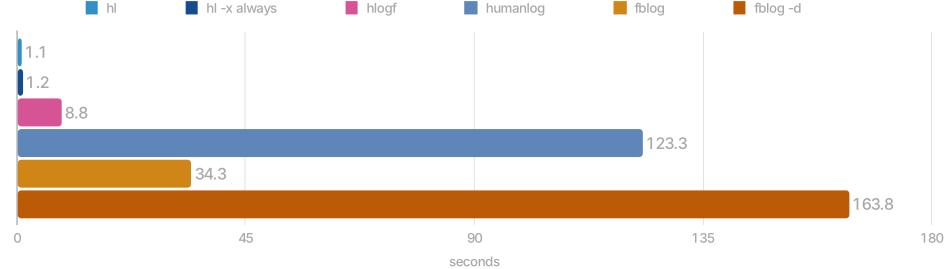
Install using homebrew on macOS
brew install hl
Download and extract using curl and tar on macOS
curl -sSfL https://github.com/pamburus/hl/releases/latest/download/hl-macos.tar.gz | tar xz
Install using cargo
cargo install --locked --git https://github.com/pamburus/hl.git
Download latest release from download page
Download and extract using curl and tar on Linux (x86_64)
curl -sSfL https://github.com/pamburus/hl/releases/latest/download/hl-linux-x86_64-musl.tar.gz | tar xz
Install hl package from Arch Linux extra repository
pacman -S hl
Download and extract using curl and tar on Linux (arm64/aarch64)
curl -sSfL https://github.com/pamburus/hl/releases/latest/download/hl-linux-arm64-musl.tar.gz | tar xz
Install using cargo
cargo install --locked --git https://github.com/pamburus/hl.git
Install from Scoop
scoop bucket add pamburus https://github.com/pamburus/scoop-bucket.git
scoop install hl
[!TIP] It is recommended to use Windows Terminal for better experience.
[!TIP] To make mouse scrolling work in the less pager, set the
LESSenvironment variable to-R --mouse.
[!IMPORTANT] Currently,
hldoes not provide a built-in pager and relies on external pagers such as less. However, the build for Windows referenced on the original download page and distributed in the WinGet package manager does not work as expected. The authors state that they have not tested or verified this build and suggest that you use it at your own risk. Unfortunately, this build breaks some ANSI escape sequences and does not work properly withhland many other programs that use ANSI escape sequences for colors and styles. It is recommended to install less from the Scoop or Chocolatey package manager. If you are using Scoop and installhlby runningscoop install hl, it already installs less automatically as a dependency. Just make sure you do not have any other conflicting installations by runningwhere lessin cmd orGet-Command lessin powershell.
Install using cargo
cargo install --locked --git https://github.com/pamburus/hl.git
Run using nix
nix run github:pamburus/hl
or binary package
nix run github:pamburus/hl#bin
or install with nix profile:
nix profile add github:pamburus/hl
or binary package
nix profile add github:pamburus/hl#bin
Install the package from source using nix-flakes
{
  inputs = {
    nixpkgs.url = "github:NixOS/nixpkgs/nixos-25.05";
    hl.url = "github:pamburus/hl";
  };
  outputs = {nixpkgs, hl, ...}:
  let
    system = "x86_64-linux";
  in
  {
    # this is just an example!
    nixosConfigurations.yourHost = nixpkgs.lib.nixosSystem {
      inherit system;
      modules = [
        ({...}: {
          environment.systemPackages = [
            hl.packages.${system}
          ];
        })
      ];
    };
  };
}
Install the package with pre-built binaries using nix-flakes
{
  inputs = {
    nixpkgs.url = "github:NixOS/nixpkgs/nixos-25.05";
    hl.url = "github:pamburus/hl";
  };
  outputs = {nixpkgs, hl, ...}:
  let
    system = "x86_64-linux";
  in
  {
    # this is just an example!
    nixosConfigurations.yourHost = nixpkgs.lib.nixosSystem {
      inherit system;
      modules = [
        ({...}: {
          environment.systemPackages = [
            hl.packages.${system}.bin
          ];
        })
      ];
    };
  };
}
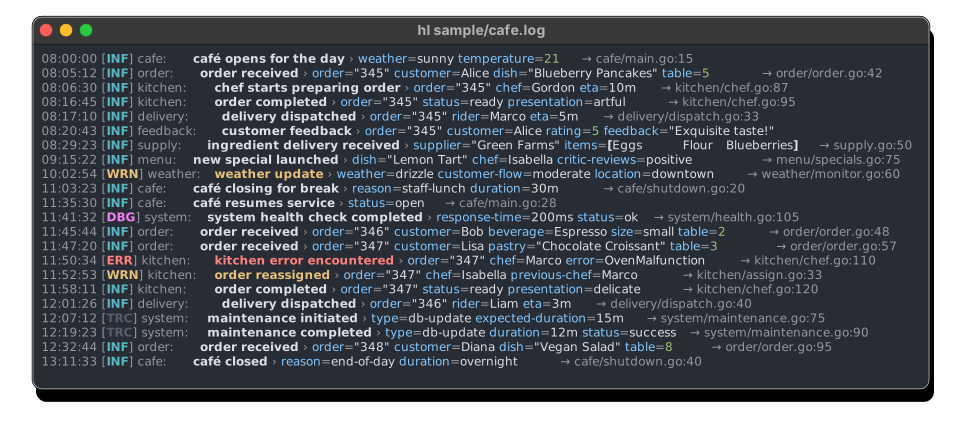
See other screenshots
Concatenate all log files
Command
hl *.log
Concatenates and displays all *.log files found in the current directory.
Concatenate all log files including compressed log files
Command
hl $(ls -tr /var/log/example/*.{log,log.gz,log.zst,s})
Concatenates and displays all *.log, *.log.gz, *.log.zst and *.s (will detect compression) files found in /var/log/example/.
Use the default pager with the default parameters
Command
hl example.log
Automatically opens less pager with the default parameters.
Override options for default pager
Command
LESS=-SR hl example.log
Opens less pager with disabled line wrapping.
Use custom pager
Command
PAGER="most -w" hl example.log
Opens most pager with -w option.
Errors only
Command
hl -l e
Displays only error log level messages.
Errors and warnings
Command
hl -l w
Displays only warning and error log level messages.
Errors, warnings and informational
Command
hl -l i
Displays all log messages except debug level messages.
Command
tail -f example.log | hl -P
Tracks changes in the example.log file and displays them immediately.
Flag -P disables automatic using of pager in this case.
Command
hl example.log --filter component=tsdb
Displays only messages where the component field has the value tsdb.
Command
hl example.log -f component!=tsdb -f component!=uninteresting
Displays only messages where the component field exists and has a value other than tsdb or uninteresting.
Command
hl example.log -f provider~=string
Displays only messages where the provider field contains the string sub-string.
Command
hl example.log -f 'provider!~=string'
Displays only messages where the provider field exists and does not contain the string sub-string.
Command
hl example.log -f 'request.method?!=GET'
Displays only messages where the request.method field does not exist or exists and is not equal to GET. In JSON messages, this also matches composite fields, e.g., {"request":{"method":"POST"}}.
Command
hl example.log -f 'span.[].name=sp0001'
Displays only messages where the span field is an array that contains an object with a name field equal to sp0001.
Command
hl example.log -f 'span.[1].name=sp0001'
Displays only messages where the span field is an array with at least two elements, and the element at index 1 (i.e., the second element) is an object with a name field equal to sp0001.
Command
hl my-service.log --query 'level > info or status-code >= 400 or duration > 0.5'
Displays messages that either have a level higher than info (i.e. warning or error) or have a status code field with a numeric value >= 400 or a duration field with a numeric value >= 0.5.
Command
hl my-service.log -q '(request in (95c72499d9ec, 9697f7aa134f, bc3451d0ad60)) or (method != GET)'
Displays all messages that have the 'request' field with one of these values, or the 'method' field with a value other than 'GET'.
Command
hl my-service.log -q '.price?=3'
Displays messages where the price field equals 3 OR the price field is absent. The ? modifier after a field name includes records that don't have that field. Without the ? modifier, filtering on a missing field will skip the record.
Command
hl my-service.log -q '.status?!=error'
Displays messages where the status field is not equal to error OR the status field is absent. This is useful to include records that may not have a status field at all.
Command
hl my-service.log -q 'exists(.price)'
Displays only messages that have the price field, regardless of its value. The exists() operator tests for field presence without any value comparison.
Command
hl my-service.log -q 'exists(msg) and msg~=warning'
Displays messages that have a msg field that exists AND contains the substring warning. This combines field existence checking with value matching.
Command
hl my-service.log -q 'not exists(.internal)'
Displays messages that do NOT have an internal field, effectively filtering out records with that field.
Complete set of supported operators
and, &&or, ||not, !eq, =ne, !=gt, >ge, >=lt, <le, <=contain, ~=), (not contain, !~=)like), (not like)
* for zero or more characters and ? for a single charactermatch, ~~=), (not match, !~~=)in (v1, v2), not in (v1, v2)in @filename, not in @filename, assuming that each element is a line in the file, which can be either a simple string or a JSON stringin @-, not in @-exists(.field) or exist(.field) (both forms are supported)Notes
Include Absent Modifier (?): When appending ? to a field name (e.g., .field?=value), the filter will match both:
This is useful in logfmt or similar formats where fields may be optional. Without the ? modifier, records with a non-existent field are excluded from the results.
Special field names that are reserved for filtering by predefined fields regardless of the actual source field names used to load the corresponding value: level, message, caller and logger.
To address a source field with one of these names instead of predefined fields, add a period before its name, i.e., .level will perform a match against the "level" source field.
To address a source field by its exact name, use a JSON-formatted string, i.e. -q '".level" = info'.
To specify special characters in field values, also use a JSON-formatted string, i.e.
hl my-service.log -q 'message contain "Error:\nSomething unexpected happened"'
Command
hl example.log --since 'Jun 19 11:22:33' --until yesterday
Displays only messages that occurred after Jun 19 11:22:33 UTC of the current year (or the previous year if the current date is less than Jun 19 11:22:33) and before yesterday midnight.
Command
hl example.log --since -3d
Displays only messages from the past 72 hours.
Command
hl example.log --until '2021-06-01 18:00:00' --local
Displays only messages that occurred before 6 PM local time on June 1, 2021, and shows timestamps in local time.
Command
hl example.log --hide provider
Hides field provider.
Command
hl example.log --hide '*' --hide '!provider'
Hides all fields except provider.
Command
hl example.log -h headers -h body -h '!headers.content-type'
Hides fields headers and body but shows a single sub-field content-type inside field headers.
Command
hl -s *.log
Displays log messages from all log files in the current directory sorted in chronological order.
Command
hl --sync-interval-ms 500 -F <(kubectl logs -l app=my-app-1 -f) <(kubectl logs -l app=my-app-2 -f)
Runs without a pager in follow mode by merging messages from the outputs of these 2 commands and sorting them chronologically within a custom 500ms interval.
Command
hl -F --tail 100 app1.log app2.log app3.log
Runs without a pager in follow mode, following the changes in three log files in the current directory and sorting them chronologically at a default interval of 100ms. Preloads 100 lines from the end of each file before filtering.
Configuration files are automatically loaded if found in predefined platform-specific locations.
| OS | System-Wide Location | User Profile Location |
|---|---|---|
| macOS | /etc/hl/config.{yaml,toml,json} | ~/.config/hl/config.{yaml,toml,json} |
| Linux | /etc/hl/config.{yaml,toml,json} | ~/.config/hl/config.{yaml,toml,json} |
| Windows | %PROGRAMDATA%\hl\config.{yaml,toml,json} | %USERPROFILE%\AppData\Roaming\hl\config.{yaml,toml,json} |
The path to the configuration file can be overridden using the HL_CONFIG environment variable or the --config command-line option.
The order in which the configuration files are searched and loaded is as follows:
HL_CONFIG environment variable (unless the --config option is used).--config option (can be specified multiple times).If a configuration file is found in multiple locations, the file in each subsequent location overrides only the parameters it contains.
If HL_CONFIG or --config specifies - or an empty string, all default locations and any locations specified by previous --config options are discarded. The search for the configuration file locations starts over.
To disable loading of configuration files and use the built-in defaults, --config - can be used.
All parameters in the configuration file are optional and can be omitted. In this case, default values are used.
HL_TIME_FORMAT='%y-%m-%d %T.%3N' overrides the time format specified in the configuration file.HL_TIME_ZONE=Europe/Berlin overrides the time zone specified in the configuration file.HL_CONCURRENCY=4 overrides the concurrency limit specified in the configuration file.HL_PAGING=never specifies the default value for the paging option, but it can be overridden by command line arguments.theme value in the configuration file.HL_THEME=classic, overrides the value specified in configuration file.--theme classic, overrides all other values.Theme overlays allow you to apply multiple theme modifications on top of your base theme and main configured theme, enabling compositional theming. Overlays are merged in order: @base → configured theme → overlays (in list order).
Configure overlays in your configuration file using the theme-overlays setting:
theme: "uni"
theme-overlays: ["@accent-italic"]
Overlays are regular theme files that can customize specific aspects without replacing the entire theme
Overlays are applied in the specified order, allowing fine-grained control over theme composition
Empty array [] or omitting theme-overlays means no overlays are applied
Overlay themes are typically tagged with overlay and excluded from default theme listings (use --list-themes=overlay to view them)
To select themes with preview fzf tool can be used like this:
hl --list-themes | fzf --color='bg+:23,gutter:-1,pointer:210' --highlight-line --preview-window 'right,border-left,88%,<142(up,88%,border-bottom)' --preview="hl -t '%b %d %T' --input-info minimal -c --theme {} sample/*.log"
For complete theme configuration reference, see Theme Configuration Guide.
Custom themes are automatically loaded when found in a predefined platform-specific location.
| OS | Location |
|---|---|
| macOS | ~/.config/hl/themes/*.{yaml,yml,toml,json} |
| Linux | ~/.config/hl/themes/*.{yaml,yml,toml,json} |
| Windows | %USERPROFILE%\AppData\Roaming\hl\themes*.{yaml,yml,toml,json} |
Structure
version (required): Must be "1.0"tags (optional): Theme classification and filtering
dark, light, 16color, 256color, truecolorbase (foundation themes, excluded from default listings), overlay (composition themes, excluded from default listings)--list-themes=base or --list-themes=overlay to show themes with these tags@ (e.g., @base, @accent-italic) are a naming convention; filtering is based on tags, not name prefixesstyles (optional): Reusable role-based styles that can inherit from each otherelements (optional): Visual styles for specific log elementslevels (optional): Per-level overrides for elementsindicators (optional): Sync indicator styling for --follow modeExample
version = "1.0"
tags = ["dark", "256color"]

# Reusable styles with inheritance
[styles]
primary = { modes = ["-faint"] }
secondary = { style = "primary", modes = ["faint"] }
warning = { style = "primary", foreground = "yellow" }
error = { style = "primary", foreground = "bright-red" }

# Element-specific styles can reference roles
[elements]
message = { style = "primary", modes = ["bold"] }
time = { style = "secondary" }
level-inner = { style = "primary" }

# Level-specific overrides
[levels.warning]
level-inner = { style = ["primary", "warning"] }
message = { style = ["primary", "warning"] }

[levels.error]
level-inner = { style = ["primary", "error"] }
message = { style = ["primary", "error"] }
Roles (predefined): default, primary, secondary, strong, muted, accent, accent-secondary, message, syntax, status, key, value, level, trace, debug, info, warning, error
Elements (predefined): input, input-number, input-number-inner, input-name, input-name-inner, time, level, level-inner, logger, logger-inner, caller, caller-inner, message, message-delimiter, field, key, array, object, string, number, boolean, boolean-true, boolean-false, null, ellipsis
Mode operations:
+mode or mode: Add mode (e.g., ["+bold"] or ["bold"])-mode: Remove inherited mode (e.g., ["-faint"])["+bold", "-bold"] removes bold)Inheritance chain: @base theme → user theme's styles → element's style field → element's explicit properties
@base themestyle fieldstyle fieldColor format:
default for terminal default colorblack, red, green, yellow, blue, magenta, cyan, white, bright-black, bright-red, bright-green, bright-yellow, bright-blue, bright-magenta, bright-cyan, bright-white0 to 255#RRGGBB (e.g., #FFFF00 for bright yellow)Modes: bold, faint, italic, underline, slow-blink, rapid-blink, reverse, conceal, crossed-out
draw_bold_text_with_bright_colors: true settingdraw_bold_text_with_bright_colors: false settingJSON and logfmt log converter to human readable representation
Usage: hl [OPTIONS] [FILE]...
Arguments:
[FILE]... Files to process
Options:
--config <FILE> Configuration file path [env: HL_CONFIG=]
-s, --sort Sort entries chronologically
-F, --follow Follow input streams and sort entries chronologically within time frame set by --sync-interval-ms option
--tail <N> Number of last entries to preload from each file in --follow mode [default: 10]
--sync-interval-ms <MILLISECONDS> Synchronization interval for live streaming mode enabled by --follow option [default: 100]
--paging <WHEN> Control pager usage (HL_PAGER or PAGER) [env: HL_PAGING=] [default: auto] [possible values: auto, always, never]
-P Handful alias for --paging=never, overrides --paging option
--help[=<VERBOSITY>] Print help [possible values: short, long]
-V, --version Print version
Filtering Options:
-l, --level <LEVEL> Display entries with level >= <LEVEL> [env: HL_LEVEL=]
--since <TIME> Display entries with timestamp >= <TIME>
--until <TIME> Display entries with timestamp <= <TIME>
-f, --filter <FILTER> Filter entries by matching field values [k=v, k~=v, k~~=v, 'k!=v', 'k?!=v', etc]
-q, --query <QUERY> Filter entries using a query expression ['status>=400 or duration>=15', etc]
Output Options:
--color [<WHEN>] Whether to use ANSI colors and styles [env: HL_COLOR=] [default: auto] [possible values: auto, always, never]
-c Handful alias for --color=always, overrides --color option
--theme <THEME> Color theme [env: HL_THEME=] [default: uni]
-r, --raw Output raw source entries instead of formatted entries
--no-raw Disable raw source entries output, overrides --raw option
--raw-fields Output field values as is, without unescaping or prettifying
-h, --hide <KEY> Hide or reveal fields with the specified keys, prefix with ! to reveal, provide '!*' to reveal all
--flatten <WHEN> Whether to flatten objects [env: HL_FLATTEN=] [default: always] [possible values: never, always]
-t, --time-format <FORMAT> Time format, see https://man7.org/linux/man-pages/man1/date.1.html [env: HL_TIME_FORMAT=] [default: "%Y-%m-%d %T.%3N"]
-Z, --time-zone <TZ> Time zone name, see column "TZ identifier" at https://en.wikipedia.org/wiki/List_of_tz_database_time_zones [env: HL_TIME_ZONE=] [default: UTC]
-L, --local Use local time zone, overrides --time-zone option
--no-local Disable local time zone, overrides --local option
-e, --hide-empty-fields Hide empty fields, applies for null, string, object and array fields only [env: HL_HIDE_EMPTY_FIELDS=]
-E, --show-empty-fields Show empty fields, overrides --hide-empty-fields option [env: HL_SHOW_EMPTY_FIELDS=]
--input-info <LAYOUTS> Input number and filename layouts [default: auto] [possible values: auto, none, minimal, compact, full]
--ascii [<WHEN>] Whether to restrict punctuation to ASCII characters only [env: HL_ASCII=] [default: auto] [possible values: auto, never, always]
-x, --expansion [<MODE>] Whether to expand fields and messages [env: HL_EXPANSION=] [default: auto] [possible values: never, inline, auto, always]
-o, --output <FILE> Output file
--output-delimiter <D> Output entry delimiter [env: HL_OUTPUT_DELIMITER=] [default: newline] [possible values: newline, nul]
Input Options:
--input-format <FORMAT> Input format [env: HL_INPUT_FORMAT=] [default: auto] [possible values: auto, json, logfmt]
--unix-timestamp-unit <UNIT> Unix timestamp unit [env: HL_UNIX_TIMESTAMP_UNIT=] [default: auto] [possible values: auto, s, ms, us, ns]
--allow-prefix Allow non-JSON prefixes before JSON log entries [env: HL_ALLOW_PREFIX=]
--delimiter <DELIMITER> Log entry delimiter [env: HL_DELIMITER=] [default: auto] [possible values: auto, cr, lf, crlf, newline, nul]
Advanced Options:
--interrupt-ignore-count <N> Number of interrupts to ignore, i.e. Ctrl-C (SIGINT) [env: HL_INTERRUPT_IGNORE_COUNT=] [default: 3]
--buffer-size <SIZE> Buffer size [env: HL_BUFFER_SIZE=] [default: "256 KiB"]
--max-message-size <SIZE> Maximum log entry size [env: HL_MAX_MESSAGE_SIZE=] [default: "64 MiB"]
-C, --concurrency <N> Number of processing threads [env: HL_CONCURRENCY=]
--shell-completions <SHELL> Print shell auto-completion script and exit [possible values: bash, elvish, fish, powershell, zsh]
--man-page Print man page and exit
--list-themes[=<TAGS>] Print available themes optionally filtered by tags [possible values: dark, light, 16color, 256color, truecolor, overlay, base]
--dump-index Print debug index metadata (in --sort mode) and exit
CPU: Apple M1 Max CPU
OS: macOS Tahoe 26.2
Data: ~ 2.3 GiB log file, 6 000 000 lines
hl v0.35.2 ~ 1.1 seconds
$ time hl --config - example.log -c -o /dev/null
hl --config - example.log -c -o /dev/null  9.33s user 0.45s system 922% cpu 1.060 total
hl with -x always flag v0.35.2 ~ 1.2 seconds
$ time hl --config - example.log -c -x always -o /dev/null
hl --config - example.log -c -x always -o /dev/null  11.19s user 0.50s system 936% cpu 1.248 total
hlogf v1.4.1 ~ 8.8 seconds
$ time hlogf example.log --color always >/dev/null
hlogf example.log --color always > /dev/null  6.79s user 2.05s system 100% cpu 8.787 total
humanlog v0.8.9 ~ 123 seconds
$ time humanlog <example.log --color always >/dev/null
humanlog --color always < example.log > /dev/null  136.18s user 7.17s system 116% cpu 2:03.25 total
fblog v4.17.0 ~ 34 seconds
$ time fblog example.log >/dev/null
fblog example.log > /dev/null  31.92s user 2.39s system 99% cpu 34.327 total
fblog with -d flag v4.17.0 ~ 164 seconds
$ time fblog -d example.log >/dev/null
fblog -d example.log > /dev/null  147.57s user 16.20s system 99% cpu 2:43.82 total
See #132 for how to repeat measurements
(top 24 of 102)
2,927 followers · starred Nov 2024
579 followers · starred Oct 2025
8,913 followers · starred Nov 2024
94 followers · starred Feb 2026
A fast and powerful log viewer and processor that converts JSON logs or logfmt logs into a clear human-readable format.
Rust
3,304
1,776 commits
updated Oct 12, 2026
High-performance log viewer and processor that transforms logs in JSON and logfmt formats into a human-readable output. Built with efficiency in mind, it enables quick parsing and analysis of large log files with minimal overhead.
-P flag, which disables the pager.-f option, with support for hierarchical keys.-l option.--since and --until options with intuitive formats:
-t option or environment variable).today, yesterday, friday, or relative offsets such as -3h or -14d.-h option.-e flag.-x option:
never: Compact single-line output with escaped newlines.inline: Preserve newlines as-is in the output.auto: Automatically expand fields containing multi-line content.always: Expand all fields into structured multi-line format.-s flag.
-F flag for live, timestamp-sorted message updates across multiple sources, with a preview of recent messages via the --tail option.--allow-prefix flag.-Z option or local timezone adjustments using the -L flag.
Install using homebrew on macOS
brew install hl
Download and extract using curl and tar on macOS
curl -sSfL https://github.com/pamburus/hl/releases/latest/download/hl-macos.tar.gz | tar xz
Install using cargo
cargo install --locked --git https://github.com/pamburus/hl.git
Download latest release from download page
Download and extract using curl and tar on Linux (x86_64)
curl -sSfL https://github.com/pamburus/hl/releases/latest/download/hl-linux-x86_64-musl.tar.gz | tar xz
Install hl package from Arch Linux extra repository
pacman -S hl
Download and extract using curl and tar on Linux (arm64/aarch64)
curl -sSfL https://github.com/pamburus/hl/releases/latest/download/hl-linux-arm64-musl.tar.gz | tar xz
Install using cargo
cargo install --locked --git https://github.com/pamburus/hl.git
Install from Scoop
scoop bucket add pamburus https://github.com/pamburus/scoop-bucket.git
scoop install hl
[!TIP] It is recommended to use Windows Terminal for better experience.
[!TIP] To make mouse scrolling work in the less pager, set the
LESSenvironment variable to-R --mouse.
[!IMPORTANT] Currently,
hldoes not provide a built-in pager and relies on external pagers such as less. However, the build for Windows referenced on the original download page and distributed in the WinGet package manager does not work as expected. The authors state that they have not tested or verified this build and suggest that you use it at your own risk. Unfortunately, this build breaks some ANSI escape sequences and does not work properly withhland many other programs that use ANSI escape sequences for colors and styles. It is recommended to install less from the Scoop or Chocolatey package manager. If you are using Scoop and installhlby runningscoop install hl, it already installs less automatically as a dependency. Just make sure you do not have any other conflicting installations by runningwhere lessin cmd orGet-Command lessin powershell.
Install using cargo
cargo install --locked --git https://github.com/pamburus/hl.git
Run using nix
nix run github:pamburus/hl
or binary package
nix run github:pamburus/hl#bin
or install with nix profile:
nix profile add github:pamburus/hl
or binary package
nix profile add github:pamburus/hl#bin
Install the package from source using nix-flakes
{
  inputs = {
    nixpkgs.url = "github:NixOS/nixpkgs/nixos-25.05";
    hl.url = "github:pamburus/hl";
  };
  outputs = {nixpkgs, hl, ...}:
  let
    system = "x86_64-linux";
  in
  {
    # this is just an example!
    nixosConfigurations.yourHost = nixpkgs.lib.nixosSystem {
      inherit system;
      modules = [
        ({...}: {
          environment.systemPackages = [
            hl.packages.${system}
          ];
        })
      ];
    };
  };
}
Install the package with pre-built binaries using nix-flakes
{
  inputs = {
    nixpkgs.url = "github:NixOS/nixpkgs/nixos-25.05";
    hl.url = "github:pamburus/hl";
  };
  outputs = {nixpkgs, hl, ...}:
  let
    system = "x86_64-linux";
  in
  {
    # this is just an example!
    nixosConfigurations.yourHost = nixpkgs.lib.nixosSystem {
      inherit system;
      modules = [
        ({...}: {
          environment.systemPackages = [
            hl.packages.${system}.bin
          ];
        })
      ];
    };
  };
}
See other screenshots
Concatenate all log files
Command
hl *.log
Concatenates and displays all *.log files found in the current directory.
Concatenate all log files including compressed log files
Command
hl $(ls -tr /var/log/example/*.{log,log.gz,log.zst,s})
Concatenates and displays all *.log, *.log.gz, *.log.zst and *.s (will detect compression) files found in /var/log/example/.
Use the default pager with the default parameters
Command
hl example.log
Automatically opens less pager with the default parameters.
Override options for default pager
Command
LESS=-SR hl example.log
Opens less pager with disabled line wrapping.
Use custom pager
Command
PAGER="most -w" hl example.log
Opens most pager with -w option.
Errors only
Command
hl -l e
Displays only error log level messages.
Errors and warnings
Command
hl -l w
Displays only warning and error log level messages.
Errors, warnings and informational
Command
hl -l i
Displays all log messages except debug level messages.
Command
tail -f example.log | hl -P
Tracks changes in the example.log file and displays them immediately.
Flag -P disables automatic using of pager in this case.
Command
hl example.log --filter component=tsdb
Displays only messages where the component field has the value tsdb.
Command
hl example.log -f component!=tsdb -f component!=uninteresting
Displays only messages where the component field exists and has a value other than tsdb or uninteresting.
Command
hl example.log -f provider~=string
Displays only messages where the provider field contains the string sub-string.
Command
hl example.log -f 'provider!~=string'
Displays only messages where the provider field exists and does not contain the string sub-string.
Command
hl example.log -f 'request.method?!=GET'
Displays only messages where the request.method field does not exist or exists and is not equal to GET. In JSON messages, this also matches composite fields, e.g., {"request":{"method":"POST"}}.
Command
hl example.log -f 'span.[].name=sp0001'
Displays only messages where the span field is an array that contains an object with a name field equal to sp0001.
Command
hl example.log -f 'span.[1].name=sp0001'
Displays only messages where the span field is an array with at least two elements, and the element at index 1 (i.e., the second element) is an object with a name field equal to sp0001.
Command
hl my-service.log --query 'level > info or status-code >= 400 or duration > 0.5'
Displays messages that either have a level higher than info (i.e. warning or error) or have a status code field with a numeric value >= 400 or a duration field with a numeric value >= 0.5.
Command
hl my-service.log -q '(request in (95c72499d9ec, 9697f7aa134f, bc3451d0ad60)) or (method != GET)'
Displays all messages that have the 'request' field with one of these values, or the 'method' field with a value other than 'GET'.
Command
hl my-service.log -q '.price?=3'
Displays messages where the price field equals 3 OR the price field is absent. The ? modifier after a field name includes records that don't have that field. Without the ? modifier, filtering on a missing field will skip the record.
Command
hl my-service.log -q '.status?!=error'
Displays messages where the status field is not equal to error OR the status field is absent. This is useful to include records that may not have a status field at all.
Command
hl my-service.log -q 'exists(.price)'
Displays only messages that have the price field, regardless of its value. The exists() operator tests for field presence without any value comparison.
Command
hl my-service.log -q 'exists(msg) and msg~=warning'
Displays messages that have a msg field that exists AND contains the substring warning. This combines field existence checking with value matching.
Command
hl my-service.log -q 'not exists(.internal)'
Displays messages that do NOT have an internal field, effectively filtering out records with that field.
Complete set of supported operators
and, &&or, ||not, !eq, =ne, !=gt, >ge, >=lt, <le, <=contain, ~=), (not contain, !~=)like), (not like)
* for zero or more characters and ? for a single charactermatch, ~~=), (not match, !~~=)in (v1, v2), not in (v1, v2)in @filename, not in @filename, assuming that each element is a line in the file, which can be either a simple string or a JSON stringin @-, not in @-exists(.field) or exist(.field) (both forms are supported)Notes
Include Absent Modifier (?): When appending ? to a field name (e.g., .field?=value), the filter will match both:
This is useful in logfmt or similar formats where fields may be optional. Without the ? modifier, records with a non-existent field are excluded from the results.
Special field names that are reserved for filtering by predefined fields regardless of the actual source field names used to load the corresponding value: level, message, caller and logger.
To address a source field with one of these names instead of predefined fields, add a period before its name, i.e., .level will perform a match against the "level" source field.
To address a source field by its exact name, use a JSON-formatted string, i.e. -q '".level" = info'.
To specify special characters in field values, also use a JSON-formatted string, i.e.
hl my-service.log -q 'message contain "Error:\nSomething unexpected happened"'
Command
hl example.log --since 'Jun 19 11:22:33' --until yesterday
Displays only messages that occurred after Jun 19 11:22:33 UTC of the current year (or the previous year if the current date is less than Jun 19 11:22:33) and before yesterday midnight.
Command
hl example.log --since -3d
Displays only messages from the past 72 hours.
Command
hl example.log --until '2021-06-01 18:00:00' --local
Displays only messages that occurred before 6 PM local time on June 1, 2021, and shows timestamps in local time.
Command
hl example.log --hide provider
Hides field provider.
Command
hl example.log --hide '*' --hide '!provider'
Hides all fields except provider.
Command
hl example.log -h headers -h body -h '!headers.content-type'
Hides fields headers and body but shows a single sub-field content-type inside field headers.
Command
hl -s *.log
Displays log messages from all log files in the current directory sorted in chronological order.
Command
hl --sync-interval-ms 500 -F <(kubectl logs -l app=my-app-1 -f) <(kubectl logs -l app=my-app-2 -f)
Runs without a pager in follow mode by merging messages from the outputs of these 2 commands and sorting them chronologically within a custom 500ms interval.
Command
hl -F --tail 100 app1.log app2.log app3.log
Runs without a pager in follow mode, following the changes in three log files in the current directory and sorting them chronologically at a default interval of 100ms. Preloads 100 lines from the end of each file before filtering.
Configuration files are automatically loaded if found in predefined platform-specific locations.
| OS | System-Wide Location | User Profile Location |
|---|---|---|
| macOS | /etc/hl/config.{yaml,toml,json} | ~/.config/hl/config.{yaml,toml,json} |
| Linux | /etc/hl/config.{yaml,toml,json} | ~/.config/hl/config.{yaml,toml,json} |
| Windows | %PROGRAMDATA%\hl\config.{yaml,toml,json} | %USERPROFILE%\AppData\Roaming\hl\config.{yaml,toml,json} |
The path to the configuration file can be overridden using the HL_CONFIG environment variable or the --config command-line option.
The order in which the configuration files are searched and loaded is as follows:
HL_CONFIG environment variable (unless the --config option is used).--config option (can be specified multiple times).If a configuration file is found in multiple locations, the file in each subsequent location overrides only the parameters it contains.
If HL_CONFIG or --config specifies - or an empty string, all default locations and any locations specified by previous --config options are discarded. The search for the configuration file locations starts over.
To disable loading of configuration files and use the built-in defaults, --config - can be used.
All parameters in the configuration file are optional and can be omitted. In this case, default values are used.
HL_TIME_FORMAT='%y-%m-%d %T.%3N' overrides the time format specified in the configuration file.HL_TIME_ZONE=Europe/Berlin overrides the time zone specified in the configuration file.HL_CONCURRENCY=4 overrides the concurrency limit specified in the configuration file.HL_PAGING=never specifies the default value for the paging option, but it can be overridden by command line arguments.theme value in the configuration file.HL_THEME=classic, overrides the value specified in configuration file.--theme classic, overrides all other values.Theme overlays allow you to apply multiple theme modifications on top of your base theme and main configured theme, enabling compositional theming. Overlays are merged in order: @base → configured theme → overlays (in list order).
Configure overlays in your configuration file using the theme-overlays setting:
theme: "uni"
theme-overlays: ["@accent-italic"]
Overlays are regular theme files that can customize specific aspects without replacing the entire theme
Overlays are applied in the specified order, allowing fine-grained control over theme composition
Empty array [] or omitting theme-overlays means no overlays are applied
Overlay themes are typically tagged with overlay and excluded from default theme listings (use --list-themes=overlay to view them)
To select themes with preview fzf tool can be used like this:
hl --list-themes | fzf --color='bg+:23,gutter:-1,pointer:210' --highlight-line --preview-window 'right,border-left,88%,<142(up,88%,border-bottom)' --preview="hl -t '%b %d %T' --input-info minimal -c --theme {} sample/*.log"
For complete theme configuration reference, see Theme Configuration Guide.
Custom themes are automatically loaded when found in a predefined platform-specific location.
| OS | Location |
|---|---|
| macOS | ~/.config/hl/themes/*.{yaml,yml,toml,json} |
| Linux | ~/.config/hl/themes/*.{yaml,yml,toml,json} |
| Windows | %USERPROFILE%\AppData\Roaming\hl\themes*.{yaml,yml,toml,json} |
Structure
version (required): Must be "1.0"tags (optional): Theme classification and filtering
dark, light, 16color, 256color, truecolorbase (foundation themes, excluded from default listings), overlay (composition themes, excluded from default listings)--list-themes=base or --list-themes=overlay to show themes with these tags@ (e.g., @base, @accent-italic) are a naming convention; filtering is based on tags, not name prefixesstyles (optional): Reusable role-based styles that can inherit from each otherelements (optional): Visual styles for specific log elementslevels (optional): Per-level overrides for elementsindicators (optional): Sync indicator styling for --follow modeExample
version = "1.0"
tags = ["dark", "256color"]

# Reusable styles with inheritance
[styles]
primary = { modes = ["-faint"] }
secondary = { style = "primary", modes = ["faint"] }
warning = { style = "primary", foreground = "yellow" }
error = { style = "primary", foreground = "bright-red" }

# Element-specific styles can reference roles
[elements]
message = { style = "primary", modes = ["bold"] }
time = { style = "secondary" }
level-inner = { style = "primary" }

# Level-specific overrides
[levels.warning]
level-inner = { style = ["primary", "warning"] }
message = { style = ["primary", "warning"] }

[levels.error]
level-inner = { style = ["primary", "error"] }
message = { style = ["primary", "error"] }
Roles (predefined): default, primary, secondary, strong, muted, accent, accent-secondary, message, syntax, status, key, value, level, trace, debug, info, warning, error
Elements (predefined): input, input-number, input-number-inner, input-name, input-name-inner, time, level, level-inner, logger, logger-inner, caller, caller-inner, message, message-delimiter, field, key, array, object, string, number, boolean, boolean-true, boolean-false, null, ellipsis
Mode operations:
+mode or mode: Add mode (e.g., ["+bold"] or ["bold"])-mode: Remove inherited mode (e.g., ["-faint"])["+bold", "-bold"] removes bold)Inheritance chain: @base theme → user theme's styles → element's style field → element's explicit properties
@base themestyle fieldstyle fieldColor format:
default for terminal default colorblack, red, green, yellow, blue, magenta, cyan, white, bright-black, bright-red, bright-green, bright-yellow, bright-blue, bright-magenta, bright-cyan, bright-white0 to 255#RRGGBB (e.g., #FFFF00 for bright yellow)Modes: bold, faint, italic, underline, slow-blink, rapid-blink, reverse, conceal, crossed-out
draw_bold_text_with_bright_colors: true settingdraw_bold_text_with_bright_colors: false settingJSON and logfmt log converter to human readable representation
Usage: hl [OPTIONS] [FILE]...
Arguments:
[FILE]... Files to process
Options:
--config <FILE> Configuration file path [env: HL_CONFIG=]
-s, --sort Sort entries chronologically
-F, --follow Follow input streams and sort entries chronologically within time frame set by --sync-interval-ms option
--tail <N> Number of last entries to preload from each file in --follow mode [default: 10]
--sync-interval-ms <MILLISECONDS> Synchronization interval for live streaming mode enabled by --follow option [default: 100]
--paging <WHEN> Control pager usage (HL_PAGER or PAGER) [env: HL_PAGING=] [default: auto] [possible values: auto, always, never]
-P Handful alias for --paging=never, overrides --paging option
--help[=<VERBOSITY>] Print help [possible values: short, long]
-V, --version Print version
Filtering Options:
-l, --level <LEVEL> Display entries with level >= <LEVEL> [env: HL_LEVEL=]
--since <TIME> Display entries with timestamp >= <TIME>
--until <TIME> Display entries with timestamp <= <TIME>
-f, --filter <FILTER> Filter entries by matching field values [k=v, k~=v, k~~=v, 'k!=v', 'k?!=v', etc]
-q, --query <QUERY> Filter entries using a query expression ['status>=400 or duration>=15', etc]
Output Options:
--color [<WHEN>] Whether to use ANSI colors and styles [env: HL_COLOR=] [default: auto] [possible values: auto, always, never]
-c Handful alias for --color=always, overrides --color option
--theme <THEME> Color theme [env: HL_THEME=] [default: uni]
-r, --raw Output raw source entries instead of formatted entries
--no-raw Disable raw source entries output, overrides --raw option
--raw-fields Output field values as is, without unescaping or prettifying
-h, --hide <KEY> Hide or reveal fields with the specified keys, prefix with ! to reveal, provide '!*' to reveal all
--flatten <WHEN> Whether to flatten objects [env: HL_FLATTEN=] [default: always] [possible values: never, always]
-t, --time-format <FORMAT> Time format, see https://man7.org/linux/man-pages/man1/date.1.html [env: HL_TIME_FORMAT=] [default: "%Y-%m-%d %T.%3N"]
-Z, --time-zone <TZ> Time zone name, see column "TZ identifier" at https://en.wikipedia.org/wiki/List_of_tz_database_time_zones [env: HL_TIME_ZONE=] [default: UTC]
-L, --local Use local time zone, overrides --time-zone option
--no-local Disable local time zone, overrides --local option
-e, --hide-empty-fields Hide empty fields, applies for null, string, object and array fields only [env: HL_HIDE_EMPTY_FIELDS=]
-E, --show-empty-fields Show empty fields, overrides --hide-empty-fields option [env: HL_SHOW_EMPTY_FIELDS=]
--input-info <LAYOUTS> Input number and filename layouts [default: auto] [possible values: auto, none, minimal, compact, full]
--ascii [<WHEN>] Whether to restrict punctuation to ASCII characters only [env: HL_ASCII=] [default: auto] [possible values: auto, never, always]
-x, --expansion [<MODE>] Whether to expand fields and messages [env: HL_EXPANSION=] [default: auto] [possible values: never, inline, auto, always]
-o, --output <FILE> Output file
--output-delimiter <D> Output entry delimiter [env: HL_OUTPUT_DELIMITER=] [default: newline] [possible values: newline, nul]
Input Options:
--input-format <FORMAT> Input format [env: HL_INPUT_FORMAT=] [default: auto] [possible values: auto, json, logfmt]
--unix-timestamp-unit <UNIT> Unix timestamp unit [env: HL_UNIX_TIMESTAMP_UNIT=] [default: auto] [possible values: auto, s, ms, us, ns]
--allow-prefix Allow non-JSON prefixes before JSON log entries [env: HL_ALLOW_PREFIX=]
--delimiter <DELIMITER> Log entry delimiter [env: HL_DELIMITER=] [default: auto] [possible values: auto, cr, lf, crlf, newline, nul]
Advanced Options:
--interrupt-ignore-count <N> Number of interrupts to ignore, i.e. Ctrl-C (SIGINT) [env: HL_INTERRUPT_IGNORE_COUNT=] [default: 3]
--buffer-size <SIZE> Buffer size [env: HL_BUFFER_SIZE=] [default: "256 KiB"]
--max-message-size <SIZE> Maximum log entry size [env: HL_MAX_MESSAGE_SIZE=] [default: "64 MiB"]
-C, --concurrency <N> Number of processing threads [env: HL_CONCURRENCY=]
--shell-completions <SHELL> Print shell auto-completion script and exit [possible values: bash, elvish, fish, powershell, zsh]
--man-page Print man page and exit
--list-themes[=<TAGS>] Print available themes optionally filtered by tags [possible values: dark, light, 16color, 256color, truecolor, overlay, base]
--dump-index Print debug index metadata (in --sort mode) and exit
CPU: Apple M1 Max CPU
OS: macOS Tahoe 26.2
Data: ~ 2.3 GiB log file, 6 000 000 lines
hl v0.35.2 ~ 1.1 seconds
$ time hl --config - example.log -c -o /dev/null
hl --config - example.log -c -o /dev/null  9.33s user 0.45s system 922% cpu 1.060 total
hl with -x always flag v0.35.2 ~ 1.2 seconds
$ time hl --config - example.log -c -x always -o /dev/null
hl --config - example.log -c -x always -o /dev/null  11.19s user 0.50s system 936% cpu 1.248 total
hlogf v1.4.1 ~ 8.8 seconds
$ time hlogf example.log --color always >/dev/null
hlogf example.log --color always > /dev/null  6.79s user 2.05s system 100% cpu 8.787 total
humanlog v0.8.9 ~ 123 seconds
$ time humanlog <example.log --color always >/dev/null
humanlog --color always < example.log > /dev/null  136.18s user 7.17s system 116% cpu 2:03.25 total
fblog v4.17.0 ~ 34 seconds
$ time fblog example.log >/dev/null
fblog example.log > /dev/null  31.92s user 2.39s system 99% cpu 34.327 total
fblog with -d flag v4.17.0 ~ 164 seconds
$ time fblog -d example.log >/dev/null
fblog -d example.log > /dev/null  147.57s user 16.20s system 99% cpu 2:43.82 total
See #132 for how to repeat measurements
(top 24 of 102)
2,927 followers · starred Nov 2024
579 followers · starred Oct 2025
8,913 followers · starred Nov 2024
94 followers · starred Feb 2026