A native desktop utility that batch converts bloated office files (.docx, .pdf, .pptx) into token-efficient Markdown to supercharge your LLM ingestion pipeline.
Python
24
84 commits
updated Oct 15, 2026
Convert PDFs, Word docs, decks, spreadsheets, ebooks, and more into clean, token-efficient Markdown, and redact the private parts. All of it happens on your computer. Nothing gets uploaded.



aidocprep.app · Download for Mac · Download for Windows · All releases
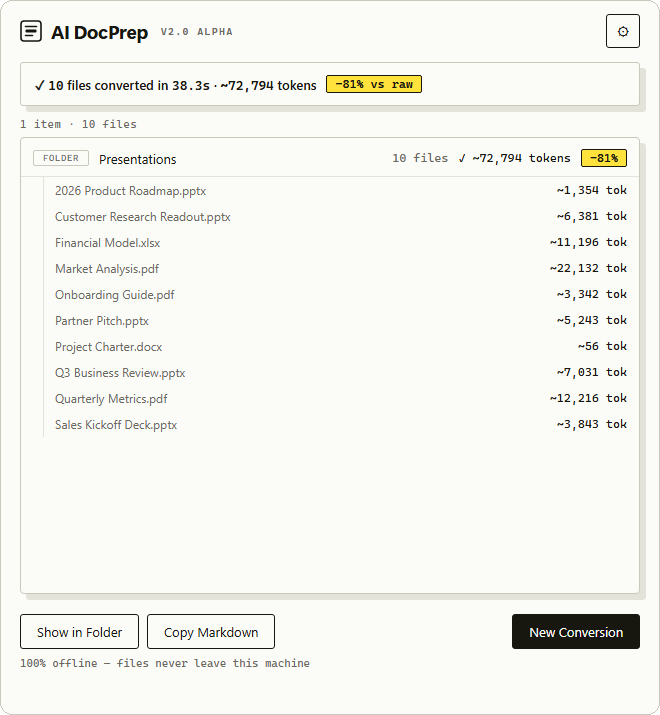
Office files are bloated with formatting metadata the model never needs. A .docx is a zip of XML several times the size of its actual text; a raw PDF upload is billed as extracted text plus a rendered image of every page. Converting to Markdown first means:
combined.md with a generated table of contents..xls), Outlook .msg, EPUB, Jupyter notebooks, HTML, VTT transcripts, and plain text. ZIP archives too, as an opt-in: contents are filtered to supported types and size-capped..md files, individual plus a combined master file, or the combined file only.If you use Obsidian, Notion, or Logseq: converted notes carry YAML frontmatter (conversion date, source format, original filename) that Obsidian reads natively, combined files get a clickable table of contents, and clean structure improves the accuracy of vault search and AI plugins. Pre-existing .md notes in a folder are never swept into combined output.
The engine runs headless via docprep_core.py, which is also the machine interface the desktop app drives:
# Convert files and folders (redacted, combined into one master file)
python docprep_core.py ./research report.docx --output combined-only --redact

# Machine-readable progress: one JSON event per line (start / file / combined / summary)
python docprep_core.py ./docs --json
Every option is a flag: output mode, conflict policy, YAML/TOC toggles, redaction engine and model, custom terms and prompt files, --ocr, --allow-zip. Exit codes: 0 ok, 1 partial failures, 2 no input, 130 cancelled. Run --help for the full list.
backend/          Python engine: markitdown conversion, OCR, redaction, combining, settings
docprep_core.py   Headless CLI wrapping the engine; emits JSON-lines events
desktop/          The app: Tauri 2 + Svelte 5, runs docprep-core as a signed sidecar
app.py            Legacy 1.x GUI (CustomTkinter) — still runs, no longer the shipped app
site/             aidocprep.app marketing page (static, served via Cloudflare)
tests/            Backend and GUI test suites
Conversion is Microsoft's MarkItDown with a purpose-built converter per format, run in parallel across ~75% of CPU cores. Only the extras for the formats above are installed, and anything else is rejected before it reaches a converter. Office temp/lock files (~$…) are skipped. The optional OCR is RapidOCR (PaddleOCR PP-OCRv4 models on ONNX Runtime), bundled with the app so it works offline.
Token math, so you can audit the claims: estimates use ~4 characters per token (within roughly ±15% for English). Savings baselines are honest per format — text formats compare against raw bytes; Word and Excel files against their uncompressed XML (there, the XML is the content), EPUBs against their uncompressed XHTML; PDFs and PowerPoint decks against extracted text plus ~1,500 tokens per page or slide, matching what providers charge for raw uploads. Deck DrawingML is deliberately not used as a baseline — it's mostly geometry, and would overstate savings by orders of magnitude. Where no defensible baseline exists, no savings are shown.
Redaction engines: regex patterns always run first (emails, SSNs, credit cards, phone numbers, private keys, AWS/OpenAI/Slack tokens, credential assignments, connection-string passwords, IP/MAC addresses). Optionally add on-device NER (bundled spaCy en_core_web_sm — names, organizations, places) or a context-aware pass through your local Ollama server, chunked and serialized so the server isn't flooded.
Retrieval-Augmented Generation (RAG) is useful for searching across massive datasets (like millions of customer service logs), but it is often overkill and less effective for smaller knowledge bases (like code documentation, project folders, or product manuals).
Frontier models from Anthropic, OpenAI, and Google now ship context windows from 200k up to 1–2 million tokens — enough to fit hundreds of documents directly in the prompt. If your data fits in the context window, you don't need RAG.
RAG works by cutting documents into small chunks and retrieving only the most relevant-looking chunks. If a question requires synthesizing information spread across multiple pages, chapters, or files, RAG often fails to retrieve all the pieces. Giving the LLM the entire compiled file lets it reason across the whole dataset at once.
Vector search is imprecise and depends on the user using the right search terms. RAG also requires setting up database infrastructure, managing embedding models, and tuning chunk sizes. AI DocPrep has zero setup: just convert your documents, merge them into one file, and start chatting.
If your dataset is so large that you must use RAG, chunking raw PDFs or HTML is notoriously messy. Running your documents through AI DocPrep first gives you clean Markdown tables, lists, and headers, which makes your embedding model and chunking strategy much more accurate.
While code editors and chat clients can index or parse local files, they have major limitations:
.pptx) or complex spreadsheets (.xlsx). AI DocPrep uses dedicated conversion engines (like MarkItDown) to translate tables and layouts into clean Markdown representations that LLMs actually understand.MarkItDown) instead of treating everything as plain text, so tables, slides, and spreadsheets survive the trip to Markdown.Docling, Marker and PyMuPDF4LLM are good parsers. They're Python libraries: install a package, set up an environment, write code. AI DocPrep is an app, and it ships docprep_core.py if you'd rather script it, so you get both. None of those libraries redact — a document with a client name or an SSN in it is still your problem.
Most turn a PDF into a redacted PDF. That works for filing a document. It doesn't help when you're pasting into a chatbot, because you're still sending a file full of formatting the model charges you for. AI DocPrep redacts and converts in one pass. Converters don't redact. Redactors don't convert.
There is no server behind AI DocPrep and no account to sign in to. Conversion makes no internet requests — the optional Ollama engine talks only to your own server on localhost. Turn off Wi‑Fi and verify. The code is public under the MIT license, so you or your security team can read exactly what it does instead of trusting this paragraph.
The app is free while it's in beta. Download it for Mac or Windows — both links always point at the latest build. Release notes and older versions are on the releases page.
Both builds are code-signed, so they install without security warnings.
macOS — download the .dmg and drag AI DocPrep into Applications. It's signed and notarized by Apple, so it opens normally. Apple Silicon only for now.
Windows — run the .exe installer.
It's a beta, so bug reports and rough edges are useful. Open an issue — a file that converted badly, a redaction it missed, or anything that felt confusing.
AI DocPrep is free to download and use — nothing to pay, no account. If it saves you tokens or time and you want to chip in, you can leave a tip on Gumroad. That funds the code-signing certificates and developer accounts behind the signed builds and the app store releases.
Prerequisites: Python 3.11+ for the engine; Node 20+ and a stable Rust toolchain for the desktop app.
git clone https://github.com/amitxm/AIDocPrep.git
cd AIDocPrep

# Engine
python -m venv .venv
source .venv/bin/activate  # Windows: .\.venv\Scripts\activate
pip install -r requirements.txt
python -m spacy download en_core_web_sm  # on-device NER engine; needed for sidecar builds
python tests/test_backend.py

# Desktop app: build the engine sidecar, then run the app in dev mode
bash desktop/build-sidecar.sh          # Windows: .\desktop\build-sidecar.ps1
cd desktop && npm install && npm run tauri dev
Release builds run from desktop/: npm run tauri build -- --bundles nsis (Windows) or npm run tauri build (macOS). Code signing is configured on the release machines and is not part of the repo. The legacy 1.x GUI still runs with python app.py (and tests/test_gui.py, which needs a display), packaged by build_win.ps1 / build_mac.sh, but it is not the shipped app.
MIT — see LICENSE. Bundles MarkItDown (MIT, Microsoft).
A native desktop utility that batch converts bloated office files (.docx, .pdf, .pptx) into token-efficient Markdown to supercharge your LLM ingestion pipeline.
Python
24
84 commits
updated Oct 15, 2026
Convert PDFs, Word docs, decks, spreadsheets, ebooks, and more into clean, token-efficient Markdown, and redact the private parts. All of it happens on your computer. Nothing gets uploaded.
aidocprep.app · Download for Mac · Download for Windows · All releases
Office files are bloated with formatting metadata the model never needs. A .docx is a zip of XML several times the size of its actual text; a raw PDF upload is billed as extracted text plus a rendered image of every page. Converting to Markdown first means:
combined.md with a generated table of contents..xls), Outlook .msg, EPUB, Jupyter notebooks, HTML, VTT transcripts, and plain text. ZIP archives too, as an opt-in: contents are filtered to supported types and size-capped..md files, individual plus a combined master file, or the combined file only.If you use Obsidian, Notion, or Logseq: converted notes carry YAML frontmatter (conversion date, source format, original filename) that Obsidian reads natively, combined files get a clickable table of contents, and clean structure improves the accuracy of vault search and AI plugins. Pre-existing .md notes in a folder are never swept into combined output.
The engine runs headless via docprep_core.py, which is also the machine interface the desktop app drives:
# Convert files and folders (redacted, combined into one master file)
python docprep_core.py ./research report.docx --output combined-only --redact

# Machine-readable progress: one JSON event per line (start / file / combined / summary)
python docprep_core.py ./docs --json
Every option is a flag: output mode, conflict policy, YAML/TOC toggles, redaction engine and model, custom terms and prompt files, --ocr, --allow-zip. Exit codes: 0 ok, 1 partial failures, 2 no input, 130 cancelled. Run --help for the full list.
backend/          Python engine: markitdown conversion, OCR, redaction, combining, settings
docprep_core.py   Headless CLI wrapping the engine; emits JSON-lines events
desktop/          The app: Tauri 2 + Svelte 5, runs docprep-core as a signed sidecar
app.py            Legacy 1.x GUI (CustomTkinter) — still runs, no longer the shipped app
site/             aidocprep.app marketing page (static, served via Cloudflare)
tests/            Backend and GUI test suites
Conversion is Microsoft's MarkItDown with a purpose-built converter per format, run in parallel across ~75% of CPU cores. Only the extras for the formats above are installed, and anything else is rejected before it reaches a converter. Office temp/lock files (~$…) are skipped. The optional OCR is RapidOCR (PaddleOCR PP-OCRv4 models on ONNX Runtime), bundled with the app so it works offline.
Token math, so you can audit the claims: estimates use ~4 characters per token (within roughly ±15% for English). Savings baselines are honest per format — text formats compare against raw bytes; Word and Excel files against their uncompressed XML (there, the XML is the content), EPUBs against their uncompressed XHTML; PDFs and PowerPoint decks against extracted text plus ~1,500 tokens per page or slide, matching what providers charge for raw uploads. Deck DrawingML is deliberately not used as a baseline — it's mostly geometry, and would overstate savings by orders of magnitude. Where no defensible baseline exists, no savings are shown.
Redaction engines: regex patterns always run first (emails, SSNs, credit cards, phone numbers, private keys, AWS/OpenAI/Slack tokens, credential assignments, connection-string passwords, IP/MAC addresses). Optionally add on-device NER (bundled spaCy en_core_web_sm — names, organizations, places) or a context-aware pass through your local Ollama server, chunked and serialized so the server isn't flooded.
Retrieval-Augmented Generation (RAG) is useful for searching across massive datasets (like millions of customer service logs), but it is often overkill and less effective for smaller knowledge bases (like code documentation, project folders, or product manuals).
Frontier models from Anthropic, OpenAI, and Google now ship context windows from 200k up to 1–2 million tokens — enough to fit hundreds of documents directly in the prompt. If your data fits in the context window, you don't need RAG.
RAG works by cutting documents into small chunks and retrieving only the most relevant-looking chunks. If a question requires synthesizing information spread across multiple pages, chapters, or files, RAG often fails to retrieve all the pieces. Giving the LLM the entire compiled file lets it reason across the whole dataset at once.
Vector search is imprecise and depends on the user using the right search terms. RAG also requires setting up database infrastructure, managing embedding models, and tuning chunk sizes. AI DocPrep has zero setup: just convert your documents, merge them into one file, and start chatting.
If your dataset is so large that you must use RAG, chunking raw PDFs or HTML is notoriously messy. Running your documents through AI DocPrep first gives you clean Markdown tables, lists, and headers, which makes your embedding model and chunking strategy much more accurate.
While code editors and chat clients can index or parse local files, they have major limitations:
.pptx) or complex spreadsheets (.xlsx). AI DocPrep uses dedicated conversion engines (like MarkItDown) to translate tables and layouts into clean Markdown representations that LLMs actually understand.MarkItDown) instead of treating everything as plain text, so tables, slides, and spreadsheets survive the trip to Markdown.Docling, Marker and PyMuPDF4LLM are good parsers. They're Python libraries: install a package, set up an environment, write code. AI DocPrep is an app, and it ships docprep_core.py if you'd rather script it, so you get both. None of those libraries redact — a document with a client name or an SSN in it is still your problem.
Most turn a PDF into a redacted PDF. That works for filing a document. It doesn't help when you're pasting into a chatbot, because you're still sending a file full of formatting the model charges you for. AI DocPrep redacts and converts in one pass. Converters don't redact. Redactors don't convert.
There is no server behind AI DocPrep and no account to sign in to. Conversion makes no internet requests — the optional Ollama engine talks only to your own server on localhost. Turn off Wi‑Fi and verify. The code is public under the MIT license, so you or your security team can read exactly what it does instead of trusting this paragraph.
The app is free while it's in beta. Download it for Mac or Windows — both links always point at the latest build. Release notes and older versions are on the releases page.
Both builds are code-signed, so they install without security warnings.
macOS — download the .dmg and drag AI DocPrep into Applications. It's signed and notarized by Apple, so it opens normally. Apple Silicon only for now.
Windows — run the .exe installer.
It's a beta, so bug reports and rough edges are useful. Open an issue — a file that converted badly, a redaction it missed, or anything that felt confusing.
AI DocPrep is free to download and use — nothing to pay, no account. If it saves you tokens or time and you want to chip in, you can leave a tip on Gumroad. That funds the code-signing certificates and developer accounts behind the signed builds and the app store releases.
Prerequisites: Python 3.11+ for the engine; Node 20+ and a stable Rust toolchain for the desktop app.
git clone https://github.com/amitxm/AIDocPrep.git
cd AIDocPrep

# Engine
python -m venv .venv
source .venv/bin/activate  # Windows: .\.venv\Scripts\activate
pip install -r requirements.txt
python -m spacy download en_core_web_sm  # on-device NER engine; needed for sidecar builds
python tests/test_backend.py

# Desktop app: build the engine sidecar, then run the app in dev mode
bash desktop/build-sidecar.sh          # Windows: .\desktop\build-sidecar.ps1
cd desktop && npm install && npm run tauri dev
Release builds run from desktop/: npm run tauri build -- --bundles nsis (Windows) or npm run tauri build (macOS). Code signing is configured on the release machines and is not part of the repo. The legacy 1.x GUI still runs with python app.py (and tests/test_gui.py, which needs a display), packaged by build_win.ps1 / build_mac.sh, but it is not the shipped app.
MIT — see LICENSE. Bundles MarkItDown (MIT, Microsoft).






